
I tried incorporating RNNoise noise cancellation into Twilio Voice browser calls and compared the audio

This page has been translated by machine translation. View original
Introduction
In call centers and business applications that make and receive calls from a browser, ambient noise around the user reaches the other party directly. For example, air conditioning sounds, keyboard typing sounds, in-store music, and surrounding conversations are typical noises that interfere with call comprehension.
In August 2026, Twilio published a reference implementation that integrates noise cancellation into the Twilio Voice JavaScript SDK. In this article, we incorporated the RNNoise version into an actual call and compared the difference with and without noise cancellation for each type of noise.
To state the conclusion first: air conditioning and keyboard sounds nearly disappeared, making voices easier to understand. Music and café ambient sounds were also greatly reduced. On the other hand, surrounding people's voices remained almost entirely.
Twilio Voice and Noise Cancellation Reference Components
Twilio Voice is a Twilio service that allows you to incorporate voice calls by phone or browser into your application. For browsers, it provides the Voice JavaScript SDK.
This SDK introduced the AudioProcessor API in version 2.9.0. It is a mechanism that allows arbitrary processing to be inserted before sending microphone audio to Twilio. Version 2.17.0 also added support for applying it to received audio.
Noise Cancellation Reference Components is a reference implementation of noise cancellation using this API. There is a version using the open-source RNNoise and a version using the commercial Krisp SDK.
Verification Environment
- macOS 26.7.1 (Apple M4, MacBook Pro)
- Google Chrome 154
- Node.js 24.15.0
- twilio-voice-js-reference-components (commit 56b24c1, @twilio/voice-sdk 2.18.3, @sapphi-red/web-noise-suppressor 0.3.5)
Target Audience
- Developers and operators of applications that make and receive calls from a browser using Twilio Voice
- Those troubled by ambient noise around the other party during calls
References
- Voice JavaScript SDK: Reference Components (Twilio Official)
- AudioProcessor (Twilio Official)
- twilio/twilio-voice-js-reference-components (GitHub)
Background
In browser-based calls, all audio captured by the microphone is sent to the other party. Chrome also has standard noise suppression, but it cannot eliminate all types of noise.
Twilio's official documentation explains how to integrate noise cancellation, but it does not show the effectiveness for each type of noise. What those considering adoption most want to know is how the call audio changes when it is integrated.
Therefore, we made actual calls while varying the type of noise and compared the difference with and without noise cancellation.
Verification Method
We launched the reference implementation demo locally and made calls from two Chrome instances. The sending side (alice) was given an audio file with voice and noise mixed together as microphone input. The receiving side (bob) recorded the received audio, and we compared the cases with noise cancellation on the sending side disabled and enabled.
Setting Up the Call Environment
The reference demo needs to expose /twiml as a Webhook for a TwiML App. This time, only this processing was deployed with Twilio Functions.
/twiml returns TwiML that connects the caller and callee in a one-on-one Conference.
/twiml moved to Twilio Functions
const crypto = require('crypto');

const isPhoneNumber = (value) => /^[\d+\-() ]+$/.test(value || '');

exports.handler = async (context, event, callback) => {
  const twiml = new Twilio.twiml.VoiceResponse();
  const roomName = `conference-${crypto.randomUUID()}`;
  let recipient = event.recipient || 'bob';
  recipient = isPhoneNumber(recipient) ? recipient : `client:${recipient}`;

  twiml.dial().conference(
    {
      beep: 'false',
      endConferenceOnExit: true,
      maxParticipants: 2,
      participantLabel: 'client-caller',
      startConferenceOnEnter: true,
      waitUrl: '',
    },
    roomName
  );

  // Functions ends execution with callback, so add the callee before returning TwiML
  try {
    await context.getTwilioClient().conferences(roomName).participants.create({
      beep: 'false',
      endConferenceOnExit: true,
      from: event.From,
      label: 'client-callee',
      to: recipient,
    });
  } catch (error) {
    console.error(`Failed to add callee to conference ${roomName}:`, error.message, error.code);
  }

  return callback(null, twiml);
};
Preparing Audio for Comparison
The voice is approximately 20 seconds of business communication that the author read aloud using the MacBook Pro's built-in microphone. Five types of noise were prepared as follows.
| Noise | How It Was Created |
|---|---|
| Air conditioning/fan | Synthesized by adding 100 Hz and 200 Hz hum to brown noise |
| Keyboard | Typing sounds recorded with built-in microphone |
| Music | Jazz instrumental performance (CC0 source from Wikimedia Commons: Jazz at the park ) |
| Café | In-store sounds including people's voices (CC0 source from Wikimedia Commons: Cafe ambiance ) |
| Surrounding voices | Japanese audio for 3 people synthesized with the macOS say command, offset and overlaid |
A 3-second noise-only segment was placed before the voice and a 2-second segment after, with the noise mixed at a volume 5 dB lower than the voice. This assumes a fairly noisy environment.
The speaker is the author alone, the microphone is the MacBook Pro's built-in microphone, and the browser is macOS Chrome only.
The noise was mixed into the voice as audio data and does not include actual room reverb. The surrounding voices are also synthesized speech.
We evaluated spectrogram observations and listened impressions.
Switching Noise Cancellation and Recording
Chrome can use an audio file as a microphone input substitute with startup options. Two Chrome instances were launched, and only alice was given the audio file with noise.
const context = await chromium.launchPersistentContext(userDataDir, {
  channel: 'chrome',
  headless: false,
  args: [
    '--use-fake-device-for-media-stream',
    '--use-fake-ui-for-media-stream',
    '--autoplay-policy=no-user-gesture-required',
    '--mute-audio',
    `--use-file-for-fake-audio-capture=${wavPath}`,
  ],
});
Once the call connected, the received audio from bob (call.getRemoteStream()) was recorded. Next, the Denoise microphone checkbox was checked on alice's screen, and the same length was recorded. When the checkbox is checked, the reference implementation executes the following processing.
await loadRnnoiseOnce();
// Disable the browser's own NS/AGC only while denoising the mic, so they
// don't run in series with RNNoise. Reverted when denoise is turned off.
await this.#device.audio.setAudioConstraints({ noiseSuppression: false, autoGainControl: false });
await this.#device.audio.addProcessor(this.#localProcessor, false);
When RNNoise is enabled, Chrome's standard noise suppression and automatic gain control are disabled. In other words, this comparison is not between unprocessed audio and RNNoise. It is a comparison between Chrome's standard noise suppression and RNNoise.
From the recorded audio, one playback segment was extracted using cross-correlation with the input.
Script for calls and recording
import fs from 'node:fs';
import path from 'node:path';
import { HARNESS_DIR, connectCall, launch, sleep, writeWav } from './lib.mjs';

const NOISES = process.argv.slice(2).length ? process.argv.slice(2) : ['fan', 'keyboard', 'music', 'cafe', 'babble'];
const listenDir = path.join(HARNESS_DIR, 'audio', 'listen');
const outDir = path.join(HARNESS_DIR, 'out', 'listen');
fs.mkdirSync(outDir, { recursive: true });

const silence = path.join(HARNESS_DIR, 'audio', 'silence.wav');
const wavSeconds = (file) => (fs.statSync(file).size - 44) / 2 / 48000;

for (const noise of NOISES) {
  const input = path.join(listenDir, `${noise}.wav`);
  const recordMs = Math.ceil(wavSeconds(input) * 2 * 1000) + 1000;
  const bob = await launch('bob', silence, outDir);
  const alice = await launch('alice', input, outDir);
  await connectCall(alice, bob);

  const record = async (label) => {
    await bob.page.evaluate(() => window.__startRec('rec', window.__call.getRemoteStream()));
    await sleep(recordMs);
    const { b64 } = await bob.page.evaluate(() => window.__stopRec('rec'));
    writeWav(path.join(outDir, `${noise}-${label}-raw.wav`), b64);
  };

  await record('off');
  await alice.page.locator('#denoise-local-checkbox').click();
  await sleep(500);
  if (!(await alice.page.locator('#denoise-local-checkbox').isChecked())) throw new Error('Failed to enable RNNoise');
  await record('on');

  await alice.page.locator('#hangup').click();
  await sleep(1000);
  await alice.context.close();
  await bob.context.close();
}
window.__call and window.__startRec are prepared by scripts injected before the page loads. The former is a reference to the demo's call object, and the latter is a function that records a MediaStream as 48 kHz PCM.
Verification Results
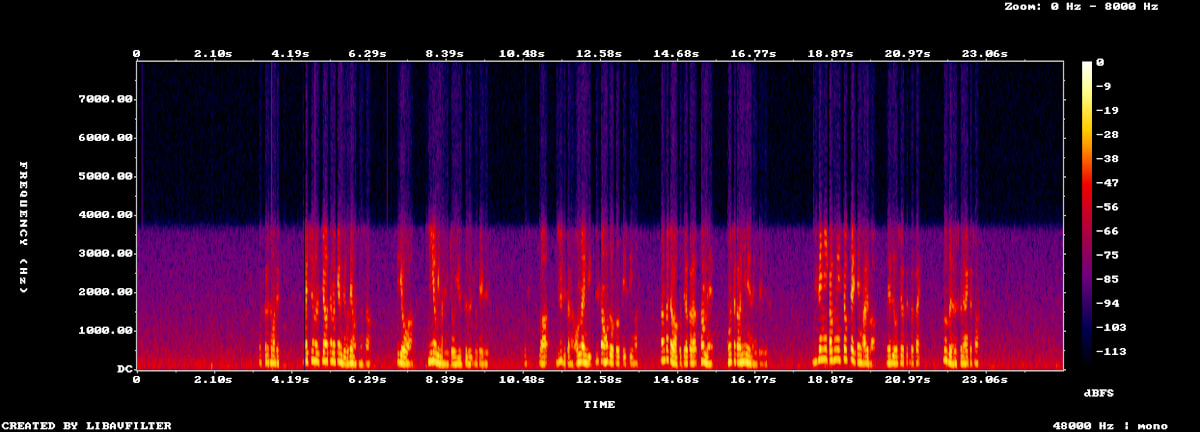
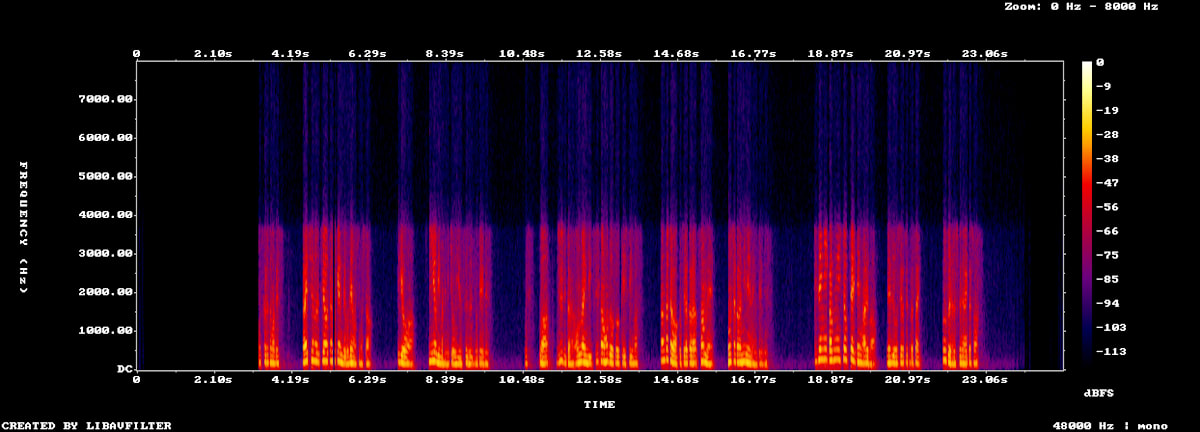
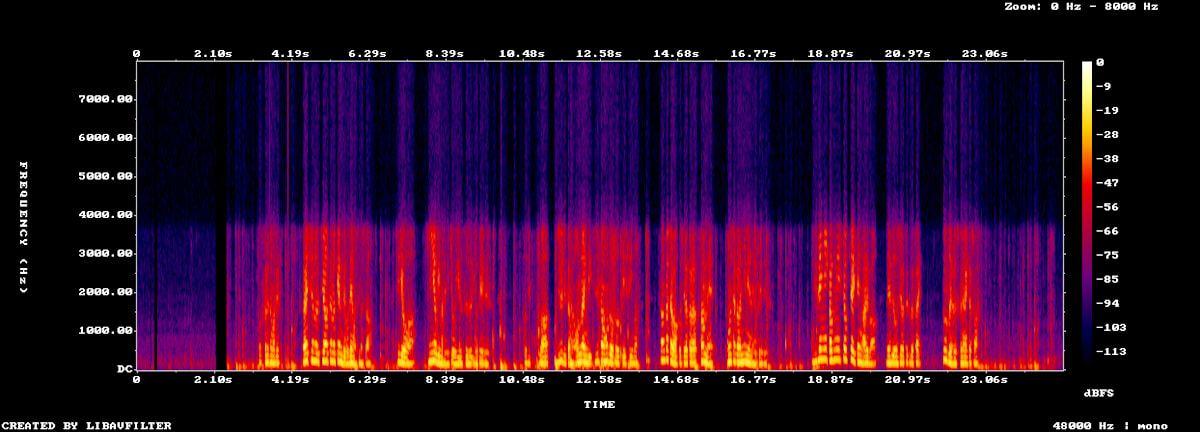
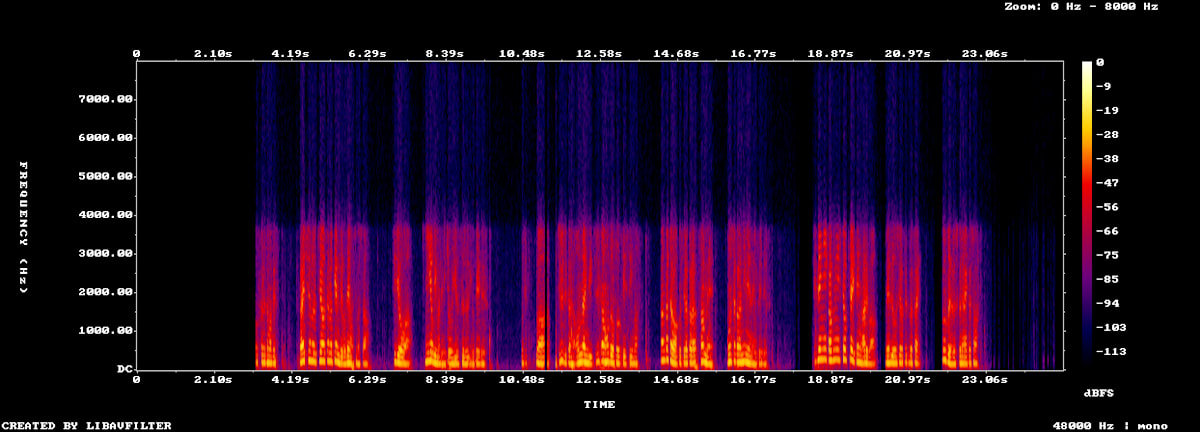
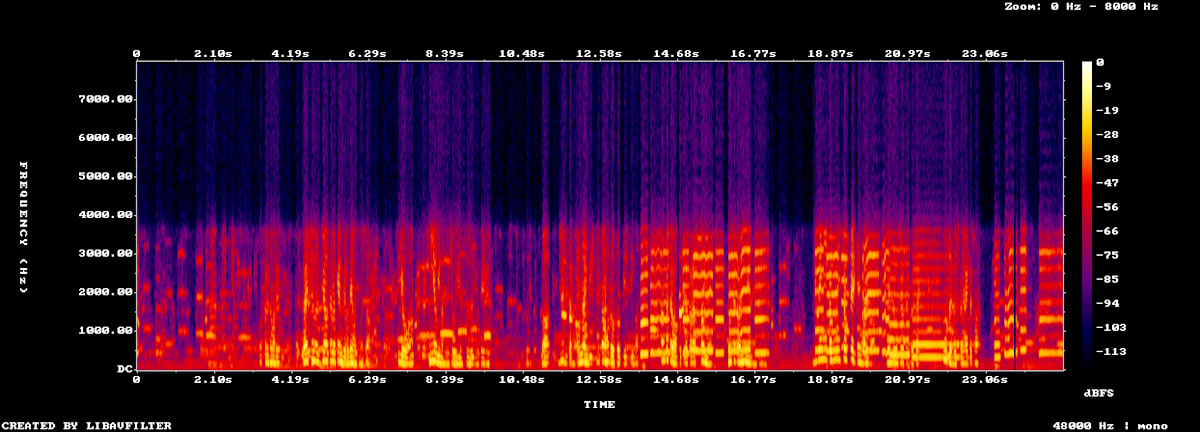
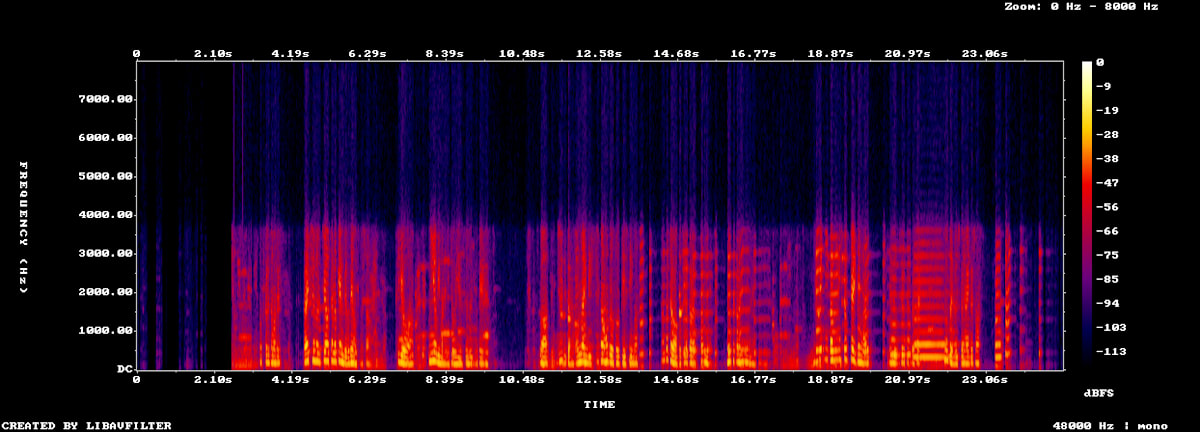
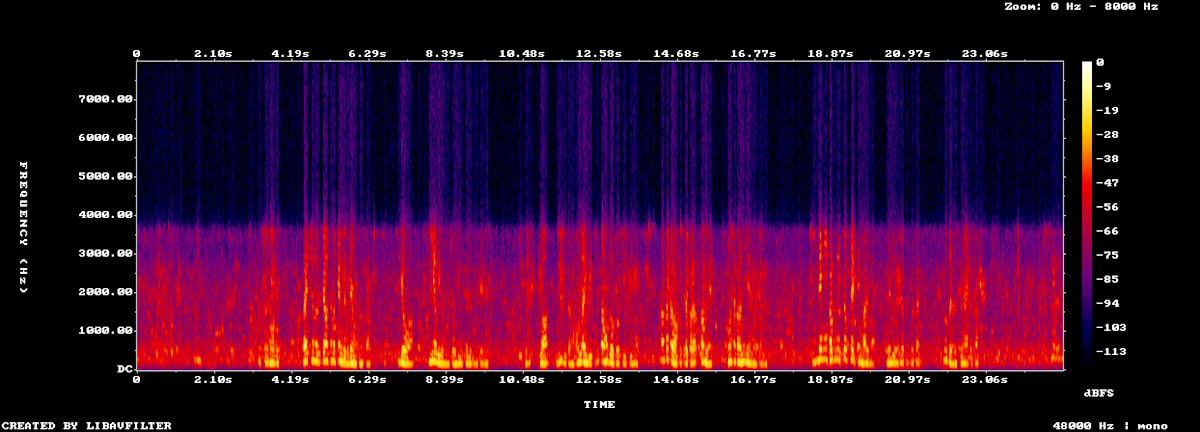
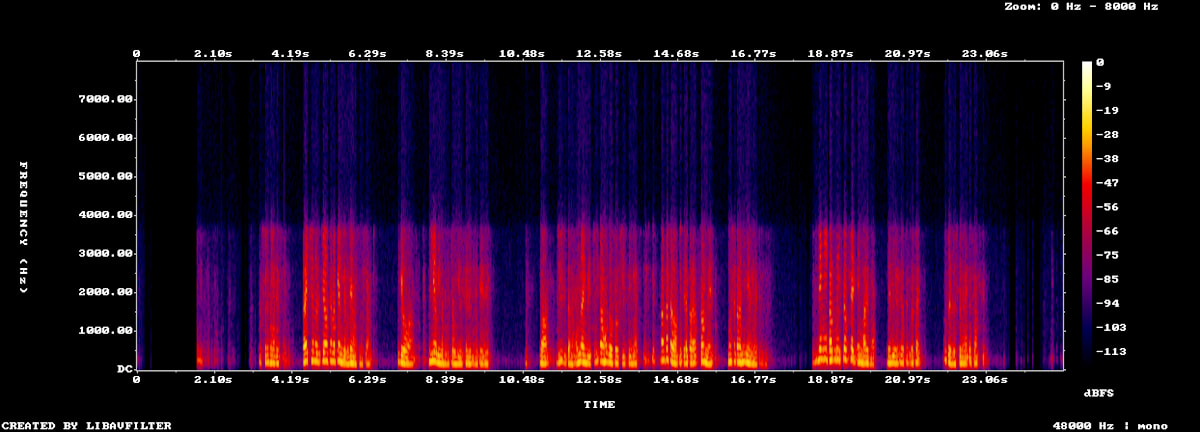
For each type of noise, spectrograms with noise cancellation disabled and enabled are shown side by side.
The volume in the table is the RMS of the noise-only segment. Since each condition was recorded once, please treat the values as a rough guide.
| Noise | Disabled | Enabled | Difference |
|---|---|---|---|
| Air conditioning/fan | -48.7 dBFS | Silent | Eliminated |
| Keyboard | -51.1 dBFS | Silent | Eliminated |
| Music | -36.8 dBFS | -56.5 dBFS | 20 dB reduction |
| Café | -39.6 dBFS | -50.6 dBFS | 11 dB reduction |
| Surrounding voices | -25.7 dBFS | -32.0 dBFS | 6 dB reduction |
Air Conditioning/Fan
Fan - noise cancellation off
Fan - noise cancellation on
When disabled, a hissing sound continues behind the voice. When enabled, the noise-only segment became completely silent. Not only did the noise disappear, but the voice became noticeably easier to understand.
Keyboard
Keyboard - noise cancellation off
Keyboard - noise cancellation on
Typing sounds also became almost inaudible. The noise-only segment was silent, just like with the fan. Even for sudden sounds, parts that do not overlap with the voice are cleanly eliminated.
Music
Music - noise cancellation off
Music - noise cancellation on
The flute and saxophone performance was reduced by about 20 dB. A small amount remains, but it does not sound unnatural when listening.
Café
Café - noise cancellation off
Café - noise cancellation on
Dish sounds and in-store background noise were reduced by about 11 dB. Like the music, a small amount remains, but it was not noticeable enough to be bothersome.
Surrounding People's Voices
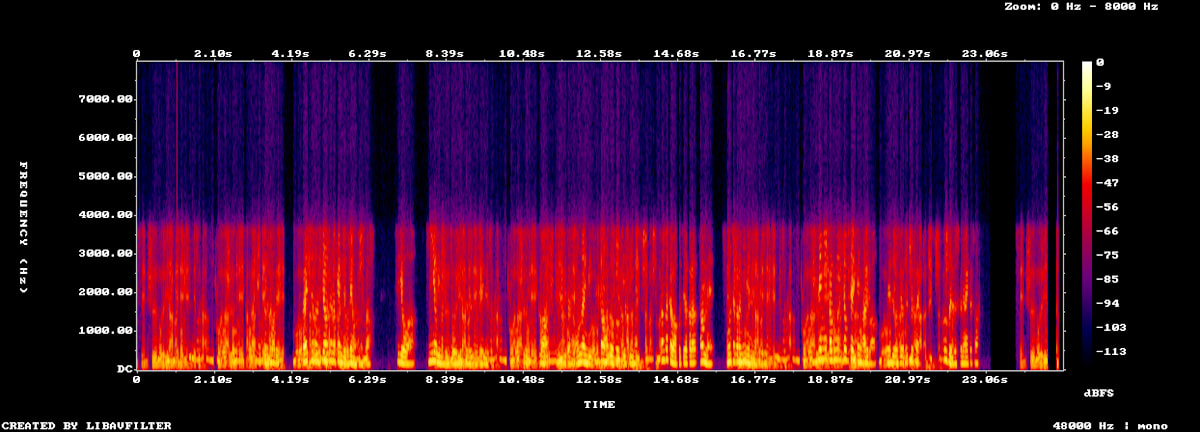
Voices - noise cancellation off
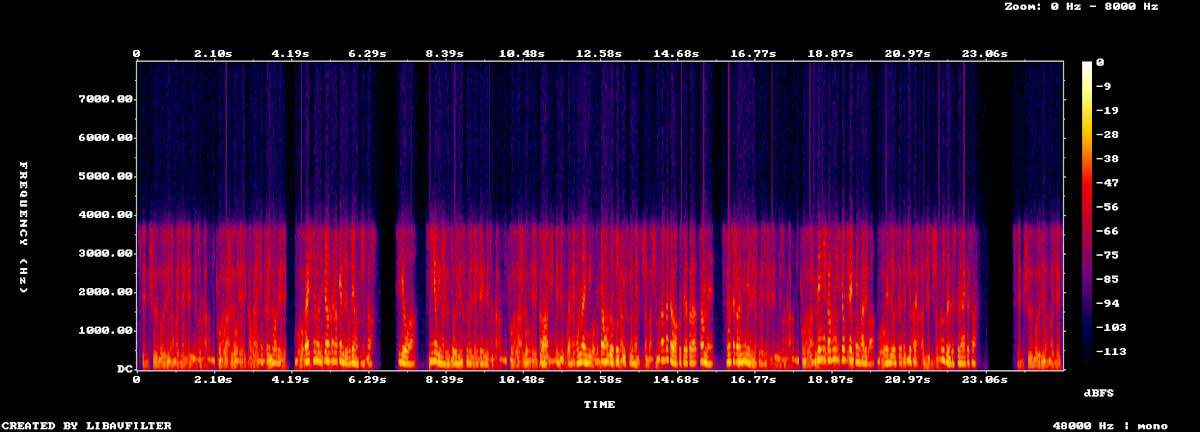
Voices - noise cancellation on
Surrounding people's voices were barely eliminated. The volume dropped by 6 dB, but in terms of listening impression, voices remained clearly audible even when enabled.
Voice Volume and Frequency Range
For all noise types, enabling noise cancellation reduced the volume of the voice portion by 5–8 dB. Also, looking at the frequency components of the received audio, regardless of whether noise cancellation was enabled or disabled, frequencies above approximately 3.4 kHz were almost entirely absent.
Discussion
A tendency was observed for noise to remain more the more it resembles a human voice. Since RNNoise uses a model trained to preserve voice-like components while suppressing everything else, this is considered a characteristic of this approach.
Adoption is most easily recommended for environments with mechanical noise such as air conditioning, keyboards, and in-store music. It should be highly effective for remote workers and operators making calls from a PC in an office. On the other hand, for call center environments where conversations from neighboring desks are picked up, RNNoise alone may be insufficient. If suppressing surrounding voices is required, a different approach that can distinguish between speakers would need to be considered.
Summary
We integrated the RNNoise version of the reference implementation into Twilio Voice browser calls and compared its effectiveness across five types of noise. Air conditioning and keyboard sounds were nearly eliminated, making voices easier to understand, and music and café ambient sounds were reduced to a level that was not bothersome. On the other hand, surrounding people's voices remained almost entirely. We hope this serves as useful reference information when considering the introduction of noise cancellation for browser-based calls.