
Caching Promises to Prevent Duplicate Execution in Parallel Processing

This page has been translated by machine translation. View original
This is Suenaga from the Retail App Co-Creation Division.
When calling fetch APIs in parallel, requests with the same key may run simultaneously. Since the next request starts before the response is returned, simply caching the fetch result is not enough to prevent duplicates.
In such cases, you can share in-progress requests by storing the Promise itself in a Map instead of the fetch result. I'll introduce the difference from caching values, and the error handling needed to avoid leaving failed Promises behind.
Parallel Processing Causes Duplicate Requests
First, let's consider calling without any caching. If the API doesn't support batch fetching, you can fetch items one by one in parallel using Promise.allSettled as shown below. The success or failure of each request can be checked individually from the returned results.
const results = await Promise.allSettled(
  keys.map((key) => client.fetch(key)),
);
If keys contains the same key multiple times, client.fetch will be executed that many times. Since we want each key to be fetched only once, the first approach that comes to mind is storing the fetch results.
const cache = new Map<string, ResponseData>();

const fetchData = async (key: string) => {
  const cached = cache.get(key);
  if (cached !== undefined) return cached;

  const data = await client.fetch(key);
  cache.set(key, data);
  return data;
};
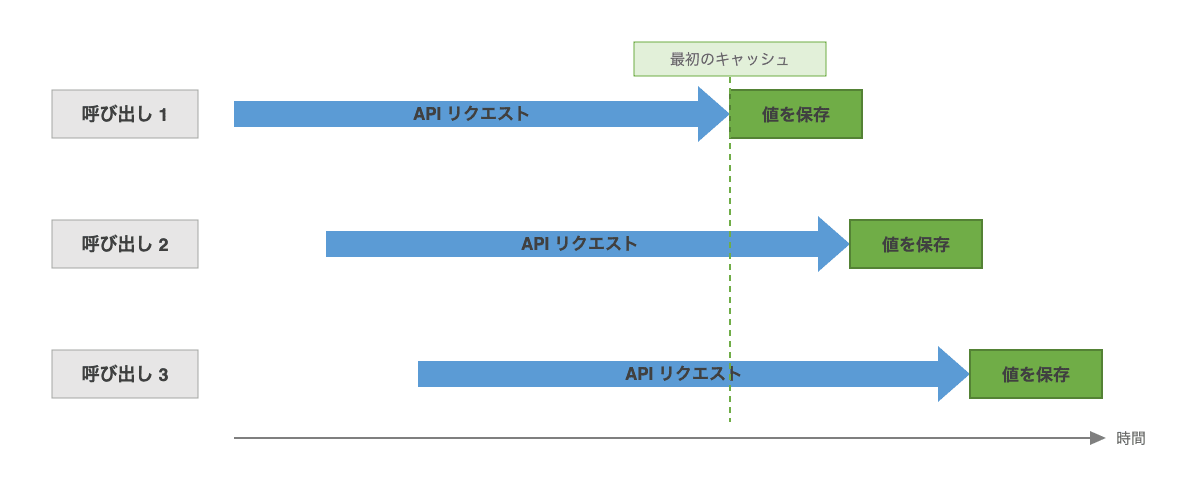
This prevents duplicates when calls are made sequentially. However, in parallel processing, the next call for the same key begins before the first client.fetch completes. Since the fetch result hasn't been stored in the Map yet, both calls will result in a cache miss.
await Promise.allSettled([
  fetchData("key-1"),
  fetchData("key-1"),
]);
Value caching can prevent duplicates after a fetch completes, but it cannot share fetch operations that are already in progress in parallel.
Store the Promise to Share In-Progress Fetches
To make the cache available even before a fetch completes, store the Promise returned by client.fetch immediately.
const cache = new Map<string, Promise<ResponseData>>();

const fetchData = async (key: string) => {
  const cached = cache.get(key);
  if (cached !== undefined) return cached;

  const promise = client.fetch(key);
  cache.set(key, promise);
  return promise;
};
The first call stores the Promise in the Map before waiting for client.fetch to complete. The second call reads the same Promise from the Map and waits for the already-started fetch to finish. Only one request is made per key.
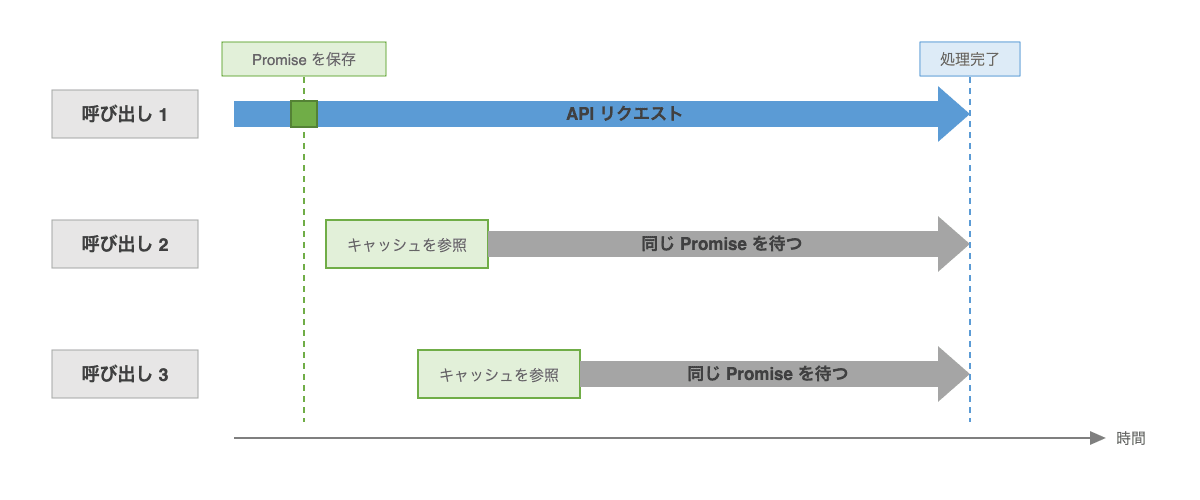
The timing of when things are stored differs between caching values and caching Promises.
| Timing | When caching values | When caching Promises |
|---|---|---|
| First call starts fetching | Cache remains empty | Stores the Promise of the started fetch |
| A call for the same key starts | Results in a cache miss and starts another fetch | Reads the stored Promise and waits for the same fetch |
| Fetch completes | Stores the result | The stored Promise becomes fulfilled |
Successful Promises remain in the cache, and subsequent calls can retrieve the same result. You can handle both consolidating in-progress requests and caching results after fetching with the same code.
Error Handling When a Promise Fails
Once a Promise is rejected, it cannot later become fulfilled. If a failed Promise is left in the Map, subsequent calls will keep receiving the same failure even after the data source recovers.
If a fetch fails, delete the Promise from the cache and re-throw the error.
} catch (error) {
  cache.delete(key);
  throw error;
}
After deletion, since no cached entry is found for subsequent calls, client.fetch will be executed again. Since the error is re-thrown with throw, the failure of that particular call is propagated to the caller as usual.
In the code so far, while a Promise remains in the cache, subsequent calls for the same key also use that Promise. Since there is no path for it to be replaced with a different Promise, it's fine to delete unconditionally on failure.
Compare References When Updating the Cache Mid-Way
Adding timeouts, forced re-fetches, or manual cache invalidation can result in a new Promise being stored in the cache before the old one completes.
For example, suppose the cache is deleted due to a timeout while promise1 is in progress, and the next call stores promise2. If promise1 then fails, the error handler's intent is to delete the failed promise1. However, since delete operates on the key rather than the Promise, deleting unconditionally would also delete promise2, which is stored at that point.
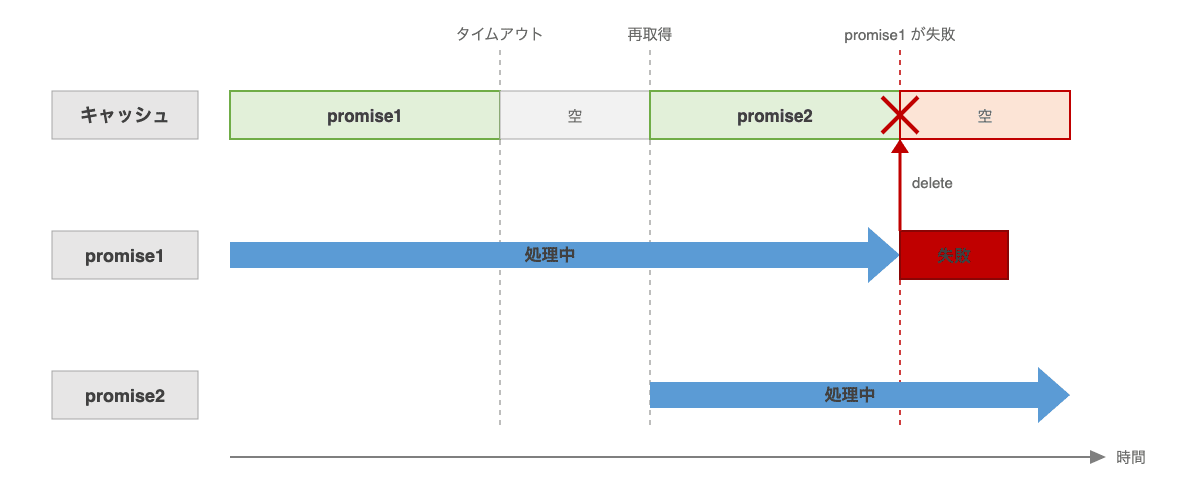
In this case, delete only when the current cached entry matches the reference of the failed Promise.
} catch (error) {
  if (cache.get(key) === promise) {
    cache.delete(key);
  }
  throw error;
}
Since Promises are objects, === can be used to check whether it's the same Promise instance. This comparison ensures deletion only when the Promise you stored is still in the cache.
The same applies when deleting the cache on timeout. Make sure a timer set by an old Promise does not delete a Promise stored later.
setTimeout(() => {
  if (cache.get(key) === promise) {
    cache.delete(key);
  }
}, 3000);
The timeout here only deletes the cache entry; the processing of promise1 itself continues.
Writing out everything from Promise caching to error handling together looks like this. For reference:
const cache = new Map<string, Promise<ResponseData>>();

const fetchData = async (key: string): Promise<ResponseData> => {
  const cached = cache.get(key);
  if (cached !== undefined) {
    return cached;
  }

  const promise = client.fetch(key);
  cache.set(key, promise);

  try {
    return await promise;
  } catch (error) {
    if (cache.get(key) === promise) {
      cache.delete(key);
    }
    throw error;
  }
};
Closing
There may not be many situations where this applies, but I think it's an incredibly useful pattern when the same fetch operation overlaps in parallel.
I personally find the approach of storing the Promise itself to share even in-progress operations, and deleting only after comparing references when needed, to be quite elegant — it's one of my favorites.
See you 👋