
I Ran Functions on a Schedule with Vercel Schedules and Compared It to Cron Jobs

This page has been translated by machine translation. View original
Introduction
Hello, this is Sato.
On November 5, 2026, Vercel's new feature "Vercel Schedules" entered public beta. It lets you run functions on a recurring basis or just once at a specified time, and it is positioned as the successor to the traditional Cron Jobs.
This article covers everything from running a function on a recurring basis with Schedules to actually checking how it differs from traditional Cron Jobs.
What is Vercel Schedules
Vercel Schedules is a feature that lets you run functions and other targets repeatedly at a fixed interval, or just once at a specified time. It is available on all plans and can run not only in production but also in preview and custom environments.
There are two ways to create a schedule.
| Static schedule | Dynamic schedule | |
|---|---|---|
| Where it is defined | vercel.json |
App code (SDK) |
| When it is registered | At deploy time | When the code is executed |
| How to change it | Edit the file and redeploy | Change it on the spot from code |
| Invocation target | Private function, HTTP path, Queue topic | Queue topic |
| Suited for | Global recurring batch jobs (data deletion, aggregation, etc.) | Per-user reservations and reminders |
This time I'll try static schedules.
Trying it out
I tried using Schedules to periodically run a function that just outputs a log every 5 minutes. As a result, the automatic runs were consistently about 27 seconds behind the scheduled time, and they stopped when I disabled the schedule from the dashboard.
The function to run
The function to run this time just outputs the schedule name and scheduled time to the log. By wrapping it with handleSchedule from @vercel/schedules, you can receive the schedule's information.
import { handleSchedule } from '@vercel/schedules';

export const POST = handleSchedule(async (metadata) => {
  console.log(`Running ${metadata.name}, scheduled for ${metadata.scheduledAt.toISOString()}`);
});
The schedule was defined in vercel.json. It is configured to call this function every 5 minutes.
{
  "$schema": "https://openapi.vercel.sh/vercel.json",
  "functions": {
    "api/heartbeat.ts": {
      "experimentalTriggers": [{ "type": "schedule/v1beta" }]
    }
  },
  "schedules": {
    "heartbeat": {
      "schedule": "*/5 * * * *",
      "function": "api/heartbeat"
    }
  }
}
When you attach the schedule/v1beta trigger, the function becomes a private function with no public URL. schedule is a cron expression, and it is interpreted as UTC unless a time zone is specified.
Running it in production
After deploying to production, the schedule was registered in an enabled state. The project's Schedules tab shows heartbeat and the next run time.

I deployed at 13:13, and it ran automatically at 13:15 and 13:20. The logs in the Logs tab are as follows.

The logs revealed the following.
- The runs were about 27 seconds behind the scheduled time: both runs had almost the same delay. It doesn't seem suitable for processing that requires second-level accuracy
- Unless specified otherwise, the function ran in Washington, D.C., USA.
Comparing with Cron Jobs
The biggest difference was whether the function has a public URL. With Cron Jobs you need to protect the public URL in your own code, whereas with Schedules the function can't be called from outside in the first place.
Cron Jobs for comparison
For comparison, I created a function that outputs a log every 5 minutes using Cron Jobs.
api/cron.ts is as follows.
export function GET(request: Request) {
  const auth = request.headers.get('authorization');
  if (auth !== `Bearer ${process.env.CRON_SECRET}`) {
    return new Response('Unauthorized', { status: 401 });
  }
  console.log(`Running cron at ${new Date().toISOString()}`);
  return Response.json({ ok: true });
}
vercel.json is as follows.
{
  "$schema": "https://openapi.vercel.sh/vercel.json",
  "crons": [
    { "path": "/api/cron", "schedule": "*/5 * * * *" }
  ]
}
Cron Jobs is a mechanism that sends a GET request to the specified path. Since anyone can access that path, you set the environment variable CRON_SECRET and verify it on the function side. Once it is set, Vercel attaches the Authorization: Bearer <CRON_SECRET> header to cron requests.
Calling from outside
I called both functions with curl.
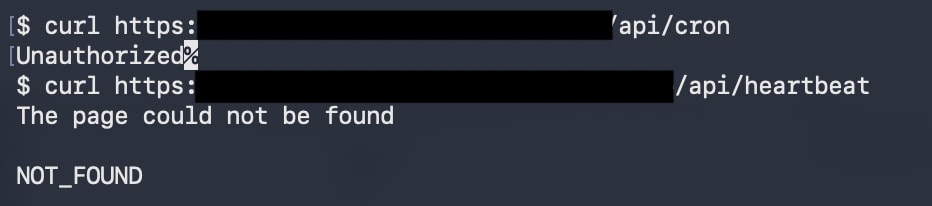
The Cron Jobs function returned 401 Unauthorized. The request reached the function and was turned away by the if statement I wrote myself. If you forget to write this check, anyone who knows the URL can execute the process.
The Schedules function returned NOT_FOUND. Since it is a private function, it has no public URL and the request doesn't reach the function.
Summary of differences
| Cron Jobs | Schedules (static) | |
|---|---|---|
| How it's invoked | GET to a public path | POST to a private function |
| Authentication | Verify CRON_SECRET yourself |
Not needed (can't be called from outside) |
| Environments | Production only | Production, preview, custom environments |
| Time zone | UTC only | Can be specified |
| One-time execution | Not possible | Possible |
Scenarios where it could actually be useful
Having tried it, I feel static schedules are well suited to recurring tasks.
- Periodic reports: every morning, aggregate the previous day's sales and traffic and post them to Slack
- Data cleanup: delete expired sessions and old logs every night
- External data sync: import exchange rates and stock counts from an external API every hour
- Monitoring: check every 5 minutes whether an external service is responding.
For processing like data deletion in particular, Cron Jobs required a mechanism to protect the public URL. With Schedules you can make it a private function, so you can leave it to run with peace of mind.
Impressions after using it
Honestly, I didn't feel a big difference between static schedules and Cron Jobs. The usability is almost the same: write it in vercel.json, deploy, and it runs periodically.
What I found nice was that the function doesn't become a public URL. Unlike Cron Jobs, you don't need to write code to verify CRON_SECRET, and there's no worry about it being executed arbitrarily from outside.
Officially, Schedules is positioned as the successor to Cron Jobs, and a migration guide from Cron Jobs is also provided. If you're going to build a recurring task from now on, choosing Schedules seems like a good idea.
On the other hand, I feel the real value of Schedules lies in dynamic schedules, which let you create, change, and delete schedules from your app's code. That's something Cron Jobs couldn't do, so I'll try it in the next blog post.