
# WebCrypto API Browser Credential Encryption — AES-256-GCM + PBKDF2 in Practice

This page has been translated by machine translation. View original
Introduction
While developing an in-house AI tool, I needed to store user login information (username, password, TOTP secret) in the browser. Since the server side performs automatic login, authentication credentials are kept in localStorage, but storing them in plain text is out of the question.
I implemented AES-256-GCM encryption based on a master password using the WebCrypto API. The master password is never stored anywhere — only the encrypted data remains in localStorage.
Prerequisites & Environment
- TypeScript / SvelteKit
- WebCrypto API (built into modern browsers as a standard feature)
- localStorage (browser-side storage)
Overall Encryption Design
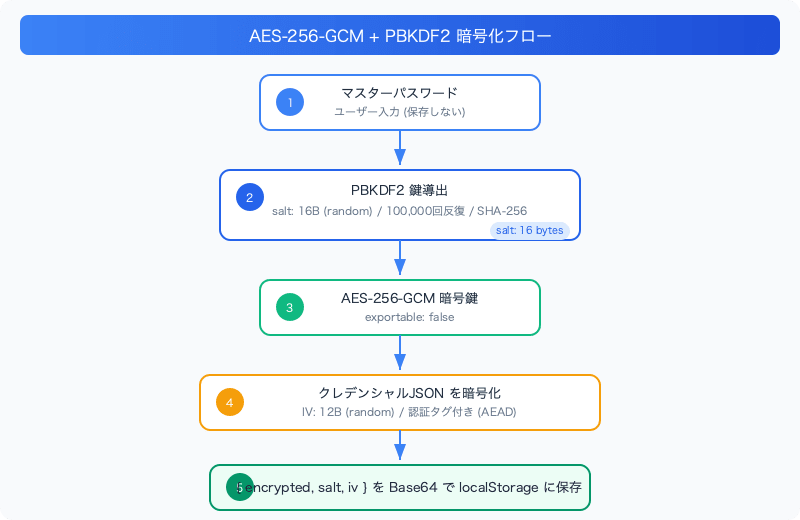
The master password is not stored. Each time the user opens the app, they enter it, and it is used to decrypt the encrypted data in localStorage.
Implementation
Type Definitions
interface StoredCredentials {
  username: string;
  password: string;
}

interface EncryptedCredentials {
  encrypted: string; // Base64
  salt: string;      // Base64
  iv: string;        // Base64
}

class CredentialStorageError extends Error {
  constructor(message: string, public code: string) {
    super(message);
    this.name = "CredentialStorageError";
  }
}
Encryption Parameters
const STORAGE_KEY = "my-app-credentials";
const PBKDF2_ITERATIONS = 100000;
const SALT_LENGTH = 16;
const IV_LENGTH = 12;
- PBKDF2_ITERATIONS: 100,000 — The number of iterations when deriving a key from the password. A high value is set to slow down brute-force attacks. OWASP recommends 600,000 iterations (for SHA-256), but 100,000 is used here as a balance with browser response speed.
- SALT_LENGTH: 16 bytes — A random value that ensures different keys are generated even from the same password.
- IV_LENGTH: 12 bytes — The recommended IV length for AES-GCM. A new IV is generated for each encryption operation.
Key Derivation (PBKDF2)
A cryptographic key is derived from the master password.
async function deriveKey(password: string, salt: Uint8Array): Promise<CryptoKey> {
  // Import the password as "key material"
  const passwordKey = await window.crypto.subtle.importKey(
    "raw",
    new TextEncoder().encode(password),
    { name: "PBKDF2" },
    false,       // Non-exportable
    ["deriveKey"] // This key material is used only for "key derivation"
  );

  // Derive a cryptographic key using PBKDF2
  return await window.crypto.subtle.deriveKey(
    {
      name: "PBKDF2",
      salt: salt.buffer as ArrayBuffer,
      iterations: PBKDF2_ITERATIONS,
      hash: "SHA-256"
    },
    passwordKey,
    { name: "AES-GCM", length: 256 }, // Output: key for AES-256
    false,              // Non-exportable
    ["encrypt", "decrypt"] // Allow encryption and decryption with this key
  );
}
A feature of the WebCrypto API is that it allows you to restrict the usage of keys. By specifying ["deriveKey"], the key material can only be used for key derivation. The derived key is also limited to ["encrypt", "decrypt"].
Encryption
export async function encryptCredentials(
  credentials: StoredCredentials,
  masterPassword: string
): Promise<EncryptedCredentials> {
  // Generate random salt and IV
  const salt = generateRandomBytes(SALT_LENGTH);
  const iv = generateRandomBytes(IV_LENGTH);

  // Derive a cryptographic key from the master password
  const key = await deriveKey(masterPassword, salt);

  // Convert credentials from JSON to byte array
  const credentialsJson = JSON.stringify(credentials);
  const credentialsBytes = new TextEncoder().encode(credentialsJson);

  // Encrypt with AES-256-GCM
  const encryptedBuffer = await window.crypto.subtle.encrypt(
    { name: "AES-GCM", iv: iv.buffer as ArrayBuffer },
    key,
    credentialsBytes
  );

  // Encode to Base64 and return
  return {
    encrypted: arrayBufferToBase64(encryptedBuffer),
    salt: arrayBufferToBase64(salt.buffer as ArrayBuffer),
    iv: arrayBufferToBase64(iv.buffer as ArrayBuffer)
  };
}
A new salt and IV are generated every time. Even if the same data is encrypted with the same password, the output will differ each time.
Decryption
export async function decryptCredentials(
  encryptedData: EncryptedCredentials,
  masterPassword: string
): Promise<StoredCredentials> {
  try {
    const salt = new Uint8Array(base64ToArrayBuffer(encryptedData.salt));
    const iv = new Uint8Array(base64ToArrayBuffer(encryptedData.iv));
    const encryptedBuffer = base64ToArrayBuffer(encryptedData.encrypted);

    // Derive the same key from the same password and salt
    const key = await deriveKey(masterPassword, salt);

    // Decrypt
    const decryptedBuffer = await window.crypto.subtle.decrypt(
      { name: "AES-GCM", iv: iv.buffer },
      key,
      encryptedBuffer
    );

    const credentialsJson = new TextDecoder().decode(decryptedBuffer);
    return JSON.parse(credentialsJson) as StoredCredentials;
  } catch (error) {
    if (error instanceof CredentialStorageError) throw error;
    throw new CredentialStorageError(
      "Failed to decrypt credentials - invalid password or corrupted data",
      "DECRYPTION_FAILED"
    );
  }
}
An important property of AES-GCM is that decryption itself fails if the password is wrong. GCM includes an authentication tag that verifies data integrity. Decryption with an invalid key throws an exception, so a situation where "decryption succeeds but produces corrupted data" cannot occur.
Saving and Loading from localStorage
export async function saveCredentials(
  credentials: StoredCredentials,
  masterPassword: string
): Promise<void> {
  const encryptedData = await encryptCredentials(credentials, masterPassword);
  window.localStorage.setItem(STORAGE_KEY, JSON.stringify(encryptedData));
}

export async function loadCredentials(
  masterPassword: string
): Promise<StoredCredentials | null> {
  const storedData = window.localStorage.getItem(STORAGE_KEY);
  if (!storedData) return null;

  const encryptedData: EncryptedCredentials = JSON.parse(storedData);
  return await decryptCredentials(encryptedData, masterPassword);
}
What gets saved to localStorage is just three Base64 strings: { encrypted, salt, iv }.
Note for SvelteKit Environment: SSR Support
Because SvelteKit performs SSR (Server-Side Rendering), window and localStorage do not exist on the server side. They are guarded using the browser flag from $app/environment.
import { browser } from "$app/environment";

function generateRandomBytes(length: number): Uint8Array {
  if (!browser || !window.crypto || !window.crypto.getRandomValues) {
    throw new CredentialStorageError("Crypto API not available", "CRYPTO_UNAVAILABLE");
  }
  return window.crypto.getRandomValues(new Uint8Array(length));
}
A browser check is performed at the beginning of every function, and an error is thrown if called on the server side.
Why AES-GCM
| Mode | Encryption | Tamper Detection | IV Management |
|---|---|---|---|
| AES-CBC | ○ | × | Block size (16B) |
| AES-GCM | ○ | ○ | 12B recommended |
AES-GCM performs both encryption and authentication (AEAD) simultaneously. With CBC mode, tamper detection must be implemented separately using HMAC or similar, whereas with GCM it is built in.
Trust Model of This Approach
Let me clarify what this approach can and cannot protect against.
What it protects against:
- Even if the localStorage data is viewed directly, credentials cannot be read
- Even with a weak master password, PBKDF2 iterations delay dictionary attacks
- Tampering with the ciphertext (detected by the GCM authentication tag)
What it does not protect against:
- XSS attacks (if JavaScript can execute, the WebCrypto API can also be called)
- Cases where the master password is leaked
- Offline attacks if the device itself is stolen (decryption is possible given enough time)
Browser-side encryption is a "best-effort" defense. It is intended to be used in conjunction with XSS countermeasures (CSP, input sanitization).
Summary
Using the WebCrypto API, encryption within the browser can be implemented without any external libraries.
Key points of the implementation:
- Derive a key from the password using PBKDF2 (do not use the password directly as the encryption key)
- Perform encryption and authentication simultaneously with AES-GCM (safer and simpler than CBC)
- Generate salt and IV randomly every time (different ciphertext is produced even from the same input)
- Do not store the master password (it exists only in the user's head)