
Xcode 26.1.1 became unavailable on Xcode Cloud without notice

This page has been translated by machine translation. View original
Around 10:00 on 2026/04/16, when I checked the Xcode Cloud workflow, Xcode 26.1.1, which I had been using, was no longer selectable. There was no prior announcement, the Xcode Cloud release notes had not been updated since 2026/02/10, and there was no official explanation whatsoever.
This article documents the circumstances under which Xcode 26.1.1 became unavailable from Xcode Cloud without notice.
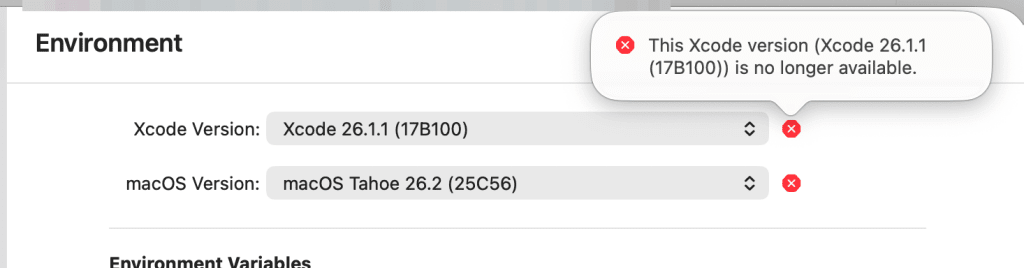
In the already-configured workflow, an error was displayed indicating that Xcode 26.1.1 (17B100) was unavailable.
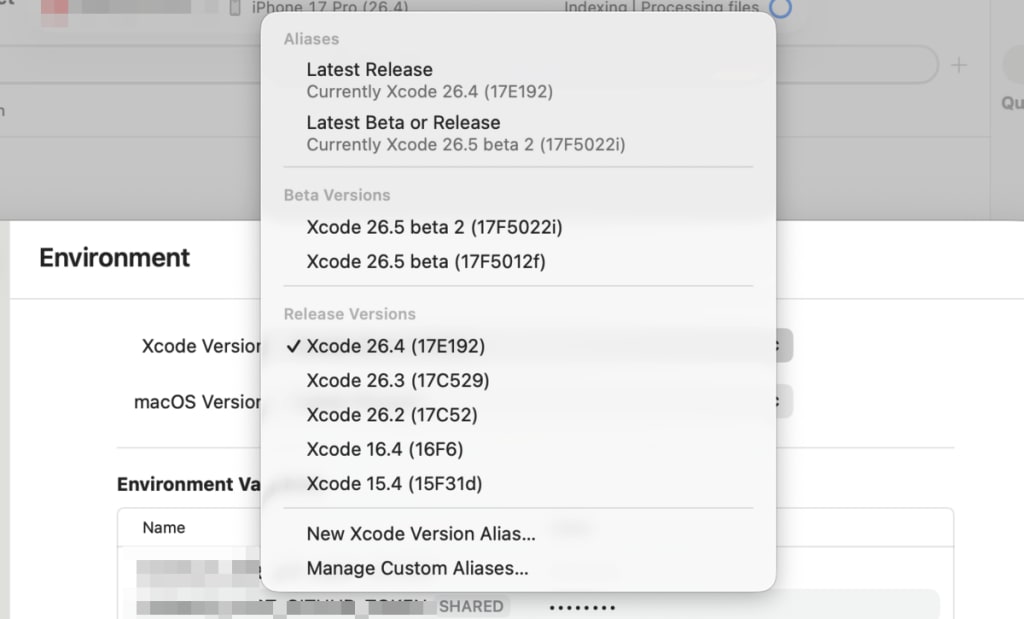
When checking the Xcode Version options, Xcode 26.1.1 had disappeared from the list.
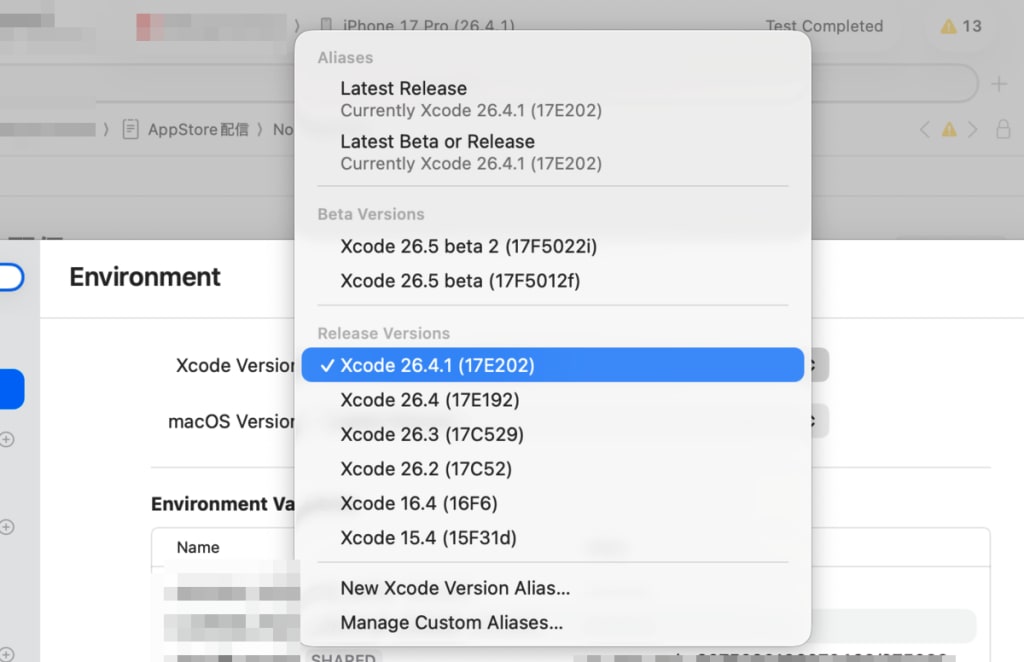
Around 9:00 the following day, 2026/04/17, I noticed that Xcode 26.4.1 had been added to Xcode Cloud. This was also not mentioned in the release notes.
Deprecation Patterns from Past Release Notes
The Xcode Cloud release notes record several past deprecation histories.
| Date | Content |
|---|---|
| 2025/09/15 | Xcode 26.0 (17A324) released |
| 2025/09/30 | Xcode 26.0 (17A324), beta 6, RC, and all Xcode 15.x / 16.x removed in bulk |
| 2025/11/11 | Xcode 26.1.1 released, added to Xcode Cloud |
| 2025/12/19 | Xcode 26.2 (17C52) added to Xcode Cloud |
| 2026/02/10 | IP egress range update (no further release note updates after this) |
| 2026/04/16 | Xcode 26.1.1 becomes unavailable (no official announcement) |
| 2026/04/17 | Confirmed that Xcode 26.4.1 has been added to Xcode Cloud |
Xcode 26.0 (17A324) was removed from Xcode Cloud in just 2 weeks after its GA release, making it an extremely short-lived case in the past. This time, Xcode 26.1.1 was available for about 5 months, but which version remains available and for how long is entirely up to Apple, and there is no guarantee of a certain grace period.
Furthermore, including this removal, deprecations can occur without being noted in the Xcode Cloud release notes. It tends to be the case that one only notices after suffering actual consequences such as build failures or options disappearing, and the reality is that users have no choice but to deal with each situation as it arises.
What's Fixed in Xcode 26.4.1
Since Xcode 26.4 itself had bugs, Xcode 26.4.1 is recommended as the migration target.
MetricKit Crash (FB22384135)
An issue was fixed where apps built with Xcode 26.4 would crash due to missing symbols when run on iOS/macOS/visionOS environments older than 26.4. Since iOS 26.4 has a low adoption rate at this point, the majority of users were affected.
Apps already built with Xcode 26.4 need to be rebuilt with Xcode 26.4.1 and redistributed.
Swift Compiler async Function Crash
A bug was fixed where a "freed pointer was not the last allocation" crash occurred around swift_asyncLet_finish. This had actually become more frequent due to optimizer improvements in Swift 6.2 and 6.3, and if you experienced unexplained crashes in apps that make heavy use of async/await, this bug may have been the cause.
Other Minor Bug Fixes
The iOS Simulator has a feature that syncs the Pasteboard (clipboard) with the development machine, allowing text copied on the development machine to be pasted directly into apps on the simulator. In Xcode 26.4, this sync was not working, causing an issue where paste was not possible in the simulator. While not mentioned in the release notes, this has also been fixed in Xcode 26.4.1. Since it had already been fixed in the previously released Xcode 26.5 Beta 2, a parallel fix was likely made.
Summary
For those of us who were using Xcode 26.1.1, we decided to switch to Xcode 26.4.1 based on the following considerations.
| Situation | Action |
|---|---|
| Old version became unavailable in Xcode Cloud | Switch to Xcode 26.4.1 |
| Distributing apps already built with Xcode 26.4 | Rebuild and redistribute with Xcode 26.4.1 |
Xcode 26.2 was not without consideration as an option, but there is a possibility that Xcode Cloud may only maintain around 3 versions going forward. With Xcode 26.5 Beta 2 already released, even upgrading to Xcode 26.2 might quickly push it out of support. Therefore, migrating to Xcode 26.4.1, which is both the current stable and latest version, would be the safe choice.
When a new version is added, old versions may disappear from Xcode Cloud without notice. The reason has not been officially announced and remains unknown, but I hope this serves as a helpful reference for anyone who encounters a similar situation.