![[Update] Amazon Redshift Can Now Run ALTER TABLE on Apache Iceberg Tables, So I Tried It Out](https://images.ctfassets.net/ct0aopd36mqt/wp-thumbnail-63f1274931b942e9a92e601c1127ad73/cfe87ec6d62fa2fc3c474ed4cb2f6c2e/amazon-redshift?w=3840&fm=webp)
[Update] Amazon Redshift Can Now Run ALTER TABLE on Apache Iceberg Tables, So I Tried It Out

This page has been translated by machine translation. View original
I'm Ishikawa from the Cloud Business Division. Amazon Redshift now supports ALTER TABLE DDL for Apache Iceberg tables and writes through the AWS Glue Data Catalog (awsdatacatalog) mount, so I tried it out.
Amazon Redshift added append-only write support in November 2025 and UPDATE/DELETE/MERGE support in April 2026. You can now finally manage Iceberg table schema evolution directly from Redshift.
Until now, changing the schema of an Iceberg table required dropping and recreating the table and its data, which added unnecessary complexity and delay to data pipelines. With this update, ALTER TABLE operations such as ADD/DROP/ALTER COLUMN, RENAME COLUMN, SET TABLE PROPERTIES, and ADD/DROP/REPLACE PARTITION FIELD are available, and you can also evolve your partition strategy later as data volume grows.
In addition, because Redshift can now write directly through the auto-mounted awsdatacatalog, you can write to the data lake using the three-part notation awsdatacatalog.<database>.<table> without creating an external schema. Writing to Iceberg tables federated through Lake Formation is also supported.
- The auto-mounted awsdatacatalog refers to automatic mounting of AWS Glue Data Catalog, which became GA in July 2023. It is a feature that automatically mounts the AWS Glue Data Catalog as a database in your account so you can query data lake tables using three-part notation.
What is ALTER TABLE for Iceberg?
There are five types of ALTER TABLE for Iceberg tables that you can issue from Amazon Redshift.
ALTER TABLE ADD COLUMN/DROP COLUMNALTER TABLE ALTER COLUMN TYPE(type widening only:int → bigint,float → double,decimal(P,S) → decimal(P2,S)where P2 > P)ALTER TABLE RENAME COLUMNALTER TABLE SET TABLE PROPERTIES(currently onlycompression_type. Allowed values arebrotli/gzip/snappy/uncompressed/zstd)ALTER TABLE ADD / DROP / REPLACE PARTITION FIELD
All ALTER statements are metadata operations, and existing data files are not rewritten. The restrictions on usage are as follows.
- Only Iceberg v2 tables are supported
- Not supported for tables with complex type columns
RENAME COLUMNis not supported for tables registered with AWS Lake Formation- The
voidtransform cannot be used in ALTER statements
Trying it out
Prerequisites
- AWS account (Tokyo Region)
- Redshift Serverless workgroup
devio-wg(patch version 201, workgroup version 1.0.300094) - Redshift Serverless namespace
devio-ns(the default IAM Role has write permissions to Glue/S3) - Glue Database for testing
cm_blog_iceberg - S3 bucket for testing
cm-blog-iceberg - Test date: May 19, 2026
All SQL was issued via the Amazon Redshift Data API (aws redshift-data execute-statement).
Authentication
For writes using the awsdatacatalog three-part notation (CREATE TABLE / INSERT / ALTER, etc.), the Redshift engine calls the Glue Data Catalog and S3 behind the scenes, so the IAM session credentials used for those API calls must be tied to the "current DB session." For this reason, a session connected with psql using admin + password authentication (the administrator password from Secrets Manager) contains no IAM credentials at all. As a result, Redshift cannot find usable credentials at write time and returns
ERROR: No session credential found
The chain is: "psql with a Redshift user and password" → "no IAM session" → "awsdatacatalog write error." Therefore, as shown below, I obtained temporary credentials that include IAM authentication information and ran the queries.
% CREDS=$(aws redshift-serverless get-credentials \
  --workgroup-name devio-wg \
  --db-name dev \
  --duration-seconds 3600 \
  --region ap-northeast-1)

export PGUSER=$(echo "$CREDS" | jq -r '.dbUser')
export PGPASSWORD=$(echo "$CREDS" | jq -r '.dbPassword')
export PGHOST=devio-wg.<AWS_ACCOUNT_ID>.ap-northeast-1.redshift-serverless.amazonaws.com
export PGPORT=5439
export PGSSLMODE=require

psql -d dev

psql (14.20 (Homebrew), server 8.0.2)
SSL connection (protocol: TLSv1.3, cipher: TLS_AES_128_GCM_SHA256, bits: 128, compression: off)
Type "help" for help.
Note that the above workaround is not needed when running from Query Editor v2 (the Management Console) or the Redshift Data API.
Creating an Iceberg table (via awsdatacatalog)
I create the table directly using the three-part notation awsdatacatalog.<database>.<table> without creating an external schema. I used a two-level partition of year(order_date) and bucket(8, customer_id).
dev=# CREATE TABLE awsdatacatalog.cm_blog_iceberg.customer_orders (
    customer_id INT,
    order_date DATE,
    order_amount DECIMAL(10, 2),
    region VARCHAR
)
USING ICEBERG
LOCATION 's3://cm-blog-iceberg/customer_orders/'
PARTITIONED BY (year(order_date), bucket(8, customer_id));

CREATE TABLE
At first I wrote region VARCHAR(50) and ran it, and the following error was returned.
ERROR: VARCHAR(N) specifiying length is not supported for column "region" in Iceberg table.
  Hint: Use VARCHAR for strings in Iceberg tables.
Iceberg tables do not support specifying a length for VARCHAR, so it must remain plain VARCHAR. After removing the length and re-running, CREATE TABLE succeeded in about 10 seconds.
Writing with INSERT INTO
INSERT via awsdatacatalog also works without problems.
dev=# INSERT INTO awsdatacatalog.cm_blog_iceberg.customer_orders
(customer_id, order_date, order_amount, region) VALUES
(1001, DATE '2025-01-15', 100.50, 'us-east-1'),
(1002, DATE '2025-06-20', 250.75, 'us-west-2'),
(1003, DATE '2026-01-10', 80.00, 'eu-west-1'),
(1004, DATE '2026-03-05', 500.00, 'ap-northeast-1'),
(1005, DATE '2026-05-18', 175.25, 'ap-northeast-1');

INSERT 0 5
The INSERT of 5 rows completed in about 4 seconds. Now we're ready to test ALTER TABLE.
ALTER TABLE ADD COLUMN
First, adding a column. I'll add discount_rate DECIMAL(5, 2) after the fact.
dev=# ALTER TABLE awsdatacatalog.cm_blog_iceberg.customer_orders
ADD COLUMN discount_rate DECIMAL(5, 2);

ALTER TABLE
Because it is only a metadata operation, the time required does not change even as the row count grows. The added column is NULL for existing rows.
ALTER TABLE ALTER COLUMN TYPE (type widening)
Next, I'll widen the precision of the added discount_rate from 5 to 8.
dev=# ALTER TABLE awsdatacatalog.cm_blog_iceberg.customer_orders
ALTER COLUMN discount_rate TYPE DECIMAL(8, 2);

ALTER TABLE
Widening the precision of DECIMAL is allowed as long as the scale does not change. int → bigint and float → double work in the same way.
ALTER TABLE RENAME COLUMN
I'll rename the column from region to sales_region.
dev=# ALTER TABLE awsdatacatalog.cm_blog_iceberg.customer_orders
RENAME COLUMN region TO sales_region;

ALTER TABLE
According to the official documentation, note that RENAME COLUMN is not supported for tables registered with Lake Formation. Since the table in this test is not registered with Lake Formation, it succeeded without problems.
ALTER TABLE SET TABLE PROPERTIES (changing the compression type)
I switch the compression type of the data files from snappy (the default) to zstd.
dev=# ALTER TABLE awsdatacatalog.cm_blog_iceberg.customer_orders
SET TABLE PROPERTIES ('compression_type' = 'zstd');

ALTER TABLE
The new compression type is applied to data inserted after changing the setting with SET TABLE PROPERTIES. Existing data files are not rewritten.
ALTER TABLE ADD PARTITION FIELD (partition evolution)
From here, I try partition evolution. First, I add a truncate(3, ...) transform to the sales_region column. With this, us-east-1 and us-west-2 are grouped under the same us- partition prefix.
dev=# ALTER TABLE awsdatacatalog.cm_blog_iceberg.customer_orders
ADD PARTITION FIELD truncate(3, sales_region);

ALTER TABLE
ALTER TABLE REPLACE PARTITION FIELD
I'll change the existing year(order_date) to month(order_date).
dev=# ALTER TABLE awsdatacatalog.cm_blog_iceberg.customer_orders
REPLACE PARTITION FIELD year(order_date) WITH month(order_date);

ALTER TABLE
With REPLACE, the field being replaced does not need to be at the "last level." A field at any level can be swapped for a different transform.
ALTER TABLE DROP PARTITION FIELD
I remove the bucket(8, customer_id) that was set initially.
dev=# ALTER TABLE awsdatacatalog.cm_blog_iceberg.customer_orders
DROP PARTITION FIELD bucket(8, customer_id);

ALTER TABLE
DROP PARTITION FIELD can also specify a field at any level. Data inserted after the ALTER follows the new partition spec, and existing data remains as is.
ALTER TABLE DROP COLUMN
Finally, I drop the discount_rate column that I had added.
dev=# ALTER TABLE awsdatacatalog.cm_blog_iceberg.customer_orders
DROP COLUMN discount_rate;

ALTER TABLE
A column included in the partition spec cannot be removed with DROP COLUMN, so you must first remove it from the partitioning with DROP PARTITION FIELD.
Checking the final schema with SHOW TABLE
I check how the changes so far have been reflected using SHOW TABLE.
dev=# SHOW TABLE awsdatacatalog.cm_blog_iceberg.customer_orders;
                               Show Table DDL statement
--------------------------------------------------------------------------------------
 CREATE TABLE awsdatacatalog.cm_blog_iceberg.customer_orders (customer_id int,       +
 order_date date,                                                                    +
 order_amount decimal(10, 2),                                                        +
 sales_region varchar)                                                               +
 USING ICEBERG                                                                       +
 LOCATION 's3://cm-blog-iceberg/customer_orders'+
 PARTITIONED BY (MONTH(order_date), TRUNCATE(3, sales_region))                       +
 TABLE PROPERTIES ('compression_type'='zstd');
(1 row)

(END)
region has been renamed to sales_region, and discount_rate is gone. The partitioning has evolved to (MONTH(order_date), TRUNCATE(3, sales_region)), and the compression type has also been switched to zstd.
Confirming existing data remains with SELECT
Since ALTER TABLE is only a metadata operation, the existing data should still be readable as is.
dev=# SELECT customer_id, order_date, order_amount, sales_region
FROM awsdatacatalog.cm_blog_iceberg.customer_orders
ORDER BY customer_id;

 customer_id | order_date | order_amount |  sales_region
-------------+------------+--------------+----------------
        1001 | 2025-01-15 |       100.50 | us-east-1
        1002 | 2025-06-20 |       250.75 | us-west-2
        1003 | 2026-01-10 |        80.00 | eu-west-1
        1004 | 2026-03-05 |       500.00 | ap-northeast-1
        1005 | 2026-05-18 |       175.25 | ap-northeast-1
(5 rows)
The 5 inserted rows can be read as is. Queries using the renamed column name work without problems.
Checking cross-engine compatibility from Athena
I check whether the schema changes made through Redshift are visible from other Iceberg-compatible engines. I queried the same table from Athena.
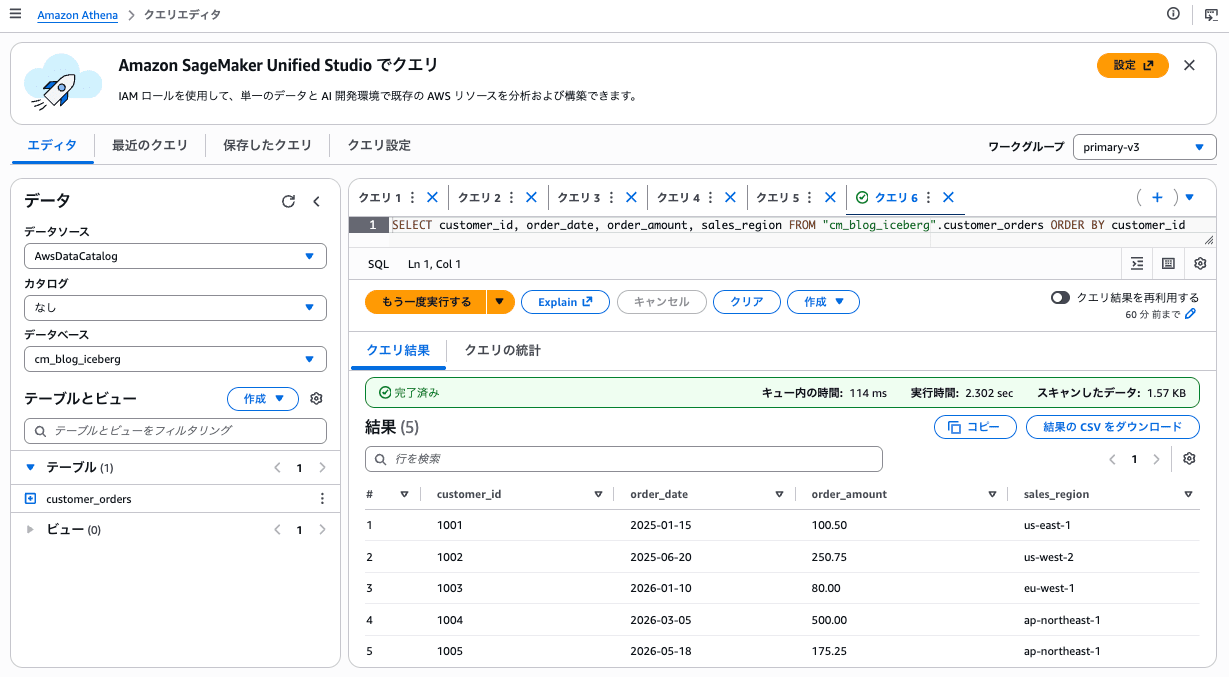
The rename and DROP COLUMN performed in Redshift are reflected as is in Athena, confirming that cross-engine compatibility is maintained.
Checking failure cases
I also look at what kind of errors are actually returned for the restrictions listed in the documentation.
1. Type narrowing is rejected
dev=# ALTER TABLE awsdatacatalog.cm_blog_iceberg.customer_orders
ALTER COLUMN order_amount TYPE DECIMAL(8, 2);
ERROR:  Cannot change column "order_amount" from type "numeric(10, 2)" to "numeric(8, 2)"
DETAIL:  Only type widening is supported for Iceberg tables.
HINT:  Supported type changes: integer to bigint, real to double precision, or numeric with increased precision (same scale).
The error message directly shows which type changes are allowed, so it's easy to know how to respond.
2. A column already in a partition cannot be re-partitioned with a different transform
dev=# ALTER TABLE awsdatacatalog.cm_blog_iceberg.customer_orders
ADD PARTITION FIELD year(order_date);
ERROR:  Column "order_date" is already part of an existing partition field in table "customer_orders"
Since order_date is used with month(order_date) from the previous step, you cannot add year(order_date).
3. The void transform cannot be used
dev=# ALTER TABLE awsdatacatalog.cm_blog_iceberg.customer_orders
ADD PARTITION FIELD void(customer_id);
ERROR:  Unknown Iceberg transform function: "void".
void is used in the Iceberg specification to represent incompatible partitions, but Redshift doesn't recognize it as a transform function in the first place.
Discussion
Here are the points I noticed from actually trying it.
- All ALTER operations complete in a few seconds: Because they are metadata operations, they finish quickly regardless of table size. Whether on a dev table or a production table, it looks like you can proceed with schema evolution without worrying about downtime.
- The awsdatacatalog three-part notation is convenient: You can write directly to
awsdatacatalog.<database>.<table>without creating an external schema, so you can complete a simple ELT pipeline with Redshift alone. Lake Formation integration is also within view. - Cross-engine compatibility is maintained: That schemas changed on the Redshift side are visible as is from Athena (or EMR/Spark, etc.) is important from the standpoint of data lake openness.
- The VARCHAR(N) pitfall: If you write
VARCHAR(50)out of habit from a regular Redshift CREATE TABLE, you'll get an error. For Iceberg tables, you need to accept using onlyVARCHAR. - Type widening restrictions: Only one direction is allowed, like
int → bigint. For decimal, only increasing precision is allowed, and scale cannot be changed. In production, a realistic approach is to choose wider types up front. - The Lake Formation restriction on
RENAME COLUMN: The fact that renaming is not possible for Lake Formation-registered tables needs to be kept in mind when designing workloads. - Partition evolution is powerful, but existing data is not redistributed: ADD/REPLACE/DROP PARTITION FIELD are all metadata-only, and the file layout of past data does not change. Note that the new partitioning applies only to data inserted after the ALTER.
Going forward, I'd like to see more properties supported by SET TABLE PROPERTIES and ALTER TABLE support for tables with complex type columns.
Conclusion
Amazon Redshift's Iceberg write support has steadily been strengthened, from append-only to UPDATE/DELETE/MERGE and now ALTER TABLE. With this update, when using Redshift as a write hub to the data lake, the workaround of dropping and recreating tables is finally no longer necessary.
With the auto-mount of awsdatacatalog, you can build an ELT pipeline without even creating an external schema, which makes it simpler to write results aggregated in Redshift back to the data lake and share them from Athena or EMR. I'd definitely recommend trying this feature if you are adopting a lakehouse architecture with Iceberg tables, or plan to move to Iceberg in earnest. I hope this article helps someone.
Related reading
