![[Update] Amazon SageMaker Unified Studio now supports UI display in 12 languages including Japanese](https://images.ctfassets.net/ct0aopd36mqt/wp-thumbnail-4e6e510f2f74e1cc7d0ec360f38d138a/c00e9d7f4e47022543b37632bc20bcc0/amazon-sagemaker?w=3840&fm=webp)
[Update] Amazon SageMaker Unified Studio now supports UI display in 12 languages including Japanese

This page has been translated by machine translation. View original
This is Ishikawa from the Cloud Business Division. Amazon SageMaker Unified Studio now supports UI localization in 12 languages, including Japanese. In addition to automatic display based on your browser's language settings, you can also manually select any language from your profile. This is a quietly impactful update with broad reach, making it easier for teams that include members unfamiliar with English UIs to adopt the service.
What is Amazon SageMaker Unified Studio?
Amazon SageMaker Unified Studio is a service that consolidates everything from data preparation and analysis to machine learning (ML) model development and deployment into a single integrated development environment (IDE). It was announced at re:Invent 2024 as the "next-generation Amazon SageMaker" and is now generally available (GA).
In addition to development environments such as a SQL-based Query Editor, Visual ETL, serverless notebooks, JupyterLab, and Editor for VS Code, it also features the ability to handle ML workflows including MLflow, Training jobs, and Inference endpoints—all from a single screen.
Update Details
With this update, the Amazon SageMaker Unified Studio UI can now be displayed in 12 languages.
The main changes are as follows:
- The entire UI now supports localized display in 12 languages
- The display language is automatically detected based on the browser's default language settings
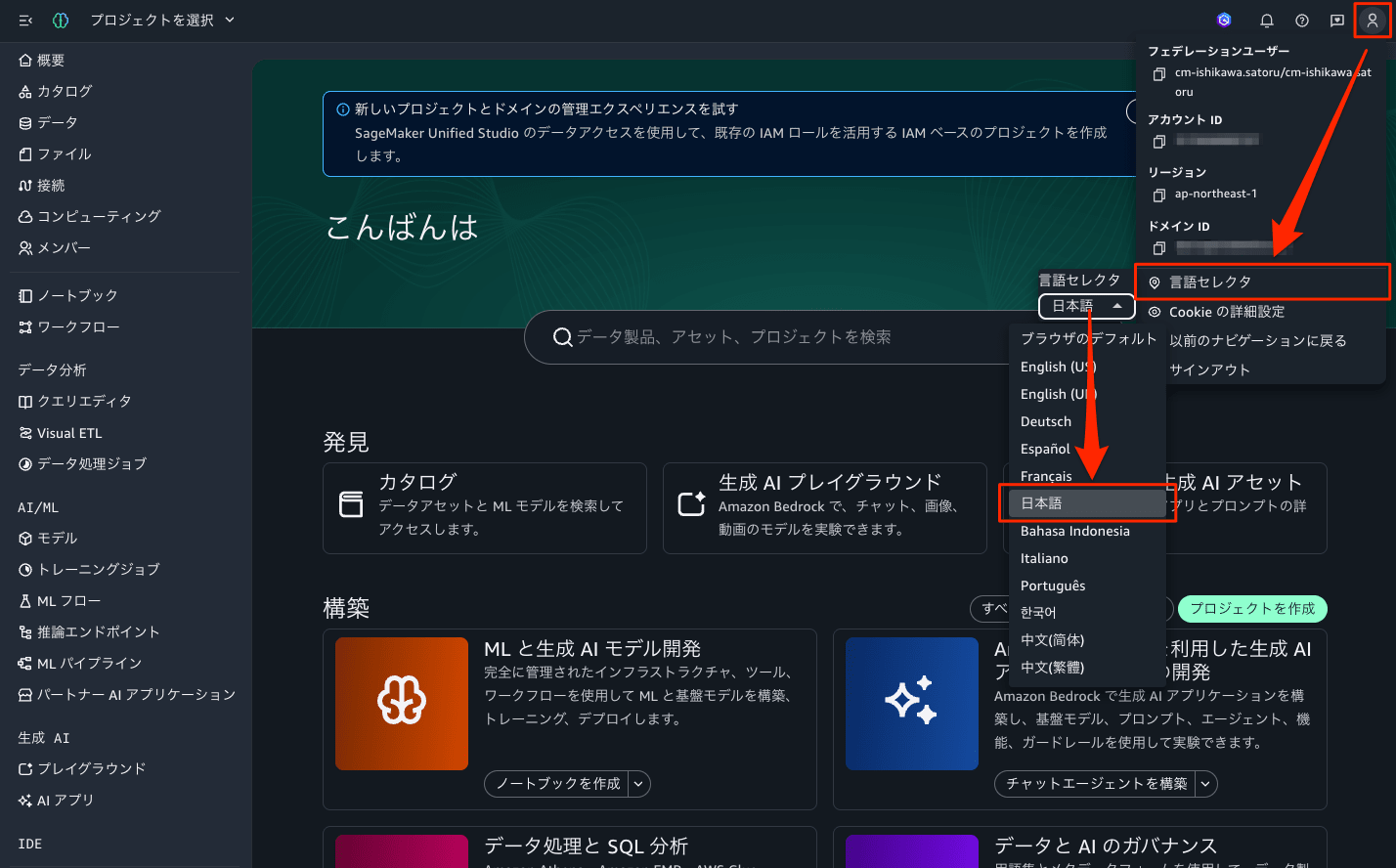
- The display language can be manually selected from the "Language selector" in profile settings
- The selected language is applied across all pages of Amazon SageMaker Unified Studio, and the setting is automatically saved and maintained across sessions
- Available on both AWS IAM Identity Center-based and IAM-based domains
The 12 supported languages are English (US), Japanese, Chinese (Simplified), Chinese (Traditional), French, German, Indonesian, Italian, Korean, Portuguese (Brazil), Spanish, and Turkish.
How to Use
No special configuration is required. On first access, the display language is automatically determined based on your browser's default language settings. If you want to change the display language, you can manually select it from your profile.
The steps to manually change the display language are as follows:
- Select the profile icon in the upper right corner of the screen.
- Select "Language selector."
- Select the language you want to use from the list.
The selected language is automatically saved and carried over to subsequent sessions.
Notes on Usage
Some areas remain in English
As of this update, some areas are not subject to localization and will continue to be displayed in English. The affected areas vary depending on the domain type.
| Domain Type | Areas that remain in English |
|---|---|
| IAM-based domain | Catalog Browse page, MLflow |
| IAM Identity Center-based domain | ML Pipelines, MLflow |
MLflow is not yet supported for either domain type. If you want a fully Japanese UI including experiment management and pipeline screens, keep in mind that these screens will switch back to English.
Considerations when rolling out to organizations or teams
Since the display language is automatically detected from browser settings, there is a possibility that internal procedure manuals and training materials previously created with an English UI in mind may not match the actual screen display. If UI languages are mixed within a team, communication gaps may arise—for example, when referring to button names during screen sharing. For a smooth organizational rollout, it is advisable to decide on a standard display language in advance.
Please note that this update is solely related to the UI display language. The languages used in AWS CLI, SDKs, API responses, and official AWS documentation are not covered by this update.
Closing
Amazon SageMaker Unified Studio now supports UI localization in 12 languages, including Japanese. It supports both automatic detection from browser settings and manual selection from the profile, with no mention of additional charges. However, please note that some areas, such as MLflow, will continue to be displayed in English.
For teams that have hesitated to deploy Amazon SageMaker Unified Studio internally due to the English-only UI, this update lowers the barrier to adoption by one more step. Why not start by switching to the Japanese UI and seeing how it feels?
