
A migration guide from Amazon QuickSight Topics to Dataset Q&A for metadata has been published, so I tried it out.

This page has been translated by machine translation. View original
This is Ishikawa from the Cloud Business Division. A guide for converting metadata from Topics, the traditional natural language query feature, to the Dataset Enrichment format for Dataset Q&A has been published on the Amazon QuickSight community by alaresch (Amy Marvin@AWS). A Python script automatically extracts business context accumulated in Topics (synonyms, calculated fields, custom instructions, etc.) and carries it over to Dataset Q&A.
For those who have already been adding business metadata to Topics, this is a practical guide that allows you to migrate to a new, higher-accuracy Q&A experience without wasting your previous investment.
What are Topics and Dataset Q&A
Amazon QuickSight provides two types of natural language data query experiences.
- Topics: The traditional Q&A feature. It groups one or more datasets and defines business context and field semantics to scope in advance "what users can ask questions about." It excels at predictable question patterns and continues to be supported.
- Dataset Q&A: A new feature based on the latest text-to-SQL architecture. It queries datasets directly, converting questions to SQL at runtime and executing them against all data. It supports runtime calculations, row-level security (RLS) / column-level security (CLS), scaling up to 2 billion rows, and each answer comes with an Explanation showing the generated SQL and data sources.
Note that Dataset Enrichment is the mechanism for defining business context at the dataset layer. This guide bridges the curation on the Topics side to this Dataset Enrichment format.
Migrating Metadata from Topics to Dataset Q&A
The main points of this migration are as follows.
- A Python script (
convert_topics_to_enrichment.py) is provided that calls the TopicsListTopics/DescribeTopicAPIs to automatically extract curated metadata. - Extraction targets include field synonyms, friendly names, semantic types (currency, dates, etc.), calculated fields, default aggregations, display formats, cell value synonyms, named entities, comparison order (greater-is-better, etc.), custom instructions, and more.
- Output supports 3 formats — YAML (default) / JSON / TXT — and is generated as files such as
<topic-name>_enrichment.yaml. - Dataset Q&A supports direct queries to SPICE as well as Amazon Redshift, Amazon Athena, Aurora PostgreSQL, and Amazon S3 Tables (direct queries have no row count limit).
Overview of the Conversion
The migration proceeds in the following 3 phases.
How to Use
Phase 1: Identify the Topics to Convert
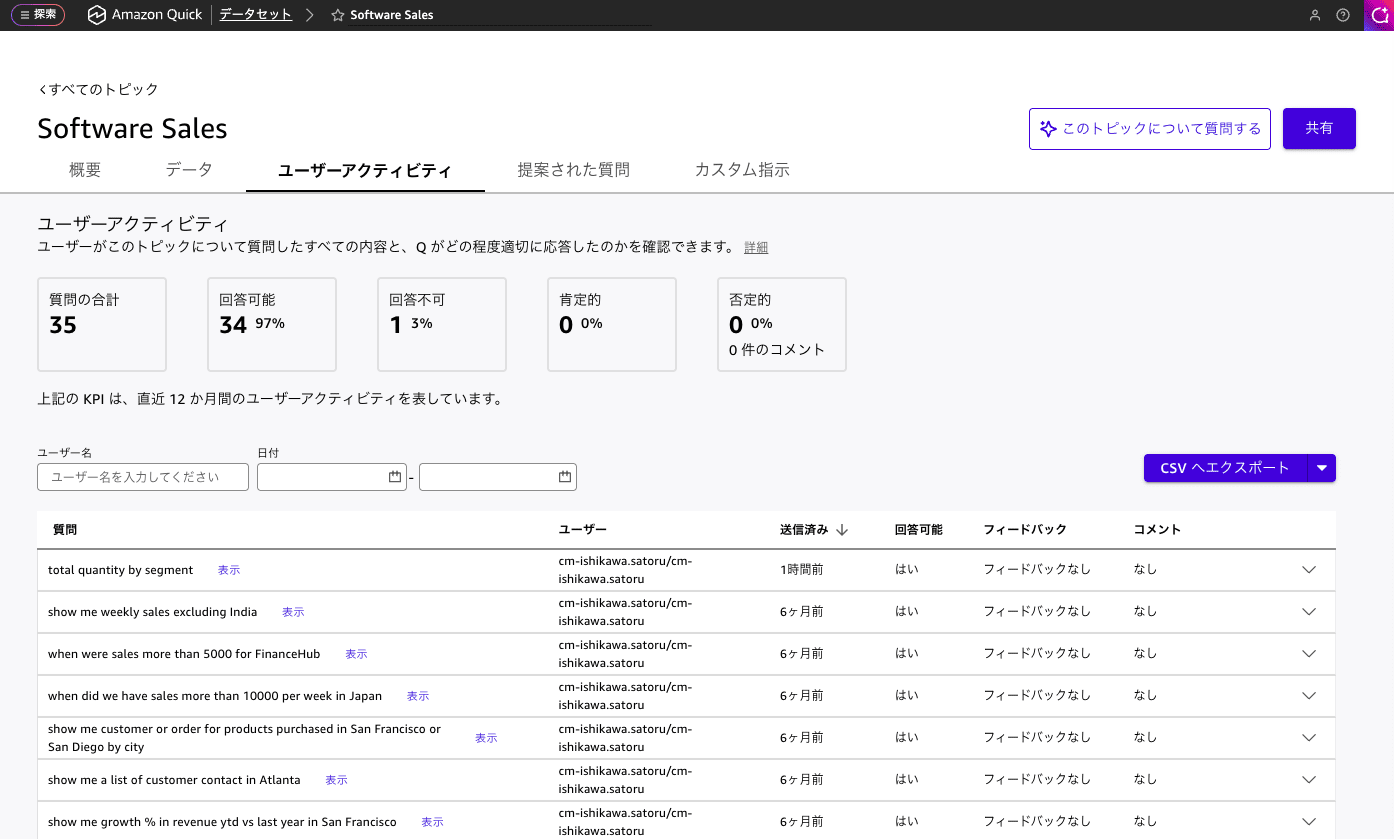
You don't need to convert all Topics at once. Check usage in the User Activity tab of each Topic and prioritize Topics such as the following.
- Frequent unanswered responses of "I can't answer that"
- Complex or frequently updated calculated fields
- Low feedback scores or usage rates
- Questions are being requested that exceed the pre-configured field scope
Conversely, Topics that are stable with high satisfaction and predictable question patterns can continue to operate as-is for the time being.
Phase 2: Run the Conversion Script
Download the conversion script convert_topics_to_enrichment.py from Conversion Guide: Amazon Quick Topics → Dataset Q&A.
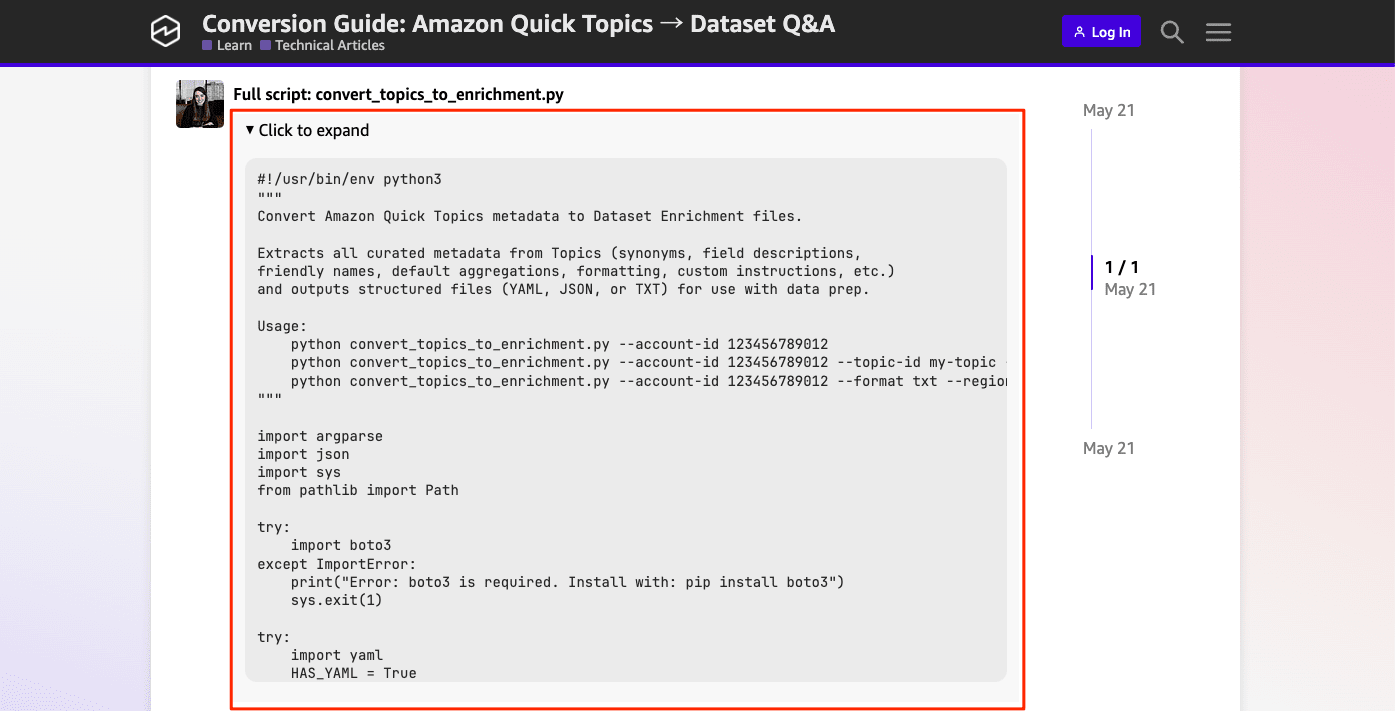
Run the script after meeting the following prerequisites.
- Python 3.8 or higher
- AWS credentials with
QuickSight:ListTopicsandQuickSight:DescribeTopicpermissions - boto3 installed (
pip install boto3)
Examples of execution are as follows.
# Export all Topics in YAML format (default)
python convert_topics_to_enrichment.py --account-id $(aws sts get-caller-identity --query "Account" --output text)

# Export a specific Topic in JSON format
python convert_topics_to_enrichment.py --account-id $(aws sts get-caller-identity --query "Account" --output text) \
  --topic-id my-topic-id --format json

# Export in human-readable text format
python convert_topics_to_enrichment.py --account-id $(aws sts get-caller-identity --query "Account" --output text) --format txt
When actually executed, topics including those I don't own are output all at once.
% python convert_topics_to_enrichment.py --account-id $(aws sts get-caller-identity --query "Account" --output text) --region ap-northeast-1
Listing all topics in account 123456789012...
Found 21 topic(s)

:
:

Processing topic: siqCyC17cQiSRZoPuqj2PgzsI2SRZG2L
  Written: software_sales_enrichment.yaml

:
:

Done.
The contents of the generated enrichment file software_sales_enrichment.yaml are as follows.
software_sales_enrichment.yaml
topic_id: siqCyC17cQiSRZoPuqj2PgzsI2SRZG2L
topic_name: Software Sales
description: 'A sample Q topic with software sales order details topic with product, location, sales and geographical information. '
datasets:
- dataset_arn: arn:aws:quicksight:ap-northeast-1:123456789012:dataset/d5fe021f-e8a9-4582-9ff4-450f2b358989
  dataset_name: Daily Customer Sales
  dataset_description: Daily Customer Sales Data
  data_aggregation:
    date_granularity: DAY
    default_date_column: Order Date
  fields:
  - column_name: Order ID
    friendly_name: Order ID
    description: Order Identifier
    data_role: DIMENSION
    default_aggregation: DISTINCT_COUNT
    not_allowed_aggregations:
    - COUNT
    never_aggregate_in_filter: false
    is_included_in_topic: true
    semantic_type:
      type_name: Identifier
  - column_name: Order Date
    friendly_name: Order Date
    description: Customer Order Date
    data_role: DIMENSION
    never_aggregate_in_filter: false
    is_included_in_topic: true
    semantic_type:
      type_name: Date
      sub_type_name: Day
  - column_name: Date Key
    friendly_name: Date Key
    data_role: DIMENSION
    never_aggregate_in_filter: false
    is_included_in_topic: false
    semantic_type:
      type_name: DatePart
  - column_name: Contact Name
    friendly_name: Contact Name
    description: Customer Name
    synonyms:
    - Customer Name
    - Customer POC
    data_role: DIMENSION
    never_aggregate_in_filter: false
    is_included_in_topic: true
    semantic_type:
      type_name: Person
  - column_name: Country
    friendly_name: Country
    description: Customer Country
    data_role: DIMENSION
    never_aggregate_in_filter: false
    is_included_in_topic: true
    semantic_type:
      type_name: Location
      sub_type_name: Country
  - column_name: City
    friendly_name: City
    description: Customer City
    data_role: DIMENSION
    never_aggregate_in_filter: false
    is_included_in_topic: true
    semantic_type:
      type_name: Location
      sub_type_name: City
  - column_name: Region
    friendly_name: Region
    description: Sales Region
    synonyms:
    - Area
    data_role: DIMENSION
    never_aggregate_in_filter: false
    is_included_in_topic: true
    semantic_type:
      type_name: Location
  - column_name: Subregion
    friendly_name: Subregion
    description: Sales Sub-Regions
    data_role: DIMENSION
    never_aggregate_in_filter: false
    is_included_in_topic: true
    semantic_type:
      type_name: Location
  - column_name: Customer
    friendly_name: Customer
    synonyms:
    - buyer
    - purchaser
    - company
    - client
    data_role: DIMENSION
    never_aggregate_in_filter: false
    is_included_in_topic: true
  - column_name: Customer ID
    friendly_name: Customer ID
    description: Unique Customer Identifier
    data_role: DIMENSION
    default_aggregation: DISTINCT_COUNT
    never_aggregate_in_filter: false
    is_included_in_topic: true
    semantic_type:
      type_name: Identifier
  - column_name: Industry
    friendly_name: Industry
    description: Customer Industry
    synonyms:
    - Domain
    data_role: DIMENSION
    never_aggregate_in_filter: false
    is_included_in_topic: true
  - column_name: Segment
    friendly_name: Segment
    description: Customer Business Segment
    synonyms:
    - Sector
    data_role: DIMENSION
    never_aggregate_in_filter: false
    is_included_in_topic: true
  - column_name: Product
    friendly_name: Product
    description: Product Name
    synonyms:
    - Item
    - Service
    data_role: DIMENSION
    default_aggregation: DISTINCT_COUNT
    never_aggregate_in_filter: false
    is_included_in_topic: true
  - column_name: License
    friendly_name: License
    description: Product License Detail
    data_role: DIMENSION
    never_aggregate_in_filter: false
    is_included_in_topic: true
  - column_name: Sales
    friendly_name: Sales
    description: Sales in dollar
    synonyms:
    - Revenue
    - Spend
    data_role: MEASURE
    default_aggregation: SUM
    never_aggregate_in_filter: false
    is_included_in_topic: true
    formatting:
      display_format: CURRENCY
      currency_symbol: $
      fraction_digits: 0
      use_grouping: false
      use_blank_cell_format: false
    semantic_type:
      type_name: Currency
  - column_name: Quantity
    friendly_name: Quantity
    description: Quantity Sold
    synonyms:
    - qty
    data_role: MEASURE
    default_aggregation: SUM
    never_aggregate_in_filter: false
    is_included_in_topic: true
    formatting:
      display_format: NUMBER
      fraction_digits: 0
      use_grouping: false
      use_blank_cell_format: false
  - column_name: Discount
    friendly_name: Discount
    description: Sales Discount applied on order
    data_role: MEASURE
    default_aggregation: SUM
    never_aggregate_in_filter: false
    is_included_in_topic: true
    formatting:
      display_format: CURRENCY
      currency_symbol: $
      fraction_digits: 0
      use_grouping: false
      use_blank_cell_format: false
  - column_name: Profit
    friendly_name: Profit
    description: Estimated Gross Profit
    data_role: MEASURE
    default_aggregation: SUM
    never_aggregate_in_filter: false
    is_included_in_topic: true
    formatting:
      display_format: CURRENCY
      currency_symbol: $
      fraction_digits: 0
      use_grouping: false
      use_blank_cell_format: false
  named_entities:
  - entity_name: Order Details
    description: Named Entity with data fields commonly asked for orders
    definitions:
    - field_name: Order Date
    - field_name: Customer
    - field_name: Product
    - field_name: Segment
    - field_name: Industry
    - field_name: Quantity
    - field_name: Sales
    - field_name: Profit
    - field_name: Discount
    - field_name: Order ID
  - entity_name: Order location
    definitions:
    - field_name: Order Date
    - field_name: Product
    - field_name: Customer
    - field_name: Sales
    - field_name: Quantity
    - field_name: Country
    - field_name: City
    - field_name: Region
    - field_name: Subregion
The generated enrichment file can be uploaded directly to Dataset Q&A, or you can use its contents as a reference to manually configure field descriptions and calculated fields via the UpdateDataSet API or the console.
Phase 3: Enable Dataset Q&A
Since the Dataset Enrichment feature was not available in legacy experience datasets, I created a new experience dataset.
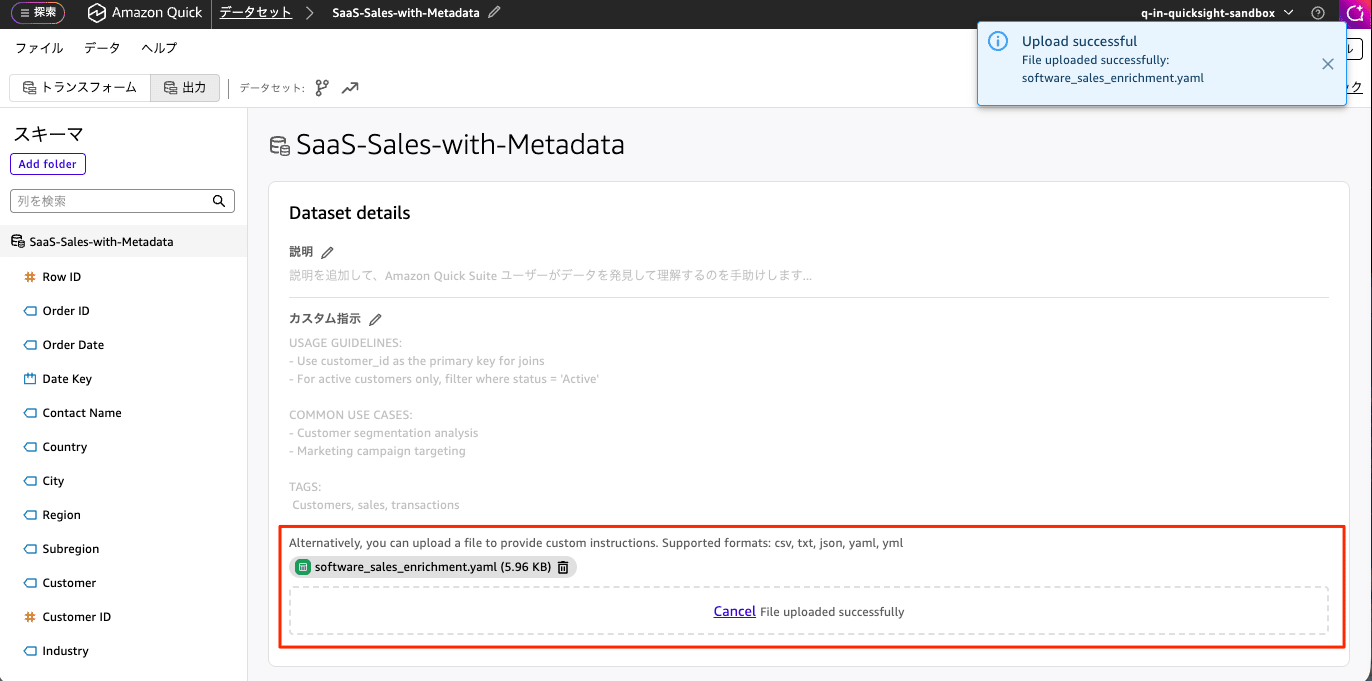
Open the target dataset in Amazon QuickSight, go to "Dataset details" → "Custom instructions" → "Upload file", and upload the generated enrichment file software_sales_enrichment.yaml. Press the [Save and publish] button to apply the changes.
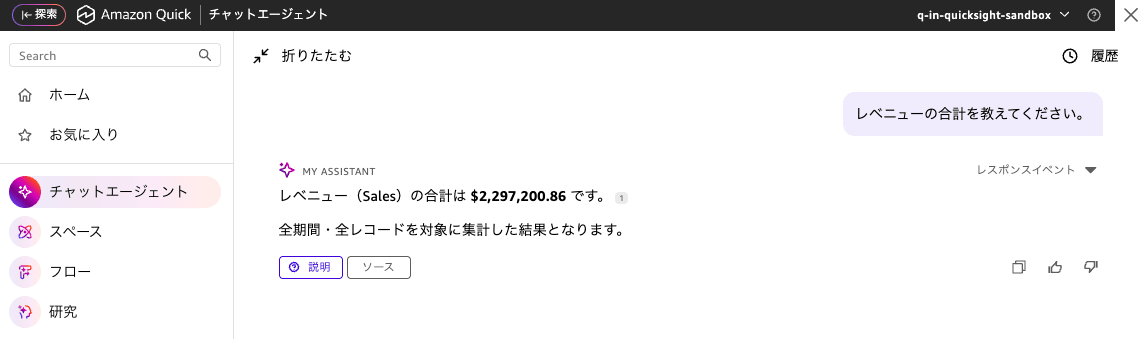
For the prompt "Please tell me the total revenue," while "revenue" does not exist as a column, since "Revenue" has been configured as a synonym for Sales, the correct result is returned.
Notes on Usage
- Topics will not be deprecated. They continue to be fully supported and will evolve going forward. However, for new Q&A implementations, Dataset Q&A + Dataset Enrichment is recommended.
- Topics and Dataset Q&A can run in parallel. You can use Topics on sheets and Dataset Q&A via chat.
- SPICE datasets are subject to capacity limits, but direct queries have no row count limits.
- For calculated fields, the system may automatically generate complex window functions and others, so you may not need to recreate the same ones as in Topics (refer to the official documentation for details).
In Closing
The curation accumulated in Amazon QuickSight Topics — such as synonyms and calculated fields — can be seamlessly carried over to the Dataset Enrichment format for Dataset Q&A using the conversion script. Dataset Q&A offers advantages such as high accuracy through a Text-to-SQL foundation, large-scale support, and automatic RLS/CLS application, making it effective to migrate incrementally, starting with Topics that have many unanswered questions or complex calculated fields.
For those already operating Topics, why not start by identifying migration candidates in the Topics User Activity tab and exporting the metadata with the conversion script?
