Amazon Quick の Topics から Dataset Q&A へメタデータの移行ガイドが公開されたので試してみました

クラウド事業本部の石川です。Amazon Quickコミュニティで、従来の自然言語クエリ機能である Topics のメタデータを、Dataset Q&A 向けの Dataset Enrichment 形式へ変換するためのガイドが alaresch(Amy Marvin@AWS)さんによって公開されました。Python スクリプトで Topics に蓄積したビジネスコンテキスト(同義語・計算フィールド・カスタムインストラクションなど)を自動抽出し、Dataset Q&A に引き継げます。
すでに Topics をビジネスメタデータ付与してしてきた方にとって、これまでの投資を無駄にせず、より高精度な新しい Q&A 体験へ移行できる実用的なガイドになっています。
Topics と Dataset Q&A とは
Amazon Quick は、自然言語でデータに質問できる体験を 2 種類提供しています。
- Topics: 従来の Q&A 機能です。1 つ以上のデータセットをグループ化し、ビジネスコンテキストとフィールドのセマンティクスを定義することで、ユーザーが「何について質問できるか」をあらかじめスコープします。予測可能な質問パターンに強く、引き続きサポートされます。
- Dataset Q&A: 最新のテキスト-to-SQL(text-to-SQL)アーキテクチャに基づく新機能です。データセットを直接クエリし、質問を実行時に SQL へ変換して全データに対して実行します。ランタイム計算、行レベルセキュリティ(RLS)/ 列レベルセキュリティ(CLS)、最大 20 億行までのスケールに対応し、各回答には生成された SQL やデータソースを示す Explanation(説明)が付きます。
なお、ビジネスコンテキストをデータセット層に定義する仕組みが Dataset Enrichment です。今回のガイドは、Topics 側のキュレーションをこの Dataset Enrichment 形式へ橋渡しするものです。
Topics から Dataset Q&A へメタデータを移行
今回の移行の主なポイントは以下のとおりです。
- Topics の
ListTopics/DescribeTopicAPI を呼び出し、キュレーション済みメタデータを自動抽出する Python スクリプト(convert_topics_to_enrichment.py)が提供されています。 - 抽出対象は、フィールド同義語、フレンドリー名、セマンティック型(通貨・日付など)、計算フィールド、デフォルト集計、表示フォーマット、セルバリュー同義語、名前付きエンティティ、比較順序(greater-is-better など)、カスタムインストラクションなど多岐にわたります。
- 出力は YAML(デフォルト)/ JSON / TXT の 3 形式に対応し、
<topic-name>_enrichment.yamlのようなファイルとして生成されます。 - Dataset Q&A は SPICE のほか、Amazon Redshift、Amazon Athena、Aurora PostgreSQL、Amazon S3 Tables への直接クエリに対応します(直接クエリは行数制限なし)。
変換の全体像
移行は次の 3 フェーズで進めます。
利用方法
Phase 1: 変換対象の Topics を特定する
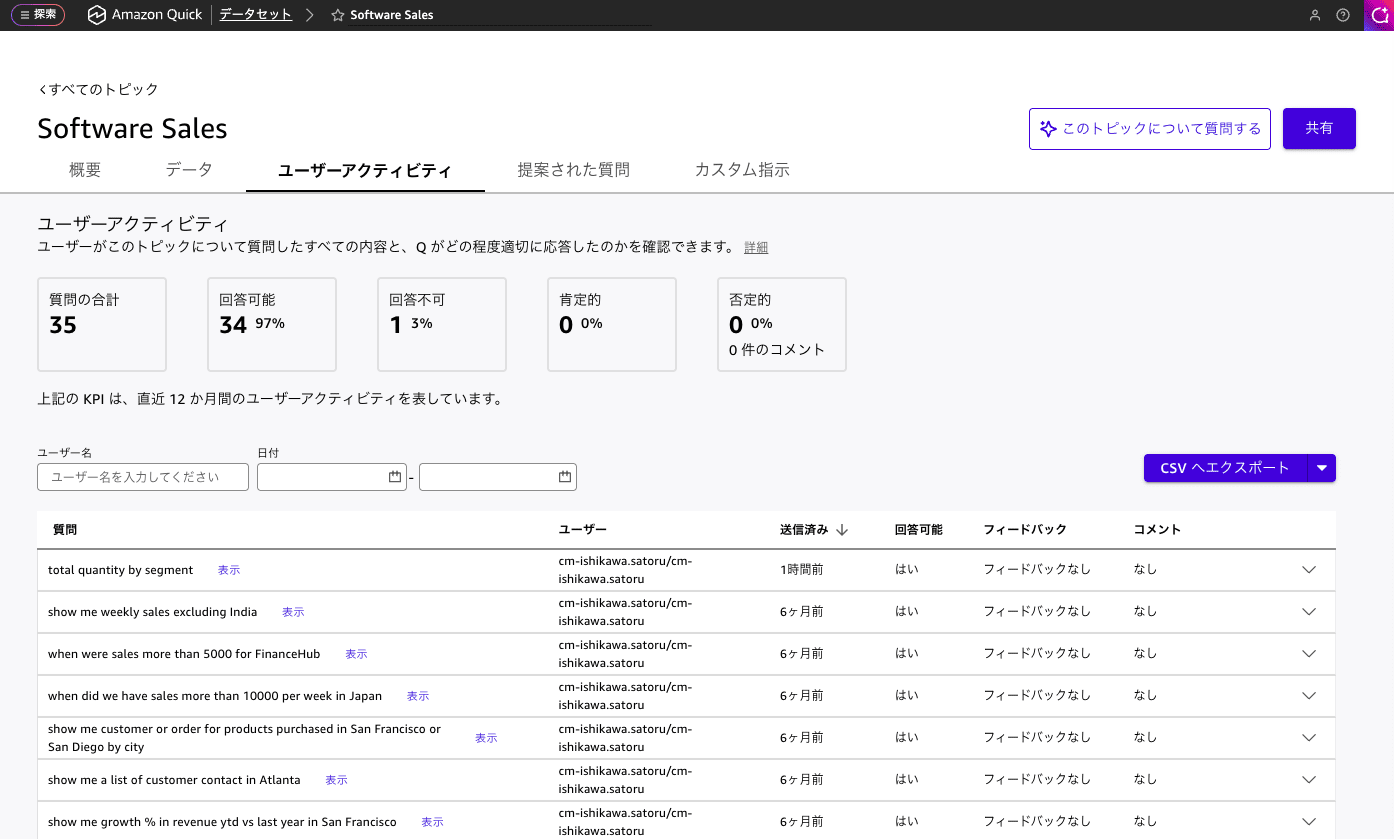
すべての Topics を一度に変換する必要はありません。各 Topics の User Activity(ユーザーアクティビティ)タブで使用状況を確認し、次のような Topics から優先的に着手します。
- 「I can't answer that」という未回答応答が頻発している
- 計算フィールドが複雑、または頻繁に更新される
- フィードバックスコアや使用率が低い
- 事前設定したフィールドスコープを超える質問が求められている
逆に、満足度が高く予測可能な質問パターンで安定している Topics は、当面そのまま運用しても問題ありません。
Phase 2: 変換スクリプトを実行する
変換スクリプトconvert_topics_to_enrichment.py は、Conversion Guide: Amazon Quick Topics → Dataset Q&Aからダウンロードします。
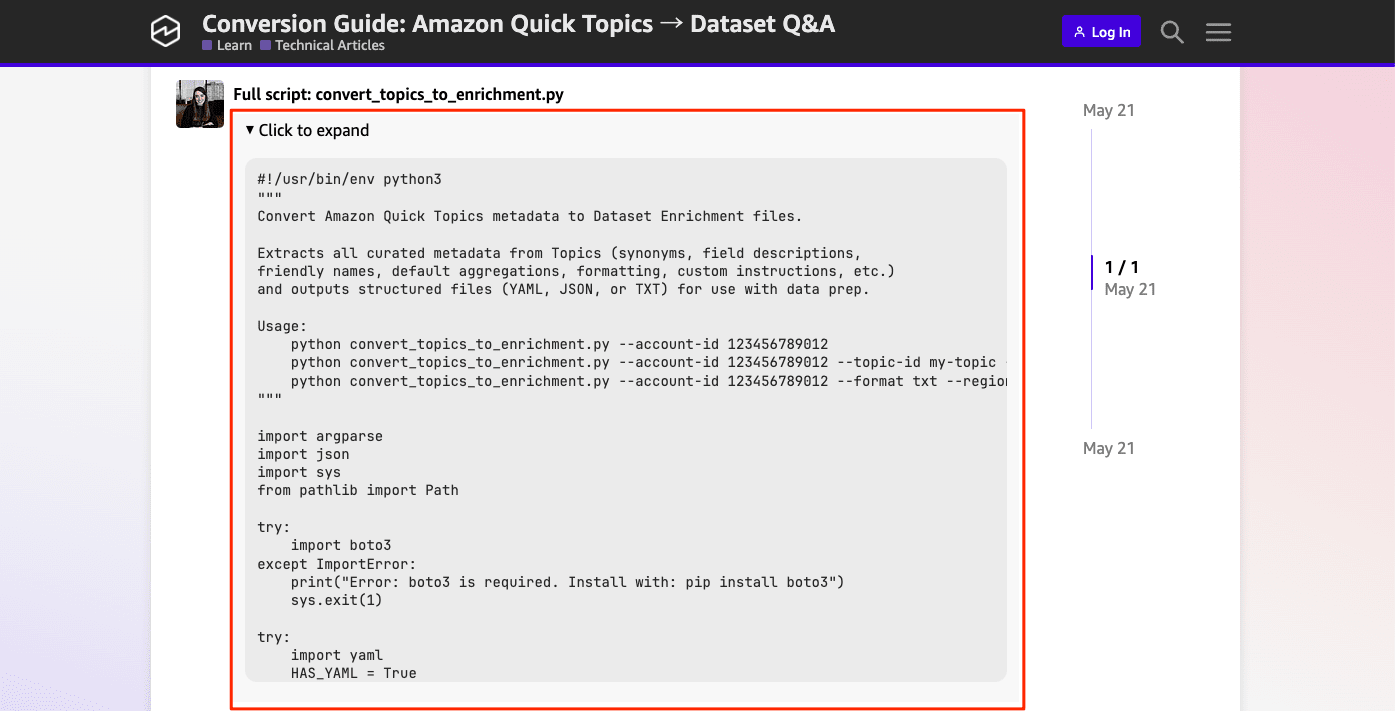
以下の前提条件を満たした上でスクリプトを実行します。
- Python 3.8 以上
Quick:ListTopicsおよびQuick:DescribeTopicの権限を持つ AWS 認証情報- boto3 のインストール(
pip install boto3)
実行例は以下のとおりです。
# すべての Topics を YAML 形式(デフォルト)でエクスポート
python convert_topics_to_enrichment.py --account-id $(aws sts get-caller-identity --query "Account" --output text)

# 特定の Topic を JSON 形式でエクスポート
python convert_topics_to_enrichment.py --account-id $(aws sts get-caller-identity --query "Account" --output text) \
  --topic-id my-topic-id --format json

# 人間が読みやすいテキスト形式でエクスポート
python convert_topics_to_enrichment.py --account-id $(aws sts get-caller-identity --query "Account" --output text) --format txt
実際に実行すると私が所有していないトピックも含めて一気に出力されます。
% python convert_topics_to_enrichment.py --account-id $(aws sts get-caller-identity --query "Account" --output text) --region ap-northeast-1
Listing all topics in account 123456789012...
Found 21 topic(s)

:
:

Processing topic: siqCyC17cQiSRZoPuqj2PgzsI2SRZG2L
  Written: software_sales_enrichment.yaml

:
:

Done.
生成したエンリッチメントファイル software_sales_enrichment.yaml の内容は以下のとおりです。
software_sales_enrichment.yaml
topic_id: siqCyC17cQiSRZoPuqj2PgzsI2SRZG2L
topic_name: Software Sales
description: 'A sample Q topic with software sales order details topic with product, location, sales and geographical information. '
datasets:
- dataset_arn: arn:aws:quicksight:ap-northeast-1:123456789012:dataset/d5fe021f-e8a9-4582-9ff4-450f2b358989
  dataset_name: Daily Customer Sales
  dataset_description: Daily Customer Sales Data
  data_aggregation:
    date_granularity: DAY
    default_date_column: Order Date
  fields:
  - column_name: Order ID
    friendly_name: Order ID
    description: Order Identifier
    data_role: DIMENSION
    default_aggregation: DISTINCT_COUNT
    not_allowed_aggregations:
    - COUNT
    never_aggregate_in_filter: false
    is_included_in_topic: true
    semantic_type:
      type_name: Identifier
  - column_name: Order Date
    friendly_name: Order Date
    description: Customer Order Date
    data_role: DIMENSION
    never_aggregate_in_filter: false
    is_included_in_topic: true
    semantic_type:
      type_name: Date
      sub_type_name: Day
  - column_name: Date Key
    friendly_name: Date Key
    data_role: DIMENSION
    never_aggregate_in_filter: false
    is_included_in_topic: false
    semantic_type:
      type_name: DatePart
  - column_name: Contact Name
    friendly_name: Contact Name
    description: Customer Name
    synonyms:
    - Customer Name
    - Customer POC
    data_role: DIMENSION
    never_aggregate_in_filter: false
    is_included_in_topic: true
    semantic_type:
      type_name: Person
  - column_name: Country
    friendly_name: Country
    description: Customer Country
    data_role: DIMENSION
    never_aggregate_in_filter: false
    is_included_in_topic: true
    semantic_type:
      type_name: Location
      sub_type_name: Country
  - column_name: City
    friendly_name: City
    description: Customer City
    data_role: DIMENSION
    never_aggregate_in_filter: false
    is_included_in_topic: true
    semantic_type:
      type_name: Location
      sub_type_name: City
  - column_name: Region
    friendly_name: Region
    description: Sales Region
    synonyms:
    - Area
    data_role: DIMENSION
    never_aggregate_in_filter: false
    is_included_in_topic: true
    semantic_type:
      type_name: Location
  - column_name: Subregion
    friendly_name: Subregion
    description: Sales Sub-Regions
    data_role: DIMENSION
    never_aggregate_in_filter: false
    is_included_in_topic: true
    semantic_type:
      type_name: Location
  - column_name: Customer
    friendly_name: Customer
    synonyms:
    - buyer
    - purchaser
    - company
    - client
    data_role: DIMENSION
    never_aggregate_in_filter: false
    is_included_in_topic: true
  - column_name: Customer ID
    friendly_name: Customer ID
    description: Unique Customer Identifier
    data_role: DIMENSION
    default_aggregation: DISTINCT_COUNT
    never_aggregate_in_filter: false
    is_included_in_topic: true
    semantic_type:
      type_name: Identifier
  - column_name: Industry
    friendly_name: Industry
    description: Customer Industry
    synonyms:
    - Domain
    data_role: DIMENSION
    never_aggregate_in_filter: false
    is_included_in_topic: true
  - column_name: Segment
    friendly_name: Segment
    description: Customer Business Segment
    synonyms:
    - Sector
    data_role: DIMENSION
    never_aggregate_in_filter: false
    is_included_in_topic: true
  - column_name: Product
    friendly_name: Product
    description: Product Name
    synonyms:
    - Item
    - Service
    data_role: DIMENSION
    default_aggregation: DISTINCT_COUNT
    never_aggregate_in_filter: false
    is_included_in_topic: true
  - column_name: License
    friendly_name: License
    description: Product License Detail
    data_role: DIMENSION
    never_aggregate_in_filter: false
    is_included_in_topic: true
  - column_name: Sales
    friendly_name: Sales
    description: Sales in dollar
    synonyms:
    - Revenue
    - Spend
    data_role: MEASURE
    default_aggregation: SUM
    never_aggregate_in_filter: false
    is_included_in_topic: true
    formatting:
      display_format: CURRENCY
      currency_symbol: $
      fraction_digits: 0
      use_grouping: false
      use_blank_cell_format: false
    semantic_type:
      type_name: Currency
  - column_name: Quantity
    friendly_name: Quantity
    description: Quantity Sold
    synonyms:
    - qty
    data_role: MEASURE
    default_aggregation: SUM
    never_aggregate_in_filter: false
    is_included_in_topic: true
    formatting:
      display_format: NUMBER
      fraction_digits: 0
      use_grouping: false
      use_blank_cell_format: false
  - column_name: Discount
    friendly_name: Discount
    description: Sales Discount applied on order
    data_role: MEASURE
    default_aggregation: SUM
    never_aggregate_in_filter: false
    is_included_in_topic: true
    formatting:
      display_format: CURRENCY
      currency_symbol: $
      fraction_digits: 0
      use_grouping: false
      use_blank_cell_format: false
  - column_name: Profit
    friendly_name: Profit
    description: Estimated Gross Profit
    data_role: MEASURE
    default_aggregation: SUM
    never_aggregate_in_filter: false
    is_included_in_topic: true
    formatting:
      display_format: CURRENCY
      currency_symbol: $
      fraction_digits: 0
      use_grouping: false
      use_blank_cell_format: false
  named_entities:
  - entity_name: Order Details
    description: Named Entity with data fields commonly asked for orders
    definitions:
    - field_name: Order Date
    - field_name: Customer
    - field_name: Product
    - field_name: Segment
    - field_name: Industry
    - field_name: Quantity
    - field_name: Sales
    - field_name: Profit
    - field_name: Discount
    - field_name: Order ID
  - entity_name: Order location
    definitions:
    - field_name: Order Date
    - field_name: Product
    - field_name: Customer
    - field_name: Sales
    - field_name: Quantity
    - field_name: Country
    - field_name: City
    - field_name: Region
    - field_name: Subregion
生成されたエンリッチメントファイルは、そのまま Dataset Q&A にアップロードできるほか、内容をリファレンスとして UpdateDataSet API やコンソールから手動でフィールド説明・計算フィールドを設定する、という使い方も可能です。
Phase 3: Dataset Q&A を有効化する
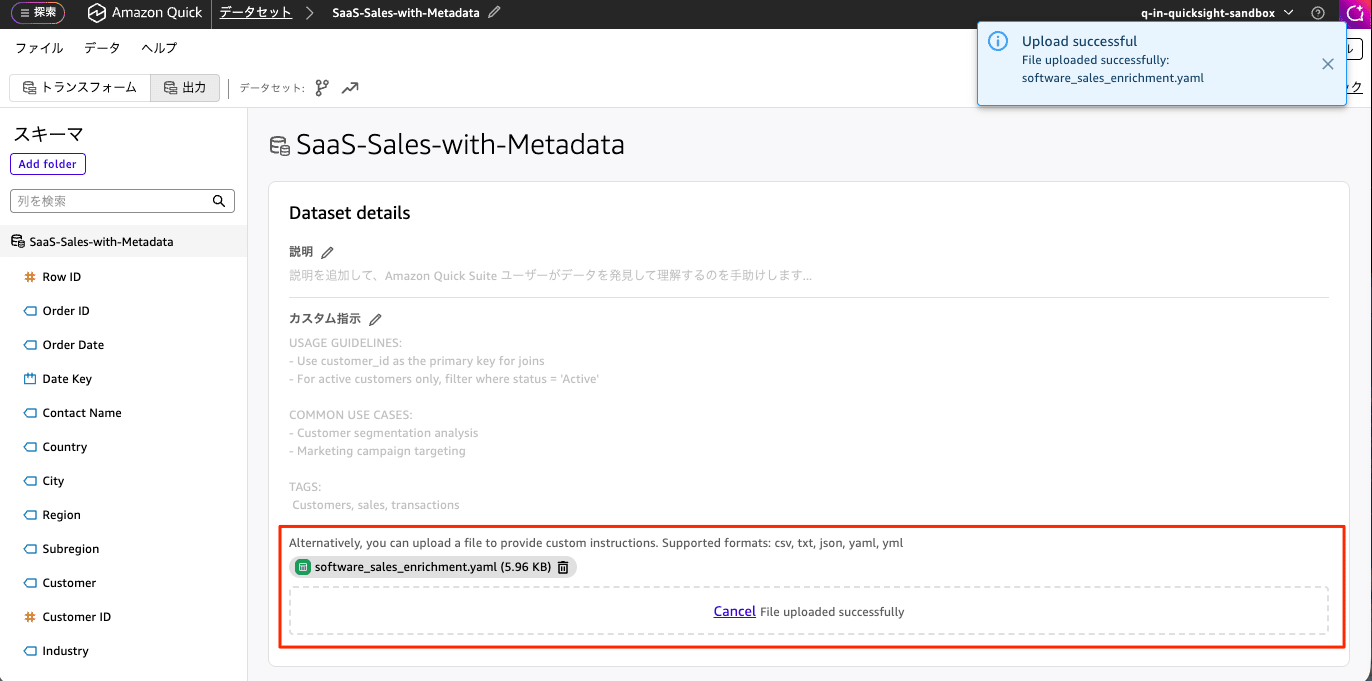
レガシーエクスペリエンスのデータセットでは、Dataset Enrichment 機能が見当たらないので、新しいエクスペリエンスのデータセットを作成しました。
Amazon Quick で対象のデータセットを開き、「Dataset details」→「Custom instructions」→「Upload file」から、生成したエンリッチメントファイル software_sales_enrichment.yaml のをアップロードします。[保存して公開]ボタンを押して、変更を適用します。
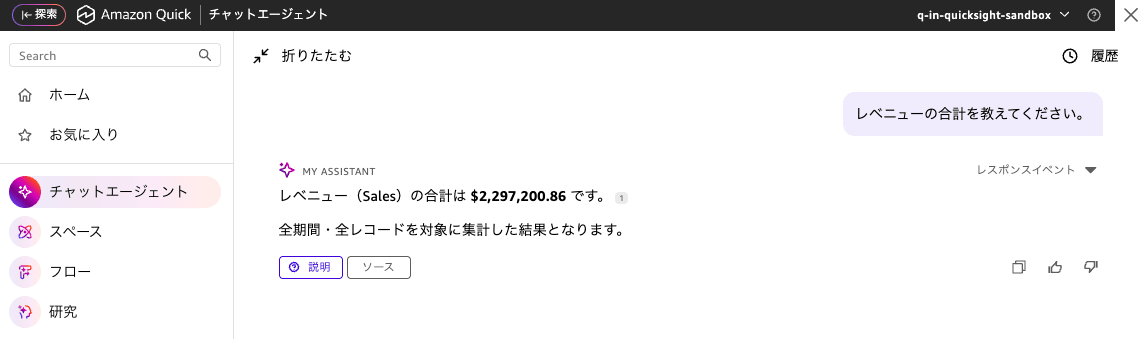
レベニューの合計を教えてください。というプロンプトに対して、「レベニュー」はカラムにありませんがSalesに対して、Revenue というシノニムを設定してあるので、正しい結果が導かれています。
利用上の注意
- Topics は廃止されません。引き続きフルサポートされ、今後も進化します。ただし新規の Q&A 導入では Dataset Q&A + Dataset Enrichment が推奨です。
- Topics と Dataset Q&A は並行運用が可能です。シート上では Topics、チャット経由では Dataset Q&A という使い分けができます。
- SPICE データセットは容量制限の対象ですが、直接クエリには行数制限がありません。
- 計算フィールドは、複雑なウィンドウ関数などをシステムが自動生成するため、Topics と同じものを再作成する必要がない場合があります(詳細は公式ドキュメントを参照してください)。
最後に
Amazon Quick の Topics で積み上げてきた同義語や計算フィールドなどのキュレーションは、変換スクリプトを使うことで Dataset Q&A 向けの Dataset Enrichment 形式へ無駄なく引き継げます。Dataset Q&A は Text-to-SQL 基盤による高精度・大規模対応・RLS/CLS 自動適用といった利点を備えており、未回答が多い Topics や複雑な計算フィールドを抱える Topics から段階的に移行するのが効果的です。
すでに Topics を運用されている方は、まず、Topics の User Activity(ユーザーアクティビティ)タブで移行候補を洗い出し、変換スクリプトでメタデータをエクスポートするところから検討してみてはいかがでしょうか。