![[Update] I tried out AWS Entity Resolution's Advanced rule type that now supports real-time matching](https://images.ctfassets.net/ct0aopd36mqt/wp-thumbnail-bcaad4c42016a139fddffa225966b901/91ef2374a897d0502ecc3ff1a10dbeb0/aws-entity-resolution?w=3840&fm=webp)
[Update] I tried out AWS Entity Resolution's Advanced rule type that now supports real-time matching

This page has been translated by machine translation. View original
I am Ishikawa from the Cloud Business Division. The Advanced matching workflow of AWS Entity Resolution now supports real-time matching, so since it's real-time matching, I actually tried it out using the AWS CLI.
AWS Entity Resolution is a service that has an enormous amount of demand yet surprisingly low name recognition. I hope this article helps raise awareness even a little.
What is AWS Entity Resolution
AWS Entity Resolution is a managed service that matches and links customer, product, business, and healthcare-related records distributed across multiple applications and data stores, associating them as the same entity. A unique identifier called a Match ID is assigned to each set of matched records.
With this update, the Advanced rule type matching workflow, which was previously limited to batch processing, now supports real-time matching via the GenerateMatchId API. According to the announcement, evaluation of complex rule sets that previously took minutes to hours can now complete in milliseconds.
To enable it, you simply set the enableRealTimeMatching parameter to true in the resolutionTechniques of the matching workflow.
However, reading the GenerateMatchId documentation, the following two statements appear on the same page:
- To call the GenerateMatchId API, you must first successfully run the StartMatchingJob API for a rule-based matching workflow at least once
- Workflows with
enableRealTimeMatchingset totruecannot be run with the StartMatchingJob API
As it stands, this would mean GenerateMatchId could never be called for an Advanced real-time workflow. I verified in the Tokyo region what actually happens, including this point.
Rule Types and Real-Time Matching
When creating a rule-based matching workflow, you choose either Simple or Advanced as the rule type. The rule type cannot be changed after creation.
Here is an excerpt of the key differences from the official documentation comparison table.
| Item | Advanced Rule Type | Simple Rule Type |
|---|---|---|
| Input field to match key mapping | 1 to 1 | Multiple columns can be grouped into one match key |
| Exact matching and fuzzy matching | Both supported | Exact matching only |
| Operators | AND, OR, parentheses | AND only |
| Batch workflow | Supported | Supported |
| Incremental workflow | Supported | Supported |
With the Advanced rule type, matching conditions are described as a string called condition. The available functions are as follows:
- Exact:
Exact(matchKey),ExactManyToMany(matchKey, matchKey, ...) - Fuzzy:
Cosine(matchKey, threshold),Levenshtein(matchKey, threshold),Soundex(matchKey)
These are combined using AND / OR / parentheses. The rule sets that gained real-time support with this update are those that combine Exact-type functions.
Note that the comparison table has a "Supports real-time workflows" row, and at the time of writing this article, Advanced still shows No and has not been updated. It appears this update has not yet been reflected there, so it is more accurate to refer to the GenerateMatchId page.
Let's Try It
Prerequisites
- Verification region: ap-northeast-1 (Tokyo)
- AWS CLI: aws-cli/2.36.9
- Python: 3.14.0 / boto3: 1.43.14 (used only for latency measurement)
- Things to prepare in advance: S3 buckets for input/output, AWS Glue database and table
Preparing Verification Data
I prepared a CSV resembling customer data and placed it in S3, then registered it as a Glue table. The reason for having two phone number columns (phone and alt_phone) is to verify the behavior of ExactManyToMany in a later step.
customers.csv
unique_id,first_name,last_name,email,phone,alt_phone
c-001,Taro,Yamada,taro.yamada@example.com,090-1111-2222,03-1000-0001
c-002,Hanako,Suzuki,hanako.suzuki@example.com,090-5555-6666,03-2000-0002
c-003,Jiro,Tanaka,jiro.tanaka@example.com,070-7777-8888,03-3000-0003
c-004,Saburo,Sato,saburo.sato@example.com,080-9999-0000,03-4000-0004
c-005,Shiro,Takahashi,shiro.takahashi@example.com,090-2222-3333,03-9000-0009
Create an S3 bucket and place the CSV in it.
% aws s3 mb s3://er-rt-blog-123456789012 --region ap-northeast-1
make_bucket: er-rt-blog-123456789012

% aws s3 cp customers.csv s3://er-rt-blog-123456789012/input/customers.csv
upload: ./customers.csv to s3://er-rt-blog-123456789012/input/customers.csv
Next, create the Glue database and table. In the table definition, skip.header.line.count is specified to skip the header row.
table-input.json
{
  "Name": "customers",
  "TableType": "EXTERNAL_TABLE",
  "Parameters": { "classification": "csv", "skip.header.line.count": "1" },
  "StorageDescriptor": {
    "Columns": [
      {"Name": "unique_id",  "Type": "string"},
      {"Name": "first_name", "Type": "string"},
      {"Name": "last_name",  "Type": "string"},
      {"Name": "email",      "Type": "string"},
      {"Name": "phone",      "Type": "string"},
      {"Name": "alt_phone",  "Type": "string"}
    ],
    "Location": "s3://er-rt-blog-123456789012/input/",
    "InputFormat": "org.apache.hadoop.mapred.TextInputFormat",
    "OutputFormat": "org.apache.hadoop.hive.ql.io.HiveIgnoreKeyTextOutputFormat",
    "SerdeInfo": {
      "SerializationLibrary": "org.apache.hadoop.hive.serde2.lazy.LazySimpleSerDe",
      "Parameters": { "field.delim": "," }
    }
  }
}
% aws glue create-database \
  --database-input '{"Name":"er_rt_blog"}'

% aws glue create-table \
  --database-name er_rt_blog \
  --table-input file://table-input.json

% aws glue get-table --database-name er_rt_blog --name customers \
  --query 'Table.{Name:Name,Location:StorageDescriptor.Location}'
{
    "Name": "customers",
    "Location": "s3://er-rt-blog-123456789012/input/"
}
Creating the IAM Service Role
Create a service role for AWS Entity Resolution to access the source Glue table and destination S3 bucket.
In the trust policy, allow sts:AssumeRole from entityresolution.amazonaws.com. To avoid the confused deputy problem, add conditions for aws:SourceAccount and aws:SourceArn, but since the workflow ARN is not determined at the time of role creation, specify a wildcard for aws:SourceArn.
trust-policy.json
{
  "Version": "2012-10-17",
  "Statement": [
    {
      "Effect": "Allow",
      "Principal": { "Service": "entityresolution.amazonaws.com" },
      "Action": "sts:AssumeRole",
      "Condition": {
        "StringEquals": { "aws:SourceAccount": "123456789012" },
        "ArnLike": { "aws:SourceArn": "arn:aws:entityresolution:ap-northeast-1:123456789012:matchingworkflow/*" }
      }
    }
  ]
}
Include only the permissions necessary for reading the Glue Data Catalog and S3 input/output in the permissions policy.
permissions-policy.json
{
  "Version": "2012-10-17",
  "Statement": [
    {
      "Sid": "GluePermissions",
      "Effect": "Allow",
      "Action": ["glue:GetDatabase","glue:GetTable","glue:GetPartition","glue:GetPartitions","glue:GetSchema","glue:GetSchemaVersion","glue:BatchGetPartition"],
      "Resource": [
        "arn:aws:glue:ap-northeast-1:123456789012:catalog",
        "arn:aws:glue:ap-northeast-1:123456789012:database/er_rt_blog",
        "arn:aws:glue:ap-northeast-1:123456789012:table/er_rt_blog/customers"
      ]
    },
    {
      "Sid": "S3InputPermissions",
      "Effect": "Allow",
      "Action": ["s3:GetObject","s3:ListBucket","s3:GetBucketLocation"],
      "Resource": ["arn:aws:s3:::er-rt-blog-123456789012","arn:aws:s3:::er-rt-blog-123456789012/*"],
      "Condition": {"StringEquals": {"s3:ResourceAccount": ["123456789012"]}}
    },
    {
      "Sid": "S3OutputPermissions",
      "Effect": "Allow",
      "Action": ["s3:PutObject","s3:ListBucket","s3:GetBucketLocation"],
      "Resource": ["arn:aws:s3:::er-rt-blog-123456789012","arn:aws:s3:::er-rt-blog-123456789012/*"],
      "Condition": {"StringEquals": {"s3:ResourceAccount": ["123456789012"]}}
    }
  ]
}
Create the role and store the ARN in ROLE_ARN for use in subsequent steps.
% ROLE_ARN=$(aws iam create-role \
  --role-name er_rt_blog_role \
  --assume-role-policy-document file://trust-policy.json \
  --query 'Role.Arn' --output text)

% aws iam put-role-policy \
  --role-name er_rt_blog_role \
  --policy-name er-access \
  --policy-document file://permissions-policy.json

% echo "${ROLE_ARN}"
arn:aws:iam::123456789012:role/er_rt_blog_role
Creating the Schema Mapping
With the Advanced rule type, each input field must be mapped to a unique match key. However, fields grouped with groupName can share the same match key. Since I want to combine the first and last name columns into a single match key, I'll use grouping.
schema-fields.json
[
  {"fieldName":"unique_id",  "type":"UNIQUE_ID"},
  {"fieldName":"first_name", "type":"NAME_FIRST",    "groupName":"name", "matchKey":"name"},
  {"fieldName":"last_name",  "type":"NAME_LAST",     "groupName":"name", "matchKey":"name"},
  {"fieldName":"email",      "type":"EMAIL_ADDRESS", "matchKey":"email"},
  {"fieldName":"phone",      "type":"PHONE_NUMBER",  "matchKey":"phone"},
  {"fieldName":"alt_phone",  "type":"PHONE_NUMBER",  "matchKey":"altphone"}
]
% aws entityresolution create-schema-mapping \
  --schema-name er_rt_blog_customers \
  --mapped-input-fields file://schema-fields.json
{
    "schemaName": "er_rt_blog_customers",
    "schemaArn": "arn:aws:entityresolution:ap-northeast-1:123456789012:schemamapping/er_rt_blog_customers",
    "mappedInputFields": [
        {
            "fieldName": "unique_id",
            "type": "UNIQUE_ID"
        },
        {
            "fieldName": "first_name",
            "type": "NAME_FIRST",
            "groupName": "name",
            "matchKey": "name"
        },
        {
            "fieldName": "last_name",
            "type": "NAME_LAST",
            "groupName": "name",
            "matchKey": "name"
        },
        {
            "fieldName": "email",
            "type": "EMAIL_ADDRESS",
            "matchKey": "email"
        },
        {
            "fieldName": "phone",
            "type": "PHONE_NUMBER",
            "matchKey": "phone"
        },
        {
            "fieldName": "alt_phone",
            "type": "PHONE_NUMBER",
            "matchKey": "altphone"
        }
    ]
}
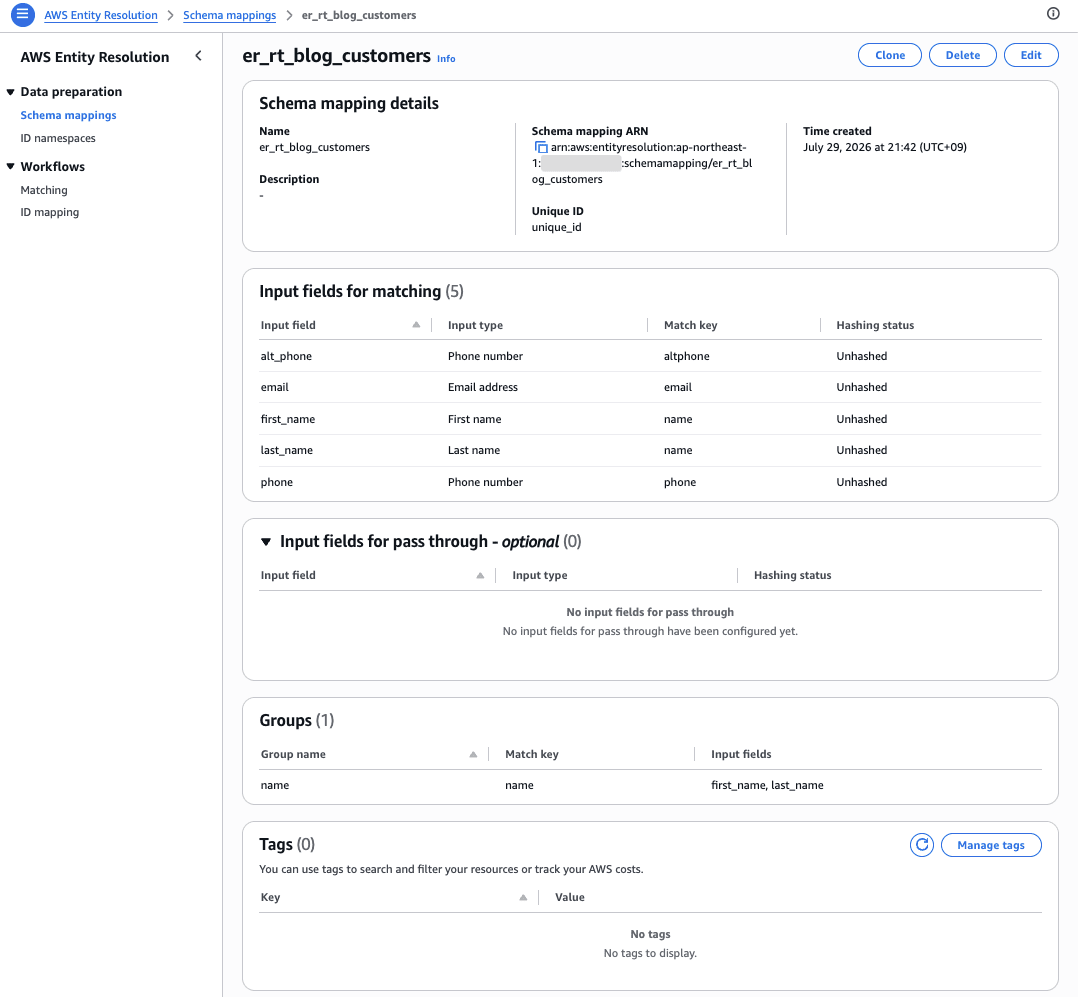
Both phone and alt_phone are of type PHONE_NUMBER, but by assigning them different match keys, the creation completed without any issues. Here is the schema mapping that was actually created.
A Stumbling Block When Creating the Workflow
Next, I create a workflow with the Advanced rule type and enableRealTimeMatching enabled.
resolution-advanced.json
{
  "resolutionType": "RULE_MATCHING",
  "ruleConditionProperties": {
    "rules": [
      { "ruleName": "Rule1", "condition": "Exact(email) AND Exact(name)" },
      { "ruleName": "Rule2", "condition": "(Exact(name) AND Exact(phone)) OR ExactManyToMany(phone, altphone)" }
    ]
  },
  "enableRealTimeMatching": true
}
Specify the already-created Glue table and schema mapping as the input source, and the S3 bucket as the output destination.
input-source.json
[
  {
    "inputSourceARN": "arn:aws:glue:ap-northeast-1:123456789012:table/er_rt_blog/customers",
    "schemaName": "er_rt_blog_customers",
    "applyNormalization": true
  }
]
output-source.json
[
  {
    "outputS3Path": "s3://er-rt-blog-123456789012/output/",
    "applyNormalization": true,
    "output": [
      {"name": "unique_id",  "hashed": false},
      {"name": "first_name", "hashed": false},
      {"name": "last_name",  "hashed": false},
      {"name": "email",      "hashed": false},
      {"name": "phone",      "hashed": false},
      {"name": "alt_phone",  "hashed": false}
    ]
  }
]
However, an error was returned here.
% aws entityresolution create-matching-workflow \
  --workflow-name er_rt_blog_advanced \
  --input-source-config file://input-source.json \
  --output-source-config file://output-source.json \
  --resolution-techniques file://resolution-advanced.json \
  --role-arn "${ROLE_ARN}"

aws: [ERROR]: An error occurred (AccessDeniedException) when calling the CreateMatchingWorkflow operation: The service does not have access to read your data in Glue. Please check IAM role for the service to read your data.
Although the IAM role had been granted Glue read permissions and S3 read/write permissions, the issue was not resolved. The cause was AWS Lake Formation.
% aws lakeformation get-data-lake-settings
{
    "DataLakeSettings": {
        "DataLakeAdmins": [
            {
                "DataLakePrincipalIdentifier": "arn:aws:iam::123456789012:role/cm-ishikawa.satoru"
            },
            {
                "DataLakePrincipalIdentifier": "arn:aws:iam::123456789012:role/service-role/AmazonSageMakerAdminIAMExecutionRole_1"
            }
        ],
        "ReadOnlyAdmins": [],
        "CreateDatabaseDefaultPermissions": [],
        "CreateTableDefaultPermissions": [],
        "Parameters": {
            "CROSS_ACCOUNT_VERSION": "1",
            "SET_CONTEXT": "FALSE"
        },
        "AllowExternalDataFiltering": false,
        "AllowFullTableExternalDataAccess": true,
        "ExternalDataFilteringAllowList": []
    }
}
CreateDatabaseDefaultPermissions and CreateTableDefaultPermissions are empty. In an account in this state, newly created databases and tables are not granted the default IAMAllowedPrincipals permissions, so access via IAM policy alone is not possible — a separate Lake Formation permission grant is required.
Grant Lake Formation permissions to the Entity Resolution service role.
% aws lakeformation grant-permissions \
  --principal "DataLakePrincipalIdentifier=${ROLE_ARN}" \
  --resource '{"Database":{"CatalogId":"123456789012","Name":"er_rt_blog"}}' \
  --permissions DESCRIBE

% aws lakeformation grant-permissions \
  --principal "DataLakePrincipalIdentifier=${ROLE_ARN}" \
  --resource '{"Table":{"CatalogId":"123456789012","DatabaseName":"er_rt_blog","Name":"customers"}}' \
  --permissions SELECT DESCRIBE
When I tried creating the workflow again, it succeeded this time.
% aws entityresolution create-matching-workflow \
  --workflow-name er_rt_blog_advanced \
  --input-source-config file://input-source.json \
  --output-source-config file://output-source.json \
  --resolution-techniques file://resolution-advanced.json \
  --role-arn "${ROLE_ARN}"
{
    "workflowName": "er_rt_blog_advanced",
    "workflowArn": "arn:aws:entityresolution:ap-northeast-1:123456789012:matchingworkflow/er_rt_blog_advanced",
    "inputSourceConfig": [
        {
            "inputSourceARN": "arn:aws:glue:ap-northeast-1:123456789012:table/er_rt_blog/customers",
            "schemaName": "er_rt_blog_customers",
            "applyNormalization": true
        }
    ],
    "outputSourceConfig": [
        {
            "outputS3Path": "s3://er-rt-blog-123456789012/output/",
            "output": [
                {
                    "name": "unique_id",
                    "hashed": false
                },
                {
                    "name": "first_name",
                    "hashed": false
                },
                {
                    "name": "last_name",
                    "hashed": false
                },
                {
                    "name": "email",
                    "hashed": false
                },
                {
                    "name": "phone",
                    "hashed": false
                },
                {
                    "name": "alt_phone",
                    "hashed": false
                }
            ],
            "applyNormalization": true
        }
    ],
    "resolutionTechniques": {
        "resolutionType": "RULE_MATCHING",
        "ruleConditionProperties": {
            "rules": [
                {
                    "ruleName": "Rule1",
                    "condition": "Exact(email) AND Exact(name)"
                },
                {
                    "ruleName": "Rule2",
                    "condition": "(Exact(name) AND Exact(phone)) OR ExactManyToMany(phone, altphone)"
                }
            ]
        },
        "enableRealTimeMatching": true
    },
    "roleArn": "arn:aws:iam::123456789012:role/er_rt_blog_role"
}
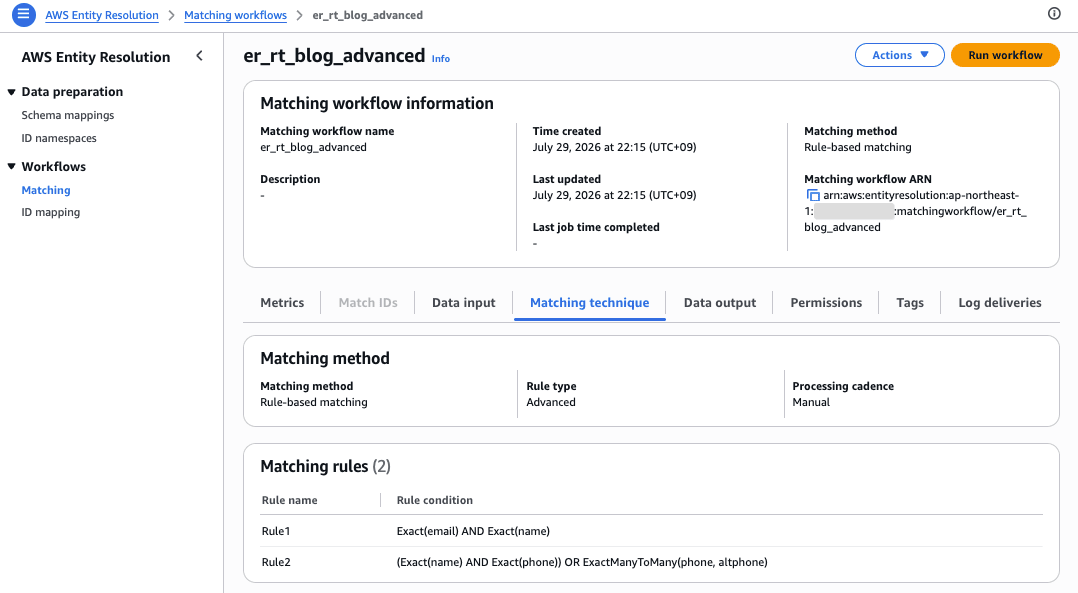
The condition combining Exact and ExactManyToMany with AND / OR / parentheses was accepted as-is. The core part of this update has been confirmed.
Here is the mapping rule that was actually created.
Calling GenerateMatchId Without Running StartMatchingJob
Let me verify the documentation contradiction mentioned at the beginning. I'll call GenerateMatchId directly without ever running StartMatchingJob.
rec-rt001.json
[{"inputSourceARN":"arn:aws:glue:ap-northeast-1:123456789012:table/er_rt_blog/customers",
  "uniqueId":"rt-001",
  "recordAttributeMap":{
    "first_name":"Taro","last_name":"Yamada","email":"taro.yamada@example.com",
    "phone":"090-1111-2222","alt_phone":"03-1000-0001"}}]
% aws entityresolution generate-match-id \
  --workflow-name er_rt_blog_advanced \
  --records file://rec-rt001.json \
  --processing-type CONSISTENT
{
    "matchGroups": [
        {
            "records": [
                {
                    "inputSourceARN": "arn:aws:glue:ap-northeast-1:123456789012:table/er_rt_blog/customers",
                    "recordId": "rt-001"
                }
            ],
            "matchId": "314059b866ec4e2fa22bd6ff2bcc808b",
            "matchRule": "NoRule"
        }
    ],
    "failedRecords": []
}
It succeeded. GenerateMatchId can be called even without ever running a batch job. Since there is no existing match counterpart, matchRule is NoRule, and a new Match ID was assigned.
The note in the documentation saying "you must first successfully run StartMatchingJob" does not appear to apply to Advanced real-time workflows.
Verifying Matching Decisions
I'll submit a record with the same name and email address but a different phone number. It should match via Rule1 (Exact(email) AND Exact(name)).
rec-rt002.json
[{"inputSourceARN":"arn:aws:glue:ap-northeast-1:123456789012:table/er_rt_blog/customers",
  "uniqueId":"rt-002",
  "recordAttributeMap":{
    "first_name":"Taro","last_name":"Yamada","email":"taro.yamada@example.com",
    "phone":"080-0000-1111","alt_phone":"03-5000-0005"}}]
% aws entityresolution generate-match-id \
  --workflow-name er_rt_blog_advanced \
  --records file://rec-rt002.json \
  --processing-type CONSISTENT
{
    "matchGroups": [
        {
            "records": [
                {
                    "inputSourceARN": "arn:aws:glue:ap-northeast-1:123456789012:table/er_rt_blog/customers",
                    "recordId": "rt-002"
                }
            ],
            "matchId": "314059b866ec4e2fa22bd6ff2bcc808b",
            "matchRule": "Rule1"
        }
    ],
    "failedRecords": []
}
The same matchId as rt-001 was returned, and matchRule contains the name of the matching rule, Rule1. Since the response shows which rule was used for deduplication, you can trace the basis for the matching result.
Verifying the Behavior of ExactManyToMany
ExactManyToMany is described in the official documentation as "evaluating all combinations of the specified match keys." We will verify whether it also matches across different fields.
We will use 3 records for verification. The trick is to vary which field — phone or alt_phone — the phone number 03-1000-0001 is placed in for each record.
| Record | Name / Email | phone | alt_phone | Intent |
|---|---|---|---|---|
| rt-003 | Ichiro Suzuki | 03-1000-0001 | 03-6000-0006 | Create the anchor group |
| rt-004 | Kenji Watanabe | 03-1000-0001 | 03-7000-0007 | Match with rt-003 on the same phone field |
| rt-005 | Yuki Nakamura | 050-1111-0000 | 03-1000-0001 | Match rt-003's phone against alt_phone |
All 3 records have different names and email addresses. This ensures that neither Rule1 (Exact(email) AND Exact(name)) nor the first half of Rule2 (Exact(name) AND Exact(phone)) will match, so if a match occurs, we can conclude that ExactManyToMany is responsible.
rec-rt003.json
[{"inputSourceARN":"arn:aws:glue:ap-northeast-1:123456789012:table/er_rt_blog/customers",
  "uniqueId":"rt-003",
  "recordAttributeMap":{
    "first_name":"Ichiro","last_name":"Suzuki","email":"ichiro.suzuki@example.com",
    "phone":"03-1000-0001","alt_phone":"03-6000-0006"}}]
rec-rt004.json
[{"inputSourceARN":"arn:aws:glue:ap-northeast-1:123456789012:table/er_rt_blog/customers",
  "uniqueId":"rt-004",
  "recordAttributeMap":{
    "first_name":"Kenji","last_name":"Watanabe","email":"kenji.watanabe@example.com",
    "phone":"03-1000-0001","alt_phone":"03-7000-0007"}}]
rec-rt005.json
[{"inputSourceARN":"arn:aws:glue:ap-northeast-1:123456789012:table/er_rt_blog/customers",
  "uniqueId":"rt-005",
  "recordAttributeMap":{
    "first_name":"Yuki","last_name":"Nakamura","email":"yuki.nakamura@example.com",
    "phone":"050-1111-0000","alt_phone":"03-1000-0001"}}]
First, we insert rt-003. The phone of rt-003 is 03-1000-0001, which is the same value as rt-001's alt_phone. If things go as intended, it should have joined rt-001's group.
% aws entityresolution generate-match-id \
  --workflow-name er_rt_blog_advanced \
  --records file://rec-rt003.json \
  --processing-type CONSISTENT
{
    "matchGroups": [
        {
            "records": [
                {
                    "inputSourceARN": "arn:aws:glue:ap-northeast-1:123456789012:table/er_rt_blog/customers",
                    "recordId": "rt-003"
                }
            ],
            "matchId": "a16dd2dc5159466994f924810321a373",
            "matchRule": "NoRule"
        }
    ],
    "failedRecords": []
}
However, it did not join and a new group was created instead. This point will be discussed later. For now, we will proceed using 0adc112c033c4549a19679bd66b8e54d as the reference.
Next, we insert rt-004. This is the case where rt-003 and rt-004 match on the same phone field.
% aws entityresolution generate-match-id \
  --workflow-name er_rt_blog_advanced \
  --records file://rec-rt004.json \
  --processing-type CONSISTENT

{
    "matchGroups": [
        {
            "records": [
                {
                    "inputSourceARN": "arn:aws:glue:ap-northeast-1:123456789012:table/er_rt_blog/customers",
                    "recordId": "rt-004"
                }
            ],
            "matchId": "a16dd2dc5159466994f924810321a373",
            "matchRule": "Rule2"
        }
    ],
    "failedRecords": []
}
Finally, rt-005. This is the cross-field case where only the alt_phone matches rt-003's phone.
% aws entityresolution generate-match-id \
  --workflow-name er_rt_blog_advanced \
  --records file://rec-rt005.json \
  --processing-type CONSISTENT

{
    "matchGroups": [
        {
            "records": [
                {
                    "inputSourceARN": "arn:aws:glue:ap-northeast-1:123456789012:table/er_rt_blog/customers",
                    "recordId": "rt-005"
                }
            ],
            "matchId": "a16dd2dc5159466994f924810321a373",
            "matchRule": "Rule2"
        }
    ],
    "failedRecords": []
}
Both rt-004 and rt-005 returned the same matchId as rt-003. Not only a same-field match on phone, but also a cross-field match between phone and alt_phone caused them to join the same group under Rule2. This means that cases where the same person has a mobile phone registered as their primary number in one system and as a secondary number in another can be captured with a single rule.
The Waterfall Pitfall
Here, we encountered behavior that differed from our expectations.
Even when inserting a record that satisfies the Rule2 conditions into a match group already established by Rule1 (the group containing rt-001 and rt-002), the record did not join that group.
We inserted rt-006, a record whose phone exactly matches rt-001's. The ExactManyToMany(phone, altphone) condition of Rule2 should have been satisfied.
rec-rt006.json
[{"inputSourceARN":"arn:aws:glue:ap-northeast-1:123456789012:table/er_rt_blog/customers",
  "uniqueId":"rt-006",
  "recordAttributeMap":{
    "first_name":"Sora","last_name":"Kimura","email":"sora.kimura@example.com",
    "phone":"090-1111-2222","alt_phone":"03-8000-0008"}}]
% aws entityresolution generate-match-id \
  --workflow-name er_rt_blog_advanced \
  --records file://rec-rt006.json \
  --processing-type CONSISTENT
{
    "matchGroups": [
        {
            "records": [
                {
                    "inputSourceARN": "arn:aws:glue:ap-northeast-1:123456789012:table/er_rt_blog/customers",
                    "recordId": "rt-006"
                }
            ],
            "matchId": "de731cd48996490193443b0a78a139c0",
            "matchRule": "NoRule"
        }
    ],
    "failedRecords": []
}
It did not join, and a new Match ID was assigned. The same result occurred with rt-008, a record whose phone matches rt-002's. Across a total of 3 attempts — both cross-field and same-field — none of them joined.
rec-rt008.json
[{"inputSourceARN":"arn:aws:glue:ap-northeast-1:123456789012:table/er_rt_blog/customers",
  "uniqueId":"rt-008",
  "recordAttributeMap":{
    "first_name":"Mei","last_name":"Inoue","email":"mei.inoue@example.com",
    "phone":"080-0000-1111","alt_phone":"03-8888-8888"}}]
% aws entityresolution generate-match-id \
  --workflow-name er_rt_blog_advanced \
  --records file://rec-rt008.json \
  --processing-type CONSISTENT
{
    "matchGroups": [
        {
            "records": [
                {
                    "inputSourceARN": "arn:aws:glue:ap-northeast-1:123456789012:table/er_rt_blog/customers",
                    "recordId": "rt-008"
                }
            ],
            "matchId": "6c517f2edf114df0a494c8f23ec0a61e",
            "matchRule": "NoRule"
        }
    ],
    "failedRecords": []
}
On the other hand, records can join without issue via Rule2 for groups where Rule1 has not been established (groups created with matchRule still as NoRule). In fact, rt-007, which was inserted afterward, joined rt-006's group under Rule2.
rec-rt007.json
[{"inputSourceARN":"arn:aws:glue:ap-northeast-1:123456789012:table/er_rt_blog/customers",
  "uniqueId":"rt-007",
  "recordAttributeMap":{
    "first_name":"Rin","last_name":"Kobayashi","email":"rin.kobayashi@example.com",
    "phone":"03-9999-9999","alt_phone":"090-1111-2222"}}]
% aws entityresolution generate-match-id \
  --workflow-name er_rt_blog_advanced \
  --records file://rec-rt007.json \
  --processing-type CONSISTENT
{
    "matchGroups": [
        {
            "records": [
                {
                    "inputSourceARN": "arn:aws:glue:ap-northeast-1:123456789012:table/er_rt_blog/customers",
                    "recordId": "rt-007"
                }
            ],
            "matchId": "de731cd48996490193443b0a78a139c0",
            "matchRule": "Rule2"
        }
    ],
    "failedRecords": []
}
The group assignments for all verified records are summarized as follows.
Rule-based matching is described in the official documentation as a waterfall (hierarchical) rule application. This behavior is consistent with the idea that match groups established by a higher-priority rule are not re-evaluated by lower-priority rules.
Therefore, the design principle of placing conditions you want to capture with higher-priority rules first and looser conditions later applies just as well in real-time matching. Conversely, if you design with the assumption that later rules will catch certain cases, the expected entity resolution may not occur.
Verifying Constraints
We will reproduce the constraints described in the documentation as actual errors.
First, we try to create a workflow with enableRealTimeMatching enabled for a condition that includes a Fuzzy function.
rec-rt007.json
{
  "resolutionType": "RULE_MATCHING",
  "ruleConditionProperties": {
    "rules": [
      { "ruleName": "Rule1", "condition": "Exact(email) AND Levenshtein(name, 2)" }
    ]
  },
  "enableRealTimeMatching": true
}
% aws entityresolution create-matching-workflow \
  --workflow-name er_rt_blog_fuzzy \
  --input-source-config file://input-source.json \
  --output-source-config file://output-source.json \
  --resolution-techniques file://resolution-fuzzy-rt.json \
  --role-arn "${ROLE_ARN}"

aws: [ERROR]: An error occurred (ValidationException) when calling the CreateMatchingWorkflow operation: The enableRealTimeMatching parameter doesn't support fuzzy matching functions (Cosine, Levenshtein, Soundex) or EmptyValues=Ignore. Update your rules to use only exact matching functions (Exact or ExactManyToMany) without EmptyValues=Ignore.
It was rejected as expected. The error message directly communicates the content of the constraint, making it easy to understand.
Next, we try to run a batch job against a workflow with real-time matching enabled.
% aws entityresolution start-matching-job --workflow-name er_rt_blog_advanced

aws: [ERROR]: An error occurred (ValidationException) when calling the StartMatchingJob operation: You can't run matching jobs on this workflow because real time matching is enabled. Create a workflow without real-time matching to run matching jobs, or use the GenerateMatchId API instead.
This was also as expected. The message explicitly states "use the GenerateMatchId API instead," and the answer to the contradiction mentioned at the beginning is written in the error message itself. The design calls for creating separate workflows for real-time use and batch use.
Only CONSISTENT is Available for processingType
GenerateMatchId has a parameter called processingType, and the official documentation describes the following 3 types.
| processingType | Console Display | Characteristics |
|---|---|---|
CONSISTENT (default) |
Consistent | Highest accuracy, relatively slower response time |
EVENTUAL |
Background | Fast initial response; updated records are saved in the background |
EVENTUAL_NO_LOOKUP |
Quick ID generation | Fastest method that skips looking up existing Match IDs and assigns new ones |
When we tried to compare response times across the 3 types, we got an error with EVENTUAL. We reused the existing rec-rt001.json for the record and only changed the --processing-type.
% aws entityresolution generate-match-id \
  --workflow-name er_rt_blog_advanced \
  --records file://rec-rt001.json \
  --processing-type EVENTUAL

aws: [ERROR]: An error occurred (ValidationException) when calling the GenerateMatchId operation: GenerateMatchId requires CONSISTENT processing type for advanced rule-based workflows. Set the processing type to CONSISTENT.
The same error occurs with EVENTUAL_NO_LOOKUP.
% aws entityresolution generate-match-id \
  --workflow-name er_rt_blog_advanced \
  --records file://rec-rt001.json \
  --processing-type EVENTUAL_NO_LOOKUP

aws: [ERROR]: An error occurred (ValidationException) when calling the GenerateMatchId operation: GenerateMatchId requires CONSISTENT processing type for advanced rule-based workflows. Set the processing type to CONSISTENT.
Only CONSISTENT can be specified for the Advanced rule type. Note that since both are rejected at validation, no records are registered.
The GenerateMatchId documentation only lists all 3 types side by side without mentioning the restriction for the Advanced rule type. If you design with EVENTUAL in mind to prioritize response speed, this could become a stumbling block during implementation.
Measuring Latency
We called CONSISTENT 10 times in a row and measured the response time. To exclude TLS handshakes and credential resolution from the measurement, one warmup call was made in advance. Since we wanted to insert a different record each time, we used a boto3 script instead of the AWS CLI.
bench.py
import boto3
import statistics
import time

REGION = "ap-northeast-1"
WORKFLOW = "er_rt_blog_advanced"
TABLE_ARN = "arn:aws:glue:ap-northeast-1:123456789012:table/er_rt_blog/customers"

client = boto3.client("entityresolution", region_name=REGION)

def record(seq):
    return {
        "inputSourceARN": TABLE_ARN,
        "uniqueId": f"bench-{seq}",
        "recordAttributeMap": {
            "first_name": f"Bench{seq}",
            "last_name": f"User{seq}",
            "email": f"bench{seq}@example.net",
            "phone": f"062-{seq:04d}-0000",
            "alt_phone": f"063-{seq:04d}-0000",
        },
    }

def call(seq):
    started = time.perf_counter()
    client.generate_match_id(
        workflowName=WORKFLOW,
        records=[record(seq)],
        processingType="CONSISTENT",
    )
    return (time.perf_counter() - started) * 1000

call(0)
print("warmup done\n")

latencies = [call(seq) for seq in range(1, 11)]
print("CONSISTENT (n=10) measured latency [ms]")
print("  " + "  ".join(f"{ms:.0f}" for ms in latencies))
print(
    f"  min={min(latencies):.0f}"
    f"  median={statistics.median(latencies):.0f}"
    f"  mean={statistics.mean(latencies):.0f}"
    f"  max={max(latencies):.0f}"
)
% python3 bench.py
warmup done

CONSISTENT (n=10) の実測レイテンシ [ms]
  101  107  97  108  115  91  126  78  109  70
  min=70  median=104  mean=100  max=126
The median was 104 milliseconds. Since this was measured from a domestic local PC calling the Tokyo region over the internet, it includes network round-trip time. Calling from a Lambda function or EC2 instance in the same region would be expected to yield even shorter times.
In any case, it is a significant change that processing which previously took minutes to hours in batch mode now returns from a single synchronous API call.
Discussion
Here we summarize the insights gained from this verification.
The contradiction in the documentation is resolved by the GenerateMatchId side
For Advanced real-time workflows, there is no need to run StartMatchingJob in advance. You can start using GenerateMatchId directly without going through a batch process. The design premise is to create separate workflows for real-time use and batch use.
Conditions available for Advanced real-time are limited
Only rulesets combining Exact-type functions (Exact, ExactManyToMany) with AND / OR / parentheses have real-time support. Fuzzy functions (Cosine, Levenshtein, Soundex) and EmptyValues=Ignore are rejected at workflow creation time. If you have requirements to absorb variations in notation, batch processing operations will continue to be necessary.
processingType is fixed to CONSISTENT
This is a constraint not documented officially and only discovered upon execution. Speed improvements through EVENTUAL-type processing should be considered an option for the Simple rule type.
Rule order design is important even in real-time
Records could not join match groups that were already established by higher-priority rules via lower-priority rules. The waterfall application order directly determines the entity resolution results. When designing rules, careful consideration of which conditions to place first is required.
Additional permissions are required for accounts with Lake Formation enabled
Even if IAM policies are properly configured, you will get an AccessDeniedException. The error message guides you to "check IAM role," but the actual cause is missing DESCRIBE / SELECT permissions in Lake Formation. For accounts managing Glue Data Catalog with Lake Formation, this is likely to be the first stumbling block.
Cost
AWS Entity Resolution rule-based matching costs $0.25 per 1,000 records processed, with no free tier. There are no price differences by region. The verification in this article involved around 40 GenerateMatchId calls, keeping the cost well under $0.01.
Closing
Real-time matching via the GenerateMatchId API is now available for the Advanced rule type in AWS Entity Resolution. Simply setting enableRealTimeMatching to true allows complex rulesets to be evaluated synchronously. Our measurements showed a median response time of 104 milliseconds.
At the same time, there are constraints to keep in mind when designing: Fuzzy functions cannot be used, processingType is limited to CONSISTENT, and batch jobs cannot be used together. In particular, the processingType constraint is not documented officially, so caution is required.
If you have requirements — such as fraud detection or real-time account lookups — where you need to perform strict matching on the spot, we suggest starting by checking whether your existing rule definitions can be expressed using only Exact-type functions.
Related Articles
