![[Update] Amazon QuickSight app now supports live data for datasets, so I compared Direct Query and SPICE](https://images.ctfassets.net/ct0aopd36mqt/2x7muHjvW69fxuVNSKWZHp/b37e05a972fc8125e9214abd764928fa/amazon-quick.png?w=3840&fm=webp)
[Update] Amazon QuickSight app now supports live data for datasets, so I compared Direct Query and SPICE

This page has been translated by machine translation. View original
This is Ishikawa from the Cloud Business Division. Since it is now possible to reference Quick datasets live from Amazon Quick Apps, I tried out the differences in when the display is updated between Direct Query and SPICE.
Amazon Quick Apps is a feature where you describe the app you want to create in natural language, and an agent creates and deploys a web application. In the DevelopersIO article written at the time of Apps' GA, it stated that "at this point, integration with QuickSight datasets and topics is not supported."
According to the AWS blog, previously when displaying dataset values in an app, those values were from the time the agent created the app and remained as a snapshot at the time of publication without changing.
With this update, apps can now directly query Quick datasets. A query is issued to the dataset every time the app is opened, and that query is executed with the Quick permissions of the app user themselves. Row-level security (RLS) and column-level security (CLS) configured on the dataset are applied per app user.
What is the live data feature for datasets in apps
When adding a dataset to an app, you tell the app editor's agent the dataset name. There is no dedicated menu for selecting data sources. The agent searches for the dataset, identifies the columns, and requests approval for access. Upon approval, a visual is created, and once published, app users can use it. App users approve a per-dataset consent prompt once the first time they open the app.
Even if you share the app, the data is not shared. App users separately need read permissions for each dataset the app uses (or sharing of the folder containing the dataset).
The main specifications and limitations are as follows.
| Item | Details |
|---|---|
| Supported datasets | Single-table datasets. SPICE and Direct Query (Redshift, Athena, Aurora PostgreSQL, PostgreSQL, Databricks, S3 Tables) |
| Not supported | Multi-table (data models), composite/child datasets, datasets that JOIN across sources. Topics, dashboards, and analyses cannot be live data sources |
| Account/Region | The dataset and app must be in the same account and same region |
| Version referenced | Published version of the dataset |
| Data freshness | SPICE and S3 Tables are cached for up to 12 hours and updated upon SPICE refresh completion. Direct Query is not cached and queries the source every time the app is opened |
| Reload | There is no refresh button; the query is re-executed every time the page loads. The "Last updated" date in the header is the date the app was last edited, not the data freshness |
| Roles that can view live data | Admin, Author, Admin Pro, Author Pro, Reader Pro (Reader Pro only when enabled). Reader and Restricted Reader are not supported |
| Publication scope | Apps using live data cannot be made public |
| Row count | Maximum 50,000 rows per visual. If exceeded, only the first 50,000 rows are displayed |
| Dataset changes | If column names or types are changed, or the dataset is replaced or deleted, the affected visuals will stop working without warning |
| Supported regions for Apps | US East (N. Virginia), US West (Oregon), Europe (Ireland), Asia Pacific (Sydney) |
The AWS blog also notes the following points.
- Direct Query datasets from the same data source, or SPICE datasets, can be used together in one app, but Direct Query datasets from different sources cannot be used together in the same app
- If the builder's own RLS results in 0 records, an app cannot be created with that dataset
The flow of processing when an app is opened is illustrated below. The queries to Athena in the diagram are based on what I confirmed from Athena's query history in the verification described later.
Tried it out
Prerequisites
- AWS account (Amazon Quick Enterprise edition, ID region is ap-northeast-1)
- Quick user: IAM type, role is ADMIN_PRO
- Verification region: us-east-1 (supported region for Apps. App and dataset created in this region)
- Data source: Amazon Athena (workgroup is primary) + Amazon S3 CSV
Quick's ID region is Tokyo, but I created both the app and the dataset in us-east-1 for verification.
Verification configuration
I prepared a Direct Query dataset and a SPICE dataset that read from the same Athena table, and displayed them side by side in a single app.
Preparing verification data
I placed a CSV of sales deals (18 rows) in S3 and created a table in the Glue Data Catalog. The full content of the CSV is as follows.
deal_id,region,stage,owner,amount,close_date
D-001,AMER,Closed Won,Alice,120000,2026-07-15
D-002,AMER,Negotiation,Bob,85000,2026-10-20
D-003,AMER,Proposal,Alice,64000,2026-11-05
D-004,AMER,Prospecting,Carol,30000,2026-12-10
D-005,AMER,Closed Won,Bob,98000,2026-08-28
D-006,AMER,Negotiation,Carol,150000,2026-10-31
D-007,EMEA,Closed Won,Dieter,72000,2026-07-30
D-008,EMEA,Proposal,Emma,56000,2026-11-12
D-009,EMEA,Negotiation,Dieter,110000,2026-10-15
D-010,EMEA,Prospecting,Fatima,25000,2026-12-20
D-011,EMEA,Closed Won,Emma,67000,2026-09-10
D-012,EMEA,Proposal,Fatima,43000,2026-11-25
D-013,APJ,Closed Won,Hiro,90000,2026-08-05
D-014,APJ,Negotiation,Mei,76000,2026-10-22
D-015,APJ,Proposal,Hiro,51000,2026-11-18
D-016,APJ,Prospecting,Arjun,22000,2026-12-03
D-017,APJ,Closed Won,Mei,105000,2026-09-25
D-018,APJ,Negotiation,Arjun,48000,2026-10-28
I ran an aggregation in Athena to confirm the values for later comparison with the app's display.
SELECT region, count(*) AS deals, sum(amount) AS amount
FROM pipeline_deals
GROUP BY region
ORDER BY region;
| region | deals | amount |
|---|---|---|
| AMER | 6 | 547000 |
| APJ | 6 | 392000 |
| EMEA | 6 | 373000 |
The total is 18 records, 1,312,000.
Creating the Quick data source and datasets
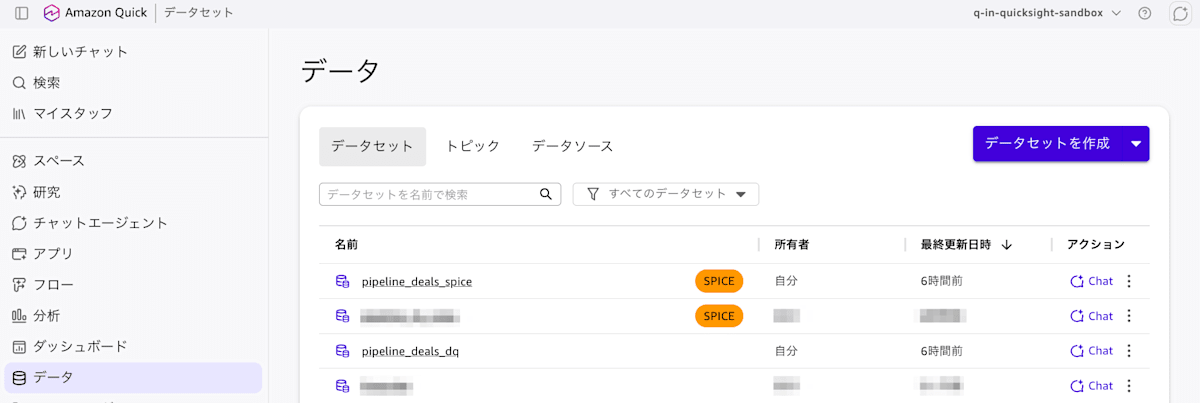
I created an Athena data source and created two datasets from the same table: Direct Query and SPICE.
Creating the app
I opened "Apps" from the Quick left menu and entered the app I wanted to create in the prompt field. I specified the dataset names and the column names to use.
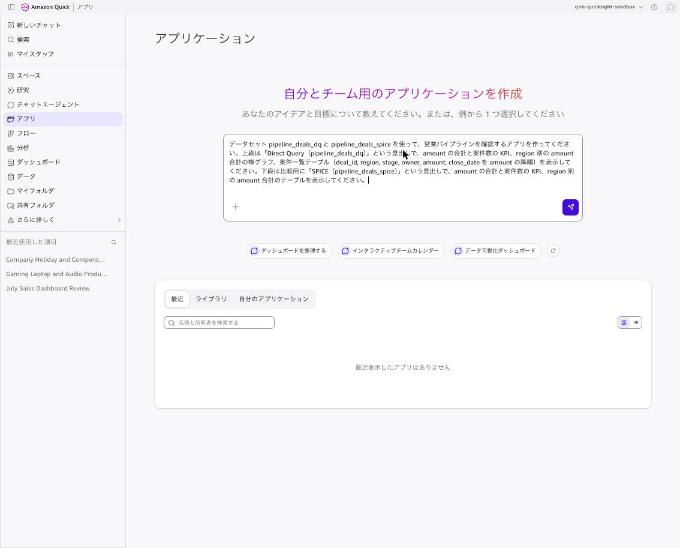
Using datasets pipeline_deals_dq and pipeline_deals_spice, please create an app to check the sales pipeline. The upper section should have a heading "Direct Query (pipeline_deals_dq)" and display KPIs for the total amount and number of deals, a bar chart of total amount by region, and a deal list table (deal_id, region, stage, owner, amount, close_date in descending order by amount). The lower section should be for comparison with a heading "SPICE (pipeline_deals_spice)" and display KPIs for the total amount and number of deals, and a table of total amount by region.
After submitting, the app editor opened and the agent executed tools such as discover_datasets, list_files, and query_dataset. Then a prompt saying "Confirm use of assets" appeared for each dataset. Opening "Show action details" displays the SQL the agent will execute for validation in JSON format.
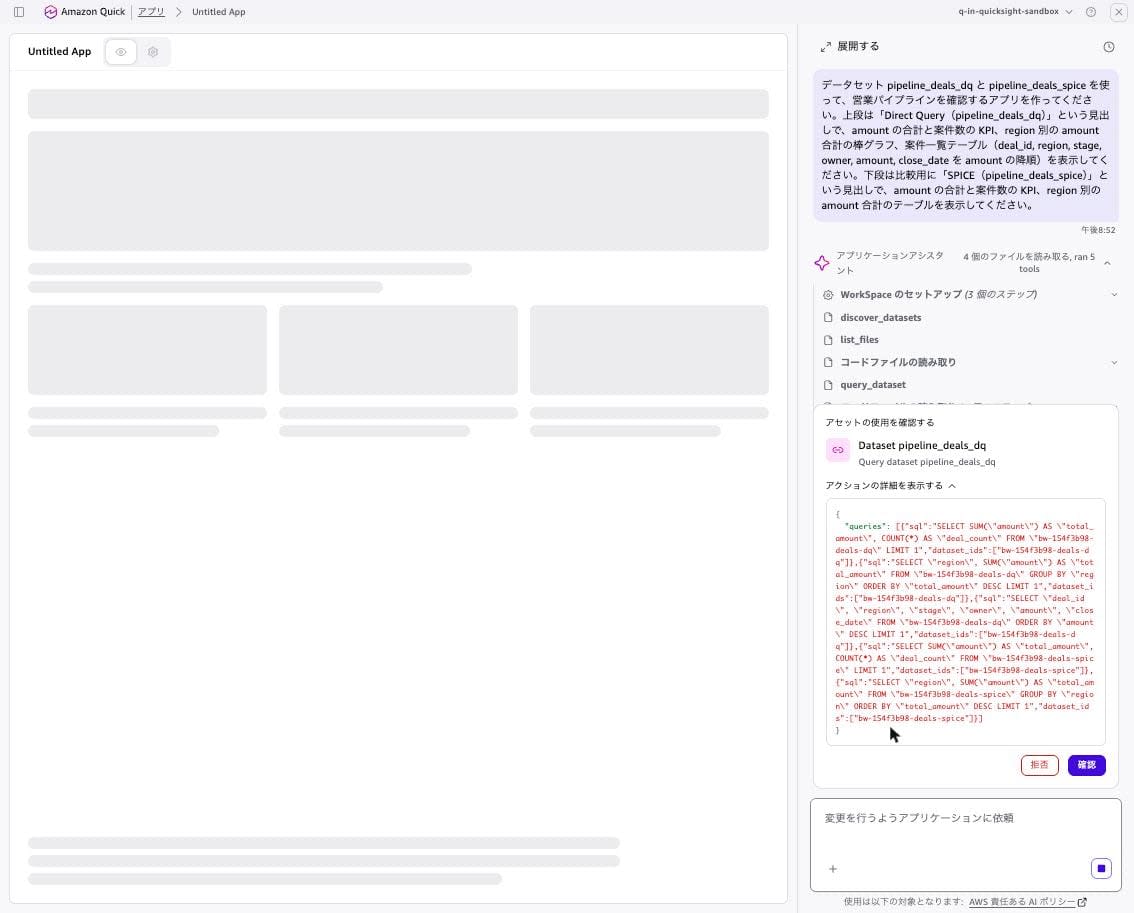
{
  "queries": [
    {"sql": "SELECT SUM(\"amount\") AS \"total_amount\", COUNT(*) AS \"deal_count\" FROM \"bw-154f3b98-deals-dq\" LIMIT 1", "dataset_ids": ["bw-154f3b98-deals-dq"]},
    {"sql": "SELECT \"region\", SUM(\"amount\") AS \"total_amount\" FROM \"bw-154f3b98-deals-dq\" GROUP BY \"region\" ORDER BY \"total_amount\" DESC LIMIT 1", "dataset_ids": ["bw-154f3b98-deals-dq"]},
    {"sql": "SELECT \"deal_id\", \"region\", \"stage\", \"owner\", \"amount\", \"close_date\" FROM \"bw-154f3b98-deals-dq\" ORDER BY \"amount\" DESC LIMIT 1", "dataset_ids": ["bw-154f3b98-deals-dq"]},
    {"sql": "SELECT SUM(\"amount\") AS \"total_amount\", COUNT(*) AS \"deal_count\" FROM \"bw-154f3b98-deals-spice\" LIMIT 1", "dataset_ids": ["bw-154f3b98-deals-spice"]},
    {"sql": "SELECT \"region\", SUM(\"amount\") AS \"total_amount\" FROM \"bw-154f3b98-deals-spice\" GROUP BY \"region\" ORDER BY \"total_amount\" DESC LIMIT 1", "dataset_ids": ["bw-154f3b98-deals-spice"]}
  ]
}
The FROM clause contains dataset IDs rather than table names, and LIMIT 1 is appended at the end. Although this was the confirmation screen for pipeline_deals_dq, it also included the 4th and 5th queries targeting pipeline_deals_spice. After clicking "Confirm" for each of pipeline_deals_dq and pipeline_deals_spice, the agent displayed "All queries validated successfully" and executed register_runtime_integration.
Then "Confirm use of assets" appeared again. This time it was a screen with checkboxes to select "Read-only access" for the two datasets. pipeline_deals_dq was checked, but pipeline_deals_spice was unchecked, so I checked it before clicking "Confirm." I did not verify this time what happens if you proceed with the box unchecked.
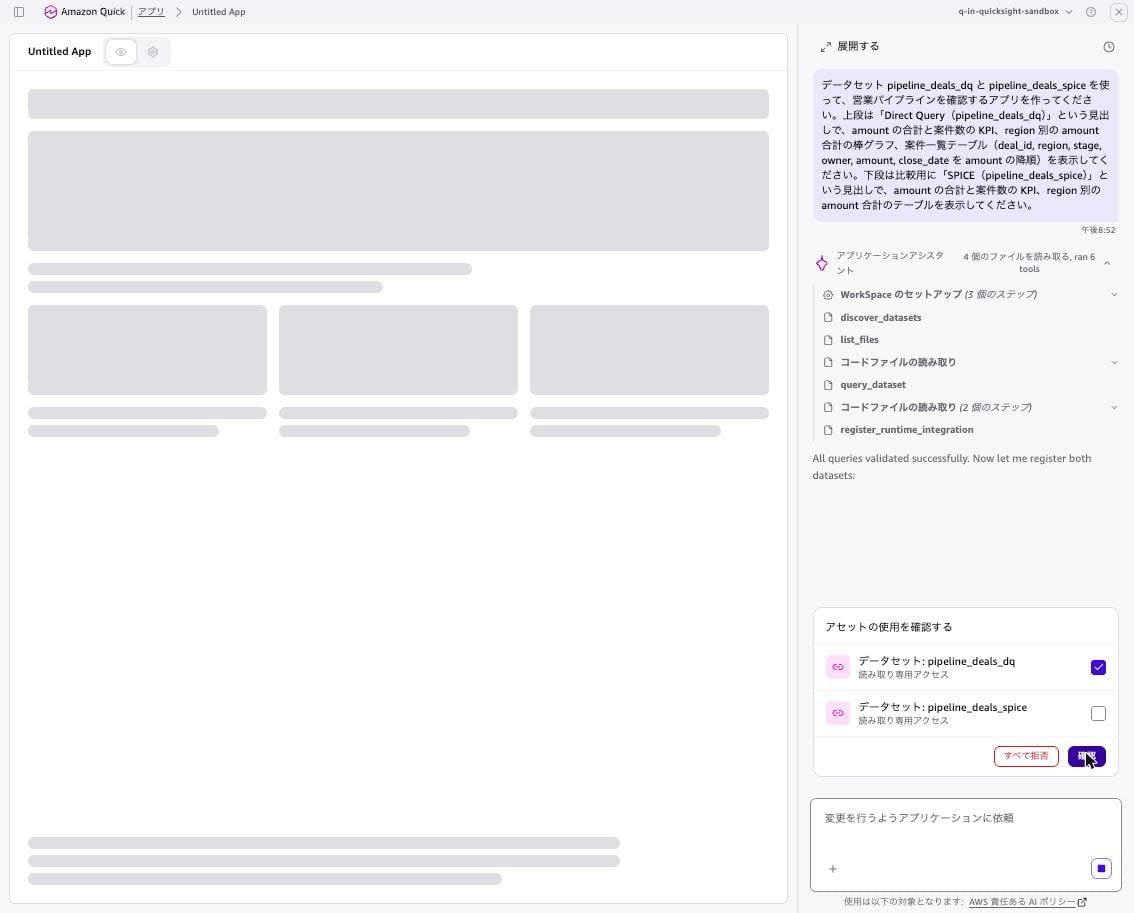
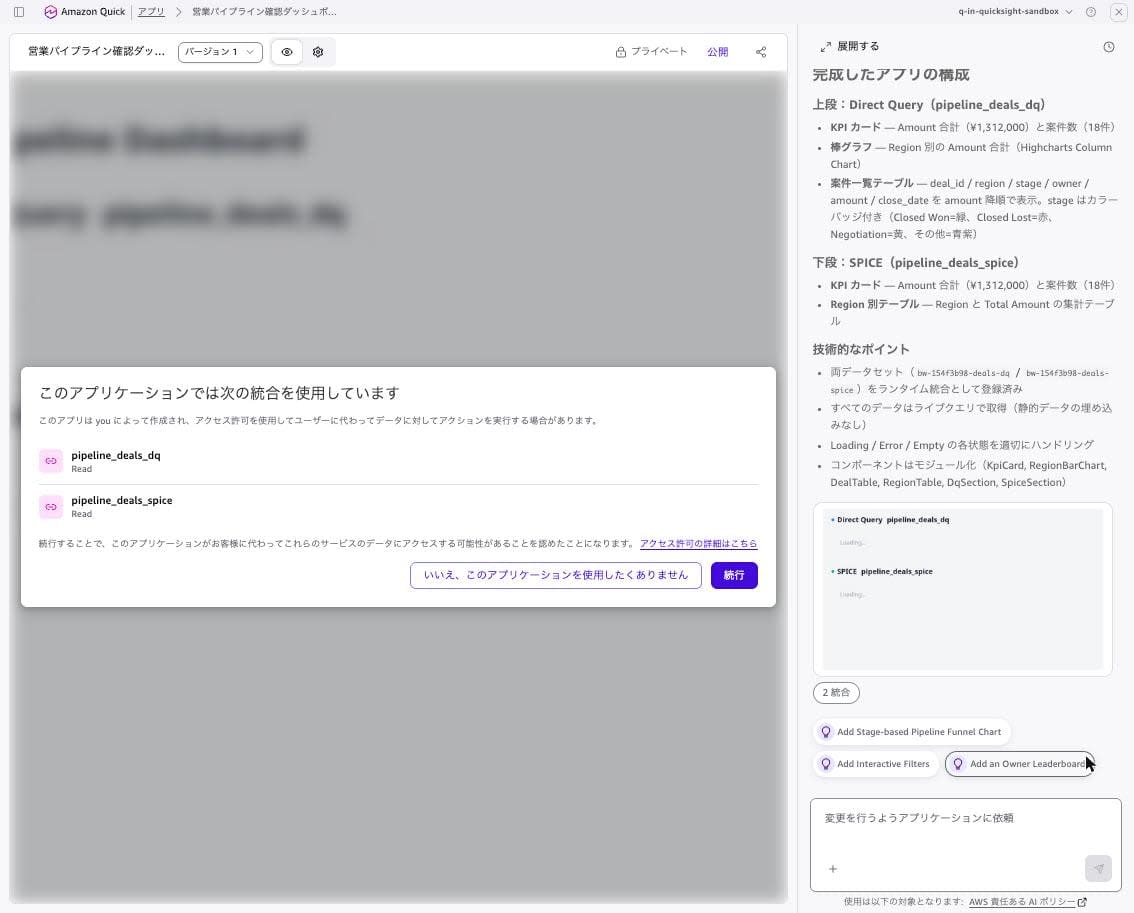
The app was completed in about 5 minutes after submitting the prompt. The preview displayed a dialog saying "This application uses the following integrations," with both datasets shown as "Read." Clicking "Continue" displayed the data.
I published the app from "Publish" in the upper right and opened the published URL (.../apps/<app ID>/view/app). Since sharing was not configured, the header displays "Only me."
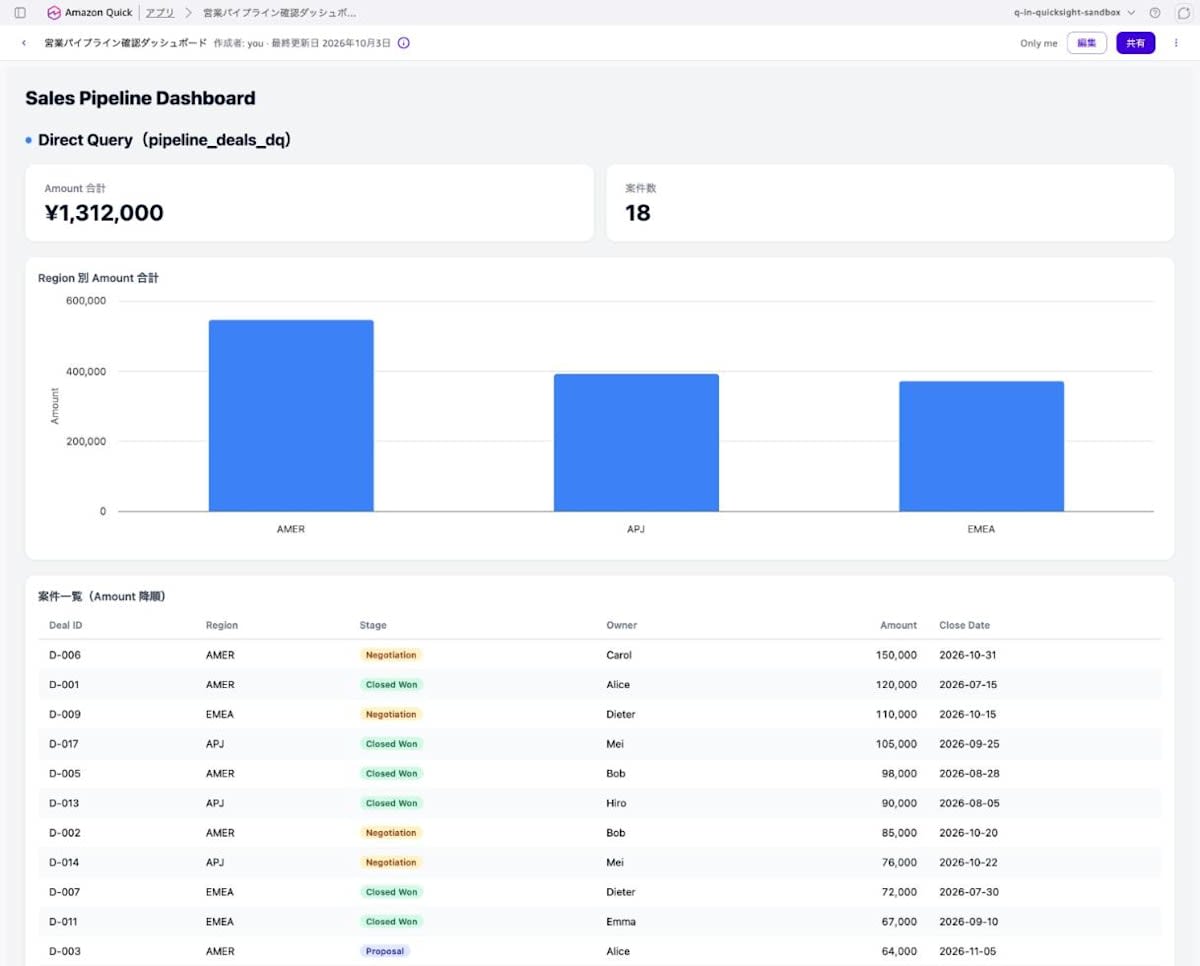
Both the Direct Query side and the SPICE side showed a total Amount of ¥1,312,000 and 18 deals, matching the values aggregated in Athena. The data does not contain currency information, but the agent displayed the amounts with "¥." The consent prompt did not appear when opening the published version. This is presumably because the same user had already consented in the preview.
Adding data and comparing freshness
I added one new deal row to S3.
deal_id,region,stage,owner,amount,close_date
D-019,APJ,Closed Won,Hiro,200000,2026-10-03
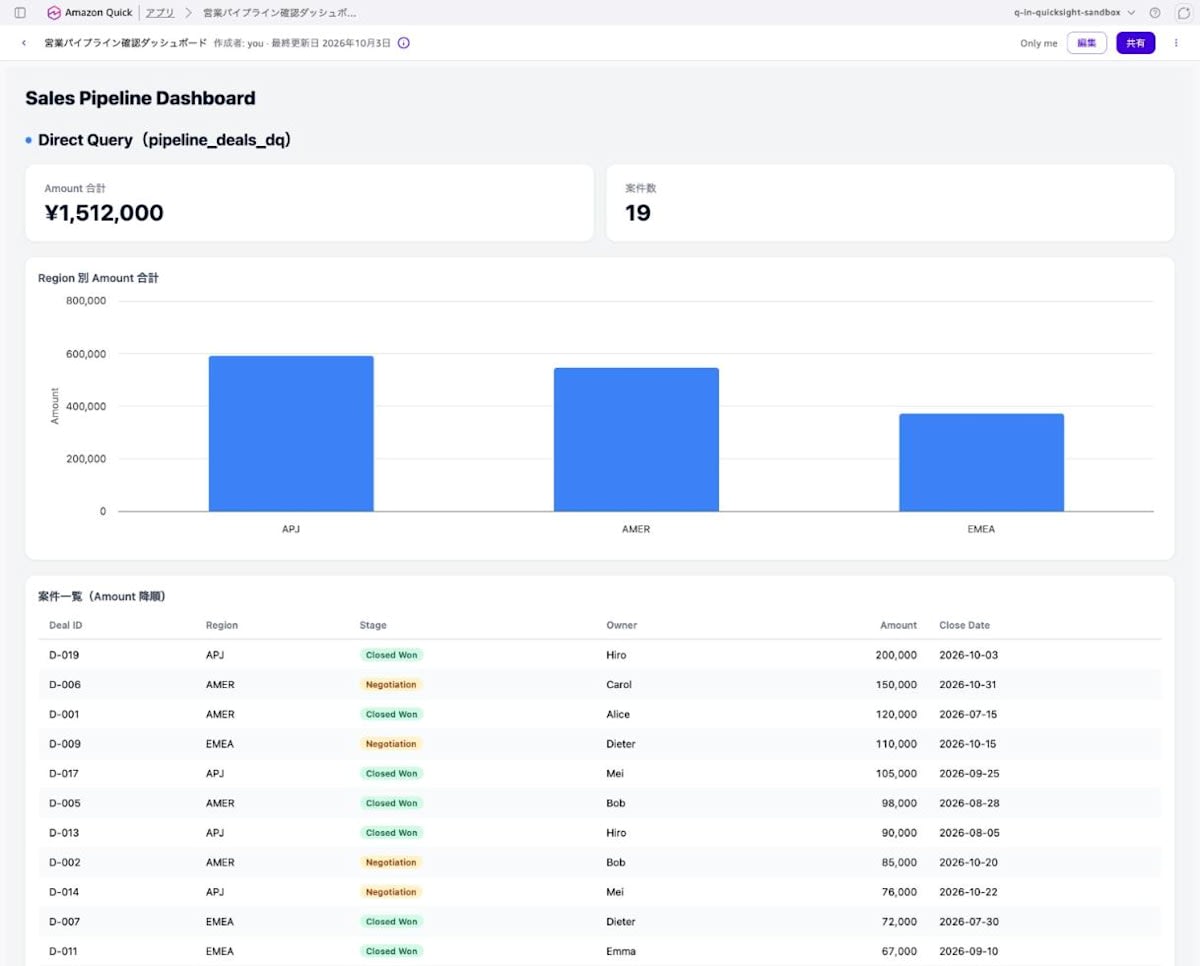
When I reloaded the published app, the Direct Query side changed to a total Amount of ¥1,512,000 and 19 deals. The bar chart showed APJ as the largest, and D-019 appeared at the top of the deal list.
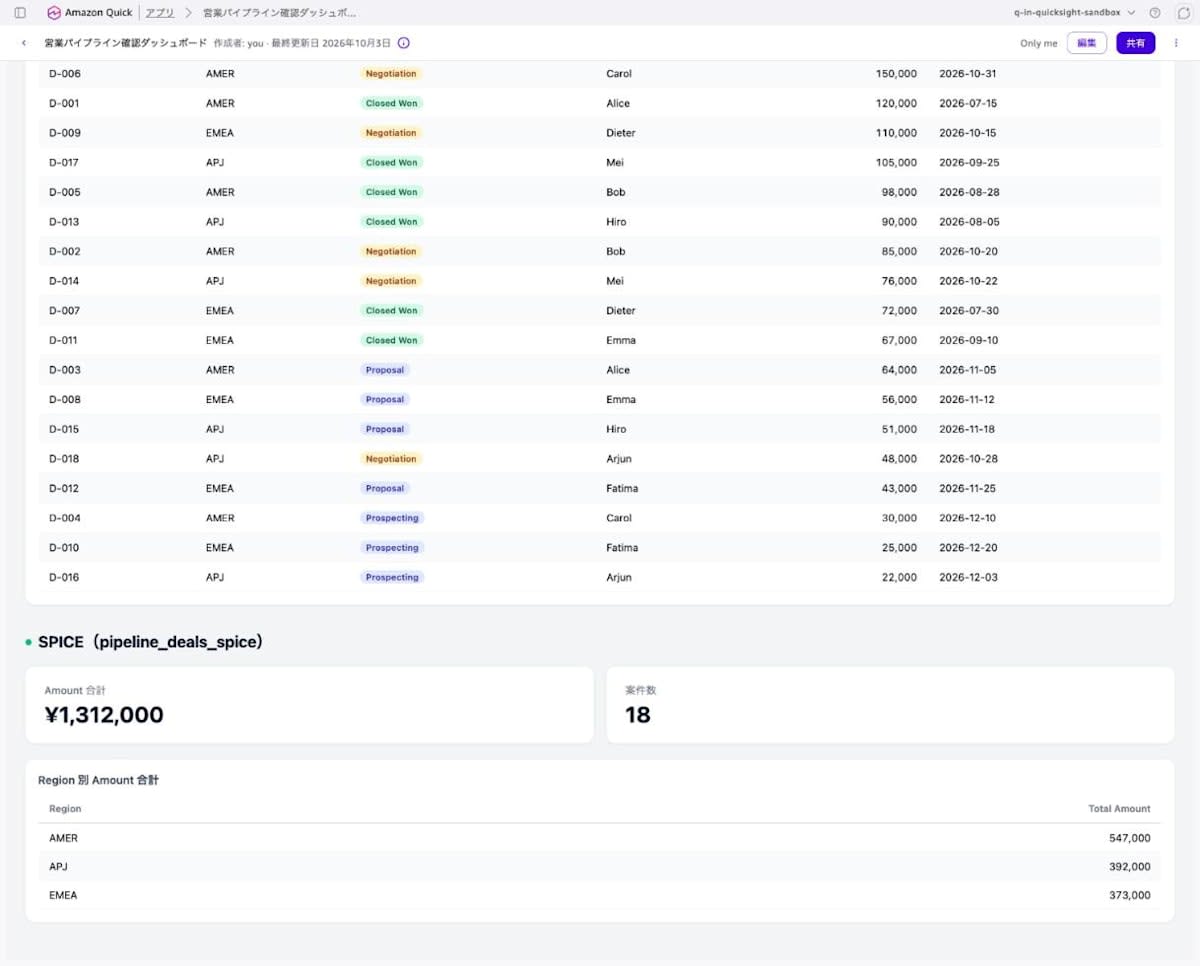
Meanwhile, the SPICE side on the same screen remained at ¥1,312,000 / 18 records.
At this point, checking the Athena query history showed that 3 queries with a comment /* Quick Suite <UUID> */ were issued each time the app was loaded. The 3 queries correspond to the Direct Query side visuals (KPI, bar chart, deal list).
/* Quick Suite f549bfbf-179e-4306-a7f9-1ee76d1cf671 */
SELECT SUM("amount") AS "total_amount", COUNT(*) AS "deal_count"
FROM "AwsDataCatalog"."blogwriter_quick_live_154f3b98"."pipeline_deals"
LIMIT 50000
| Execution time (UTC) | Trigger | Query suffix | Data scanned |
|---|---|---|---|
| 11:53:31 | Dataset exploration by agent | LIMIT 1 |
845 bytes |
| 11:54:31 | SQL validation after consent (3 queries) | LIMIT 1 |
845 bytes |
| 11:57:56 / 11:58:34 / 11:58:58 | Preview and published version display (3 queries each) | LIMIT 50000 |
845 bytes |
| 11:59:54 | Reload after adding 1 row to S3 (3 queries) | LIMIT 50000 |
934 bytes |
The queries after adding to S3 showed data scanned increasing from 845 bytes to 934 bytes, and the increase of 89 bytes is the size of the added deals_002.csv. The LIMIT 50000 appended to queries after publication is the same value as the "maximum 50,000 rows per visual" stated in the documentation. Even when displaying SPICE-side visuals, no queries were issued to Athena.
Next, I manually refreshed the SPICE dataset. The following program starts an ingestion, waits until it completes, and then displays the result. After the ingestion completed, reloading the app showed the SPICE side also updated to ¥1,512,000 / 19 records.
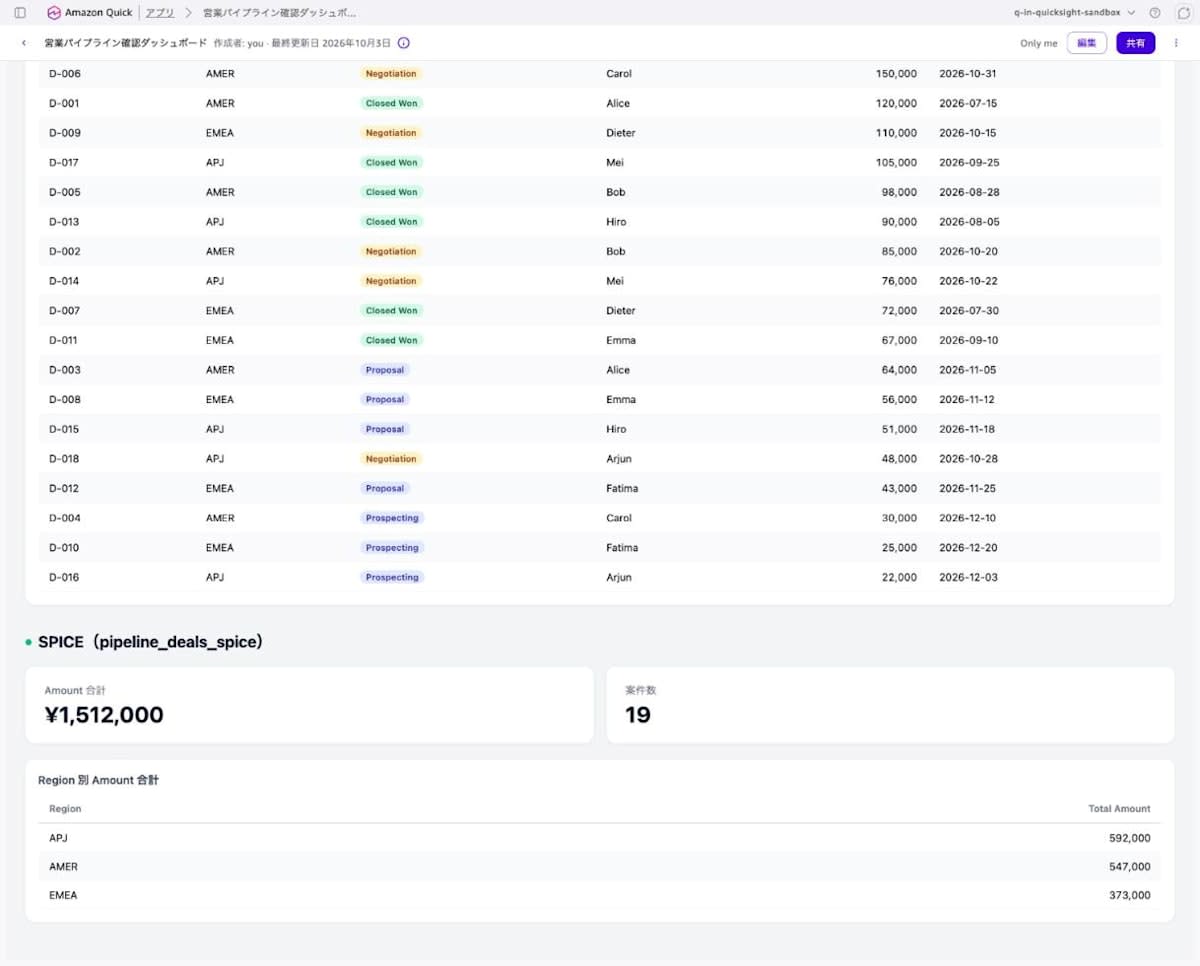
| Timing | Direct Query side | SPICE side |
|---|---|---|
| Immediately after app publication | ¥1,312,000 / 18 records | ¥1,312,000 / 18 records |
| Reload after adding 1 row to S3 | ¥1,512,000 / 19 records | ¥1,312,000 / 18 records |
| Reload after SPICE refresh | ¥1,512,000 / 19 records | ¥1,512,000 / 19 records |
The "Last updated: October 3, 2026" in the header did not change even when the data changed. As documented, this date is the app's last edited date.
Discussion
Direct Query reflects on reload, SPICE reflects after refresh
The Direct Query dataset changed its display immediately upon reload after adding data to S3. The SPICE dataset's display did not change until the refresh (CreateIngestion) completed. You need to choose between Direct Query and SPICE based on how frequently you want the numbers displayed in the app to be updated. According to the documentation, SPICE results are cached for up to 12 hours, but in this case they were reflected immediately after the refresh completed. I did not verify in this testing the conditions under which the cache persists.
A query is issued for each Direct Query visual on every display
On the Direct Query side, queries for 3 visuals were issued to Athena every time the app was loaded. Since Athena charges based on the amount of data scanned, apps using Direct Query datasets will see query execution counts increase in proportion to the number of views and visuals. For apps with many viewers or tables with large scan volumes, consideration should be given to using pre-aggregated tables or choosing SPICE instead.
Three types of consent screens
From build to preview, the following 3 types of confirmation screens appeared.
- Per-dataset "Confirm use of assets" (opening the details shows the validation SQL)
- Registration of "Read-only access" for datasets used at runtime (checkbox format; in this case, the SPICE side checkbox was unchecked by default)
- "This application uses the following integrations" at preview time
For item 2's checkboxes, I recommend confirming that all boxes are checked before clicking "Confirm."
Datasets in the Tokyo region cannot be used
The Tokyo region is not included in the supported regions for Apps. Also, datasets and apps must be in the same region, and datasets across regions cannot be referenced. Therefore, existing datasets in the Tokyo region cannot currently be used from apps. In this verification, I created the app and datasets in us-east-1 using a Quick account whose ID region is Tokyo.
What I hope for in the future
- Apps support for the Tokyo region
- Support for multi-table (data model) datasets
- An API for creating apps, and a means to retrieve the datasets used by an app via API
Closing
I confirmed that Amazon Quick apps can now reference Quick datasets live, and that with Direct Query datasets, the latest data is displayed simply by reloading the app. According to the documentation, queries are executed with the Quick permissions of the app user themselves, so RLS and CLS configured on the dataset are also applied per app user.
On the other hand, the facts that Apps does not support the Tokyo region and that Direct Query issues queries to the source on every view are things that need to be verified during design. If you want to create an app using existing QuickSight datasets, first check whether the dataset is in a supported region and whether it is a single-table dataset before trying it out.
See also
