![[Update] AgentCore Gateway rate limiting can now be separated by request header and body values](https://devio2024-media.developers.io/image/upload/f_auto,q_auto,w_3840/f_auto,q_auto/v1790875048/eyecatch/edq4dfptctqlcwjhffhs.png)
[Update] AgentCore Gateway rate limiting can now be separated by request header and body values

This page has been translated by machine translation. View original
Introduction
Hello, I'm Kamino from the Consulting Department, and I love cheese naan.
Amazon Bedrock AgentCore Gateway's rate limiting now allows you to split quotas by the values in request headers and bodies!
This was documented in the official docs, and the segmentation units had been added before I knew it.
Rate limiting itself is a feature added in August, and I tried it in a previous article, so feel free to check it out if you're interested!
What's the benefit?
Until now, the units for separating callers were IAM or JWT claims, so in a configuration where the application backend calls Gateway with a single IAM role, all users share the same quota. If you wanted to separate by user, you needed to change the authentication configuration, such as passing the user's JWT all the way to the Gateway.
With this update, even with IAM, the application can now split quotas by the user ID placed in the request body!
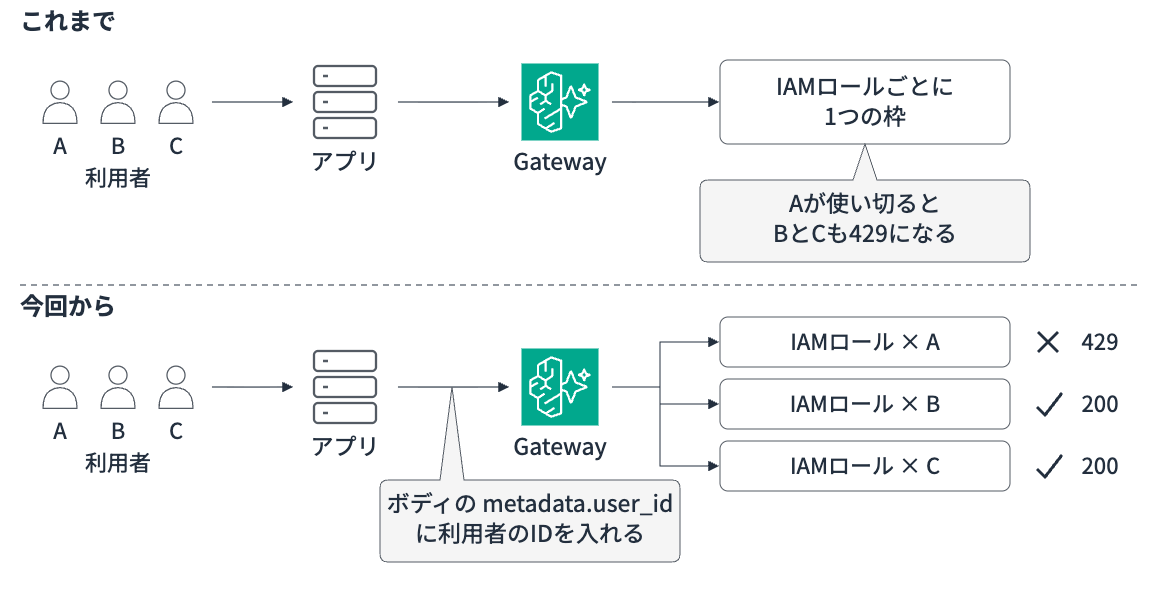
You can also split by header in the same way, so you could use it like "throttle batch processing rates individually even from the same caller."
Let's take a closer look.
Added dimensions
A dimension is the key that determines how to split the rate limiting quota. It was possible to split by user and other criteria, but this update added the following two:
| Dimension | Referenced value | Example |
|---|---|---|
$.context.request.header.<name> |
Request header value | $.context.request.header.X-Workload |
$.context.request.body.<path> |
JSON body field value | $.context.request.body.metadata.user_id |
The documentation states that header and body values cannot be used alone because they can be freely written by the caller.
What this means is that they must be combined within the same rate limit as an ID verified by the Gateway (such as an IAM principal or JWT sub claim), and a quota must be created for each combination.
The image below illustrates this.
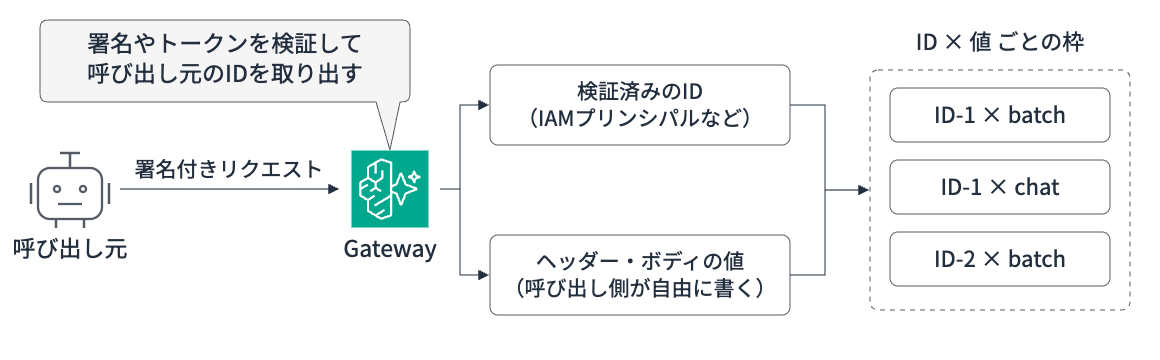
I suppose it's because values determined solely by the user can't be fully trusted.
Also, since a verified ID is a prerequisite, this dimension cannot be used with Gateways that have no inbound authentication.
Prerequisites
We'll proceed with the following prerequisites!
| Item | Details |
|---|---|
| Region | us-east-1 (N. Virginia) |
| boto3 / botocore | 1.43.114 |
| Python / Package manager | 3.14.6 / uv |
| Gateway | AgentCore Gateway (AWS_IAM authentication) |
| Target | Inference target (Bedrock Mantle connector), Claude Haiku 4.5 / GPT-5.6 Luna |
The Gateway for testing uses the same configuration as in the previous article. I'll collapse the steps from IAM role creation to Gateway creation and the calling script.
Setting up the test environment
Create a working project.
uv init --no-readme agentcore-rl-dims
cd agentcore-rl-dims
uv python pin 3.14
uv add 'boto3>=1.43.114' requests
Grant the Gateway's service role permissions to call Bedrock and Mantle.
aws iam create-role \
  --role-name rate-limit-demo-gateway-role \
  --assume-role-policy-document '{
    "Version": "2012-10-17",
    "Statement": [{
      "Effect": "Allow",
      "Principal": {"Service": "bedrock-agentcore.amazonaws.com"},
      "Action": "sts:AssumeRole",
      "Condition": {"StringEquals": {"aws:SourceAccount": "<ACCOUNT_ID>"}}
    }]
  }'

aws iam put-role-policy \
  --role-name rate-limit-demo-gateway-role \
  --policy-name inference-permissions \
  --policy-document '{
    "Version": "2012-10-17",
    "Statement": [
      {
        "Effect": "Allow",
        "Action": ["bedrock:InvokeModel", "bedrock:InvokeModelWithResponseStream"],
        "Resource": "*"
      },
      {
        "Effect": "Allow",
        "Action": "bedrock-mantle:*",
        "Resource": "arn:aws:bedrock-mantle:*:<ACCOUNT_ID>:project/*"
      }
    ]
  }'
Create the Gateway and the Bedrock Mantle connector inference target.
import time

import boto3

client = boto3.client("bedrock-agentcore-control", region_name="us-east-1")

gateway = client.create_gateway(
    name="rl-dims-demo-gateway",
    roleArn="arn:aws:iam::<ACCOUNT_ID>:role/rate-limit-demo-gateway-role",
    protocolType="MCP",
    authorizerType="AWS_IAM",
)
print(gateway["gatewayId"], gateway["gatewayUrl"])

while client.get_gateway(gatewayIdentifier=gateway["gatewayId"])["status"] != "READY":
    time.sleep(5)

client.create_gateway_target(
    gatewayIdentifier=gateway["gatewayId"],
    name="bedrock-mantle",
    credentialProviderConfigurations=[{"credentialProviderType": "GATEWAY_IAM_ROLE"}],
    targetConfiguration={"inference": {"connector": {"source": {"connectorId": "bedrock-mantle"}}}},
)
uv run setup.py
A function that sends requests to Gateway's /inference/v1/messages with SigV4 signing, and a function that keeps calling for a specified duration and counts the results. Replace <GATEWAY_ID> with the output from setup.py.
import json

import boto3
import requests
from botocore.auth import SigV4Auth
from botocore.awsrequest import AWSRequest

GATEWAY_URL = "https://<GATEWAY_ID>.gateway.bedrock-agentcore.us-east-1.amazonaws.com"
credentials = boto3.Session().get_credentials()

def call(headers=None, body_extra=None):
    body = {
        "model": "anthropic.claude-haiku-4-5",
        "anthropic_version": "bedrock-2023-05-31",
        "max_tokens": 16,
        "messages": [{"role": "user", "content": "hi"}],
        **(body_extra or {}),
    }
    req = AWSRequest(
        method="POST",
        url=f"{GATEWAY_URL}/inference/v1/messages",
        data=json.dumps(body),
        headers={"Content-Type": "application/json", **(headers or {})},
    )
    SigV4Auth(credentials, "bedrock-agentcore", "us-east-1").add_auth(req)
    res = requests.post(req.url, data=req.body, headers=dict(req.headers))
    return res.status_code, res.text
import time
from collections import Counter
from concurrent.futures import ThreadPoolExecutor

def keep_calling(fn, seconds, interval):
    counts = Counter()
    end = time.time() + seconds
    while time.time() < end:
        status, _ = fn()
        counts[status] += 1
        time.sleep(interval)
    return counts

def run(patterns, seconds=40):
    """patterns: list of (label, function to call, number of parallel workers, interval in seconds)"""
    with ThreadPoolExecutor(max_workers=50) as executor:
        futures = {
            label: [executor.submit(keep_calling, fn, seconds, interval) for _ in range(workers)]
            for label, fn, workers, interval in patterns
        }
    for label, fs in futures.items():
        total = sum((f.result() for f in fs), Counter())
        print(f"{label:<24} 200: {total[200]:>3}  429: {total[429]:>3}")
Once ready, let's give it a try!
Splitting by user_id in the body per user
The Anthropic Messages API body has metadata.user_id for identifying users, so assuming the application puts the user ID here when calling, we'll create a quota of 60 requests per minute per user.
import boto3

client = boto3.client("bedrock-agentcore-control", region_name="us-east-1")

response = client.create_gateway_rate_limit(
    gatewayIdentifier="<GATEWAY_ID>",
    rateLimitId="per-end-user",
    dimensionKeys=[
        "$.context.iam.principal",
        "$.context.request.body.metadata.user_id",
    ],
    entries=[
        {
            "dimensions": {
                "$.context.iam.principal": "*",
                "$.context.request.body.metadata.user_id": "*",
            },
            "requests": [{"rate": 60, "period": "minute"}],
        },
    ],
)
print(response["rateLimitId"], response["status"])
* means "create an independent quota for each value," so this single entry creates a quota of 60 requests/minute for each "IAM role × user ID" combination.
uv run create_body_limit.py
After waiting about 30 seconds for it to take effect, user-a calls continuously with 5 parallel threads, while user-c calls only once every 2 seconds during the same period. We count the results over 40 seconds for each.
from call import call
from load import run

run([
    ("user-a (5 parallel)", lambda: call(body_extra={"metadata": {"user_id": "user-a"}}), 5, 0),
    ("user-c (once every 2s)", lambda: call(body_extra={"metadata": {"user_id": "user-c"}}), 1, 2),
])
user-a(並列5本)             200:  81  429:  42
user-c(2秒に1回)            200:  11  429:   0
As mentioned in the previous article, rate limiting is not a strict request count control, and requests may pass beyond the configured rate immediately after traffic starts. This behavior is also documented in the official documentation.
Even from the same IAM role, user-a is throttled with 429 while user-c passes through without issues!
The 429 response returns which rate limit was hit via limitKey.
{"type":"error","error":{"type":"rate_limit_error","message":"Rate limit exceeded","limitKey":"per-end-user","metric":"requests","retryAfter":1.0}}
Splitting by processing type using headers
Next, let's look at headers. We'll set 60 requests/minute for requests with X-Workload: batch, and 6000 requests/minute for all other requests.
First, I tried arranging in the order "IAM principal → header" and creating an entry for "anyone (*) × batch," but it resulted in an error.
ValidationException Wildcard '*' may only appear at trailing positions. Found non-wildcard value at position 1 after '*'
This is due to how entries are looked up. Gateway searches for entries from the most specific match for the request's values, replacing dimensions one by one with * from the end.
| Search order | IAM principal | X-Workload |
|---|---|---|
| 1 | Role A | batch |
| 2 | Role A | * |
| 3 | * |
* |
In this order, an entry like "* × batch" where a concrete value follows * is never reached. Therefore, it's rejected as an error at creation time.
If you put the header first, the search order becomes:
| Search order | X-Workload | IAM principal |
|---|---|---|
| 1 | batch | Role A |
| 2 | batch | * |
| 3 | * |
* |
The second entry "batch × *" matches any batch request regardless of which role it came from. Since the IAM principal satisfies the combination condition regardless of its position, this order works fine. The search order is also documented, so please refer to it as needed.
It's a bit hard to understand, so I drew a diagram as well.
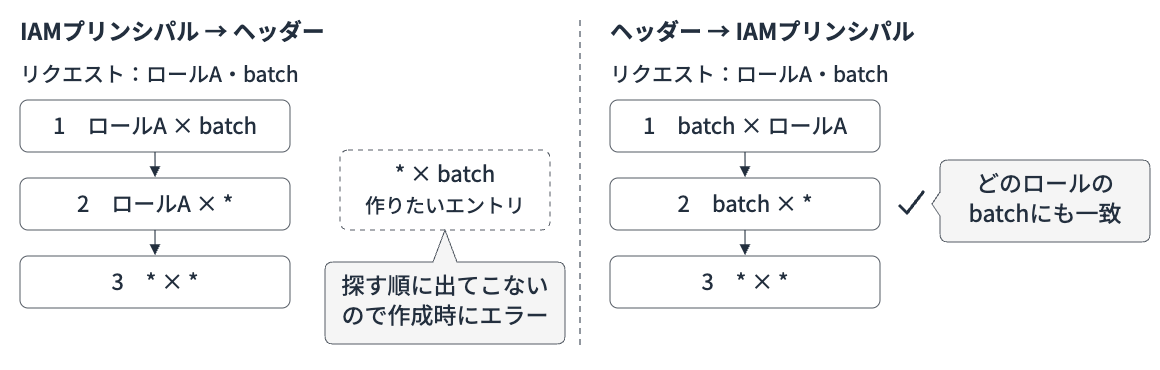
Now that we understand the proper way to write this, let's write the code and apply the rate limit.
import boto3

client = boto3.client("bedrock-agentcore-control", region_name="us-east-1")

response = client.create_gateway_rate_limit(
    gatewayIdentifier="<GATEWAY_ID>",
    rateLimitId="per-workload",
    dimensionKeys=[
        "$.context.request.header.X-Workload",
        "$.context.iam.principal",
    ],
    entries=[
        {
            "dimensions": {
                "$.context.request.header.X-Workload": "batch",
                "$.context.iam.principal": "*",
            },
            "requests": [{"rate": 60, "period": "minute"}],
        },
        {
            "dimensions": {
                "$.context.request.header.X-Workload": "*",
                "$.context.iam.principal": "*",
            },
            "requests": [{"rate": 6000, "period": "minute"}],
        },
    ],
)
print(response["rateLimitId"], response["status"])
After it took effect, I simultaneously called 5 variations of the header with 3 parallel threads each for 40 seconds.
from call import call
from load import run

run([
    ("X-Workload: batch", lambda: call({"X-Workload": "batch"}), 3, 0),
    ("x-workload: batch", lambda: call({"x-workload": "batch"}), 3, 0),
    ("X-Workload: Batch", lambda: call({"X-Workload": "Batch"}), 3, 0),
    ("X-Workload: chat", lambda: call({"X-Workload": "chat"}), 3, 0),
    ("(no header)", lambda: call(), 3, 0),
])
X-Workload: batch        200:  36  429:  44
x-workload: batch        200:  37  429:  42
X-Workload: Batch        200:  66  429:   0
X-Workload: chat         200:  64  429:   0
(ヘッダーなし)                 200:  66  429:   0
429 was returned for batch! Even with the header name in lowercase, it counts toward the same quota.
Interestingly, requests with the value set to Batch and requests without the header all passed through.
Splitting by safety_identifier for OpenAI format
In the OpenAI-format API, safety_identifier in the body is the field for identifying users, so let's try using that (the previous user field is now deprecated).
Let's try calling GPT-5.6 Luna with the Responses API. The calling function is call.py with the path and body changed to Responses format.
import json

import boto3
import requests
from botocore.auth import SigV4Auth
from botocore.awsrequest import AWSRequest

GATEWAY_URL = "https://<GATEWAY_ID>.gateway.bedrock-agentcore.us-east-1.amazonaws.com"
credentials = boto3.Session().get_credentials()

def call_openai(body_extra=None):
    body = {
        "model": "openai.gpt-5.6-luna",
        "max_output_tokens": 16,
        "input": "hi",
        **(body_extra or {}),
    }
    req = AWSRequest(
        method="POST",
        url=f"{GATEWAY_URL}/inference/v1/responses",
        data=json.dumps(body),
        headers={"Content-Type": "application/json"},
    )
    SigV4Auth(credentials, "bedrock-agentcore", "us-east-1").add_auth(req)
    res = requests.post(req.url, data=req.body, headers=dict(req.headers))
    return res.status_code, res.text
As in the body section, we create a quota of 60 requests/minute per user.
import boto3

client = boto3.client("bedrock-agentcore-control", region_name="us-east-1")

response = client.create_gateway_rate_limit(
    gatewayIdentifier="<GATEWAY_ID>",
    rateLimitId="per-end-user-openai",
    dimensionKeys=[
        "$.context.iam.principal",
        "$.context.request.body.safety_identifier",
    ],
    entries=[
        {
            "dimensions": {
                "$.context.iam.principal": "*",
                "$.context.request.body.safety_identifier": "*",
            },
            "requests": [{"rate": 60, "period": "minute"}],
        },
    ],
)
print(response["rateLimitId"], response["status"])
After it takes effect, we compare user-a and user-c in the same way as in the body section.
from call_openai import call_openai
from load import run

run([
    ("user-a (5 parallel)", lambda: call_openai({"safety_identifier": "user-a"}), 5, 0),
    ("user-c (once every 2s)", lambda: call_openai({"safety_identifier": "user-c"}), 1, 2),
])
user-a(並列5本)             200:  77  429:  51
user-c(2秒に1回)            200:  11  429:   0
Even with the OpenAI format, quotas were split by the safety_identifier value!
Notes
Since quotas are split based on values written by the caller, there are a few things to keep in mind before using this feature.
Value handling
Header and body values are handled according to the following rules:
- For body paths, specify dot-separated field names. The final value supports strings, numbers, and booleans.
- Leading and trailing whitespace is stripped, but values are case-sensitive (
goldandGoldare separate quotas). - If the header is absent, the path doesn't exist, or the value contains
/,|,,, or*, that rate limit is skipped entirely and the request passes through.
The documentation covers this in the "Selector syntax and value constraints" and "Dimension resolution behavior" sections.
Values containing / are not rate-limited
If you use a user ID format like org/user-a, no 429 was returned even when calling with 5 parallel threads for 40 seconds.
from call import call
from load import run

run([
    ("user_id: org/user-a", lambda: call(body_extra={"metadata": {"user_id": "org/user-a"}}), 5, 0),
])
user_id: org/user-a 200: 109 429: 0
If you use a format that includes /, such as an ID combining organization and user, the evaluation itself is invalidated, so care must be taken with the format of input values.
Changing the value means a different quota
As shown in the header results, you can call without hitting the batch quota by slightly changing the value or removing the header. The same applies to user IDs in the body — if the caller changes the ID, it becomes a different quota.
Therefore, this feature is suited for splitting traffic from callers where the backend can be trusted to always provide correct values.
If you also want to cap the total per caller, create a separate rate limit split by IAM principal and use them together. When multiple rate limits are configured, only requests that pass all limits are executed (AND evaluation).
As a test, I added a quota of 60 requests/minute per caller.
import boto3

client = boto3.client("bedrock-agentcore-control", region_name="us-east-1")

client.create_gateway_rate_limit(
    gatewayIdentifier="<GATEWAY_ID>",
    rateLimitId="per-caller",
    dimensionKeys=["$.context.iam.principal"],
    entries=[
        {
            "dimensions": {"$.context.iam.principal": "*"},
            "requests": [{"rate": 60, "period": "minute"}],
        },
    ],
)
With this in place, I call with 5 parallel threads for 40 seconds while changing the user ID on each call.
import itertools
import json
import threading
import time
from collections import Counter
from concurrent.futures import ThreadPoolExecutor

from call import call

counter = itertools.count()
counts = Counter()
lock = threading.Lock()

def worker(seconds=40):
    end = time.time() + seconds
    while time.time() < end:
        # Use a different user ID on each call
        status, text = call(body_extra={"metadata": {"user_id": f"user-{next(counter)}"}})
        limit_key = json.loads(text)["error"]["limitKey"] if status == 429 else "-"
        with lock:
            counts[(status, limit_key)] += 1

with ThreadPoolExecutor(max_workers=5) as executor:
    for _ in range(5):
        executor.submit(worker)

for (status, limit_key), n in sorted(counts.items()):
    print(f"{status} limitKey={limit_key}: {n}")
200 limitKey=-: 73
429 limitKey=per-caller: 52
Each per-user-ID quota is being accessed for the first time so it's open, but the added per-caller quota stopped them. You can manage per-user quotas and the overall caller cap separately with two rate limits.
Bonus: Can Cedar catch missing values?
Ideally, the backend should always be built to insert the correct values. That said, since requests with missing values would slip through rate limiting, I tried using AgentCore Policy to see if the Gateway side could also block them.
I created a Policy Engine, attached it to the Gateway in ENFORCE mode, and added a policy to reject requests without the required values. Basic usage of Policy is introduced in a previous article.
In conclusion, for requests to inference targets, the body fields that can be referenced from context.input in Cedar were limited. The results of my testing are as follows.
| API | Field | Referenceable in Cedar |
|---|---|---|
| Anthropic Messages | metadata.user_id |
No |
| OpenAI Chat Completions | user |
Yes |
| OpenAI Chat Completions / Responses | safety_identifier |
No |
Fields that could not be referenced were judged as "not present" even when included in the request, and all such requests were rejected. The only field that could be made required was user in Chat Completions.
Preparing the Policy Engine
Add policy evaluation permissions to the Gateway's execution role.
aws iam put-role-policy \
  --role-name rate-limit-demo-gateway-role \
  --policy-name policy-engine-permissions \
  --policy-document '{
    "Version": "2012-10-17",
    "Statement": [{
      "Effect": "Allow",
      "Action": [
        "bedrock-agentcore:GetPolicyEngine",
        "bedrock-agentcore:AuthorizeAction",
        "bedrock-agentcore:PartiallyAuthorizeActions"
      ],
      "Resource": [
        "arn:aws:bedrock-agentcore:us-east-1:<ACCOUNT_ID>:policy-engine/<ENGINE_ID>",
        "arn:aws:bedrock-agentcore:us-east-1:<ACCOUNT_ID>:gateway/*"
      ]
    }]
  }'
Create a Policy Engine and attach it to the Gateway in ENFORCE mode.
import boto3

client = boto3.client("bedrock-agentcore-control", region_name="us-east-1")

engine = client.create_policy_engine(name="RlDimsDemoEngine")
print(engine["policyEngineId"])

gw = client.get_gateway(gatewayIdentifier="<GATEWAY_ID>")
client.update_gateway(
    gatewayIdentifier=gw["gatewayId"],
    name=gw["name"],
    roleArn=gw["roleArn"],
    protocolType=gw["protocolType"],
    authorizerType=gw["authorizerType"],
    policyEngineConfiguration={"arn": engine["policyEngineArn"], "mode": "ENFORCE"},
)
Since ENFORCE mode defaults to deny, I add two policies: one to allow everything, and one to deny requests without user.
import boto3

client = boto3.client("bedrock-agentcore-control", region_name="us-east-1")
ENGINE_ID = "<ENGINE_ID>"
GATEWAY_ARN = "<GATEWAY_ARN>"

policies = {
    # ENFORCE mode defaults to deny, so first add an allow-all policy
    "allow_all": f'permit (principal, action, resource == AgentCore::Gateway::"{GATEWAY_ARN}");',
    # Deny Chat Completions requests that don't include user
    "require_user": (
        'forbid (principal, action == AgentCore::Action::"bedrock-mantle___POST:/v1/chat/completions", '
        f'resource == AgentCore::Gateway::"{GATEWAY_ARN}")\n'
        "unless { context.input has user };"
    ),
}
for name, statement in policies.items():
    client.create_policy(
        policyEngineId=ENGINE_ID,
        name=name,
        definition={"cedar": {"statement": statement}},
        validationMode="IGNORE_ALL_FINDINGS",
    )
Using gpt-oss-120b, which can be called in Chat Completions format, I compare requests with and without user.
check_user_required.py
import json

import boto3
import requests
from botocore.auth import SigV4Auth
from botocore.awsrequest import AWSRequest

GATEWAY_URL = "https://<GATEWAY_ID>.gateway.bedrock-agentcore.us-east-1.amazonaws.com"
credentials = boto3.Session().get_credentials()

def call_chat(body_extra=None):
    body = {
        "model": "openai.gpt-oss-120b",
        "max_tokens": 16,
        "messages": [{"role": "user", "content": "hi"}],
        **(body_extra or {}),
    }
    req = AWSRequest(
        method="POST",
        url=f"{GATEWAY_URL}/inference/v1/chat/completions",
        data=json.dumps(body),
        headers={"Content-Type": "application/json"},
    )
    SigV4Auth(credentials, "bedrock-agentcore", "us-east-1").add_auth(req)
    res = requests.post(req.url, data=req.body, headers=dict(req.headers))
    return res.status_code, res.text

for label, extra in [("user", {"user": "user-a"}), ("no user", None)]:
    status, text = call_chat(extra)
    print(label, status, "" if status == 200 else text)
user 200
no user 403 {"error":{"message":"Request Denied: Gateway Target request not allowed due to policy enforcement [Policy evaluation denied due to require_user-djgb74zm3l]","type":"permission_error","code":"403"}}
Only requests missing user were blocked by the Policy! However, since metadata.user_id in Anthropic Messages could not be referenced, making it required via Cedar is not possible for the main example in this article. For preventing forgotten values, the most reliable approach is still to ensure the backend always inserts the correct values.
Cannot be created without a verified ID
As stated in the documentation, attempting to create a rate limit using only header or body dimensions without a verified ID is rejected at creation time.
body-only -> ValidationException Custom request header/body dimensions require an IAM co-dimension in the same rate limit
header-only -> ValidationException Custom request header/body dimensions require an IAM co-dimension in the same rate limit
In the first place, the Gateway has no way to verify what values the caller sends. Since the correctness of values depends entirely on the caller, it makes some sense that the spec keeps the scope confined within verified IDs.
Cleanup
Delete in the order of rate limits, targets, then Gateway.
import sys
import time

import boto3

region, gw = sys.argv[1], sys.argv[2]
client = boto3.client("bedrock-agentcore-control", region_name=region)

for rate_limit in client.list_gateway_rate_limits(gatewayIdentifier=gw)["rateLimits"]:
    client.delete_gateway_rate_limit(gatewayIdentifier=gw, rateLimitId=rate_limit["rateLimitId"])

for target in client.list_gateway_targets(gatewayIdentifier=gw)["items"]:
    client.delete_gateway_target(gatewayIdentifier=gw, targetId=target["targetId"])

while client.list_gateway_targets(gatewayIdentifier=gw)["items"]:
    time.sleep(5)
client.delete_gateway(gatewayIdentifier=gw)
uv run cleanup.py us-east-1 <GATEWAY_ID>
If you created a Policy Engine, after deleting the Gateway, also delete the policies and the Policy Engine.
import time

import boto3

client = boto3.client("bedrock-agentcore-control", region_name="us-east-1")
ENGINE_ID = "<ENGINE_ID>"

for policy in client.list_policies(policyEngineId=ENGINE_ID)["policies"]:
    client.delete_policy(policyEngineId=ENGINE_ID, policyId=policy["policyId"])

while client.list_policies(policyEngineId=ENGINE_ID)["policies"]:
    time.sleep(5)
client.delete_policy_engine(policyEngineId=ENGINE_ID)
If the IAM role is no longer needed, delete it with aws iam delete-role-policy and aws iam delete-role.
Conclusion
Being able to divide quotas per user behind a single IAM role seems very convenient for architectures where an application backend calls the Gateway! This was an update that expands the possibilities by enabling rate limiting via headers and body.
I hope this article was helpful in some way. Thank you for reading to the end!
