
Agentic Voice, which enables low-latency and more natural AI voice conversations, is now available in Amazon Connect Customer.

This page has been translated by machine translation. View original
Introduction
Amazon Connect agentic voice, which enables low-latency, more natural AI voice conversations, is now available for Amazon Connect customers.
This update provides over 50 languages and more than 100 voices. In addition to voice controls such as speech rate, volume, and emotional expression, improvements to turn-taking are also announced, including responses with natural pauses and AI responses that begin at natural timing by predicting when users have finished speaking.
Amazon Connect agentic voice is integrated into existing contact flows and Bot configurations.
In this article, we configure Amazon Connect agentic voice for an already-created Amazon Connect AI agent and verify the voice in Japanese.
We also introduce the results of reading out phone numbers, addresses, and AWS service names.
Note that while this update includes multilingual support, this article only verifies Japanese voice.
Overview of Amazon Connect agentic voice
Amazon Connect agentic voice is a voice feature that combines natural speech synthesis with Advanced Speech Recognition (hereinafter Advanced ASR).
The main features are as follows.
| Feature | Overview |
|---|---|
| Multilingual support | Supports over 50 languages and locales |
| Voice options | Provides over 100 voices |
| Advanced ASR | Achieves low-latency natural turn-taking |
| Speech rate control | Allows specifying speech rate |
| Volume control | Allows specifying volume |
| Pause control | Allows inserting pauses of any length during speech |
| Spell-out reading | Can read out codes, IDs, etc. character by character |
| Emotional expression | Allows emotional expression based on speech content, or specification via emotion tags |
| Interruption | Supports barge-in where users can start speaking during AI speech |
Advanced ASR predicts the end of speech while evaluating the content of the user's utterance, not just based on a fixed silence duration.
Also, Amazon Connect agentic voice automatically infers the appropriate speech rate and emotion from the content of the text. If you want fine-grained control over specific utterances, tags for controlling speech rate, volume, pauses, spell-out reading, and emotion are also available.
Prerequisites
This time, we use a self-service environment with an Amazon Connect AI agent.
The following are assumed to have been created.
- Amazon Connect Customer instance
- Phone number
- Amazon Connect AI agent
- Self-service Bot for the AI agent
- Contact flow that calls the AI agent
The AI agent is configured with knowledge to answer inquiries about Classmethod, Inc.
Configuring the Contact Flow
Overall Flow Structure
The contact flow uses a self-service flow with an Amazon Connect AI agent.
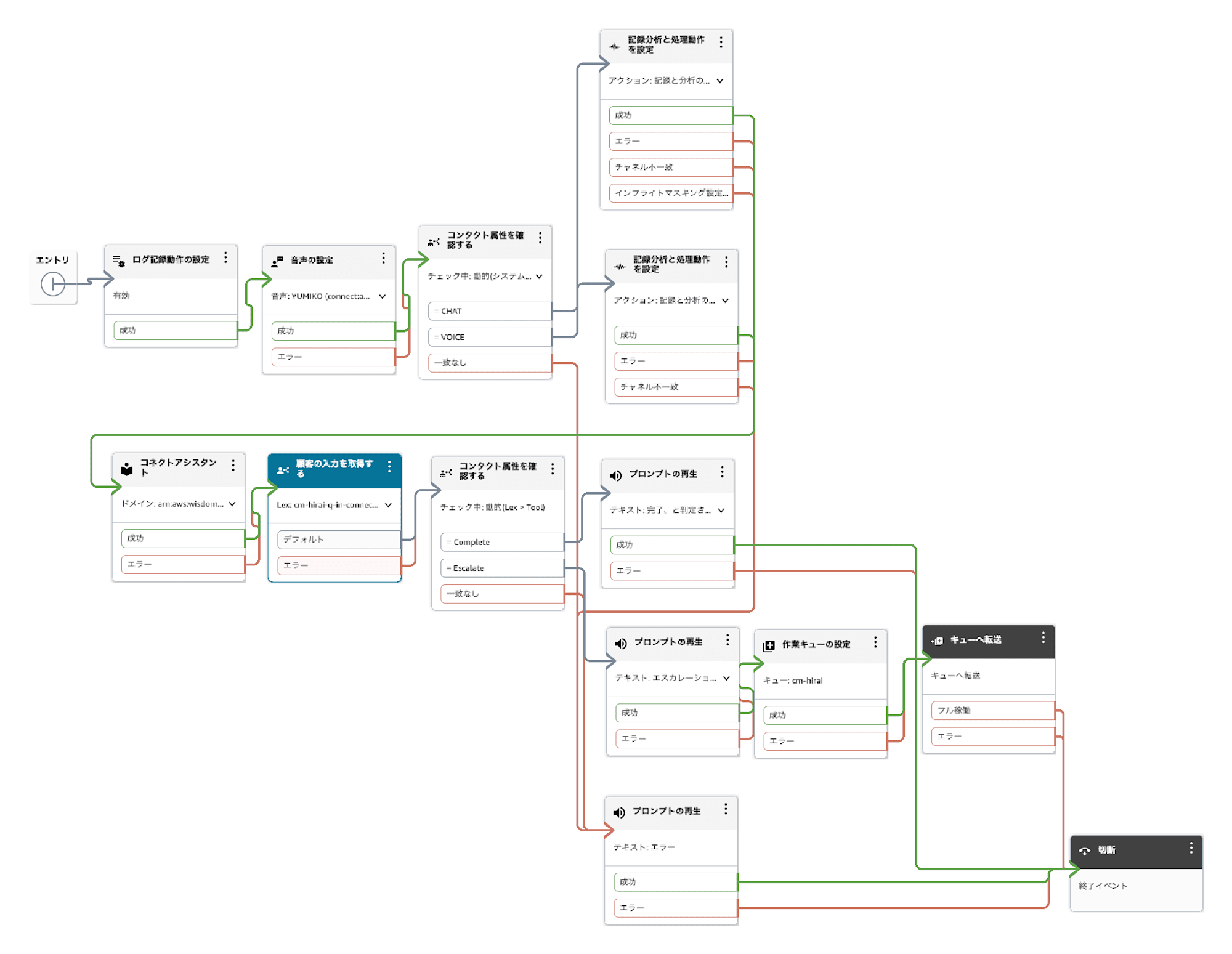
The self-service flow for the AI agent used this time
Since we are using an existing flow, the main configuration points are the following two:
- Change the voice provider in the [Set voice] block
- Enable Advanced ASR in the Bot used by the AI agent
Configuring the Voice Provider
When opening the [Set voice] block, we were able to select [Amazon agentic voice] as the voice provider.
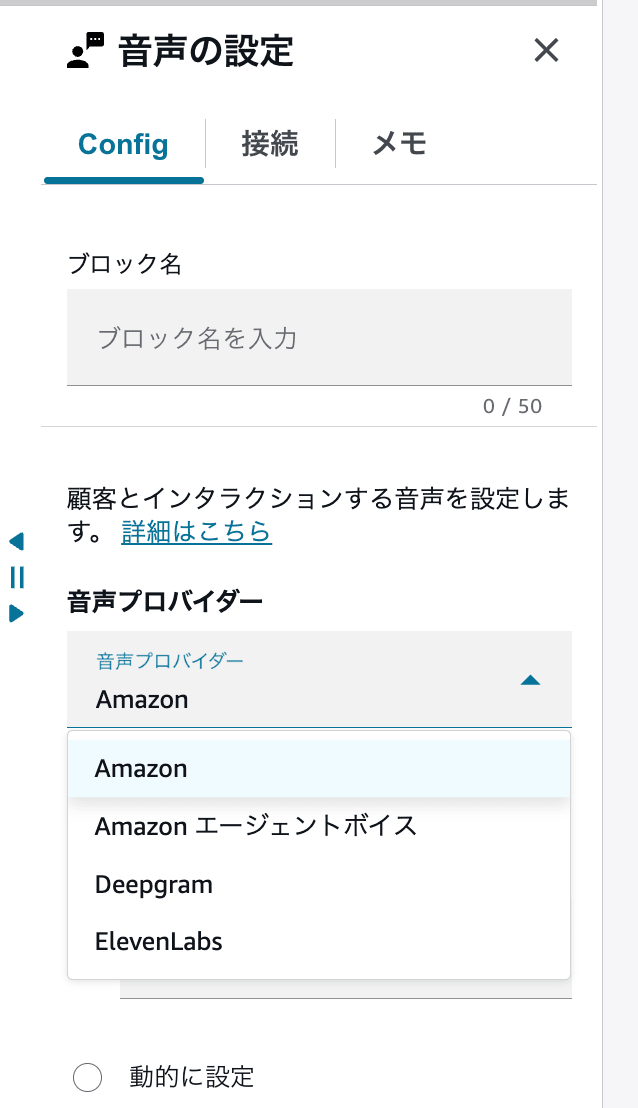
Selecting Amazon agentic voice as the voice provider
For the language, Japanese was selectable.
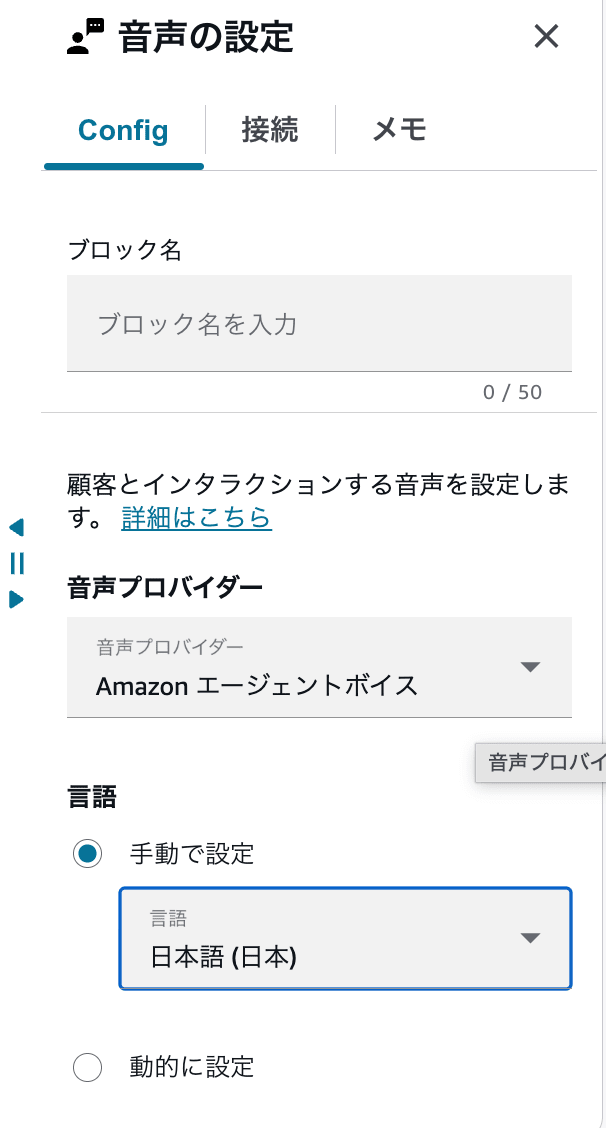
Selecting Japanese as the language
In this environment, the following 3 types of Japanese voices were available for selection.
AikoRenYumiko
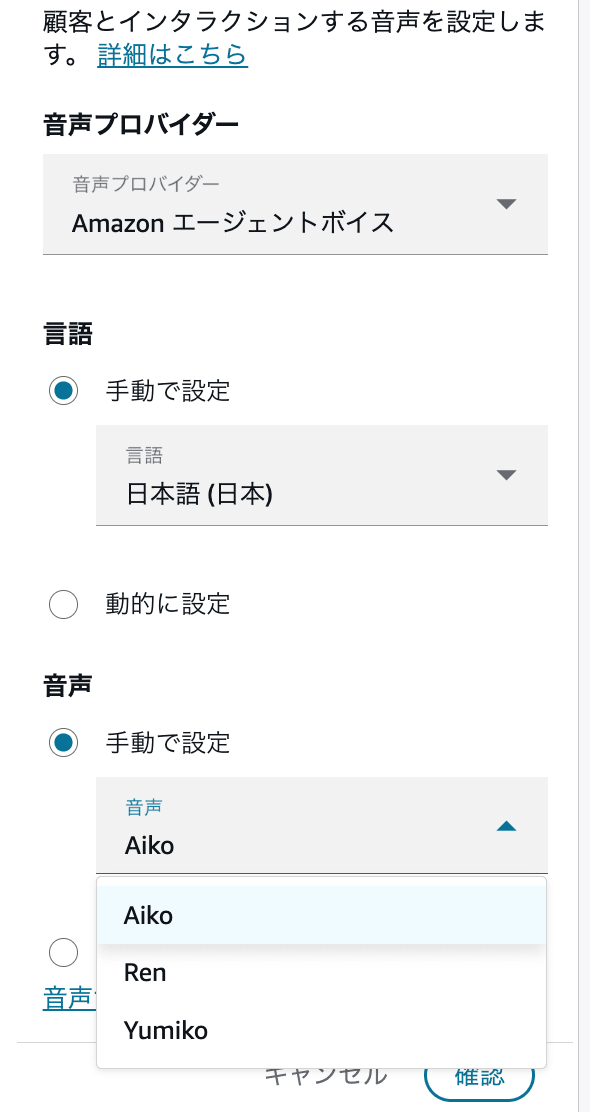
The 3 types of Japanese voices available for selection
By selecting [Listen to voice sample], you can play a sample of the selected voice in a new tab.
This is convenient because you can compare each voice before publishing the contact flow.
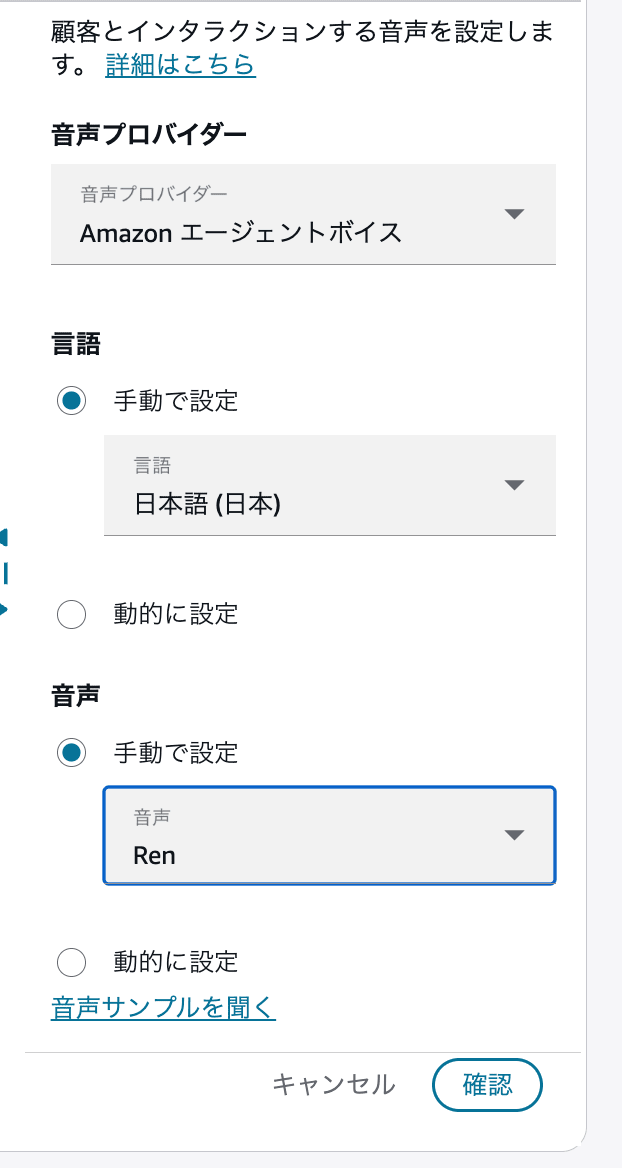
Screen playing a sample of the selected voice
When Amazon Connect agentic voice is configured in the [Set voice] block, the configured voice was used not only for AI agent responses but also in [Play prompt] blocks within the same flow.
Therefore, the same voice can be used for both AI agent responses and fixed messages in the contact flow.
After configuring, save and publish the contact flow.
Enabling Advanced ASR in the Bot
To use Amazon Connect agentic voice for speech recognition in the AI agent as well, edit the Speech model of the Bot.
The settings configured this time are as follows.
| Setting Item | Setting Value |
|---|---|
| Model type | Speech-to-Text |
| Voice provider | Amazon Connect agentic voice |
| Speech model preference | Advanced |
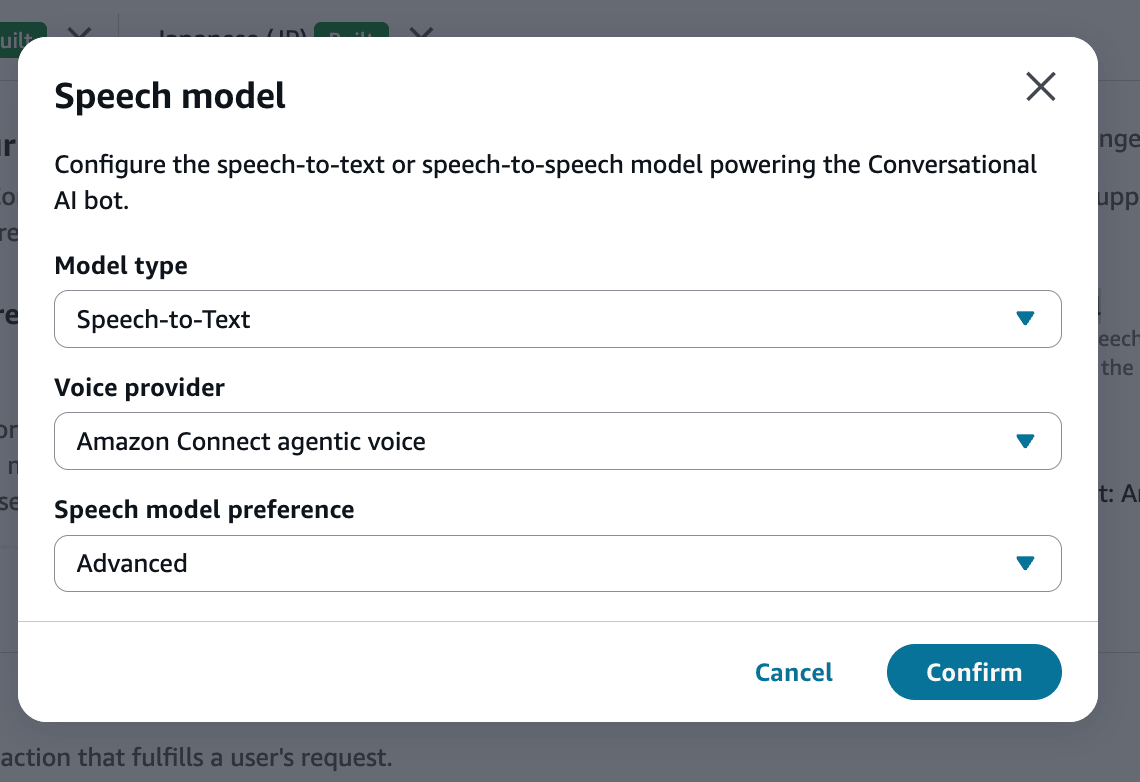
Selecting Amazon Connect agentic voice and Advanced in the Bot
In the screen confirmed this time, Speech-to-Text was displayed as the Model type, and Speech-to-Speech was not available as an option.
Selecting Advanced for Speech model preference enables the advanced speech recognition model of Amazon Connect agentic voice.
The official documentation states that this provides lower latency and improved recognition accuracy compared to before.
After saving the settings, build the Bot.
Trying It Out
The following content was inquired via phone.
Please tell me the address of Classmethod, Inc.

Please tell me the phone number for the inquiry desk.

Thank you. My issue has been resolved.
The actual voice demo is as follows.
In this verification, we felt that Amazon Connect agentic voice sounded more natural and human-like compared to the Amazon Polly voice used previously.
| Verification Item | Result |
|---|---|
| Voice naturalness | Felt more natural and human-like than the Amazon Polly voice used previously |
| Latency | Subjectively felt that responses were faster than before |
| Phone number | Read out the actual inquiry desk phone number naturally as a phone number |
| Address | The 1-1-1 in the address was sometimes read as "January 1st, Year 1" |
The naturalness of the voice and latency are subjective evaluations based on listening to actual phone calls. They are not quantitative measurements of voice quality or response time.
Voice Naturalness
Compared to the Amazon Polly voice used previously, we felt that intonation and pauses within sentences became more natural.
In particular, even when the AI agent read out generated text as-is, there was less impression of mechanically concatenated sentences, and it was easier to hear as a conversation.
Latency
The time from when the user's question ended to when the AI agent's response began also felt shorter than before.
Advanced ASR predicts the end of speech while evaluating the content of the user's utterance, not just based on a fixed silence duration. By default, the user's turn ends when either the confidence of end-of-speech or the silence duration condition is met first.
However, we did not actually measure and compare latency this time.
The actual response time is also affected by the processing time of the model, tools, external APIs, and other resources used by the AI agent.
Phone Number Reading
The actual inquiry desk phone number answered by the AI agent was read out naturally as a phone number.
In the previously used environment, numbers separated by hyphens were sometimes read as large values. In this demo, we confirmed that each digit was read out as a phone number.
The official documentation states that Amazon Connect agentic voice automatically converts common formats such as phone numbers, email addresses, dates, and times into natural speech.
However, we have not verified that the same result occurs for all phone numbers and notation methods.
Address Reading
For addresses, the reading of street numbers was sometimes unstable.
The text generated by the AI agent was as follows.
The Hibiya head office is located at 1-1-1 Nishi-Shimbashi, Minato-ku, Tokyo, Hibiya Fort Tower 26th floor.
Of this, 1-1-1 was sometimes read as "January 1st, Year 1."
On the other hand, it was sometimes read as "1 no 1 no 1," and the results were not consistent in this verification.
It is possible that the numbers separated by hyphens were interpreted as a date rather than a street number, but the internal determination method could not be confirmed from public documentation.
When handling strings that can be interpreted with multiple meanings, such as addresses, dates, and phone numbers, it is necessary to verify the reading results with actual phone calls.
AWS Service Names Were Also Verified Separately
Separately from the voice demo this time, we also verified the reading of AWS service names.
The verification results are as follows.
| Input Text | Actual Reading |
|---|---|
EC2 |
"ee-shee-ni" instead of "ee-shee-tsuu" |
S3 |
"es-san" instead of "es-suri" |
The numerical parts of EC2 and S3 were read as Japanese numbers.
Within the range confirmed this time, the readings did not match the commonly used pronunciations of AWS service names.
Phone numbers were read naturally, but for service names combining letters and numbers, the intended pronunciation was not always achieved.
If the responses generated by the AI agent include product names, service names, abbreviations, model numbers, etc., it would be advisable to verify the reading results with the combination of voice and language being used.
Voice Control Tags Are Also Supported
With Amazon Connect agentic voice, you can adjust speech rate, volume, pauses, spell-out reading, and emotional expression by including voice control tags in the utterance text.
Voice control tags can be used not only in [Play prompt] blocks, but also in responses generated by Amazon Connect AI agents.
The official documentation includes examples of adding voice output rules to the AI agent's system prompt when generating text to be read aloud.
Note that this article does not verify the operation of voice control tags. The following is an overview of the features available in the official documentation.
| Tag | Usage |
|---|---|
<speed ratio="X"/> |
Specifies speech rate |
<volume ratio="X"/> |
Specifies volume |
<break time="X"/> |
Inserts a pause during speech |
<spell>...</spell> |
Reads a string character by character |
<emotion value="X"/> |
Specifies emotional expression |
[laughter] |
Inserts laughter |
When Using in AI Agent Responses
When using in AI agent responses, instruct the system prompt to output the necessary tags.
For example, to read a confirmation code character by character, have the AI agent generate text like the following.
The confirmation code is <spell>TKT4829XB</spell>.
To insert an explicit pause during speech, the <break> tag can be used.
We will provide you with the confirmation results. <break time="500ms"/>Your contract is valid.
The speech rate can be specified in the range of 0.6 to 1.5.
<speed ratio="0.85"/>This is an important announcement.
The volume can be specified in the range of 0.5 to 2.0.
<volume ratio="0.8"/>We will provide the phone number once more.
When Using in [Play Prompt] Blocks
When using Text-to-Speech in [Play prompt] blocks, write the tags directly in the text to be read.
For example, to add a 500-millisecond pause between menu items, specify as follows.
Press 1 for billing inquiries. <break time="500ms"/>Press 2 for technical inquiries.
In AI agent responses, the AI generates the tags, but in [Play prompt] blocks, tags are written directly in fixed text.
Since the tag format is easier to manage with fixed messages, this seems well-suited for announcements that should always be read at a consistent speed and with consistent pauses.
Notes on Usage
Voice control tags are not in the same format as Amazon Polly's Speech Synthesis Markup Language (SSML).
The official documentation states that unsupported SSML wrappers such as <speak>...</speak> are unnecessary and should not be included.
Also, if incorrectly formatted tags are included, such as unclosed tags, the tag strings themselves may be read aloud.
When having AI agents generate voice control tags, it is necessary to limit the tags used to the minimum necessary and verify the output with actual phone calls.
AI Agent Prompts Can Also Be Adjusted for Voice Output
If the AI agent generates responses containing Markdown, JSON, symbols, etc., these may be read out unnaturally.
The official documentation introduces examples of specifying the following points in the AI agent's system prompt.
- Use complete sentences and standard punctuation
- Do not output Markdown or bullet points
- Do not output JSON or emojis
- Do not output asterisks or hash symbols
- Keep responses concise
- Use the
<spell>tag when reading codes or IDs character by character - Do not output internal reasoning or meta information
Based on the results of this verification, for example, the following instructions could be added.
## Voice Output Rules

All responses will be read aloud.

- Please respond in natural Japanese spoken language.
- Respond in complete sentences, ending with a period, question mark, or exclamation mark.
- Keep responses concise and do not provide long explanations all at once.
- Do not output Markdown, bullet points, headings, JSON, or emojis.
- Do not use special symbols such as asterisks or hash symbols.
- When reading codes or IDs character by character, enclose them in spell tags.
- Do not output internal reasoning, processing details, or meta information.
Amazon Connect agentic voice converts ordinary text into natural speech without special tags in most cases.
Therefore, rather than adding voice control tags to all responses, it seems best to start with rules for outputting natural sentences, and only use tags for parts where you want to explicitly control the reading.
About Multilingual Support
Amazon Connect agentic voice supports over 50 languages and locales.
The official documentation also introduces polyglot voice for multilingual support.
When using polyglot voice, you can instruct the AI agent's system prompt to detect the user's input language and respond in the same language.
There are also example prompts for switching the AI agent's response language when the user switches languages mid-conversation.
Summary
We tried Amazon Connect agentic voice with a Japanese AI agent.
Compared to the conventional Amazon Polly, the naturalness of the voice and the pace of conversation were well-received. On the other hand, addresses and AWS service names may be read in unintended ways.
When implementing, it would be advisable to verify addresses, phone numbers, product names, and other content handled in business operations with actual calls.
