
I tried retrieving inquiry types from a data table using Amazon Connect Customer AI Agent and branching the flow

This page has been translated by machine translation. View original
Introduction
After Amazon Connect Customer AI Agent answers customer questions, there are cases where you want to classify the conversation content by inquiry type and branch the subsequent contact flow.
While it is possible to define inquiry types directly in the AI agent's prompt or tool input schema, this requires modifying the AI agent configuration every time inquiry types change.
In this article, I tried a configuration that manages inquiry types and classification examples in Amazon Connect Customer's data tables, and retrieves them from the AI agent as a flow module tool.
Additionally, to pass the inquiry type selected by the AI agent to the contact flow without speaking it to the customer, and to end the conversation with the AI agent, I am using a custom Return to Control tool.
The tool types for AI agents including Return to Control are organized in the following article.
In this configuration, without using AWS Lambda, the following is achieved using Amazon Connect Customer's standard features.
- Manage inquiry types and classification examples in a data table
- Retrieve inquiry type candidates from a flow module tool
- Have the AI agent select the inquiry type closest to the conversation content
- Pass the classification result to the contact flow without speaking it to the customer
- Set the classification result as a contact attribute in the contact flow
- Branch subsequent processing according to the contact attribute
- Do not change the AI agent's default prompt
Configuration for This Article
The main resources created this time are as follows.
| Resource | Name | Purpose |
|---|---|---|
| Data Table | InquiryCategoryMaster |
Manages inquiry types and classification examples |
| Flow Module | GetInquiryCategories |
Retrieves inquiry type candidates from the data table and returns them |
| AI Agent | SelfServiceOrchestrator-GetInquiryCategories |
Answers customers and classifies inquiry types |
| Flow Module Tool | GetInquiryCategories |
Calls the flow module from the AI agent |
| Return to Control Tool | CompleteInquiryClassification |
Passes the classification result to the contact flow and ends the conversation with the AI agent |
| Contact Flow | cm-hirai-SelfServiceOrchestration-GetInquiryCategories |
Sets the classification result as a contact attribute and branches |
The processing flow is as follows.
Customer and AI agent have a conversation
↓
AI agent calls the Retrieve tool as needed to respond
↓
AI agent determines that the customer has no more questions
↓
Calls the GetInquiryCategories tool
↓
The "Data Table" block inside the flow module
retrieves inquiry type candidates from InquiryCategoryMaster
↓
The "Return" block of the flow module returns the retrieval result to the AI agent
↓
AI agent selects the inquiryTypeName closest to the conversation content
↓
Calls the CompleteInquiryClassification tool
↓
Passes inquiryTypeName as an Amazon Lex session attribute to the contact flow
↓
Ends the conversation with the AI agent and returns control to the contact flow
↓
Sets inquiryTypeName as a contact attribute in the contact flow
↓
Branches subsequent processing according to inquiryTypeName
GetInquiryCategories and CompleteInquiryClassification each have different roles.
GetInquiryCategories retrieves inquiry type candidates from the data table. CompleteInquiryClassification passes the inquiryTypeName selected by the AI agent to the contact flow and ends the conversation with the AI agent.
Prerequisites
The following are assumed for this article.
- Amazon Connect Customer instance has been created
- Amazon Connect Customer AI Agent is available for use
- A knowledge base referenced by the AI agent has been created
- An Amazon Lex bot for self-service has been created
- The verification region is
ap-northeast-1 - The AI agent prompt uses the default settings of
SelfServiceOrchestrationVoice - The
Retrievetool is used with default settings
This article does not cover the creation procedures for the knowledge base, Amazon Lex bot, or Retrieve tool.
Creating the Data Table
I created a data table named InquiryCategoryMaster.
The following two attributes are defined in the data table.
| Attribute Name | Type | Primary Attribute | Purpose |
|---|---|---|---|
inquiryTypeName |
Text | Use | Inquiry type name |
examples |
Text | Do not use | Examples used for classification judgment |
inquiryTypeName is used as the primary attribute to uniquely identify each record.
For examples, I registered comma-separated text with examples that the AI agent references during classification. Since there is no need to process individual examples within the flow this time, regular text rather than a text list is used.
The registered records are as follows.
inquiryTypeName |
examples |
|---|---|
| Other | Unknown department, Inquiries not falling under the above |
| Account | Cannot log in, Forgot password, Change email address |
| Contract | Cancellation, Plan change, Contract content confirmation, Name change |
| Technical Support | Cannot connect to internet, Getting an error, App won't launch |
| Billing | Payment delay, Reissue invoice, Confirm billing amount, Change payment method |
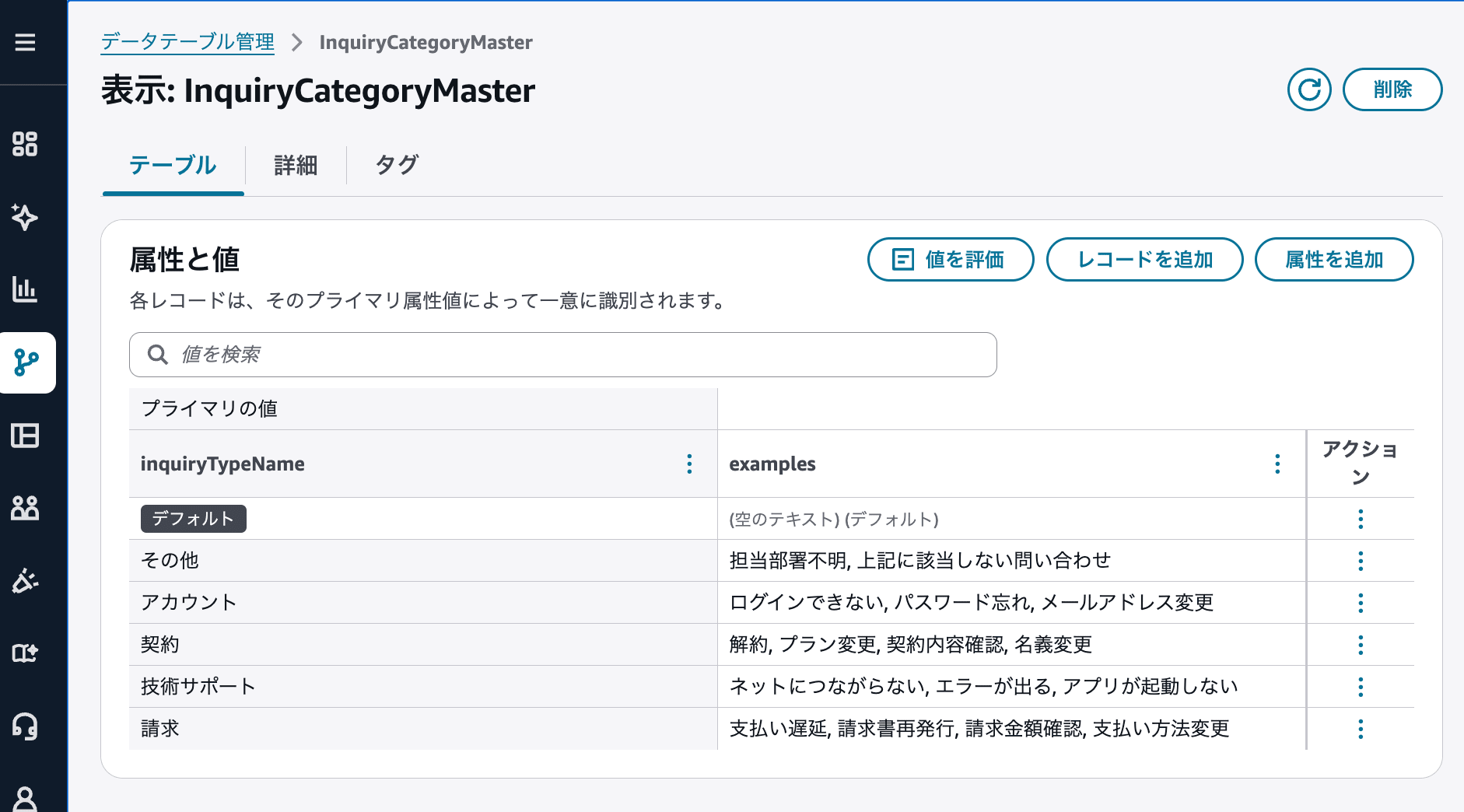
State with inquiry types and classification examples registered in InquiryCategoryMaster
examples is not used as an exact match condition, but as reference information for the AI agent to determine the inquiryTypeName closest to the conversation content.
The following documentation is also helpful for creating data tables.
Creating the GetInquiryCategories Flow Module
To retrieve inquiry type candidates from the data table, I create a flow module called GetInquiryCategories.
The flow module consists of the following two blocks.
Data Table
↓
Return
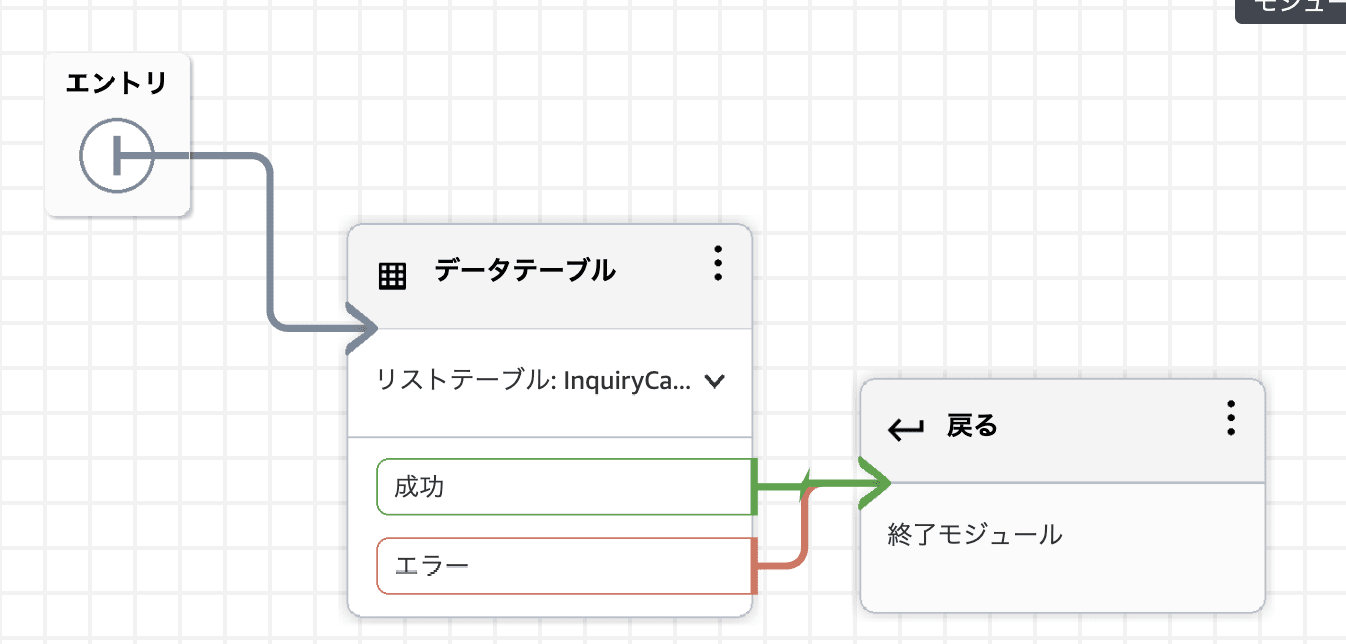
GetInquiryCategories flow module that returns the data table retrieval result
Flow modules can not only be called from contact flows, but can also be used as tools for AI agents. The "Data Table" block can also be used when using a flow module as a tool.
Configuring Flow Module Input and Output
This flow module always retrieves all records from InquiryCategoryMaster.
Therefore, the flow module input is left empty and no input parameters are defined.
The output schema is configured as follows.
{
  "type": "object",
  "properties": {
    "default": {
      "type": "array",
      "items": {
        "type": "object"
      }
    }
  },
  "required": [
    "default"
  ]
}
The data table retrieval result is stored in default under primaryKeyGroups.
Since this flow module returns primaryKeyGroups as-is, the root property of the output schema is set to default.
Configuring the "Data Table" Block
In the "Data Table" block, all records from InquiryCategoryMaster are retrieved.
The configuration values are as follows.
| Configuration Item | Configuration Value |
|---|---|
| Action | Read from data table |
| Read Action | List data table values |
| Data Table | InquiryCategoryMaster |
| Primary Value Group | Not specified |
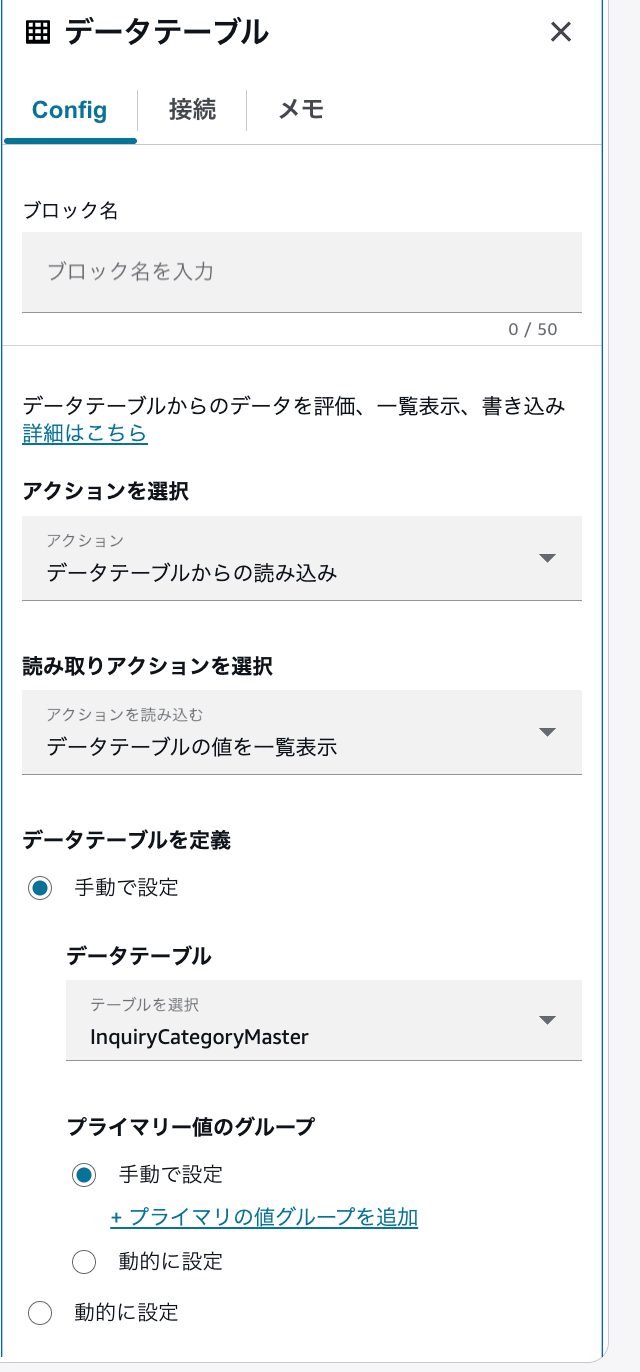
Configuration to retrieve a list of all records from InquiryCategoryMaster
When no primary value group is specified, the entire data table is retrieved, and the result can be referenced from the default group.
The following documentation is also helpful for the data table block.
Configuring the "Return" Block
In the "Return" block, the retrieval result from the "Data Table" block is set dynamically.
The configuration values are as follows.
| Configuration Item | Configuration Value |
|---|---|
| Output | Set dynamically |
| Namespace | Data Table List |
| Key | Result Data |
| Attribute | primaryKeyGroups |
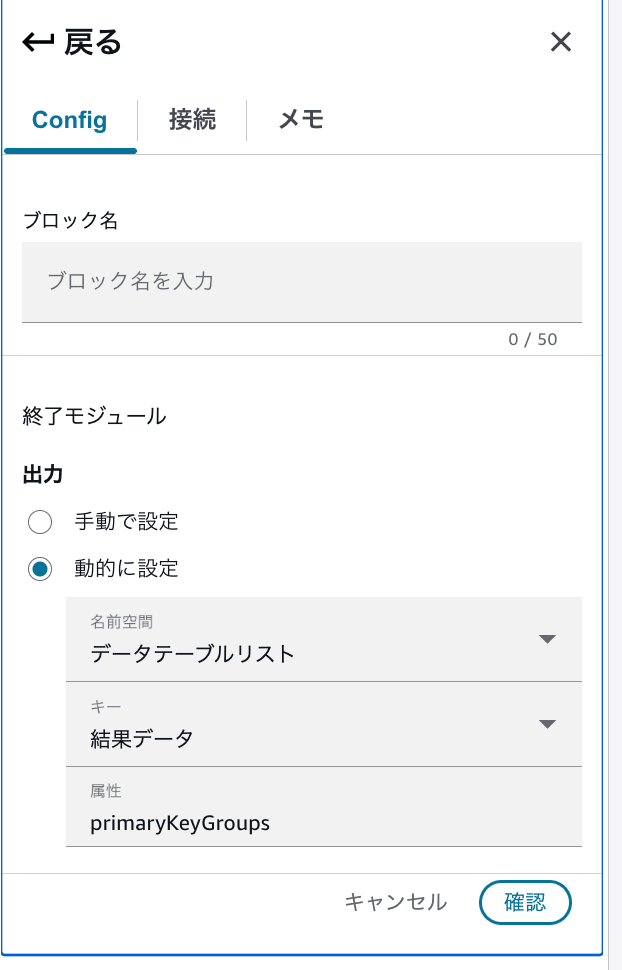
State with primaryKeyGroups of the data table list set as the flow module output
This configuration corresponds to the following value in JSONPath.
$.DataTableList.ResultData.primaryKeyGroups
The reason primaryKeyGroups is specified without going all the way to .default is that the flow module output schema receives an object like the following.
{
  "default": [
    {
      "primaryKeys": [],
      "attributes": []
    }
  ]
}
Creating a Version of the Flow Module
Once configuration is complete, save and publish the flow module.
Then, to specify it from the AI agent's flow module tool, create a version of the GetInquiryCategories flow module.
Flow modules allow you to create versions to track changes, and flows and tools can reference a specific version.
In the subsequent tool configuration, select the version of the flow module created here.
Creating the AI Agent
From the AI agent management screen, create an orchestration AI agent.
The AI agent name for this time is as follows.
SelfServiceOrchestrator-GetInquiryCategories
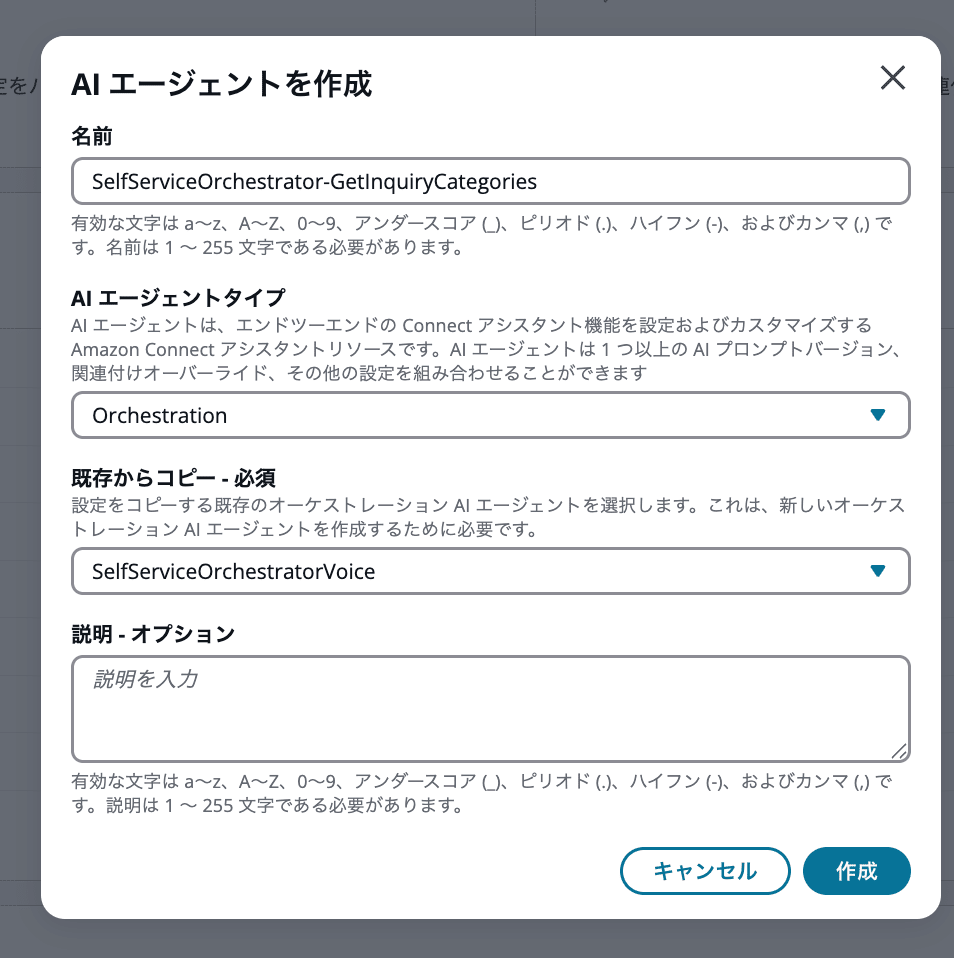
AI agent used for retrieving and classifying inquiry types
This time, the AI agent prompt has not been changed from the default prompt of SelfServiceOrchestrationVoice.
The Retrieve tool is also used with default settings, and the behavior related to inquiry classification is configured in the two tools to be added next.
| Tool Name | Tool Type | Role |
|---|---|---|
GetInquiryCategories |
Flow Module | Retrieves inquiry type candidates from the data table |
CompleteInquiryClassification |
Return to Control | Passes the classification result to the contact flow and ends the conversation |
Adding the GetInquiryCategories Tool
Add a flow module tool to the AI agent and specify the created GetInquiryCategories flow module.
The configuration values are as follows.
| Configuration Item | Configuration Value |
|---|---|
| Tool Name | GetInquiryCategories |
| Tool Type | Flow Module |
| Flow Module | GetInquiryCategories |
| Version | The version of the created flow module |
| Instructions | Call this when you determine that the customer has no more questions or no additional questions. |
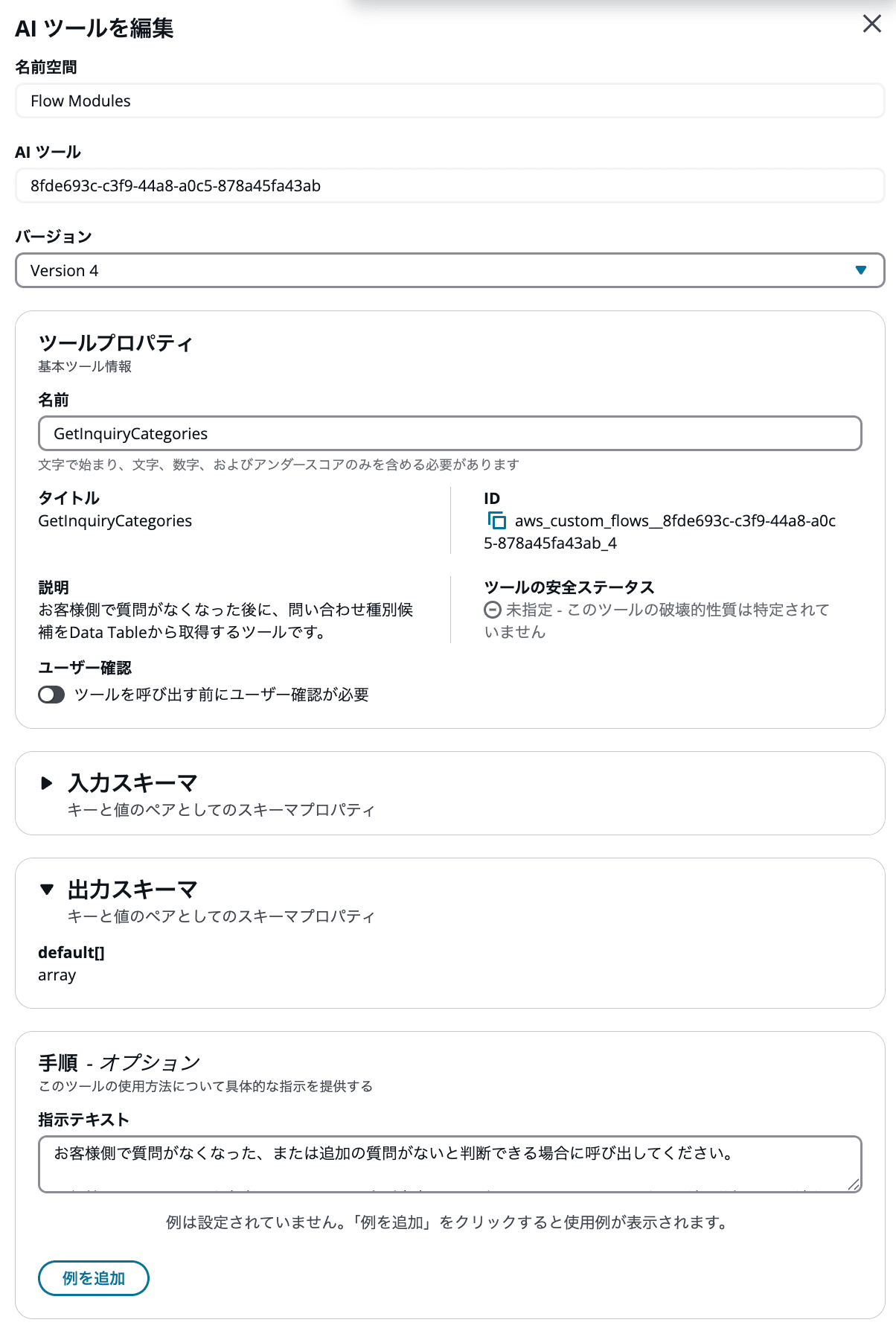
State with the GetInquiryCategories flow module added as an AI agent tool
Since the flow module side has no input, there are no input values when calling the GetInquiryCategories tool.
When the tool is executed, the data table retrieval result set in the flow module's "Return" block is returned to the AI agent. The actual retrieval result will be confirmed in the operation verification described later.
Adding the CompleteInquiryClassification Tool
Next, add a custom tool with the tool type Return to Control.
The configuration values are as follows.
| Configuration Item | Configuration Value |
|---|---|
| Tool Name | CompleteInquiryClassification |
| Tool Type | Return to Control |
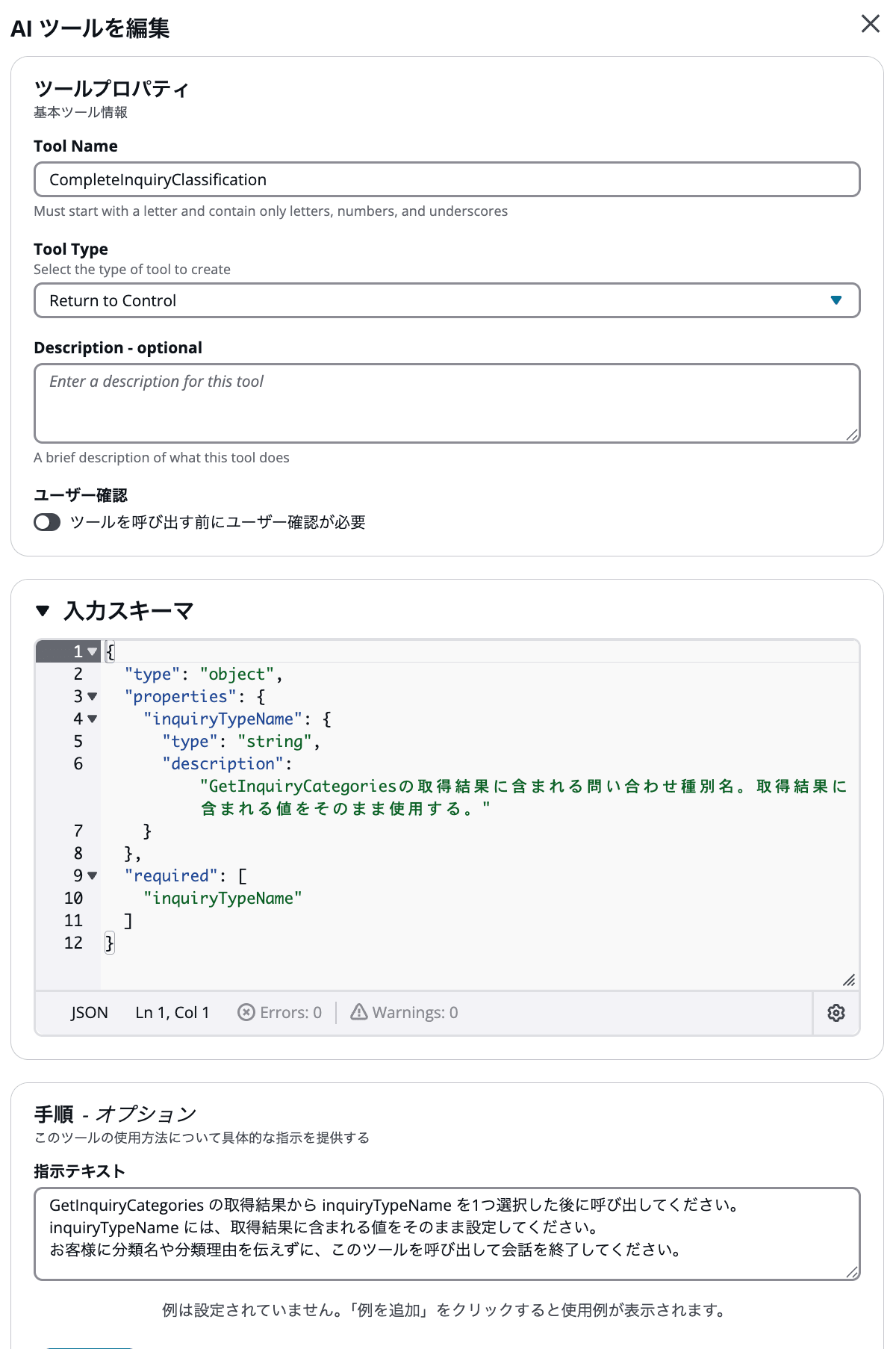
CompleteInquiryClassification tool that passes the inquiry type to the contact flow
The input schema is as follows.
{
  "type": "object",
  "properties": {
    "inquiryTypeName": {
      "type": "string",
      "description": "The inquiry type name included in the GetInquiryCategories retrieval result. Use the value included in the retrieval result as-is."
    }
  },
  "required": [
    "inquiryTypeName"
  ]
}
The tool instruction text is as follows.
Call this after selecting one inquiryTypeName from the GetInquiryCategories retrieval result.
Set the value included in the retrieval result as-is for inquiryTypeName.
Call this tool to end the conversation without telling the customer the classification name or reason for classification.
For example, if determined to be a billing-related inquiry, CompleteInquiryClassification is called internally with the following value.
{
  "inquiryTypeName": "請求"
}
When the Return to Control tool is called, the conversation with the AI agent ends and control returns to the contact flow. The tool name and input parameters are stored in Amazon Lex session attributes and can be referenced from the contact flow.
The following documentation is also helpful for creating custom Return to Control tools.
Please also refer to the following article for specific steps on creating Return to Control tools.
After adding the two tools, save the AI agent and create a version. The contact flow will use the version of the AI agent created here.
Configuring the Contact Flow
The contact flow created this time is as follows.
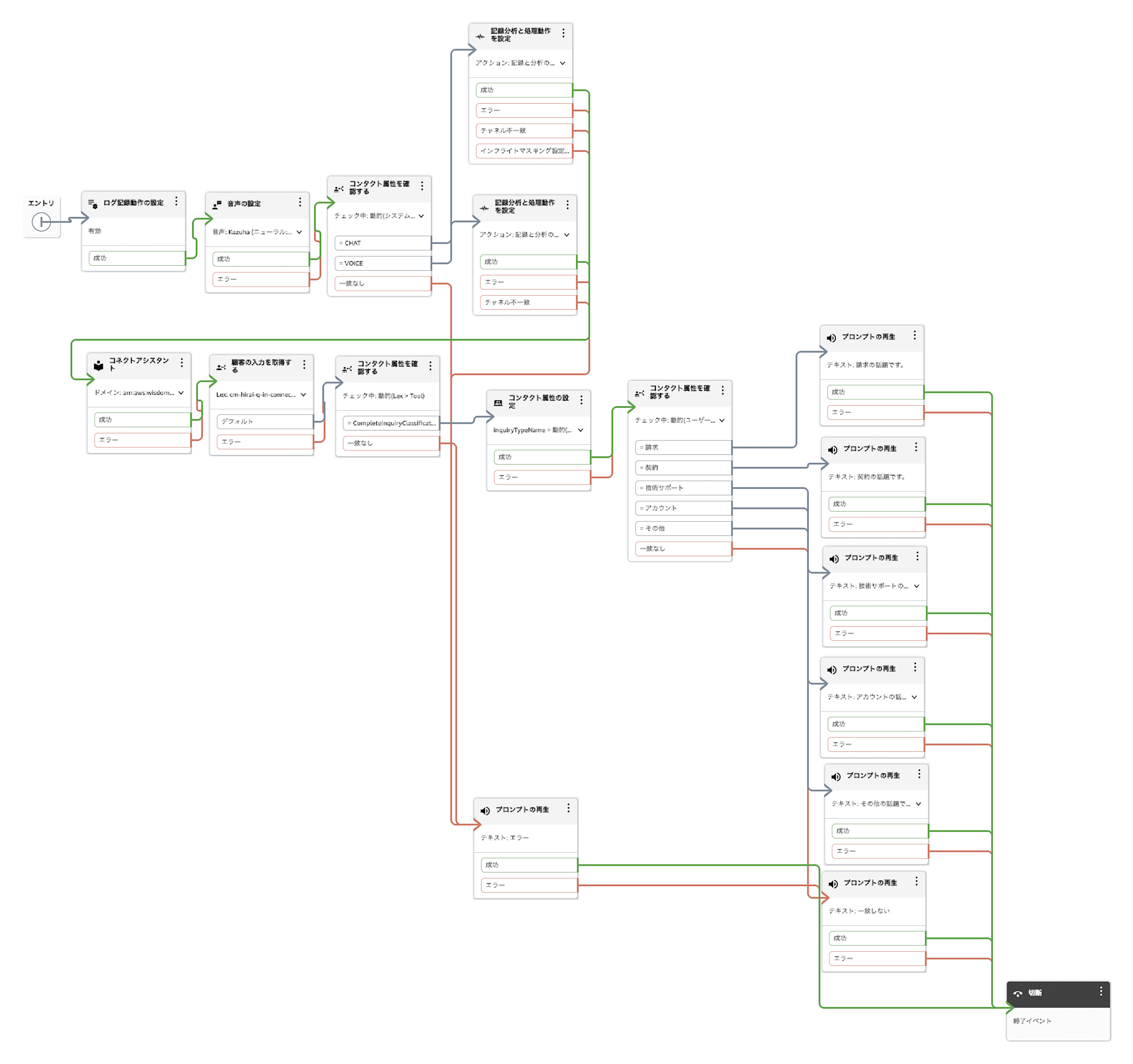
Contact flow that sets the inquiry type as a contact attribute after the conversation with the AI agent ends and branches
In this article, the focus is on the configuration after the conversation with the AI agent ends.
Checking the Return to Control Tool Name
Place a "Check contact attributes" block after the default output of the "Get customer input" block.
The configuration values are as follows.
| Configuration Item | Configuration Value |
|---|---|
| Attribute to check | Lex |
| Key | Session attributes |
| Session attribute key | Tool |
| Condition | Equals CompleteInquiryClassification |
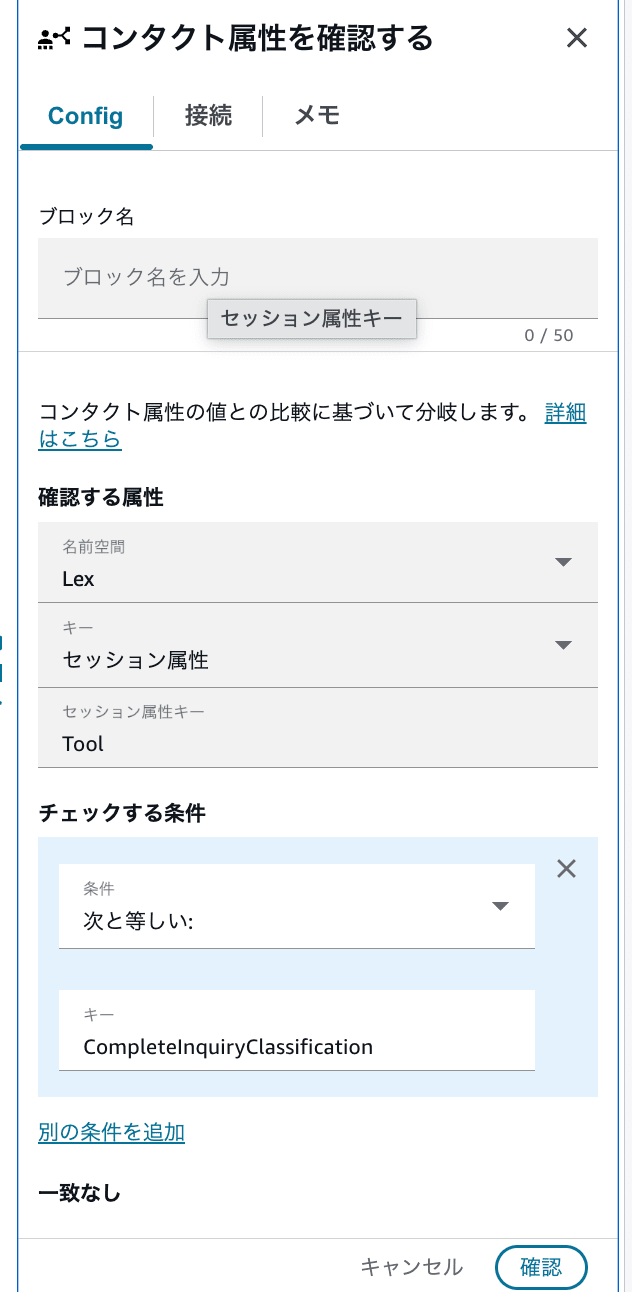
Configuration to verify that the Lex session attribute Tool is CompleteInquiryClassification
The value being checked is as follows.
$.Lex.SessionAttributes.Tool
When CompleteInquiryClassification is called, this value will contain the Return to Control tool name CompleteInquiryClassification.
Here, instead of the flow module tool name GetInquiryCategories, the Return to Control tool name that returned control to the contact flow is verified.
Setting inquiryTypeName as a Contact Attribute
When Tool is CompleteInquiryClassification, proceed to the "Set contact attributes" block.
The configuration values are as follows.
| Configuration Item | Configuration Value |
|---|---|
| Destination | Current contact |
| Destination key | inquiryTypeName |
| Value namespace | Lex |
| Key | Session attributes |
| Session attribute key | inquiryTypeName |
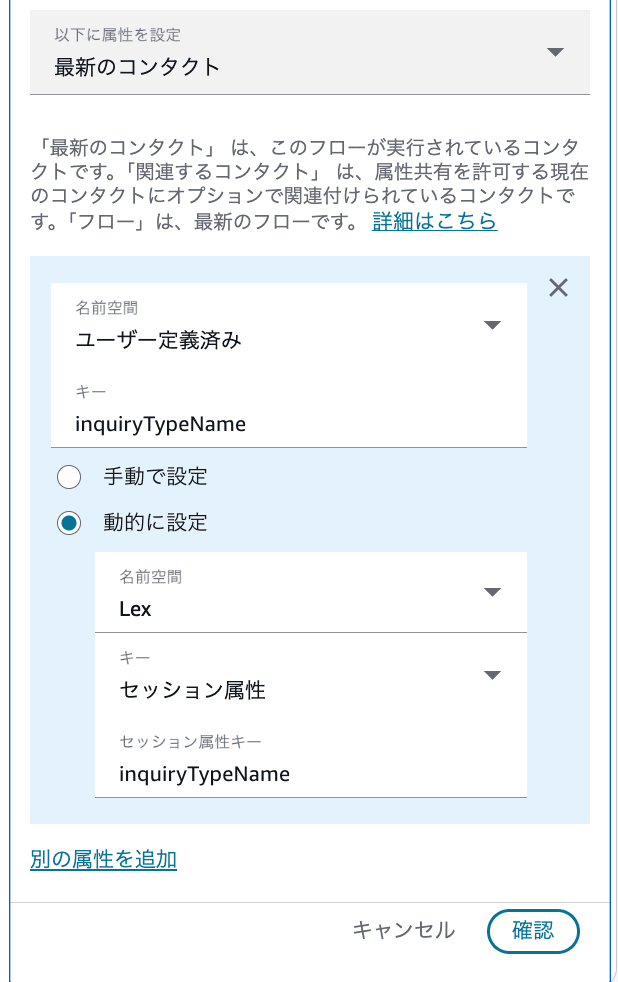
State with the Lex session attribute inquiryTypeName set as a user-defined contact attribute
The input parameters of the Return to Control tool are referenced from the following Amazon Lex session attribute.
$.Lex.SessionAttributes.inquiryTypeName
When this is set as a user-defined contact attribute, it can be referenced from subsequent blocks as follows.
$.Attributes.inquiryTypeName
Branching by Inquiry Type
Place a "Check contact attributes" block and check the user-defined inquiryTypeName.
The conditions configured this time are as follows.
請求(Billing)契約(Contract)技術サポート(Technical Support)アカウント(Account)その他(Other)
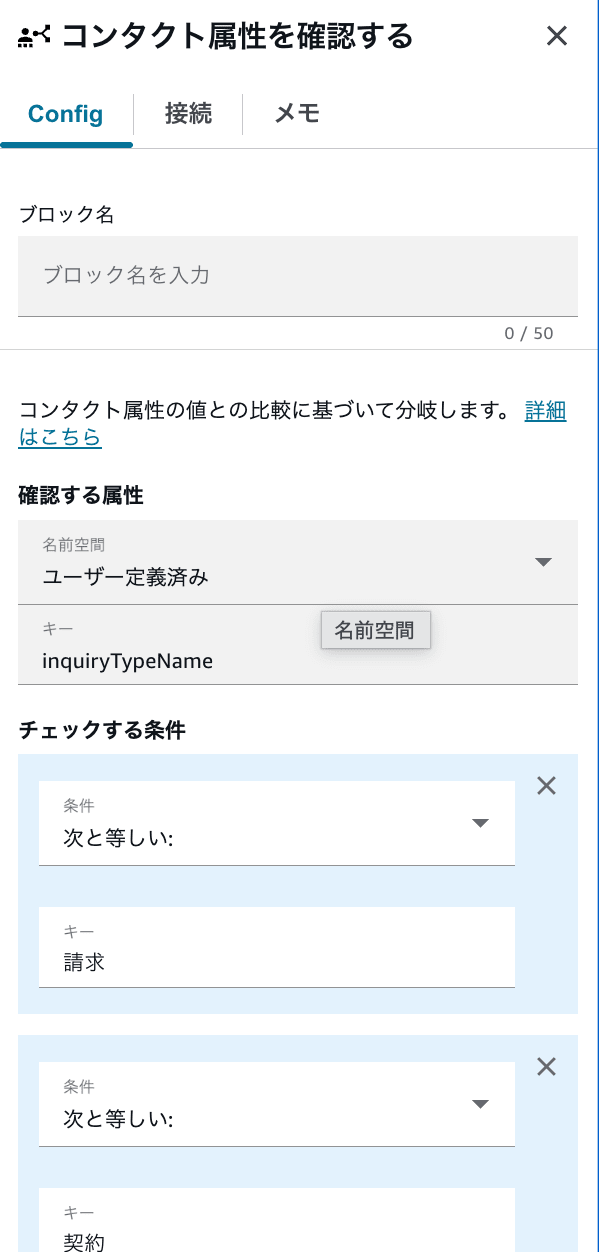
Configuration to branch subsequent processing according to user-defined inquiryTypeName
In the verification contact flow, to confirm the classification result, a message is played at each branch as follows.
inquiryTypeName |
Message to play |
|---|---|
| 請求 (Billing) | This is a billing topic. |
| 契約 (Contract) | This is a contract topic. |
| 技術サポート (Technical Support) | This is a technical support topic. |
| アカウント (Account) | This is an account topic. |
| その他 (Other) | This is another topic. |
| No match | No match |
In actual production use, replace each message block with processing such as "Set working queue" or "Transfer to queue."
Operation Verification
The following is based on content excerpted from actual verification logs.
Flow of Interaction
The customer made the following inquiry.
Please tell me about billing methods.
The AI agent responded as follows.
I see you have a question about billing methods. Let me check for you.
The AI agent then called the Retrieve tool and searched the knowledge base with the following search query.
{
  "assistantId": "d28ddb7e-edee-4655-a8d3-02cf659d80f6",
  "retrievalQuery": "請求方法 支払い方法"
}
The assistantId is an ID that identifies the AI assistant used in this verification environment.
Based on the search results, the AI agent spoke the following response to the customer.
Regarding billing methods for Classmethod Members. The basic billing is invoice payment in Japanese yen. Credit card payment is also available, in which case the discount rate is 4 percent. The billing cycle is end-of-month closing with payment due by the end of the following month. Do you have any other questions?
The customer responded as follows.
Thank you. My issue has been resolved.
Inquiry Type Classification
In response to the customer's utterance, the AI agent made the following judgment and called GetInquiryCategories.
The customer says their issue has been resolved, so this conversation is heading toward closure. Since I can determine that the customer has no more questions, I need to call GetInquiryCategories to retrieve the inquiry type and then complete the classification with CompleteInquiryClassification.
Looking at the logs, the retrieval result of GetInquiryCategories contained the 5 records registered in InquiryCategoryMaster.
The actual retrieval result is as follows. Only some records are excerpted.
{
  "default": [
    {
      "primaryKeys": [
        {
          "attributeName": "inquiryTypeName",
          "attributeValue": "請求"
        }
      ],
      "attributes": [
        {
          "attributeName": "examples",
          "attributeValue": "支払い遅延, 請求書再発行, 請求金額確認, 支払い方法変更",
          "useDefault": false
        }
      ]
    },
    {
      "primaryKeys": [
        {
          "attributeName": "inquiryTypeName",
          "attributeValue": "その他"
        }
      ],
      "attributes": [
        {
          "attributeName": "examples",
          "attributeValue": "担当部署不明, 上記に該当しない問い合わせ",
          "useDefault": false
        }
      ]
    }
  ]
}
From this result, it was confirmed that each element under default in the flow module output consists of primaryKeys and attributes.
inquiryTypeName was returned as primaryKeys, and the examples referenced during classification were returned as examples within attributes.
Based on the retrieval result, the AI agent made the following judgment.
The customer's inquiry was about billing methods, and that issue has been resolved. From the GetInquiryCategories result, this inquiry falls under the "Billing" category.
The inquiryTypeName included in the retrieval result is "Billing". I will pass this to CompleteInquiryClassification to end the conversation.
Ultimately, the AI agent called CompleteInquiryClassification with the following input value.
{
  "inquiryTypeName": "請求"
}
In the logs, no utterances to the customer were recorded after the call to CompleteInquiryClassification, confirming that the selected inquiryTypeName was not communicated to the customer.
From this verification log, it was confirmed that the AI agent classified the conversation content based on the inquiry type candidates from the data table and passed the result to the Return to Control tool without speaking it to the customer.
Summary
The AI agent of Amazon Connect Customer was able to call a flow module tool and retrieve inquiry type candidates managed in a data table.
The inquiry type selected by the AI agent can be passed as an input parameter to the custom Return to Control tool, allowing it to be referenced from the contact flow without being spoken to the customer.
With this configuration, it was confirmed that inquiry types and classification examples can be managed in a data table while the AI agent's classification results can be handled in subsequent contact flows.
