
You can now select GPT 5.6 Terra and GPT 5.6 Luna in Amazon Connect Customer AI Agent

This page has been translated by machine translation. View original
Introduction
When checking the AI prompt creation screen for the AI Agent in Amazon Connect Customer in the Tokyo region, I found that the following models are now available for selection.
- GPT 5.6 Terra (Cross-Region Global)
- GPT 5.6 Luna (Cross-Region Global)
In this article, we will check the models available for selection in the orchestration type, the prompt types supported by GPT 5.6 Terra/Luna, and the models configured in the default prompts provided by AWS.
Confirming GPT 5.6 Terra and Luna in the Admin Console
GPT 5.6 Terra and GPT 5.6 Luna were displayed as model options in the AI prompt for the orchestration type in the Tokyo region.
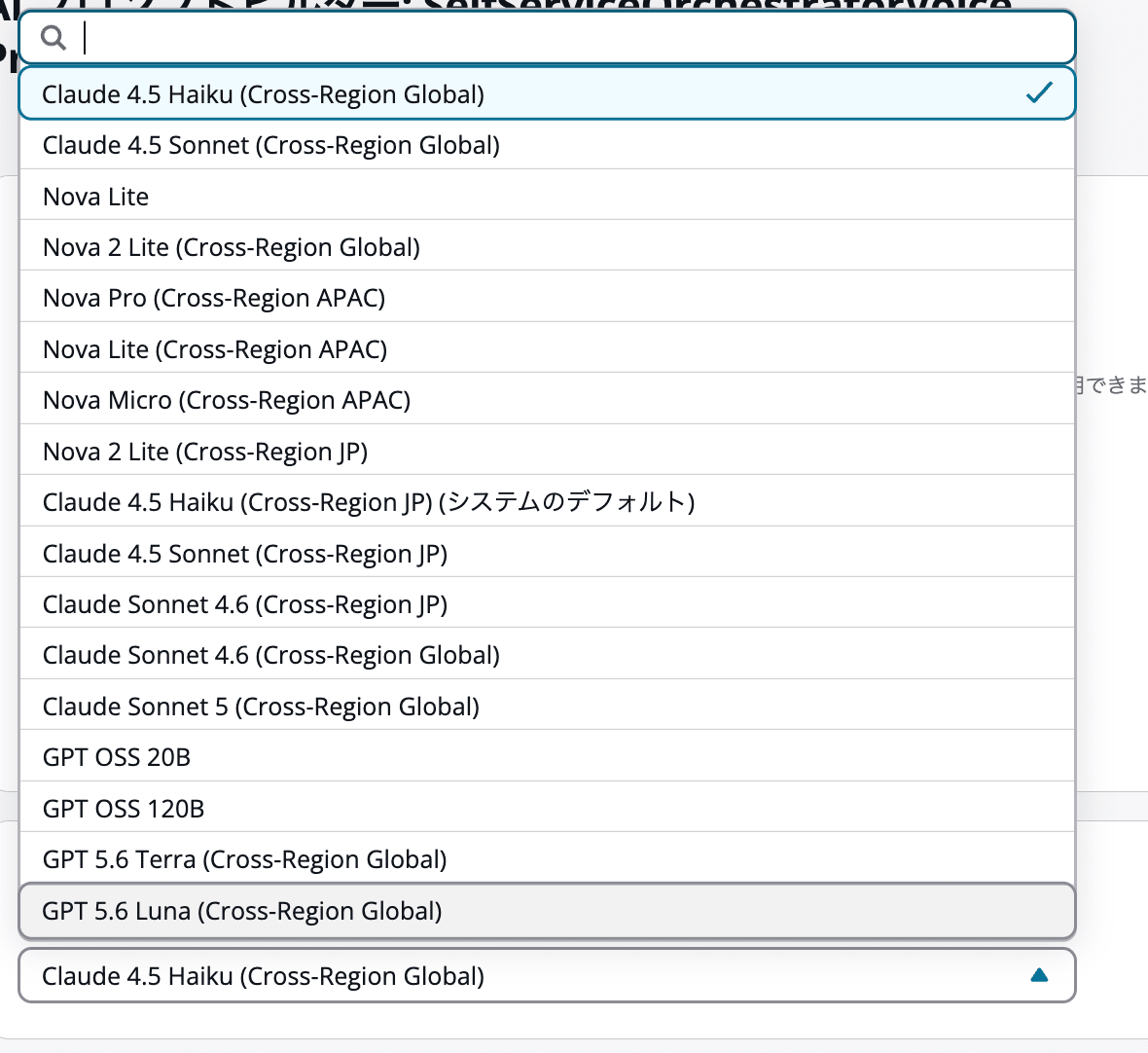
GPT 5.6 Terra/Luna are displayed in the model options.
Both are Cross-Region Global models. Next, we will use the AWS CLI to check the model IDs and supported prompt types.
Checking Model Information with the AWS CLI
Environment and Prerequisites
I performed the check from AWS CloudShell, targeting the Assistant in the Tokyo region verification environment. The AWS CLI version used was 2.38.1.
First, set the region and output destination, then retrieve the list of Assistants.
export AWS_REGION="ap-northeast-1"
export AWS_PAGER=""

export OUT_DIR="$HOME/qconnect-model-check-$(date -u +%Y%m%dT%H%M%SZ)"
mkdir -p "$OUT_DIR"

aws --version

aws qconnect list-assistants \
  --region "$AWS_REGION" \
  --query 'assistantSummaries[].{Name:name,AssistantId:assistantId,Status:status}' \
  --output table
Set the target Assistant ID to an environment variable from the list-assistants results.
export ASSISTANT_ID="Target environment's Assistant ID"
Please replace ASSISTANT_ID with the value from your own environment. Note that what is specified here is the ID that identifies the Assistant, not the Amazon Connect Customer instance ID.
Model Information for GPT 5.6 Terra/Luna
Retrieve the model list with list-models and save it to a JSON file.
aws qconnect list-models \
  --region "$AWS_REGION" \
  --assistant-id "$ASSISTANT_ID" \
  --output json \
  > "$OUT_DIR/models-all.json"

jq '
  [
    .modelSummaries[]
    | select(
        .modelId == "global.openai.gpt-5.6-terra"
        or .modelId == "global.openai.gpt-5.6-luna"
      )
  ]
' "$OUT_DIR/models-all.json"
The full model response is saved first, and then jq is used to extract only the two models in question.
The results were as follows.
[
  {
    "modelId": "global.openai.gpt-5.6-terra",
    "displayName": "GPT 5.6 Terra (Cross-Region Global)",
    "crossRegionStatus": "GLOBAL",
    "supportsPromptCaching": false,
    "supportedAIPromptTypes": [
      "INTENT_LABELING_GENERATION",
      "QUERY_REFORMULATION",
      "SELF_SERVICE_PRE_PROCESSING",
      "SELF_SERVICE_ANSWER_GENERATION",
      "EMAIL_OVERVIEW",
      "EMAIL_QUERY_REFORMULATION",
      "CASE_SUMMARIZATION",
      "NOTE_TAKING",
      "ORCHESTRATION"
    ],
    "modelLifecycle": "ACTIVE"
  },
  {
    "modelId": "global.openai.gpt-5.6-luna",
    "displayName": "GPT 5.6 Luna (Cross-Region Global)",
    "crossRegionStatus": "GLOBAL",
    "supportsPromptCaching": false,
    "supportedAIPromptTypes": [
      "INTENT_LABELING_GENERATION",
      "QUERY_REFORMULATION",
      "SELF_SERVICE_PRE_PROCESSING",
      "SELF_SERVICE_ANSWER_GENERATION",
      "EMAIL_OVERVIEW",
      "EMAIL_QUERY_REFORMULATION",
      "CASE_SUMMARIZATION",
      "NOTE_TAKING",
      "ORCHESTRATION"
    ],
    "modelLifecycle": "ACTIVE"
  }
]
For both models, crossRegionStatus was GLOBAL and modelLifecycle was ACTIVE. Also, supportsPromptCaching was false in this response.
The model IDs were as follows.
| Model | Model ID |
|---|---|
| GPT 5.6 Terra | global.openai.gpt-5.6-terra |
| GPT 5.6 Luna | global.openai.gpt-5.6-luna |
When specifying a model via CLI or similar tools, use this model ID rather than the display name.
Support for More Than Just Orchestration
The supported AI prompt types can be checked with supportedAIPromptTypes. Both GPT 5.6 Terra and Luna supported the following 9 types.
| Use Case | Prompt Type in API |
|---|---|
| Intent labeling generation | INTENT_LABELING_GENERATION |
| Query reformulation | QUERY_REFORMULATION |
| Self-service pre-processing | SELF_SERVICE_PRE_PROCESSING |
| Self-service answer generation | SELF_SERVICE_ANSWER_GENERATION |
| Email overview | EMAIL_OVERVIEW |
| Email query reformulation | EMAIL_QUERY_REFORMULATION |
| Case summarization | CASE_SUMMARIZATION |
| Note taking | NOTE_TAKING |
| Orchestration | ORCHESTRATION |
On the other hand, the following 3 types were not included in the supported list for either model.
ANSWER_GENERATION
EMAIL_RESPONSE
EMAIL_GENERATIVE_ANSWER
In this investigation, Claude Sonnet 4.6 and Claude Sonnet 5 only supported the ORCHESTRATION type, whereas GPT 5.6 Terra/Luna support types beyond orchestration as well.
List of Orchestration-Supported Models
Extract models that support ORCHESTRATION from the saved response.
jq '
  [
    .modelSummaries[]
    | select(
        (.supportedAIPromptTypes // [])
        | index("ORCHESTRATION")
      )
    | {
        displayName,
        modelId,
        modelLifecycle
      }
  ]
' "$OUT_DIR/models-all.json"
This command extracts models that include ORCHESTRATION in their supported types and displays the display name, model ID, and lifecycle.
This time, the orchestration-supported models returned as ACTIVE by the API were the following 17.
| Display Name |
|---|
| Claude 4.5 Haiku (Cross-Region Global) |
| Claude 4.5 Sonnet (Cross-Region Global) |
| Nova Lite |
| Nova 2 Lite (Cross-Region Global) |
| Nova Pro (Cross-Region APAC) |
| Nova Lite (Cross-Region APAC) |
| Nova Micro (Cross-Region APAC) |
| Nova 2 Lite (Cross-Region JP) |
| Claude 4.5 Haiku (Cross-Region JP) |
| Claude 4.5 Sonnet (Cross-Region JP) |
| Claude Sonnet 4.6 (Cross-Region JP) |
| Claude Sonnet 4.6 (Cross-Region Global) |
| Claude Sonnet 5 (Cross-Region Global) |
| GPT OSS 20B |
| GPT OSS 120B |
| GPT 5.6 Terra (Cross-Region Global) |
| GPT 5.6 Luna (Cross-Region Global) |
The API response also included the following 2 items with LEGACY status.
- Claude 3.5 Sonnet v2 (Cross-Region APAC)
- Claude Sonnet 4 (Cross-Region APAC)
In total, 19 items are returned by the API as orchestration-supported. When organizing the model list, be sure to check modelLifecycle in addition to supportedAIPromptTypes.
No GPT Specified in Default Prompts
Retrieving AWS-Provided System Prompts
Next, we will check the models configured in the default prompts provided by AWS.
Here, AI prompts with an origin of SYSTEM are treated as default prompts. Use --origin SYSTEM with list-ai-prompts to narrow down the targets.
aws qconnect list-ai-prompts \
  --region "$AWS_REGION" \
  --assistant-id "$ASSISTANT_ID" \
  --origin SYSTEM \
  --output json \
  > "$OUT_DIR/prompts-system.json"

jq '
  [
    .aiPromptSummaries[]
    | {
        name,
        type,
        modelId
      }
  ]
  | sort_by(.type, .name)
' "$OUT_DIR/prompts-system.json"
The results are saved to a JSON file, and the prompt name, type, and model ID are displayed. This allows you to check the models configured in each system prompt, rather than the available model options.
Models Configured in System Prompts
The 15 items retrieved this time are summarized by model as follows. The model IDs in the table are the values obtained from the API.
| System Prompt Name | Configured Model ID |
|---|---|
AnswerGenerationCaseSummarizationEmailGenerativeAnswerEmailOverviewEmailQueryReformulationEmailResponse |
jp.anthropic.claude-sonnet-4-5-20250929-v1:0 |
IntentLabelingGenerationQueryReformulation |
jp.amazon.nova-2-lite-v1:0 |
NoteTakingSalesAgentSelfServiceOrchestrationChatSelfServiceOrchestrationVoice |
jp.anthropic.claude-haiku-4-5-20251001-v1:0 |
AgentAssistanceOrchestration |
jp.anthropic.claude-sonnet-4-6 |
SelfServiceAnswerGenerationSelfServicePreProcessing |
apac.amazon.nova-pro-v1:0 |
Among the 15 system prompts retrieved this time, no GPT models were specified.
For orchestration types specifically, the configured models were divided as follows.
| System Prompt Name | Configured Model |
|---|---|
AgentAssistanceOrchestration |
Claude Sonnet 4.6/JP |
SalesAgent |
Claude Haiku 4.5/JP |
SelfServiceOrchestrationChat |
Claude Haiku 4.5/JP |
SelfServiceOrchestrationVoice |
Claude Haiku 4.5/JP |
Note that the official documentation also lists the models used in system prompts, but at the time of writing, there were some discrepancies compared to the API results from this investigation. This article presents the values obtained from the API in the verification environment.
Summary
GPT 5.6 Terra and GPT 5.6 Luna are now available as model options for the orchestration type in Amazon Connect Customer AI Agent in the Tokyo region.
Through the API, both models were confirmed to support 9 types including orchestration. However, among the AWS-provided system prompts retrieved this time, no GPT models were specified.
When changing models, be sure to check the supported AI prompt types and the currently configured model.
