
In Amazon Connect AI agent self-service, switching to the default AI agent may occur after a Lex session timeout.

This page has been translated by machine translation. View original
Issue
I am testing a configuration in Amazon Connect Customer AI agent self-service that classifies conversation content into inquiry categories after responding to customer inquiries.
In the contact flow, InquiryClassificationAgent is specified as the AI agent responsible for handling and classifying inquiries.
This AI agent classifies the conversation content and then calls the custom Return to Control tool ReturnInquiryCategory. This ends the conversation with the AI agent and returns control to the contact flow.
The expected processing flow is as follows.
InquiryClassificationAgentresponds to the customer's question- Confirm that the customer has no additional questions
- Classify the conversation content into categories such as "Billing," "Contract," or "Other"
- Call
ReturnInquiryCategoryto return control to the contact flow - The contact flow branches according to the classification result
In the contact flow, it is confirmed that the Lex session attribute Tool has the following value.
ReturnInquiryCategory
However, during testing, Tool had the following value, and it did not match the expected condition.
COMPLETE
Upon checking the AI agent logs, it was found that instead of InquiryClassificationAgent specified in the contact flow, the default self-service AI agent SelfService_JP was responding partway through.
Answer
In this test, the cause was that no response was received from the customer within the Amazon Lex bot's idle session timeout period.
In the AI agent logs, there was a gap of more than 1 minute between customer responses. Meanwhile, the idle session timeout of the Lex bot being used was set to 1 minute.
As a result, the Lex session timed out during the conversation and a new conversation session was created. In the new session, instead of InquiryClassificationAgent specified in the contact flow, the default self-service AI agent SelfService_JP was called.
Because SelfService_JP called the system tool COMPLETE, the Lex session attribute Tool referenced in the contact flow also became COMPLETE.
In other words, ReturnInquiryCategory was not converted to COMPLETE. After the session timeout, a different AI agent was called, and that AI agent executed COMPLETE.
What Was Confirmed in the AI Agent Logs
From the AI agent logs and Lex bot settings, the following sequence of events was confirmed.
InquiryClassificationAgentspecified in the contact flow was responding- There was a gap of more than 1 minute between customer responses
- The Lex bot's idle session timeout of 1 minute was exceeded
- A new conversation session was created
- The default
SelfService_JPresponded SelfService_JPcalledCOMPLETE
When customer responses were intentionally delayed by more than 1 minute using the same configuration, it was also confirmed that a new session was created and the default self-service AI agent responded.
The title uses the expression "switches to the default AI agent" for clarity, but strictly speaking, the AI agent did not switch within the same conversation session. A new conversation session was created due to the timeout, and the default AI agent was called in that session.
Default AI Agent Settings
In the environment used for this test, SelfService_JP was specified under [Self-service] in [Default AI agent settings].
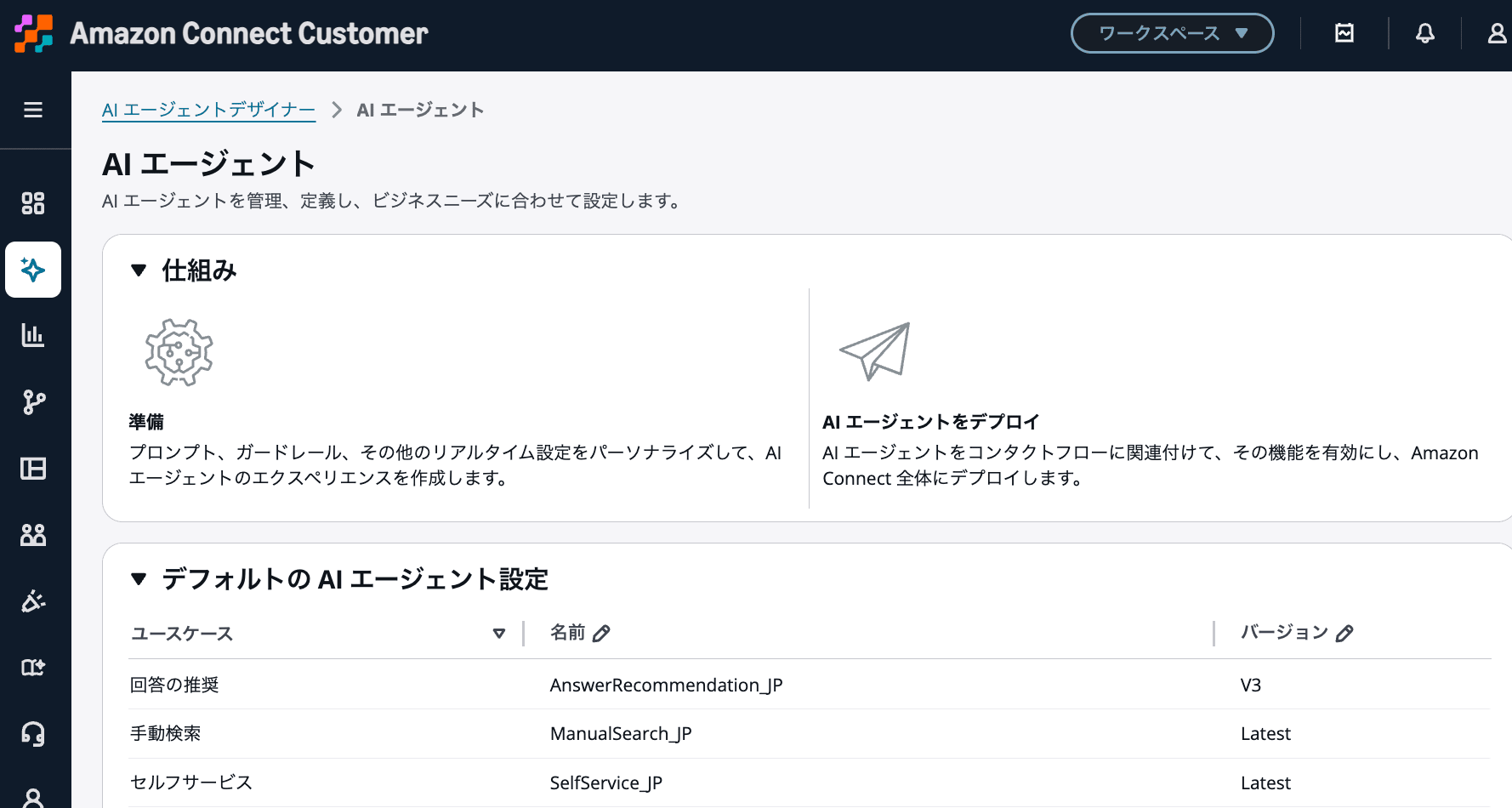
State where SelfService_JP is specified under [Self-service] in [Default AI agent settings]
Due to this setting, SelfService_JP was called in the new conversation session created after the Lex session timeout.
Even when an individual AI agent is specified in the contact flow, if a new session is created during the conversation as in this case, the default self-service AI agent may respond.
Lex Idle Session Timeout
Amazon Lex retains context information such as slot data and session attributes until the conversation session ends.
The length of time a session is retained is configured using the Lex bot's idle session timeout. The default is 5 minutes, and it can be set anywhere from 0 to 1,440 minutes.
Amazon Lex retains context information (slot data and session attributes) until the conversation session ends. To control the length of a bot session, set the session timeout.
The Lex bot used in this test had the idle session timeout set to 1 minute.
In voice channels, customers may take more than 1 minute to respond as they think about their answers or review question details. Therefore, if a short idle session timeout is configured, a new session may be created even during a normal conversation.
Resolution
Set the Lex bot's idle session timeout to be longer than the expected customer response wait time.
If the customer responds within the timeout period, creating a new session can be avoided, and InquiryClassificationAgent specified in the contact flow can continue to handle the conversation.
However, even if the idle session timeout is extended, the session will still end once the configured time is exceeded. Set the timeout with the expected customer response wait time in mind.
Summary
In Amazon Connect Customer AI agent self-service, if a different AI agent than the one specified in the contact flow begins responding partway through, check the Lex bot's idle session timeout.
In this test, because no response was received from the customer within the 1-minute idle session timeout, a new conversation session was created. As a result, the default SelfService_JP responded and called COMPLETE.
It is necessary to check the session and the responding AI agent in the AI agent logs, and to configure the Lex bot's idle session timeout to match the expected response wait time in actual conversations.
