
A manager assistance feature that allows checking contact center operational status in natural language using Amazon Connect Customer has been made available in preview.

This page has been translated by machine translation. View original
Introduction
A preview of an AI-powered manager assistance feature has been announced for Amazon Connect Customer, enabling contact center operations status to be checked using natural language.
In the Amazon Connect Customer management console, this feature is displayed as "Connect Assistant - Preview." In this article, it will be referred to as "Connect Assistant."
According to the AWS update information, it is described as being able to query more than 150 metrics in natural language, including agent schedules, self-service experiences, and performance evaluations, along with their historical data.
It is also described as being able to identify queues that may fail to meet service level objectives and recommend recovery actions.
As of August 19, 2026, an overview of this feature is also published in the Amazon Connect Customer release notes.
On the other hand, within the scope confirmed as of August 19, 2026, no AWS documentation dedicated to this feature explaining available metrics, required permissions, how to use it, or limitations could be found.
Therefore, in addition to the overview described in What's New and the release notes, this article organizes what could be confirmed at this time based on the actual screens and Connect Assistant's responses.
Upon checking the Amazon Connect Customer management console, Connect Assistant was displayed, so the following were actually verified.
- What can and cannot be confirmed with Connect Assistant
- Whether past periods can be specified to compare operational metrics
- Whether monthly inquiry content can be analyzed
- Whether Contact Lens contact categories can be referenced
August 24, 2026 Addendum
Conclusion
In this verification, Connect Assistant was usable as a feature for aggregating and comparing information available in Amazon Connect Customer dashboards, real-time metrics, historical metrics, and more, using natural language.
For example, the following types of information can be confirmed.
- Number of contacts, number of abandonments
- Average handling time
- Performance by queue and channel
- Agent handling status
- Comparison with past periods
- Aggregation by Contact Lens contact category
On the other hand, in this verification, the behavior of cross-referencing the transcript text of each contact to classify and summarize its content could not be confirmed.
Therefore, it is necessary to distinguish between the following two things.
| What you want to confirm | Verification result |
|---|---|
| What were the number of inquiries and average handling time in July and August? | Confirmed as operational metrics |
| What types of inquiries were common in July and August? | Free analysis using transcript text could not be confirmed |
| Which queues or channels increased from July to August? | Confirmed as operational metrics |
| What were the specific inquiry reasons that increased from July to August? | Difficult if Contact Lens categories have not been set up in advance |
In other words, Connect Assistant is a conversational assistant for checking operational metrics, not a feature for freely analyzing inquiry content across all transcripts.
If you want to check trends in inquiry content, a candidate approach is to set up contact categories in Contact Lens for items such as "pricing," "cancellation," "how to use," and "outage" in advance, and then aggregate those classification results from Connect Assistant.
Checking Connect Assistant
"Connect Assistant - Preview" was displayed on the right side of the Amazon Connect Customer management console.
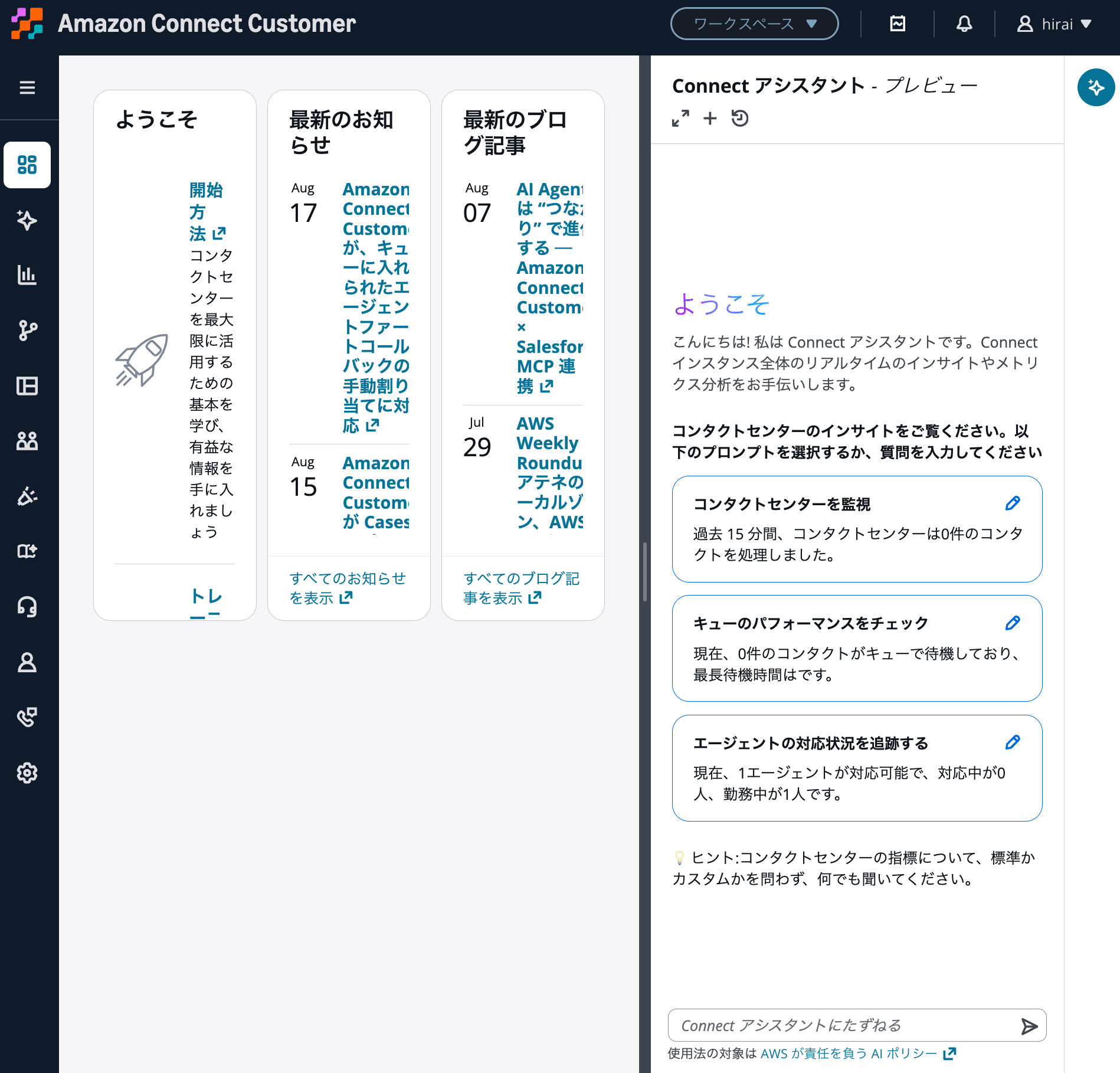
Connect Assistant - Preview displayed in the Amazon Connect Customer management console
The initial screen displayed the following prompts.
- Monitor contact center
- Check queue performance
- Track agent handling status
For example, "Check queue performance" allows you to check the current number of contacts waiting in queues and the longest wait time.
"Track agent handling status" allows you to check the number of agents by status, such as available, handling, or on duty.
Even from the initial screen prompts, it is clear that the primary use cases are real-time monitoring of the contact center and checking operational metrics.
What Can Be Confirmed
Connect Assistant was asked what it can confirm.
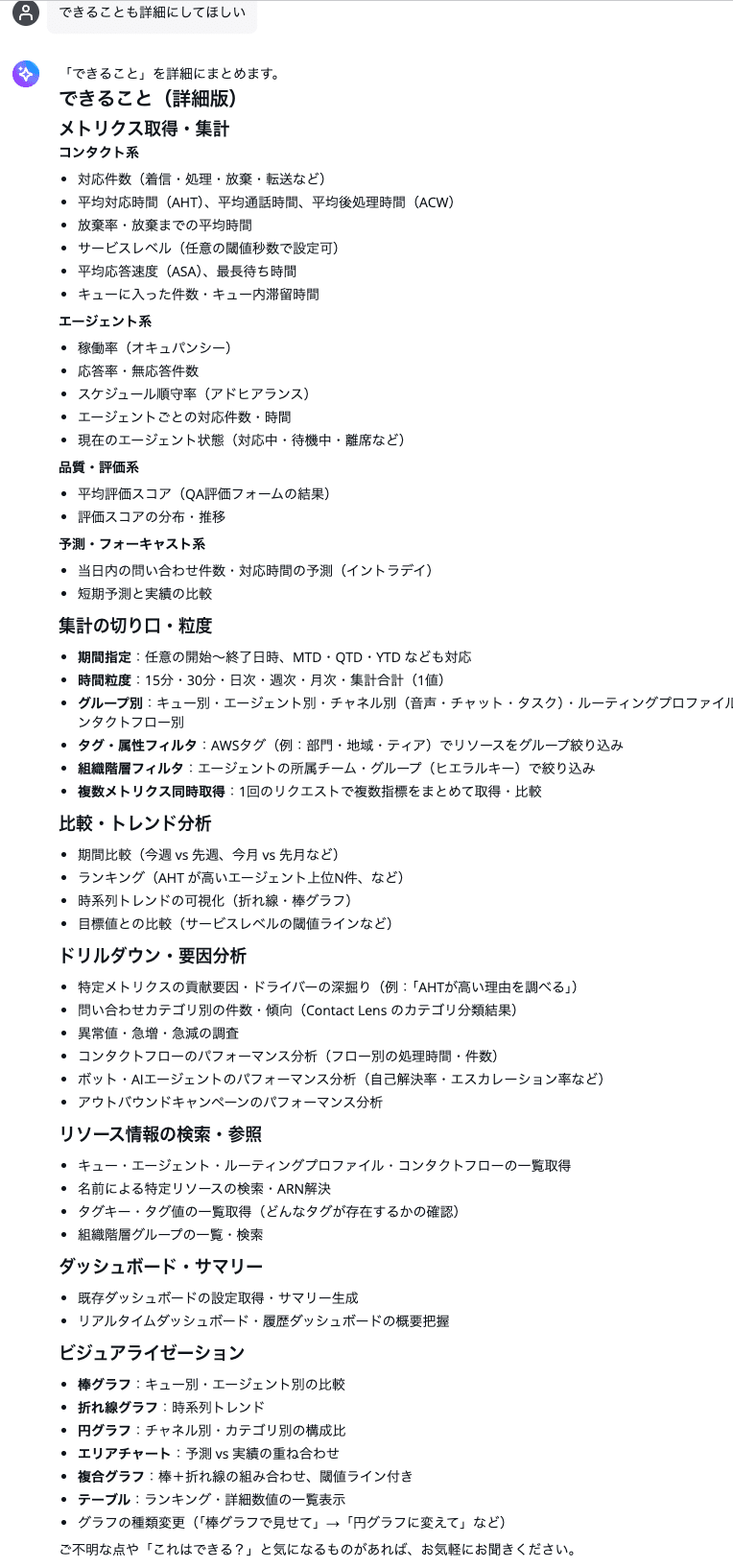
Result of asking Connect Assistant what it can confirm
The response explained that mainly the following information can be confirmed.
- Number of handled contacts, abandoned contacts, transferred contacts
- Average handling time, average hold time, average after-contact work time
- Service level
- Average speed of answer
- Number of contacts entered in queue, longest wait time
- Number of agents by status
- Schedule adherence rate
- Performance evaluation score
- Number of contacts by Contact Lens contact category
- Filtering by period, channel, queue, and agent
- Comparison with previous period and rankings
- Checking metrics that affect service level
These overlap with the information handled in Amazon Connect Customer dashboards, real-time metrics, historical metrics, and more.
The advantage of Connect Assistant is that instead of checking this information individually across multiple screens, you can ask in natural language and compare it all at once.
In Amazon Connect Customer dashboards, you can check contact center performance using real-time and historical metrics.
What Cannot Be Confirmed
Next, Connect Assistant was asked what it cannot confirm.
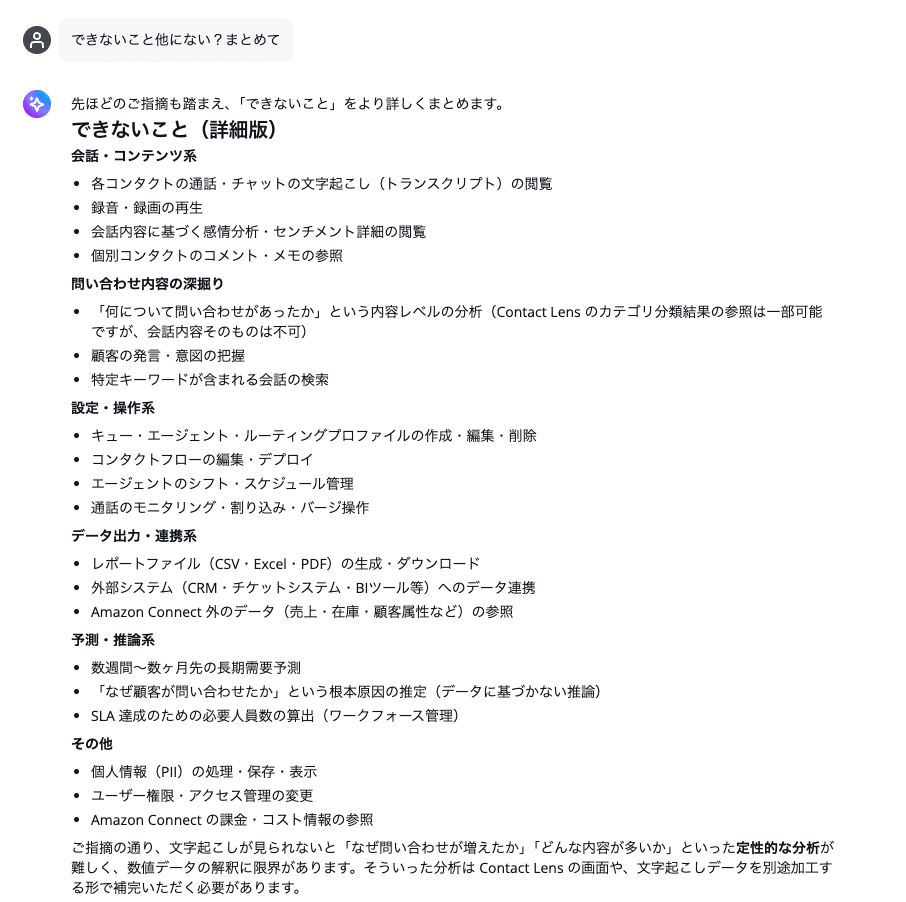
Result of asking Connect Assistant what it cannot confirm
The response explained that mainly the following are out of scope.
- Viewing transcript text of calls and chats
- Playing back recordings and videos
- Understanding what customers said or their intent
- Searching conversations containing specific keywords
- Referencing comments or notes for individual contacts
- Creating, editing, or deleting queues, agents, and similar items
- Editing and deploying contact flows
- Generating report files such as CSV, Excel, or PDF
- Referencing data outside Amazon Connect Customer
- Long-term demand forecasting or inferring root causes that cannot be confirmed from data
This response was generated by Connect Assistant itself and is not an official feature specification stated in public documentation. The scope of responses may vary depending on how questions are phrased, the user's permissions, and the data that has been accumulated.
However, in the verification described below, operational metrics by channel and queue were analyzed rather than transcript text.
Analyzing July and August Inquiries
The following inquiry was made.
Please analyze inquiry types. July and August
The result is as follows.
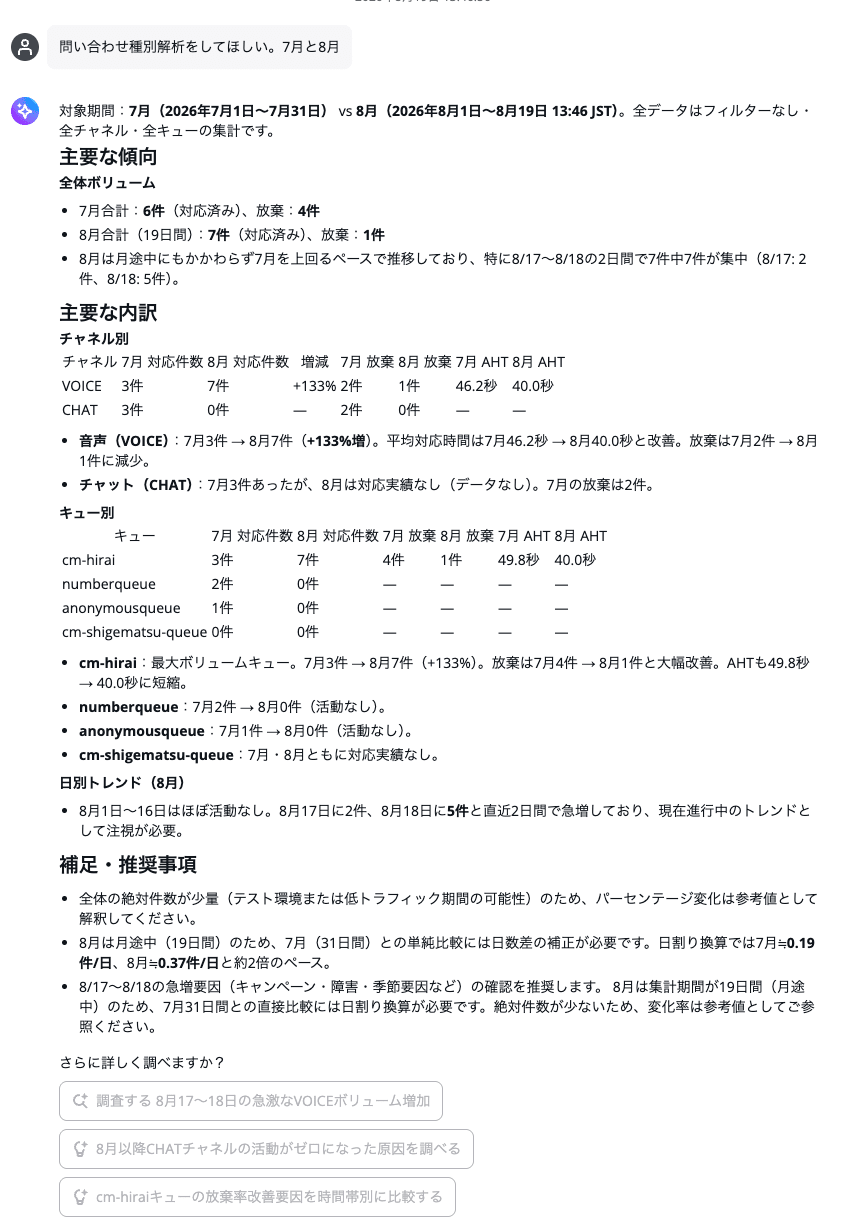
Result of requesting an inquiry type analysis for July and August 2026
In this verification, the following periods were compared.
- July 1, 2026 to July 31, 2026
- August 1, 2026 to August 19, 2026 at 13:46
The response compared the number of handled contacts, abandoned contacts, and average handling time by channel and queue.
It also extracted days when contacts were concentrated and performed a daily average comparison that took into account the difference in aggregation periods.
It is convenient to be able to retrieve multiple operational metrics together and have them explained with consideration for the period difference.
On the other hand, the requested "inquiry types" were analyzed as channels such as VOICE and CHAT, and queues, rather than as inquiry content.
Transcript-Based Inquiry Content Analysis Could Not Be Confirmed
What the author wanted to confirm as "inquiry types" was inquiry content such as the following.
- Pricing
- Cancellation
- How to use
- Outages, defects
- Contract changes
- Complaints, dissatisfaction
However, what Connect Assistant analyzed was mainly the following information.
- Channels such as VOICE and CHAT
- Queues that handled contacts
- Number of handled contacts, abandoned contacts
- Average handling time
- Daily contact count
In other words, the response was a dimensional analysis of contact performance, not an analysis of inquiry content.
In this verification, the behavior of cross-referencing transcript text to perform the following types of analysis could not be confirmed.
- What types of inquiries were common
- What inquiry reasons increased compared to the previous month
- Whether new inquiry themes emerged
- What the main reasons customers felt dissatisfied
- What caused the increase in inquiries
For example, the following questions can be answered by referencing operational metrics.
Please compare the number of inquiries and average handling time for July and August
Please tell me which queue had the most contacts in August
On the other hand, answering the following questions requires checking the transcript text of each contact and comprehensively classifying the conversation content.
Please tell me what types of inquiries were common in July and August
Please tell me the inquiry reasons that newly increased from July to August
In this verification, such highly flexible analysis could not be confirmed.
Therefore, it is easiest to understand Connect Assistant as a feature for aggregating and comparing information available in dashboards, real-time metrics, historical metrics, and more, using natural language.
Inquiry Content Can Be Aggregated Using Contact Lens Categories
While direct analysis of transcript text is not possible, contact categories pre-assigned by Contact Lens could be referenced.
The following inquiry was made.
What types of inquiries were common this month?
The result is as follows.
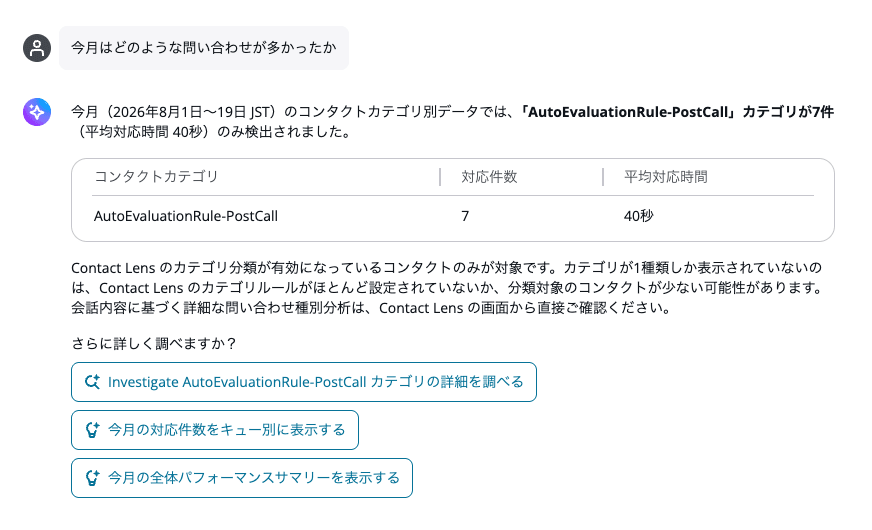
Result of checking contact categories for August 2026
In this verification, the following was displayed as contact categories from August 1 to August 19, 2026.
| Contact Category | Number of Handled Contacts | Average Handling Time |
|---|---|---|
AutoEvaluationRule-PostCall |
7 | 40 seconds |
From this result, it was confirmed that Connect Assistant can reference categories assigned to contacts by Contact Lens and aggregate the number of handled contacts and average handling time by category.
However, the AutoEvaluationRule-PostCall displayed in this verification appears to be a category related to automatic evaluation rules based on its name, and is not a category representing inquiry content.
If you want to aggregate inquiry content by month, a good approach seems to be to set up contact categories in Contact Lens in advance, such as the following examples.
| Contact Category | Examples of Classification Targets |
|---|---|
| Pricing/Billing | Pricing, billing amount, payment method |
| Cancellation | Cancellation, withdrawal, contract termination |
| How to Use | How to use products or services |
| Outages/Defects | Connection errors, issues not working properly |
In Contact Lens, contacts can be classified based on specific words or phrases, or conditions described in natural language.
If categories have been assigned to contacts, it may be possible to ask Connect Assistant the following.
Please compare inquiries in July and August by Contact Lens contact category
Contact Lens handles the classification of conversation content, and Connect Assistant aggregates and compares the already-classified categories.
Therefore, this approach is suited for continuously checking the count and trends of inquiry reasons defined in advance, such as pricing or cancellations.
On the other hand, even if Contact Lens categories are set up, Connect Assistant does not freely read through all transcripts and discover new inquiry themes on the spot.
A different analysis method is needed for discovering inquiry themes that were not anticipated in advance or for free root cause analysis based on what customers said.
Note that newly created category rules are applied to contacts that occur after the rule is created. They cannot be retroactively applied to past conversations that have already been saved, so if you want to perform monthly comparisons, it is necessary to set up categories early and accumulate data.
Summary
An AI-powered manager assistance feature has been provided as a preview for Amazon Connect Customer.
In this verification, information from dashboards, real-time metrics, historical metrics, and more could be aggregated and compared using natural language. On the other hand, the behavior of cross-referencing transcript text to freely classify and summarize inquiry content could not be confirmed.
For checking monthly trends in inquiry content, a good approach seems to be to set up inquiry categories in Contact Lens in advance and then aggregate those classification results from Connect Assistant.
However, what can be analyzed with this approach is limited to predefined inquiry reasons. It should be noted that this approach is not suited for discovering new, unanticipated inquiry themes or for free analysis based on what customers said.
