
Amazon Connect Customer now allows you to select a generative AI version in performance evaluations

This page has been translated by machine translation. View original
Introduction
Amazon Connect Customer performance evaluation now allows you to select the generative AI version used for automatic evaluation.
You can select [Latest], [Preview], or [Specific version] for each evaluation form.
In addition to automatically using the latest version, you can try preview versions in advance or continue using a specific version.
This time, we confirmed the generative AI version selection on both agent evaluation forms and bot evaluation forms.
This article introduces the generative AI version settings screen and the change details for each version listed in the official documentation.
Selecting a Generative AI Version
The [Generative AI version] option appears on the [Additional settings] tab of the evaluation form.
The available settings are as follows. The default is [Latest].
| Setting | Behavior |
|---|---|
| Latest | Automatically upgrades to the latest generative AI version |
| Preview | Try upcoming versions before they are made available as the latest. Uses the latest if no preview version is available |
| Specific version | Use the selected version until end of support. Uses the latest after end of support |
[Specific version] is not a setting that directly specifies the name of a foundation model. You select a version identifier for performance evaluation, such as AGENT_EVALUATION_2026-05-05.
If you want to automatically switch to the latest version, [Latest] is the candidate; if you want to try a new version in advance, [Preview]; and if you want to continue using a validated version, [Specific version].
Agent Evaluation Forms
Below is the screen for selecting a generative AI version on an agent evaluation form.
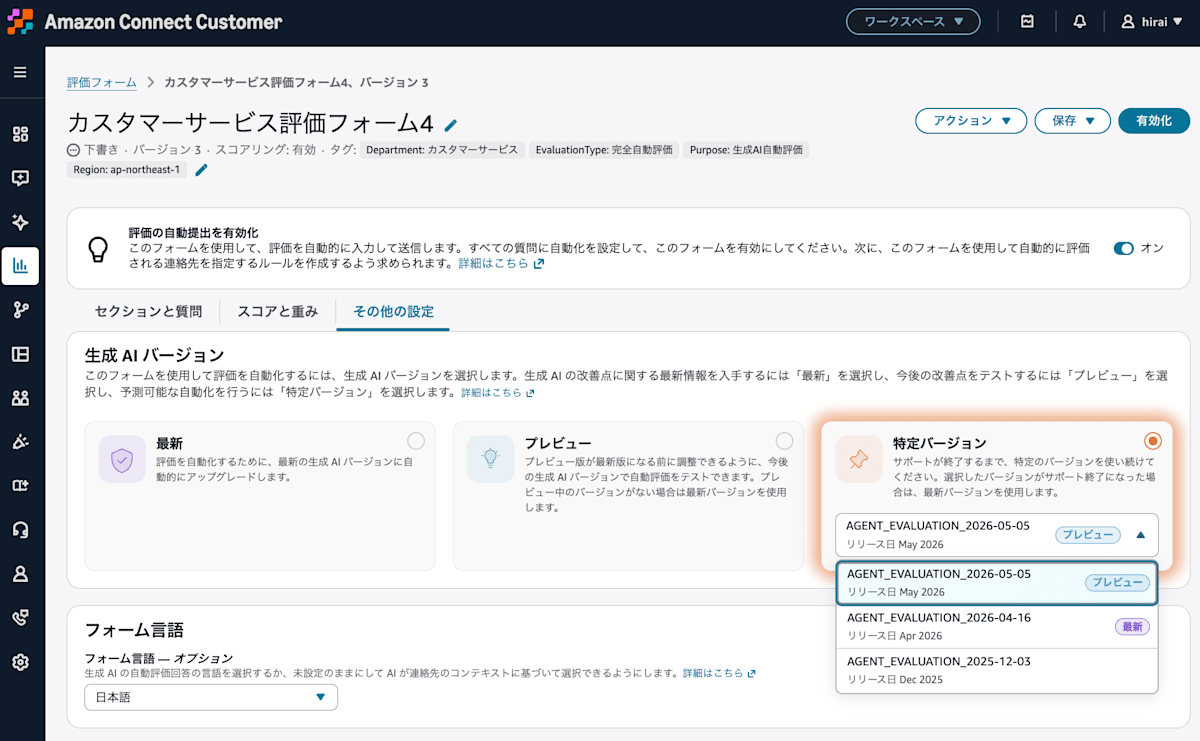
Generative AI version selection screen for agent evaluation forms
For agent evaluation, you select a version beginning with AGENT_EVALUATION_. The change details for each version can be found in the official documentation list described later.
Bot Evaluation Forms
You can also select a generative AI version on forms that evaluate automated interactions such as bots.
Below is the screen showing the version list after selecting [Specific version] on a bot evaluation form.
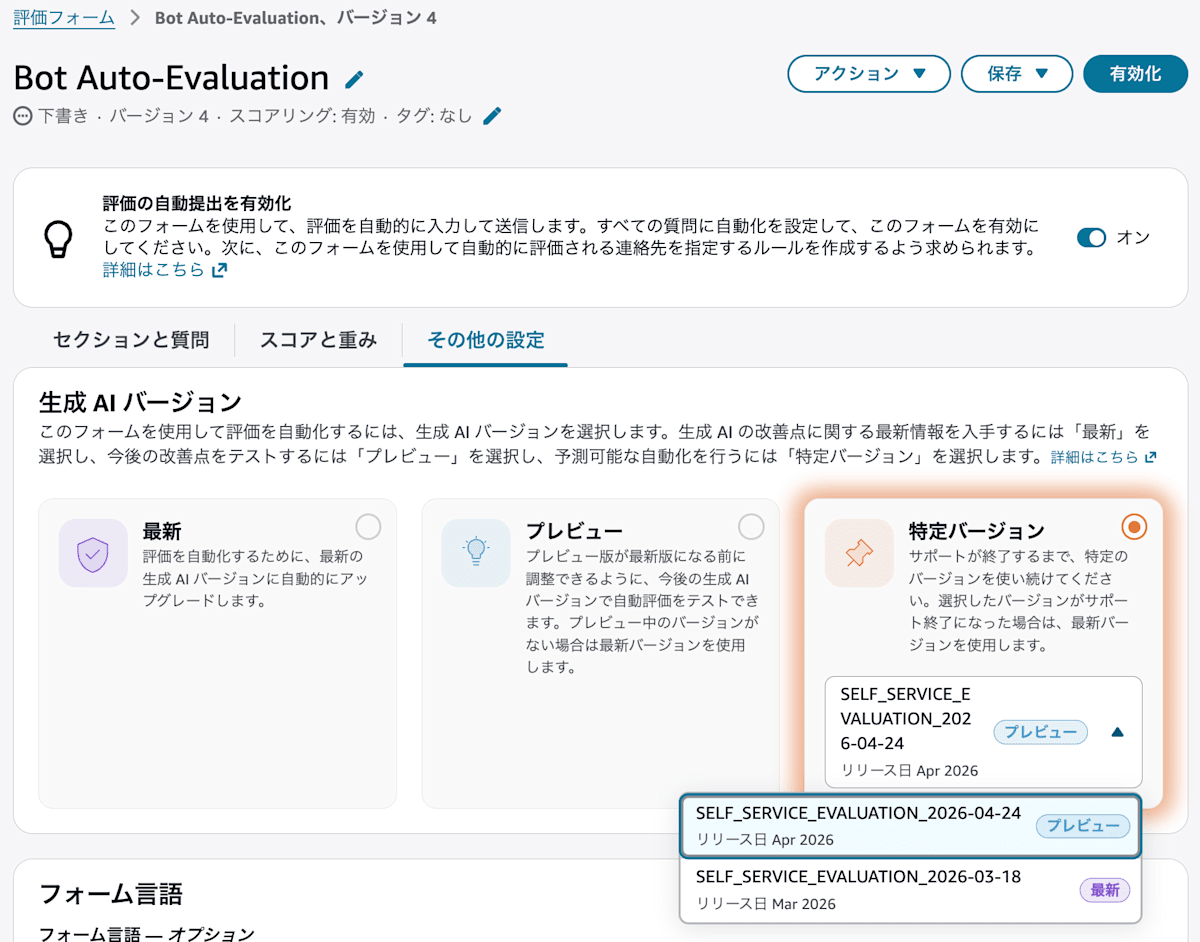
Latest, Preview, and Specific version can also be selected on bot evaluation forms
In this screen, the following 2 options were displayed as choices.
SELF_SERVICE_EVALUATION_2026-04-24: PreviewSELF_SERVICE_EVALUATION_2026-03-18: Latest
Unlike agent evaluation, automated interaction evaluation uses versions beginning with SELF_SERVICE_EVALUATION_.
You Can Also Check Change Details for Each Version in the Documentation
The official documentation includes not only version names and statuses, but also what has changed.
Below is the documentation screen we checked this time. The version list is divided between agent evaluation and automated interaction evaluation.
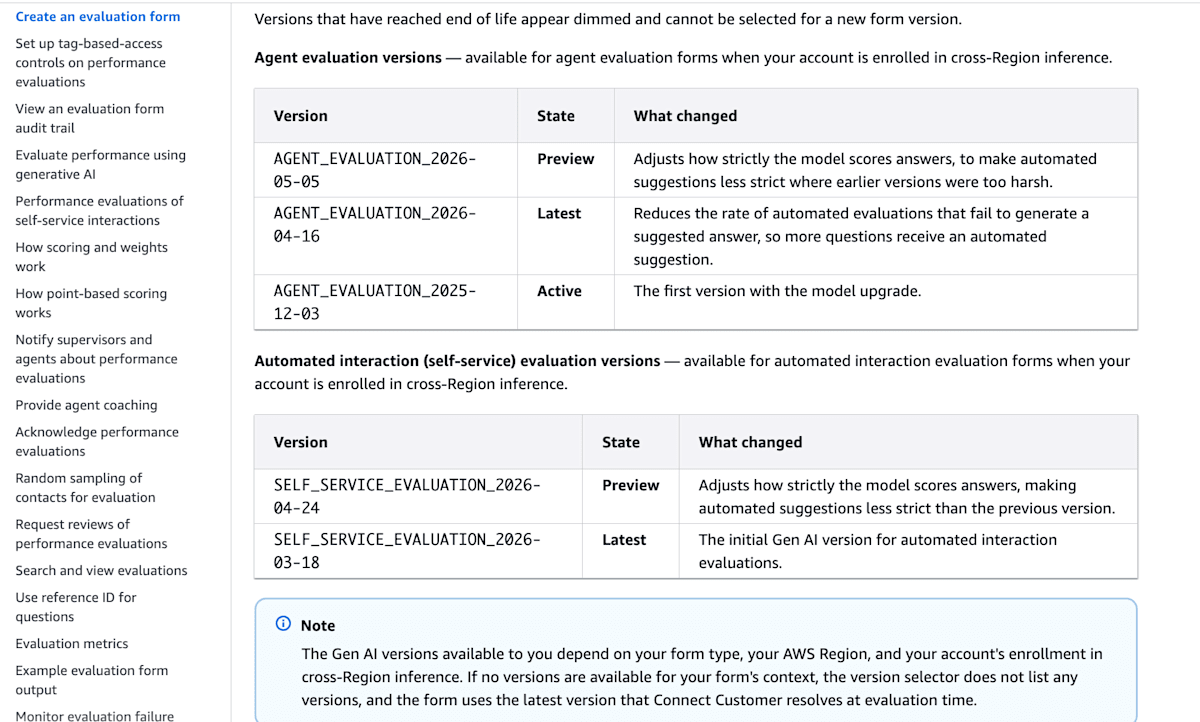
The status and change details for each version are listed
The table below is a list of the versions we confirmed this time. Since version statuses may change in the future, please check the management console and official documentation when configuring settings.
Versions for Agent Evaluation
| Version | Status | Changes |
|---|---|---|
AGENT_EVALUATION_2026-05-05 |
Preview | Adjusted strictness when evaluating answers to relax judgments that were too strict in previous versions |
AGENT_EVALUATION_2026-04-16 |
Latest | Changed to reduce the rate at which answer candidates are not generated, so that automatic answer candidates appear for more questions |
AGENT_EVALUATION_2025-12-03 |
Active | First version after model upgrade |
In the list we checked, changes include reducing cases where answer candidates are not generated and adjusting judgment strictness.
For example, if evaluation results are coming out stricter than human judgment, comparing with the preview version that has adjusted strictness might be useful. However, a more lenient judgment does not necessarily align with your company's evaluation standards. You will need to verify this against the evaluation results of actual conversations.
Versions for Automated Interaction Evaluation
| Version | Status | Changes |
|---|---|---|
SELF_SERVICE_EVALUATION_2026-04-24 |
Preview | Adjusted strictness when evaluating answers, relaxing judgments compared to the previous version |
SELF_SERVICE_EVALUATION_2026-03-18 |
Latest | First generative AI version for automated interaction evaluation |
A version with adjusted judgment strictness is also provided as a preview for automated interaction evaluation.
Even a version with a newer date may still be provided as a preview, so be sure to check the status as well as the version name.
Since the change details can be confirmed in the documentation, I found it easier to decide which version to try.
Specific Versions Also Have an End of Support
Even if you select [Specific version], once that version reaches end of support, it will switch to the latest.
The official documentation states that notifications will be provided via the AWS Health Dashboard and a warning banner on the target form before end of support.
Therefore, it is easier to understand this not as "a setting that, once selected, is unaffected by changes," but as "a setting that specifies the version to use within the support period."
When you receive a notification, you will want to verify that the new version still produces the intended evaluations.
Summary
Amazon Connect Customer performance evaluation now allows you to select the generative AI version. In our verification, selection was available on both agent evaluation forms and bot evaluation forms.
Since the official documentation also lists the change details for each version, it is easier to determine reasons for trying the preview version and to decide which version to use.
Since specific versions also have an end of support, it is not a matter of fixing a version and being done with it — you need to review change details and compare actual evaluation results on an ongoing basis.
