Amazon ECS Now Supports Controls for Pausing and Resuming Service Deployments

This page has been translated by machine translation. View original
I want to specify the timing of production traffic rerouting myself in ECS Native Blue/Green Deployment
Have you ever wanted to specify the timing of traffic rerouting yourself in ECS Native Blue/Green Deployment? I have.
In this article, ECS Native Blue/Green Deployment refers to ECS's built-in Blue/Green Deployment that does not use CodeDeploy.
As introduced in the following article, with ECS Native Blue/Green Deployment you could not specify a grace period before traffic rerouting.
To implement it, developers had to prepare a deployment lifecycle hook Lambda function themselves, which was quite a hassle. In addition, because the behavior involved polling the Lambda function many times, it left an unsatisfying feeling.
Furthermore, it was inconvenient because you could not instruct the timing of rerouting directly from the management console.
With this update, Amazon ECS now supports the ability to pause and resume service deployments.
The deployment is paused when it reaches the lifecycle stage you specified. By providing the hook ID issued at this time along with the next action, you can resume or roll back the deployment.
Events are also published to EventBridge.
Using this feature resolves the pain points mentioned earlier all at once.
I tried it out right away.
Summary up front
- Amazon ECS now supports the ability to pause and resume service deployments
- With ECS Native Blue/Green Deployment, you can now pause a deployment at a specified lifecycle stage without preparing a Lambda function for a deployment lifecycle hook
- You instruct the deployment to continue / roll back by calling the
ContinueServiceDeploymentAPI in one of the following ways- Select
Continue/Rollbackdirectly from the management console - Run the
aws ecs continue-service-deploymentcommand
- Select
- There are the following 6 lifecycle stages where you can configure a pause hook
RECONCILE_SERVICEPRE_SCALE_UPPOST_SCALE_UPPOST_TEST_TRAFFIC_SHIFTPRE_PRODUCTION_TRAFFIC_SHIFTPOST_PRODUCTION_TRAFFIC_SHIFT
- The timeout can be specified in 1-minute units up to a maximum of 20,160 minutes (14 days)
- Greatly extended from the maximum of 1 day for Lambda hooks
- You can choose
CONTINUE/ROLLBACKas the action on timeout
- As of 2026/5/20, Q Developer in chat applications does not support
ecs continue-service-deployment, so it cannot be run from a Slack custom action button - If you want to insert human approval during an ECS deployment, pause hooks will likely be the first choice going forward
How pause hooks work
How pause hooks work is summarized in the following official AWS documentation.
As mentioned earlier, the deployment is stopped when it reaches the lifecycle stage specified at deployment time.
You control it by specifying the hook ID and the next action using ContinueServiceDeployment.
You can check the hook ID from the event published to EventBridge or from DescribeServiceDeployments.
{
    "version": "0",
    "id": "a1b2c3d4-5678-90ab-cdef-EXAMPLE11111",
    "detail-type": "ECS Hook State Change",
    "source": "aws.ecs",
    "account": "123456789012",
    "time": "2024-01-15T10:00:00Z",
    "region": "us-west-2",
    "detail": {
        "eventType": "INFO",
        "eventName": "HOOK_AWAITING_ACTION",
        "hookId": "ecs-pause-e7tK9G_WRJqNF_EOMjztDXfKenlJuEUVjsNStf4WLKw",
        "hookType": "PAUSE",
        "expiresAt": "2024-01-15T12:00:00Z",
        "lifecycleStage": "POST_TEST_TRAFFIC_SHIFT",
        "clusterArn": "arn:aws:ecs:us-west-2:123456789012:cluster/my-cluster",
        "serviceArn": "arn:aws:ecs:us-west-2:123456789012:service/my-cluster/my-service",
        "serviceDeploymentArn": "arn:aws:ecs:us-west-2:123456789012:service-deployment/my-cluster/my-service/EZe5RNVLH6PPzHXINuP28",
        "updatedAt": "2024-01-15T10:00:00Z"
    }
}
{
    "serviceDeployments": [
        {
            "lifecycleHookDetails": [
                {
                    "hookId": "ecs-pause-e7tK9G_WRJqNF_EOMjztDXfKenlJuEUVjsNStf4WLKw",
                    "targetType": "PAUSE",
                    "status": "AWAITING_ACTION",
                    "expiresAt": "2024-01-15T12:00:00Z",
                    "timeoutAction": "ROLLBACK"
                }
            ]
        }
    ]
}
From the standpoint of notifications, I think you would basically use an EventBridge Rule.
The event names (eventName) of the events published to EventBridge are as follows.
| Event name | Description |
|---|---|
HOOK_IN_PROGRESS |
Pause hook processing started |
HOOK_AWAITING_ACTION |
The pause hook is waiting for ContinueServiceDeployment to be run |
HOOK_SUCCEEDED |
The pause hook completed successfully ( ContinueServiceDeployment was run with CONTINUE). |
HOOK_FAILED |
The pause hook completed with a failure ( ContinueServiceDeployment was run with ROLLBACK). |
HOOK_TIMED_OUT |
A timeout occurred before ContinueServiceDeployment was called |
Configuring a pause hook is easy. As shown below, a Pause hook item has been added to the deployment lifecycle hooks, and you specify the following there.
- Lifecycle stage
- Timeout
- Timeout action
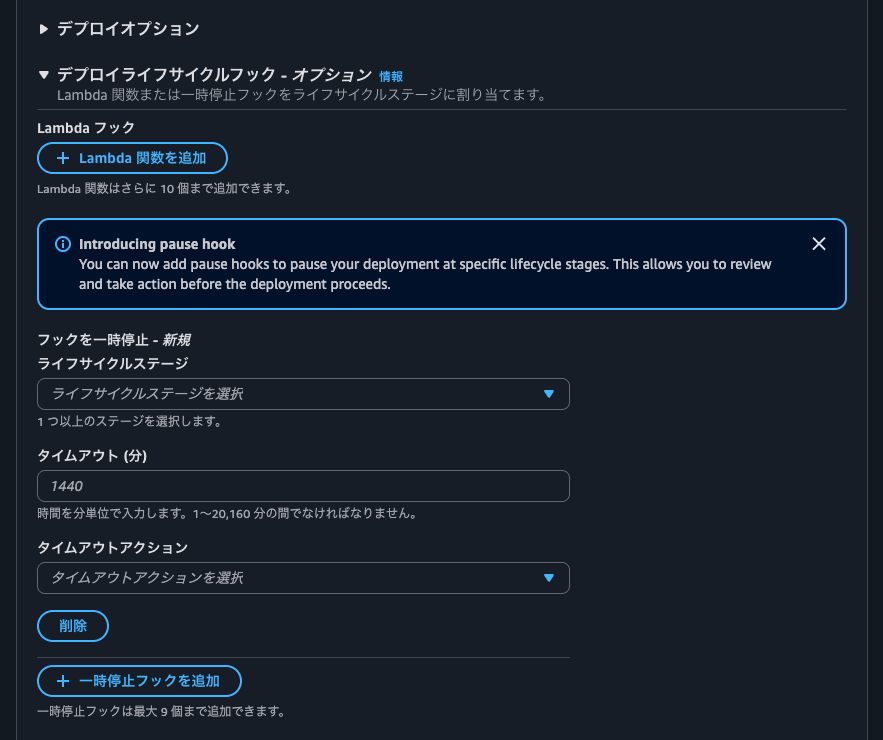
The lifecycle stages you can specify are as follows.
The list of events usable with Lambda hooks and pause hooks respectively is as follows.
| Lifecycle stage | Lambda hooks | Pause hooks |
|---|---|---|
RECONCILE_SERVICE |
Yes | Yes |
PRE_SCALE_UP |
Yes | Yes |
POST_SCALE_UP |
Yes | Yes |
TEST_TRAFFIC_SHIFT |
Yes | No |
POST_TEST_TRAFFIC_SHIFT |
Yes | Yes |
PRE_PRODUCTION_TRAFFIC_SHIFT |
Yes | Yes |
PRODUCTION_TRAFFIC_SHIFT |
Yes | No |
POST_PRODUCTION_TRAFFIC_SHIFT |
Yes | Yes |
Excerpt: Lifecycle hooks for Amazon ECS service deployments - Amazon Elastic Container Service
The PRE_PRODUCTION_TRAFFIC_SHIFT lifecycle stage did not exist before, so it seems to have been added along with this update.
It seems PRE_PRODUCTION_TRAFFIC_SHIFT is invoked every time in the case of linear and canary deployments.
For linear and canary deployments, Lambda hooks configured at PRODUCTION_TRAFFIC_SHIFT or PRE_PRODUCTION_TRAFFIC_SHIFT are invoked at each traffic shift step.
Lambda hooks for Amazon ECS service deployments - Amazon Elastic Container Service
For linear and canary deployments, pause hooks configured at PRE_PRODUCTION_TRAFFIC_SHIFT are invoked at each traffic shift step. Each invocation generates a unique hookId, and you must call ContinueServiceDeployment for each one.
For example, a linear deployment with 5 traffic shift steps and a pause hook at PRE_PRODUCTION_TRAFFIC_SHIFT pauses 5 times - once before each step. Each pause requires a separate call to ContinueServiceDeployment with the corresponding hookId.
Pause hooks for Amazon ECS service deployments - Amazon Elastic Container Service
If you want to pause every time, you would use PRE_PRODUCTION_TRAFFIC_SHIFT, but if your use case is to insert approval once before routing production traffic, you would adopt POST_TEST_TRAFFIC_SHIFT.
Also, the timeout for pause hooks can be specified in 1-minute units up to a maximum of 20,160 minutes (14 days). With Lambda hooks the maximum was 1 day, so this is welcome.
If the specified timeout is exceeded, the deployment rolls back / continues according to the specified timeout action.
Trying it out
Test environment
Let's actually try it.
The test environment is as follows.
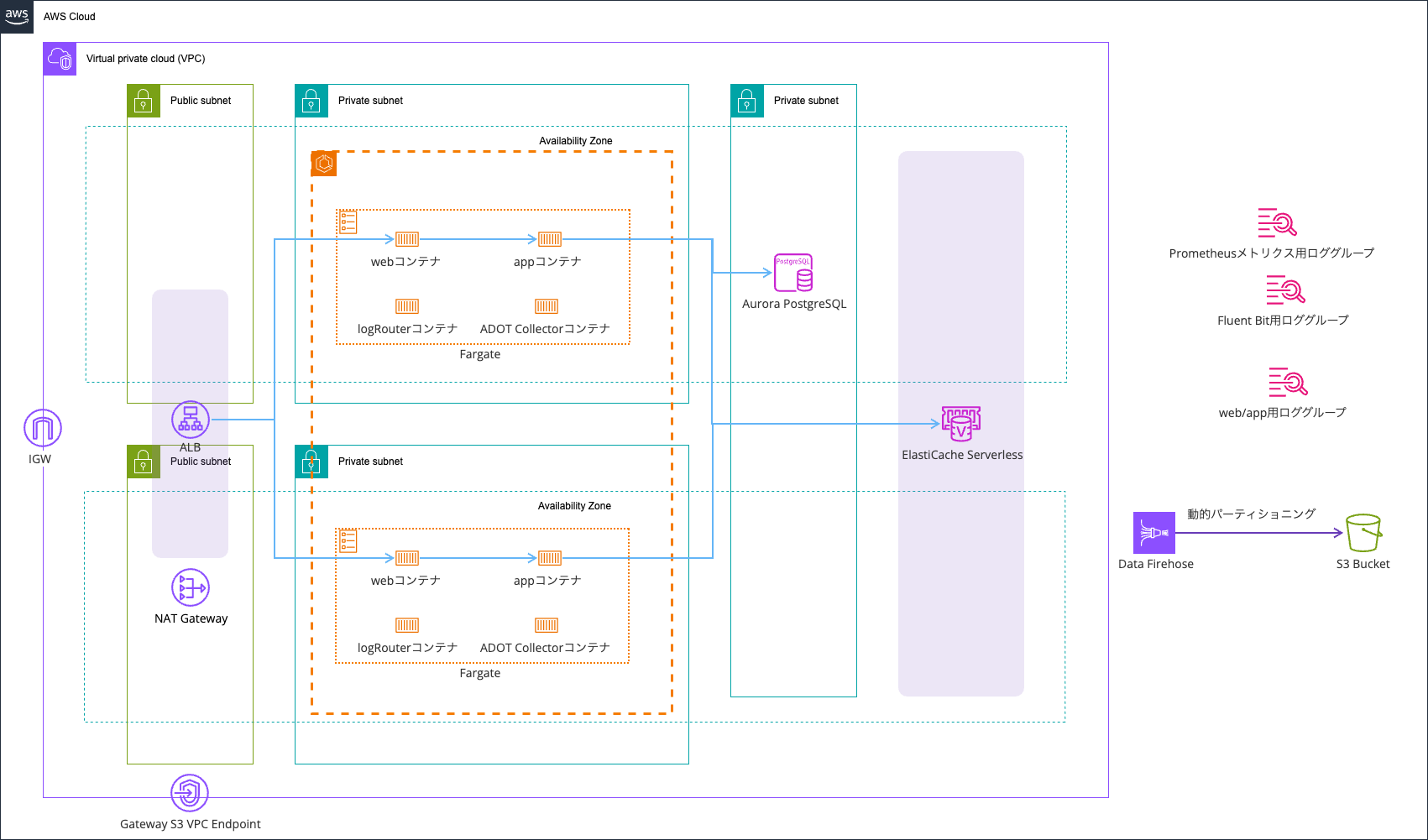
It is based on the one from the following article.
For logs, I use AWS FireLens (AWS for Fluent Bit), outputting error logs to CloudWatch Logs and all logs to an S3 bucket via Data Firehose.
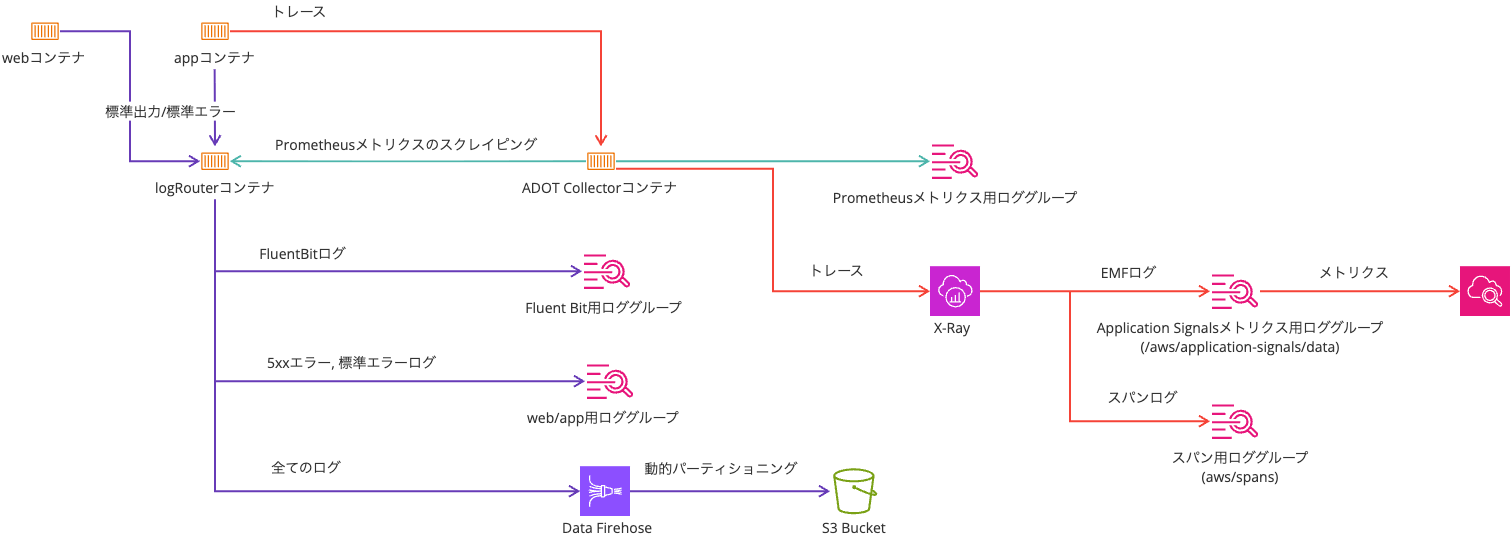
The mechanism around notifications and custom action buttons is illustrated as follows.
The notification flow is as follows.

Step Functions performs the following processing.
Ideally, I would like to deploy without approval during the initial deployment. However, as of 2026/5/20, Step Functions did not support ContinueServiceDeployment. Therefore, I could not do something like checking the state of the service deployment within the Step Functions processing and continuing the deployment with ContinueServiceDeployment during the initial deployment.
All resources are deployed with AWS CDK. The code used is as follows.
Initial deployment
I perform the initial deployment with cdk deploy.
After a while from starting the deployment, the following notification arrived in the specified Slack channel.
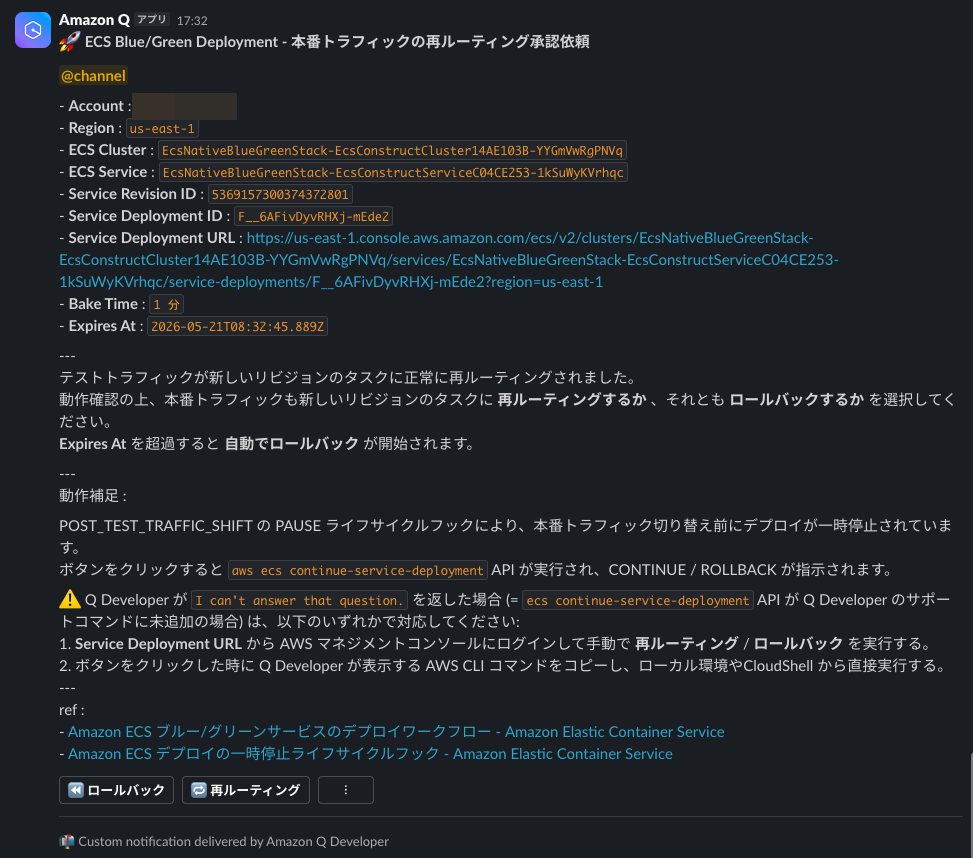
Clicking the URL lets you see the details of the service deployment. It says The service deployment is paused by pause hook ecs-pause-xrkqfL99Sem2S5poPtD78IuIDa-rXkj9vSMCk2xWx6w. If no action is taken, the deployment will be automatically rolled back at 2026/5/21 17:32:45, so you can see it is waiting for a deployment action.
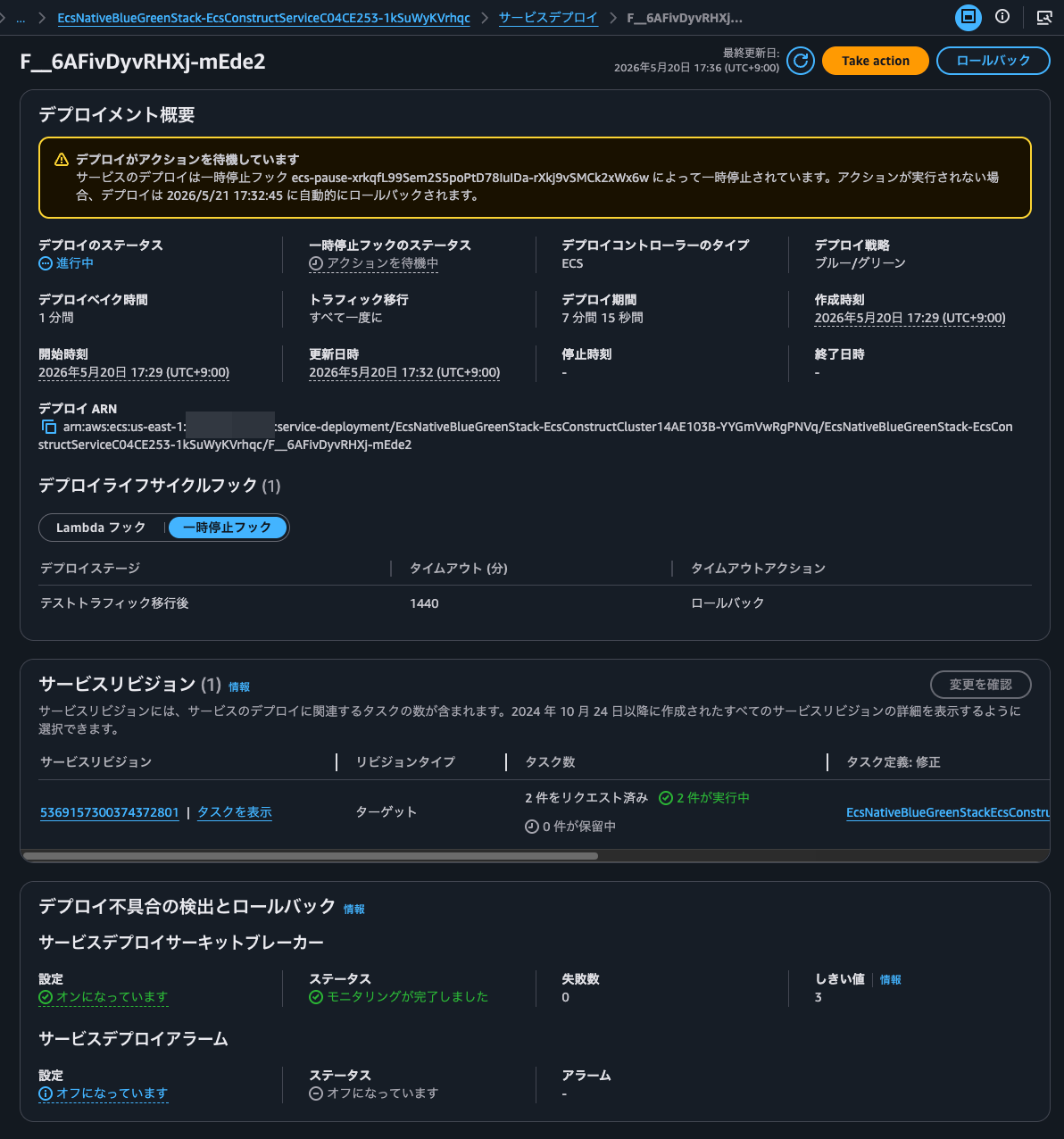
This ecs-pause-xrkqfL99Sem2S5poPtD78IuIDa-rXkj9vSMCk2xWx6w is the hook ID.
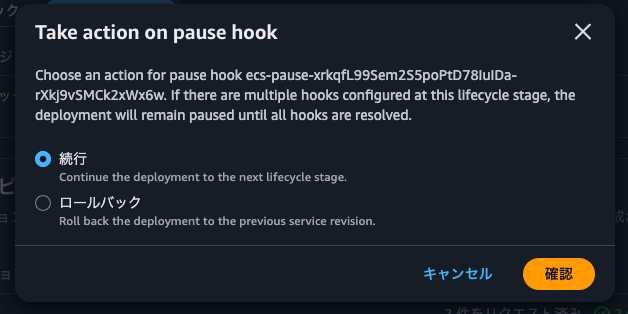
When you click Take action, you can choose Continue or Rollback. In the past it could not be controlled from the management console, so this is super exciting.
This time I'll try operating from the custom button in the Slack notification. When I press the Reroute button, a confirmation window for the command to run opens as shown below.
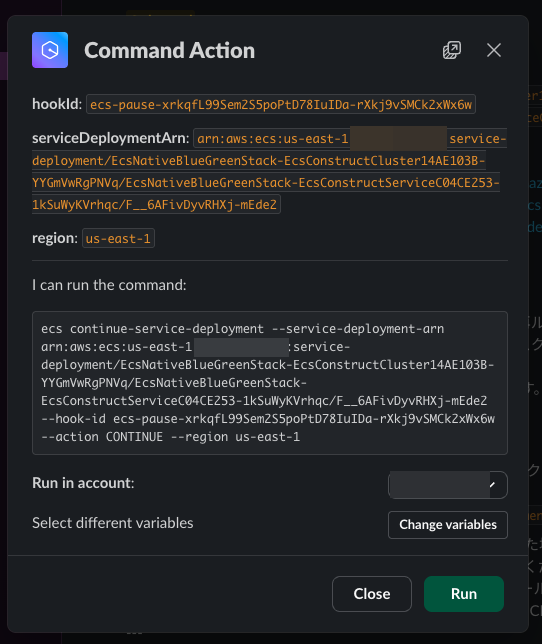
I click Run.
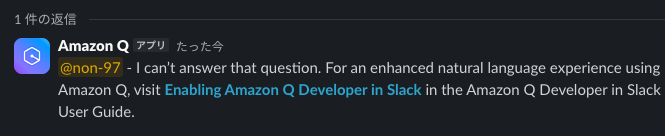
Yes, I was expecting a response saying the command was accepted, but instead I got a response saying it can't answer the question: I can’t answer that question. For an enhanced natural language experience using Amazon Q, visit Enabling Amazon Q Developer in Slack in the Amazon Q Developer in Slack User Guide.
Instead of the custom button, I'll try giving the instruction by mentioning the Amazon Q Developer in chat applications (hereafter, Q Dev chat) application.
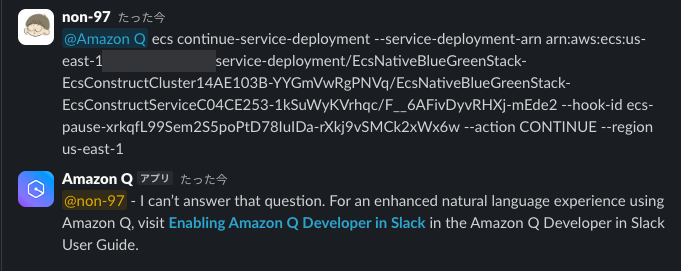
The result is the same. So it seems Q Dev chat does not support ContinueServiceDeployment. That's unfortunate.
I'll run the same command on my local machine.
> aws ecs continue-service-deployment \
  --service-deployment-arn arn:aws:ecs:us-east-1:<AWSアカウントID>:service-deployment/EcsNativeBlueGreenStack-EcsConstructCluster14AE103B-YYGmVwRgPNVq/EcsNativeBlueGreenStack-EcsConstructServiceC04CE253-1kSuWyKVrhqc/F__6AFivDyvRHXj-mEde2 \
  --hook-id ecs-pause-xrkqfL99Sem2S5poPtD78IuIDa-rXkj9vSMCk2xWx6w \
  --action CONTINUE \
  --region us-east-1
{
    "serviceDeploymentArn": "arn:aws:ecs:us-east-1:<AWSアカウントID>:service-deployment/EcsNativeBlueGreenStack-EcsConstructCluster14AE103B-YYGmVwRgPNVq/EcsNativeBlueGreenStack-EcsConstructServiceC04CE253-1kSuWyKVrhqc/F__6AFivDyvRHXj-mEde2"
}
This was accepted successfully.
Checking the management console, the deployment is now in progress.
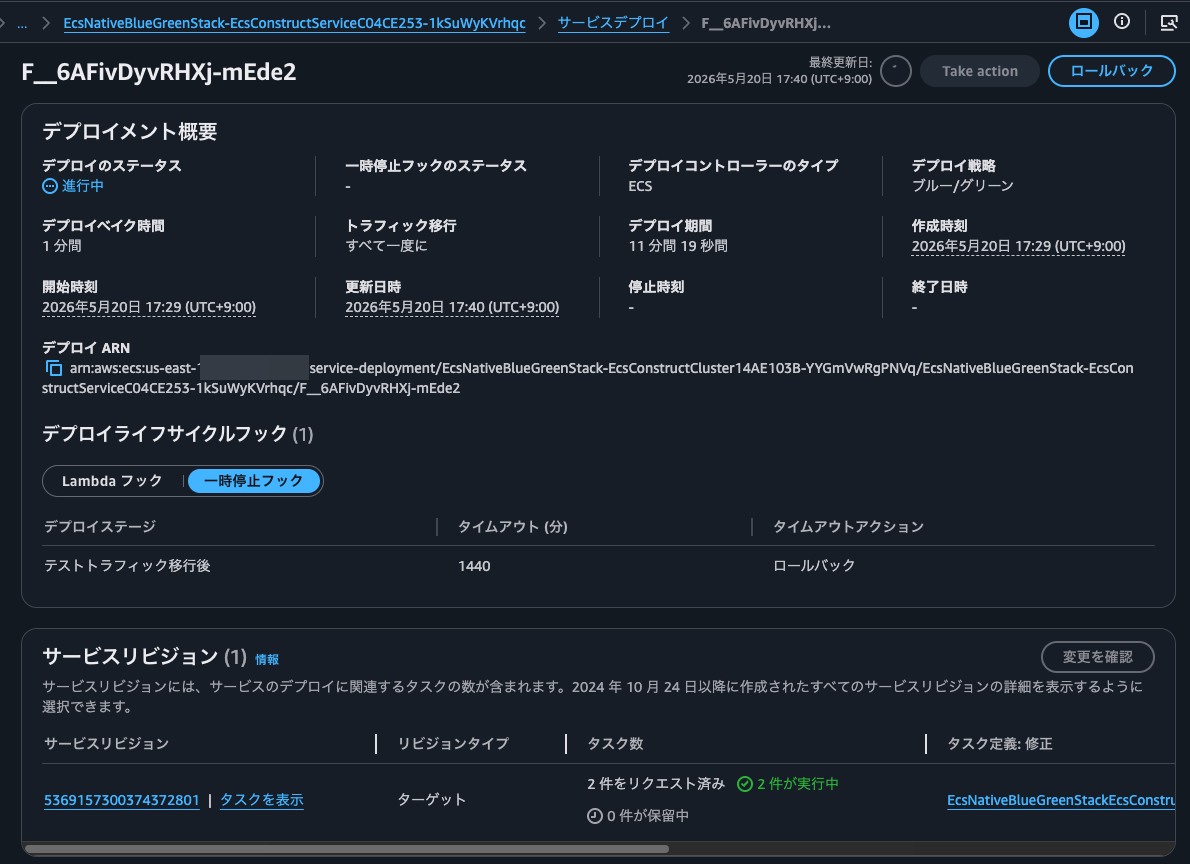
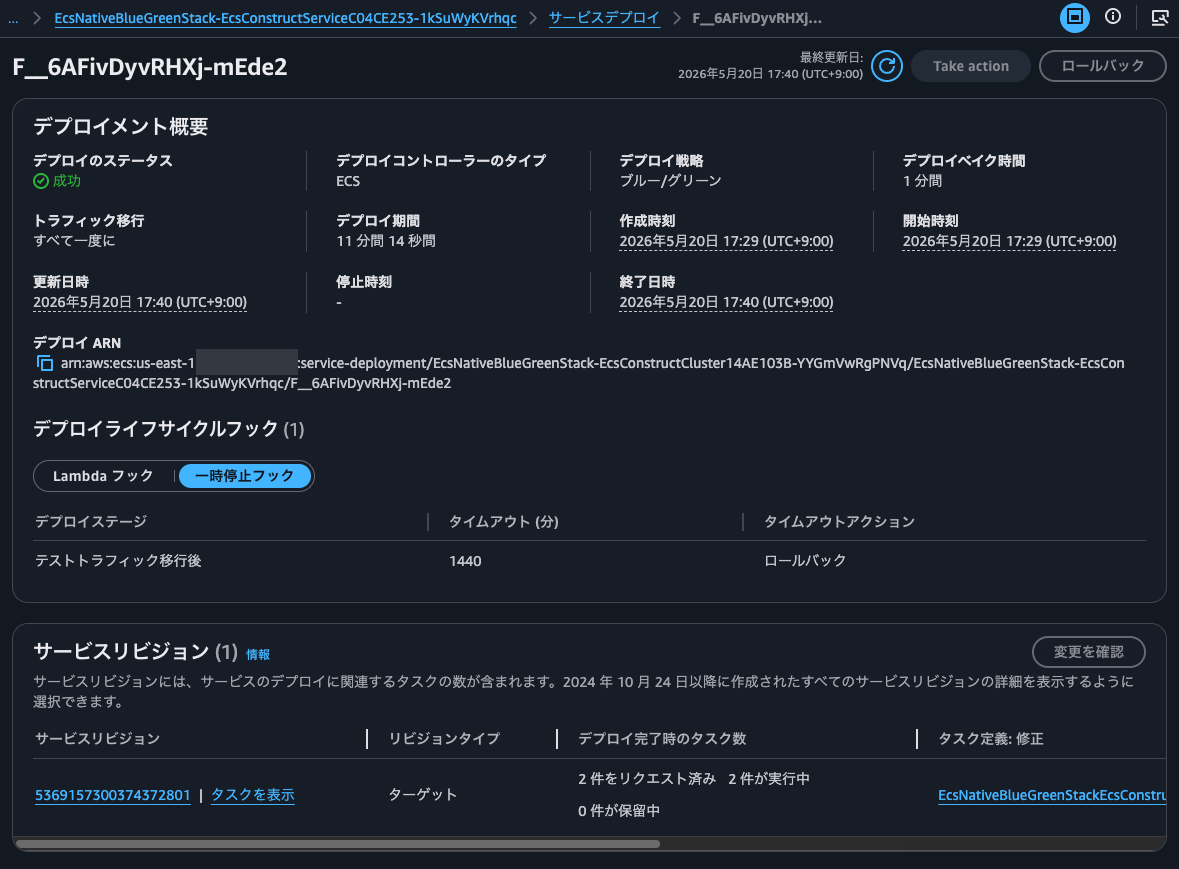
After a while, the deployment succeeded.
Second deployment
I'll change index.html and deploy again.
After running cdk deploy and waiting a while, the following notification arrived.
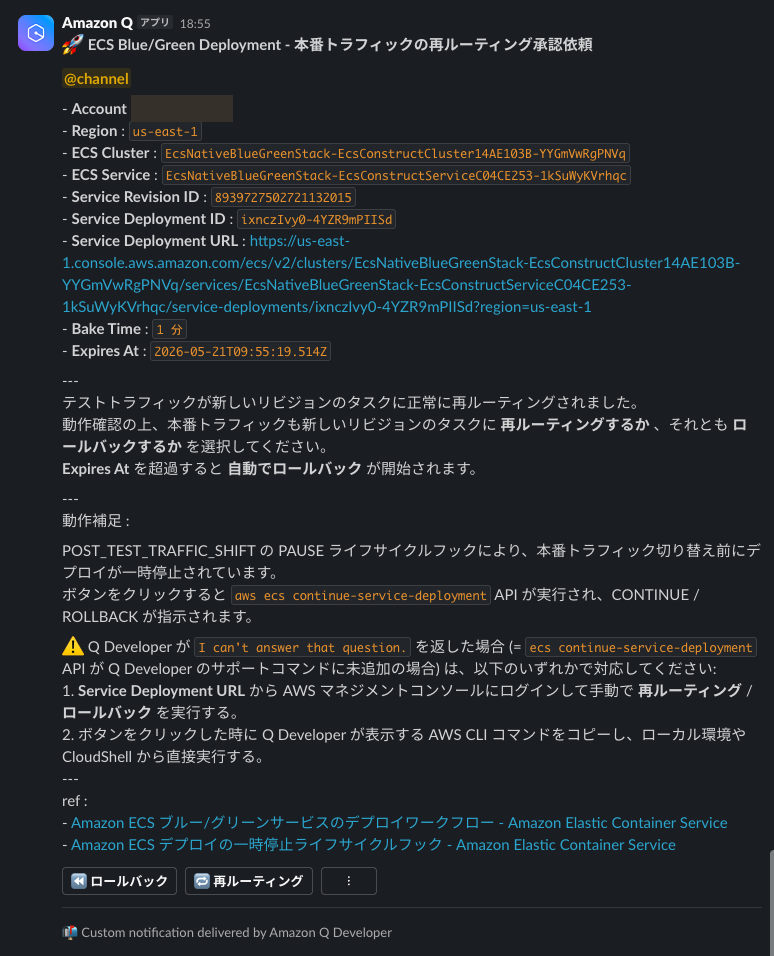
At this point, I access the production listener and the test listener.
> curl EcsNat-AlbCo-heEpSVXyHHDZ-670410644.us-east-1.elb.amazonaws.com/
index.txt v1.0

> curl EcsNat-AlbCo-heEpSVXyHHDZ-670410644.us-east-1.elb.amazonaws.com:10080/
index.txt v1.1
Only the test listener's response changed.
This time I'll roll back from the management console.
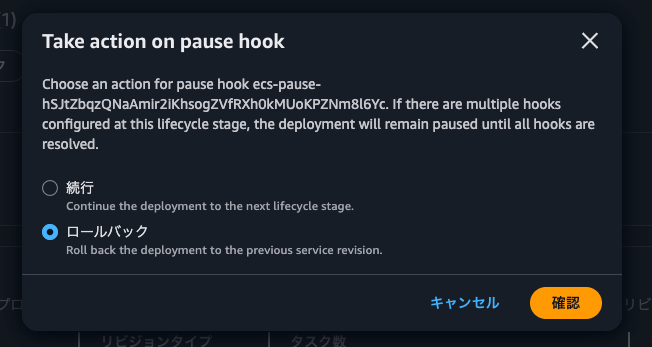
When I click Confirm, it seems to have been accepted successfully.
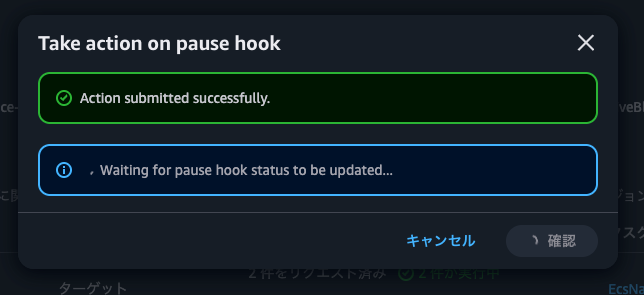
Waiting as is, the rollback started.
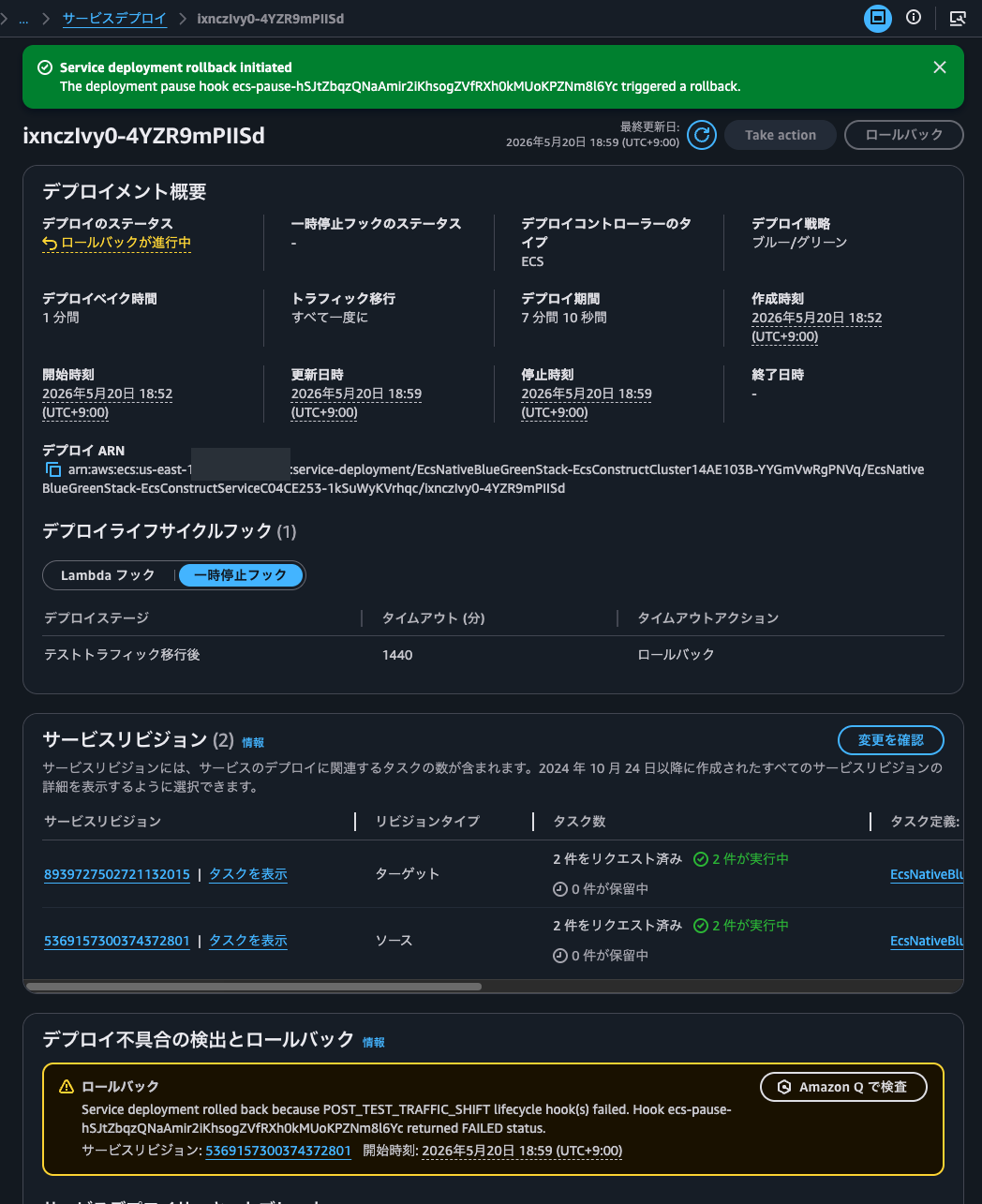
Waiting further, the rollback completed.
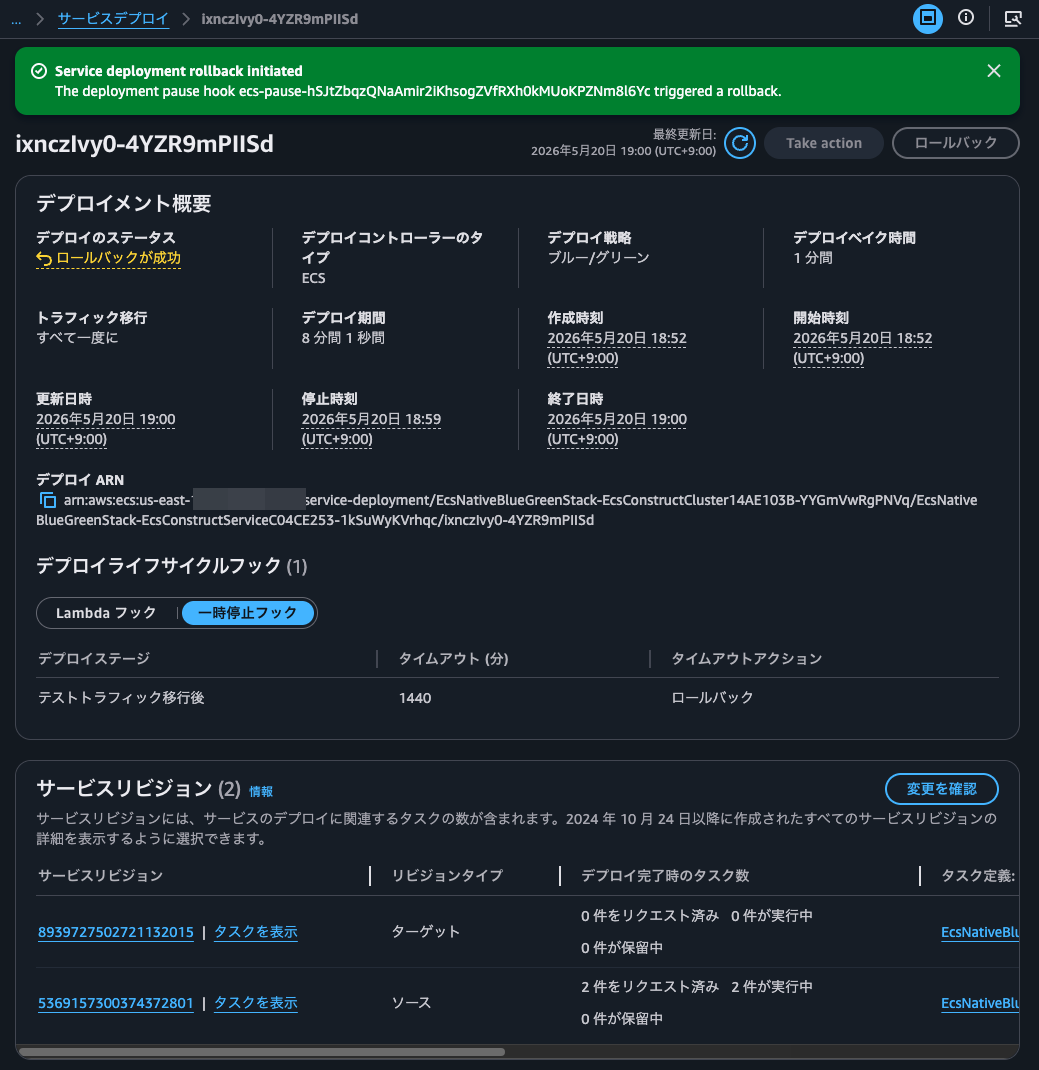
When I accessed again, the responses from the production listener and the test listener were the same.
> curl EcsNat-AlbCo-heEpSVXyHHDZ-670410644.us-east-1.elb.amazonaws.com/
index.txt v1.0

> curl EcsNat-AlbCo-heEpSVXyHHDZ-670410644.us-east-1.elb.amazonaws.com:10080/
index.txt v1.0
Use pause hooks when humans are involved during ECS deployments
I introduced the update that adds support for pausing and resuming service deployments in Amazon ECS.
Going forward, I think pause hooks will be the way to go when humans are involved during ECS deployments. Let's actively use them.
I hope this article helps someone.
That's all from Non-pi (@non____97) of the Consulting Department, Cloud Business Division!
