![[Update] AWS Client VPN Now Supports Native Integration with AWS Transit Gateway](https://images.ctfassets.net/ct0aopd36mqt/wp-thumbnail-78c709ce8ff80dd2872e3acdc877ccd9/b02707ee3316906a252376c916882d1c/aws-client-vpn?w=3840&fm=webp)
[Update] AWS Client VPN Now Supports Native Integration with AWS Transit Gateway

This page has been translated by machine translation. View original
I want to identify the Client VPN endpoint's IP address from the destination
Hello, this is Nonpi (@non____97).
When using AWS Client VPN, have you ever wanted to identify the Client VPN endpoint's IP address from the destination? I have.
As introduced in the article below, when communicating via Client VPN, the source IP address is an SNATed IP address.
This is a confusing point, but the source IP as seen from the destination server is not an IP address from this client CIDR. Because the source IP address is NATed by the ENI on the target network, the source IP as seen from the destination server is the one held by the ENI on the target network.
Therefore, the destination cannot determine specifically which user the IP address came from.
The following log is recorded as the Client VPN connection log, but as long as client-ip is shared by multiple users, it is difficult to identify the user.
{
    "connection-log-type": "connection-attempt",
    "connection-attempt-status": "successful",
    "connection-reset-status": "NA",
    "connection-attempt-failure-reason": "NA",
    "connection-id": "cvpn-connection-abc123abc123abc12",
    "client-vpn-endpoint-id": "cvpn-endpoint-aaa111bbb222ccc33",
    "transport-protocol": "udp",
    "connection-start-time": "2020-03-26 20:37:15",
    "connection-last-update-time": "2020-03-26 20:37:15",
    "client-ip": "10.0.1.2",
    "common-name": "client1",
    "device-type": "mac",
    "device-ip": "98.247.202.82",
    "port": "50096",
    "ingress-bytes": "0",
    "egress-bytes": "0",
    "ingress-packets": "0",
    "egress-packets": "0",
    "connection-end-time": "NA",
    "username": "joe"
}
Excerpt: Connection logging for an AWS Client VPN endpoint - AWS Client VPN
With this update, native integration between Transit Gateway and Client VPN is now supported. In other words, instead of associating with a VPC, you associate with a Transit Gateway.
It has also been posted on the AWS Blogs.
Previously, traffic was SNATed to the ENI created in the subnet associated with the Client VPN endpoint, but that no longer happens. This makes it easy to identify communications.
Of course, if you had prepared a dedicated VPC, that dedicated VPC is no longer needed either.
The pricing remains unchanged, which is very welcome.
Prerequisites for native integration between Client VPN and Transit Gateway
The prerequisites for native integration between Client VPN and Transit Gateway are as follows.
- Transit Gateway requirements
- Must be in the same Region as the Client VPN endpoint
- When associating across accounts, use RAM
- A Transit Gateway CIDR block must be assigned
- If adopting IPv6 or a dual-stack configuration, also assign an IPv6 CIDR block
- Network requirements
- The Client VPN client CIDR block must not overlap with the CIDR blocks of VPCs connected to the Transit Gateway
- The AZs specified for Client VPN must also be supported by Transit Gateway
- To route return traffic to Client VPN, define a return route in the route table of the destination VPC
Reference: Transit Gateway integration with Client VPN - AWS Client VPN
Personally, I was curious about how the Transit Gateway CIDR block is used and how to size it. The documentation has no elements that serve as design hints.
Trying it out
Test environment
Let's actually try it.
The test environment is as follows.
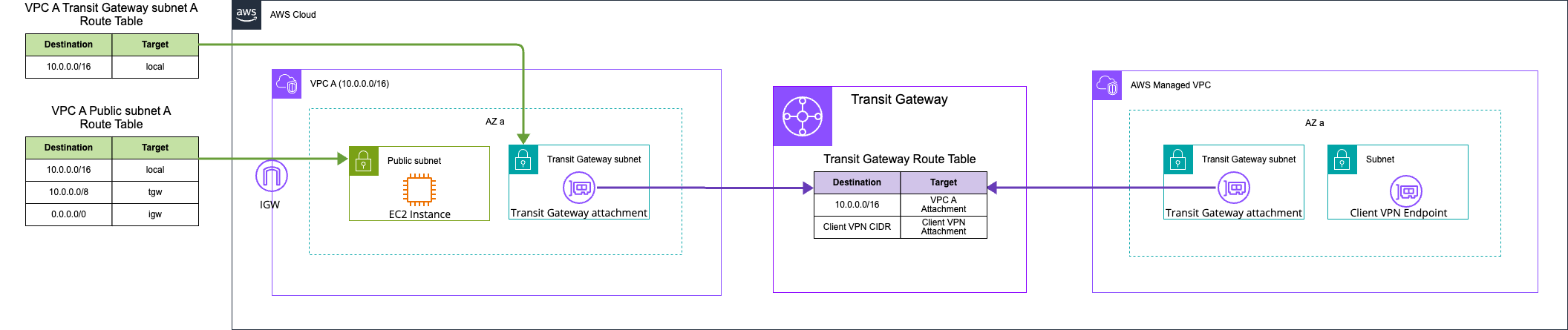
Everything other than Client VPN has already been created.
The Transit Gateway and Transit Gateway route table are as follows.
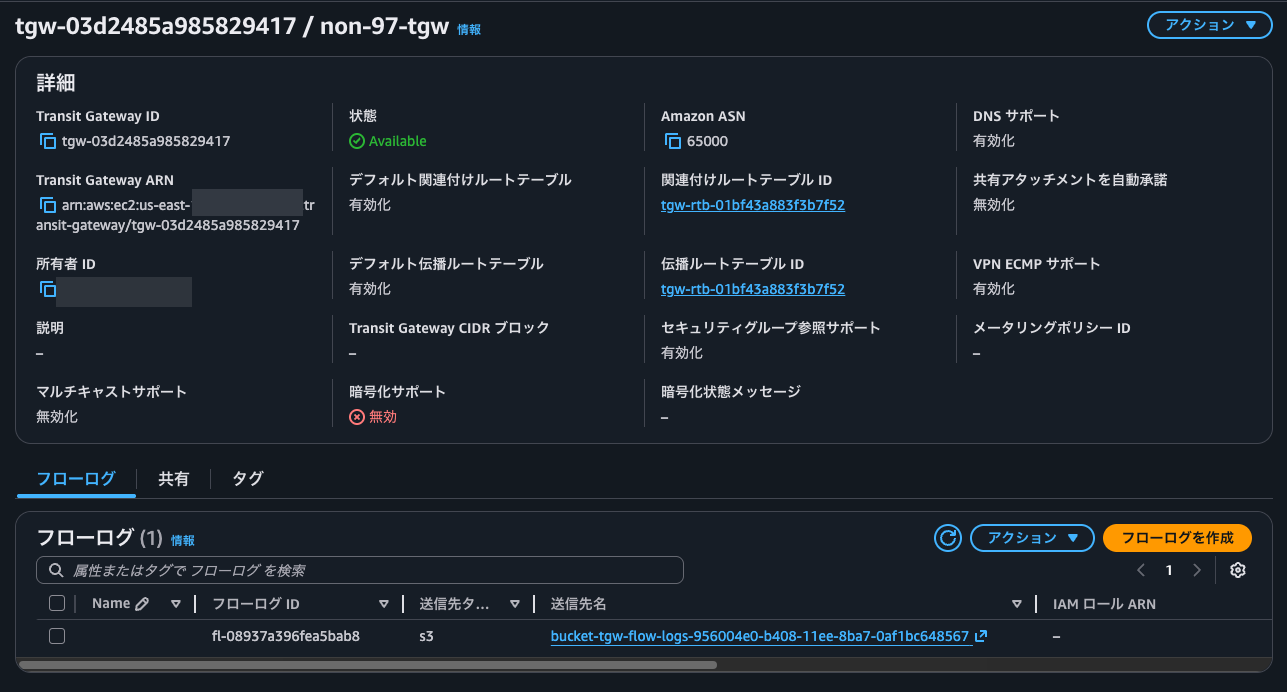
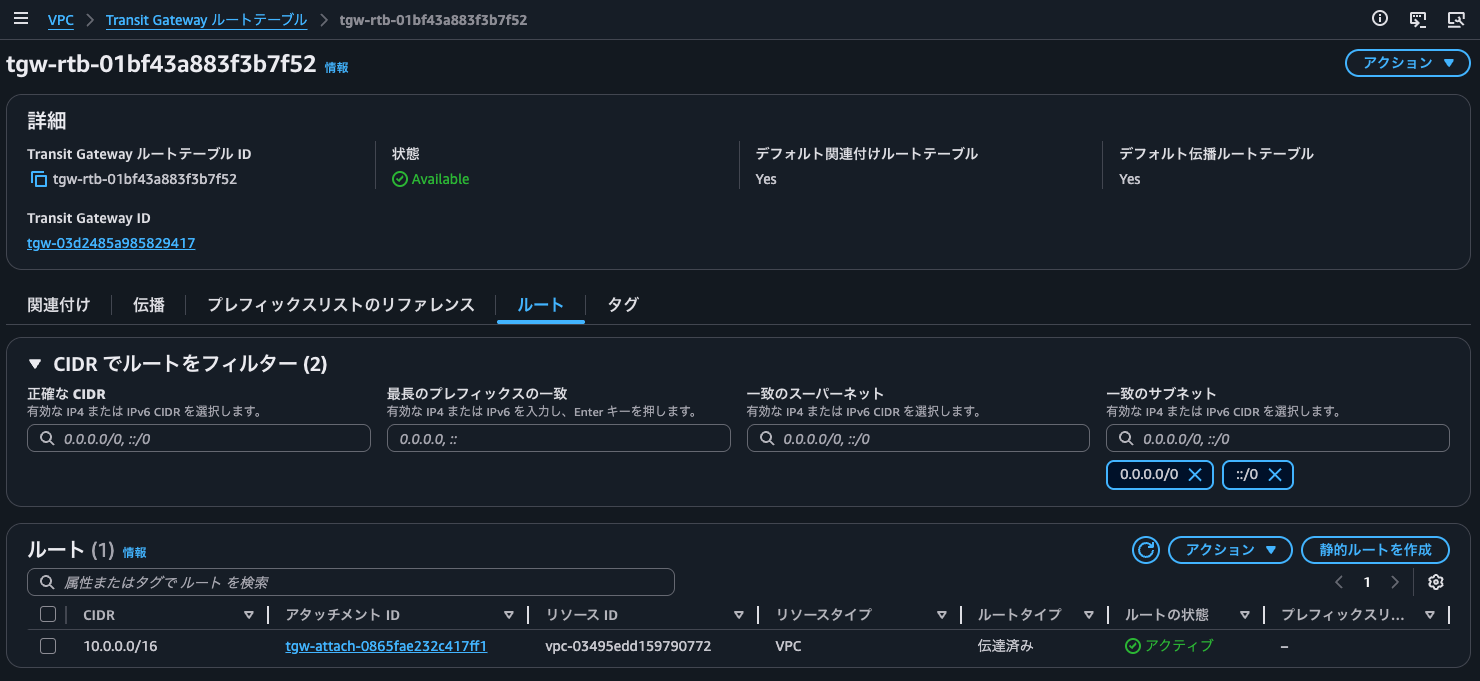
I was curious about the behavior when the Transit Gateway CIDR block is not specified, so I left it unspecified for now.
Issuing the certificates
We issue the certificates following the AWS official documentation below.
$ git clone https://github.com/OpenVPN/easy-rsa.git
Cloning into 'easy-rsa'...
remote: Enumerating objects: 9284, done.
remote: Counting objects: 100% (324/324), done.
remote: Compressing objects: 100% (119/119), done.
remote: Total 9284 (delta 213), reused 209 (delta 204), pack-reused 8960 (from 4)
Receiving objects: 100% (9284/9284), 69.36 MiB | 25.95 MiB/s, done.
Resolving deltas: 100% (4391/4391), done.

$ cd easy-rsa/easyrsa3

$ ./easyrsa init-pki

Notice
------
'init-pki' complete; you may now create a CA or requests.

Your newly created PKI dir is:
* /home/ssm-user/easy-rsa/easyrsa3/pki

$ ./easyrsa build-ca nopass
.........+.+..+++++++++++++++++++++++++++++++++++++++*..+.+++++++++++++++++++++++++++++++++++++++*......+.......+..+...+...+...+..........+......+.....+....+......+......+.....+..........+..+.............+...............+............+..+....+..+............+.+.....+.+.....+.+...+............+..+.+......+...+...+..+..........+..+........................................+......+..+...+...+......+...+.+.................+.......+.....+...+.............+.....................+...........+....+...........+...+....+..+..........+......+...+.....+....+...+..+...+...+..........+.....+.......+...+..+.........+..........+...+.................+...+......+......+...+.+..+...............+...............+.......+......+.........+..+......+.......+........+.......+......+..............+.......+...+..+......+....+......+...+..+.........+...+............+......+....+......+...+............+...+...........+.............+........+....+...+...........+....+.....+.+..+.......+.....+...+.............+.....+....+...+..+......+......+.+..+.......+........+............+.+.....+.........+.++++++
.......+..+.+..+++++++++++++++++++++++++++++++++++++++*....+..+...+.+......+..+.+.........+..+.+..+.+.....+++++++++++++++++++++++++++++++++++++++*....+......+.........+......++++++
You are about to be asked to enter information that will be incorporated
into your certificate request.
What you are about to enter is what is called a Distinguished Name or a DN.
There are quite a few fields but you can leave some blank
For some fields there will be a default value,
If you enter '.', the field will be left blank.
-----
Common Name (eg: your user, host, or server name) [Easy-RSA CA]:non-97 CA

Notice
------
CA creation complete. Your new CA certificate is at:
* /home/ssm-user/easy-rsa/easyrsa3/pki/ca.crt

Build-ca completed successfully.

$ ./easyrsa --san=DNS:server build-server-full server nopass
.+.........+...+..+.............+...+..+.......+.........+++++++++++++++++++++++++++++++++++++++*.....+..+....+.......................+...+++++++++++++++++++++++++++++++++++++++*.++++++
.+...+.+......+...+++++++++++++++++++++++++++++++++++++++*..+..+...+....+...+........+.+........+.+++++++++++++++++++++++++++++++++++++++*......+...+.....+...+...+....+..+..........+.....+......+...............+...+......+.........+....++++++
-----

Notice
------
Private-Key and Public-Certificate-Request files created.
Your files are:
* req: /home/ssm-user/easy-rsa/easyrsa3/pki/reqs/server.req
* key: /home/ssm-user/easy-rsa/easyrsa3/pki/private/server.key

You are about to sign the following certificate:

  Requested CN:     'server'
  Requested type:   'server'
  Valid for:        '825' days


subject=
    commonName                = server

            X509v3 Subject Alternative Name:
                DNS:server

Type the word 'yes' to continue, or any other input to abort.
  Confirm requested details: yes

Using configuration from /home/ssm-user/easy-rsa/easyrsa3/pki/5e8f7136/temp.02
Check that the request matches the signature
Signature ok
The Subject's Distinguished Name is as follows
commonName            :ASN.1 12:'server'
Certificate is to be certified until Aug  1 15:55:02 2028 GMT (825 days)

Write out database with 1 new entries
Database updated

WARNING
=======
INCOMPLETE Inline file created:
* /home/ssm-user/easy-rsa/easyrsa3/pki/inline/private/server.inline

Missing TLS Key, see 'easyrsa help gen-tls'


Notice
------
Certificate created at:
* /home/ssm-user/easy-rsa/easyrsa3/pki/issued/server.crt

$ ./easyrsa build-client-full client1.domain.tld nopass
....+.........+............+.....+....+.........+.....+.+++++++++++++++++++++++++++++++++++++++*.....+.......+...+.....+....+........+.+..+...+.......+.....+...+.+.....+...+......+.........+++++++++++++++++++++++++++++++++++++++*.........+.....+.......+...........+....+...+......+..+.......+..+.........+......+...+.+..............+.......+...+........+.......+.....+.......+..............+.+..................+.....+.+.....+.......+..+.+..+..........+.........+...........+.........+..........+.........+..+.......+........+...+....+......+...............+..+.......+..+.+............+..+.+...+..+...+......+..........+........+...+...+................+...+.....+......+.+........+.+.........+..+.+..............+.+........+.........+.......+...+..+.....................+...+.........+................+.........+........+....+.....+.............+...+..+.......+...+.....+.+.........+......++++++
...+.....................+++++++++++++++++++++++++++++++++++++++*.........+..+...+....+...+..+................+...........+.+............+......+.....+.+...+++++++++++++++++++++++++++++++++++++++*.........+....+......+..++++++
-----

Notice
------
Private-Key and Public-Certificate-Request files created.
Your files are:
* req: /home/ssm-user/easy-rsa/easyrsa3/pki/reqs/client1.domain.tld.req
* key: /home/ssm-user/easy-rsa/easyrsa3/pki/private/client1.domain.tld.key

You are about to sign the following certificate:

  Requested CN:     'client1.domain.tld'
  Requested type:   'client'
  Valid for:        '825' days


subject=
    commonName                = client1.domain.tld

Type the word 'yes' to continue, or any other input to abort.
  Confirm requested details: yes

Using configuration from /home/ssm-user/easy-rsa/easyrsa3/pki/6014a4ac/temp.02
Check that the request matches the signature
Signature ok
The Subject's Distinguished Name is as follows
commonName            :ASN.1 12:'client1.domain.tld'
Certificate is to be certified until Aug  1 15:55:15 2028 GMT (825 days)

Write out database with 1 new entries
Database updated

WARNING
=======
INCOMPLETE Inline file created:
* /home/ssm-user/easy-rsa/easyrsa3/pki/inline/private/client1.domain.tld.inline

Missing TLS Key, see 'easyrsa help gen-tls'


Notice
------
Certificate created at:
* /home/ssm-user/easy-rsa/easyrsa3/pki/issued/client1.domain.tld.crt

$ mkdir ~/custom_folder/
$ cp pki/ca.crt ~/custom_folder/
$ cp pki/issued/server.crt ~/custom_folder/
$ cp pki/private/server.key ~/custom_folder/
$ cp pki/issued/client1.domain.tld.crt ~/custom_folder
$ cp pki/private/client1.domain.tld.key ~/custom_folder/
$ cd ~/custom_folder/
$ aws acm import-certificate --certificate fileb://server.crt --private-key fileb://server.key --certificate-chain fileb://ca.crt
{
    "CertificateArn": "arn:aws:acm:us-east-1:<AWSアカウントID>:certificate/5309c0e4-a468-4689-8ab9-22b47197e261"
}

$ aws acm import-certificate --certificate fileb://client1.domain.tld.crt --private-key fileb://client1.domain.tld.key --certificate-chain fileb://ca.crt
{
    "CertificateArn": "arn:aws:acm:us-east-1:<AWSアカウントID>:certificate/5692a55a-a6e3-4687-8495-4554b29ecdb7"
}
The server certificate and client certificate are now registered in ACM.
Creating the Client VPN endpoint
Next, we create the Client VPN endpoint.
There is nothing particularly notable other than that the association target is a Transit Gateway rather than a VPC, and that you specify the AZs at this point.
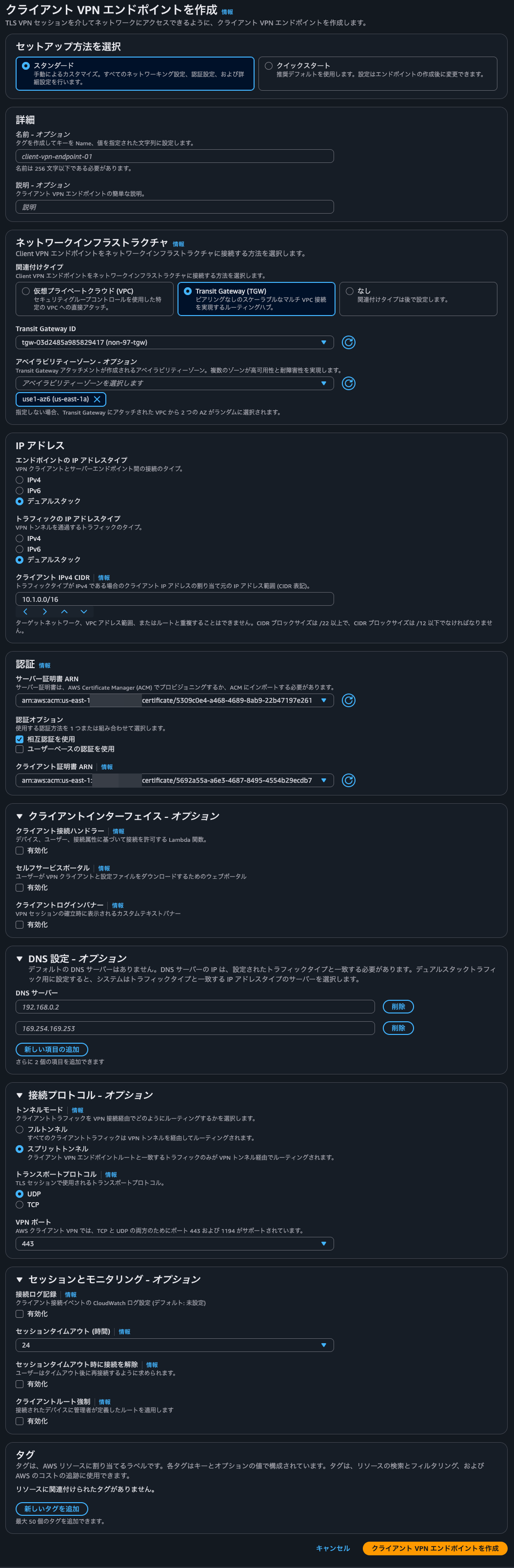
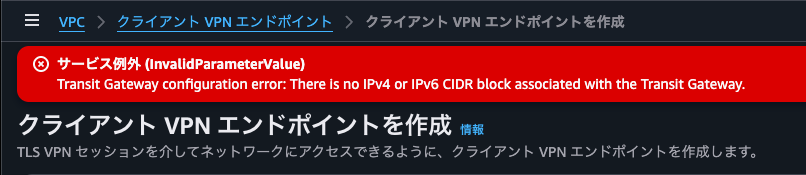
When I tried to create it like this, it failed with the error Transit Gateway configuration error- There is no IPv4 or IPv6 CIDR block associated with the Transit Gateway. As expected, assigning a Transit Gateway CIDR block seems to be mandatory.
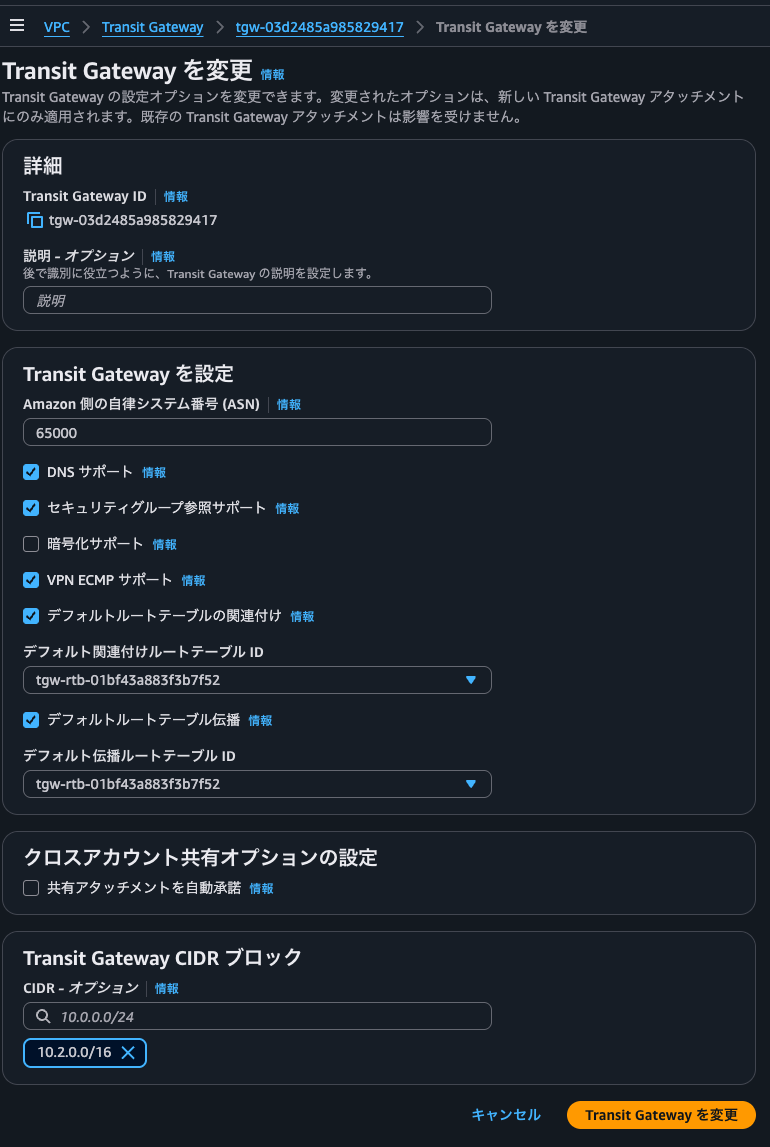
We specify a Transit Gateway CIDR block that does not overlap with the VPC CIDR or the Client VPN client IPv4 CIDR block.
After adding the Transit Gateway CIDR block, I requested creation of the Client VPN endpoint with the same parameters as before, and it was accepted successfully.
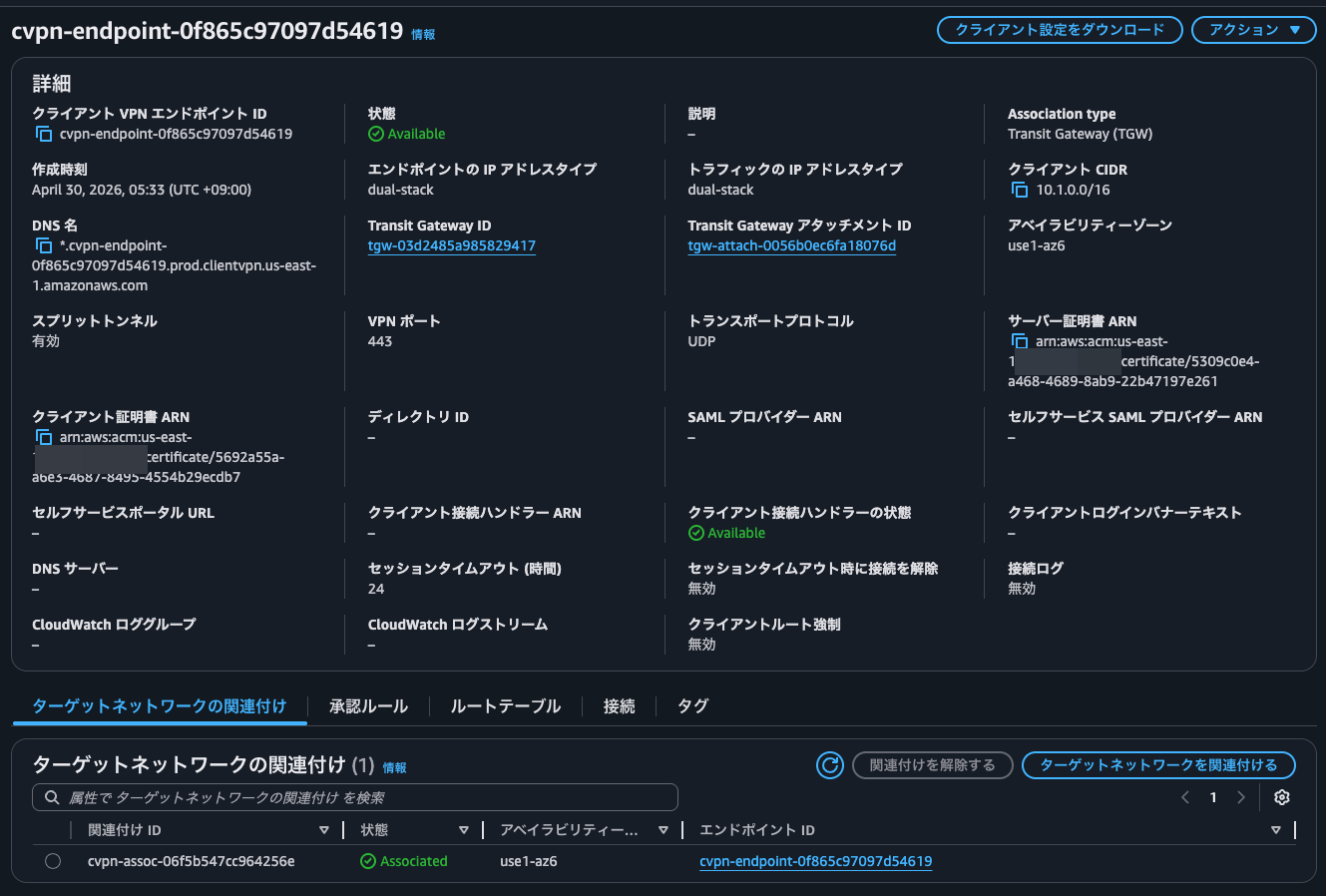
The association with the AZs has already been done.
We configure an authorization rule and routes so that it can communicate with the VPC connected to the Transit Gateway.


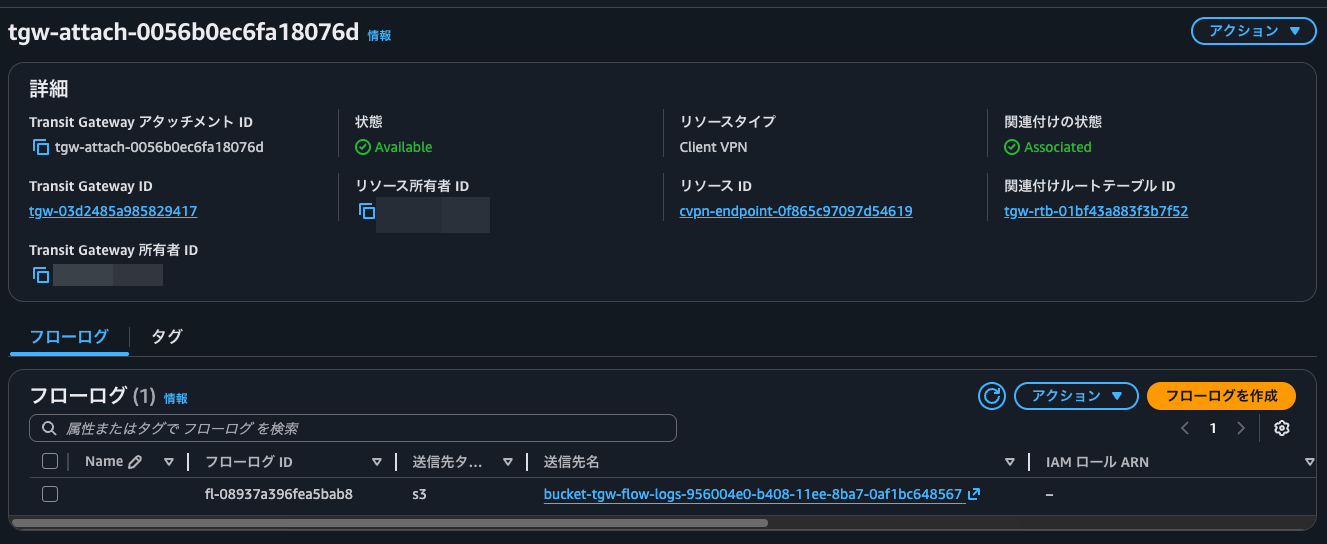
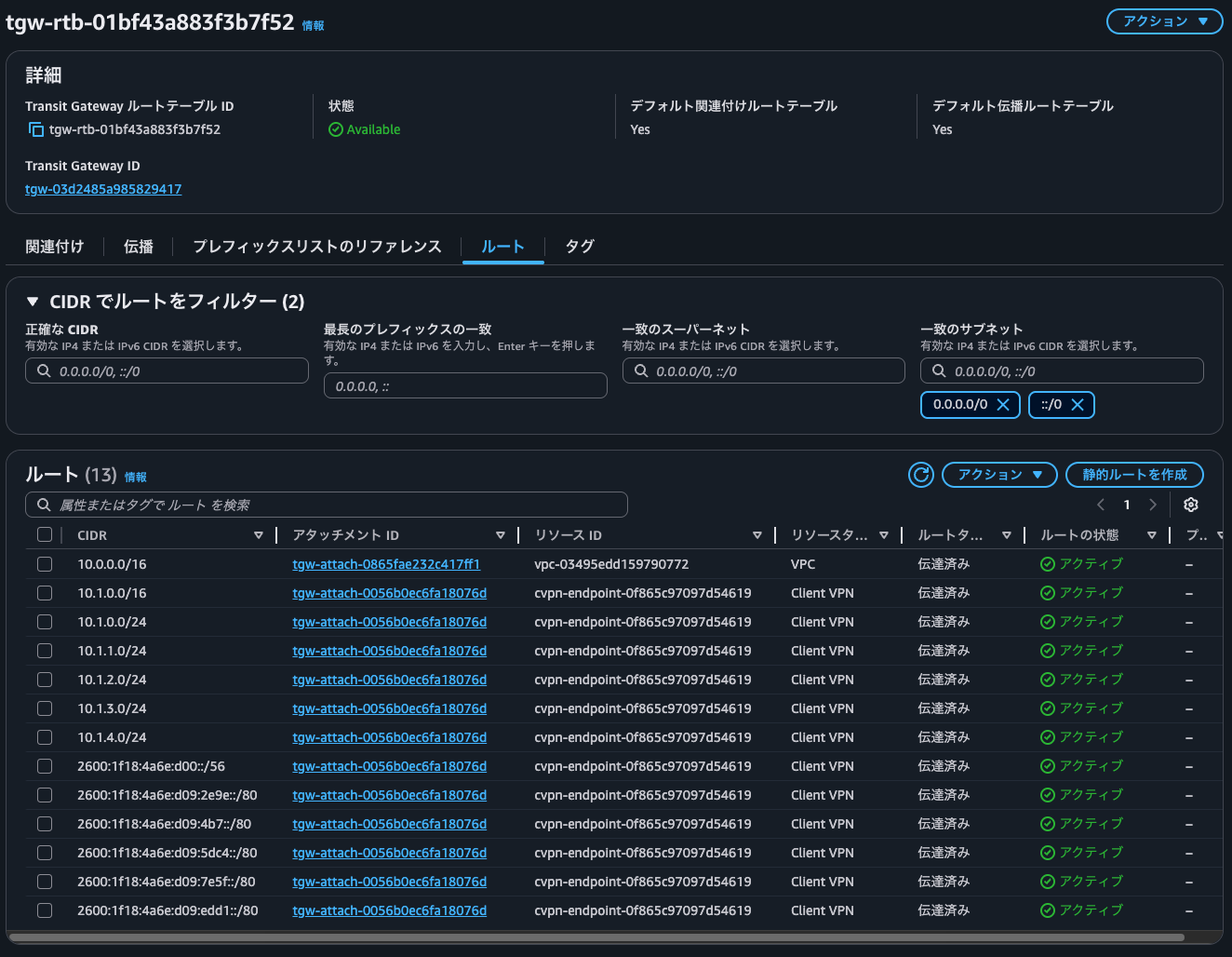
When I checked the Transit Gateway attachments in this state, one with the resource type Client VPN had been created.
Also, checking the Transit Gateway route table, a route to the range specified as the Client VPN client IPv4 CIDR block had been added. It is a mystery why routes more specific than the one specified as the Client VPN client IPv4 CIDR block, such as 10.1.0.0/24, are configured.
Verifying operation
Now let's verify operation.
Download the client configuration file of the Client VPN endpoint and enter the client certificate and private key in the configuration file.
Specify the configuration file in a Client VPN profile and connect.
I think the following article explains the overall flow clearly.
In this state, I ping the EC2 instance in the VPC from my local machine.
> ping -c 4 10.0.12.144
PING 10.0.12.144 (10.0.12.144): 56 data bytes
64 bytes from 10.0.12.144: icmp_seq=0 ttl=125 time=185.791 ms
64 bytes from 10.0.12.144: icmp_seq=1 ttl=125 time=187.940 ms
64 bytes from 10.0.12.144: icmp_seq=2 ttl=125 time=187.484 ms
64 bytes from 10.0.12.144: icmp_seq=3 ttl=125 time=183.719 ms

--- 10.0.12.144 ping statistics ---
4 packets transmitted, 4 packets received, 0.0% packet loss
round-trip min/avg/max/stddev = 183.719/186.233/187.940/1.658 ms
Nice.
I start nginx on the EC2 instance in the VPC and access it with curl.
> curl 10.0.12.144
<!DOCTYPE html>
<html>
<head>
<title>Welcome to nginx!</title>
<style>
html { color-scheme: light dark; }
body { width: 35em; margin: 0 auto;
font-family: Tahoma, Verdana, Arial, sans-serif; }
</style>
</head>
<body>
<h1>Welcome to nginx!</h1>
<p>If you see this page, the nginx web server is successfully installed and
working. Further configuration is required.</p>

<p>For online documentation and support please refer to
<a href="http://nginx.org/">nginx.org</a>.<br/>
Commercial support is available at
<a href="http://nginx.com/">nginx.com</a>.</p>

<p><em>Thank you for using nginx.</em></p>
</body>
</html>

> curl 10.0.12.144 -I
HTTP/1.1 200 OK
Server: nginx/1.28.3
Date: Wed, 29 Apr 2026 21:33:09 GMT
Content-Type: text/html
Content-Length: 615
Last-Modified: Tue, 31 Mar 2026 20:27:53 GMT
Connection: keep-alive
ETag: "69cc2e49-267"
Accept-Ranges: bytes

> curl 10.0.12.144 -Iv
*   Trying 10.0.12.144:80...
* Connected to 10.0.12.144 (10.0.12.144) port 80
> HEAD / HTTP/1.1
> Host: 10.0.12.144
> User-Agent: curl/8.7.1
> Accept: */*
>
* Request completely sent off
< HTTP/1.1 200 OK
HTTP/1.1 200 OK
< Server: nginx/1.28.3
Server: nginx/1.28.3
< Date: Wed, 29 Apr 2026 21:33:16 GMT
Date: Wed, 29 Apr 2026 21:33:16 GMT
< Content-Type: text/html
Content-Type: text/html
< Content-Length: 615
Content-Length: 615
< Last-Modified: Tue, 31 Mar 2026 20:27:53 GMT
Last-Modified: Tue, 31 Mar 2026 20:27:53 GMT
< Connection: keep-alive
Connection: keep-alive
< ETag: "69cc2e49-267"
ETag: "69cc2e49-267"
< Accept-Ranges: bytes
Accept-Ranges: bytes
<

* Connection #0 to host 10.0.12.144 left intact
It is accessible without any problems.
Checking nginx's access log at this point, the IP address is indeed within the IP address range I assigned.
$ sudo cat /var/log/nginx/access.log
10.1.3.2 - - [29/Apr/2026:21:28:11 +0000] "GET / HTTP/1.1" 200 615 "-" "curl/8.7.1" "-"
10.1.3.2 - - [29/Apr/2026:21:33:09 +0000] "HEAD / HTTP/1.1" 200 0 "-" "curl/8.7.1" "-"
10.1.3.2 - - [29/Apr/2026:21:33:16 +0000] "HEAD / HTTP/1.1" 200 0 "-" "curl/8.7.1" "-"
This IP address matches the client IP address that can be checked from the Client VPN connection history. This is convenient.

Checking Transit Gateway Flow Logs
Let's also check the Transit Gateway Flow Logs.
Since I want to run queries in Athena, I execute the following DDL.
CREATE EXTERNAL TABLE `tgw_flow_logs`(
  `version` int,
  `resource_type` string,
  `account_id` string,
  `tgw_id` string,
  `tgw_attachment_id` string,
  `tgw_src_vpc_account_id` string,
  `tgw_dst_vpc_account_id` string,
  `tgw_src_vpc_id` string,
  `tgw_dst_vpc_id` string,
  `tgw_src_subnet_id` string,
  `tgw_dst_subnet_id` string,
  `tgw_src_eni` string,
  `tgw_dst_eni` string,
  `tgw_src_az_id` string,
  `tgw_dst_az_id` string,
  `tgw_pair_attachment_id` string,
  `srcaddr` string,
  `dstaddr` string,
  `srcport` int,
  `dstport` int,
  `protocol` bigint,
  `packets` bigint,
  `bytes` bigint,
  `start` bigint,
  `end` bigint,
  `log_status` string,
  `type` string,
  `packets_lost_no_route` bigint,
  `packets_lost_blackhole` bigint,
  `packets_lost_mtu_exceeded` bigint,
  `packets_lost_ttl_expired` bigint,
  `tcp_flags` int,
  `region` string,
  `flow_direction` string,
  `pkt_src_aws_service` string,
  `pkt_dst_aws_service` string)
PARTITIONED BY (
  `aws_account_id` string,
  `aws_region` string,
  `datehour` string)
ROW FORMAT SERDE
  'org.apache.hadoop.hive.ql.io.parquet.serde.ParquetHiveSerDe'
STORED AS INPUTFORMAT
  'org.apache.hadoop.hive.ql.io.parquet.MapredParquetInputFormat'
OUTPUTFORMAT
  'org.apache.hadoop.hive.ql.io.parquet.MapredParquetOutputFormat'
LOCATION
  's3://bucket-tgw-flow-logs-956004e0-b408-11ee-8ba7-0af1bc648567/AWSLogs'
TBLPROPERTIES (
  'projection.enabled'='true',
  'has_encrypted_data'='true',
  'classification'='parquet',
  'projection.aws_account_id.type'='enum',
  'projection.aws_account_id.values'='<AWSアカウントID>',
  'projection.aws_region.type'='enum',
  'projection.aws_region.values'='us-east-1',
  'projection.datehour.format'='yyyy/MM/dd/HH',
  'projection.datehour.interval'='1',
  'projection.datehour.interval.unit'='HOURS',
  'projection.datehour.range'='NOW-1YEARS,NOW',
  'projection.datehour.type'='date',
  'projection.enabled'='true',
  'skip.header.line.count'='1',
  'storage.location.template'='s3://bucket-tgw-flow-logs-956004e0-b408-11ee-8ba7-0af1bc648567/AWSLogs/${aws_account_id}/vpcflowlogs/${aws_region}/${datehour}',
  'transient_lastDdlTime'='1705373737')
We extract the logs of the traffic during the connectivity check.
SELECT
    *
FROM
    "default"."tgw_flow_logs"
WHERE
    datehour='2026/04/29/21' AND
    (
        srcaddr='10.0.12.144' OR
        dstaddr='10.0.12.144'
    )
;
The execution results are as follows.
version,resource_type,account_id,tgw_id,tgw_attachment_id,tgw_src_vpc_account_id,tgw_dst_vpc_account_id,tgw_src_vpc_id,tgw_dst_vpc_id,tgw_src_subnet_id,tgw_dst_subnet_id,tgw_src_eni,tgw_dst_eni,tgw_src_az_id,tgw_dst_az_id,tgw_pair_attachment_id,srcaddr,dstaddr,srcport,dstport,protocol,packets,bytes,start,end,log_status,type,packets_lost_no_route,packets_lost_blackhole,packets_lost_mtu_exceeded,packets_lost_ttl_expired,tcp_flags,region,flow_direction,pkt_src_aws_service,pkt_dst_aws_service,aws_account_id,aws_region,datehour
6,TransitGateway,<AWSアカウントID>,tgw-03d2485a985829417,tgw-attach-0056b0ec6fa18076d,<AWSアカウントID>,<AWSアカウントID>,'-,vpc-03495edd159790772,'-,subnet-078545a6acad5a157,'-,eni-0c845bf8606c21517,use1-az6,use1-az6,tgw-attach-0865fae232c417ff1,10.1.3.2,10.0.12.144,58760,80,6,6,398,1777498091,1777498091,OK,IPv4,0,0,0,0,,us-east-1,ingress,'-,'-,<AWSアカウントID>,us-east-1,2026/04/29/21
6,TransitGateway,<AWSアカウントID>,tgw-03d2485a985829417,tgw-attach-0865fae232c417ff1,<AWSアカウントID>,<AWSアカウントID>,'-,vpc-03495edd159790772,'-,subnet-078545a6acad5a157,'-,eni-0c845bf8606c21517,use1-az6,use1-az6,tgw-attach-0056b0ec6fa18076d,10.1.3.2,10.0.12.144,58760,80,6,6,398,1777498091,1777498091,OK,IPv4,0,0,0,0,,us-east-1,egress,'-,'-,<AWSアカウントID>,us-east-1,2026/04/29/21
6,TransitGateway,<AWSアカウントID>,tgw-03d2485a985829417,tgw-attach-0865fae232c417ff1,<AWSアカウントID>,<AWSアカウントID>,vpc-03495edd159790772,'-,subnet-078545a6acad5a157,'-,eni-0c845bf8606c21517,'-,use1-az6,use1-az6,tgw-attach-0056b0ec6fa18076d,10.0.12.144,10.1.3.2,80,58760,6,4,1069,1777498091,1777498091,OK,IPv4,0,0,0,0,0,us-east-1,ingress,'-,'-,<AWSアカウントID>,us-east-1,2026/04/29/21
6,TransitGateway,<AWSアカウントID>,tgw-03d2485a985829417,tgw-attach-0056b0ec6fa18076d,<AWSアカウントID>,<AWSアカウントID>,vpc-03495edd159790772,'-,subnet-078545a6acad5a157,'-,eni-0c845bf8606c21517,'-,use1-az6,use1-az6,tgw-attach-0865fae232c417ff1,10.0.12.144,10.1.3.2,80,58760,6,4,1069,1777498091,1777498091,OK,IPv4,0,0,0,0,0,us-east-1,egress,'-,'-,<AWSアカウントID>,us-east-1,2026/04/29/21
6,TransitGateway,<AWSアカウントID>,tgw-03d2485a985829417,tgw-attach-0865fae232c417ff1,<AWSアカウントID>,<AWSアカウントID>,vpc-03495edd159790772,'-,subnet-078545a6acad5a157,'-,eni-0c845bf8606c21517,'-,use1-az6,use1-az6,tgw-attach-0056b0ec6fa18076d,10.0.12.144,10.1.3.2,0,0,1,4,336,1777498375,1777498378,OK,IPv4,0,0,0,0,0,us-east-1,ingress,'-,'-,<AWSアカウントID>,us-east-1,2026/04/29/21
6,TransitGateway,<AWSアカウントID>,tgw-03d2485a985829417,tgw-attach-0056b0ec6fa18076d,<AWSアカウントID>,<AWSアカウントID>,vpc-03495edd159790772,'-,subnet-078545a6acad5a157,'-,eni-0c845bf8606c21517,'-,use1-az6,use1-az6,tgw-attach-0865fae232c417ff1,10.0.12.144,10.1.3.2,0,0,1,4,336,1777498375,1777498378,OK,IPv4,0,0,0,0,0,us-east-1,egress,'-,'-,<AWSアカウントID>,us-east-1,2026/04/29/21
6,TransitGateway,<AWSアカウントID>,tgw-03d2485a985829417,tgw-attach-0056b0ec6fa18076d,<AWSアカウントID>,<AWSアカウントID>,'-,vpc-03495edd159790772,'-,subnet-078545a6acad5a157,'-,eni-0c845bf8606c21517,use1-az6,use1-az6,tgw-attach-0865fae232c417ff1,10.1.3.2,10.0.12.144,58926,80,6,6,399,1777498389,1777498389,OK,IPv4,0,0,0,0,,us-east-1,ingress,'-,'-,<AWSアカウントID>,us-east-1,2026/04/29/21
6,TransitGateway,<AWSアカウントID>,tgw-03d2485a985829417,tgw-attach-0865fae232c417ff1,<AWSアカウントID>,<AWSアカウントID>,'-,vpc-03495edd159790772,'-,subnet-078545a6acad5a157,'-,eni-0c845bf8606c21517,use1-az6,use1-az6,tgw-attach-0056b0ec6fa18076d,10.1.3.2,10.0.12.144,58926,80,6,6,399,1777498389,1777498389,OK,IPv4,0,0,0,0,,us-east-1,egress,'-,'-,<AWSアカウントID>,us-east-1,2026/04/29/21
6,TransitGateway,<AWSアカウントID>,tgw-03d2485a985829417,tgw-attach-0865fae232c417ff1,<AWSアカウントID>,<AWSアカウントID>,vpc-03495edd159790772,'-,subnet-078545a6acad5a157,'-,eni-0c845bf8606c21517,'-,use1-az6,use1-az6,tgw-attach-0056b0ec6fa18076d,10.0.12.144,10.1.3.2,80,58930,6,4,454,1777498395,1777498396,OK,IPv4,0,0,0,0,0,us-east-1,ingress,'-,'-,<AWSアカウントID>,us-east-1,2026/04/29/21
6,TransitGateway,<AWSアカウントID>,tgw-03d2485a985829417,tgw-attach-0056b0ec6fa18076d,<AWSアカウントID>,<AWSアカウントID>,'-,vpc-03495edd159790772,'-,subnet-078545a6acad5a157,'-,eni-0c845bf8606c21517,use1-az6,use1-az6,tgw-attach-0865fae232c417ff1,10.1.3.2,10.0.12.144,58930,80,6,6,399,1777498395,1777498396,OK,IPv4,0,0,0,0,,us-east-1,ingress,'-,'-,<AWSアカウントID>,us-east-1,2026/04/29/21
6,TransitGateway,<AWSアカウントID>,tgw-03d2485a985829417,tgw-attach-0865fae232c417ff1,<AWSアカウントID>,<AWSアカウントID>,'-,vpc-03495edd159790772,'-,subnet-078545a6acad5a157,'-,eni-0c845bf8606c21517,use1-az6,use1-az6,tgw-attach-0056b0ec6fa18076d,10.1.3.2,10.0.12.144,58930,80,6,6,399,1777498395,1777498396,OK,IPv4,0,0,0,0,,us-east-1,egress,'-,'-,<AWSアカウントID>,us-east-1,2026/04/29/21
6,TransitGateway,<AWSアカウントID>,tgw-03d2485a985829417,tgw-attach-0056b0ec6fa18076d,<AWSアカウントID>,<AWSアカウントID>,vpc-03495edd159790772,'-,subnet-078545a6acad5a157,'-,eni-0c845bf8606c21517,'-,use1-az6,use1-az6,tgw-attach-0865fae232c417ff1,10.0.12.144,10.1.3.2,80,58930,6,4,454,1777498395,1777498396,OK,IPv4,0,0,0,0,0,us-east-1,egress,'-,'-,<AWSアカウントID>,us-east-1,2026/04/29/21
6,TransitGateway,<AWSアカウントID>,tgw-03d2485a985829417,tgw-attach-0056b0ec6fa18076d,<AWSアカウントID>,<AWSアカウントID>,vpc-03495edd159790772,'-,subnet-078545a6acad5a157,'-,eni-0c845bf8606c21517,'-,use1-az6,use1-az6,tgw-attach-0865fae232c417ff1,10.0.12.144,10.1.3.2,80,58926,6,4,454,1777498389,1777498389,OK,IPv4,0,0,0,0,0,us-east-1,egress,'-,'-,<AWSアカウントID>,us-east-1,2026/04/29/21
6,TransitGateway,<AWSアカウントID>,tgw-03d2485a985829417,tgw-attach-0865fae232c417ff1,<AWSアカウントID>,<AWSアカウントID>,vpc-03495edd159790772,'-,subnet-078545a6acad5a157,'-,eni-0c845bf8606c21517,'-,use1-az6,use1-az6,tgw-attach-0056b0ec6fa18076d,10.0.12.144,10.1.3.2,80,58926,6,4,454,1777498389,1777498389,OK,IPv4,0,0,0,0,0,us-east-1,ingress,'-,'-,<AWSアカウントID>,us-east-1,2026/04/29/21
6,TransitGateway,<AWSアカウントID>,tgw-03d2485a985829417,tgw-attach-0865fae232c417ff1,<AWSアカウントID>,<AWSアカウントID>,'-,vpc-03495edd159790772,'-,subnet-078545a6acad5a157,'-,eni-0c845bf8606c21517,use1-az6,use1-az6,tgw-attach-0056b0ec6fa18076d,10.1.3.2,10.0.12.144,0,0,1,4,336,1777498375,1777498378,OK,IPv4,0,0,0,0,0,us-east-1,egress,'-,'-,<AWSアカウントID>,us-east-1,2026/04/29/21
6,TransitGateway,<AWSアカウントID>,tgw-03d2485a985829417,tgw-attach-0056b0ec6fa18076d,<AWSアカウントID>,<AWSアカウントID>,'-,vpc-03495edd159790772,'-,subnet-078545a6acad5a157,'-,eni-0c845bf8606c21517,use1-az6,use1-az6,tgw-attach-0865fae232c417ff1,10.1.3.2,10.0.12.144,0,0,1,4,336,1777498375,1777498378,OK,IPv4,0,0,0,0,0,us-east-1,ingress,'-,'-,<AWSアカウントID>,us-east-1,2026/04/29/21
Here too, the source/destination IP addresses are within the IP address range assigned to the Client VPN endpoint that we checked earlier.
I also checked whether IP addresses within the range assigned to the Transit Gateway CIDR block are recorded in the Transit Gateway Flow Logs, as shown below, but the result was 0 records.
SELECT
    *
FROM
    "default"."tgw_flow_logs"
WHERE
    datehour='2026/04/29/21' AND
    (
        srcaddr LIKE '10.2.%' OR
        dstaddr LIKE '10.2.%'
    )
;
So I can't tell how it is being used.
If you're in an environment that uses Transit Gateway, you'll probably use the native integration with Transit Gateway from now on
I introduced the update in which AWS Client VPN supports native integration with AWS Transit Gateway.
If you're in an environment that uses Transit Gateway, you'll probably use the native integration with Transit Gateway from now on.
I hope this article helps someone.
This was Nonpi (@non____97) of the Consulting Department, Cloud Business Division!
