Here is my thinking on considerations when using AWS Network Firewall to aggregate and inspect inbound traffic from the internet

This page has been translated by machine translation. View original
When aggregating inspection of inbound traffic from the internet, what configurations are available and what are the key considerations?
Hello, I'm nonPi (@non____97).
Have you ever wondered what configurations are available and what key considerations exist when aggregating inspection of inbound traffic from the internet? I certainly have.
Using Network Firewall with Transit Gateway or Cloud WAN to aggregate and inspect outbound traffic to the internet seems to be a common configuration.
But what about inbound traffic? Compared to outbound traffic, I feel there are fewer examples.
Let me think about why there are fewer examples and what configurations are possible.
Summary Up Front
- There are 2 patterns for inspecting inbound traffic from the internet with Network Firewall
- Pattern 1: IGW → Network Firewall → ALB
- Pattern 2: IGW → ALB → Network Firewall
- Cases where Network Firewall is adopted for aggregated inspection of inbound traffic are rare
- Mainly due to the following reasons
- Most publicly exposed traffic is encrypted, and without TLS inspection, the scope of inspection is limited
- Enabling the Advanced Inspection Endpoint for TLS inspection increases the fixed monthly cost by approximately 2.7x (576.70 USD → 2,175.40 USD)
- Only about 4% of AWS managed rule groups operate in the inbound direction (900 rules / 22,888 rules)
- HTTP/HTTPS threats can be addressed by AWS WAF and AWS Shield Advanced
- ALB terminates TCP, absorbing SYN floods and UDP reflection attacks
- Separating VPCs and AWS accounts for aggregation increases management overhead
- There are hurdles in dynamically tracking IP addresses across accounts
- Communication logs can be partially substituted by VPC Flow Logs / ALB access logs / WAF logs
- HOME_NET definitions become complex, making detection gaps more likely
- CloudFront VPC Origins and Global Accelerator can become bypass routes
- Mainly due to the following reasons
- Cases where there is still motivation to inspect inbound traffic with Network Firewall
- Publicly exposing TLS protocols other than HTTP/HTTPS (SMTPS / IMAPS / LDAPS, etc.)
- Publicly exposing TCP/UDP services via NLB
- Finding value in rules within threat signature managed rule groups that address inbound internet traffic
- Compliance or audit requirements explicitly call for network-based IDS/IPS
- Evaluate what threats you want to address, what gaps your existing controls leave, and whether the cost is justified before deciding to adopt it
Overview of Configurations
There are broadly two possible configurations:
- Place Network Firewall in front of the internet-facing resource
- Place Network Firewall behind the internet-facing resource
Each is described below.
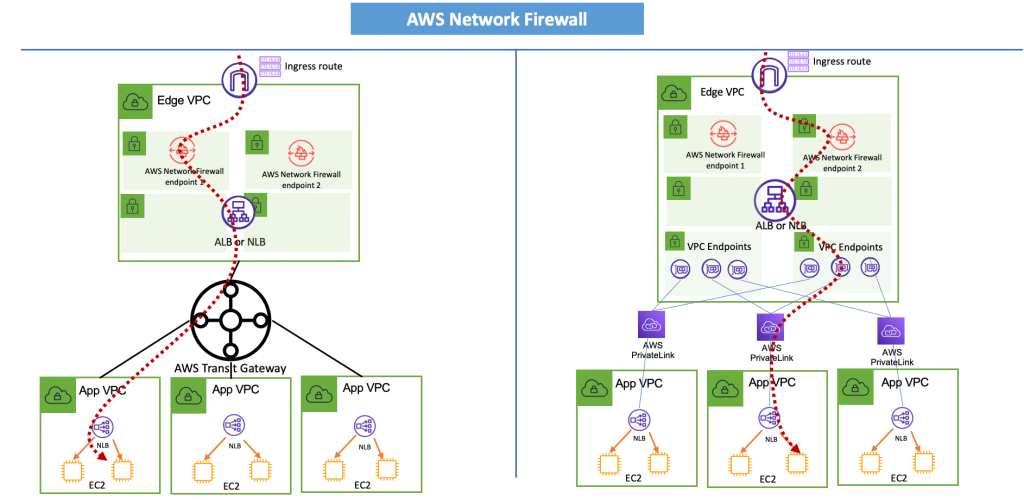
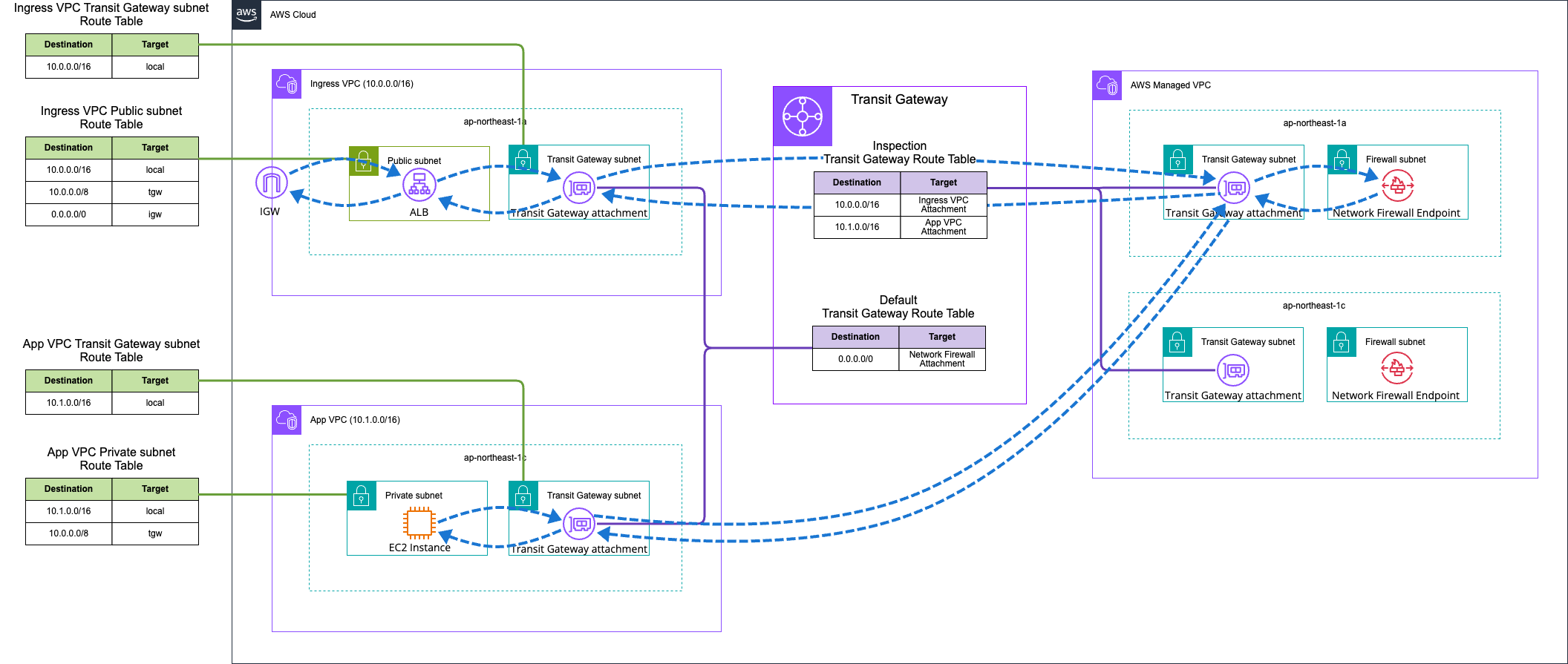
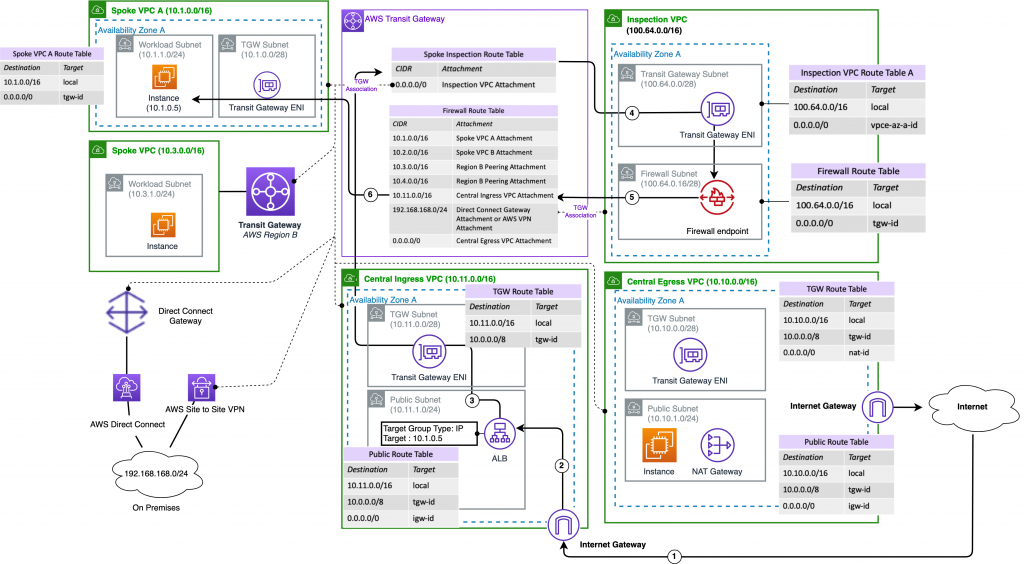
1. Place Network Firewall in Front of the Internet-Facing Resource
This is an approach where Network Firewall is placed in front of the internet-facing resource, such as IGW → Network Firewall → ALB.
The diagram looks like this:
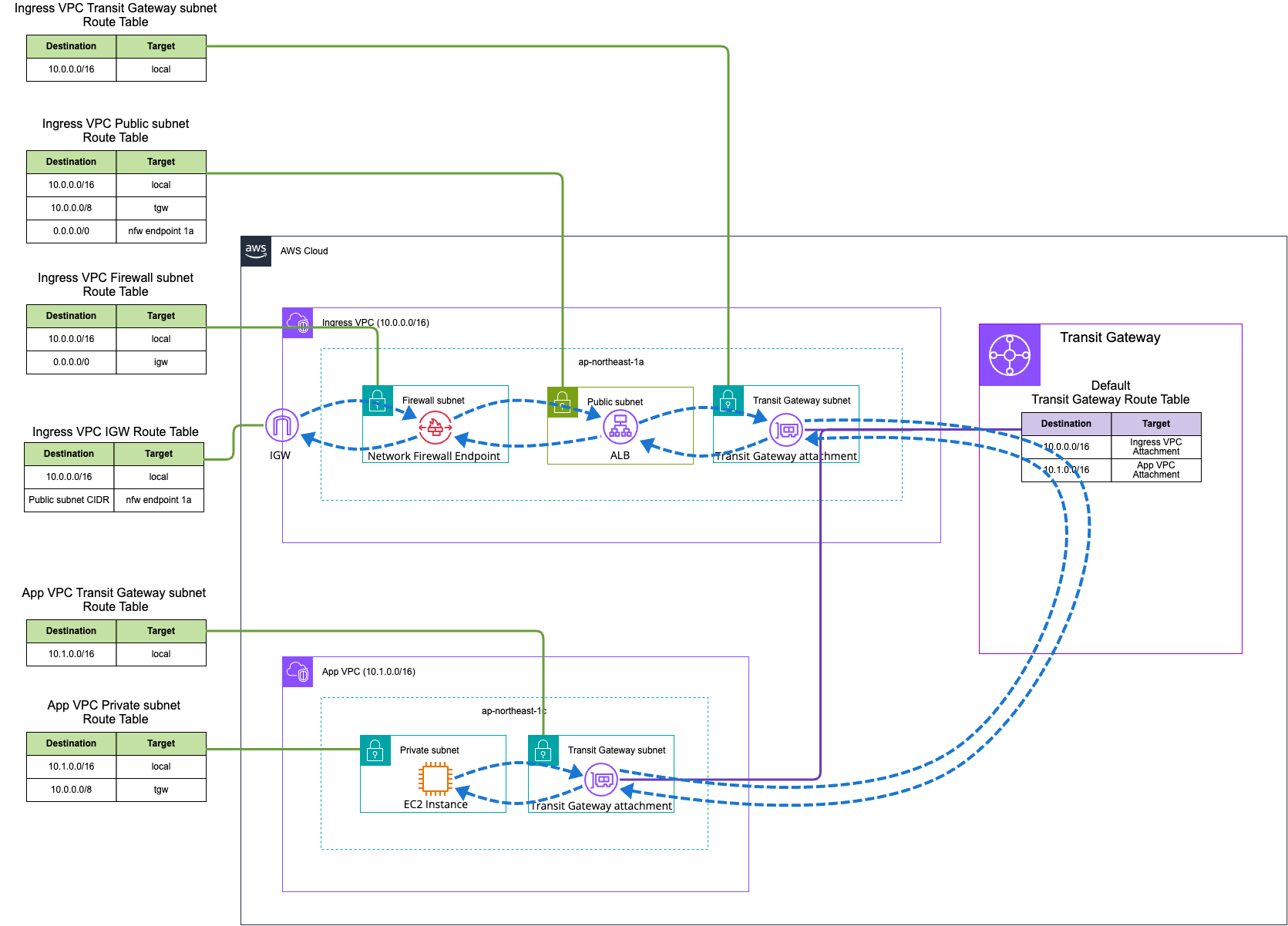
In the case of Cloud WAN, it's simply a matter of replacing Transit Gateway and nothing else changes.
It is also introduced in the AWS Blog as follows:
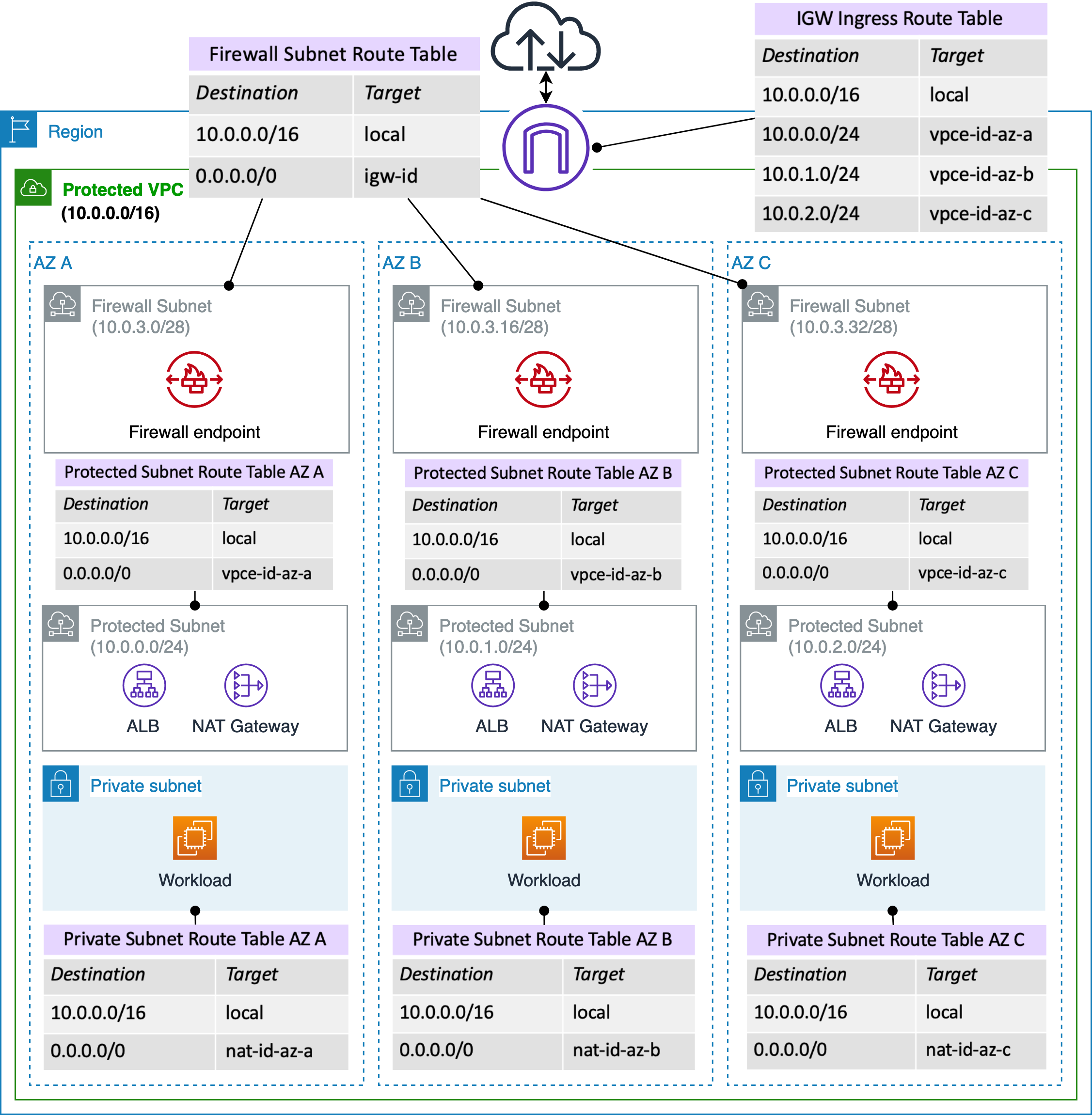
Excerpt: AWS Network Firewall Deployment Models | Amazon Web Services Blog
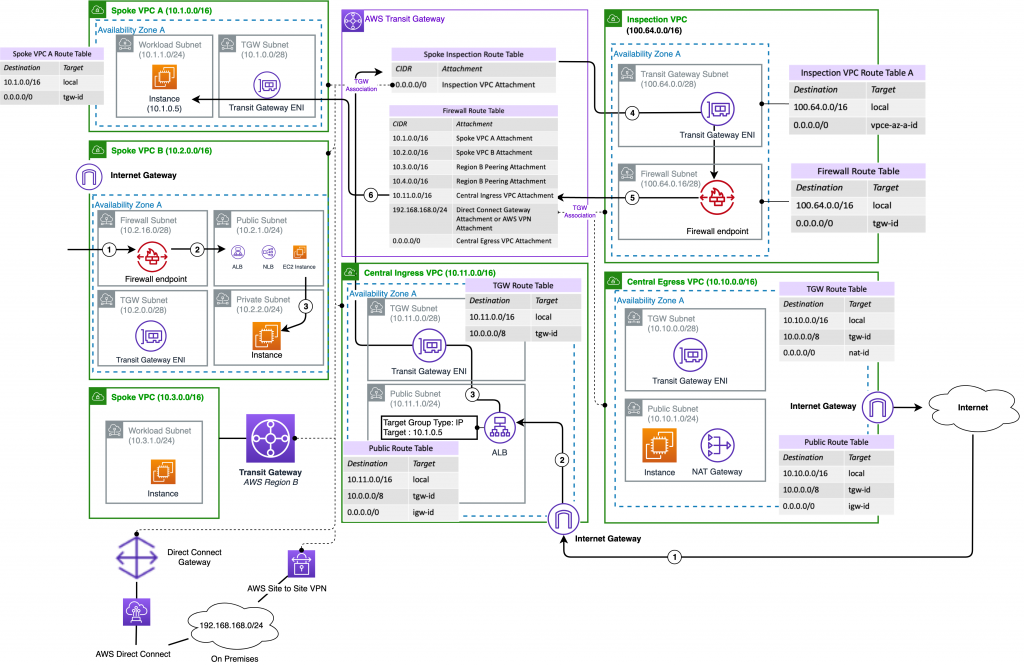
Excerpt: AWS Network Firewall Deployment Models | Amazon Web Services Blog
Excerpt: Firewall Deployment Design for Internet Ingress Traffic Flows | Amazon Web Services Blog
Normally, you cannot inspect the contents of TLS-encrypted traffic, but by enabling TLS inspection, it is also possible to inspect encrypted portions.
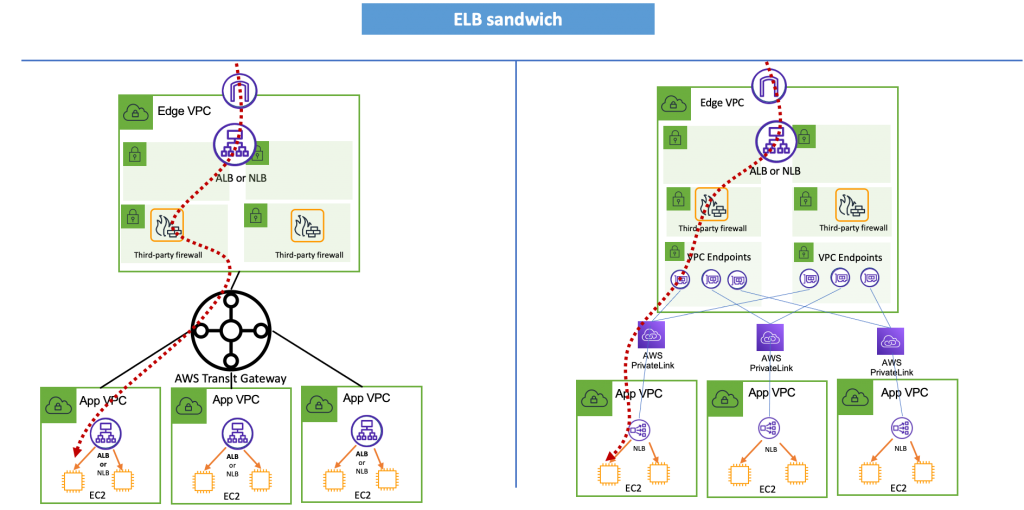
2. Place Network Firewall Behind the Internet-Facing Resource
This is an approach where Network Firewall is placed behind the internet-facing resource, such as IGW → ALB → Network Firewall → Target.
The diagram looks like this:
In the case of Cloud WAN here as well, it's simply a matter of replacing Transit Gateway and nothing else changes.
It is also introduced in the AWS Blog as follows:
Excerpt: AWS Network Firewall Deployment Models | Amazon Web Services Blog
Excerpt: Firewall Deployment Design for Internet Ingress Traffic Flows | Amazon Web Services Blog
With this approach, if internet-facing resources like ALB terminate TLS, TLS inspection is not required.
On the other hand, the source IP address visible to Network Firewall becomes the IP address of the internet-facing resource such as ALB.
If you want to know the client IP address, you will need to manually correlate it yourself using information from VPC Flow Logs, ALB access logs, etc., based on time, destination port to the resource upstream of Network Firewall, protocol, user agent, path, method, status code, and so on.
Summary of Configuration Pros/Cons
Let me summarize the pros and cons of the configurations.
To conclude upfront, I personally prefer 2. Place Network Firewall Behind the Internet-Facing Resource.
The pros and cons are as follows:
| Aspect | Pattern 1 (IGW → Network Firewall → ALB) | Pattern 2 (IGW → ALB → Network Firewall) |
|---|---|---|
| TLS/HTTPS Traffic Inspection | Without TLS inspection, only plaintext portions like SNI are visible. TLS inspection is required to inspect HTTPS content | ○ Since ALB terminates TLS, plain HTTP can be inspected directly without TLS inspection |
| Client IP Visibility | ○ The client IP address can be confirmed directly | The client IP address visible to Network Firewall is the ALB's private IP address, and the true client IP address can only be obtained via the X-Forwarded-For header |
| Network Firewall Processing Volume | All inbound traffic during DDoS attempts, scan attempts, etc. passes through Network Firewall for evaluation, increasing charges based on processing volume | ○ Only traffic that passes through ALB and AWS WAF without being dropped reaches Network Firewall |
| Reuse of East-West / Egress Network Firewall | Separate procurement is required (not a concern if you want explicit separation from other Network Firewalls) | ○ Easy to reuse the same Network Firewall. Since both the ALB → Target path and the East-West / Egress path pass through the same Inspection VPC via TGW, firewall endpoint hours can be saved |
Analysis of Why Inspecting Inbound Internet Traffic with Network Firewall Is Uncommon
First, let me analyze why inspecting inbound traffic from the internet with Network Firewall is uncommon.
I believe the reasons include the following:
- Inbound traffic from the internet is often encrypted, making it difficult to obtain meaningful inspection results
- The cost of TLS inspection is high
- There are few effective AWS managed rule groups for inbound traffic from the internet
- Other services such as AWS WAF and AWS Shield Advanced are often considered sufficient countermeasures
- ALB acts as an L3/L4 proxy layer
- When aggregating inbound internet traffic for inspection, it becomes necessary to separate the VPCs and AWS accounts of internet-facing resources and target resources, increasing management overhead
- When separating the AWS accounts of internet-facing resources and target resources for aggregated inspection, there are hurdles in dynamically tracking IP addresses across accounts
- Traffic log aggregation can be partially substituted by VPC Flow Logs, ALB access logs, and WAF logs
- When inspecting behind ALB, if CIDR ranges are not properly managed, source IP addresses may be included in HOME_NET, preventing sufficient detection
- There are bypass routes when using CloudFront VPC Origins or Global Accelerator
1. Inbound Traffic from the Internet Is Often Encrypted, Making It Difficult to Obtain Meaningful Inspection Results
The primary reason is probably that inbound traffic from the internet is often encrypted, making it difficult to obtain meaningful inspection results.
Most broadly publicly exposed inbound internet traffic is likely HTTPS. SSH and RDP connections typically have source IP addresses tightly restricted via security groups.
In that case, the role of Network Firewall becomes detecting and defending based on elements other than source IP address, destination port, security groups, and NACLs.
However, if the publicly exposed inbound internet traffic is encrypted like HTTPS, inspection can only be performed on unencrypted elements.
With this limitation, even if Network Firewall is introduced, it cannot do much more than a security group.
2. The Cost of TLS Inspection Is High
So you might think the solution is to enable TLS inspection, but the cost of TLS inspection is a concern.
Network Firewall pricing is as follows:
| Resource Type | Price |
|---|---|
| Network Firewall Endpoint | USD 0.395/hour |
| Network Firewall Secondary Endpoint | USD 0.158/hour |
| Network Firewall Traffic Processing | USD 0.065/GB |
| Network Firewall Advanced Inspection Endpoint | USD 1.095/hour |
| Network Firewall Advanced Inspection Traffic Processing | USD 0.00/GB |
| Network Firewall Advanced Threat Protection Traffic Processing | USD 0.005/GB |
Excerpt: AWS Network Firewall Pricing – Network Security Service – Amazon Web Services Tokyo Region
When performing TLS inspection, in addition to the standard Network Firewall Endpoint charge, a separate Network Firewall Advanced Inspection Endpoint charge applies.
Comparing the fixed monthly costs (excluding traffic processing) with and without the Network Firewall Advanced Inspection Endpoint:
| Network Firewall Advanced Inspection Endpoint | Monthly Cost |
|---|---|
| Without | 0.395 USD/h × 2AZ × 730 h = 576.70 USD |
| With | 0.395 USD/h × 2AZ × 730 h + 1.095 USD/h × 2AZ × 730 h = 2,175.40 USD |
An additional cost of approximately 2.7x is quite a significant impact.
3. There Are Few Effective AWS Managed Rule Groups for Inbound Traffic from the Internet
Suppose TLS inspection is enabled so that traffic encrypted by TLS such as HTTPS, SMTPS, and POP3S can be inspected. And suppose we also want to explore whether suspicious communications can be detected from unencrypted parts of traffic such as HTTPS.
As mentioned earlier, the role of Network Firewall is to detect and defend based on elements other than source IP address, destination port, security groups, and NACLs.
Specifically, it controls traffic handling by examining various headers such as IP, TCP, and HTTP, as well as payload content.
It would be extremely difficult for operators to define rules from scratch to detect or prevent traffic deemed as threats. In practice, AWS-provided managed rule groups would typically be adopted.
However, as of 2026/5/31, among the managed rule groups provided by AWS, there are few that are effective against inbound traffic from the internet.
There are 3 types of managed rule groups provided by Network Firewall:
- Active Threat Defense
- Domains and IP Addresses
- Threat Signatures
The threat categories detected by the first, Active Threat Defense, are as follows:
| Indicator group and description | Traffic direction | Indicator types |
|---|---|---|
| Command and control Infrastructure that malicious actors use to remotely control compromised systems. |
Egress | IPs, domains |
| Malware staging Infrastructure that facilitates the distribution of malware and attack tooling. |
Ingress/Egress | URLs |
| Sinkholes Previously abused infrastructure used for malicious purposes. |
Egress | Domains |
| Out-of-band application security testing A technique where injected payloads make an outbound connection to external infrastructure that validates the existence of a vulnerability. |
Egress | IPs, domains |
| Crypto-mining pool Infrastructure used by crypto-miners. |
Egress | IPs, domains |
Excerpt: Understanding active threat defense managed rule group indicators - AWS Network Firewall
As you can see, the primary focus is on Egress = inspection of outbound traffic to the internet.
The second category, Domains and IP Addresses, also consists of rule groups that block requests to suspicious domains, such as block requests to a class of domains.. and block requests to domains that are known for hosting malware.
| Rule name | Description and label |
|---|---|
AbusedLegitMalwareDomainsStrictOrder,AbusedLegitMalwareDomainsActionOrder |
Rules that allow you to block requests to a class of domains, which are generally legitimate but are compromised and may host malware. This can help reduce the risk of receiving malware or viruses originating from these sources with poor reputation. |
MalwareDomainsStrictOrder,MalwareDomainsActionOrder |
Rules that allow you to block requests to domains that are known for hosting malware. This can help reduce the risk of receiving malware or viruses originating from these known sources. |
AbusedLegitBotNetCommandAndControlDomainsStrictOrder,AbusedLegitBotNetCommandAndControlDomainsActionOrder |
Rules that allow you to block requests to a class of domains, which are generally legitimate but are compromised and may host botnets. This can help reduce the risk of resources accessing botnets originating from these sources with poor reputation. |
BotNetCommandAndControlDomainsStrictOrder,BotNetCommandAndControlDomainsActionOrder |
Rules that allow you to block requests to domains that are known for hosting botnets. This can help reduce the risk of resources accessing botnets originating from these known sources. |
Excerpt: AWS domain and IP managed rule groups for AWS Network Firewall - AWS Network Firewall
The third category, Threat Signatures, had a total of 22,888 rules across all rule groups as of 2026/5/31.
Breaking down by traffic direction, the rule counts are as follows:
| Category | Definition | Count |
|---|---|---|
| A | $EXTERNAL_NET or any → $HOME_NET + flow:to_server (requests from external to internal) |
764 |
| B | $EXTERNAL_NET or any → $HOME_NET + flow:established only |
25 |
| C | $EXTERNAL_NET or any → $HOME_NET + no flow specification |
67 |
| D | $EXTERNAL_NET or any → $HOME_NET + flow:to_client (responses from external to internal) |
3,881 |
| E | <> (bidirectional) |
0 |
| F | any → any |
28 |
| G | $HOME_NET → $EXTERNAL_NET or any + flow:to_server (requests from internal to external) |
14,964 |
| K | $HOME_NET → $EXTERNAL_NET or any + flow:to_client (responses to inbound requests) |
23 |
| L | $HOME_NET → $EXTERNAL_NET or any + no flow specification / established (other Egress) |
3,045 |
| I | $EXTERNAL_NET → any + flow:to_server (external origin, wildcard destination, request) |
69 |
| J | $EXTERNAL_NET → any + flow:to_client (external origin, wildcard destination, response) |
3 |
| H | Other ($HOME_NET → $HOME_NET 13 rules, $HOME_NET → other 4 rules, $EXTERNAL_NET → $EXTERNAL_NET 2 rules) |
19 |
| Total | 22,888 |
Among these, the categories that include rules for inspecting inbound traffic from the internet are A, B, C, F, I, and K.
Further classifying B, C, and F by message content since they have no directional specification:
| Category | Total | Inbound Detection | Client Protection | Post-compromise | Lateral Movement | Scan Detection | IoT |
|---|---|---|---|---|---|---|---|
B (flow:established only) |
25 | 8 | 17 | 0 | 0 | 0 | 0 |
C (no flow specification) |
67 | 29 | 7 | 21 | 0 | 4 | 6 |
F (any → any) |
28 | 7 | 0 | 5 | 14 | 0 | 2 |
| Total | 120 | 44 | 24 | 26 | 14 | 4 | 8 |
Tallying these up, the rules that inspect inbound traffic from the internet come to 900 rules.
As a proportion of all applicable rules, that's approximately 4% of the total. The absolute number is inevitably small.
The rule information at the time of writing is also saved in the following GitHub repository:
I also believe that among managed rule groups subscribable from AWS Marketplace, those covering inbound traffic from the internet are not particularly numerous.
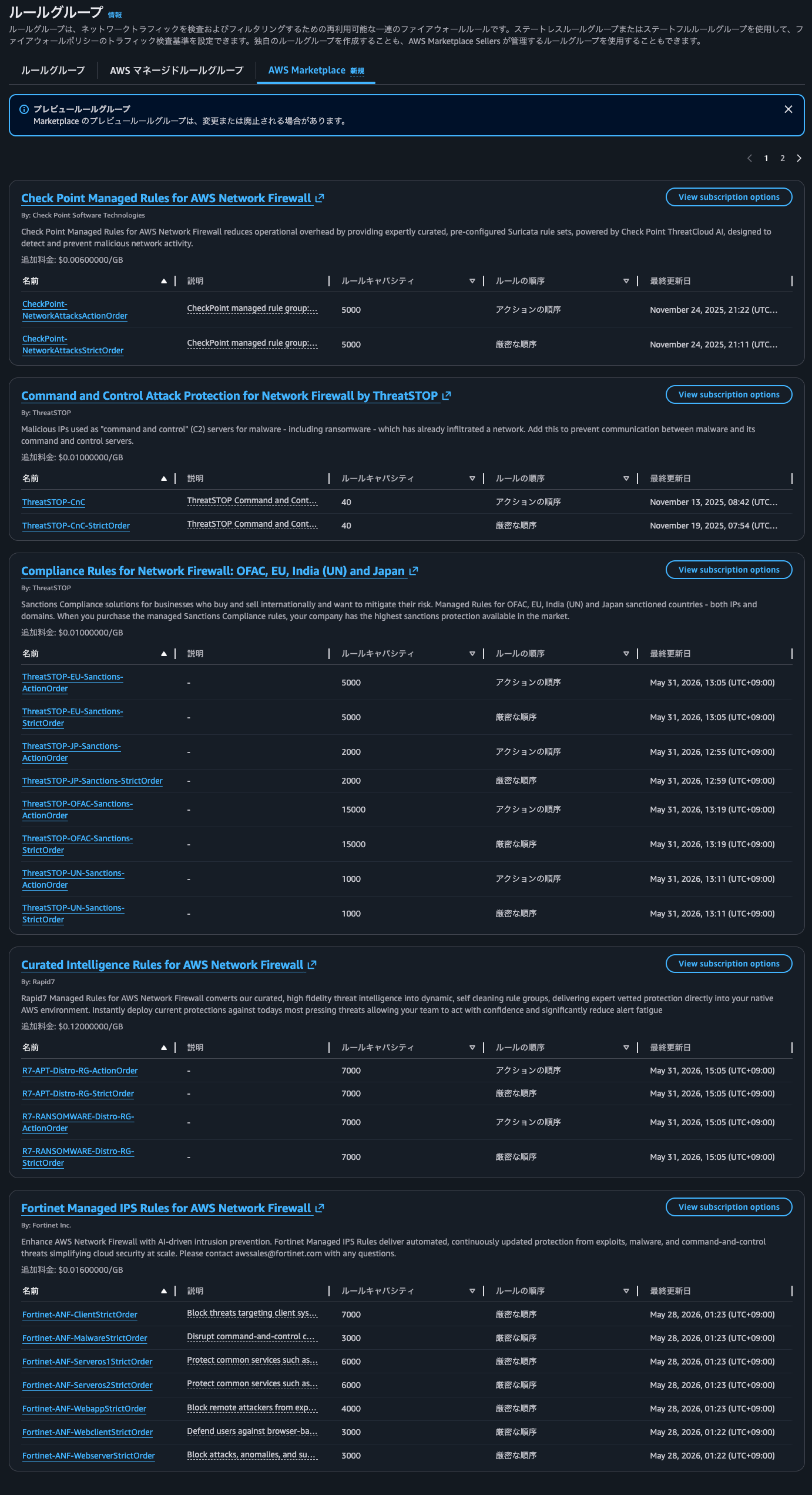
At a glance, Network Scanners Protection for Network Firewall by ThreatSTOP appeared to be about the only one.
Having few managed rule groups doesn't necessarily mean Network Firewall can't provide sufficient detection, but introducing Network Firewall solely for inbound internet traffic seems to offer poor overall cost performance.
4. Other Services Such as AWS WAF and AWS Shield Advanced Are Often Considered Sufficient Countermeasures
What if the publicly exposed internet traffic is HTTP or HTTPS?
For these, AWS WAF and AWS Shield Advanced provide L7-level control. In other words, inspection based on HTTP headers and request bodies is possible.
Furthermore, for HTTPS traffic, if you associate it with ALB or CloudFront that terminates TLS rather than passing it through like NLB, no additional charges like TLS inspection are required.
As mentioned earlier, the absolute number of rules in AWS-provided managed rule groups that operate against inbound internet traffic is small. Given that the cost is also high, it seems unlikely that one would introduce only Network Firewall without AWS WAF.
For these reasons, when it comes to HTTP and HTTPS, other services such as AWS WAF and AWS Shield Advanced are often considered sufficient countermeasures.
Also, when anti-malware requirements lead to deploying products such as Trend Micro's TrendAI Vision One Endpoint Security on individual targets, these products sometimes include host-based IPS/IDS functionality.
A network-based IPS/IDS is a good option from the perspective of preventing access to arbitrary resources such as lateral movement. However, if the target is specific and the traffic is inbound from the internet, a host-based IPS/IDS deployed on that target may well be sufficient.
5. ALB Acts as an L3/L4 Proxy Layer
Network Firewall also operates at L3 and L4. This means it can cover layers that AWS WAF cannot address.
On the other hand, ALB terminates TCP connections once. Thanks to this, ALB handles L3 and L4 threats such as SYN flood and UDP reflection attacks.
For web applications, you can use an Application Load Balancer to route traffic based on content and to accept only well-formed web requests. Application Load Balancer blocks many common attacks, such as SYN flood DDoS attacks and UDP reflection attacks, protecting your application. When these types of attacks are detected, Application Load Balancer automatically scales to absorb additional traffic. Scaling activity due to infrastructure layer attacks is transparent to customers and does not affect billing.
Elastic Load Balancing (BP6) - AWS Best Practices for DDoS Resiliency
Therefore, if Network Firewall inspection is performed behind ALB, it can be said that ALB has already filtered out a certain amount of suspicious packets.
6. When Aggregating Inbound Internet Traffic for Inspection, It Becomes Necessary to Separate the VPCs and AWS Accounts of Internet-Facing Resources and Target Resources, Increasing Management Overhead
When there are many systems receiving inbound traffic from the internet, Network Firewall would need to be deployed for each system.
This not only increases the cost of Network Firewall itself, but also significantly raises the operational and maintenance costs for managing rules.
As a solution, a model of aggregating inbound internet traffic for centralized inspection is adopted, as shown below:
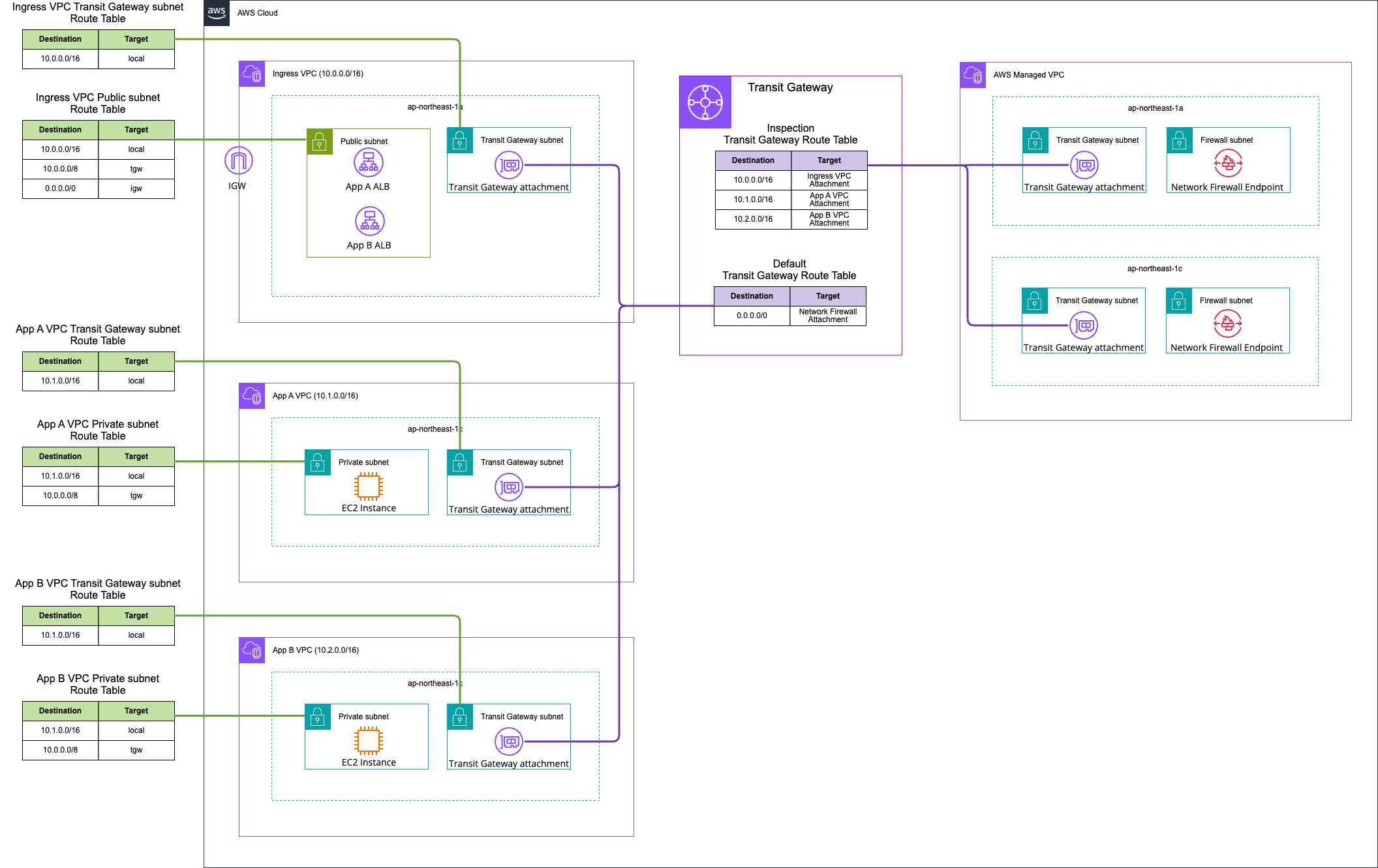
It is not possible to receive access to a public IP address associated with a VPC resource from a different VPC.
Therefore, for the purposes of aggregation, it becomes necessary to separate the VPCs and AWS accounts of internet-facing resources and target resources.
As a result, a large number of ALBs and NLBs for each application end up being created in the Ingress VPC. This increases the difficulty of operational mistakes, cost allocation, and permission management.
7. When aggregating and inspecting inbound communications from the internet while separating the AWS accounts of internet-facing resources and target resources, there are hurdles with cross-account dynamic IP address tracking
Currently, it is not possible to specify instance IDs or Auto Scaling Groups in a different VPC from ALB or NLB in target groups, nor to specify cross-account target groups with ALB or NLB.
If your instances are in a VPC that is peered with the load balancer VPC (same Region or different Region), you cannot register the instances by instance ID. You can register these instances by IP address.
Target groups for your Application Load Balancers - Elastic Load Balancing
If you register targets by instance ID, the instances must be in the same VPC as the Network Load Balancer. If your instances are in a VPC that is peered with the load balancer VPC (same Region or different Region), you cannot register the instances by instance ID. You can register these instances by IP address.
Register targets with your Network Load Balancer - Elastic Load Balancing
To associate an Application Load Balancer as a target of a Network Load Balancer, the load balancers must be in the same VPC within the same account.
Use an Application Load Balancer as a target of a Network Load Balancer - Elastic Load Balancing
Therefore, there are hurdles to adopting mechanisms where resources change dynamically, such as enabling Auto Scaling for targets or adopting ECS Fargate.
It is not completely impossible, but it requires setting up an additional NLB or using subnet sharing. The configuration becomes more complex, and the former also incurs additional costs.
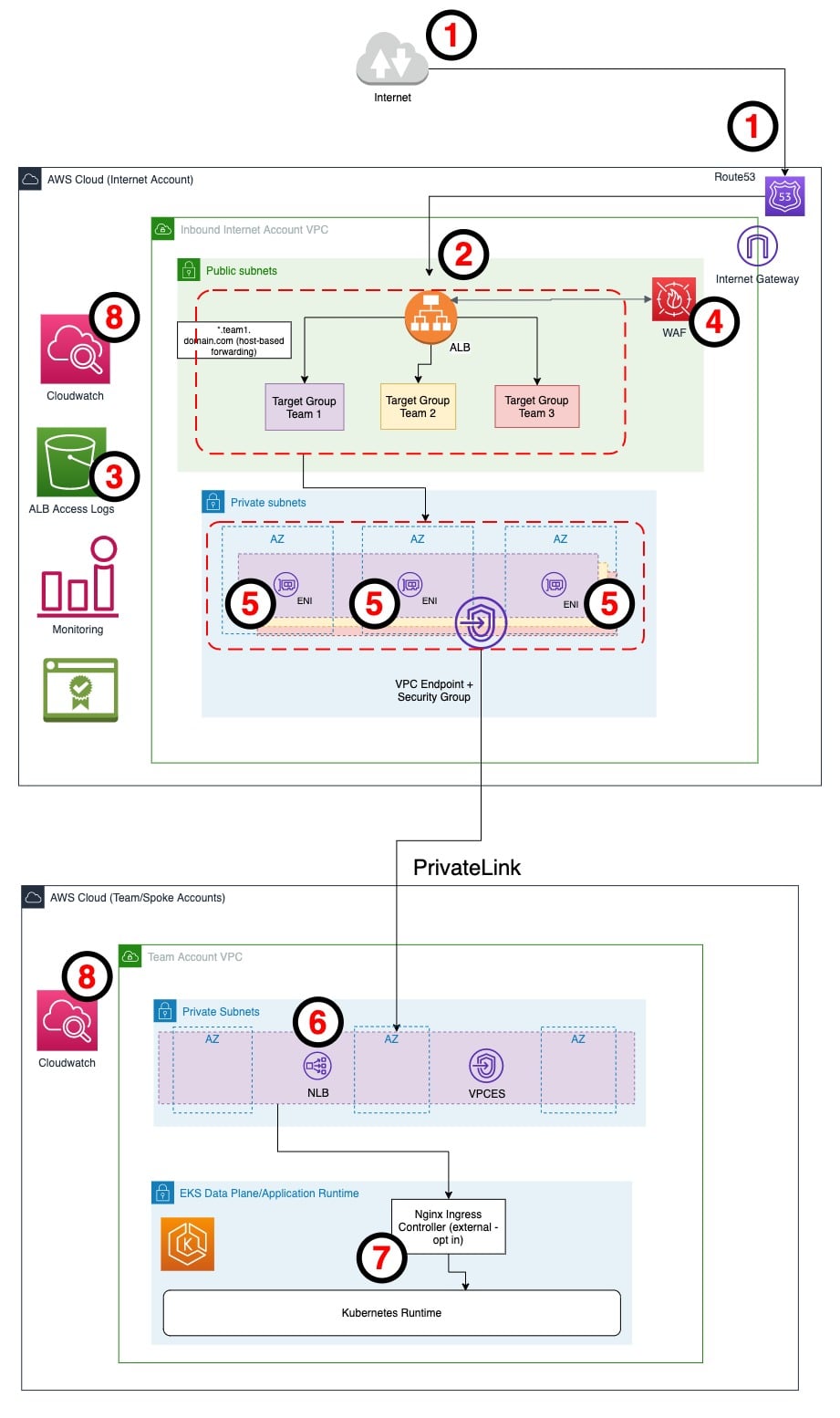
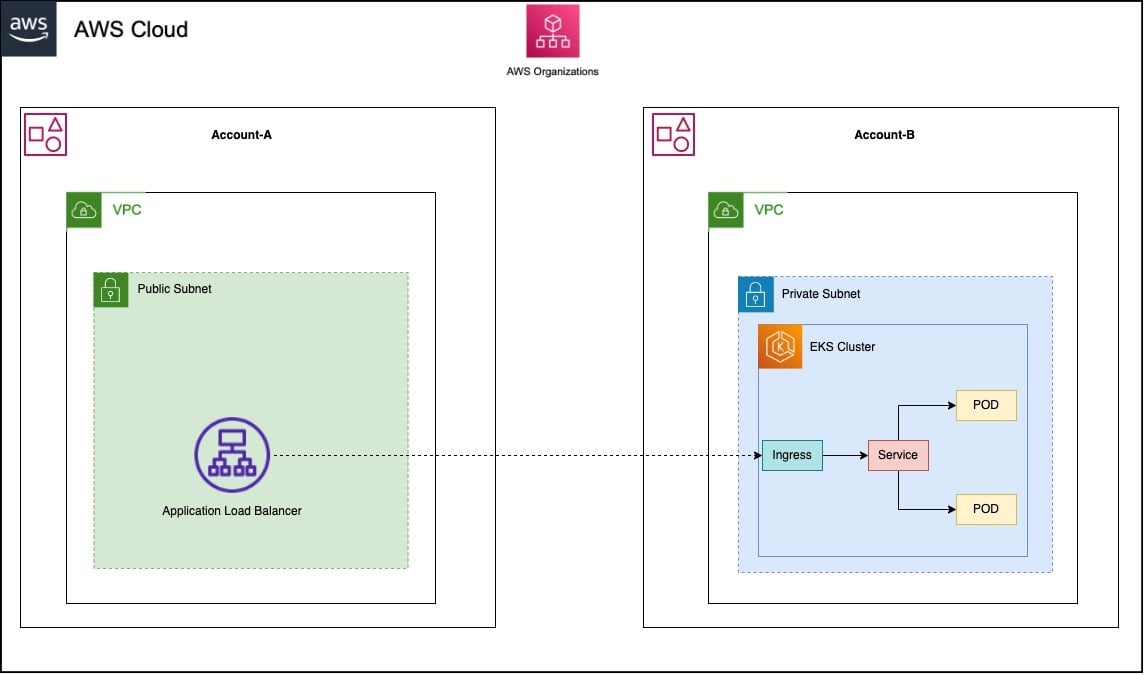
Excerpt: Expose Amazon EKS pods through cross-account load balancer | Containers
8. Because aggregating communication logs can be partially substituted with VPC Flow Logs, ALB access logs, and WAF logs
In some cases, the purpose of aggregating inbound communications from the internet may include aggregating communication logs.
However, VPC Flow Logs, ALB access logs, and AWS WAF logs may partially substitute for this. These logs can be sent to S3 buckets cross-account.
In that case, the value lies in content that can only be confirmed through logs output by Network Firewall, but there is not much difference.
9. When inspecting traffic behind an ALB, if CIDR ranges are not properly organized, the source IP address may be included in HOME_NET, making sufficient detection impossible
When ALB routes traffic to targets, the source IP address of that traffic becomes the private IP address of the ALB.
Therefore, in configurations where Network Firewall is placed behind the ALB, care must be taken with IP address-based controls.
Rules within managed rule groups almost universally use a variable called HOME_NET, which defines the network of the protected target. As a result, if the IP address range to which the ALB belongs is included in HOME_NET, even carefully defined managed rules will mostly be excluded from rule evaluation.
If the CIDR of the Ingress VPC is not cleanly divided from the CIDR of the target VPC, the HOME_NET definition becomes complex.
The HOME_NET definition is per AWS Network Firewall, not per rule group. Therefore, if CIDRs are not properly allocated, there is a possibility that sufficient detection cannot be achieved.
10. Because bypass paths exist when using CloudFront VPC Origins, Global Accelerator, and similar services
Assuming that inbound communications from the internet are aggregated and inspected by placing Network Firewall in front of internet-facing resources as in Pattern 1, the existence of bypass paths is also a concern.
Specifically, this applies when using CloudFront VPC Origins or Global Accelerator. In these cases, inbound communications from the internet do not pass through the IGW.
- Internet gateway – You must add an internet gateway to the VPC with the VPC origin resource. The internet gateway is required to indicate that the VPC can receive traffic from the internet. You don't need to update your routing policy because the internet gateway is not used to route traffic to your origin in the subnet.
- A private subnet with at least one available IPv4 address – CloudFront routes to the subnet using a service-managed Elastic Network Interface (ENI) that CloudFront creates after you define the private origin CloudFront resource. To make the ENI creation process successful, the private subnet must have at least one available IPv4 address. The IPv4 address can be private. There is no additional charge. IPv6-only subnets are not supported.
When you add a Network Load Balancer, internal Application Load Balancer, or Amazon EC2 instance endpoint to AWS Global Accelerator, you can target it in a private subnet and send internet traffic directly to and from endpoints in your virtual private cloud (VPC). The VPC containing the load balancer or EC2 instance must have an internet gateway attached to indicate that the VPC accepts internet traffic. However, the load balancer or EC2 instance does not need a public IP address, and the subnet does not need an internet gateway route associated with it.
This is different from the typical internet gateway use case, where both a public IP address and an internet gateway route are required to send internet traffic to instances or load balancers in the VPC. Even if the target's elastic network interface is in a public subnet (a subnet with an internet gateway route), using Global Accelerator for internet traffic causes Global Accelerator to override common internet routes, and all logical connections arriving via Global Accelerator are also returned via Global Accelerator rather than the internet gateway.
Secure VPC connections in AWS Global Accelerator - AWS Global Accelerator
It is the IGW route table that routes inbound communications from the internet to Network Firewall. Therefore, if traffic does not pass through the IGW, it will not be routed to Network Firewall. Even though aggregation is intended, care must be taken for these exceptions.
Motivations for inspecting inbound communications from the internet with Network Firewall
So what are the motivations for inspecting inbound communications from the internet with Network Firewall?
Organizing the content so far, the following can be considered:
- When exposing TLS protocols other than HTTP/HTTPS externally
- When exposing TCP/UDP services externally via NLB
- When you find value in the rules within the threat signature managed rule groups that correspond to inbound communications from the internet
- When compliance or audit requirements explicitly require a "network-based IDS/IPS"
If none of these apply, I feel there is no strong need to proactively introduce Network Firewall specifically for inspecting inbound communications from the internet.
Regarding "3. When you find value in the rules within the threat signature managed rule groups that correspond to inbound communications from the internet," the number of rules per protocol is as follows:
| Protocol | Count |
|---|---|
| http | 570 |
| tcp | 148 |
| smtp | 36 |
| udp | 22 |
| http1 | 11 |
| tls | 10 |
| smb | 3 |
| ftp | 2 |
| dcerpc | 2 |
| icmp | 1 |
| tcp-pkt | 1 |
| icmpv6 | 1 |
| ike | 1 |
If you only expose services externally over HTTPS and have not enabled TLS inspection, only about 10 rules can detect anything. The specific rules are as follows:
| SID | Group | Category | proto | dst port | msg |
|---|---|---|---|---|---|
| 2861650 | Exploits | A | tls | any | Microsoft Windows Web Threat Defense (WTD.sys) Unauthenticated Denial of Service (CVE-2025-29971) M1 |
| 2861651 | Exploits | A | tls | any | Microsoft Windows Web Threat Defense (WTD.sys) Unauthenticated Denial of Service (CVE-2025-29971) M2 |
| 2809192 | Exploits | B | tls | any | SChannel Possible Heap Overflow DSAWithSHA1 CVE-2014-6321 |
| 2809193 | Exploits | B | tls | any | SChannel Possible Heap Overflow DSAWithSHA224 CVE-2014-6321 |
| 2809194 | Exploits | B | tls | any | SChannel Possible Heap Overflow DSAWithSHA256 CVE-2014-6321 |
| 2809195 | Exploits | B | tls | any | SChannel Possible Heap Overflow ECDSAWithSHA1 CVE-2014-6321 |
| 2809196 | Exploits | B | tls | any | SChannel Possible Heap Overflow ECDSAWithSHA224 CVE-2014-6321 |
| 2809197 | Exploits | B | tls | any | SChannel Possible Heap Overflow ECDSAWithSHA256 CVE-2014-6321 |
| 2809198 | Exploits | B | tls | any | SChannel Possible Heap Overflow ECDSAWithSHA384 CVE-2014-6321 |
| 2809199 | Exploits | B | tls | any | SChannel Possible Heap Overflow ECDSAWithSHA512 CVE-2014-6321 |
All of these are rules related to vulnerabilities in Microsoft Windows products.
There are about 148 rules with the TCP protocol, but most of them do not operate over HTTPS or reference URL paths, so there were very few applicable ones.
- Protocol is TCP
- Destination port is any or 443
- The inspected protocol is HTTPS (non-HTTPS protocols such as SMB / DCE/RPC / TDS / DNS / proprietary RAT C2 are excluded)
- Detection is possible even without TLS inspection enabled
- The rule does not include conditions that inspect URL paths or HTTP body content
- Those that act directly at the TCP layer
- Higher-level protocols running over TCP such as Java serialization / S/MIME / HTML ActiveX, etc., are excluded because the match target becomes invisible when encrypted over HTTPS
- Category is one of the following:
- A
- B
- C
- F
- I
- K
※ B, C, F include only those that detect inbound communications from the internet
Only the following 1 rule matched:
| SID | Group | Category | proto | dst port | msg |
|---|---|---|---|---|---|
| 2823966 | DoS | A | tcp | any | CVE-2016-8610 |
In other words, in a configuration where Network Firewall is placed in front of internet-facing resources as in Pattern 1, without enabling TLS inspection, only 11 rules would function in this scenario.
For reference, the number of rules by category for each AWS managed rule group is as follows:
| Group | Total | A | B | C | D | E | F | G | K | L | I | J | H |
|---|---|---|---|---|---|---|---|---|---|---|---|---|---|
| Botnet | 3,484 | 3 | 0 | 20 | 1,631 | 0 | 2 | 1,194 | 1 | 630 | 1 | 1 | 1 |
| BotnetWeb | 2,420 | 0 | 0 | 0 | 96 | 0 | 0 | 2,320 | 1 | 1 | 0 | 0 | 2 |
| BotnetWindows | 3,289 | 39 | 0 | 0 | 485 | 0 | 0 | 2,755 | 3 | 2 | 3 | 1 | 1 |
| DoS | 24 | 9 | 0 | 6 | 1 | 0 | 1 | 1 | 0 | 5 | 0 | 0 | 1 |
| EmergingEvents | 56 | 0 | 0 | 0 | 11 | 0 | 16 | 18 | 0 | 11 | 0 | 0 | 0 |
| Exploits | 635 | 331 | 8 | 28 | 142 | 0 | 7 | 91 | 4 | 9 | 3 | 0 | 12 |
| FUP | 13 | 0 | 0 | 0 | 1 | 0 | 0 | 11 | 0 | 1 | 0 | 0 | 0 |
| IOC | 299 | 0 | 0 | 0 | 238 | 0 | 0 | 40 | 1 | 20 | 0 | 0 | 0 |
| MalwareCoinmining | 24 | 0 | 0 | 0 | 6 | 0 | 0 | 16 | 0 | 2 | 0 | 0 | 0 |
| MalwareMobile | 3,172 | 0 | 0 | 0 | 6 | 0 | 0 | 2,673 | 0 | 493 | 0 | 0 | 0 |
| Malware | 877 | 7 | 0 | 0 | 141 | 0 | 1 | 433 | 2 | 293 | 0 | 0 | 0 |
| MalwareWeb | 3,289 | 39 | 0 | 0 | 485 | 0 | 0 | 2,755 | 3 | 2 | 3 | 1 | 1 |
| Phishing | 4,152 | 1 | 17 | 4 | 156 | 0 | 0 | 2,421 | 0 | 1,553 | 0 | 0 | 0 |
| Scanners | 67 | 1 | 0 | 5 | 0 | 0 | 0 | 1 | 0 | 1 | 59 | 0 | 0 |
| Suspect | 178 | 0 | 0 | 1 | 1 | 0 | 0 | 173 | 0 | 3 | 0 | 0 | 0 |
| WebAttacks | 909 | 334 | 0 | 3 | 481 | 0 | 1 | 62 | 8 | 19 | 0 | 0 | 1 |
| TOTAL | 22,888 | 764 | 25 | 67 | 3,881 | 0 | 28 | 14,964 | 23 | 3,045 | 69 | 3 | 19 |
Furthermore, the rules that operate against inbound communications from the internet for each managed rule group are as follows:
| Rule Group | A | B (inbound detection only) | C (inbound detection only) | F (inbound detection only) | I | K | Contributing Total | Cumulative Rate | Group Total Rules |
|---|---|---|---|---|---|---|---|---|---|
| Exploits | 331 | 8 | 21 | 4 | 3 | 4 | 371 | 43.4% | 635 |
| WebAttacks | 334 | 0 | 1 | 1 | 0 | 8 | 344 | 83.6% | 909 |
| Scanners | 1 | 0 | 2 | 0 | 59 | 0 | 62 | 90.8% | 67 |
| BotnetWindows | 39 | 0 | 0 | 0 | 3 | 3 | 45 | 96.1% | 3,289 |
| DoS | 9 | 0 | 5 | 1 | 0 | 0 | 15 | 97.9% | 24 |
| Malware | 7 | 0 | 0 | 1 | 0 | 2 | 10 | 99.1% | 877 |
| Botnet | 3 | 0 | 0 | 0 | 1 | 1 | 5 | 99.6% | 3,484 |
| BotnetWeb | 0 | 0 | 0 | 0 | 0 | 1 | 1 | 99.8% | 2,420 |
| IOC | 0 | 0 | 0 | 0 | 0 | 1 | 1 | 99.9% | 299 |
| Phishing | 1 | 0 | 0 | 0 | 0 | 0 | 1 | 100.0% | 4,152 |
When inspecting inbound communications from the internet with Network Firewall, it would be good to select managed rule groups based on these findings.
Evaluate what threats you want to address, what areas are not covered by existing measures, and whether the implementation and running costs are justified before adopting
I considered the points to take into account when aggregating and inspecting inbound communications from the internet using AWS Network Firewall.
Evaluate what threats you want to address, what areas are not covered by existing measures, and whether the implementation and running costs are justified, then decide whether to adopt it.
I hope this article helps someone.
This has been non-pi (@non____97) from the Cloud Business Division, Consulting Department!
