I built a web terminal that can operate Kiro CLI from a browser using the Shell API of Amazon Bedrock AgentCore

This page has been translated by machine translation. View original
Introduction
On 2026/06/05, a Shell API (InvokeAgentRuntimeCommandShell) was added to Amazon Bedrock AgentCore Runtime. This allows remote operation of the interactive shell on microVMs in AgentCore via WebSocket.
Kiro has three interfaces: IDE, CLI, and Web. This PoC operates Kiro CLI via a web terminal using AgentCore Runtime's Shell API. Please note that this differs from the existing Kiro Web.
| Comparison Item | Kiro Web (GitHub Integration) | This PoC (Web Terminal via Shell API) |
|---|---|---|
| Authentication | GitHub OAuth | None in this PoC. For public configurations, design separately within your organization (Cognito, etc.) |
| Execution Environment | Kiro-managed cloud environment | AgentCore Runtime microVM (custom container) |
| Customization | Kiro standard configuration | Container image can be freely customized |
| Workflow Integration | GitHub PR-based | Can be designed to fit your use case |
| Intended Use | Remote AI coding | Verification of dedicated AI agent distribution using Shell API |
This article constructs a "minimum PoC without authentication running on localhost" for operational verification. This PoC is for local verification only. Do not publish to internal or external networks without implementing authentication, authorization, Origin checks, etc.
As a preceding article, the basic setup of AgentCore Runtime and verification of Kiro CLI / Codex CLI have been conducted below.
Verification Content
Architecture
The configuration consists of the following 3 layers.
Browser (xterm.js) ←→ Node.js relay server (Docker) ←→ AgentCore Shell API (microVM)
The Node.js server handles SigV4 signing and establishes a WebSocket connection to AgentCore. The design does not pass AWS credentials to the browser (the purpose is to prevent credential exposure; separate authorization for browser connections is required. See notes for details). The relay server runs as a Docker container, eliminating the need to install Node.js directly on the host environment. Inside the container, it listens on 0.0.0.0, but is only exposed to the loopback address on the host side via -p 127.0.0.1:3000:3000.
Shell API Frame Format (as confirmed in this verification)
In this verification, we confirmed that Shell API WebSocket messages can be communicated by treating "the first 1 byte as the channel number and the remainder as the payload." The following channel numbers are values observed in this verification (see notes below).
| Channel | Direction | Purpose |
|---|---|---|
| ch0 (stdin) | Client → Agent | Key input / command transmission |
| ch1 (stdout) | Agent → Client | Standard output |
| ch2 (stderr) | Agent → Client | Standard error output |
| ch3 (confirmation) | Agent → Client | Shell establishment notification (JSON containing metadata.shellId observed in this verification) |
| ch4 (resize) | Client → Agent | Terminal size change (JSON: {width: columns, height: rows}) |
| ch5 (heartbeat) | Client → Agent | Keep-alive (sent at 30-second intervals in verification) |
| ch255 (close) | Client → Agent | Shell termination (separate from WebSocket Close frame) |
Connection endpoints:
# New connection
wss://bedrock-agentcore.<region>.amazonaws.com/runtimes/<encoded-runtime-arn>/ws/shells?qualifier=DEFAULT

# On reconnection (specify shellId to attach to existing Shell)
wss://bedrock-agentcore.<region>.amazonaws.com/runtimes/<encoded-runtime-arn>/ws/shells?qualifier=DEFAULT&shellId=<shellId>
Key Limitations
The following are based on the limit values documented in the official documentation, with the close code behavior confirmed in this verification noted alongside. The correspondence with close codes and reconnection availability include verification results, not official guarantees.
| Item | Value | Notes |
|---|---|---|
| Frame size | 64KB | In this PoC, for safety, split so that including the 1-byte channel number it stays within 64KB. Close code 1009 on excess |
| Frame rate | 250 frames/sec | Close code 1008 on excess |
| Connection TTL | 1 hour | Limit documented in official documentation. Close code and reconnection behavior at TTL expiration not confirmed in this verification |
| Reconnection buffer | 256KB | Value documented in official documentation. Reconnect to existing Shell with same X-Amzn-Bedrock-AgentCore-Runtime-Session-Id and shellId query parameter. Relationship with replayed output (replay buffer) not confirmed in this verification |
| Concurrent session limit | 10 | — |
Close Code List
| Code | Meaning | Reconnect |
|---|---|---|
| 1000 | Normal closure | No |
| 1001 | Going away (server shutdown) | Yes |
| 1003 | Text frame sent (binary only violation) | No |
| 1006 | Abnormal closure (network disconnection, etc. Not a code sent as a Close frame, but a state observed on the client side) | Yes |
| 1008 | Policy violation (TTL / rate limit / buffer overflow) | Varies by condition. Reconnection at TTL expiration not verified in this verification |
| 1009 | Frame too big (exceeds 64KB) | No |
| 1011 | Server error | Yes |
| 4000 | Another client connected with the same session_id + shellId, replacing the existing connection | No |
Core Implementation
SigV4-Signed WebSocket Connection
Using @smithy/signature-v4, sign the connection URL and headers. In this PoC, the X-Amzn-Bedrock-AgentCore-Runtime-Session-Id header is attached per connection and included in the SigV4 signing target. The same session_id is used on reconnection.
async function signWebSocketRequest(region, url, sessionId) {
  const query = Object.fromEntries(url.searchParams.entries());
  const headers = { host: url.hostname };
  if (sessionId) {
    headers["x-amzn-bedrock-agentcore-runtime-session-id"] = sessionId;
  }
  const request = new HttpRequest({
    method: "GET",
    protocol: "https:",
    hostname: url.hostname,
    path: url.pathname,
    query,
    headers,
  });
  const signer = new SignatureV4({
    service: "bedrock-agentcore",
    region,
    credentials: fromNodeProviderChain(),
    sha256: Sha256,
  });
  return (await signer.sign(request)).headers;
}
Binary Frame Relay and 64KB Chunking
Input exceeding 64KB is split into frames before sending. In this verification environment, xterm.js's onData was subdividing paste input finely, so the browser-side 64KB splitting rarely fired. However, the split processing is included in the implementation as a failsafe.
const MAX_FRAME_SIZE = 64 * 1024;
const MAX_PAYLOAD_SIZE = MAX_FRAME_SIZE - 1;

function chunkPayload(channel, data) {
  const frames = [];
  const buf = Buffer.isBuffer(data) ? data : Buffer.from(data);
  for (let offset = 0; offset < buf.length; offset += MAX_PAYLOAD_SIZE) {
    const chunk = buf.slice(offset, offset + MAX_PAYLOAD_SIZE);
    frames.push(Buffer.concat([Buffer.from([channel]), chunk]));
  }
  return frames;
}
Reconnection Design
When implementing without sending ch255 on browser disconnection, we confirmed in this verification that the Shell session on the AgentCore side was maintained and re-attachment was possible. In this verification, we confirmed the behavior that connecting again with the same session_id (X-Amzn-Bedrock-AgentCore-Runtime-Session-Id) and shellId re-attaches to the existing Shell. At that time, output within the range remaining in the replay buffer was resent. In this verification, it was primarily observed as STDOUT frames (ch1).
clientWs.on("close", () => {
  if (agentWs && agentWs.readyState === WebSocket.OPEN) {
    // Do NOT send ch255 — keep PTY alive for reconnection
    agentWs.close();
  }
});
For disconnections between the browser and the Node.js relay server, automatic reconnection is performed with exponential backoff (1s, 2s, 4s, 8s, 8s, maximum 5 times, upper limit 8s). Reconnection behavior per AgentCore side close code was only partially confirmed in this verification.
Operational Verification
Startup
cd poc
docker build -t agentcore-shell .
docker run -d --name agentcore-shell \
  --restart unless-stopped \
  -p 127.0.0.1:3000:3000 \
  -e AWS_ACCESS_KEY_ID -e AWS_SECRET_ACCESS_KEY -e AWS_SESSION_TOKEN \
  -e AWS_REGION=us-west-2 \
  -e RUNTIME_ARN=arn:aws:bedrock-agentcore:us-west-2:<account-id>:runtime/<runtime-id> \
  -e SSM_PARAM_NAME=/your/api-key-param \
  agentcore-shell
# → Open http://localhost:3000 in browser
Shell Establishment + API Key Retrieval via SSM
After connecting to the Shell API, when the shellId is received in the confirmation frame (ch3), the Node.js server sends initialization commands to the Shell. Inside the microVM, KIRO_API_KEY is retrieved from SSM Parameter Store with the permissions of the Execution Role and exported as an environment variable (see notes for IAM permission details).
[agent] Shell ready: <shellId>
[agent] Sent KIRO_API_KEY init command
[KIRO ready]
root@localhost:/#
Headless Mode
root@localhost:/# kiro-cli chat --no-interactive "What is 2+2? One word."

> Four.

 ▸ Credits: 0.02 • Time: 1s
Interactive Mode
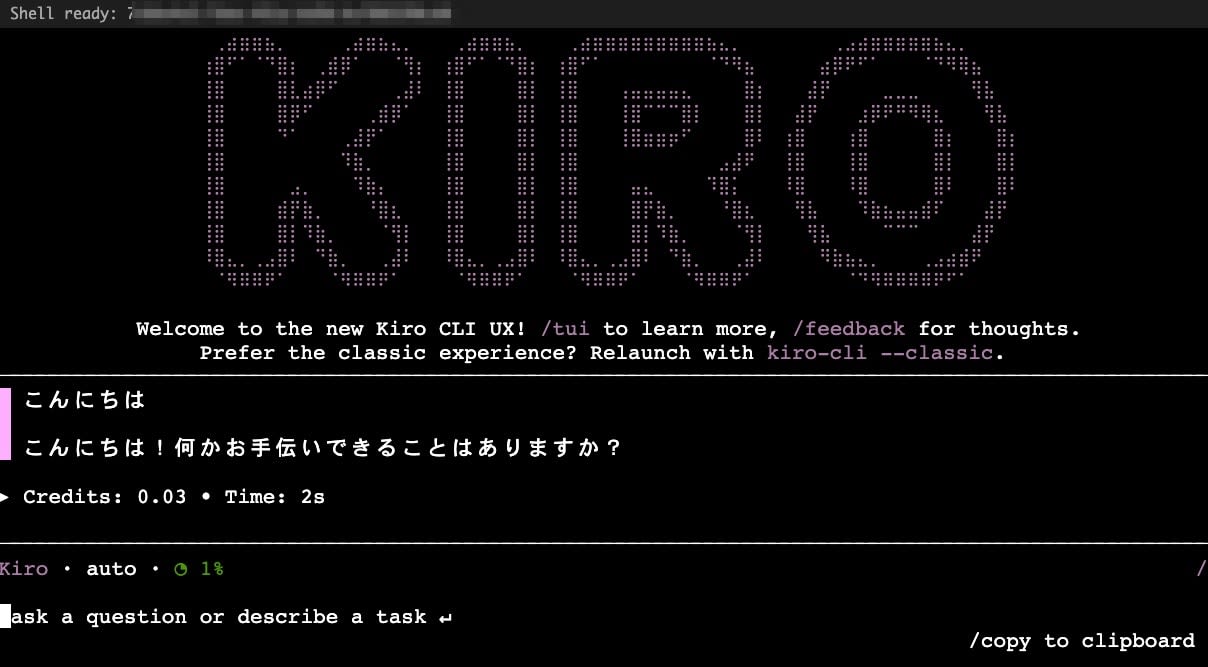
We confirmed that the Welcome message is displayed and responses are returned even in interactive mode.
Additional Verification Results
| Verification Item | Result |
|---|---|
| Reconnection (reconnect with session_id + shellId) | 5/5 PASS |
| Replay buffer (previous output resent on reconnection) | Confirmed |
| Environment variable persistence (KIRO_API_KEY valid when re-attaching to existing Shell with same session_id + shellId) | Confirmed |
| Terminal resize (browser width tracking via ch4) | Confirmed |
| Heartbeat (ch5 sent at 30-second intervals) | Connection maintenance confirmed within verification time (comparison without sending not performed) |
| Large output 120KB | No disconnection |
| Large input 600KB (file write) | Successful with this procedure and transmission speed |
| Close code 4000 (replacement by another client connection) | Operation confirmed |
| 1-hour TTL (close code 1008) | Not verified (reconnection behavior at TTL expiration unconfirmed) |
Notes
This PoC assumes no authentication and localhost. Do not publish as-is.
Regarding security, the following points require attention.
- The Node.js server binds to
0.0.0.0inside the container. When publishing to the host, explicitly specify the loopback address likedocker run -p 127.0.0.1:3000:3000and do not expose it to external networks. When starting directly without using a container, it is recommended to change this to127.0.0.1. The web terminal becomes an entry point where those who connect can execute commands on the execution environment - WebSocket Origin checks are required even on localhost. Cross-Site WebSocket Hijacking, where a malicious website attempts a connection to
ws://localhost:3000, can succeed. Validate theOriginheader on the server side and limit allowed Origins (omitted in this PoC) - With the method of sending
export KIRO_API_KEY=$(aws ssm ...)to stdin, depending on the PTY echo settings, the command string may be displayed in the terminal. Also be aware of residual data in~/.bash_history, inclusion in reconnect replay, and appearance in browser DevTools or screenshots. For public configurations, consider countermeasures such as injection via file orset +o history
Regarding IAM permission separation:
- The IAM principal by which the Node.js relay server connects to the Shell API with SigV4 signing, and the Execution Role that calls AWS APIs inside the microVM, are separate principals
- Shell API connection permissions are granted to the former, and
ssm:GetParameterpermissions are granted to the latter (Execution Role) - SSM Parameter Store is placed in us-east-1 due to verification environment constraints. Explicit specification of
--region us-east-1is required. For production configurations, placement in the same region as AgentCore is recommended
Regarding ch255 and Shell lifecycle:
- When intending to terminate the Shell, the implementation in this PoC's frame format sends ch255
- The behavior where the Shell is maintained upon disconnection without sending ch255 is a verification result. It should not be relied upon as a permanent specification. For public configurations, cleanup design for orphan shells is also a consideration
Regarding single-client constraints:
- The relay server in this PoC holds session information in global variables on memory. It is a minimal configuration that does not consider simultaneous connections or individual management from multiple browsers or multiple tabs.
Summary
We built a Web Terminal PoC using AgentCore Runtime's Shell API and xterm.js, and verified SigV4-signed WebSocket connections, binary frame relay, 64KB chunking, and Shell session persistence via reconnection. Note that some behaviors, such as the behavior upon reaching the 1-hour TTL, remain unverified.
This PoC is a minimal configuration verification. If you plan to expose this within your organization, please separately design authentication/authorization, session_id / shellId separation, Origin checks, and Shell lifecycle management.
Full PoC (server.mjs)
import { createServer } from "http";
import crypto from "crypto";
import { WebSocketServer, WebSocket } from "ws";
import { SignatureV4 } from "@smithy/signature-v4";
import { Sha256 } from "@aws-crypto/sha256-js";
import { HttpRequest } from "@smithy/protocol-http";
import credentialProviders from "@aws-sdk/credential-providers";
const { fromNodeProviderChain } = credentialProviders;

const REGION = process.env.AWS_REGION || "us-west-2";
const RUNTIME_ARN = process.env.RUNTIME_ARN; // arn:aws:bedrock-agentcore:<region>:<account-id>:runtime/<runtime-id>
const PORT = parseInt(process.env.PORT || "3000");
const SSM_PARAM_NAME = process.env.SSM_PARAM_NAME || "/your/api-key-param";
const SSM_REGION = process.env.SSM_REGION || "us-east-1";

// Frame size limit from official docs; close-code behavior was observed in this PoC
const MAX_FRAME_SIZE = 64 * 1024; // 64KB — close code 1009 if exceeded
const MAX_PAYLOAD_SIZE = MAX_FRAME_SIZE - 1; // channel byte takes 1 byte
const SHELL_ID_PATTERN = /^[a-zA-Z0-9_-]{1,128}$/;

// Close code descriptions (for logging and client feedback)
const CLOSE_CODES = {
  1000: "Normal closure",
  1001: "Going away (server shutdown) — reconnectable",
  1003: "Unsupported data (text frames sent — binary only)",
  1006: "Abnormal closure (network death) — reconnectable",
  1008: "Policy violation (TTL expired / rate limit / write buffer overflow)",
  1009: "Message too big (frame > 64KB)",
  1011: "Server error",
  4000: "Replaced (another client connected with same session_id + shell_id)",
};

// Codes that should NOT auto-reconnect
const NO_RECONNECT_CODES = new Set([1003, 4000]);

function isValidShellId(id) {
  return SHELL_ID_PATTERN.test(id);
}

// Split large payloads into chunks under 64KB to avoid close code 1009
function chunkPayload(channel, data) {
  const frames = [];
  const buf = Buffer.isBuffer(data) ? data : Buffer.from(data);
  for (let offset = 0; offset < buf.length; offset += MAX_PAYLOAD_SIZE) {
    const chunk = buf.slice(offset, offset + MAX_PAYLOAD_SIZE);
    frames.push(Buffer.concat([Buffer.from([channel]), chunk]));
  }
  return frames;
}

function getDataPlaneHost(region) {
  return `bedrock-agentcore.${region}.amazonaws.com`;
}

function buildShellUrl(region, runtimeArn, shellId) {
  const host = getDataPlaneHost(region);
  const encoded = encodeURIComponent(runtimeArn);
  const url = new URL(`wss://${host}/runtimes/${encoded}/ws/shells`);
  url.searchParams.set("qualifier", "DEFAULT");
  if (shellId) url.searchParams.set("shellId", shellId);
  return url;
}

async function signWebSocketRequest(region, url, sessionId) {
  const query = Object.fromEntries(url.searchParams.entries());
  const headers = { host: url.hostname };
  if (sessionId) {
    headers["x-amzn-bedrock-agentcore-runtime-session-id"] = sessionId;
  }
  const request = new HttpRequest({
    method: "GET",
    protocol: "https:",
    hostname: url.hostname,
    path: url.pathname,
    query,
    headers,
  });
  const signer = new SignatureV4({
    service: "bedrock-agentcore",
    region,
    credentials: fromNodeProviderChain(),
    sha256: Sha256,
  });
  const signed = await signer.sign(request);
  return signed.headers;
}

// HTML with xterm.js
const HTML = `<!DOCTYPE html>
<html>
<head>
  <title>AgentCore Shell</title>
  <link rel="stylesheet" href="https://cdn.jsdelivr.net/npm/@xterm/xterm@5.5.0/css/xterm.min.css">
  <style>body{margin:0;background:#1e1e1e;display:flex;flex-direction:column;height:100vh}
  #terminal{flex:1}#status{color:#aaa;font:12px monospace;padding:4px 8px}</style>
</head>
<body>
  <div id="status">Connecting...</div>
  <div id="terminal"></div>
  <script src="https://cdn.jsdelivr.net/npm/@xterm/xterm@5.5.0/lib/xterm.min.js"></script>
  <script src="https://cdn.jsdelivr.net/npm/@xterm/addon-fit@0.10.0/lib/addon-fit.min.js"></script>
  <script>
    const term = new Terminal({cursorBlink:true, fontSize:14});
    const fit = new FitAddon.FitAddon();
    term.loadAddon(fit);
    term.open(document.getElementById('terminal'));
    fit.fit();
    window.addEventListener('resize', ()=>fit.fit());

    const status = document.getElementById('status');
    let ws = null;
    let retryCount = 0;
    const MAX_RETRIES = 5;

    function connect() {
      ws = new WebSocket('ws://'+location.host+'/ws');
      ws.binaryType = 'arraybuffer';

      ws.onopen = () => {
        retryCount = 0;
        status.textContent = 'Connected - waiting for shell...';
        setTimeout(() => {
          const json = JSON.stringify({width:term.cols, height:term.rows});
          const enc = new TextEncoder().encode(json);
          const frame = new Uint8Array(1+enc.length);
          frame[0]=4; frame.set(enc,1);
          ws.send(frame);
        }, 500);
      };

      ws.onmessage = (e) => {
        const buf = new Uint8Array(e.data);
        const ch = buf[0], payload = buf.slice(1);
        if (ch===1||ch===2) { term.write(payload); }
        else if (ch===3) {
          try {
            const msg = JSON.parse(new TextDecoder().decode(payload));
            if (msg.metadata?.shellId) status.textContent = 'Shell ready: ' + msg.metadata.shellId;
          } catch{}
        }
      };

      ws.onclose = (e) => {
        const noReconnect = [1000, 1003, 1009, 4000];
        if (noReconnect.includes(e.code)) {
          const msgs = {1000:'Session closed normally', 1003:'Protocol error: binary frames only', 1009:'Frame too big', 4000:'Session replaced by another client'};
          status.textContent = msgs[e.code] || 'Disconnected (code '+e.code+')';
          term.write('\\r\\n['+status.textContent+']\\r\\n');
          return;
        }
        if (retryCount < MAX_RETRIES) {
          const delay = Math.min(1000 * Math.pow(2, retryCount), 8000);
          retryCount++;
          status.textContent = 'Reconnecting (' + retryCount + '/' + MAX_RETRIES + ')...';
          setTimeout(connect, delay);
        } else {
          status.textContent = 'Disconnected (max retries reached)';
          term.write('\\r\\n[Connection lost]\\r\\n');
        }
      };

      ws.onerror = () => {};
    }

    term.onData((data) => {
      if (ws && ws.readyState===1) {
        const enc = new TextEncoder().encode(data);
        const MAX_CHUNK = 64 * 1024 - 1; // Payload limit after subtracting 1B for channel byte
        for (let i = 0; i < enc.length; i += MAX_CHUNK) {
          const chunk = enc.slice(i, i + MAX_CHUNK);
          const frame = new Uint8Array(1+chunk.length);
          frame[0]=0; frame.set(chunk,1);
          ws.send(frame);
        }
      }
    });

    term.onResize(({cols,rows}) => {
      if (ws && ws.readyState===1) {
        const json = JSON.stringify({width:cols, height:rows});
        const enc = new TextEncoder().encode(json);
        const frame = new Uint8Array(1+enc.length);
        frame[0]=4; frame.set(enc,1);
        ws.send(frame);
      }
    });

    connect();
  </script>
</body>
</html>`;

// HTTP server
const httpServer = createServer((req, res) => {
  if (req.url === "/" || req.url === "/index.html") {
    res.writeHead(200, { "Content-Type": "text/html" });
    res.end(HTML);
  } else {
    res.writeHead(404);
    res.end("Not found");
  }
});

// WebSocket server for browser clients
const wss = new WebSocketServer({ noServer: true });

// Session state (single-client PoC)
let savedShellId = null;
let savedSessionId = null;

httpServer.on("upgrade", (req, socket, head) => {
  if (req.url === "/ws") {
    wss.handleUpgrade(req, socket, head, (clientWs) => {
      wss.emit("connection", clientWs, req);
    });
  } else {
    socket.destroy();
  }
});

wss.on("connection", async (clientWs) => {
  console.log("[client] Browser connected");
  let agentWs = null;

  try {
    const shellId = savedShellId || undefined;
    if (shellId && !isValidShellId(shellId)) {
      console.error(`[agent] Invalid shellId: ${shellId} — resetting`);
      savedShellId = null;
    }
    const validShellId = savedShellId || undefined;
    if (!savedSessionId) {
      savedSessionId = crypto.randomUUID();
    }
    const url = buildShellUrl(REGION, RUNTIME_ARN, validShellId);
    const headers = await signWebSocketRequest(REGION, url, savedSessionId);
    console.log(`[agent] Connecting to ${url.hostname}... (shellId=${validShellId || "new"}, sessionId=${savedSessionId.slice(0, 8)}...)`);

    agentWs = new WebSocket(url.toString(), { headers });

    agentWs.on("open", () => console.log("[agent] WebSocket open"));
    agentWs.on("error", (e) => {
      console.error("[agent] Error:", e.message);
      clientWs.close(1011, "Agent connection error");
    });
    agentWs.on("close", (code) => {
      const desc = CLOSE_CODES[code] || "Unknown";
      console.log(`[agent] Closed (code ${code}: ${desc})`);
      if (clientWs.readyState === WebSocket.OPEN) {
        // Convert 1006 and reserved codes below 1000 to 1011 since they cannot be set in a Close frame
        const clientCode = (code === 1006 || code < 1000) ? 1011 : code;
        clientWs.close(clientCode, desc);
      }
    });

    // Agent → Client (binary relay with backpressure)
    agentWs.on("message", (data, isBinary) => {
      if (clientWs.readyState === WebSocket.OPEN) {
        if (clientWs.bufferedAmount > 1024 * 1024) {
          agentWs.pause();
          const check = () => {
            if (clientWs.bufferedAmount < 512 * 1024) {
              agentWs.resume();
            } else {
              setTimeout(check, 50);
            }
          };
          setTimeout(check, 50);
        }
        clientWs.send(data, { binary: true });
      }
      const buf = Buffer.isBuffer(data) ? data : Buffer.from(data);
      if (buf[0] === 3) {
        try {
          const msg = JSON.parse(buf.slice(1).toString());
          if (msg.metadata?.shellId) {
            const isReconnect = savedShellId === msg.metadata.shellId;
            savedShellId = msg.metadata.shellId;
            console.log(`[agent] Shell ready: ${savedShellId} (reconnect=${isReconnect})`);
            if (!isReconnect) {
              // Safety margin for PTY readiness (empirical practice from testing, not a spec requirement)
              setTimeout(() => {
                const initCmd = `export KIRO_API_KEY=$(aws ssm get-parameter --name "${SSM_PARAM_NAME}" --with-decryption --query 'Parameter.Value' --output text --region ${SSM_REGION}) && [ -n "$KIRO_API_KEY" ] && echo "[KIRO ready]" || echo "[SSM fetch failed]"\n`;
                const frame = Buffer.concat([Buffer.from([0]), Buffer.from(initCmd)]);
                if (agentWs.readyState === WebSocket.OPEN) {
                  agentWs.send(frame);
                  console.log("[agent] Sent KIRO_API_KEY init command");
                }
              }, 500);
            }
          }
        } catch {}
      }
    });

    // Client → Agent (binary relay with frame size guard)
    clientWs.on("message", (data, isBinary) => {
      if (!agentWs || agentWs.readyState !== WebSocket.OPEN) return;
      const buf = Buffer.isBuffer(data) ? data : Buffer.from(data);
      if (buf.length <= MAX_FRAME_SIZE) {
        agentWs.send(buf);
      } else {
        const channel = buf[0];
        const payload = buf.slice(1);
        const frames = chunkPayload(channel, payload);
        for (const frame of frames) {
          if (agentWs.readyState === WebSocket.OPEN) agentWs.send(frame);
        }
        console.log(`[relay] Chunked ${buf.length} bytes into ${frames.length} frames`);
      }
    });

    clientWs.on("close", () => {
      console.log("[client] Browser disconnected");
      if (agentWs && agentWs.readyState === WebSocket.OPEN) {
        // Do NOT send ch255 CLOSE frame — keep PTY alive for reconnection
        agentWs.close();
      }
    });

    // Heartbeat every 30s
    const heartbeat = setInterval(() => {
      if (agentWs && agentWs.readyState === WebSocket.OPEN) {
        agentWs.send(Buffer.from([5]));
      }
    }, 30000);

    agentWs.on("close", () => clearInterval(heartbeat));
    clientWs.on("close", () => clearInterval(heartbeat));

  } catch (e) {
    console.error("[error]", e.message);
    clientWs.close(1011, e.message);
  }
});

httpServer.listen(PORT, "0.0.0.0", () => {
  console.log(`\n  AgentCore Web Shell PoC`);
  console.log(`  http://localhost:${PORT}`);
  console.log(`  Runtime: ${RUNTIME_ARN}`);
  console.log(`  Region:  ${REGION}`);
  console.log(`  Bind:    0.0.0.0 (container mode)\n`);
});
Dependency packages (package.json):
{
  "name": "agentcore-webshell-poc",
  "type": "module",
  "scripts": { "start": "node server.mjs" },
  "dependencies": {
    "@aws-crypto/sha256-js": "^5.2.0",
    "@aws-sdk/credential-providers": "^3.850.0",
    "@smithy/protocol-http": "^5.1.0",
    "@smithy/signature-v4": "^5.0.2",
    "ws": "^8.18.2"
  }
}
Dockerfile:
FROM node:22-slim
WORKDIR /app
COPY package.json .
RUN npm install
COPY server.mjs .
EXPOSE 3000
CMD ["node", "server.mjs"]
How to start:
cd poc
docker build -t agentcore-shell .
docker run -d --name agentcore-shell \
  --restart unless-stopped \
  -p 127.0.0.1:3000:3000 \
  -e AWS_ACCESS_KEY_ID -e AWS_SECRET_ACCESS_KEY -e AWS_SESSION_TOKEN \
  -e AWS_REGION=us-west-2 \
  -e RUNTIME_ARN=arn:aws:bedrock-agentcore:us-west-2:<account-id>:runtime/<runtime-id> \
  -e SSM_PARAM_NAME=/your/api-key-param \
  agentcore-shell
