Amazon Bedrock AgentCoreのShell APIで、ブラウザーからKiro CLIを操作できるWebターミナルを作ってみた

はじめに
2026/06/05、Amazon Bedrock AgentCore RuntimeにShell API(InvokeAgentRuntimeCommandShell)が追加されました。これにより、AgentCore上のmicroVMにある対話シェルをWebSocket経由でリモート操作できます。
KiroにはIDE・CLI・Webの3インターフェースがあります。本PoCはAgentCore RuntimeのShell APIでKiro CLIをWebターミナル経由で操作するものです。既存のKiro Webとは異なる点にご留意ください。
| 比較項目 | Kiro Web(GitHub統合) | 本PoC(Shell API経由Webターミナル) |
|---|---|---|
| 認証 | GitHub OAuth | 本PoCではなし。公開構成では自組織で別途設計(Cognito等) |
| 実行環境 | Kiro管理クラウド環境 | AgentCore Runtime microVM(自前コンテナ) |
| カスタマイズ | Kiro標準構成 | コンテナイメージを自由にカスタマイズ可能 |
| ワークフロー統合 | GitHub PRベース | 用途に合わせて設計可能 |
| 想定用途 | リモートAIコーディング | Shell APIを使った専用AIエージェント配布の検証 |
本記事では「認証なし・localhostで動く最小PoC」を構築して動作検証します。本PoCはローカル検証専用です。認証・認可・Originチェック等を実装しないまま、社内外のネットワークへ公開しないでください。
先行記事として、AgentCore Runtimeの基本的なセットアップとKiro CLI / Codex CLIの検証を以下で行っています。
検証内容
アーキテクチャ
構成は以下の3層です。
ブラウザー (xterm.js) ←→ Node.js中継サーバー (Docker) ←→ AgentCore Shell API (microVM)
Node.jsサーバーがSigV4署名を処理し、AgentCoreへのWebSocket接続を確立します。ブラウザーにはAWS認証情報を渡さない設計です(認証情報の露出防止が目的であり、ブラウザー接続自体の認可は別途必要です。注意事項参照)。中継サーバーはDockerコンテナとして動作させ、ホスト環境へのNode.js直接インストールが不要です。コンテナ内では 0.0.0.0 で待ち受けますが、-p 127.0.0.1:3000:3000 によりホスト側ではループバックアドレスにのみ公開しています。
Shell APIのフレーム形式(本検証で確認した範囲)
本検証では、Shell APIのWebSocketメッセージを「先頭1バイトをチャネル番号、残りをペイロード」として扱うことで通信できることを確認しました。以下のチャネル番号は本検証で観測した値です(後述の注記参照)。
| チャネル | 方向 | 用途 |
|---|---|---|
| ch0 (stdin) | Client → Agent | キー入力・コマンド送信 |
| ch1 (stdout) | Agent → Client | 標準出力 |
| ch2 (stderr) | Agent → Client | 標準エラー出力 |
| ch3 (confirmation) | Agent → Client | Shell確立通知(本検証では metadata.shellId を含むJSONを観測) |
| ch4 (resize) | Client → Agent | ターミナルサイズ変更(JSON: {width: 列数, height: 行数}) |
| ch5 (heartbeat) | Client → Agent | 接続維持(検証では30秒間隔で送信) |
| ch255 (close) | Client → Agent | Shell終了(WebSocket Close frameとは別物) |
接続エンドポイント:
# 新規接続
wss://bedrock-agentcore.<region>.amazonaws.com/runtimes/<encoded-runtime-arn>/ws/shells?qualifier=DEFAULT

# 再接続時(既存ShellへアタッチするためshellIdを指定)
wss://bedrock-agentcore.<region>.amazonaws.com/runtimes/<encoded-runtime-arn>/ws/shells?qualifier=DEFAULT&shellId=<shellId>
主要な制限事項
以下は公式ドキュメント記載の制限値をベースに、本検証で確認したclose codeの挙動を併記したものです。close codeとの対応や再接続可否は、公式保証ではなく検証結果を含みます。
| 項目 | 値 | 備考 |
|---|---|---|
| フレームサイズ | 64KB | 本PoCでは安全側に、チャネル番号1バイトを含めて64KB以内になるよう分割。超過時close code 1009 |
| フレームレート | 250 frames/sec | 超過時close code 1008 |
| 接続TTL | 1時間 | 公式ドキュメント記載の制限。本検証ではTTL到達時のclose codeおよび再接続挙動は未確認 |
| Reconnection buffer | 256KB | 公式ドキュメント記載値。同じ X-Amzn-Bedrock-AgentCore-Runtime-Session-Id と shellId クエリパラメータで既存Shellへ再接続。再送される出力(replay buffer)との関係は本検証では未確認 |
| 同時セッション上限 | 10 | — |
Close Code一覧
| Code | 意味 | 再接続 |
|---|---|---|
| 1000 | Normal closure | しない |
| 1001 | Going away(サーバーシャットダウン) | する |
| 1003 | Text frame送信(binary only違反) | しない |
| 1006 | Abnormal closure(ネットワーク断など。Close frameとして送信されるコードではなく、クライアント側で観測される状態) | する |
| 1008 | Policy violation(TTL / レート制限 / buffer overflow) | 条件により異なる。本検証ではTTL到達時の再接続は未検証 |
| 1009 | Frame too big(64KB超過) | しない |
| 1011 | Server error | する |
| 4000 | 別クライアントが同じsession_id + shellIdで接続し既存接続を置換 | しない |
実装の核心部分
SigV4署名付きWebSocket接続
@smithy/signature-v4 を使い、接続URLとヘッダーに署名します。本PoCでは接続ごとに X-Amzn-Bedrock-AgentCore-Runtime-Session-Id ヘッダーを付与し、SigV4署名対象に含めます。再接続時も同じsession_idを使います。
async function signWebSocketRequest(region, url, sessionId) {
  const query = Object.fromEntries(url.searchParams.entries());
  const headers = { host: url.hostname };
  if (sessionId) {
    headers["x-amzn-bedrock-agentcore-runtime-session-id"] = sessionId;
  }
  const request = new HttpRequest({
    method: "GET",
    protocol: "https:",
    hostname: url.hostname,
    path: url.pathname,
    query,
    headers,
  });
  const signer = new SignatureV4({
    service: "bedrock-agentcore",
    region,
    credentials: fromNodeProviderChain(),
    sha256: Sha256,
  });
  return (await signer.sign(request)).headers;
}
バイナリフレーム中継と64KBチャンキング
64KBを超える入力はフレーム分割して送信します。本検証環境では、xterm.jsの onData がペースト入力を細分化していたため、ブラウザー側の64KB分割はほとんど発火しませんでした。ただし実装上はフェイルセーフとして分割処理を入れています。
const MAX_FRAME_SIZE = 64 * 1024;
const MAX_PAYLOAD_SIZE = MAX_FRAME_SIZE - 1;

function chunkPayload(channel, data) {
  const frames = [];
  const buf = Buffer.isBuffer(data) ? data : Buffer.from(data);
  for (let offset = 0; offset < buf.length; offset += MAX_PAYLOAD_SIZE) {
    const chunk = buf.slice(offset, offset + MAX_PAYLOAD_SIZE);
    frames.push(Buffer.concat([Buffer.from([channel]), chunk]));
  }
  return frames;
}
Reconnection設計
ブラウザー切断時にch255を送信しない実装にしたところ、本検証ではAgentCore側のShellセッションが維持され、再アタッチできる挙動を確認しました。本検証では、次回接続時に同じ session_id(X-Amzn-Bedrock-AgentCore-Runtime-Session-Id)と shellId で再接続すると、既存Shellへ再アタッチされる挙動を確認しました。その際、replay bufferに残っていた範囲の出力が再送されました。本検証では主にSTDOUTフレーム(ch1)として観測しています。
clientWs.on("close", () => {
  if (agentWs && agentWs.readyState === WebSocket.OPEN) {
    // Do NOT send ch255 — keep PTY alive for reconnection
    agentWs.close();
  }
});
ブラウザー↔Node.js中継サーバー間の切断に対しては、指数バックオフ(1s, 2s, 4s, 8s, 8sの最大5回、上限8s)で自動再接続します。AgentCore側close codeごとの再接続挙動は、本検証では一部のみ確認しています。
動作確認
起動
cd poc
docker build -t agentcore-shell .
docker run -d --name agentcore-shell \
  --restart unless-stopped \
  -p 127.0.0.1:3000:3000 \
  -e AWS_ACCESS_KEY_ID -e AWS_SECRET_ACCESS_KEY -e AWS_SESSION_TOKEN \
  -e AWS_REGION=us-west-2 \
  -e RUNTIME_ARN=arn:aws:bedrock-agentcore:us-west-2:<account-id>:runtime/<runtime-id> \
  -e SSM_PARAM_NAME=/your/api-key-param \
  agentcore-shell
# → http://localhost:3000 をブラウザーで開く
Shell確立 + SSMによるAPI Key取得
Shell API接続後、confirmationフレーム(ch3)でshellIdを受信すると、Node.jsサーバーがShellへ初期化コマンドを送信します。microVM内ではExecution Roleの権限でSSM Parameter StoreからKIRO_API_KEYを取得し、環境変数としてexportします(IAM権限の詳細は注意事項参照)。
[agent] Shell ready: <shellId>
[agent] Sent KIRO_API_KEY init command
[KIRO ready]
root@localhost:/#
ヘッドレスモード
root@localhost:/# kiro-cli chat --no-interactive "What is 2+2? One word."

> Four.

 ▸ Credits: 0.02 • Time: 1s
対話モード
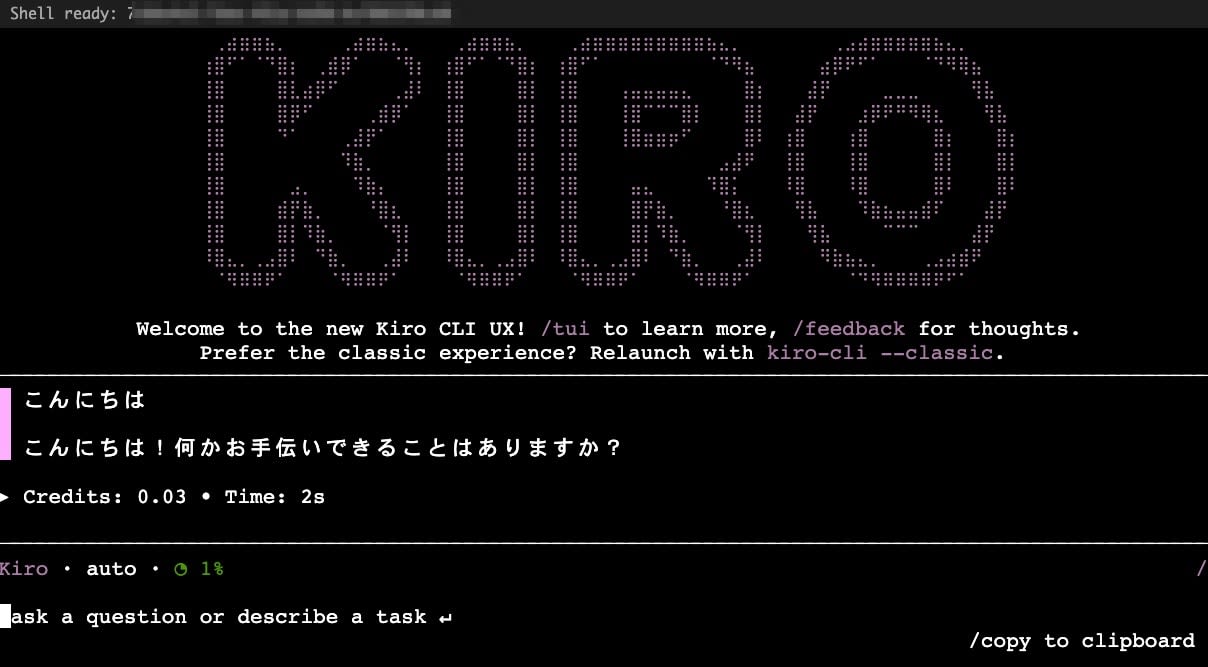
対話モードでもWelcomeメッセージが表示され、応答が返ることを確認しました。
追加検証の結果
| 検証項目 | 結果 |
|---|---|
| Reconnection(session_id + shellIdで再接続) | 5/5 PASS |
| Replay buffer(再接続時に直前の出力が再送) | 確認済み |
| 環境変数の維持(同じ session_id + shellId で既存Shellへ再アタッチした場合、KIRO_API_KEYが有効) | 確認済み |
| ターミナルリサイズ(ch4によるブラウザー幅追従) | 確認済み |
| ハートビート(ch5を30秒間隔で送信) | 検証時間内は接続維持を確認(送信なしとの比較は未実施) |
| 大量出力120KB | 切断なし |
| 大量入力600KB(ファイル書き出し) | 本手順・本送信速度では成功 |
| Close code 4000(別クライアント接続による置換) | 動作確認済み |
| 1時間TTL(close code 1008) | 未検証(TTL到達時の再接続挙動は未確認) |
注意事項
本PoCは認証なしのlocalhost前提です。そのまま公開しないでください。
セキュリティに関して、以下の点に注意が必要です。
- Node.jsサーバーはコンテナ内で
0.0.0.0にbindしています。ホストへ公開する際はdocker run -p 127.0.0.1:3000:3000のようにループバックアドレスを明示し、外部ネットワークに露出させないでください。コンテナを使わず直接起動する場合は127.0.0.1に書き換えることを推奨します。Webターミナルは、接続者が実行環境上でコマンドを実行できる入口になります - localhostでもWebSocketのOriginチェックが必要です。悪意あるWebサイトから
ws://localhost:3000への接続を試みるCross-Site WebSocket Hijackingが成立し得ます。サーバー側でOriginヘッダーを検証し、許可Originを限定してください(本PoCでは省略) export KIRO_API_KEY=$(aws ssm ...)をstdinに送信する方式では、PTYのエコー設定によってはコマンド文字列がターミナルに表示されます。また~/.bash_historyへの残存、reconnect replayへの含有、ブラウザーDevToolsやスクリーンショットへの映り込みにも注意してください。公開構成ではファイル経由注入やset +o history等の対策を検討してください
IAM権限の分離について:
- Node.js中継サーバーがSigV4署名でShell APIに接続するIAM principalと、microVM内でAWS APIを呼ぶExecution Roleは別のprincipalです
- Shell API接続権限は前者に、
ssm:GetParameter権限は後者(Execution Role)に付与します - SSM Parameter Storeは検証環境の都合でus-east-1に配置しています。
--region us-east-1の明示指定が必要です。本番構成ではAgentCoreと同一リージョンへの配置を推奨します
ch255とShellライフサイクルについて:
- Shell終了を意図する場合、本PoCのフレーム形式ではch255を送信する実装としました
- ch255を送らない切断でShellが維持される挙動は検証結果です。恒久的仕様として依存すべきではありません。公開構成ではorphan shellのクリーンアップ設計も検討対象になります
シングルクライアント制約について:
- 本PoCの中継サーバーはセッション情報をメモリ上のグローバル変数で保持しています。複数ブラウザーや複数タブからの同時接続・個別管理は考慮していない最小構成です
まとめ
AgentCore RuntimeのShell APIとxterm.jsでWebターミナルPoCを構築し、SigV4署名付きWebSocket接続、バイナリフレーム中継、64KBチャンキング、reconnectionによるShellセッション維持を確認しました。なお、1時間TTL到達時の挙動など一部は未検証です。
本PoCは最小構成の検証です。組織内向けに公開する場合は、認証・認可、session_id / shellIdの分離、Originチェック、Shellライフサイクル管理などを別途設計してください。
PoC全文(server.mjs)
import { createServer } from "http";
import crypto from "crypto";
import { WebSocketServer, WebSocket } from "ws";
import { SignatureV4 } from "@smithy/signature-v4";
import { Sha256 } from "@aws-crypto/sha256-js";
import { HttpRequest } from "@smithy/protocol-http";
import credentialProviders from "@aws-sdk/credential-providers";
const { fromNodeProviderChain } = credentialProviders;

const REGION = process.env.AWS_REGION || "us-west-2";
const RUNTIME_ARN = process.env.RUNTIME_ARN; // arn:aws:bedrock-agentcore:<region>:<account-id>:runtime/<runtime-id>
const PORT = parseInt(process.env.PORT || "3000");
const SSM_PARAM_NAME = process.env.SSM_PARAM_NAME || "/your/api-key-param";
const SSM_REGION = process.env.SSM_REGION || "us-east-1";

// Frame size limit from official docs; close-code behavior was observed in this PoC
const MAX_FRAME_SIZE = 64 * 1024; // 64KB — close code 1009 if exceeded
const MAX_PAYLOAD_SIZE = MAX_FRAME_SIZE - 1; // channel byte takes 1 byte
const SHELL_ID_PATTERN = /^[a-zA-Z0-9_-]{1,128}$/;

// Close code descriptions (for logging and client feedback)
const CLOSE_CODES = {
  1000: "Normal closure",
  1001: "Going away (server shutdown) — reconnectable",
  1003: "Unsupported data (text frames sent — binary only)",
  1006: "Abnormal closure (network death) — reconnectable",
  1008: "Policy violation (TTL expired / rate limit / write buffer overflow)",
  1009: "Message too big (frame > 64KB)",
  1011: "Server error",
  4000: "Replaced (another client connected with same session_id + shell_id)",
};

// Codes that should NOT auto-reconnect
const NO_RECONNECT_CODES = new Set([1003, 4000]);

function isValidShellId(id) {
  return SHELL_ID_PATTERN.test(id);
}

// Split large payloads into chunks under 64KB to avoid close code 1009
function chunkPayload(channel, data) {
  const frames = [];
  const buf = Buffer.isBuffer(data) ? data : Buffer.from(data);
  for (let offset = 0; offset < buf.length; offset += MAX_PAYLOAD_SIZE) {
    const chunk = buf.slice(offset, offset + MAX_PAYLOAD_SIZE);
    frames.push(Buffer.concat([Buffer.from([channel]), chunk]));
  }
  return frames;
}

function getDataPlaneHost(region) {
  return `bedrock-agentcore.${region}.amazonaws.com`;
}

function buildShellUrl(region, runtimeArn, shellId) {
  const host = getDataPlaneHost(region);
  const encoded = encodeURIComponent(runtimeArn);
  const url = new URL(`wss://${host}/runtimes/${encoded}/ws/shells`);
  url.searchParams.set("qualifier", "DEFAULT");
  if (shellId) url.searchParams.set("shellId", shellId);
  return url;
}

async function signWebSocketRequest(region, url, sessionId) {
  const query = Object.fromEntries(url.searchParams.entries());
  const headers = { host: url.hostname };
  if (sessionId) {
    headers["x-amzn-bedrock-agentcore-runtime-session-id"] = sessionId;
  }
  const request = new HttpRequest({
    method: "GET",
    protocol: "https:",
    hostname: url.hostname,
    path: url.pathname,
    query,
    headers,
  });
  const signer = new SignatureV4({
    service: "bedrock-agentcore",
    region,
    credentials: fromNodeProviderChain(),
    sha256: Sha256,
  });
  const signed = await signer.sign(request);
  return signed.headers;
}

// HTML with xterm.js
const HTML = `<!DOCTYPE html>
<html>
<head>
  <title>AgentCore Shell</title>
  <link rel="stylesheet" href="https://cdn.jsdelivr.net/npm/@xterm/xterm@5.5.0/css/xterm.min.css">
  <style>body{margin:0;background:#1e1e1e;display:flex;flex-direction:column;height:100vh}
  #terminal{flex:1}#status{color:#aaa;font:12px monospace;padding:4px 8px}</style>
</head>
<body>
  <div id="status">Connecting...</div>
  <div id="terminal"></div>
  <script src="https://cdn.jsdelivr.net/npm/@xterm/xterm@5.5.0/lib/xterm.min.js"></script>
  <script src="https://cdn.jsdelivr.net/npm/@xterm/addon-fit@0.10.0/lib/addon-fit.min.js"></script>
  <script>
    const term = new Terminal({cursorBlink:true, fontSize:14});
    const fit = new FitAddon.FitAddon();
    term.loadAddon(fit);
    term.open(document.getElementById('terminal'));
    fit.fit();
    window.addEventListener('resize', ()=>fit.fit());

    const status = document.getElementById('status');
    let ws = null;
    let retryCount = 0;
    const MAX_RETRIES = 5;

    function connect() {
      ws = new WebSocket('ws://'+location.host+'/ws');
      ws.binaryType = 'arraybuffer';

      ws.onopen = () => {
        retryCount = 0;
        status.textContent = 'Connected - waiting for shell...';
        setTimeout(() => {
          const json = JSON.stringify({width:term.cols, height:term.rows});
          const enc = new TextEncoder().encode(json);
          const frame = new Uint8Array(1+enc.length);
          frame[0]=4; frame.set(enc,1);
          ws.send(frame);
        }, 500);
      };

      ws.onmessage = (e) => {
        const buf = new Uint8Array(e.data);
        const ch = buf[0], payload = buf.slice(1);
        if (ch===1||ch===2) { term.write(payload); }
        else if (ch===3) {
          try {
            const msg = JSON.parse(new TextDecoder().decode(payload));
            if (msg.metadata?.shellId) status.textContent = 'Shell ready: ' + msg.metadata.shellId;
          } catch{}
        }
      };

      ws.onclose = (e) => {
        const noReconnect = [1000, 1003, 1009, 4000];
        if (noReconnect.includes(e.code)) {
          const msgs = {1000:'Session closed normally', 1003:'Protocol error: binary frames only', 1009:'Frame too big', 4000:'Session replaced by another client'};
          status.textContent = msgs[e.code] || 'Disconnected (code '+e.code+')';
          term.write('\\r\\n['+status.textContent+']\\r\\n');
          return;
        }
        if (retryCount < MAX_RETRIES) {
          const delay = Math.min(1000 * Math.pow(2, retryCount), 8000);
          retryCount++;
          status.textContent = 'Reconnecting (' + retryCount + '/' + MAX_RETRIES + ')...';
          setTimeout(connect, delay);
        } else {
          status.textContent = 'Disconnected (max retries reached)';
          term.write('\\r\\n[Connection lost]\\r\\n');
        }
      };

      ws.onerror = () => {};
    }

    term.onData((data) => {
      if (ws && ws.readyState===1) {
        const enc = new TextEncoder().encode(data);
        const MAX_CHUNK = 64 * 1024 - 1; // channel byte 1B を引いたpayload上限
        for (let i = 0; i < enc.length; i += MAX_CHUNK) {
          const chunk = enc.slice(i, i + MAX_CHUNK);
          const frame = new Uint8Array(1+chunk.length);
          frame[0]=0; frame.set(chunk,1);
          ws.send(frame);
        }
      }
    });

    term.onResize(({cols,rows}) => {
      if (ws && ws.readyState===1) {
        const json = JSON.stringify({width:cols, height:rows});
        const enc = new TextEncoder().encode(json);
        const frame = new Uint8Array(1+enc.length);
        frame[0]=4; frame.set(enc,1);
        ws.send(frame);
      }
    });

    connect();
  </script>
</body>
</html>`;

// HTTP server
const httpServer = createServer((req, res) => {
  if (req.url === "/" || req.url === "/index.html") {
    res.writeHead(200, { "Content-Type": "text/html" });
    res.end(HTML);
  } else {
    res.writeHead(404);
    res.end("Not found");
  }
});

// WebSocket server for browser clients
const wss = new WebSocketServer({ noServer: true });

// Session state (single-client PoC)
let savedShellId = null;
let savedSessionId = null;

httpServer.on("upgrade", (req, socket, head) => {
  if (req.url === "/ws") {
    wss.handleUpgrade(req, socket, head, (clientWs) => {
      wss.emit("connection", clientWs, req);
    });
  } else {
    socket.destroy();
  }
});

wss.on("connection", async (clientWs) => {
  console.log("[client] Browser connected");
  let agentWs = null;

  try {
    const shellId = savedShellId || undefined;
    if (shellId && !isValidShellId(shellId)) {
      console.error(`[agent] Invalid shellId: ${shellId} — resetting`);
      savedShellId = null;
    }
    const validShellId = savedShellId || undefined;
    if (!savedSessionId) {
      savedSessionId = crypto.randomUUID();
    }
    const url = buildShellUrl(REGION, RUNTIME_ARN, validShellId);
    const headers = await signWebSocketRequest(REGION, url, savedSessionId);
    console.log(`[agent] Connecting to ${url.hostname}... (shellId=${validShellId || "new"}, sessionId=${savedSessionId.slice(0, 8)}...)`);

    agentWs = new WebSocket(url.toString(), { headers });

    agentWs.on("open", () => console.log("[agent] WebSocket open"));
    agentWs.on("error", (e) => {
      console.error("[agent] Error:", e.message);
      clientWs.close(1011, "Agent connection error");
    });
    agentWs.on("close", (code) => {
      const desc = CLOSE_CODES[code] || "Unknown";
      console.log(`[agent] Closed (code ${code}: ${desc})`);
      if (clientWs.readyState === WebSocket.OPEN) {
        // 1006および1000未満の予約コードはClose frameに設定できないため1011へ変換
        const clientCode = (code === 1006 || code < 1000) ? 1011 : code;
        clientWs.close(clientCode, desc);
      }
    });

    // Agent → Client (binary relay with backpressure)
    agentWs.on("message", (data, isBinary) => {
      if (clientWs.readyState === WebSocket.OPEN) {
        if (clientWs.bufferedAmount > 1024 * 1024) {
          agentWs.pause();
          const check = () => {
            if (clientWs.bufferedAmount < 512 * 1024) {
              agentWs.resume();
            } else {
              setTimeout(check, 50);
            }
          };
          setTimeout(check, 50);
        }
        clientWs.send(data, { binary: true });
      }
      const buf = Buffer.isBuffer(data) ? data : Buffer.from(data);
      if (buf[0] === 3) {
        try {
          const msg = JSON.parse(buf.slice(1).toString());
          if (msg.metadata?.shellId) {
            const isReconnect = savedShellId === msg.metadata.shellId;
            savedShellId = msg.metadata.shellId;
            console.log(`[agent] Shell ready: ${savedShellId} (reconnect=${isReconnect})`);
            if (!isReconnect) {
              // PTY準備待ちの安全マージン(仕様要件ではなく検証時の経験則)
              setTimeout(() => {
                const initCmd = `export KIRO_API_KEY=$(aws ssm get-parameter --name "${SSM_PARAM_NAME}" --with-decryption --query 'Parameter.Value' --output text --region ${SSM_REGION}) && [ -n "$KIRO_API_KEY" ] && echo "[KIRO ready]" || echo "[SSM fetch failed]"\n`;
                const frame = Buffer.concat([Buffer.from([0]), Buffer.from(initCmd)]);
                if (agentWs.readyState === WebSocket.OPEN) {
                  agentWs.send(frame);
                  console.log("[agent] Sent KIRO_API_KEY init command");
                }
              }, 500);
            }
          }
        } catch {}
      }
    });

    // Client → Agent (binary relay with frame size guard)
    clientWs.on("message", (data, isBinary) => {
      if (!agentWs || agentWs.readyState !== WebSocket.OPEN) return;
      const buf = Buffer.isBuffer(data) ? data : Buffer.from(data);
      if (buf.length <= MAX_FRAME_SIZE) {
        agentWs.send(buf);
      } else {
        const channel = buf[0];
        const payload = buf.slice(1);
        const frames = chunkPayload(channel, payload);
        for (const frame of frames) {
          if (agentWs.readyState === WebSocket.OPEN) agentWs.send(frame);
        }
        console.log(`[relay] Chunked ${buf.length} bytes into ${frames.length} frames`);
      }
    });

    clientWs.on("close", () => {
      console.log("[client] Browser disconnected");
      if (agentWs && agentWs.readyState === WebSocket.OPEN) {
        // Do NOT send ch255 CLOSE frame — keep PTY alive for reconnection
        agentWs.close();
      }
    });

    // Heartbeat every 30s
    const heartbeat = setInterval(() => {
      if (agentWs && agentWs.readyState === WebSocket.OPEN) {
        agentWs.send(Buffer.from([5]));
      }
    }, 30000);

    agentWs.on("close", () => clearInterval(heartbeat));
    clientWs.on("close", () => clearInterval(heartbeat));

  } catch (e) {
    console.error("[error]", e.message);
    clientWs.close(1011, e.message);
  }
});

httpServer.listen(PORT, "0.0.0.0", () => {
  console.log(`\n  AgentCore Web Shell PoC`);
  console.log(`  http://localhost:${PORT}`);
  console.log(`  Runtime: ${RUNTIME_ARN}`);
  console.log(`  Region:  ${REGION}`);
  console.log(`  Bind:    0.0.0.0 (container mode)\n`);
});
依存パッケージ(package.json):
{
  "name": "agentcore-webshell-poc",
  "type": "module",
  "scripts": { "start": "node server.mjs" },
  "dependencies": {
    "@aws-crypto/sha256-js": "^5.2.0",
    "@aws-sdk/credential-providers": "^3.850.0",
    "@smithy/protocol-http": "^5.1.0",
    "@smithy/signature-v4": "^5.0.2",
    "ws": "^8.18.2"
  }
}
Dockerfile:
FROM node:22-slim
WORKDIR /app
COPY package.json .
RUN npm install
COPY server.mjs .
EXPOSE 3000
CMD ["node", "server.mjs"]
起動方法:
cd poc
docker build -t agentcore-shell .
docker run -d --name agentcore-shell \
  --restart unless-stopped \
  -p 127.0.0.1:3000:3000 \
  -e AWS_ACCESS_KEY_ID -e AWS_SECRET_ACCESS_KEY -e AWS_SESSION_TOKEN \
  -e AWS_REGION=us-west-2 \
  -e RUNTIME_ARN=arn:aws:bedrock-agentcore:us-west-2:<account-id>:runtime/<runtime-id> \
  -e SSM_PARAM_NAME=/your/api-key-param \
  agentcore-shell