If you want to include the source account ID in notifications from aggregated CloudWatch Alarms, extract it with Step Functions

This page has been translated by machine translation. View original
Hello! I'm Yoshida from the Cloud Business Division.
When you collect CloudWatch Alarms from a multi-account environment into a single account for monitoring, notifications need to show which account the alarm occurred in. I tried to extract the source account ID with an EventBridge Input Transformer, but it did not work.
To state the conclusion first: an Input Transformer cannot extract the source account ID. The output looked as expected in the EventBridge sandbox, but when I set it as a rule target it was rejected, or it failed during actual delivery. So I extract the source account ID with Step Functions and then pass the event to the rules.
I previously wrote an article about a configuration for centrally managing CloudWatch Alarms in a multi-account environment.
This configuration changes the following points from that article.
- Notification routing is done by EventBridge rules for each severity, not by Step Functions
- The notification text is built by the Input Transformer of each rule's target, not by Step Functions
- Step Functions is used only to extract information about the source
Current configuration
In this environment, notification destinations are split according to alarm severity. In descending order of severity, critical and high go to PagerDuty, medium goes to Microsoft Teams, and low goes to email.
Severity is expressed by the alarm name prefix (critical-, high-, medium-, low-). Each rule matches the alarm name with prefix in the event pattern to route it.
Why I moved formatting to the Input Transformer
The message format differs for each destination. Teams uses Markdown, email uses plain text, and so on. Even if Step Functions built the text first, it would have to be rebuilt for each destination anyway, so there is no benefit.
A routing Step Functions is useful when the body is the same and only the email recipients differ. When the notification method itself changes, as in this case, I considered it more natural to split the rules by destination.
There are also the following reasons.
- Every time an alarm or destination is added, modifying a state machine that all notifications pass through has a large blast radius. Simply adding a rule has a small impact and is easier to test
- Notifications from security services (such as GuardDuty) were already built with EventBridge rules and Input Transformers. It is easier to operate if monitoring notifications follow the same pattern
Architecture diagram
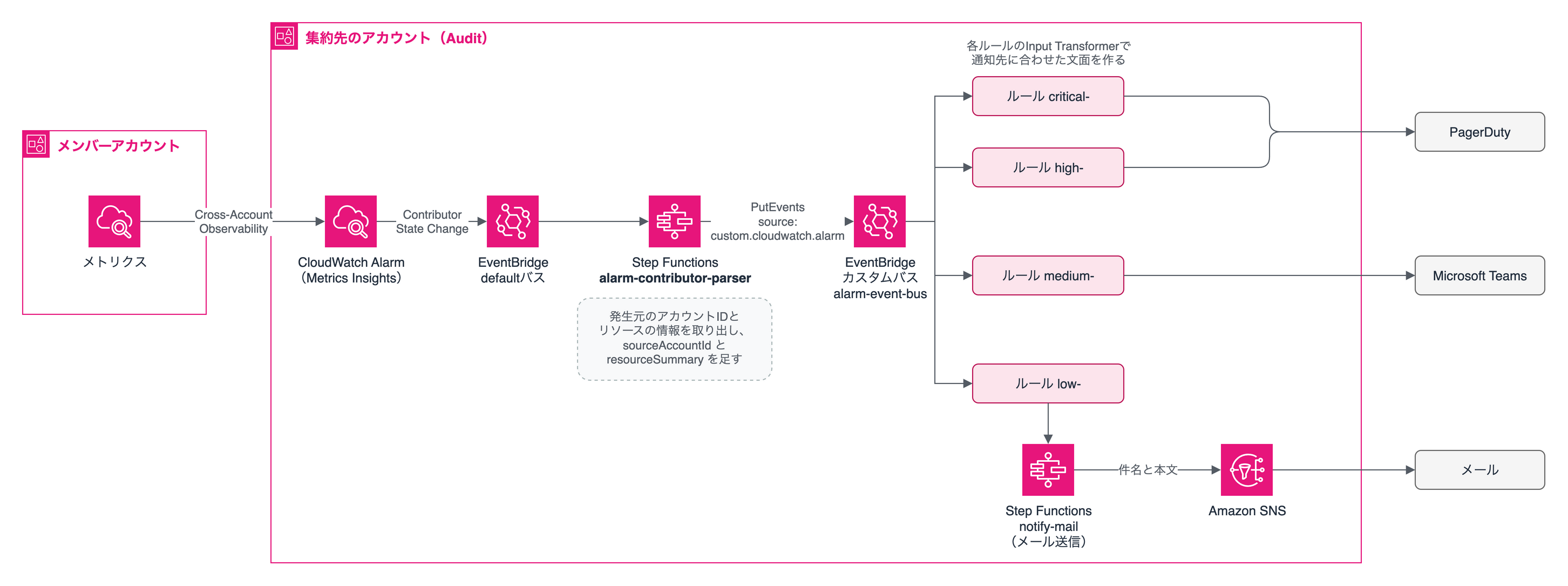
I placed Step Functions (alarm-contributor-parser) between the default bus and the custom bus. Its only role is to extract the source account ID and resource information from the event. I explain why Step Functions is needed here in the following sections.
Where is the source account ID?
For alarms that use GROUP BY in a Metrics Insights query, the state is evaluated for each combination of dimensions (Contributor) specified in GROUP BY. When a Contributor's state changes, a CloudWatch Alarm Contributor State Change event is emitted.
An excerpt of the event is as follows.
{
  "detail-type": "CloudWatch Alarm Contributor State Change",
  "source": "aws.cloudwatch",
  "account": "111111111111",
  "region": "ap-northeast-1",
  "detail": {
    "alarmName": "critical-natgw-ErrorPortAllocation",
    "alarmContributor": {
      "id": "0123456789abcdef",
      "attributes": {
        "AWS.\"AccountId\"": "333333333333",
        "NatGatewayId": "nat-0123456789abcdef0"
      }
    },
    "state": {
      "value": "ALARM",
      "timestamp": "2026-09-16T07:03:13.649+0000"
    },
    "configuration": {
      "metrics": [
        {
          "expression": "SELECT MAX(ErrorPortAllocation) FROM \"AWS/NATGateway\" GROUP BY AWS.AccountId, NatGatewayId ORDER BY MAX() DESC"
        }
      ]
    }
  }
}
account is the ID of the aggregation account that holds the alarm (here, the Control Tower Audit account, 111111111111). Even if you output $.account in the notification with an Input Transformer, you cannot tell which account the event occurred in.
The source account ID is in detail.alarmContributor.attributes. However, the key is AWS."AccountId", which contains a dot and double quotes. The keys of the resource identifiers (NatGatewayId, InstanceId, etc.) also vary depending on the alarm's GROUP BY.
The Input Transformer could not extract it
It could be extracted in the sandbox
First, I tried the EventBridge sandbox. In the console, under "Developer resources" → "Sandbox" → the "Target input transformer" tab, you can apply an input transformer to a sample event and check the output.
I compared the following three approaches against the event above.
| Approach | Input path | Output (excerpt) |
|---|---|---|
Put the whole attributes |
$.detail.alarmContributor.attributes |
リソース情報: {"AWS."AccountId"":"333333333333","NatGatewayId":"nat-0123456789abcdef0"} |
| Take only the value with a wildcard | $.detail.alarmContributor.attributes.* |
リソース情報(値のみ): 333333333333 |
| Specify the key with bracket notation | $.detail.alarmContributor.attributes['AWS."AccountId"'] |
アカウントID: 333333333333 |
The wildcard only picks up the first value, and NatGatewayId is lost. It also depends on the order of the values, so it cannot be used.
The other two produced the expected output in the sandbox. However, neither of them worked in an actual rule.
It was rejected when set as a target
When I tried to set the bracket-notation input path as a rule target with put-targets, it was rejected with the following error.
InputPath for target ... is invalid
Checking the official documentation, bracket notation is not included in the JSON path syntax that can be used in an Input Transformer.
EventBridge does not support all JSON Path syntax and evaluate it at runtime. Supported syntax includes:
dot notation (for example,$.detail)
dashes
underscores
alphanumeric characters
array indices
wildcards (*)
forward slashes(Translation: EventBridge does not support all JSON Path syntax, and the syntax is evaluated at runtime. The supported syntax is dot notation (such as
$.detail), dashes, underscores, alphanumeric characters, array indices, wildcards (*), and slashes.)
Amazon EventBridge input transformation
In the previous article, I extracted the value in Step Functions (JSONPath) by writing $.detail.alarmContributor.attributes['AWS."AccountId"']. The same notation looks like it should work in an Input Transformer too, but it could not be used there.
In actual delivery it became INVALID_JSON
I also tried the other approach, putting the whole attributes into the body. Since it displayed correctly in the sandbox, I used a verification SNS topic as the target and actually fired the alarm.
{
  "InputPathsMap": {
    "alarmName": "$.detail.alarmName",
    "resourceAttributes": "$.detail.alarmContributor.attributes",
    "stateValue": "$.detail.state.value",
    "stateTimestamp": "$.detail.state.timestamp",
    "stateReason": "$.detail.state.reason"
  },
  "InputTemplate": "\"[LOW] <alarmName>\\nリソース情報: <resourceAttributes>\\n状態: <stateValue>\\n遷移時刻: <stateTimestamp>\\n理由: <stateReason>\""
}
However, the notification did not arrive. Looking at the rule's metrics, Invocations and FailedInvocations were both 1, and nothing reached the SNS side. Delivery to the target had failed.
You can find the reason for the failure by attaching a dead-letter queue (DLQ) to the target. When I set an SQS queue as the DLQ and fired the alarm again, the following message remained in the DLQ.
{
  "Body": "\"[LOW] low-test-custom-AlarmTest\\nリソース情報: {AWS.\\AccountId\\:222222222222,TestResourceId:test-resource-001}\\n状態: ALARM\\n...\"",
  "MessageAttributes": {
    "ERROR_CODE": { "StringValue": "INVALID_JSON" },
    "ERROR_MESSAGE": { "StringValue": "Invalid input for target." }
  }
}
Looking at the リソース情報 part, the quotation marks inside the object have disappeared. This is behavior described in the official documentation.
If a JSON path references a JSON object or array, but the variable is referenced within a string, EventBridge removes all internal quotation marks to ensure the string is valid.
Amazon EventBridge input transformation
The problem is the key AWS.\"AccountId\". Only the quotation marks were removed and the backslashes remained, resulting in AWS.\AccountId\. \A is an invalid escape in a JSON string, so it appears to have been judged INVALID_JSON. If the key does not contain quotation marks, like TestResourceId, this problem does not occur.
In the sandbox, the quotation marks were displayed as they were without being removed. In other words, the sandbox output and actual delivery behave differently.
What I learned
- For alarms that include
GROUP BY AWS.AccountId, you cannot show the source account ID in the notification with an Input Transformer alone - An Input Transformer that passes in the sandbox can still fail when set on a target or during actual delivery. Actually set it on a target, deliver, and verify
- When verifying delivery, attach a DLQ to the target. Without one,
FailedInvocationsjust increases and you cannot tell the reason
Extracting it with Step Functions
Role of the state machine
I place Step Functions (a Standard workflow) between the default bus and the custom bus, extract the source information, and resend the event to the custom bus. Formatting for each destination is still done by the Input Transformer of each rule. Therefore, even when alarms or destinations are added, there is no need to modify the state machine.
The detail of the original event is kept as is, and the following two items are added.
| Added item | Content | Example |
|---|---|---|
detail.sourceAccountId |
The value of AWS."AccountId" in attributes. unknown if the key is absent |
222222222222 |
detail.resourceSummary |
A string joining the entries of attributes other than the account ID as "key=value". - if there are none |
NatGatewayId=nat-0123456789abcdef0 |
resourceSummary is built without hard-coding key names. Even if the resource type changes, the same definition can be used as is. Quotation marks are removed from the keys and values, so embedding it in an Input Transformer string template does not produce invalid JSON.
State machine definition
The state machine has two states. The BuildEvent state (a Pass state) assembles a new event, and the PutEvent state calls events:putEvents to send it to the custom bus. I use JSONata as the query language. With JSONata functions, keys containing dots and double quotes can be handled as they are.
The expression written in the Output of the BuildEvent state is as follows (in the actual definition it is written on one line).
(
  $attrs := $states.input.detail.alarmContributor.attributes;
  $acct := $lookup($attrs, 'AWS."AccountId"');
  $res := $sift($attrs, function($v, $k) { $k != 'AWS."AccountId"' });
  {
    "EventBusName": "arn:aws:events:ap-northeast-1:111111111111:event-bus/alarm-event-bus",
    "Source": "custom.cloudwatch.alarm",
    "DetailType": $states.input.`detail-type`,
    "Resources": $states.input.resources,
    "Detail": $merge([
      $states.input.detail,
      {
        "sourceAccountId": $exists($acct) ? $acct : "unknown",
        "resourceSummary": $exists($res)
          ? $join($each($res, function($v, $k) {
              $replace($k, '"', '') & "=" & $replace($string($v), '"', '')
            }), ", ")
          : "-"
      }
    ])
  }
)
Here is what each function does.
$lookupextracts the value of the keyAWS."AccountId"$siftkeeps only the keys other than the account ID$eachand$jointurn the remaining keys and values into "key=value" form and join them with commas$mergeadds the two items to the originaldetail
The PutEvent state passes the assembled event as is to Entries.
State machine definition (full)
{
  "Comment": "CloudWatch Alarm Contributor State Changeイベントに発生元アカウントIDとリソース情報を付与し、alarm-event-busへ送信する",
  "QueryLanguage": "JSONata",
  "StartAt": "BuildEvent",
  "States": {
    "BuildEvent": {
      "Type": "Pass",
      "Output": "{% ( $attrs := $states.input.detail.alarmContributor.attributes; $acct := $lookup($attrs, 'AWS.\"AccountId\"'); $res := $sift($attrs, function($v, $k) { $k != 'AWS.\"AccountId\"' }); { \"EventBusName\": \"arn:aws:events:ap-northeast-1:111111111111:event-bus/alarm-event-bus\", \"Source\": \"custom.cloudwatch.alarm\", \"DetailType\": $states.input.`detail-type`, \"Resources\": $states.input.resources, \"Detail\": $merge([$states.input.detail, { \"sourceAccountId\": $exists($acct) ? $acct : \"unknown\", \"resourceSummary\": $exists($res) ? $join($each($res, function($v, $k) { $replace($k, '\"', '') & \"=\" & $replace($string($v), '\"', '') }), \", \") : \"-\" }]) } ) %}",
      "Next": "PutEvent"
    },
    "PutEvent": {
      "Type": "Task",
      "Resource": "arn:aws:states:::events:putEvents",
      "Arguments": {
        "Entries": [
          {
            "EventBusName": "{% $states.input.EventBusName %}",
            "Source": "{% $states.input.Source %}",
            "DetailType": "{% $states.input.DetailType %}",
            "Resources": ["{% $states.input.Resources[0] %}"],
            "Detail": "{% $string($states.input.Detail) %}"
          }
        ]
      },
      "Retry": [
        {
          "ErrorEquals": ["States.ALL"],
          "IntervalSeconds": 2,
          "MaxAttempts": 3,
          "BackoffRate": 2
        }
      ],
      "End": true
    }
  }
}
The state machine's IAM role is allowed only events:PutEvents to the custom bus. The role that starts the state machine from the default bus rule is allowed only states:StartExecution.
Verifying the expression with TestState
Before creating the state machine, you can verify the BuildEvent state's expression with the TestState API. Since it is a Pass state, it does not call any external resources.
aws stepfunctions test-state \
  --definition "$(jq -c '.States.BuildEvent + {QueryLanguage: "JSONata"} | del(.Next) + {End: true}' alarm-contributor-parser.asl.json)" \
  --input file://sample-event.json \
  --inspection-level INFO \
  --query output --output text | jq '.Detail | {sourceAccountId, resourceSummary}'
{
  "sourceAccountId": "333333333333",
  "resourceSummary": "NatGatewayId=nat-0123456789abcdef0"
}
Points to note about the alarm query
The content of resourceSummary is the dimensions specified in GROUP BY in the alarm's query. To identify which resource an alarm is for in the notification, include AWS.AccountId and the resource identifier (InstanceId, LoadBalancer, etc.) in GROUP BY. For an alarm whose GROUP BY is only AWS.AccountId, resourceSummary becomes -.
Notification settings and results
Rules per severity
The events that Step Functions resends have source set to custom.cloudwatch.alarm. detail-type remains the original CloudWatch Alarm Contributor State Change. The severity rules on the custom bus match on this source and the alarm name prefix.
{
  "source": ["custom.cloudwatch.alarm"],
  "detail-type": ["CloudWatch Alarm Contributor State Change"],
  "detail": {
    "alarmName": [{ "prefix": "low-" }]
  }
}
source is set to a custom value to distinguish these events from AWS service events.
Input Transformer for email
For email notifications, the rule's target is not SNS but a state machine for sending email (notify-mail). To add a subject, I put in between a state machine that receives the subject and body and sends them to SNS. It is separate from the state machine that extracts the source.
The Input Transformer builds the subject and body using $.detail.sourceAccountId and $.detail.resourceSummary.
{
  "InputPathsMap": {
    "alarmName": "$.detail.alarmName",
    "alarmDescription": "$.detail.configuration.description",
    "sourceAccountId": "$.detail.sourceAccountId",
    "resourceSummary": "$.detail.resourceSummary",
    "region": "$.region",
    "stateValue": "$.detail.state.value",
    "stateTimestamp": "$.detail.state.timestamp",
    "stateReason": "$.detail.state.reason"
  },
  "InputTemplate": "{\"subject\":\"[LOW] <alarmName> - <sourceAccountId>\",\"message\":\"アラーム名: <alarmName> \\n説明: <alarmDescription>\\n重要度: LOW \\nアカウントID: <sourceAccountId> \\nリソース情報: <resourceSummary> \\nリージョン: <region> \\n状態: <stateValue> \\n遷移時刻: <stateTimestamp> \\n理由: \\n<stateReason>\",\"topicArn\":\"arn:aws:sns:ap-northeast-1:111111111111:alarm-verification-topic\"}"
}
For rules of other severities, you can use the same form by changing only the severity label in the subject and body and the topicArn.
The notification that arrived
I sent a test custom metric from a member account and fired a test alarm (low-test-custom-AlarmTest). The email that arrived is as follows.
件名: [LOW] low-test-custom-AlarmTest - 222222222222

アラーム名: low-test-custom-AlarmTest
説明: 通知パイプラインの動作確認用テストアラーム(low)。メンバーアカウントのカスタムメトリクスCustom/AlarmTestのTestErrorCountLowで発火させる
重要度: LOW
アカウントID: 222222222222
リソース情報: TestResourceId=test-resource-001
リージョン: ap-northeast-1
状態: ALARM
遷移時刻: 2026-10-11T03:01:13.674+0000
理由:
Threshold Crossed: 1 out of the last 1 datapoints was greater than or equal to the threshold (1.0). The most recent datapoint which crossed the threshold: [1.0 (11/10/26 03:00:00)] (minimum 1 datapoint for OK -> ALARM transition).
The source account ID (222222222222) and the resource information appear in the subject and body. When the alarm returned to OK, a notification arrived in the same format.
Conclusion
This time I summarized how to show the source account ID in notifications for aggregated CloudWatch Alarms. Since an Input Transformer cannot extract the source account ID, it seems best to turn it into fields that are easy to use for notifications with Step Functions and then pass the event to the rules. Formatting for each destination can remain in the Input Transformer.
Personally, the biggest surprise was that something that passed in the sandbox failed in actual delivery. When trying an Input Transformer, I recommend attaching a DLQ to the target and verifying with actual delivery.
Next, I plan to write about showing the resource's Name tag in notifications with the same configuration.
I hope this helps someone.
That's all from Yoshida of the Cloud Business Division!
References
- Verifying a configuration for centrally managing CloudWatch Alarms in a multi-account environment | DevelopersIO
- Amazon EventBridge input transformation
- Testing target input transformers using the EventBridge sandbox
- Transforming data with JSONata in Step Functions
- Testing state machines with the TestState API