Isolating the Execution Environment for Safe and Maximum Use of Claude Code: First Steps

This page has been translated by machine translation. View original
Manufacturing Business Technology Department's Kazue here.
At the Claude Code Seminar: AI-Driven Development Security Edition ~Risks That Settings Alone Can't Prevent, and the Next Step of Isolating Execution Environments~ held on September 1, 2026, I presented under the title "First Steps Toward Isolating Execution Environments for Safe and Full Use of Claude Code." Thank you to everyone who attended.
This article is a blog-adapted reconstruction of that presentation. Please note that the content reflects the state of things as of September 2026. In particular, Claude Code on the Web is a feature in research preview, so please be aware that specifications may change in the future.
What I'll Cover
- The Purpose of Execution Environment Isolation: Deciding Which Risks to Address
- First, I'll explain why isolating the execution environment is necessary and what its purpose is.
- Introduction to Three Isolation Methods, and the First Step
- I'll introduce three specific types of isolation, then suggest a first step to get started.
Let's start with the purpose of isolation.
The Purpose of Execution Environment Isolation: Deciding Which Risks to Address
I'll state the conclusion upfront. This time, I thought about execution environment isolation with the goal of minimizing the damage scope of information leaks caused by supply chain attacks.
You might think "that's a pretty narrow goal" or "that doesn't seem very related to Claude Code," but I'll explain that in due course.
First, Narrow Down to One Risk to Address
There are various risks to consider when using AI coding agents.
- Leakage of confidential information
- Excessive charges for AI coding agent tools
- Unintended high costs for cloud or SaaS usage
- Generation of code with vulnerabilities
- Deletion of existing resources
- Increase in cognitive debt
- And more
Since it's difficult to address all of these at once, I thought it necessary to first narrow down the risks to tackle.
Our department (Manufacturing Business Technology Department) does client work primarily supporting manufacturing industry customers, and we frequently handle confidential information belonging to those customer companies. We determined that leaking such confidential information would most severely damage customer trust, and therefore made information leakage the top-priority risk to address.
Next, Narrow Down to One Pathway to Address
There are also multiple pathways through which information leaks can occur.
- Human error by developers (misconfiguration of tools, etc.)
- AI malfunction
- Supply chain attacks (device compromise through malware installation)
- And more
Since it's also difficult to address all pathways at once, we narrow down which one to prevent. This time, I chose supply chain attacks.
What Are Supply Chain Attacks?
A supply chain attack is an attack that exploits the process by which software reaches users (the supply chain) to inject malicious code into legitimate software. The pathway most familiar to developers is OSS packages published on platforms like npm or PyPI.
A typical flow looks like this:
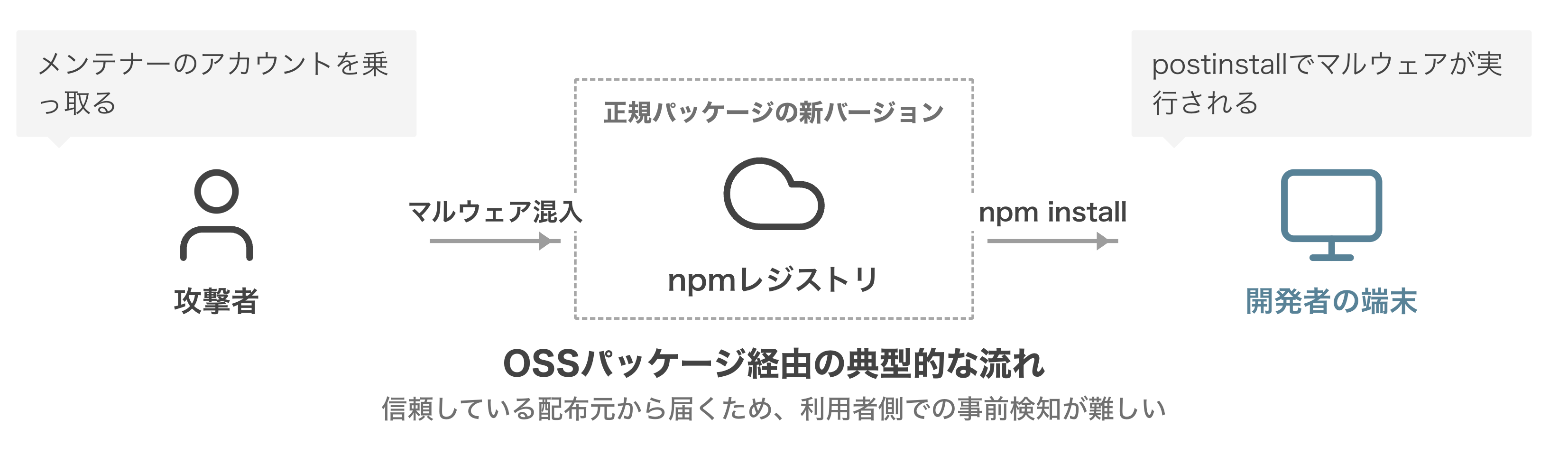
- An attacker hijacks a maintainer's account
- They publish a new version with malware embedded
- Through a script that runs automatically during installation, malware gets into the developer's device when they install it
- The device is compromised, leading to damage such as information leakage
Why Supply Chain Attacks Should Be Addressed
There are two reasons.
- Because AI-driven development has dramatically increased the number of OSS package installations
- Because large-scale attack incidents have been occurring frequently in recent years
Let me explain each in turn.
Reason ①: The Number of OSS Package Installations Has Increased by Orders of Magnitude
In today's world where AI agents are doing development, compared to when humans were doing development, the number of tasks has increased, parallel execution has become normal, and npm install or npx runs in each and every one of them. And humans are no longer watching what gets installed. Even if we could still check the OSS packages being used directly, it becomes unrealistic for humans to track everything when you include the other OSS packages that those packages use internally.
As the number of installations increases, so does the number of incidents.
Reason ②: Large-Scale Attack Incidents Are Occurring Frequently
In recent years, large-scale supply chain attacks have been occurring every few months. Here are the major ones in chronological order:
- August 2025 Nx "s1ngularity": The first attack to weaponize AI coding agents (Snyk, GitGuardian)
- September 2025 chalk / debug compromise: Malware embedded in packages with a combined total of over 2 billion downloads per week (Wiz)
- September 2025 Shai-Hulud: The first self-propagating npm worm, infecting over 500 packages (CISA)
- November 2025 Shai-Hulud 2.0: Returned at a scale of hundreds of packages (Microsoft Security Blog)
- March 2026 axios compromise: A widely-used package with 100 million downloads per week was compromised (Wiz)
- April–June 2026 Mini Shai-Hulud / Miasma: Targeting AI agent configurations and credentials (vorlon.io, Microsoft Security Blog)
- May 2026 TanStack and others compromised: Over 170 packages across npm / PyPI compromised (Orca Security)
This is no longer a rare occurrence — it is clearly a situation where developer devices are being targeted. I'll introduce two cases from this list.
Case ①: The axios Compromise — Something You Use Normally Gets Contaminated
This incident occurred on March 31, 2026, involving the HTTP client axios with approximately 100 million weekly downloads. A maintainer's npm account was hijacked, and a malicious version was published. Through a script that runs automatically at install time (postinstall), a remote access trojan (RAT) was designed to become resident on the device. According to the official axios postmortem, the malicious version was publicly available for about 3 hours, and any devices that installed it during that time were compromised (axios official postmortem, Wiz).
This is a case where simply running npm install was enough to have your device taken over.
Case ②: AI Agents Became a "Weapon" for Malware
This is the Nx "s1ngularity" from August 2025. Malware was embedded in the npm package Nx, and the postinstall stole credentials from devices. At that time, a technique was used where AI tools already installed on the device — such as Claude Code / Gemini CLI / Amazon Q — were launched with safety mechanism disabling flags, causing the AI itself to search for sensitive files.
According to primary data from GitGuardian, 2,349 credentials were detected from 1,079 repositories (GitGuardian, Snyk).
This is a case showing that a logged-in agent becomes, from an attacker's perspective, "an authenticated tool that can do anything."
Two Categories of Countermeasures: Prevention and Isolation
Countermeasures can be broadly divided into two categories.
- Prevention (proactive measures): Keep malware from getting in. Methods that are widely available to the public — such as settings that prevent installing packages immediately after release (npm's
min-release-age) and malware checking tools (Takumi Guard, Safe Chain) — are effective. If you haven't done this yet, please do. - Isolation (reactive measures): Minimize damage even if malware gets in. This is the last line of defense for when prevention is bypassed.
Prevention is effective, but we need to think about the next step on the assumption that it can be bypassed. That is isolation.
When doing client work like our department, there are cases where information from multiple customers is mixed on a single device. If a supply chain attack compromises that device on one customer's project, all other customers' information could also be taken. We want to avoid this, so we aim to minimize the damage scope — in other words, to ensure that even if compromised, only that project's information is lost.
Conditions for Information Leakage and the Concept of "Walls"
Before introducing the three isolation methods, let me organize the conditions under which information leakage occurs.
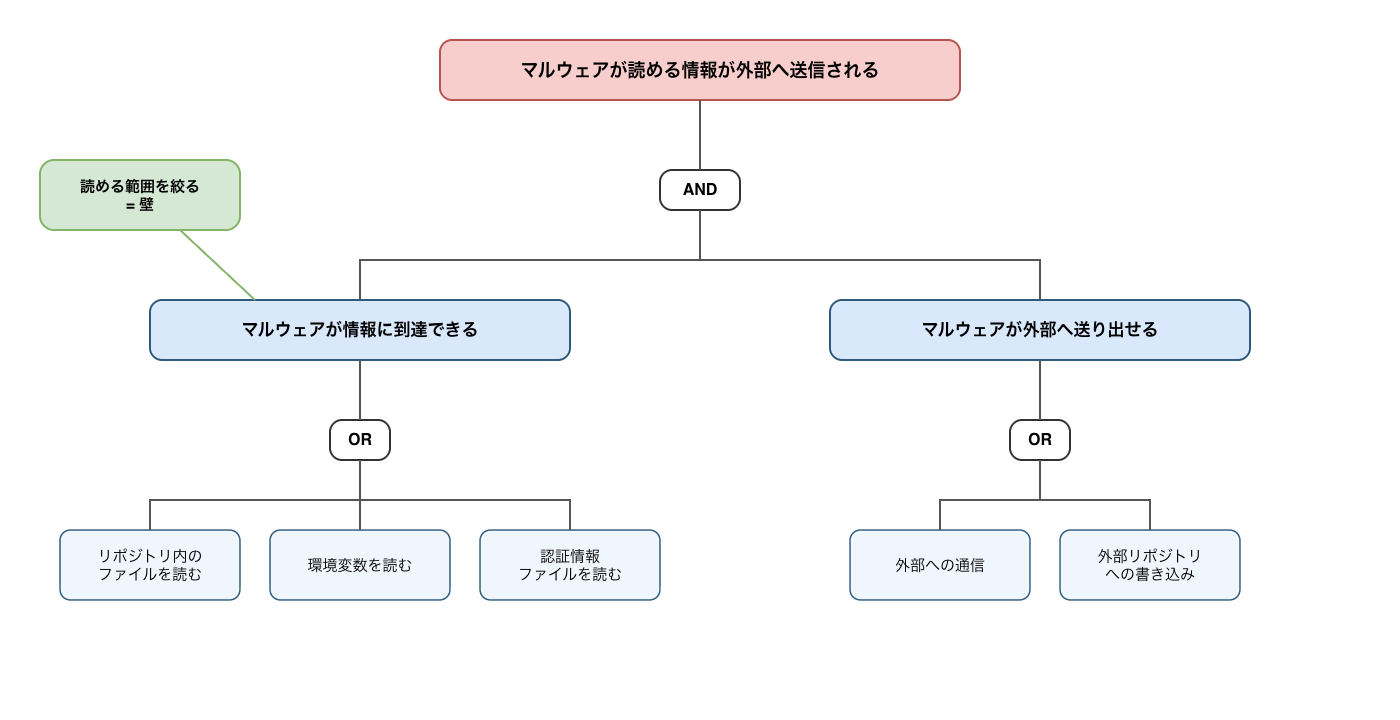
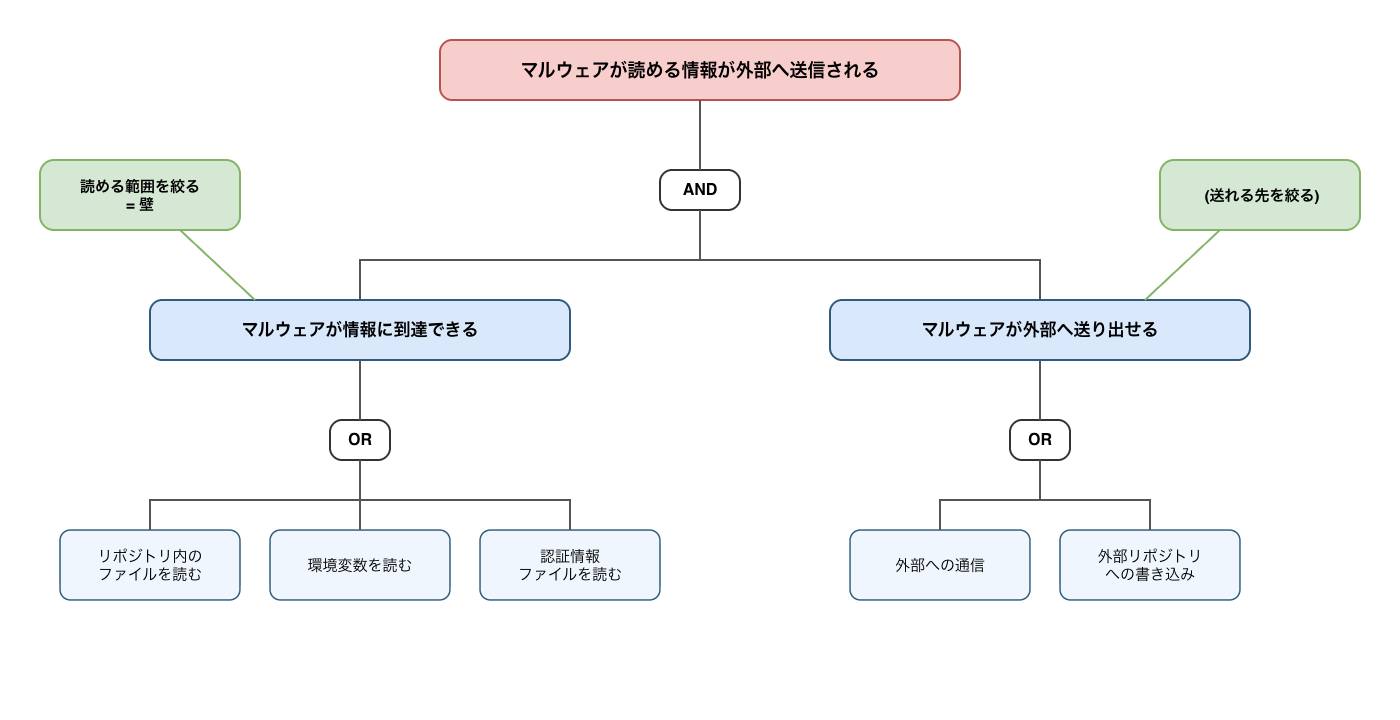
Two elements are required for information leakage to occur:
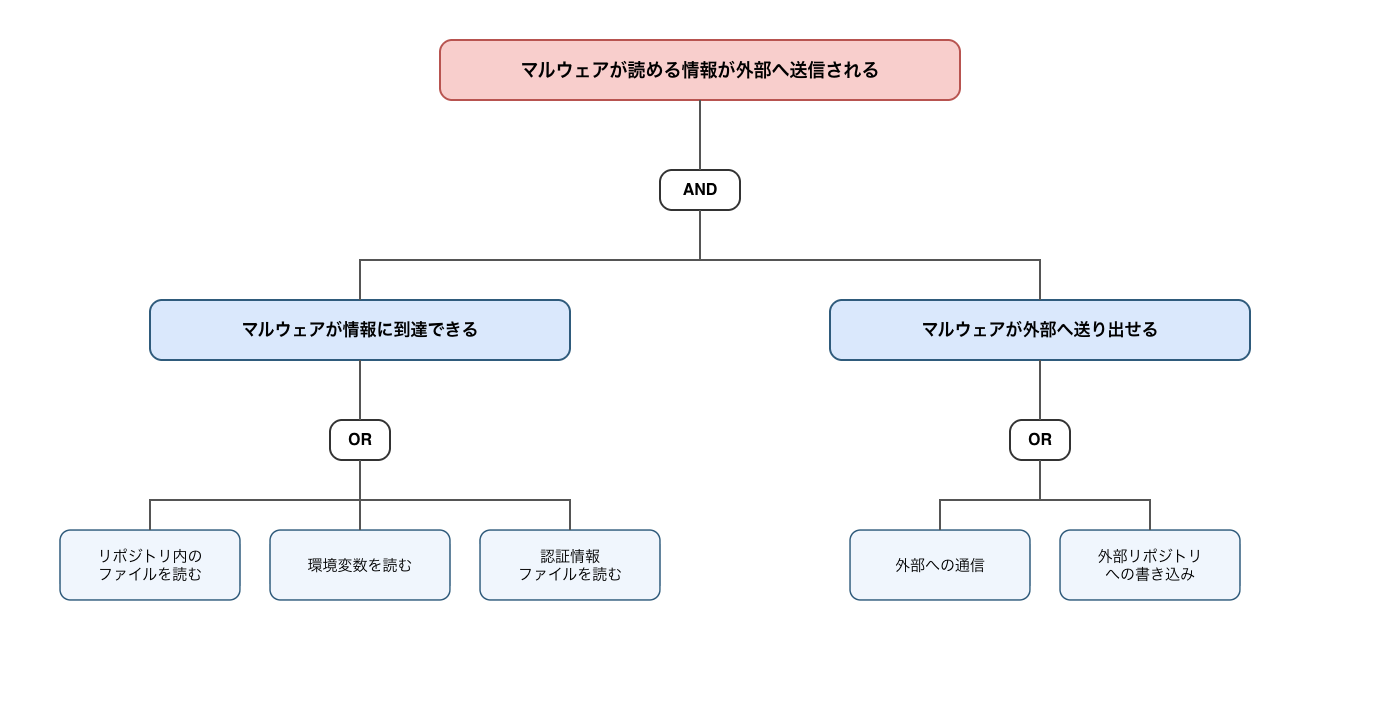
- Malware can reach the confidential information
- Malware can send that confidential information to the outside
What we aim for with execution environment isolation this time is the first point — narrowing the scope of what malware "can reach." In this article, I'll call this a wall.
Note that each isolation method discussed later can sometimes supplementally address the second point — "can send to the outside" — so I'll touch on that as well.
Three Walls: Where to Place Them
This time, I'll introduce three methods that differ in where the wall is placed. They can be classified into three layers based on where the wall is placed (from inner to outer):
| Layer | Location of Wall | Analogy: Device as a House | Specific Method |
|---|---|---|---|
| ① Per-process | Around commands executed by AI | Fencing only around the desk where AI works | Claude Code's Bash sandbox |
| ② Per-development-environment | Around each project's development environment | Dividing by rooms | Dev Container |
| ③ Outside the device | Moving the execution environment itself outside the device | Renting a workspace outside the house | Claude Code on the Web |
The further outward the wall, the broader the range it can protect. And there is one principle common to all three.
A wall can only protect what is placed outside the wall. Even things brought inside the wall may see reduced damage if you restrict where they can be sent, but it is safer to treat them as potentially stolen. The important point is to minimize what is unnecessarily brought inside the wall.
Wall ①: Bash Sandbox — Protecting AI Command Execution
This is Claude Code's standard OS-level sandbox. It can be configured from /sandbox, and enforces boundaries on commands executed by Claude and all their descendant processes. Since it can restrict write destinations and network access (where things can be sent), malware executed through postinstall during npm install may be confined inside the wall (Configure the sandboxed Bash tool - Claude Docs).
However, the default settings have gaps, so you need to tighten them with a more hardened configuration. A representative example is bypass routes. When a command fails due to the sandbox, Claude Code may retry outside the sandbox with the dangerouslyDisableSandbox parameter, and this is enabled by default. You can disable it by setting sandbox.allowUnsandboxedCommands: false.
※ Added 2026/09/18: I've summarized an example configuration for Bash sandbox in the following entry.
While Bash sandbox is easy to start using, honestly speaking it's somewhat lacking when considered from the perspective of supply chain attack countermeasures. That's because it only protects when AI is executing commands. Other times — for example, when a human runs npm run dev in their own terminal, or when an IDE loads node_modules — are outside the wall and unprotected. And malware that activates at those "human-operated stages" also exists.
As a method that also isolates those stages, I'll introduce the next wall.
Wall ②: Dev Container — Confining the Entire Development Environment
This is a method that confines the development environment inside a container for each project. It can be used transparently from VS Code or Claude Code, and limits what can be stolen to "only what was brought into that container." The advantage is that stages that couldn't be protected by Bash sandbox — such as IDE extensions, app launches, and test execution — can be included inside the wall.
There are three points to be aware of:
- Mounted directories and passed environment variables cannot be protected, so it's important to design with minimal items brought into the container
- By default, network traffic passes through freely. Custom implementation is needed to restrict where things can be sent, and Anthropic has published a reference implementation (init-firewall.sh) on GitHub that you can reference
- There is a possibility that the wall can be breached. Considering that other customers' confidential information lies beyond a breached wall, this could be considered somewhat vulnerable. Examples of "wall being breached" are as follows:
- There have been past methods of escaping from containers by exploiting kernel/container runtime vulnerabilities (such as runc CVE-2019-5736, CVE-2024-21626).
- Misconfiguration.
(VS Code Extension's) DevContainer by default allows the container to use the local device's Git credentials. This means that if the container is compromised, there is a risk of Git credentials being misused.
Also, if you want to use another container within DevContainer (for example, if you want to use an MCP server provided as a container), adopting a so-called DooD (Docker outside of Docker) configuration would essentially grant the DevContainer full access to the local device (host device).
Wall ③: Claude Code on the Web
This is a method that moves the execution environment itself outside the device. Since Claude Code runs on an Anthropic-managed cloud VM, nothing actually runs on your local device — you only give the initial instructions there. Even if a supply chain attack occurs, only that cloud environment is compromised (Use Claude Code on the web - Claude Docs).
The configuration for "restricting where things can be sent" that required custom implementation with Dev Container is built in as standard. In a domain-list format, it's a simple configuration where you just choose from 4 levels (None / Trusted / Full / Custom) in the UI. The default is Trusted, which only allows what's necessary for development, such as various package registries and GitHub (Configure cloud environments - Claude Docs). This means that even using it in the default state provides a certain level of security.
Another advantage of Claude Code on the Web is the developer experience. I have the impression that it's not a tool you have to tolerate for the sake of security.
- When starting a session: Just select a repository. There's no need to clone the repository locally or set up an environment.
- While it's running: The work continues even if you close your PC. Even if you run many sessions in parallel, all of them execute on cloud VMs, so the load on your local PC doesn't increase. You can check the work status from your smartphone, or give instructions from there.
- After it's done: You receive the results as a pull request. It automatically handles creating a branch for each session, accumulating commits, pushing to the GitHub repository, and creating a pull request. When you add review comments to that pull request, Claude picks them up and proceeds to make the corrections.
On the other hand, there are also prerequisites you should confirm before using it.
- It is a feature in research preview, and specifications may change in the future
- It cannot be used via Amazon Bedrock or Google Vertex AI
- Before using it for customer projects, you need to confirm whether placing code on an external cloud is contractually permissible
- For those concerned about this point, options to use company-managed infrastructure as the execution environment have recently emerged, so please consider those as well
- Clone / PR creation assumes GitHub
- Development types with poor compatibility: those requiring physical device connection, internal networks, or heavy environment setup
- Some settings, such as user-scope settings, cannot be carried over
How to Use the Three Walls
| ① Bash sandbox | ② Dev Container | ③ Claude Code on the Web | |
|---|---|---|---|
| Protection scope | AI command execution only | The entire development work for that project | The device itself (nothing remains) |
| Adoption barrier | Minimal (just type /sandbox) |
Medium (set up devcontainer.json) | Small (but development style changes) |
| Suitable situations | Everyone, starting today | Projects that require local development | Tasks that can be delegated and completed entirely on GitHub |
My top recommendation is ③ Claude Code on the Web. I think a good approach is to progressively move work that can be done outside the device there, and protect the remaining work with Bash sandbox or Dev Container.
First Step: Try Sending One Task to Claude Code on the Web
There is one principle: a wall can only protect what is placed outside the wall, so reduce what you bring inside, and if possible, execute it outside the device.
As a first step, I suggest trying to send just one task to Claude Code on the Web. The steps are as follows (Get started with Claude Code on the web - Claude Docs):
- Go to claude.ai/code and log in
- Link with your GitHub account
- Create an environment (configure VM settings such as network access)
- Select the created environment and start a session ↓
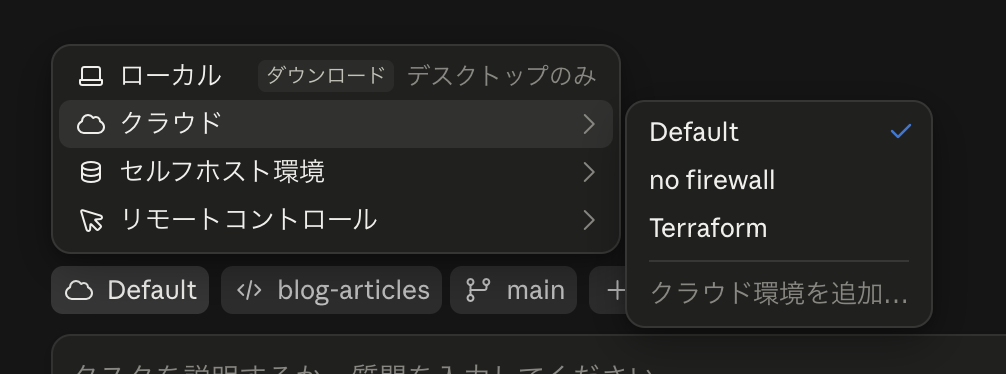
After that, just enter a prompt and run it to get started. Please give it a try.
Summary
- The purpose of execution environment isolation is to minimize the damage scope of information leaks caused by supply chain attacks. Since there are various risks with AI coding agents, the starting point is to first narrow down the risk and pathway to address.
- ※ "Execution environment isolation" can also be useful for minimizing damage from other risks such as prompt injection. However, since dealing with many risks at once makes the discussion complicated, this article focuses specifically on the risk of information leakage through supply chain attacks.
- For information leakage to occur, two conditions must be met: "can reach" and "can send out," and execution environment isolation serves as a wall that narrows the scope of "can reach"
- Three walls were introduced: ① Bash sandbox (protects AI command execution), ② Dev Container (confines the entire development environment), ③ Claude Code on the Web (moves the execution environment itself outside the device)
- There is one principle: a wall can only protect what is placed outside the wall. Reduce what you bring inside, and if possible, move it outside the device.
- Please start by trying to send just one task to Claude Code on the Web
References
- Configure the sandboxed Bash tool - Claude Docs
- Development containers - Claude Docs
- anthropics/claude-code - .devcontainer(init-firewall.sh)
- Use Claude Code on the web - Claude Docs
- Configure cloud environments - Claude Docs
- Get started with Claude Code on the web - Claude Docs
- The npm Threat Landscape: Attack Surface and Mitigations - Unit 42
- Widespread Supply Chain Compromise Impacting npm Ecosystem - CISA
- Shai-Hulud 2.0: Guidance for detecting, investigating, and defending against the supply chain attack - Microsoft Security Blog
- Post Mortem: axios npm supply chain compromise - GitHub Issue #10636
- Wiz: axios npm compromised in supply chain attack
- Weaponizing AI Coding Agents for Malware in the Nx Malicious Package - Snyk
- The Nx "s1ngularity" Attack: Inside the Credential Leak - GitGuardian
- vorlon.io: Mini Shai-Hulud npm supply chain AI coding tools
- TanStack and 160+ npm/PyPI Packages Compromised in Supply Chain Worm Attack - Orca Security
