
I Tested CloudWatch Logs Data Protection Policies for Masking Names, Addresses, and My Number in Incident Investigation

This page has been translated by machine translation. View original
Hello. This is Ogata from the Operations Innovation Department.
Some time ago, I wanted to check logs on a production machine to investigate an incident, but the logs contained personal information, so I couldn't take them out as they were.
I remember copying only the parts needed for the investigation into a text file, one entry at a time, and taking that out.
CloudWatch Logs has a "data protection policy" that masks sensitive data in logs.
I thought that if I used it, I could use the masked logs as they are for investigation.
However, the detection rules that AWS provides (managed data identifiers) don't include any for Japan.
So this time, I prepared dummy logs containing Japanese personal information and verified how much can be masked, what to do about whatever can't be masked, and whether an investigation is feasible with the masked logs.
Note that how to read logs under a data protection policy and how they appear for each output destination are verified in detail in the following article.
Conclusion
- With managed data identifiers alone, about 70% of the Japanese personal information in the verified logs was not masked
- Adding custom data identifiers (regular expressions) masked everything, but JSON-format logs were broken
- Even with the masked logs, I could trace the cause of the incident. However, I couldn't tell which users were affected.
- The original values can be seen only by those who have
logs:Unmask, and that operation is recorded in CloudTrail
Verification details
I prepared three log groups, put exactly the same dummy logs (94 lines) in each, and compared them.
| Log group | Data protection policy |
|---|---|
| A | Managed data identifiers only (7) |
| B | A plus custom data identifiers (9) |
| C | None (for comparison) |
The dummy logs assume output from an API that receives requests, and come in two kinds: JSON format and free text. Of 40 requests, 14 fail due to a timeout (E504) of an external API.
The intake logs contain personal information: name (kanji and romaji), phone number, address, date of birth, postal code, My Number, driver's license number, account number, card number, amount, and IP address. All values are fictitious.
To retrieve the logs, I used the AWS CLI's filter-log-events with an IAM role that does not have the logs:Unmask permission.
The assumption is that the person in charge of incident investigation brings the masked logs to their own machine.
Trying with managed data identifiers only
For A, I configured the following seven identifiers.
EmailAddress CreditCardNumber Name Address IpAddress DateOfBirth PhoneNumber-US
Since there is no phone number identifier for Japan, I chose the US one, which has a similar format. Searching the identifier list for "JP" returns no candidates.
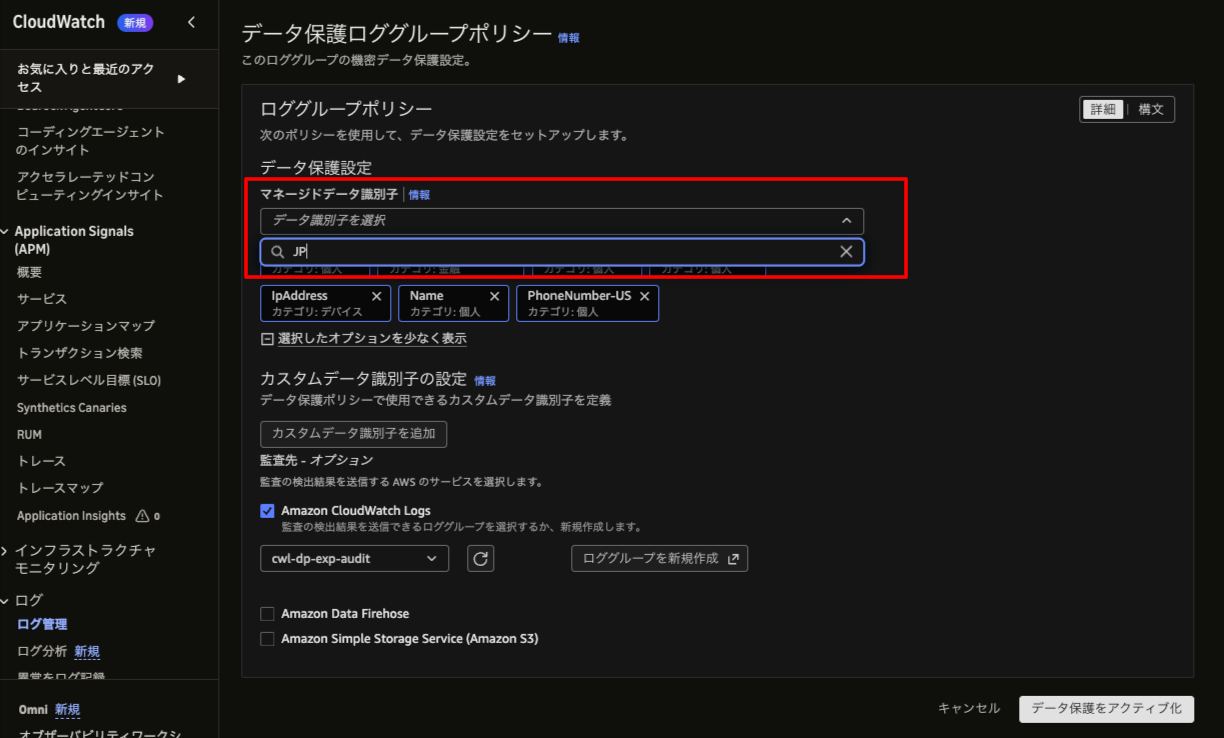
Here is a comparison of the same intake log before and after masking.
- Log before masking
{
  "ts": "2026-11-12T06:18:50.200Z",
  "level": "INFO",
  "request_id": "20261112000501",
  "msg": "application received",
  "user_email": "taro.yamada@example.com",
  "name_romaji": "Taro Yamada",
  "name_ja": "検証 太郎",
  "phone": "090-0000-0001",
  "birth_date": "1975-01-01",
  "dob": "1975-01-01",
  "seinengappi": "1975-01-01",
  "address": "東京都架空区サンプル町1-1-1",
  "postal_code": "000-0001",
  "card_number": "4242 4242 4242 4242",
  "account_number": "1000000",
  "my_number": "123456789001",
  "drivers_license": "300000000001",
  "loan_amount": 500000,
  "repayment_amount": 8333,
  "client_ip": "192.0.2.10"
}
- Log after masking
{
  "ts": "2026-11-12T06:18:50.200Z",
  "level": "INFO",
  "request_id": "20261112000501",
  "msg": "application received",
  "user_email": "***********************",
  "name_romaji": "***********",
  "name_ja": "検証 太郎",
  "phone": "090-0000-0001",
  "birth_date": "**********",
  "dob": "**********",
  "seinengappi": "1975-01-01",
  "address": "東京都架空区サンプル町1-1-1",
  "postal_code": "000-0001",
  "card_number": "*******************",
  "account_number": "1000000",
  "my_number": "123456789001",
  "drivers_license": "300000000001",
  "loan_amount": 500000,
  "repayment_amount": 8333,
  "client_ip": "**********"
}
The email address, romaji name, card number, and IP address were masked. On the other hand, the kanji name, address, postal code, My Number, driver's license number, account number, and amounts remained as they were. Name targets only Latin characters, and Japan is not among the target countries of Address, so the results match the documentation.
Of the 540 sensitive items contained in the intake logs, 367 (68%) were not masked.
Differences depending on how phone numbers are written
Even for the same phone number, some were masked and some were not, depending on how they were written.
| Format | Example | Result |
|---|---|---|
| Without hyphens | 09000000002 |
Masked |
| With hyphens | 090-0000-0004 |
Not masked |
With +81 |
+819000000006 |
Not masked |
The result for date of birth changed depending on the key name
DateOfBirth is detected only when a keyword such as dob or birth date is nearby. In these logs, birth_date and dob were masked, but seinengappi with the same value, and 生年月日= in free text, were not masked. Even when the value has the same form, whether it is protected depends on the key name.
Supplementing with custom data identifiers
Custom data identifiers let you write detection rules with regular expressions. A single policy can have up to 10 of them, and each regular expression can be up to 200 characters.
For things with a fixed format, like numbers, I wrote rules based on the shape of the value. For things without a fixed format, like names and addresses, I used key names such as name_ja and addr= as clues.
The nine I actually configured are as follows. The left is the name, and the right is the regular expression.
JpPhoneHyphen   \b0\d{1,4}-\d{1,4}-\d{4}\b
JpPhoneIntl     \+81\d{9,10}\b
Digits12        \b\d{12}\b|\b\d{4}[ -]\d{4}[ -]\d{4}\b
Digits7Postal   \b\d{7}\b|\b\d{3}-\d{4}\b
JpAmounts       loan\w*\W+\d+|repayment\w*\W+\d+
JpName          name_ja\W+[^"]+|name=\S+ \S+
JpAddress       address\W+[^"]+|addr=\S+
BirthNoKeyword  seinengappi\W+\d{4}-\d{2}-\d{2}
JpBirthKeyword  生年月日=\d{4}-\d{2}-\d{2}
The target of each is as follows.
| Name | Target |
|---|---|
| JpPhoneHyphen | Phone numbers with hyphens |
| JpPhoneIntl | Phone numbers with +81 |
| Digits12 | 12-digit numbers (My Number, driver's license number) |
| Digits7Postal | 7-digit numbers (account number), 123-4567 format (postal code) |
| JpAmounts | Amounts under keys starting with loan or repayment |
| JpName | Kanji names (values of name_ja and name=) |
| JpAddress | Addresses (values of address and addr=) |
| BirthNoKeyword | Date of birth under seinengappi |
| JpBirthKeyword | Date of birth after 生年月日= |
The identifiers for names, addresses, amounts, and dates of birth are written to match the key names in these dummy logs (name_ja, address, loan_amount, etc.). When using them for real, you need to rewrite them to match the key names in your own logs.
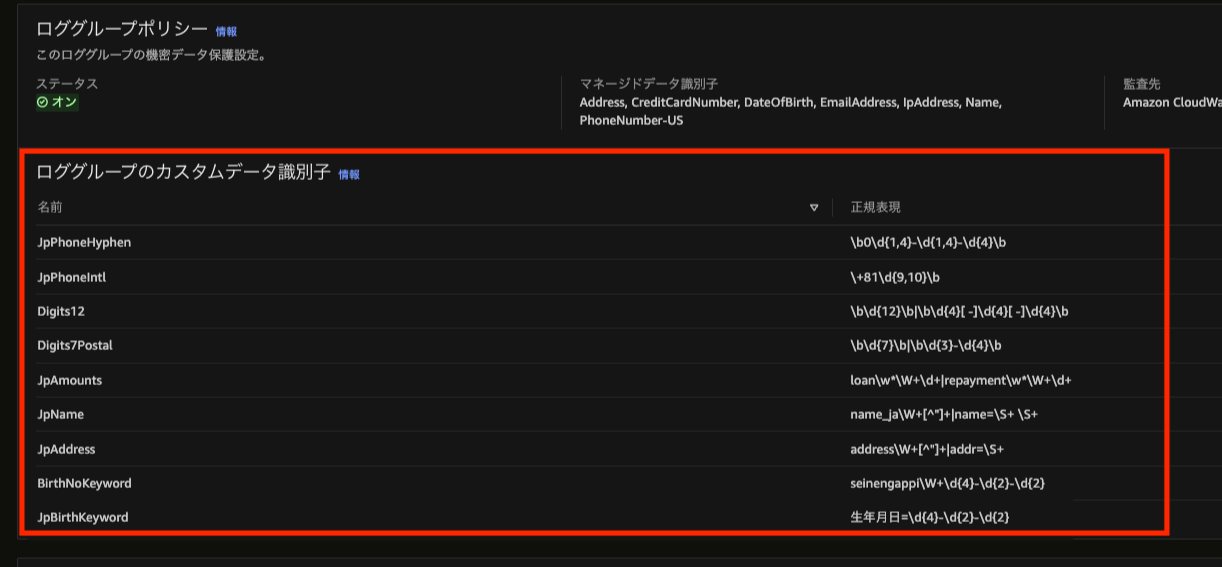
As a result, all 540 items were masked. request_id, timestamps, E504, and so on remained, and items that seem necessary for investigation were not caught up in the masking.
Note that the documentation's list of characters usable in regular expressions does not include Japanese characters or parentheses. This time they could be saved, and the Japanese identifier actually worked for masking, but since this behavior is not in the official documentation, it seems better to check beforehand if you use it.
Instead, the JSON was broken
Identifiers that use key names as clues mask the entire matched range. As a result, not only the value but also the key name and the ":" separator were replaced with *.
| Original log | After masking |
|---|---|
"seinengappi":"1975-01-01" |
"************************" |
"address":"東京都架空区サンプル町1-1-1" |
"**************************" |
"loan_amount":500000 |
"******************* |
The "key":value pairs have turned into plain strings or unclosed ". This is what the whole intake log looked like after masking.
{"ts":"2026-11-12T07:22:31.200Z","level":"INFO","request_id":"20261112000501","msg":"application received","user_email":"***********************","name_romaji":"***********","***********************":"*************","birth_date":"**********","dob":"**********","************************","**************************","postal_code":"********","card_number":"*******************","account_number":"*******","my_number":"************","drivers_license":"************","*******************,"**********************,"client_ip":"**********"}
Passing this single line to jq results in an error.
※ jq is a command-line tool that reads JSON and extracts or formats its fields.
jq: parse error: Objects must consist of key:value pairs at line 1, column 288
All 20 intake logs became unreadable as JSON. This causes the following problems.
- Even unmasked fields can no longer be extracted: Since the whole line is unreadable, even
request_idandtson the same line cannot be extracted with tools such asjq. In incident investigations, I think it is common to follow the logs from intake to failure by linking them withrequest_id. That becomes impossible with tools. In fact, for this verification's aggregation too, only B's logs could not be read as JSON, so I had to redo the aggregation with regular expressions - You can't even tell which fields existed: Because the key names disappear too, you can't even tell that
phoneoraddresswere there - The console doesn't format them either: They are not expanded as JSON and are displayed as a single-line string
I tried lookbehind (something like (?<=loan=)\\d+) to see whether I could keep the key names and mask only the values. However, saving failed with the error Regexes in Custom Data Identifiers are too complex.
This is as far as what I could confirm as fact goes. What follows is hypothesis, since I haven't verified it.
- If lookbehind could be saved, maybe only the values could be masked while leaving the key names
- Maybe the reason lookbehind couldn't be saved is that lookbehind itself is unsupported (the error message says "too complex," not "not supported")
I couldn't try either, so I don't know. What is certain is that when I used identifiers that rely on key names as in this case, the JSON structure could not be preserved.
The results of A and B are summarized below.
| A | B | |
|---|---|---|
| Items not masked | 367 / 540 (68%) | 0 / 540 |
| Intake logs readable as JSON | 20 / 20 | 0 / 20 |
Can you investigate an incident with masked logs?
Assuming the task of "investigating requests that failed due to timeout," I compared C (no masking) with A and B.
| What to find out | C (no masking) | A and B |
|---|---|---|
| Failed requests | 14 can be identified | 14 can be identified |
| Cause of failure | E504, retried 3 times |
Same |
| Affected users | 10 | Unknown |
Because request_id and error codes remain, I could trace what failed, when, and why. On the other hand, since both email addresses and IP addresses are masked, I couldn't tell who was affected. Since the IP address masking is a result of choosing IpAddress, you need to decide in advance whether to protect it or use it for investigation.
As far as investigating the cause goes, it seems that I no longer need to copy things one entry at a time, as in the experience I mentioned at the beginning.
Who can see the original values?
When I added --unmask with the investigator's role, which does not have the logs:Unmask permission, it was denied.
An error occurred (AccessDeniedException) when calling the FilterLogEvents operation: ... is not authorized to perform: logs:Unmask on resource: ...
With a role that has logs:Unmask, the original values could be retrieved.
This operation is recorded in CloudTrail. Since "unmask": true is recorded in the FilterLogEvents event, you can later check which role viewed the original values and when. Denied operations were also recorded.
{
  "eventName": "FilterLogEvents",
  "userIdentity": {
    "sessionContext": {
      "sessionIssuer": { "userName": "cwl-dp-exp-security" }
    }
  },
  "requestParameters": {
    "logGroupName": "cwl-dp-exp-a",
    "unmask": true
  }
}
However, this time I left the role session name the same as the role name, so the record only showed "which role." In real operation, I think putting the person who performed the action in the session name would make tracing easier.
Summary
Here are the answers to the opening questions, based on what this verification showed.
- How much Japanese personal information could be masked: With managed data identifiers alone, about 70% was not masked. Supplementing with custom data identifiers masked everything in these dummy logs. However, using identifiers that rely on key names broke the JSON logs
- Does it seem possible to investigate incidents with masked logs: Investigating the cause seems possible. Who and how many users were affected could not be determined
- Does it seem possible to avoid copying logs one entry at a time: As far as investigating the cause goes, it seems so
Based on these results, I think the following division could work in operation.
- Cause investigation: The investigator does not have the
logs:Unmaskpermission and takes out and uses the masked logs as they are - Identifying affected users: Only staff with the
logs:Unmaskpermission view the original values. Put the person performing the action in the session name so that who viewed them can be traced in CloudTrail - JSON-format logs: Do not use identifiers that rely on key names, and make sure names and addresses are not output to logs by the application in the first place
A data protection policy is a mechanism that protects logs after they have been output. Just as the same phone number was or wasn't protected depending on how it was written this time, the range that can be masked depends on how logs are written. For that reason, I concluded that it is more reliable for the side emitting logs to decide beforehand not to output personal information and to standardize key names and formats (I did not verify this time). It seems best to use the data protection policy as the last line of defense to protect whatever still remains.
