
I tried attaching eyes and ears to DeepSeek V4 Flash, which doesn't support vision, using Qwen-MM-Plugins

This page has been translated by machine translation. View original
Introduction
Hello, I'm Morishige from Classmethod's Manufacturing Business Technology Division.
Qwen has released Qwen-MM-Plugins — a collection of plugins described as "making any agent harness multimodal."
DeepSeek V4 Flash-0731, which I use daily, is fast and cheap but doesn't accept images. Posting a screenshot returns a 400. But switching the main model to a larger one just for images doesn't appeal to me from a cost and speed perspective... When I saw this release, I thought it could fill that gap — that's where this started.
I've written two articles about running this model on the DGX Spark.
Incidentally, I've also started seeing ideas for filling the same gap on the model side. The concept places a small VLM and shim in front of DeepSeek, converting images to text before passing them, making it look like "a DeepSeek that accepts images" from the harness perspective.
If you're self-hosting DeepSeek itself, that's also an option. The reason I chose the plugin approach this time is that it doesn't lock you into a specific main model. You can switch to a different model later and use the same setup, and as I'll mention later, there's still room to combine it with vision-capable models.
To give the conclusion upfront: the gap was filled. Images, audio, and video all work. However, the plugin's flagship "let the model read directly" tools don't work with text-only models — it's the other category that's usable. And the eyes and ears are sufficient with the DGX Spark on hand.
What I'm using as eyes and ears is Nemotron 3 Nano Omni, which I previously ran on this blog. The story of running it standalone is summarized in a previous article.
In this article, I'll explain how to build a setup that keeps a text-only model as the main brain while attaching eyes and ears externally, and walk through actually showing it a screenshot to fix a UI bug. I hope this resonates with people who want to use local LLMs in practice but are struggling with multimodal support.
Qwen-MM-Plugins extends harnesses with skills and MCP
Qwen-MM-Plugins is a collection of plugins that extend the agent execution environment rather than the model itself. Released under Apache-2.0, the repository was created on July 29.
The structure is simple: each function is distributed as a pair of a "skill" and an "MCP server." The skill tells the model "these tools are available," and the MCP server handles the actual processing.
There are 7 capabilities.
| capability | contents |
|---|---|
core |
Reading images, videos, documents, and 3D models; OCR; grounding; ASR; web search |
omni-av |
Understanding audio-accompanied video. ASR with speaker separation, captions with timestamps |
video-memory |
Hierarchical graph memory and QA for long videos |
video-edit |
Video editing and generation of images, videos, and audio |
blender |
Thin client that operates running Blender via Python |
freecad |
Similarly operates FreeCAD |
edu-agent |
Skill-only feature that creates explanatory videos from math and science problems |
Claude Code, Codex, Qoder, OpenClaw, and Qwen Code can be added via the plugin marketplace. opencode and Gemini CLI are configured by writing manually in a config file. Since I use opencode, I go with the latter.
The two I'll use this time are core and omni-av.
Tools are split into two categories
Now for the main topic. When reading the documentation, what caught my attention was how the tools were described. In the core skill, tools are written in two groups. Excerpted, it looks like this:
Native reading (feeds content directly to you):
- See a file (PDF, Office, CSV, code, notebook, 3D, ...) → visualize
- Read an image with dynamic resolution → read_image
- Read a video (extract frames) → read_video

External API calls (DashScope):
- Call an external VLM about images/videos → vision_chat
- Extract text from an image → ocr
- Detect/locate objects in an image → grounding
"feeds content directly to you" — it says the content is passed directly to you yourself. Curious, I went to look at the read_image implementation, and the last line was this:
return [text(summary), image(b64, mime)]
It's just returning the resized image itself. In other words, the native reading category assumes that the model running inside the harness can read images. For a model that can't, it's like receiving a package it can't open.
On the other hand, vision_chat and ocr call a separate vision model via API and pass back the returned text. These can be used even by models that can only read text.
Let me actually verify this distinction. When you directly throw an image at DeepSeek V4 Flash-0731, this happens:
POST /v1/chat/completions  + image_url
→ 400 {"message":"This model does not support image inputs"}
It clearly refuses. Adding plugins doesn't change this fact. Only the external VLM call category works, and native reading remains unusable.
| Category | What it returns | Text-only brain | Image-capable brain |
|---|---|---|---|
native reading (read_image / read_video / visualize) |
The image itself | ✗ | ✅ |
External VLM calls (vision_chat / ocr / grounding) |
Text | ✅ | ✅ |
omni-av (omni_asr / omni_av_caption and others) |
Text (JSON) | ✅ | ✅ |
segmentation |
Mask image + text | △ | ✅ |
What happens with native reading on a capable model
I also checked the other side just to be sure. I changed the router destination to the vision-capable minimax-m3 and had it call the same read_image. The instruction was "use only read_image."
⚙ read_image(image_path=…/ppe-sample.jpg, budget="normal")

- White helmet (safety hat) — woman on the left
- Yellow helmet (safety hat) — man on the right
- Yellow-green high-visibility safety vest (with reflective stickers) — woman on the left
- Dark navy work coverall (jumpsuit) — man on the right
The man on the right is holding what appears to be a walkie-talkie, but this is a communication device, not protective equipment.
Safety shoes and gloves are not visible in the image as the lower legs and hands are obscured by the wooden fence and clothing.
If the model can read images, it naturally works straightforwardly. Moreover, the information returned is richer than what you get later via vision_chat for the same image. Whether reflective stickers are present, the judgment that a walkie-talkie is not protective equipment, notes about parts that are hidden and can't be confirmed — all of this comes back.
The reason is clear: vision_chat works by "posing a question and getting an answer," so things you didn't ask about won't come back. With native reading, the image itself arrives in the model's hands, so the model can look at it as much as it wants on its own judgment.
In other words, native reading is not a useless feature — it's the proper approach for models that can read images. It just happens to be unusable from a text-only model's perspective.
read_image also has a budget for choosing resolution, allowing you to trade off token count against detail visibility. However, it doesn't seem to be a silver bullet — in my brief testing, labels on graphs of that size could be read even with the smallest budget, but an 11px table in a 4K screenshot couldn't be read even with a higher budget. When I tried cropping and reading it, the model mixed up columns and gave a wrong answer, so it seems worth checking compatibility with your material.
Hearing that only half is usable might feel like a loss, but in practice it's not that much of a problem. If you "want to know what's in an image," getting the answer back as text is sufficient. And since images don't enter the context, the main model stays unburdened.
Placing eyes and ears on the DGX Spark
So what do we place as the "external" in the external VLM call category? Reading the documentation, it seems to assume using Alibaba's DashScope. However, reading the source, the beginning of shared/api_openai.py says this:
Targets any OpenAI-compatible endpoint (DashScope's compatible-mode is only the default base_url).
Any OpenAI-compatible endpoint is fine; DashScope is just the default — it explicitly states this. There's also this note in the API key resolution section:
api_key falls back to "EMPTY" so local/self-hosted servers that ignore auth still work
It's designed with self-hosted servers in mind. The official documentation only says DASHSCOPE_BASE_URL is "for proxies and gateways," so this was something you'd only notice by reading the code.
So I'll set up eyes and ears on the DGX Spark. I'll use the FP8 version of Nemotron 3 Nano Omni. Since it can handle images, audio, video, and text with a single model, I don't need to prepare separate eyes and ears.
uv venv --python 3.12 && source .venv/bin/activate
uv pip install "vllm[audio]==0.20.0"

vllm serve nvidia/Nemotron-3-Nano-Omni-30B-A3B-Reasoning-FP8 \
  --served-model-name nemotron-omni qwen3.7-plus qwen3.5-omni-plus \
  --host 0.0.0.0 --port 8000 \
  --gpu-memory-utilization 0.7 \
  --max-model-len 131072 \
  --media-io-kwargs '{"video":{"num_frames":256,"fps":2}}' \
  --video-pruning-rate 0.5 \
  --enable-auto-tool-choice --tool-call-parser qwen3_coder \
  --reasoning-parser nemotron_v3 \
  --trust-remote-code
Aliasing with --served-model-name
The plugin decides on its own what model names to call. vision_chat and ocr use qwen3.7-plus, and omni-av series uses qwen3.5-omni-plus. Since there's no way to change these names via environment variables, you'd get a 404 as-is.
So I alias the names on the vLLM side. Since --served-model-name accepts multiple values, listing the names the plugin wants to call means they'll be accepted even though the actual model is Nemotron. This way the plugin side needs no modification and no additional arguments.
Set --max-model-len generously
The other consideration is context length. omni-av sends requests with a default max_tokens of 65536, so if the server's --max-model-len is smaller than that, it gets rejected with a 400 saying max_tokens=65536 cannot be greater than max_model_len. This has nothing to do with the size of the file you sent. Setting it to 131072 with room for the input portion allows video summaries to pass through as well.
Testing all three modalities
Only two environment variables need to be set.
DASHSCOPE_BASE_URL=http://<dgx-spark>:8000/v1
DASHSCOPE_API_KEY=EMPTY
With this in place, calling the tools via the MCP server, images, audio, and video each passed through.
| Tool | Input | Time | What came back |
|---|---|---|---|
vision_chat |
Construction site photo | 3.10s | Listed 2 helmets and a vest with colors |
ocr |
Same photo | 2.86s | Extracted text from the image |
omni_asr |
16-second audio | 11.0s | Transcription |
omni_av_caption |
10-second video | 44.22s | Storyline with timestamps |
The video response comes back in this form:
## Storyline

00:00.000 - 00:04.000
The video opens with a high-angle aerial shot sweeping over a steep, grassy mountainside …
Audio passed through with a one-line patch
Only audio omni_asr returned a 400 as-is, so I checked what the plugin was sending and tried three variations manually.
| How audio is passed | Result |
|---|---|
data:;base64,… (what the plugin sends) |
400 Incorrect padding |
data:audio/wav;base64,… (with MIME) |
400 Invalid or unsupported audio file |
Raw base64 (without data: prefix) |
✅ 200 / 3.92s |
Raw base64 works. The cause is a mismatch in wrapping: the plugin wraps audio in the data: format following DashScope's documentation, but the OpenAI specification says input_audio.data should be a plain base64 string. vLLM implements the spec correctly, so when passed wrapped, it trips on decoding. In other words, vLLM is correct per spec, and the plugin is aligning with DashScope's proprietary extension.
The fix is effectively one line — strip the wrapping only for self-hosted endpoints. After applying the patch locally, transcription came back in 11.0 seconds. This fix was submitted upstream as issue #8 and PR #9, and was merged. If you're using the current main, no patch is needed.
Mounting on a router to make destinations switchable
Up to this point, the MCP server hits the DGX Spark directly. It works, but the destination is hardcoded in the plugin's environment variables.
In my environment, normal model calls go through a router called NeMo Switchyard. It's a mechanism that routes between cheaper and smarter models depending on the use case — I wrote an article about this too.
Since there's a router, mounting the eyes and ears on it would consolidate destination switching and logging in one place. I tried it.
[llm_clients.local_omni]
format = "openai_chat"
base_url = "http://<dgx-spark>:8000/v1"
api_key_env = "FIREWORKS_API_KEY"

[targets.omni]
id = "nemotron-omni"
llm_client = "local_omni"

[routes.omni-vision]
id = "qwen3.7-plus"
type = "passthrough"
target = "omni"

[routes.omni-av]
id = "qwen3.5-omni-plus"
type = "passthrough"
target = "omni"
A small trick: I set the route IDs to the exact model names the plugin wants to call. This is the same thing I did earlier with vLLM's --served-model-name, but done on the router side this time. With this in place, the plugin side only needs to point DASHSCOPE_BASE_URL at the router.
Here's the overall picture of what has been assembled so far.
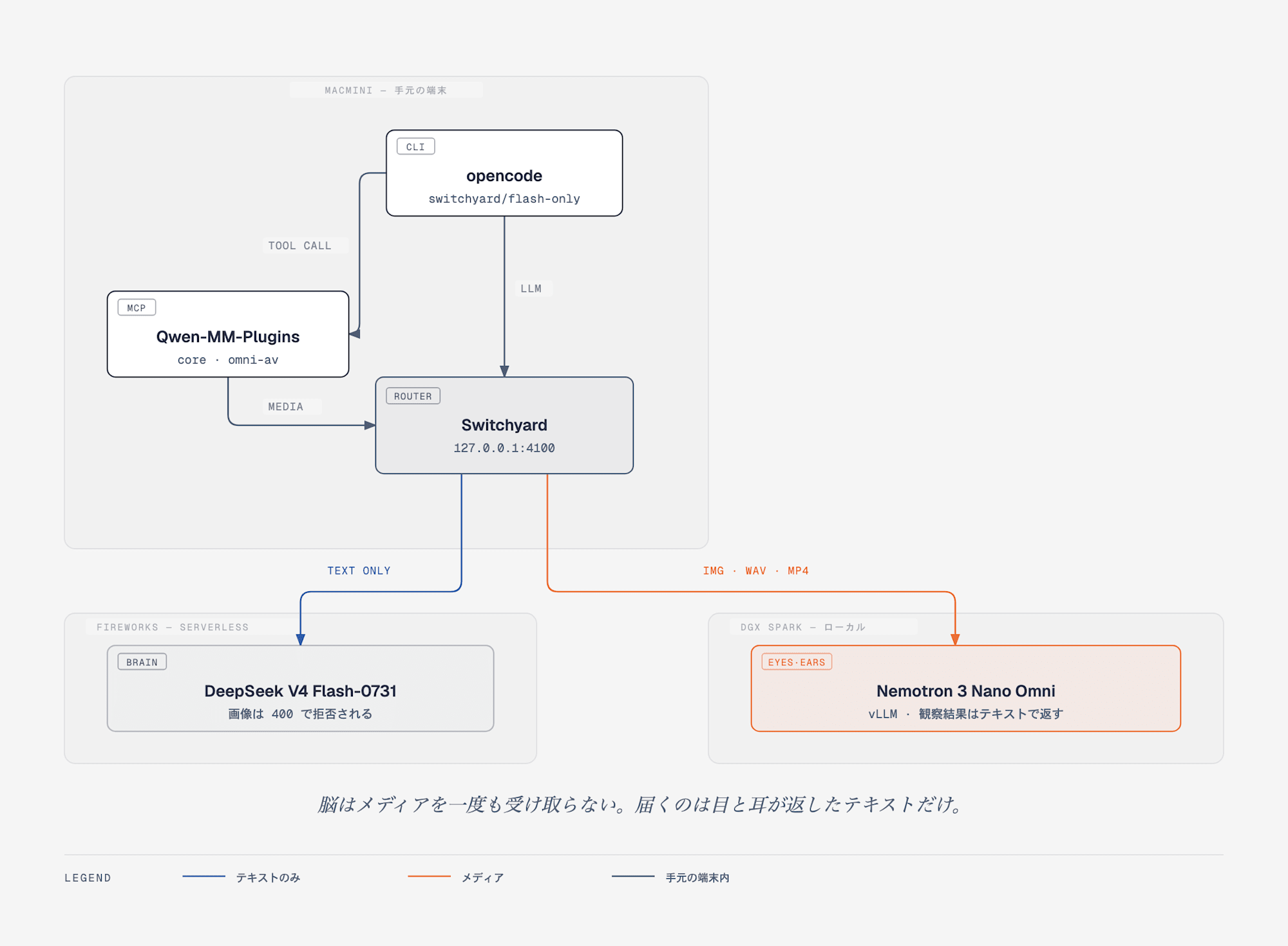
The router splits the path into two. The blue line on the left goes to the text-only brain, and the orange on the right goes to the eyes and ears that handle media. No media reaches the brain — only the text returned by the eyes and ears arrives.
I had two concerns. Would the router pass requests containing media through as-is, and if so, how much latency would be added?
The former wasn't a problem. Images, audio, and video all pass through cleanly. Since the router runs in a Docker container on a separate machine from the DGX Spark, this also verified the network connectivity at the same time.
For the latter, I alternated 3 measurements each between direct and router-via access.
| Input | Direct | Via router | Difference |
|---|---|---|---|
| Image | 2.21s | 2.47s | +0.26s (+12%) |
| Audio | 1.10s | 1.16s | +0.06s (+5%) |
| Video | 1.44s | 1.47s | +0.03s (+2%) |
Even for a video request containing 7.6MB of base64, only 0.03 seconds is added. The first time I measured, it looked over 1 second slower, but that was just variability. I'm glad I measured multiple times.
Logging also worked as expected — media calls appear in the router log with token counts.
| Call | prompt tokens | completion tokens |
|---|---|---|
| Text | 21 | 30 |
| Image | 1,109 | 124 |
| Audio | 224 | 46 |
| Video | 1,563 | 23 |
As an aside, the tier column was empty for these rows. Since it's a passthrough route, it means it doesn't go through the classifier that determines which model to route to. This means images and audio don't flow into the classifier unnecessarily, which avoids extra costs.
Turning off reasoning made it 8x faster
With the setup assembled, I measured it on actual tasks. I prepared two tasks where answers can be mechanically verified. One was listing protective equipment from a construction site photo, and the other was reading four values from a graph. Since the latter has numbers printed on the graph, it's either right or wrong. Being impossible to fudge makes it suitable for testing vision performance.
Results: both had perfect accuracy. However, latency was 16–19 seconds — too slow for use as eyes. The culprit was the long thinking that Nemotron-series models emit by default before answers. When max_tokens was reduced, it would exhaust the budget just on thinking and return empty answers. When I dealt with a different Nemotron on this blog before, I worked around it by disabling thinking via chat_template_kwargs.
However, the plugin doesn't send that parameter. It's not in the tool arguments either. I thought I'd have to patch the plugin side, but then I remembered I had a router in the middle. Just adding one line to the target is enough.
[targets.omni]
id = "nemotron-omni"
llm_client = "local_omni"
extra_body = { chat_template_kwargs = { enable_thinking = false } }
This applies to all calls at once. Here are the re-measured results.
| Task | With thinking | Without thinking | Multiplier |
|---|---|---|---|
| Listing protective equipment | 16.26s | 2.09s | 7.8x |
| Reading graph values | 18.76s | 1.31s | 14.3x |
Accuracy maintained a perfect median score. Strictly speaking, in 1 out of 3 runs without thinking, it missed picking up the vest for protective equipment. The plugin was not touched at all.
Having a router in the middle was originally intended to allow switching destinations, but it also served as a layer for injecting "model-specific conventions" from the outside. Personally, I think this was the most pleasing discovery of this whole exercise.
Can cloud-based eyes substitute?
This brings up the question of whether eyes even need to be local. I have a DGX Spark for myself alone, but distributing it to a team doesn't mean putting one on everyone's desk.
For my team's environment, I use open-weight models via Fireworks. I wrote an article about this setup too.
If Fireworks has vision-capable models available, swapping the route destination should be all that's needed. I tried it.
The swap itself was 3 lines — just add one target and change the route's destination. Nothing in the MCP config or plugin was touched. It works as intended.
The problem was figuring out which model accepts what. I brute-forced all models available from my account, and here are the results:
| Model | Image | Audio | Video |
|---|---|---|---|
minimax-m3 |
✅ | ✗ | △ |
qwen3p7-plus |
✅ | ✗ | ✗ |
kimi-k3 |
✅ | ✗ | ✗ |
minimax-m2p7 |
✗ | ✗ | ✗ |
glm-5p2 |
✗ | ✗ | ✗ |
nemotron-3-ultra-nvfp4 |
✗ | ✗ | ✗ |
deepseek-v4-flash-0731 (main brain) |
✗ | ✗ | ✗ |
Not a single model accepted audio. Three pass images.
The △ for minimax-m3 with video is because it rejected differently than the others. While other models returned errors for unsupported video, this one said "submit video via HTTP URL; base64 data URLs are not supported." Since it's saying it's a passing method issue, retrying with a publicly accessible URL video worked fine. However, the plugin converts local files to base64 and sends them, so it doesn't fit this path. To make it work, you'd need to place the video somewhere externally accessible, which isn't realistic for internal footage.
What about hosted versions of the same Omni?
There's no need to be tied to Fireworks. Nemotron 3 Nano Omni itself, the model I'm using as eyes, is hosted on OpenRouter and NVIDIA's NIM API.
Both can be tested by just changing the route destination, so I hit all three modalities using the same format the plugin sends.
| Route | Image | Audio | Video |
|---|---|---|---|
| Local vLLM (DGX Spark) | ✅ | ✅ | ✅ |
OpenRouter (:free) |
✅ | ✗ | ✅ |
NIM API (integrate.api.nvidia.com) |
✅ | ✗ | ✅ |
In addition to images, video passes through as a data URL. A hosted option that can read local video files appears here for the first time. It's the same model so it makes sense, but it fills a gap that was completely missed in the Fireworks brute-force.
Audio didn't pass through on either hosted option. Moreover, it doesn't return an error — it returns a 200 with an answer like "please upload an audio file." The usage's prompt_tokens shows only the text portion, meaning the audio part was silently stripped midway. Since no error appears, this is easy to miss, so it's worth keeping in mind.
Free tier constraints also need attention. NIM hit 503s due to concurrency limits during testing, and OpenRouter's :free has request count limits. For regular team use, paid tiers would likely be necessary.
I also compared speeds. Using the same 2 tasks from the reasoning section, I measured medians with only the route destination changed.
| Task | Local Omni | Fireworks minimax-m3 |
Fireworks qwen3p7-plus |
|---|---|---|---|
| Listing protective equipment | 2.09s | 4.36s | 1.61s |
| Reading graph values | 1.31s | 1.38s | 0.76s |
Accuracy was perfect across all arms, with no differences.
[targets.fw_qwen_vl]
id = "accounts/fireworks/models/qwen3p7-plus"
extra_body = { reasoning_effort = "none" }
For the protective equipment listing task, completion tokens dropped from 845 to 302, and that translated directly to latency. The suppression knob differs per provider (vLLM uses chat_template_kwargs, Fireworks uses reasoning_effort), so they look like different things, but they're doing the same thing. The minimax-m3 numbers were measured without disabling reasoning, so that arm's conditions aren't aligned.
So in terms of latency alone, there's no advantage to keeping eyes local. What remains local is not speed, but the single point of being able to handle audio and local video files.
From this, the placement depends on the scope of distribution.
| Distribution scope | Where to place eyes and ears |
|---|---|
| Images only | Hosted options are sufficient. Just change the route destination for Fireworks or OpenRouter |
| Local video files | Hosted Omni (OpenRouter / NIM) passes data URLs through |
| Audio | Need to run locally |
As for PDFs, they can't be opened with the plugin's read_image. However, when I actually tried it, the model found its own workaround — it would write out one page as PNG using save_view, then pass it to ocr. For PDFs with a text layer, pdftotext would be faster and more accurate, so image conversion would be needed for scanned documents and cases where the figure or table itself is the answer.
Having it view a screenshot and fix CSS
Up to this point, the discussion has been about whether the eyes can see. Finally, I'll test whether it can complete a full loop as an agent.
The subject is a common flex bug. A card has an input field and submit button arranged horizontally, but because the input field has min-width: 280px, the button overflows out of the card.
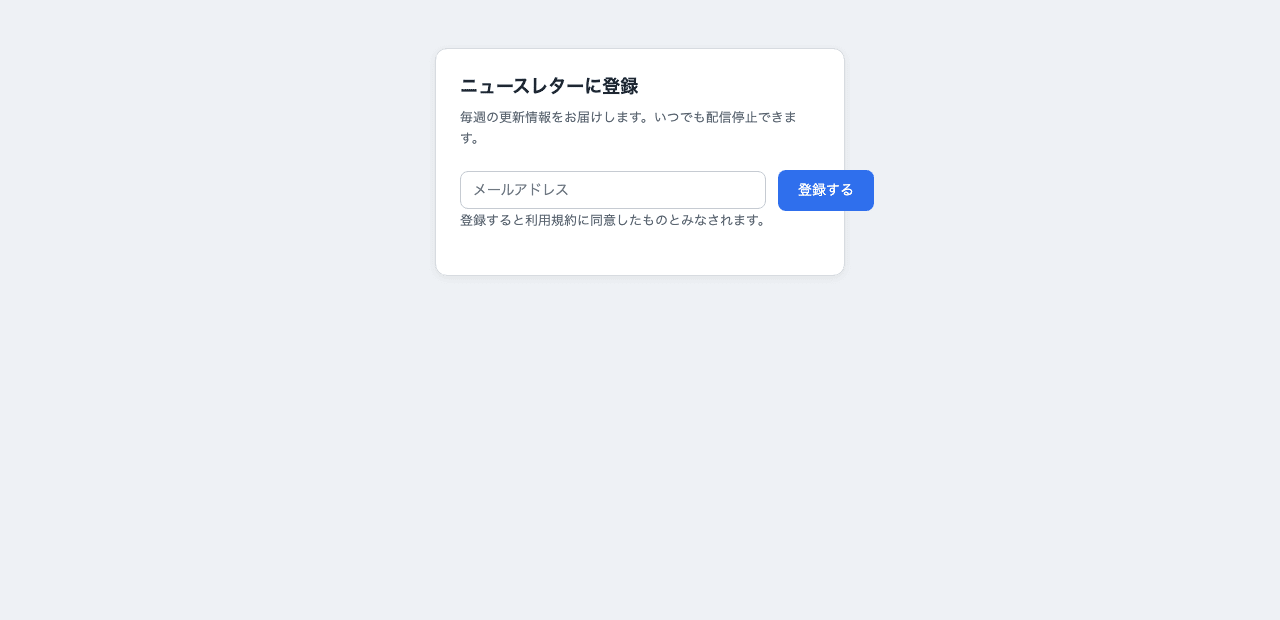
The card is 360px wide, but the combined minimum width of the input field and button doesn't fit, causing the blue "登録する" button to break through the right edge.
I set up a small shell script that hits headless Chrome to take screenshots, and have the model take them itself. The instruction is just this:
The layout of index.html is broken. Take a screenshot with ./shot.sh,
identify the cause, and fix the CSS. After fixing, take another screenshot
to visually confirm it's fixed.
You can't read images yourself, so use available tools to verify.
The loop I want it to follow is like this:
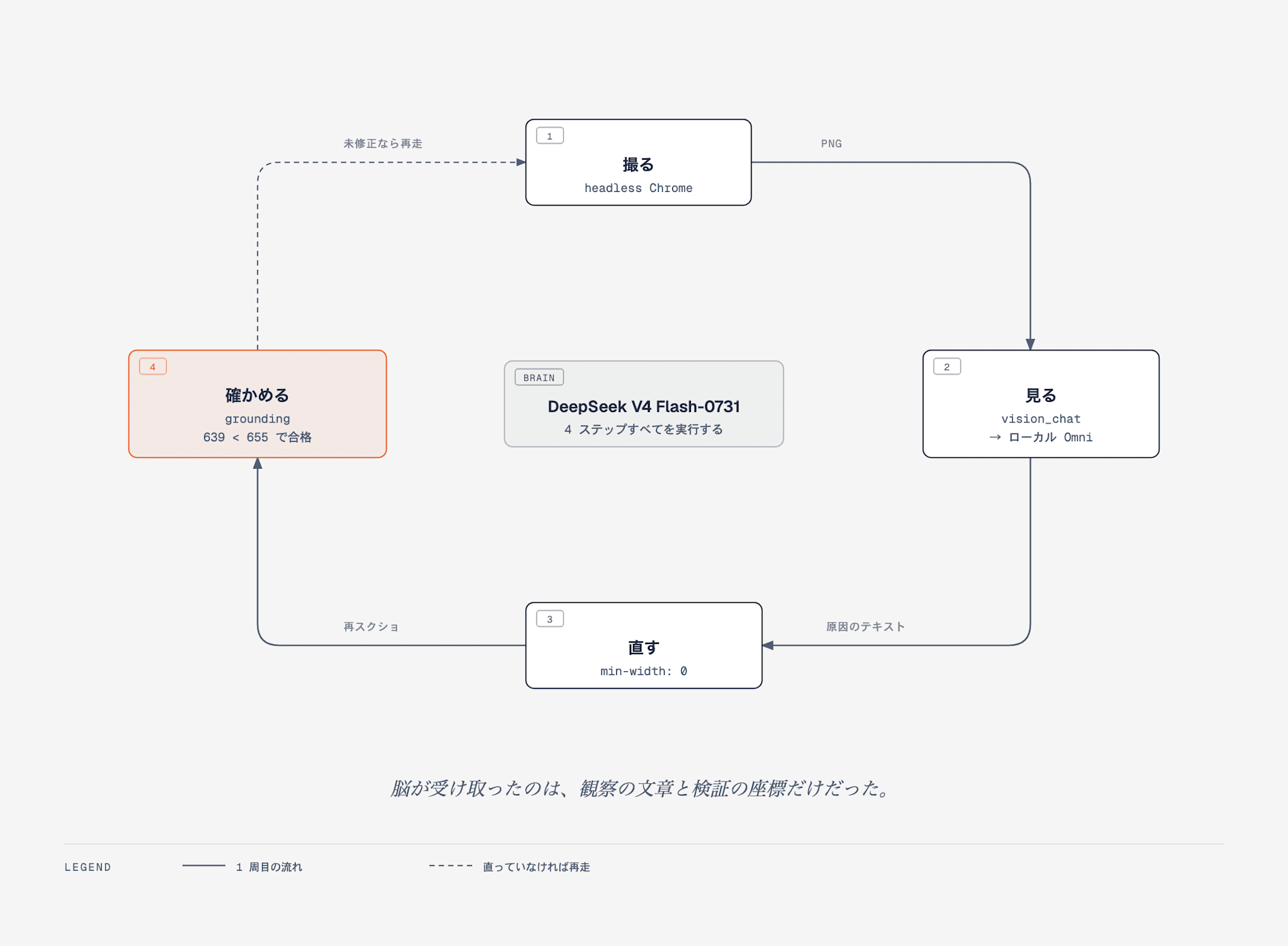
The same model executes all four steps. The first check uses vision_chat, and the final judgment uses coordinate comparison from grounding.
It started running. First it took a screenshot and sent a question to vision_chat.
⚙ vision_chat(images=[shot.png],
   text="Is the blue '登録する' button overflowing past the right border of the white card?
         Answer YES or NO, then briefly describe the location in one line.")
Using the returned answer, it drilled down to the cause.
I've identified the cause.
- What's broken: The blue "登録する" button is overflowing past the right edge of the white card
- Cause: .field has flex: 1; min-width: 280px; specified.
  The content width of the card is 360px - 24px×2 = 312px, but
  min-width 280px + gap 12px + button (nowrap, ~90px) requires ~382px,
  causing the flex row to exceed the card width and overflow to the right.
The numbers are correct too. The fix was one line of min-width: 0 — exactly the standard approach when flex items won't shrink.
What followed was interesting. After taking another screenshot and sending a confirmation query to vision_chat, it looked at the returned answer and said this:
VLM confirmation is unstable, so I'll verify strictly with coordinates.

⚙ grounding(image_path=shot.png, prompt="the blue button with text 登録する")
⚙ grounding(image_path=shot.png, prompt="the white card container")

Verified with coordinates (normalized coordinates 0-1000):
- Card right edge: x=655
- Button range: x=567–639
Button right edge 639 < 655, cleanly contained within the card. Fix complete.
Rather than asking in natural language "is it contained?", it switched to using object detection to get coordinates and verifying with an inequality. This wasn't something I instructed.
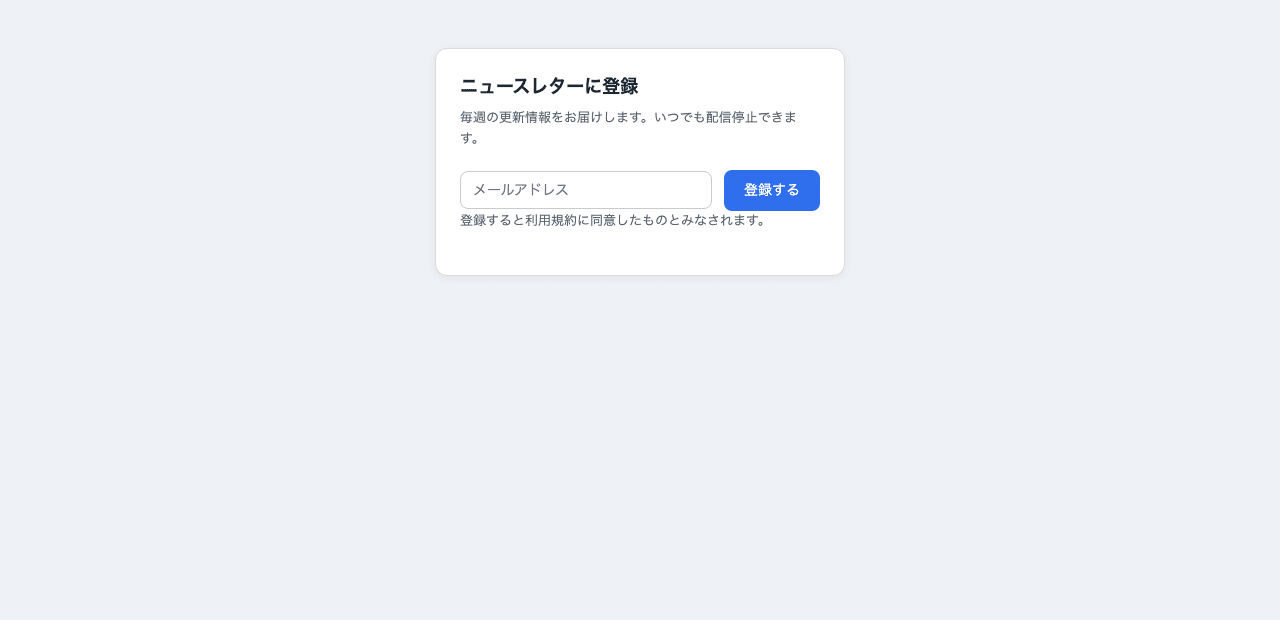
After changing to min-width: 0. The input field has shrunk, and the button is now within the card border.
It's actually fixed.
Throughout this loop, the main model never received an image. It only received the text returned by vision_chat and the coordinates returned by grounding. A model that returns a 400 when you directly throw an image at it has fixed a UI bug.
Incidentally, I also did an A/B comparison of whether to include the official plugin skill. Across 13 trials each, including the skill increased the rate of choosing grounding from 15% to 46%. Since the skill says "for detecting or locating objects, use grounding," the "please list" instruction seemed to pull it in that direction. I tried rewriting the skill myself too, but saw no notable improvement. If you want to stabilize tool selection, specifying the name in the prompt seems more reliable than the skill text.
Summary
This was about retrofitting eyes and ears onto a text-only model. As a result, images, audio, and video all pass through. However, the way it was attached differs from what the developers intended, and the native reading features that are the plugin's highlight remain unusable. Only the type that calls an external vision model and returns text actually works.
The key question — "can this hold up in real work with 0731 as the centerpiece?" — shows promise within the scope of what I measured this time. With thinking disabled, vision responses settle into the 1–2 second range, accuracy doesn't drop, and the router's additional cost is a few percent. The brain stays cheap and fast, and the loop of showing a screenshot to fix CSS closed in a single pass. The observations come back as short text, so the weakness of local 30B models — slowness in generating long text — never surfaces. That's what makes this configuration effective. That said, accuracy tied for perfect scores partly because the tasks were easy, so I plan to keep an eye on quality with materials involving detailed tables or nuanced judgment as I use it.
There were three adjustments needed, and two of them only required server startup options. One was setting --max-model-len generously, and the other was listing the names the plugin wants to call in --served-model-name. The remaining one was the way audio is wrapped in base64, which requires a one-line patch.
What changed in my impression after trying this is that the configuration is not "filling the gap of a vision-unsupported model." The centerpiece stays fixed as a cheap, fast model, while modalities are simply handed off to specialized models. Since what the eyes return is text and coordinates, there's no pressure on the centerpiece's context from images. Thinking that you no longer need a large multimodal model at the center, this seems to have quite broad applications.
Touching on Qwen-MM-Plugins itself — from reading through it, there are no new inventions inside. Both skill and MCP are existing mechanisms, and vision_chat is essentially just short code that calls an OpenAI-compatible API. The value lies more in how it's organized: consolidating over 30 tools into 7 functions and packaging them in a form that can be distributed to multiple harnesses. And that straightforwardness is exactly what worked here. If it had been locked down with a proprietary protocol, it wouldn't have been possible to point the destination to local or place it under a router.
Next, I'd also like to try pointing this configuration at long videos to see how far video-memory can go.
Reference Links
- QwenLM/Qwen-MM-Plugins — Apache-2.0. Distributed as a set of skill and MCP server
- Qwen-MM-Plugins installation guide — Configuration examples for harnesses requiring manual registration such as opencode / Gemini CLI
- nvidia/Nemotron-3-Nano-Omni-30B-A3B-Reasoning-FP8
- Nemotron 3 Nano Omni on OpenRouter (free) — Hosted. Images and video pass through, but audio is silently dropped (see body text)
- Nemotron 3 Nano Omni on NIM API — The same model provided via OpenAI-compatible API at
integrate.api.nvidia.com - Run Highly Efficient Multimodal Agentic AI with NVIDIA Nemotron 3 Nano Omni Using vLLM — Explanation from the vLLM side. DGX Spark is also listed as a supported target
- Fireworks Video & audio inputs guide — Models supporting audio and video require dedicated deployment
- Running NVIDIA Nemotron 3 Nano Omni on DGX Spark (Article from 2026-04-29)
- Running 284B DeepSeek V4 Flash-0731 on Two DGX Spark Nodes
- Trying Out NVIDIA's New LLM Routing Infrastructure NeMo Switchyard
- Team AI Environment for Everything from Development to Business Use with Open-Weight Models
