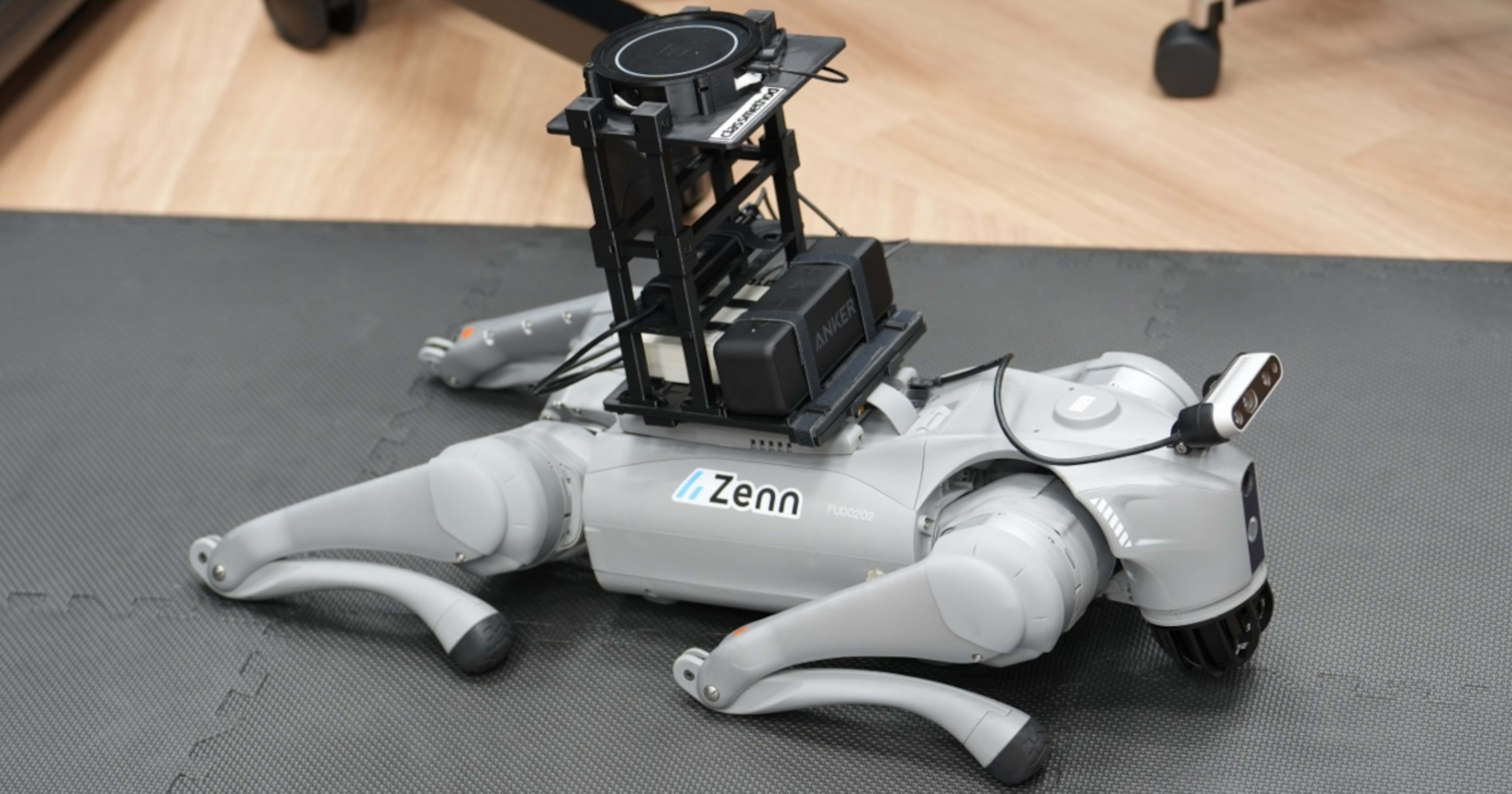
I will introduce the Physical AI content using Unitree Go2 exhibited at DevelopersIO 2026 Osaka #devio2026

This page has been translated by machine translation. View original
Introduction
This is Fujii (Da) from the Manufacturing Business Technology Department.
At DevelopersIO 2026 Osaka, held on September 28-29, 2026, we put on a demonstration using the Unitree Go2.
On Day 2, I gave a presentation titled "We tried Physical AI after the Unitree Go2 came to the Osaka Office," introducing the background of how the Unitree Go2 came to the Osaka office, the content of the demonstration, its architecture, and the development process. The slides are published in the following article.
This article explains the content of the demonstration.
Demonstration Overview
When visitors speak to the Go2, it understands what they say and responds with appropriate movements and conversational replies.
For example, if you say "greet me" or "hello," it understands it has been greeted, replies "I'll say hello," and performs the Hello movement.
It can also do things like explain what it sees when you ask "What is this?" by looking at the camera image and responding with "This is ~~."
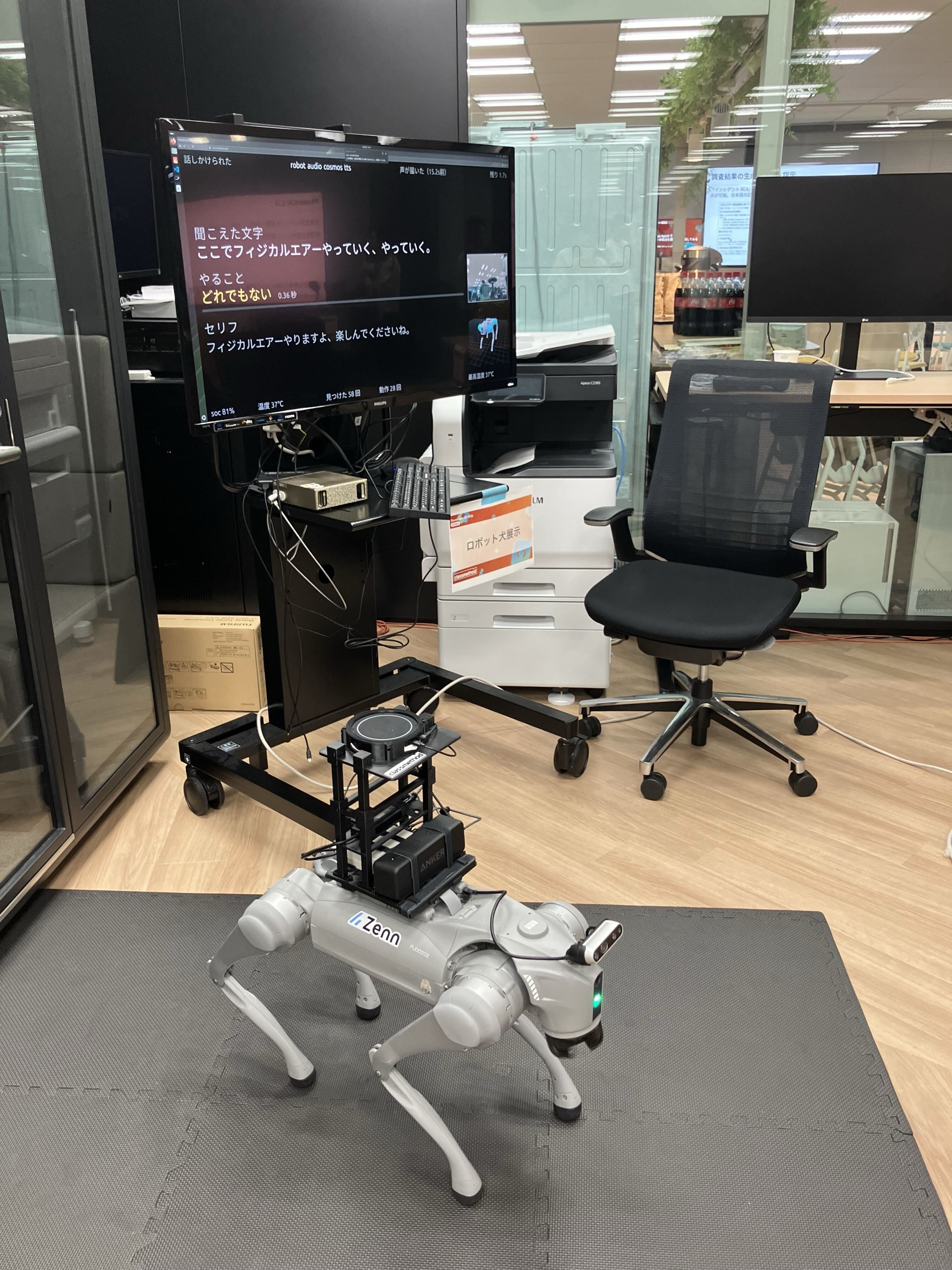
A screen was placed next to the Go2 to display the words it heard, the movement it chose, Go2's response, and what was visible on the camera.
Speech recognition, intent determination, image-based question answering, and speech synthesis were all handled by a single DGX Spark placed at the venue. No cloud AI services were used.
What We Wanted to Show with This Demonstration
Movements like Hello and Dance can be operated by a person using the Unitree smartphone app or the included remote controller.
However, simply showing a person operating it would just be an introduction to the Unitree Go2 itself.
So for this demonstration, we decided to show that it is Physical AI — where not a human, but Go2 itself understands the content from the voice spoken to it and what appears on the camera, and then decides how to move and what to say.
We also placed importance on making it a local LLM/edge AI that completes inference entirely within the local DGX Spark.
Demonstration Details
Interacting with Go2
When a visitor approaches Go2, it turns toward them and speaks to them, saying things like "Oh, hello" or "Could you look over here?"
If no one speaks to it for a while after it calls out, it says something like "Well, that's fine" or "Feel free to talk to me whenever you'd like," and returns to a waiting state.
Since Go2 is waiting with its microphone on, visitors can speak to it whenever they like (it sometimes picked up surrounding voices on its own and responded).
When spoken to with content that instructs a specific movement, such as "greet me" or "dance," Go2 understands the meaning and performs the movement.
The movements supported at the time of the demonstration are listed in the table below (the movements themselves are predefined).
| Movement | Description |
|---|---|
Hello |
Raises and waves a front leg in greeting. Also used for "shake hands" |
FingerHeart |
Makes a heart shape with its front legs |
Stretch |
Stretches |
Sit |
Sits down. Stands back up on its own afterward |
Dance1 |
Dances |
Dance2 |
Dances with a different choreography than Dance1.When simply told "dance," it performs either Dance1 or Dance2 |
Scrape |
Raises its upper body and paws at the air with its front legs |
Euler |
Tilts its body left and right, then forward and backward |
While moving, it speaks the chosen movement aloud, saying things like "I'll make a heart" or "I'll sit down."
For words that don't lead to a movement, it tilts its body once as if cocking its head, and generates a response on the spot suited to what was said.
When it cannot generate a response, it replies with a fixed phrase such as "Hmm, I didn't understand."
When speech is cut off midway or is too short, it asks again with "Could you please repeat that?"
When you hold an object up to the camera and ask something like "What is this?", Go2 understands what it sees on the camera and answers.
When it cannot answer from what it sees, it responds with something like "I couldn't see it clearly."
What Was Displayed on Screen
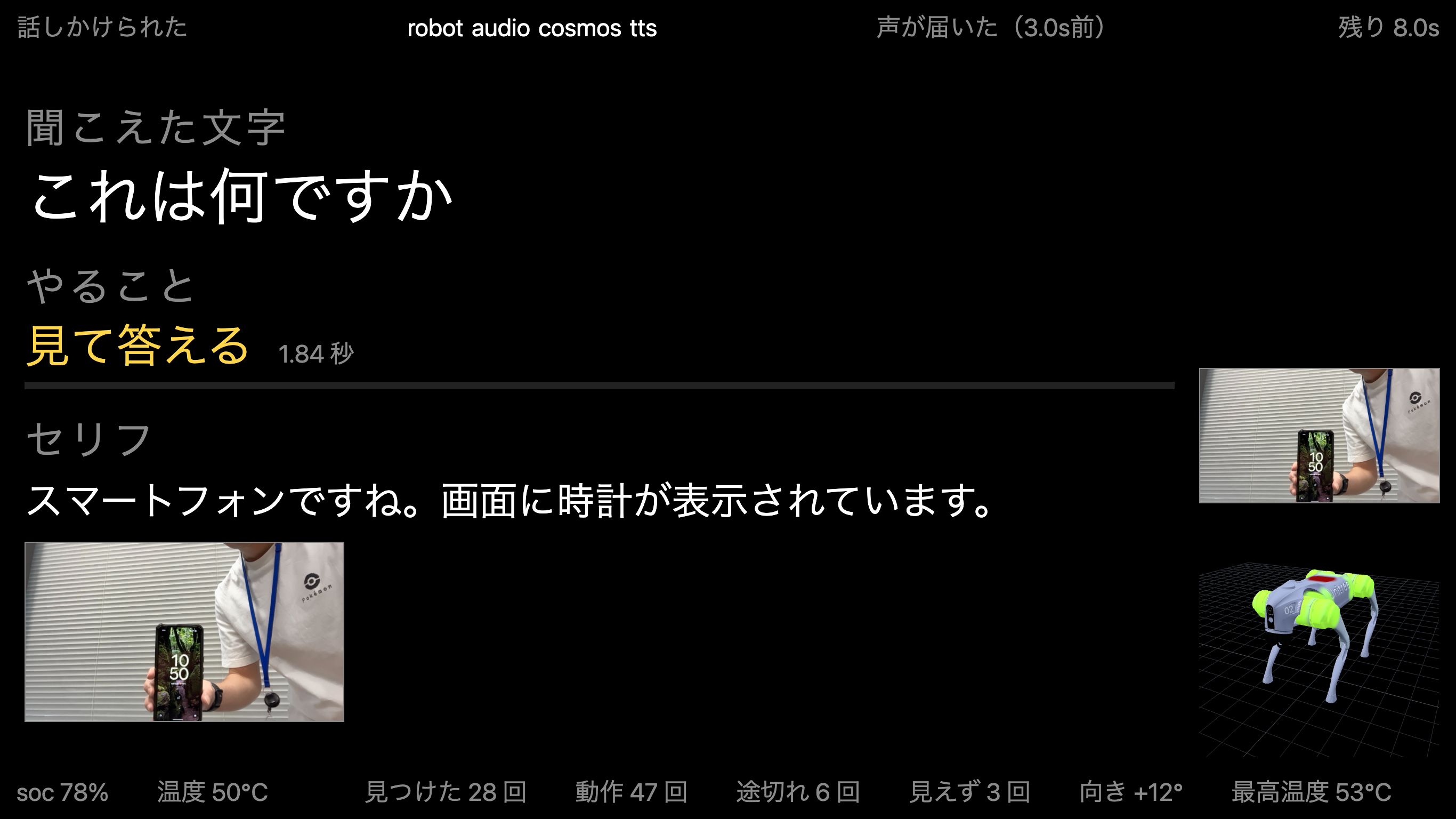
In the center of the screen, three items were arranged from top to bottom: "Words Heard," "Action," and "Line."
- "Words Heard": The words picked up by the microphone
- "Action": The movement Go2 chose. When the words don't lead to a movement, it displays "None of the above," and when shown an object and asked a question, it displays "Look and answer"
- "Line": The words Go2 spoke. When shown an object and asked a question, it also displays the camera image used to form the answer
When you speak, "Words Heard" appears first, followed shortly after by "Action."
Because the display changes in this order, you can see that Go2 is making a judgment after listening.
On the right side of the screen, the live camera feed from Go2 and a 3D model of Go2 were displayed.
The 3D model has the temperature of each part overlaid in color, with blue for low temperatures and red for high temperatures.
This was repurposed from something previously covered on the blog.
At the top and bottom of the screen, Go2's status, remaining battery level, and the number of movements performed that day were displayed.
Equipment and Fixtures Mounted on Go2
To realize the demonstration content described above, additional equipment was mounted on Go2's back.
Although Go2 has a built-in microphone and speaker, we made them external in order to capture sound direction and with the intention of preventing the microphone from picking up Go2's own voice during speech.
However, as development progressed, things didn't go as originally planned — we ended up detecting people's positions using only the camera without capturing sound direction, and we switched to half-duplex communication because the microphone was picking up the voice during speech.
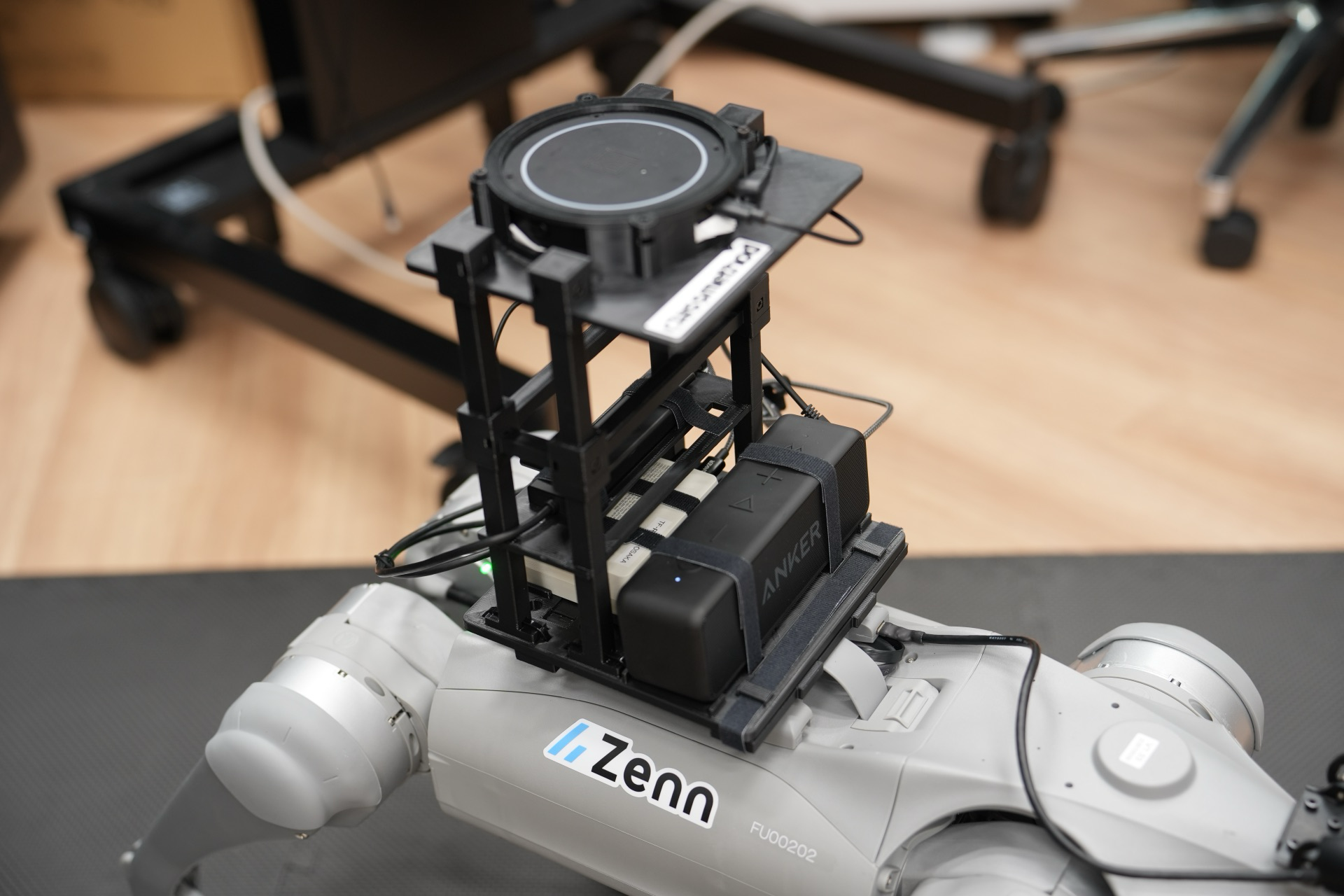
| Equipment | Role |
|---|---|
| RealSense D435i | Captures the position and distance of people. Also captures images when shown an object and asked a question. Mounted on the head |
| ReSpeaker XVF3800 | Microphone array. Picks up visitors' voices. Can also capture sound direction |
| Speaker | Outputs Go2's voice |
| Portable battery | Powers the equipment and USB hub |
| USB hub | Connects the equipment to the expansion dock |
| Wireless adapter | Connects the expansion dock to Wi-Fi |
The equipment on the back is secured to the expansion dock's rail using fixtures made with a 3D printer.
Initially, the microphone array was placed directly above the expansion dock, but it was picking up the noise from the dock's fan and couldn't capture voices properly, so the fixtures were used to raise the microphone array to a higher position.
Conclusion
Thank you to everyone who visited.
Although we announced a demonstration, the power had to be turned off during the presentation due to venue constraints, so in practice there was really only an opportunity to interact with it during the Day 1 social gathering.
We hope this article conveys what the demonstration was like to those who were unable to interact with it.
The architecture built for the demonstration is included in the presentation slides, so please take a look at the following article as well.