I Tried Automatically Triggering a DevOps Agent Investigation from a Grafana Alert and Sending the Results to Slack

This page has been translated by machine translation. View original
Hello, I'm sora from the Game Solutions Department.
In this post, I'll write about how I automatically triggered an AWS DevOps Agent investigation from an alert in Grafana self-hosted on ECS Fargate, and sent the results to Slack.
Conclusion First
- With the notification template from the official documentation left as is, an investigation started automatically from a Grafana alert, and the result was posted to a Slack thread
- Only the alert name and
summarywere passed to the investigation, but the Agent read Loki logs via Grafana and identified the endpoint that caused the problem - For an alert whose
summaryincluded AMP metric names, the Agent also read the AMP metrics - When the same alert fired again after it had once subsided, it did not become a new investigation; the previous investigation was resumed and summarized as a "known recurrence"
Architecture
The architecture I built this time is as follows.
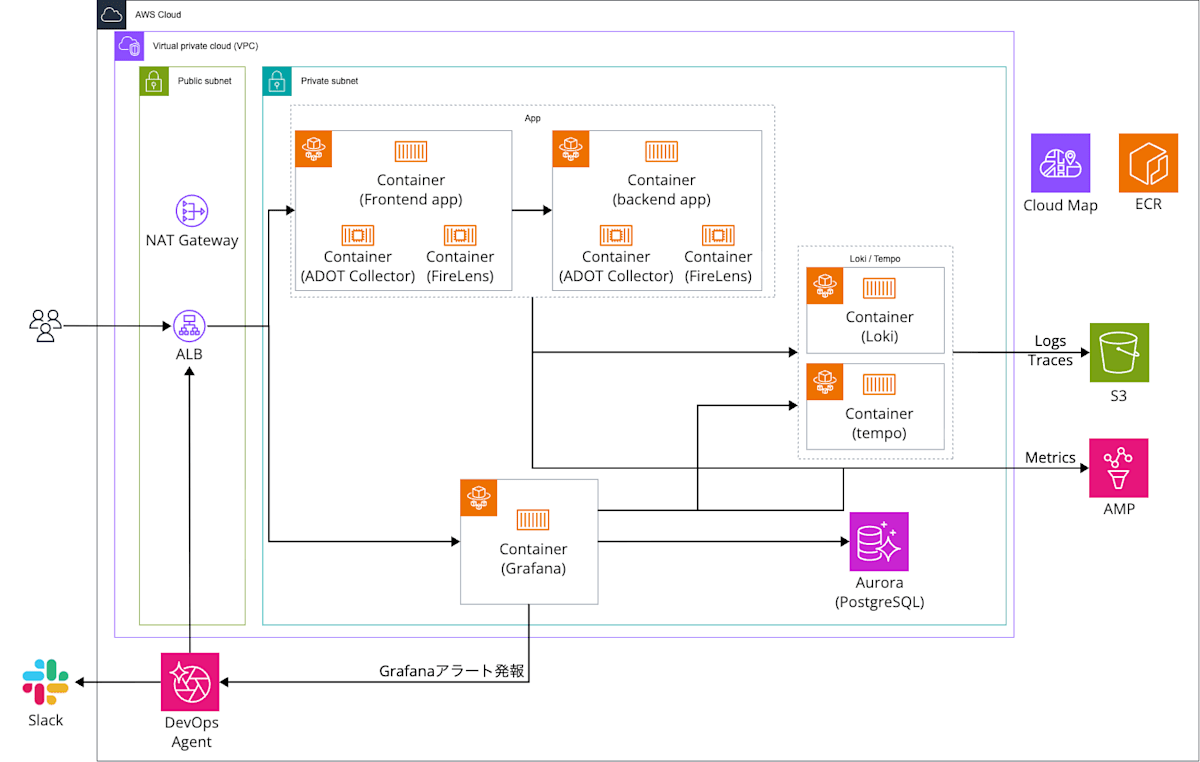
I'm using the environment built in the following article as is (Grafana / Loki / Tempo on ECS Fargate, and a sample Go app).
To this environment, I added a path that sends Grafana alerts to the DevOps Agent Webhook, and a path that posts investigation results to Slack.
In addition, communication from Grafana and the ADOT Collector to AMP goes through an AMP interface VPC endpoint.
Grafana is the self-hosted OSS version.
The official documentation states that Amazon Managed Grafana does not support Webhook as an alert Contact point, so it cannot send Webhooks directly to DevOps Agent.
In the documentation for Amazon Managed Grafana's Grafana 13, the supported Contact points are also Amazon SNS / PagerDuty / Slack / VictorOps, with no Webhook.
Main components
| Role | Component |
|---|---|
| Incident investigation | AWS DevOps Agent (Tokyo Region, 1 Agent Space) |
| Visualization / alerts | Grafana OSS (ECS Fargate, grafana/grafana:13.3.0) |
| Grafana configuration DB | Aurora Serverless v2 (PostgreSQL 18.6) |
| Entry point | ALB + ACM + Route 53 |
| Sample app | Go-based frontend / backend (ECS Fargate) |
| Telemetry collection | ADOT Collector v0.50.0 / Fluent Bit 3.4.15 (sidecars) |
| Logs | Loki 3.7.7 |
| Traces | Tempo 3.0.3 |
| Metrics | AMP (via interface VPC endpoint) |
| Notifications | Slack (DevOps Agent's Slack integration) |
There is one Agent Space, and I'll try two alerts with different summary styles in turn.
Setup
I built this with Terraform again.
The base environment is the same as in the article introduced in the architecture section, so I'll only explain the part that triggers an investigation from an alert.
The contents of Grafana (notification template, Contact point, notification policy, alert rules) are configured with the grafana provider.
Webhook for Grafana
When you associate Grafana with the Agent Space as in the article introduced in the architecture section, a Webhook for Grafana appears under "Capability webhooks" in the Capabilities tab.
The authentication type is "API key".
In Terraform, I haven't defined a resource for the Webhook.
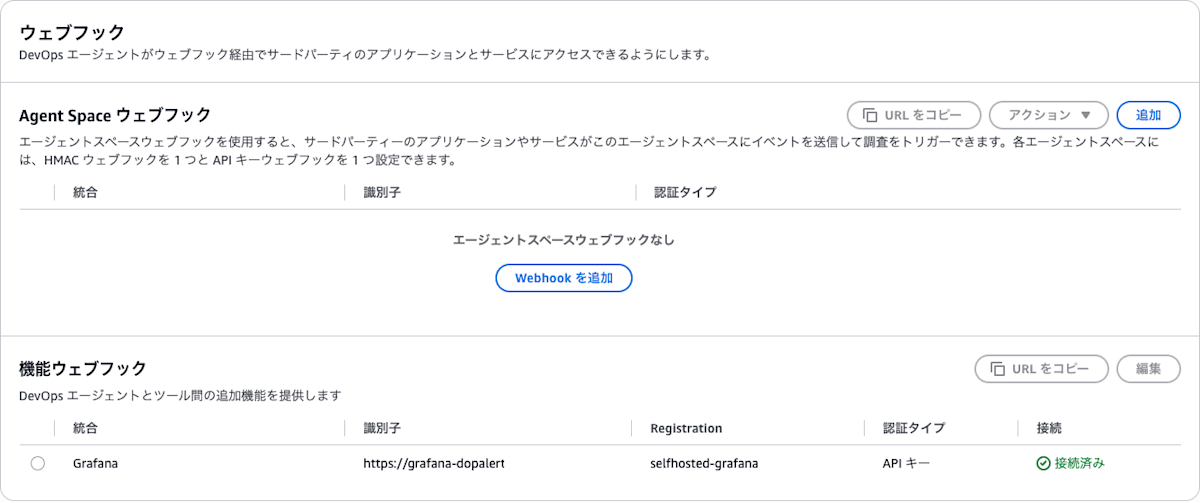
The API key is shown only once when the Webhook is created, and I hadn't received the API key of the Webhook created by the association.
So I rotated the Webhook to obtain a new API key.
Select the capability webhook row and go to the rotation screen from "Edit".
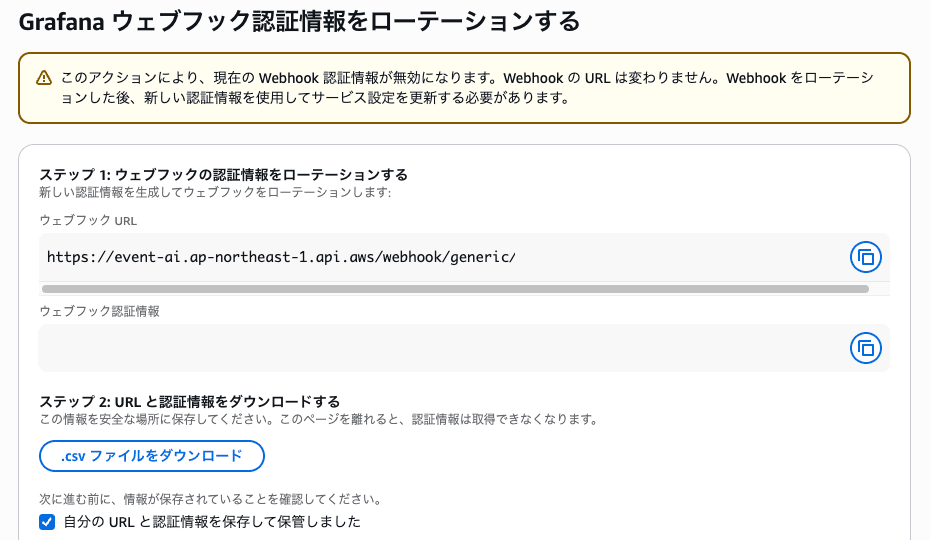
With "Download .csv file", you can save the URL and API key as a CSV.
The Webhook URL has the same form as a generic Webhook: https://event-ai.ap-northeast-1.api.aws/webhook/generic/<ID>.
Slack Integration
For Slack, I registered the workspace and associated a channel from "Communications" in the Agent Space's Capabilities tab.
Registering Slack requires an OAuth screen operation, so I did it in the console.
This time it's a one-way notification where DevOps Agent only posts to Slack, and I'm not using two-way chat.
To let it post to a private channel, I invited the app by running /invite @AWS DevOps Agent - AP (Tokyo) in the channel.
Notification Template
From here on is the Grafana-side configuration.
I configure Steps 1–3 of the official documentation (notification template, Contact point, notification policy) in order.
For the notification template, I used the one in the official documentation (devops-agent-payload) as is.
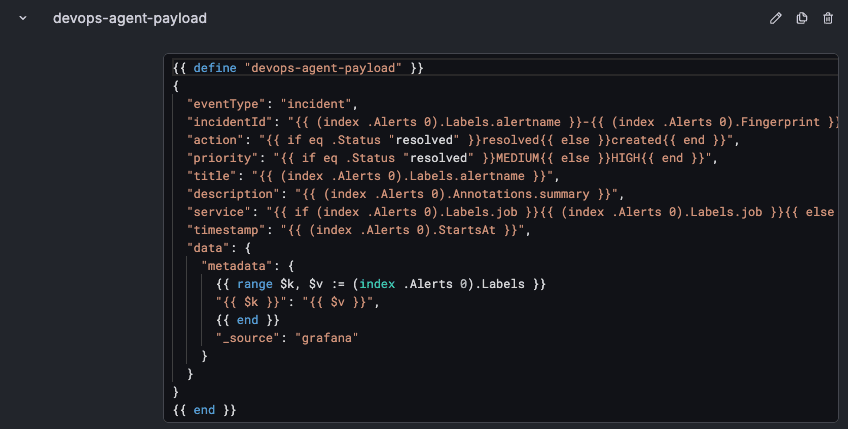
The alert rule name (alertname) goes into title, and the annotation summary goes into description.
Contact point
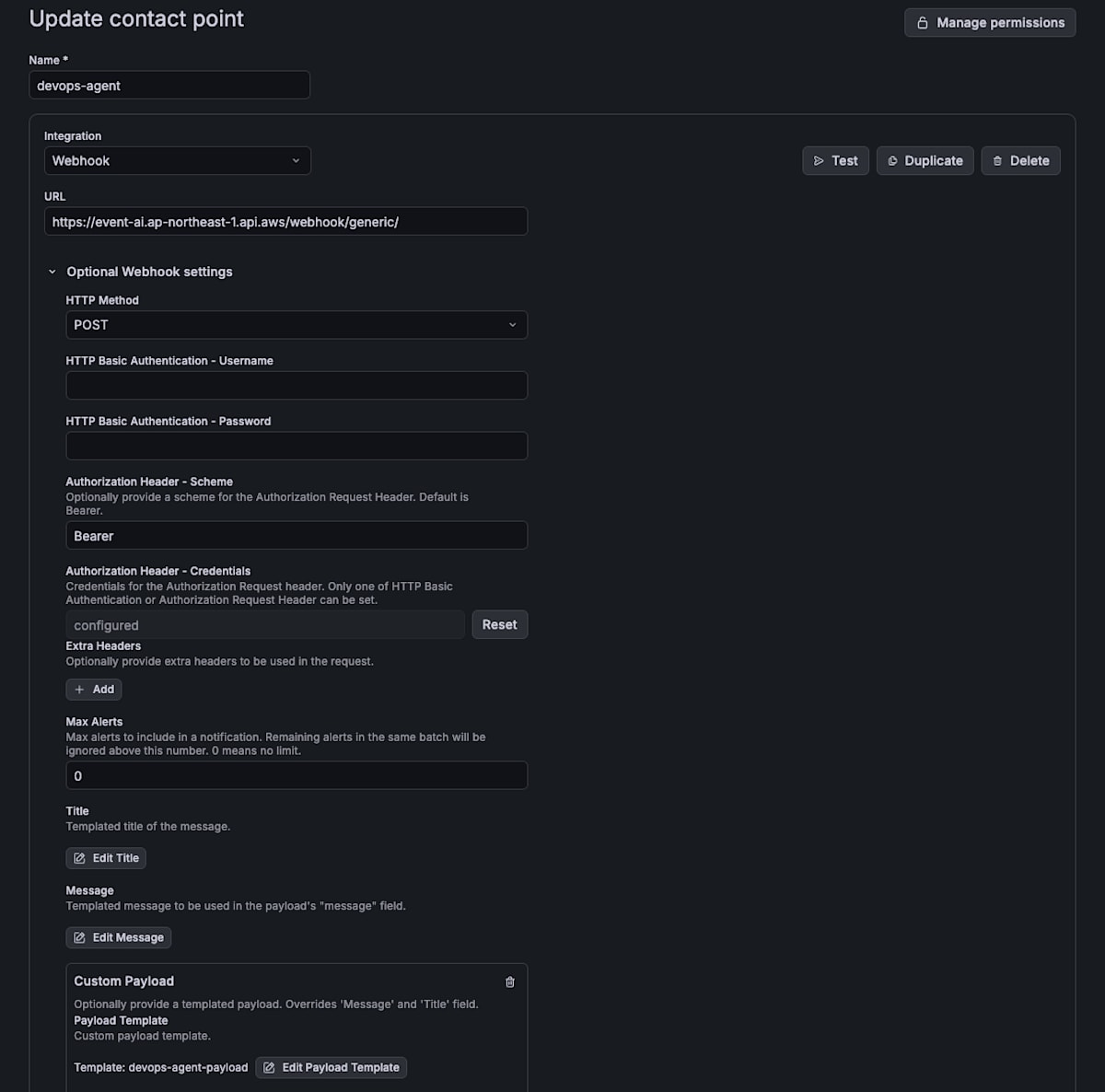
I create the Contact point as a Webhook, setting the URL to the Grafana Webhook URL, the Authorization Header Scheme to Bearer, and Credentials to the API key.
For Custom Payload, I specify {{ template "devops-agent-payload" . }}, which calls the notification template.
resource "grafana_message_template" "official" {
  name     = "devops-agent-payload"
  template = file("${path.module}/templates/devops-agent-payload.tmpl")
}

resource "grafana_contact_point" "devops_agent" {
  name = "devops-agent"

  webhook {
    url                       = var.devops_agent_webhook_url
    http_method               = "POST"
    authorization_scheme      = "Bearer"
    authorization_credentials = var.devops_agent_api_key # API key obtained by rotation

    payload {
      template = "{{ template \"devops-agent-payload\" . }}"
    }
  }
}
In the Grafana UI, it looks like this.
Notification Policy
For the notification policy, I didn't set the root's destination to the DevOps Agent Contact point; instead, I created a child policy that sends only alerts with the label devops_agent = true to DevOps Agent.
This is so that investigations don't start for alerts without the label.
As in the official documentation, group_by is set to alertname.
resource "grafana_notification_policy" "this" {
  contact_point = grafana_contact_point.fallback.name
  group_by      = ["alertname"]

  policy {
    contact_point = grafana_contact_point.devops_agent.name
    group_by      = ["alertname"]

    matcher {
      label = "devops_agent"
      match = "="
      value = "true"
    }
  }
}
Alert Rule
The alert rule looks at the number of 5xx responses per second for each job using AMP metrics, and fires when it exceeds 0.5 per second.
| Item | Value |
|---|---|
| Data source | AMP |
| Query | sum by (job) (rate(http_server_request_duration_seconds_count{http_response_status_code=~"5.."}[1m])) |
| Condition | Reduce (Last) → Threshold (greater than 0.5) |
| Evaluation interval / Pending period | 1 minute / 1 minute |
| Labels | devops_agent = true (for notification policy routing), rule_variant (a different value for each summary style) |
Since there is one series per job, if 5xx errors occur in both frontend and backend, two alerts fire.
Alert rules have an item for setting summary (alert overview) as an annotation.
The official template sends this summary as description, so the alert description that reaches the Agent is only what's written here.
This time, I change only how this alert rule's summary is written and try twice.
In both styles, I haven't included " or line breaks, since the official template doesn't escape them.
Verification
Test Send from the Contact point
Before causing a failure, I checked whether an investigation starts with the Contact point's test send.
The test alert's alertname is TestAlert-integration, and its summary is "Grafana test notification (Contact point Test)".
Even with the test send, a DevOps Agent investigation started.
However, the Agent judged it to be a test notification and ended the investigation in about 1 minute without examining anything.
Looking at the investigation record (aws devops-agent list-journal-records), the input to the Agent was just the following single line.
TITLE: TestAlert-integration, REFERENCE_URL: , DESCRIPTION: Grafanaのテスト通知(Contact pointのTest)
service, timestamp, and data.metadata (labels) that the template sends are not included in the input.
The official documentation also says that only title, description, priority, and the incident reference reach the investigation, and that anything needed for the investigation should be written in summary.
As one of the reasons for not investigating, the Agent cited "no incident time window" and wrote "there is no onset time or alert firing time as a starting point for the investigation".
The template's timestamp is set to the alert firing time and sent, but it doesn't reach the Agent.
The official template's timestamp becomes Go's default string representation like 2026-10-29 02:39:57.xxx +0000 UTC, and Grafana doesn't send the x-amzn-event-timestamp header either.
Even so, the Webhook is accepted.
I also sent the same test to a generic Webhook (API key) created from the "Agent Space webhooks" table.
It was accepted with the official template as is, and in the Web app's incident response list, the "Triggered by" column showed "Event Channel".
The one sent to the Grafana Webhook shows "Grafana".
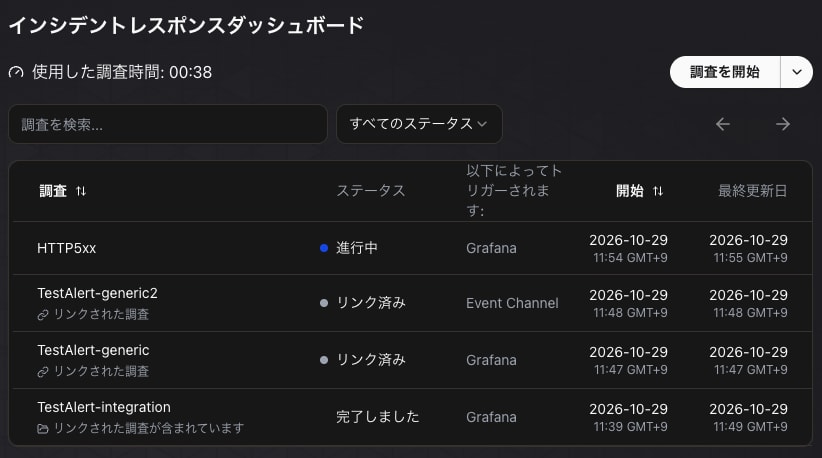
TestAlert-generic was sent before I switched the Contact point's destination to the generic Webhook, so it reached the Grafana Webhook.
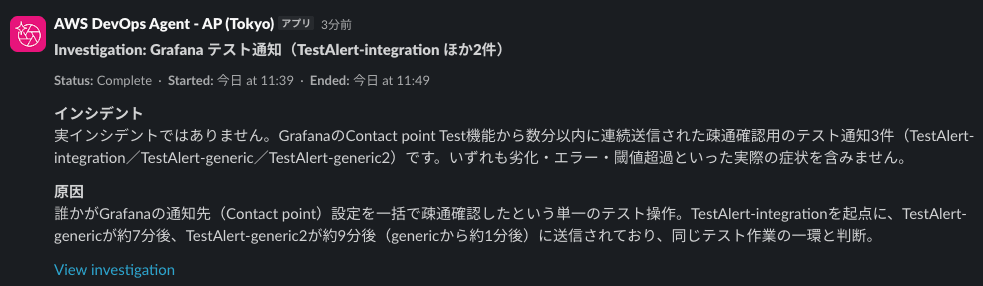
The second and subsequent test sends did not become new investigations and were marked "Linked".
They were linked to the first test investigation, which had completed.
In Slack, a single post summarizing the three linked items arrived.
How I Caused the Failure
The frontend's /error relays to the backend's /fail, and the backend returns 500 with intentional failure.
With normal traffic flowing (access to the frontend's / at 1-second intervals), I accessed /error at 0.5-second intervals for 10 minutes.
END=$(( $(date +%s) + 600 ))
( while [ $(date +%s) -lt $END ]; do curl -s -o /dev/null $APP/error; sleep 0.5; done ) &
About 2 minutes after starting access, alerts for both the frontend and backend fired.
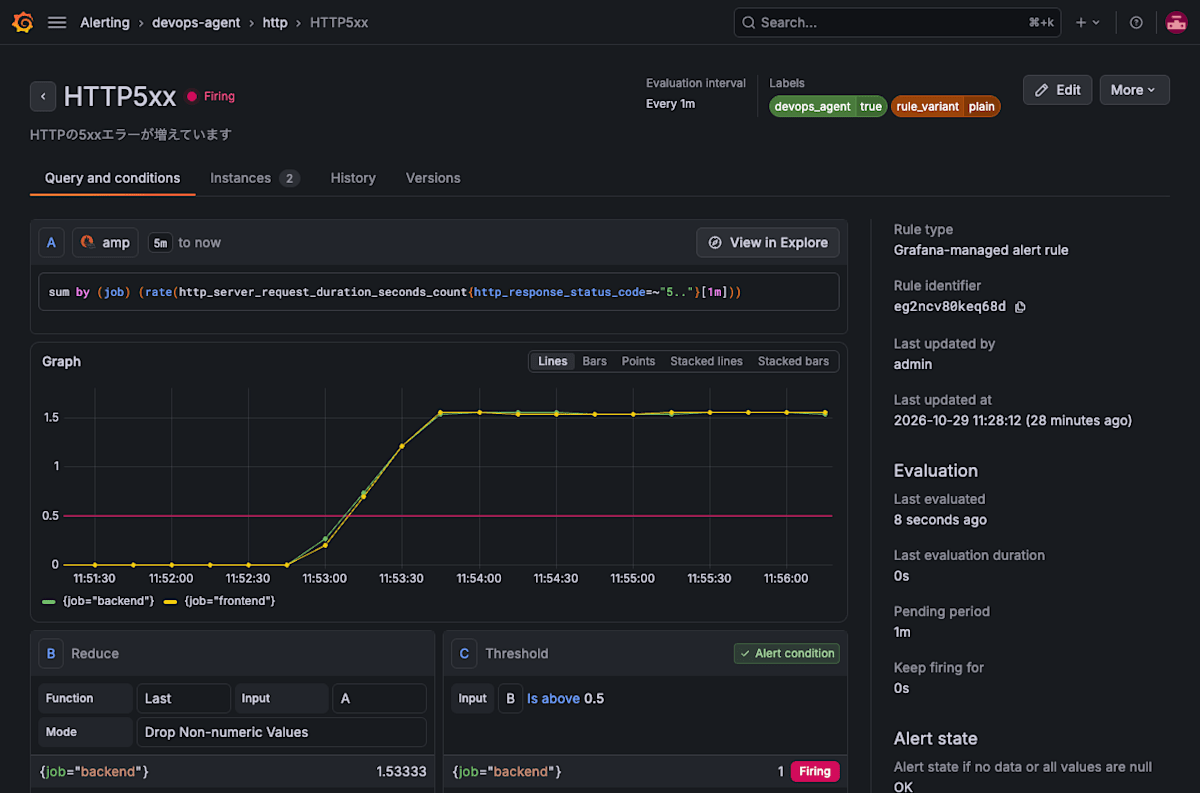
I try an alert with a one-line summary and an alert whose summary includes the service name and data locations, in turn in the same Agent Space.
The two alerts differ only in summary and labels, and because the labels differ, the incidentId also differs.
I gave no feedback on the first investigation.
Before the second one, I checked the Web app's knowledge "Memory" and confirmed there was no memory of this failure before running it.
Investigation of the Alert with a One-Line summary
For the first run, I set the alert rule's summary to just one line: "HTTP 5xx errors are increasing".
In the alert rule screen above, the summary is what's displayed under the rule name.
Which service (job) is producing 5xx errors is contained only in the labels, and labels are not passed to the investigation.
When the alert fired, DevOps Agent received the notification and an investigation started.
The input to the Agent was just one line, same as in the test.
TITLE: HTTP5xx, REFERENCE_URL: , DESCRIPTION: HTTPの5xxエラーが増えています
The investigation finished in about 18 minutes.
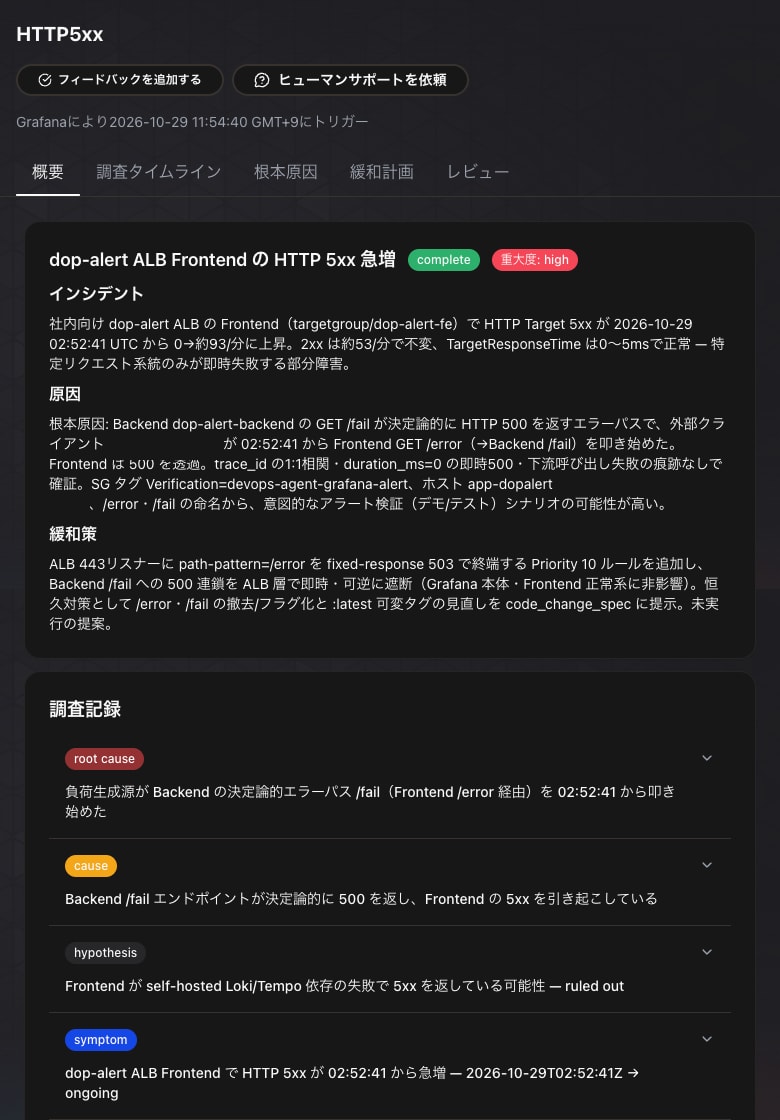
The root cause was that access to the frontend's /error from outside began at 02:52:41 (UTC), and the backend's /fail called from it always returns 500.
The time I started accessing /error also matches to the second.
Looking at the investigation record, the Agent first identified from CloudWatch ALB metrics that 5xx errors were occurring frequently on the frontend target.
Along the way, it mistakenly specified the Loki label as {app="app"} and concluded that "there are no app logs in Loki", but it later noticed that logs were being received under service_name="app".
Then it cross-referenced the frontend and backend logs by the same trace_id and confirmed the /error → /fail chain.
As for the source, it identified it as my own IP from the source IP condition of the ALB listener rule.
It also noted that, from the SG tag Verification, this was likely a verification environment.
Posting to Slack
The investigation result was posted to the Slack channel from the "AWS DevOps Agent - AP (Tokyo)" app.
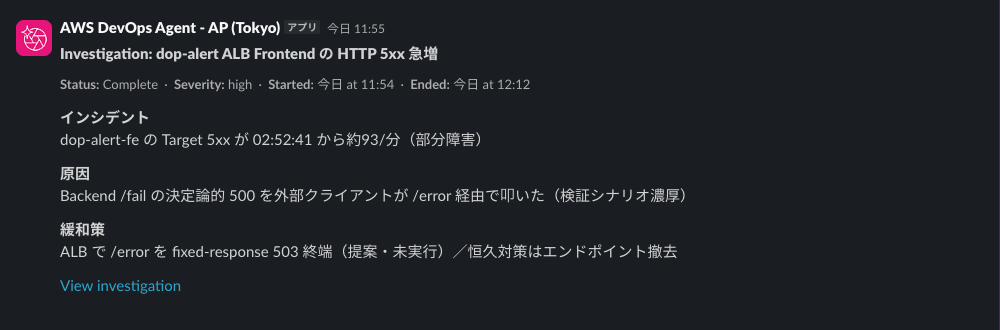
The parent post carries a summary of the incident, cause, and mitigation, along with a link to the investigation in the Web app.
In the thread, the investigation's progress was replied in the order "Symptom → Investigating → Cause → Root cause → Mitigation → Completed".
The mitigation reply includes an AWS CLI command that adds a rule to the ALB listener returning 503 for /error, and a command to revert it.
Investigation of the Alert with Service Names and Data Locations in summary
For the second run, I rewrote the same alert rule's summary to include the service name, URL, 5xx count, metric name, and the locations of logs and traces.
I limited it to facts normally written in an alert (what, where, how much, and where the data is), and didn't include hints about the cause (such as /error being suspicious).

{{ $labels.job }} and {{ $values.B.Value }} are replaced with the job name and the 5xx count at notification time.
The input to the Agent was the following.
The frontend and backend alerts were grouped into one notification, and the official template sends the summary of the first one (backend).
TITLE: HTTP5xx, REFERENCE_URL: , DESCRIPTION: サンプルアプリ(ECS Fargate、https://app-dopalert.<ドメイン>)のbackendで、HTTPの5xxが1.6件/秒出ています(しきい値0.5件/秒)。frontendはbackendを呼び出します。メトリクスはAMPのhttp_server_request_duration_seconds_count(ラベルはjob・http_route・http_response_status_code)、ログはGrafanaのデータソースloki(ラベルjob=app)、トレースはGrafanaのデータソースtempoにあります。
The investigation finished in about 15 minutes.
The cause was that the backend's /fail always returns 500 and that this becomes a 5xx via the frontend's /error, and as in the first run, it identified down to /error → /fail.
It also detected the 5xx errors from the first failure (about 1 hour earlier) from the data, and described the root cause as "repetitive traffic bursts".
On the other hand, it could not identify the source, and listed the fact that ALB access logs are disabled as a gap.
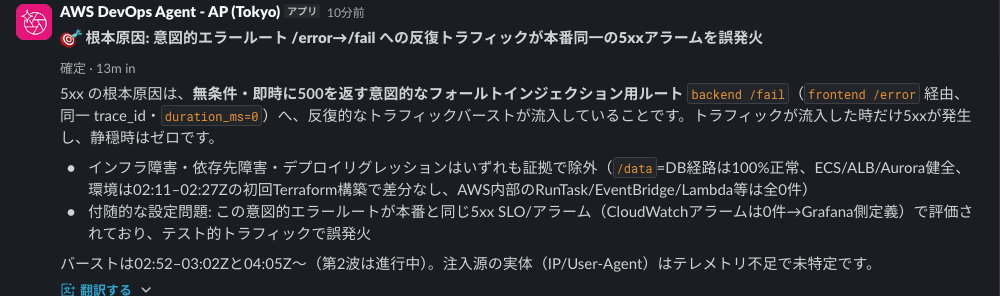
Looking at Grafana's logs (router_logging), in the second run the Agent also referenced AMP metrics via Grafana.
In the first run, it referenced only Loki logs and made no queries to AMP.
In neither investigation did the Agent reference Grafana's alert rules to supplement the summary or labels.
Alert Resolution and Re-firing
After I stopped accessing /error and both alerts returned to Normal, a notification with the same incidentId reached DevOps Agent again (Agent Space log).
At this time, no new investigation was created, and the ongoing investigation continued as is.
After the second investigation finished, I generated access to /error again and re-fired the same alert.
Since the labels are the same, the incidentId is also the same as before.
The re-fire notification created a new task, but it immediately became "Linked".
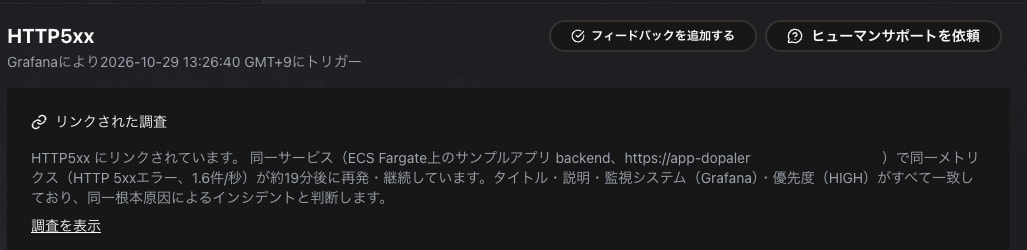
The reason for linking states: "The title, description, monitoring system (Grafana), and priority (HIGH) all match, so it is judged to be an incident caused by the same root cause."
The previous investigation at the link destination was "resumed" and, in about 2 minutes, re-summarized as a "known recurrence".
Instead of re-investigating with tools, it finished by comparing against the previous conclusion.
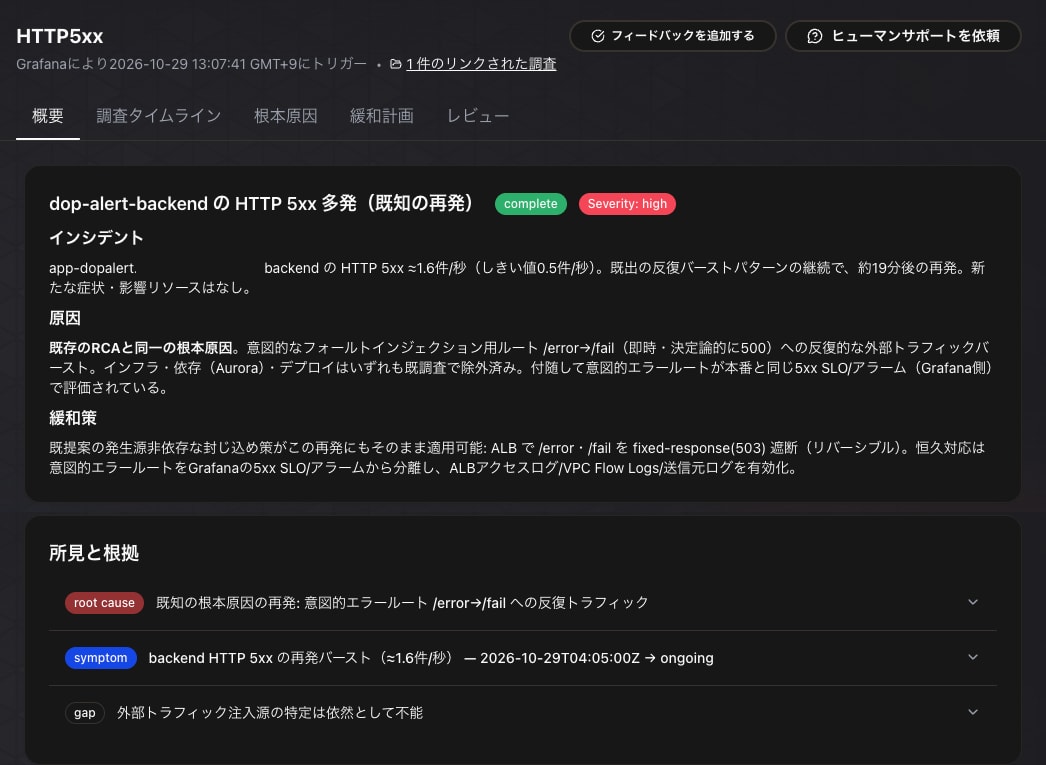
In Slack too, "Resumed" and "Completed: recurrence of a known root cause, no new cause" were appended to the previous investigation's thread, and the parent post's title was rewritten to include "(Known recurrence)".
Per-job Notifications
When group_by is set to alertname as recommended in the official documentation, the frontend and backend alerts are grouped into one notification.
The official template sends the first item in the group, so in both of the investigations above, the summary of the backend alert was sent.
While the re-fired alert was firing, I changed group_by to [alertname, job].
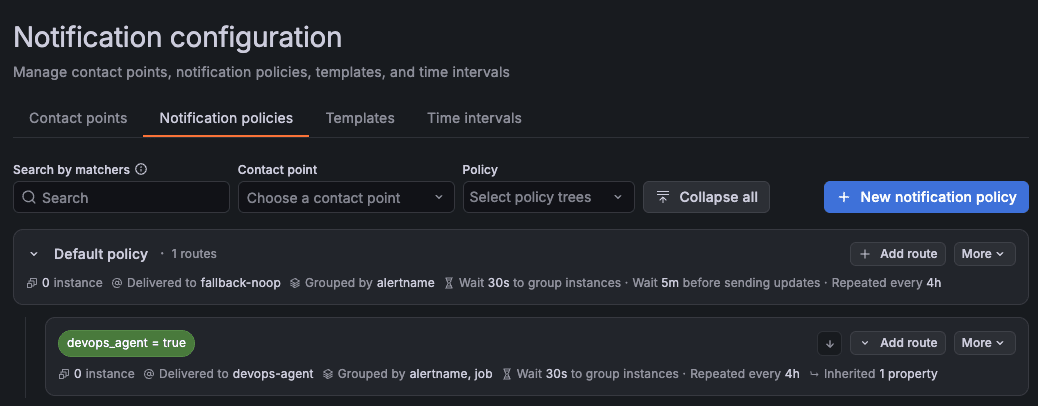
Immediately after the change, the frontend and backend alerts were sent as separate notifications, and the incidentId also split by job.
The frontend notification was not linked to the investigation that was examining the same time period, and became a new investigation.
The backend notification had the same incidentId as the immediately preceding re-fire, so no new task was created.
The frontend investigation took about 17 minutes, and as in the first and second runs, the cause was that the backend's /fail always returns 500, which propagates to the frontend's /error.
Sending to an HMAC Generic Webhook
The official documentation recommends HMAC for situations that require strong security guarantees, such as generic Webhooks.
Grafana's Contact point also has an HMAC signature setting, so I checked whether it can send to an HMAC generic Webhook.
However, the DevOps Agent documentation sample and Grafana's HMAC signature differ in signature encoding and timestamp format.
The signed content (<timestamp>:<payload>) and the algorithm (HMAC-SHA256) are the same.
| DevOps Agent (documentation sample) | Grafana | |
|---|---|---|
| Signature encoding | base64 | hex |
| Timestamp | ISO 8601 (+%Y-%m-%dT%H:%M:%S.000Z) |
Unix timestamp |
Despite these differences, I check whether DevOps Agent accepts Grafana's format as is.
In the "Agent Space webhooks" table, I created a generic Webhook with the authentication type set to HMAC.
Each Agent Space can have one HMAC Webhook and one API key Webhook.
In Grafana's Contact point, I set x-amzn-event-signature for the HMAC Signature Header and x-amzn-event-timestamp for the Timestamp header.
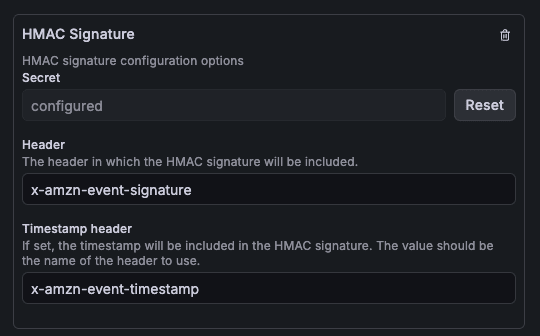
The Custom Payload remains the official template (devops-agent-payload), same as the Contact point that sends with Bearer.
With the official template as is, I was able to send to the HMAC generic Webhook using Grafana's HMAC signature.
The Contact point's test send was accepted by DevOps Agent, and an investigation started.
"Triggered by" was "Event Channel".
Although the signature encoding and timestamp format differ from the documentation sample, it was accepted in Grafana's format as is.
The documentation doesn't state which formats are accepted.
Finally
In this post, I automatically triggered an AWS DevOps Agent investigation from an alert in Grafana self-hosted on ECS Fargate using the official notification template, and sent the results to Slack.
I hope this article is helpful to someone.
