
I tried running NVIDIA VSS 3.2.0 GA on DGX Spark

This page has been translated by machine translation. View original
Introduction
Hello, I'm Morishige from Classmethod's Manufacturing Business Technology Division.
NVIDIA's VSS (Video Search and Summarization) was released as GA version 3.2.0 on June 16. This is the first General Availability release in the 3.X series.
VSS is, broadly speaking, a complete reference implementation for summarizing, searching, and evaluating alerts from video using VLM (Vision Language Model). It consists of multiple microservices and agent workflows launched via Docker Compose or Helm. Until now it was EA (Early Access), but with this GA release, I set up the full 3.2.0 configuration on my local DGX Spark and verified everything from the startup experience to the current state of new features on actual hardware.
DGX Spark is a compact AI workstation with a single GB10 (ARM64), featuring a unique architecture where the CPU and GPU share 128 GiB of Unified Memory. There are some behavioral differences compared to x86 + H100 / RTX PRO 6000 configurations, so I'll add notes where relevant.
I've also written articles about previous versions of VSS, so if you're considering migration, please check those out as well.
Overview of 3.2.0 GA
First, let me summarize what changed in the 3.2.0 GA release. I've compiled the NEW / CHANGED / FIXED / BREAKING sections from the release notes into a table.
| Category | Main Topics |
|---|---|
| NEW | GitHub source release for all microservices and agent workflows (Apache-2.0 + MIT), Agent Skills (EA), NemoClaw + VSS (EA), RT-CV-3D (Sparse4D v2.2) + Auto Calibration, audio-capable video understanding (Nemotron 3 Nano Omni) |
| CHANGED | /v1/generate_captions_alerts → /v1/generate_captions rename, Envoy/SDR routing removed from base profile, deploy structure changed to include model with developer-profiles/ + services/ |
| FIXED | HTTP 409 returned for duplicate stream/camera ID (old behavior: silent overwrite), Riva ASR NIM removed from compose bundle |
| BREAKING | Items from the above CHANGED + FIXED that will break existing client code or compose files if used as-is |
I felt the two biggest changes were "full source release" and "revamped deploy structure." This article proceeds with hands-on verification centered around these two changes.
Note that RT-CV-3D / Auto Calibration requires a multi-camera environment, so I won't go deep on that here. Audio-capable video understanding (Nemotron 3 Nano Omni) also involves a major change with Riva ASR NIM being replaced, so I plan to verify that on actual hardware in a separate article.
Revamped Deploy Structure
The 3.2 deploy structure is a modular configuration that links deploy/docker/{developer-profiles, industry-profiles, services}/ via includes. A startup script called dev-profile.sh auto-detects the GPU, determines HARDWARE_PROFILE, and assembles the profile-specific compose.
The dotted lines show the services actually picked up by the base profile (agent / Cosmos-Reason2-8B / Nemotron-Nano-9B-v2 FP8 / ui, vios, infra). By following the dotted lines for alerts or lvs, you can read what each other profile pulls in from the same diagram.
The GPU detection logic is around line 91 of dev-profile.sh:
case "${gpu_name}" in
  *gb10*) echo "DGX-SPARK" ;;
  ...
esac
It auto-detects DGX-SPARK from the GPU name in nvidia-smi and writes HARDWARE_PROFILE=DGX-SPARK to generated.env. On a DGX Spark with a GB10, it automatically lands on the correct profile without any explicit specification.
As a side note, HAProxy is designed to run as the API Gateway on port 7777, and there is no standalone vss-api-gateway image to be found. My impression is that in the 3.X series, HAProxy has settled into the role of both ingress and API Gateway.
Key Points for Running on DGX Spark
From here, I'll organize what becomes apparent when bringing up the base profile on DGX Spark, covering three areas: LLM, Alert, and startup time.
Local LLM Runs in a vLLM Container
When I used docker inspect to peek inside the LLM container with the base profile running, what was running was not a NIM but a plain vLLM container.
$ docker inspect nvidia-nemotron-nano-9b-v2-fp8 --format '{{.Config.Image}}'
nvcr.io/nvidia/vllm:25.12.post1-py3
The actual startup command looks like this:
python3 -m vllm.entrypoints.openai.api_server \
  --model nvidia/NVIDIA-Nemotron-Nano-9B-v2-FP8 \
  --trust-remote-code \
  --tensor-parallel-size 1 \
  --gpu-memory-utilization 0.40 \
  --port 8000 \
  --mamba_ssm_cache_dtype float32 \
  --enable-auto-tool-choice \
  --tool-parser-plugin /opt/toolcall_parser/nemotron_toolcall_parser_no_streaming.py \
  --tool-call-parser nemotron_json
The official compose (deploy/docker/services/nim/nvidia-nemotron-nano-9b-v2-fp8/compose.yml) even has a comment like:
# Nemotron-Nano-V2 and tool-parser (nemotron_toolcall_parser_no_streaming.py) require vLLM 25.12+; 25.10 does not support Nemotron.
You can now read the rationale for "why VSS chose vLLM 25.12+" directly from the source. The tool-call parser for Nemotron is also handled by an init container called nvidia-nemotron-nano-9b-v2-fp8-toolcall-init that fetches it from HuggingFace and places it in a volume, so you don't need to manually mount a tool parser.
The official prerequisites state "Fully local deployment for all agent workflows ... is planned for a future release" as a future plan, but judging from the existence of
hw-DGX-SPARK.envand the structure of the compose above, Local LLM works fine in practice for the base profile. It's worth keeping in mind that the official position of "Remote LLM only" and the implementation reality of "Local LLM is already set up to work" coexist here.
Alerts Consolidated into a Single vss-alert-verification
The alert workflow container configuration in 3.2 is consolidated as a single service within deploy/docker/services/alert/compose.yml.
services:
  alert-bridge:
    image: nvcr.io/nvidia/vss-core/vss-alert-verification:3.2.0
    container_name: vss-alert-bridge
An interesting detail is that while the image name is vss-alert-verification, the container name remains vss-alert-bridge. This is a thoughtful consideration to avoid breaking compose references and monitoring scripts migrated from previous versions.
While the service itself is a single unit, its functionality is differentiated into the following four categories via environment variables.
| Environment Variable | Function |
|---|---|
ALWAYS_ON_RULES_CONFIG |
Rule configuration for Always-on alerts |
VLM_AS_VERIFIER_CONFIG_FILE |
Behavior configuration for VLM-as-Verifier |
VLM_AS_VERIFIER_ALERT_TYPE_CONFIG_FILE |
Alert type definitions for VLM-as-Verifier |
RTVI_VLM_BASE_URL / RTVI_VLM_MODEL_TO_USE |
Endpoint and model for Real-Time VLM |
The path to the VLM-as-Verifier configuration file (vlm-as-verifier/configs/config.yml) remains unchanged, so migrating settings from previous versions should be relatively straightforward.
Base Profile Deployment Time
I measured the time from executing dev-profile.sh up -p base -H DGX-SPARK ... to when the health check passes through HAProxy, including time.
| Phase | Time |
|---|---|
down existing cleanup |
~2 seconds |
| Image pull (vLLM + NIM suite) | ~55 seconds |
| Container startup cascade | ~13 minutes (dominated by VLM NIM compilation wait) |
| Total (measured) | 14 minutes 0 seconds |
The measured value includes about 5 minutes of port conflict recovery work specific to my environment during startup, so subtracting this, the pure startup cascade is about 9 minutes, and the total is around 10 minutes as a representative value. On a bare DGX Spark without Langfuse running alongside, you should expect something close to this figure.
The bottleneck is the TRT-LLM compilation time inside NIM for the VLM (Cosmos-Reason2-8B, FP8 dynamic + KV8), which accounts for 8–9 minutes on a cold start. NIM_DISABLE_CUDA_GRAPH=1 being set in hw-DGX-SPARK.env is likely a measure to shorten this cold start at least a little.
The reason the image pull completed in 55 seconds is that layer caches from pulling different versions of vLLM and NIM images during previous verification were effective. On a completely fresh environment, it's safer to budget an additional few minutes to 10 minutes.
API Behaviors Worth Knowing
For those considering migration from previous versions or who want to reuse existing client code, here is a summary of areas where API behavior differs. All sources can be grepped from the GitHub repository at the v3.2.0 tag.
Caption Generation Endpoint
Caption generation for streams is called at /v1/generate_captions.
curl -X POST http://localhost:7777/v1/generate_captions -d '{...}'
The actual route is around line 1013 of services/video-summarization/src/via_server.py. Any code using the old name /v1/generate_captions_alerts will need to be migrated. Grepping the repository shows it has almost completely disappeared:
$ grep -rn "generate_captions_alerts" services/ | wc -l
1
The single remaining instance is in a docstring in services/alert/alert-agent-web/app/api/realtime_schemas.py:218, which only references the old name as "Same as RTVI VLM generate_captions_alerts: ...". At the API level, the rename is clean.
Duplicate Stream / Camera IDs Rejected with 409
Submitting the same stream ID / camera ID again will be rejected with HTTP 409 + DuplicateStreamId / DuplicateCameraId. Looking at the code:
# Around services/rtvi/rt-vlm/src/utils/asset_manager.py:1265
if camera_id:
    existing_asset_id = self._camera_id_map.get(camera_id)
    if existing_asset_id and existing_asset_id in self._asset_map:
        raise ServiceException(
            f"Live stream with camera_id '{camera_id}' already exists",
            "DuplicateCameraId",
            409,
        )

if stream_id:
    asset_id = str(stream_id)
    if asset_id in self._asset_map:
        raise ServiceException(
            f"Live stream with stream_id '{asset_id}' already exists",
            "DuplicateStreamId",
            409,
        )
The same guard is present on both the rt-vlm side and the rt-embed side. If you assumed that submitting the same ID would overwrite it, you'll be surprised, so it's safer to add 409 handling.
Same RTSP Treated as Independent Jobs
Calling /v1/generate_captions multiple times for the same RTSP URL creates a separate job each time with an independent request ID (UUID v4). The logic in asset_manager.py issues a new UUID via str(uuid.uuid4()) if stream_id is not specified, which is convenient if you want to run separate parallel processes against the same RTSP.
Base Profile Routing Has No Envoy/SDR
In the base profile, the configuration connects directly to Stream Processing without going through Envoy + SDR routing. There is an explicit comment in dev-profile-base/.env:
# Direct streamprocessing (no SDR/Envoy/SDRC router on :10000)
The alerts / lvs / search profiles still have sdrc/<mode>/configs/*.yml.tmpl, so the base profile intentionally removes the routing layer. Note that configurations with custom Envoy filters/routes, configurations that assumed passing through Istio or Linkerd, and configurations using ENVOY_* environment variables will not work in the base profile.
DGX Spark's Official Position
The official prerequisites describe DGX Spark's positioning as follows:
"AGX/IGX Thor and DGX Spark platforms currently support the listed remote-LLM configurations. Fully local deployment for all agent workflows (base, summarization, alerts, and search) is planned for a future release."
Officially it's Remote LLM only, but by combining hw-DGX-SPARK.env with the official vLLM compose, Local LLM works as-is for the base profile in practice. The alerts / search profiles remain Remote LLM only.
While VIOS-series images are consolidated into a single OCI image index for x86_64 / AGX Thor / DGX Spark, RTVI / RT-CV / RT-CV-3D series still require a separate SBSA-specific tag (*:3.2.0-sbsa), leaving some architecture dependency. When dev-profile.sh detects DGX-SPARK, it automatically writes RTVI_VLM_IMAGE_TAG=3.2.0-sbsa, so you don't need to think about this specifically.
Bonus: Locally Building services/agent and Swapping the Image
Since 3.2 brought "GitHub source release for all microservices and agent workflows," I wanted to experience that benefit on actual hardware.
The services/agent/ directory in the repository contains the full source for VSS Agent, including the Dockerfile. License is Apache 2.0.
$ head -1 services/agent/LICENSE.md
                                 Apache License
                           Version 2.0, January 2004
As a side note, the repository as a whole has a dual Apache 2.0 + MIT structure, with the top-level LICENSE explicitly stating "Apache-2.0 applies to all code in the repository except the services/ui/ directory. MIT applies to the original code under the services/ui/ directory." Since this article covers services/agent, I'll treat it as Apache 2.0.
Let's try building it ourselves and swapping out the official image.
Build Command
The Dockerfile is at services/agent/docker/Dockerfile, and the build context is the services/ directory.
docker build \
  -f services/agent/docker/Dockerfile \
  -t my-vss-agent:local \
  services/
The build is multi-stage, with each stage's role as follows:
| Stage | Base | Role |
|---|---|---|
| builder | python:3.13-bookworm |
Dependency resolution with uv, source compilation of pycairo for ARM64 |
| security-patches | debian:bookworm |
Patching libssl3 to CVE-fixed version |
| runtime | nvcr.io/nvidia/distroless/python:3.13-v3.1.7 |
Minimized with distroless |
| agent-runtime | Derived from runtime | ENTRYPOINT /vss-agent/.venv/bin/nat serve |
It's a production-grade build, and notably it even bundles the FFmpeg source in the image for LGPL compliance (services/agent/3rdparty/ffmpeg/FFmpeg-n8.0.1.tar.gz, with verify_ffmpeg_tarball.py checking its presence and validity at build time). Budget 10–20 minutes for the build to be safe.
Pitfall: The URL in the security-patches Stage Goes Stale
Here I encountered a "classic pitfall of the open-source era." In the security-patches stage of the Dockerfile, libssl3 is fetched directly from the Debian security repo via wget:
# v3.2.0 original (excerpt)
wget -O /patches/libssl3.deb http://security.debian.org/debian-security/pool/.../libssl3_3.0.19-1~deb12u2_arm64.deb
This 3.0.19-1~deb12u2 was no longer in Debian security's current pool at the time of my verification, resulting in an HTTP 404. The practical solution is to rewrite it to automatically fetch the current version while preserving the CVE-fix intent.
- RUN apt-get update && \
-     apt-get install -y --no-install-recommends wget ca-certificates && \
-     mkdir -p /patches && \
-     if [ "$TARGETARCH" = "amd64" ]; then \
-         wget -O /patches/libssl3.deb http://security.debian.org/debian-security/pool/.../libssl3_3.0.19-1~deb12u2_amd64.deb; \
-     elif [ "$TARGETARCH" = "arm64" ]; then \
-         wget -O /patches/libssl3.deb http://security.debian.org/debian-security/pool/.../libssl3_3.0.19-1~deb12u2_arm64.deb; \
-     fi && \
-     cd /patches && \
-     dpkg-deb -x libssl3.deb /patches/libssl3-extracted && \
-     rm -rf /var/lib/apt/lists/*
+ RUN apt-get update && \
+     apt-get install -y --no-install-recommends ca-certificates && \
+     mkdir -p /patches && \
+     cd /patches && \
+     apt-get download libssl3 && \
+     mv libssl3_*.deb libssl3.deb && \
+     dpkg-deb -x libssl3.deb /patches/libssl3-extracted && \
+     rm -rf /var/lib/apt/lists/*
Using apt-get download libssl3 will automatically fetch the latest patched version currently in bookworm-security. It was a great learning experience to appreciate "how grateful I am that the source was released" while simultaneously learning "you need to be prepared to deal with the aging of external dependencies."
The build after the fix completed in about 8 minutes on the DGX Spark, and the final image size was 1.98 GB (including distroless runtime). The official nvcr.io/nvidia/vss-core/vss-agent:3.2.0 image was also 1.98 GB in docker images. The fact that the locally built version from the Dockerfile came out to exactly the same size as the official image is clear evidence that the official image is reproducible from the Dockerfile.
Swapping the Image
The relevant line in deploy/docker/services/agent/compose.yml looks like this:
vss-agent:
  # for release, change this to the versioned image from the registry
  image: nvcr.io/nvidia/vss-core/vss-agent:${VSS_AGENT_VERSION}
As explicitly noted in the comment "change this to the versioned image from the registry," it's designed to be easy for users to swap. To replace it with my-vss-agent:local and restart only vss-agent:
# Edit image: in compose.yml
sed -i 's|nvcr.io/nvidia/vss-core/vss-agent:.*|my-vss-agent:local|' \
  deploy/docker/services/agent/compose.yml

# Move to deploy/docker and restart only the vss-agent container (leave dependent services as-is)
cd deploy/docker
docker compose --env-file developer-profiles/dev-profile-base/generated.env \
  up -d --no-deps --force-recreate vss-agent
Without --no-deps, dependent services including vLLM / NIM / Phoenix will also restart, making you wait another 10 minutes. A subtly important flag.
For post-startup verification, first check with docker inspect vss-agent that the image has been swapped:
$ docker inspect vss-agent --format '{{.Config.Image}}'
my-vss-agent:local
Confirm the application layer is responding by hitting /health directly:
$ curl -s http://localhost:8000/health
{"value":{"isAlive":true}}
The Web UI through HAProxy is also fine:
$ curl -s -o /dev/null -w "HTTP %{http_code}\n" http://localhost:7777/
HTTP 200
Once you get through all of this, you should have your own locally built code running the Chat tab. I actually opened the Chat tab, uploaded a sample video (the warehouse scene from services/alert/warmup/test.mp4), and sent "Summarize this video in 2-3 lines." The result is shown in the screen below.
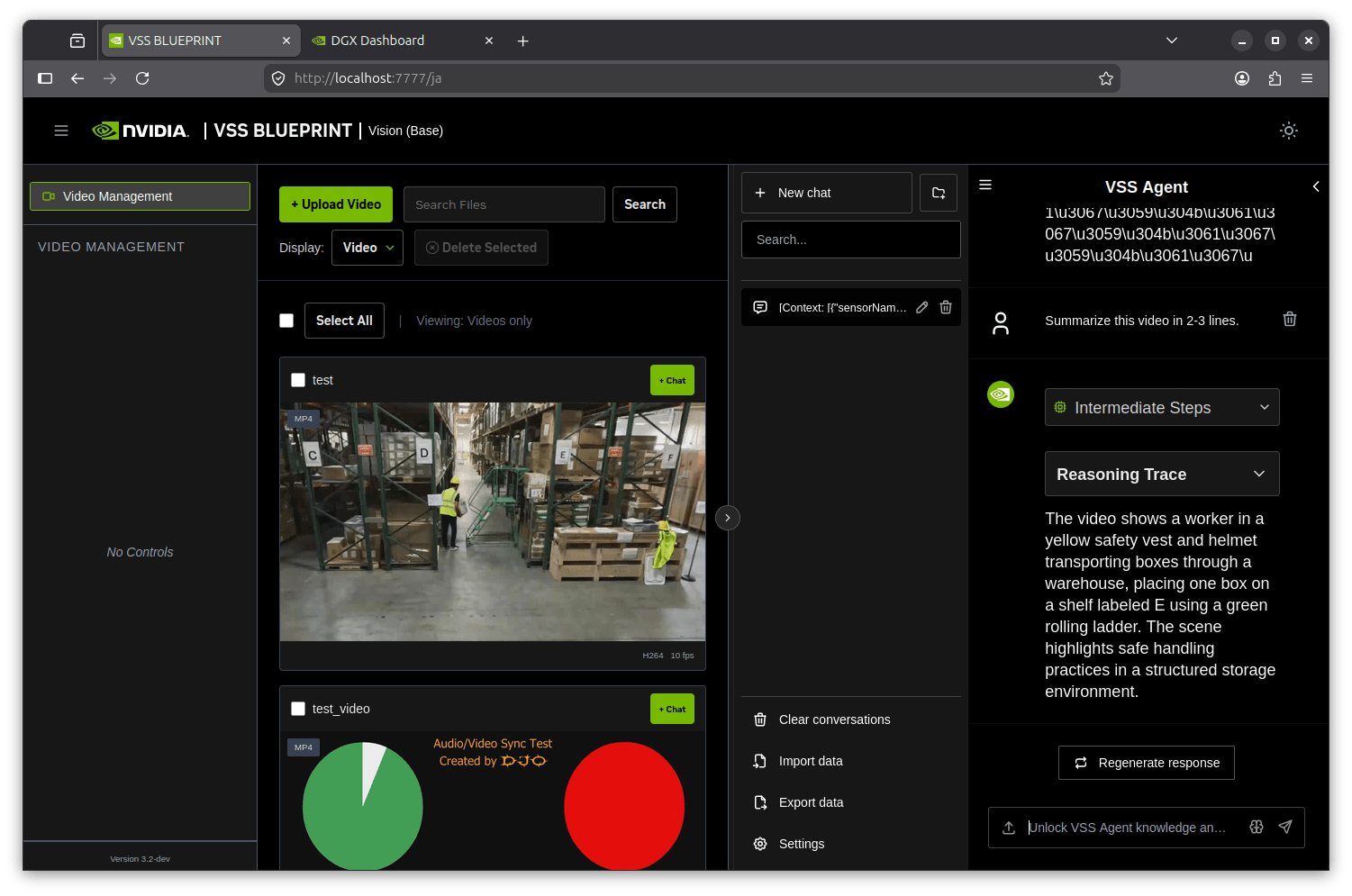
Opening the Reasoning Trace lets you follow the process by which the agent builds the summary based on the VLM output. I hope this one screenshot conveys that the locally built vss-agent in a hybrid configuration — locally built vss-agent + official NIM VLM + Local vLLM LLM — is properly communicating with the UI through the API Gateway via my-vss-agent:local.
Next Time
Finally, let me touch on a service that quietly disappeared in 3.2.
Riva ASR NIM has been removed from docker-compose. It was incorporated for audio-capable video understanding, but in 3.2 it was removed with a comment # RIVA ASR is not yet supported, and the design has switched to performing audio understanding via the native audio path of Nemotron 3 Nano Omni VLM instead.
# .env sample (base profile + Omni)
VLM_NAME=Nemotron-Nano-V3-Omni-GA0420-FP8
RTVI_VLM_MODEL_TO_USE=vllm-compatible
VLM_MODEL_SUPPORTS_AUDIO=true
The audio understanding design change is a fairly significant topic, so the plan for next time is to chase that down on actual hardware.
Summary
Here is a rough summary of what became apparent from bringing up VSS 3.2.0 GA on DGX Spark with the base profile.
| Aspect | Hands-on experience with 3.2 GA + DGX Spark |
|---|---|
| LLM | Official compose starts Nemotron-Nano-9B-v2 FP8 in a vLLM container. Tool-call parser also auto-fetched by init container |
| Alert | Single vss-alert-verification image differentiates Always-on / VLM-as-Verifier / Real-Time via environment variables |
| Deployment time | ~9 minutes for pure base profile startup cascade, ~10 minutes total (dominated by VLM NIM compilation wait) |
| API | Caption endpoint is /v1/generate_captions, duplicate IDs return 409, base profile has no Envoy/SDR |
| Source release | All microservices and Agent workflows released on GitHub under Apache-2.0 + MIT, Dockerfiles included |
While the official documentation states "DGX Spark is Remote LLM only," the implementation for the base profile has Local LLM working as-is, making it fully self-contained for PoC and verification purposes. With the Dockerfile now public, it's now normal practice to plug in your own built code and verify behavior firsthand.
Reference Links
- VSS docs (latest = 3.2.0)
- VSS 3.2.0 Release Notes
- VSS Prerequisites (Hardware / Profile / DGX Spark Remote LLM constraints)
- VSS Helm chart deployment guide
- GitHub: video-search-and-summarization v3.2.0 release
- GitHub: LICENSE (Apache-2.0 + MIT dual)
- GitHub: services/agent full source
- GitHub: deploy/docker (compose layout)
- GitHub: services/agent/docker/Dockerfile (the Dockerfile built in this article)
- HuggingFace: NVIDIA-Nemotron-Nano-9B-v2 (source of tool parser)
- build.nvidia.com: VSS Blueprint card
- Previous article: VSS 3.1.0 EA and the current state of manufacturing VSS seen at Hannover Messe
- First article: Trying VSS 3.0.0 EA on DGX Spark

