I Tried Verifying the Effectiveness of the Option to Enable Encryption in the ECS Exec Log Settings of an ECS Cluster

This page has been translated by machine translation. View original
I Wondered What the Option to Enable Encryption in the ECS Exec Log Settings of an ECS Cluster Actually Does
Hello, this is Nonpi (@non____97).
Have you ever wondered what the option to enable encryption in the ECS Exec log settings of an ECS cluster actually means? I have.
Specifically, these are the items in question.
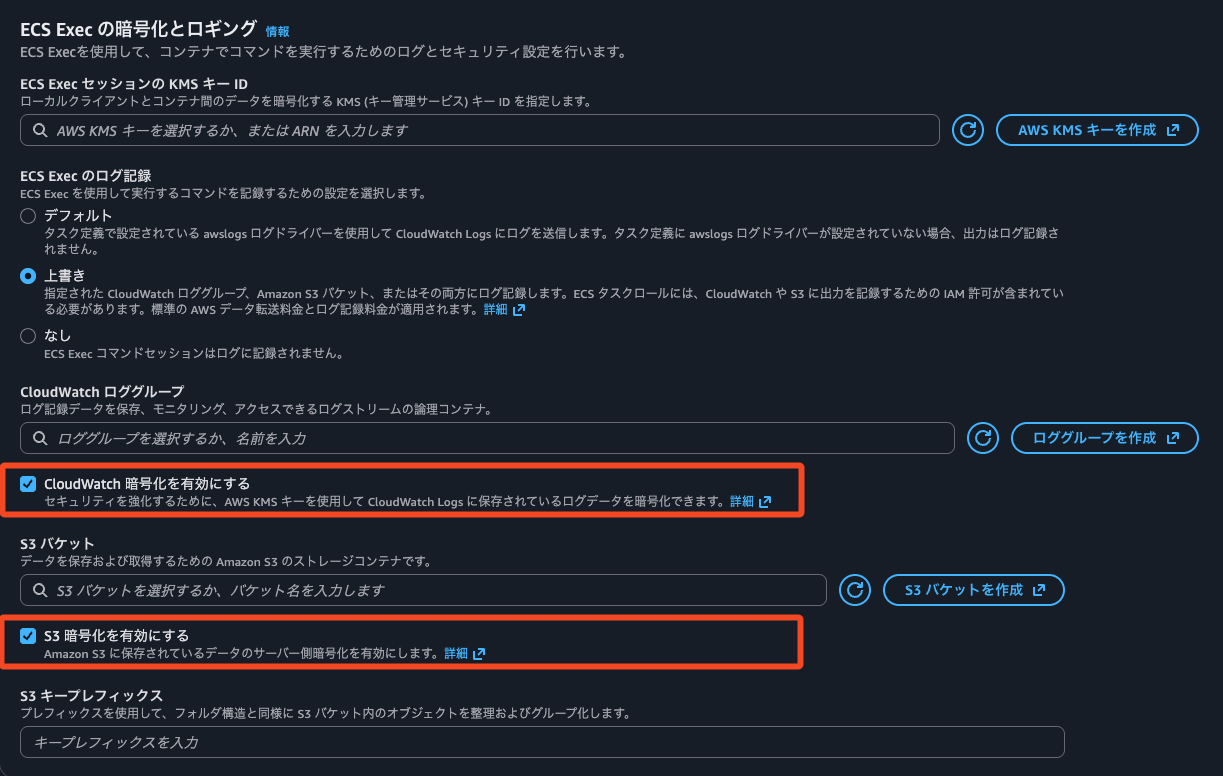
Enable CloudWatch encryption
To enhance security, you can encrypt log data stored in CloudWatch Logs using an AWS KMS key. Learn moreEnable S3 encryption
Enables server-side encryption for data stored in Amazon S3. Learn more
That is what is written.
What actually happens when you enable these options?
Encryption at rest for a CloudWatch Logs log group is configured on the log group side. Since you cannot change the encryption key per log stream, the scope of impact is unclear even if you configure it on the ECS cluster side.
For S3 buckets, it is possible to use a different encryption key for each object. If you do not specify an encryption key at PUT time, the encryption key configured on the S3 bucket is used.
All Amazon S3 buckets have encryption configured by default, and all new objects uploaded to an S3 bucket are automatically encrypted at rest. Server-side encryption with Amazon S3 managed keys (SSE-S3) is the default encryption configuration for every bucket in Amazon S3. To use a different type of encryption, you can either specify the type of server-side encryption to use in your S3 PUT requests, or you can update the default encryption configuration on the destination bucket.
If you specify a different encryption type in your PUT request, you can use server-side encryption with AWS Key Management Service (AWS KMS) keys (SSE-KMS), dual-layer server-side encryption with AWS KMS keys (DSSE-KMS), or server-side encryption with customer-provided keys (SSE-C). If you set a different default encryption configuration on the destination bucket, you can use SSE-KMS or DSSE-KMS.
Protecting data with encryption - Amazon Simple Storage Service
I am curious what these options actually affect. Will it encrypt using the KMS key specified in KMS key ID for ECS Exec sessions?
Summary Up Front
Enable CloudWatch encryptionis a feature that checks whether the log group is encrypted with KMS- Enabling it does not perform additional encryption
- If the log group is not encrypted with a specified KMS key, an error occurs during ECS Exec and the session cannot be started
- I presume
Enable S3 encryptionis likewise an option that raises an error if the S3 bucket is not encrypted with SSE-S3, SSE-KMS, or DSSE-KMS- However, newly created S3 buckets now have default encryption, so its effect is hard to notice
- This does not cause an error even if the bucket's default encryption setting is SSE-S3
Let's Try It
Test Environment
The test environment is as follows.
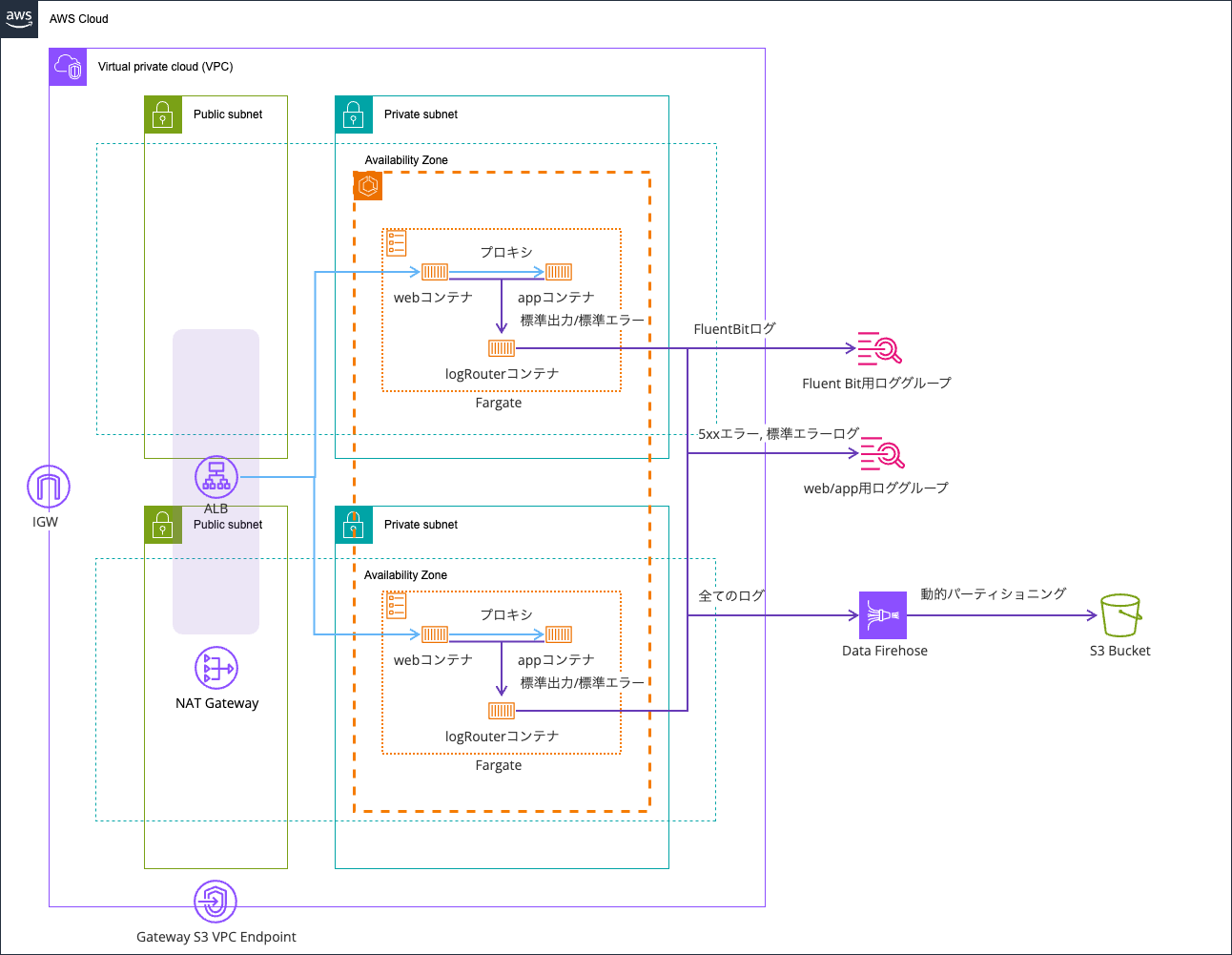
I am reusing the environment used in the following article.
The code is stored in the following repository.
ECS Exec with no KMS key ID specified for the ECS Exec session, no encryption on the log group, and "Enable CloudWatch encryption" turned on
We perform ECS Exec with no KMS key ID specified for the ECS Exec session, no encryption on the log group, and Enable CloudWatch encryption turned on.
The KMS key ID for ECS Exec sessions is used to encrypt data between the local client and the container. This value may have nothing to do with saving session logs, but let's check. Incidentally, encryption is performed even if you do not specify a KMS key.
By default, the data transferred between the local client and the container uses TLS 1.2 encryption provided by AWS. To further encrypt data using your own KMS key, you must create a KMS key and add the kms:Decrypt permission to the task IAM role.
Monitor Amazon ECS containers with ECS Exec - Amazon Elastic Container Service
The AWS CDK code is as follows.
    // ECS Exec log destinations
    const ecsExecLogGroup = new cdk.aws_logs.LogGroup(this, "EcsExecLogGroup");
    const ecsExecLogBucketConstruct = new BucketConstruct(
      this,
      "ecsExecLogBucketConstruct"
    );

    // ECS Cluster
    const cluster = new cdk.aws_ecs.Cluster(this, "Cluster", {
      vpc,
      containerInsightsV2: cdk.aws_ecs.ContainerInsights.ENHANCED,
      executeCommandConfiguration: {
        logConfiguration: {
          cloudWatchLogGroup: ecsExecLogGroup,
          cloudWatchEncryptionEnabled: true,
          s3Bucket: ecsExecLogBucketConstruct.bucket,
          s3EncryptionEnabled: true,
        },
        logging: cdk.aws_ecs.ExecuteCommandLogging.OVERRIDE,
      },
    });
.
.
(中略)
.
.
    ecsExecLogGroup.grantWrite(taskDefinition.taskRole);
    ecsExecLogBucketConstruct.bucket.grantPut(taskDefinition.taskRole);
After deployment, it looked like the following.
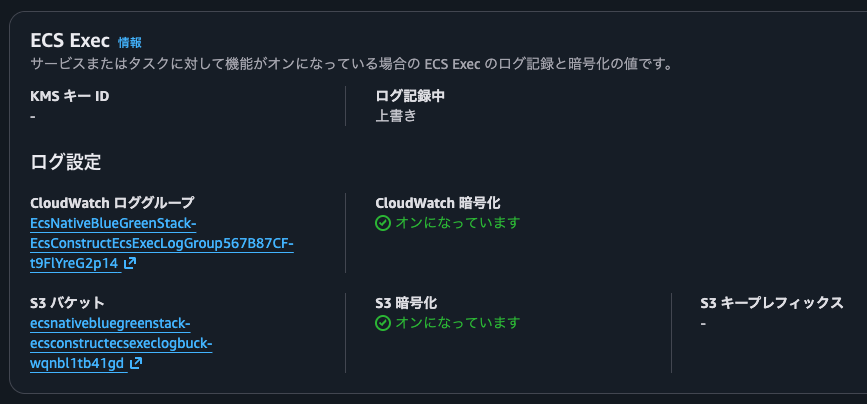
In this state, we run ECS Exec.
$ aws ecs execute-command --cluster EcsNativeBlueGreenStack-EcsConstructCluster14AE103B-1MjYOc4hurGm --task fccb314295bf438aa3dc08d17330871a --container app --interactive --command '/bin/sh'

The Session Manager plugin was installed successfully. Use the AWS CLI to start a session.

Starting session with SessionId: ecs-execute-command-z5jcak4cga3aoe9ti5b2y8vczq

SessionId: ecs-execute-command-z5jcak4cga3aoe9ti5b2y8vczq : We couldn't start the session because encryption is not set up on the selected CloudWatch Logs log group. Either encrypt the log group or choose an option to enable logging without encryption.
Yes, it resulted in an error.
judging from the wording of the error, it seems to have failed because the CloudWatch Logs log group is not encrypted.
ECS Exec with the S3 bucket as the only log destination
We run ECS Exec with the S3 bucket as the only log destination.
The result of cdk diff is as follows.
> cdk diff --no-change-set
[Warning at /EcsNativeBlueGreenStack/Custom::CDKBucketDeployment8693BB64968944B69AAFB0CC9EB8756C/ServiceRole] Failed to add construct metadata for node [ServiceRole]. Reason: ValidationError: The result of fromAwsManagedPolicyName can not be used in this API [ack: @aws-cdk/core:addConstructMetadataFailed]
[Warning at /EcsNativeBlueGreenStack/EcsConstruct/Service/AlternateTargetRole] Failed to add construct metadata for node [AlternateTargetRole]. Reason: ValidationError: The result of fromAwsManagedPolicyName can not be used in this API [ack: @aws-cdk/core:addConstructMetadataFailed]
Stack EcsNativeBlueGreenStack
IAM Statement Changes
┌───┬────────────────────────────────────────────────────────────────────────────────────────────────────────────────┬────────┬──────────────────────────────────┬─────────────────────────────────────────────┬───────────┐
│   │ Resource                                                                                                       │ Effect │ Action                           │ Principal                                   │ Condition │
├───┼────────────────────────────────────────────────────────────────────────────────────────────────────────────────┼────────┼──────────────────────────────────┼─────────────────────────────────────────────┼───────────┤
│ - │ *                                                                                                              │ Allow  │ logs:DescribeLogGroups           │ AWS:${EcsConstruct/TaskDefinition/TaskRole} │           │
│   │                                                                                                                │        │ s3:GetBucketLocation             │                                             │           │
│   │                                                                                                                │        │ ssmmessages:CreateControlChannel │                                             │           │
│   │                                                                                                                │        │ ssmmessages:CreateDataChannel    │                                             │           │
│   │                                                                                                                │        │ ssmmessages:OpenControlChannel   │                                             │           │
│   │                                                                                                                │        │ ssmmessages:OpenDataChannel      │                                             │           │
├───┼────────────────────────────────────────────────────────────────────────────────────────────────────────────────┼────────┼──────────────────────────────────┼─────────────────────────────────────────────┼───────────┤
│ - │ arn:${AWS::Partition}:logs:${AWS::Region}:${AWS::AccountId}:log-group:${EcsConstructEcsExecLogGroup567B87CF}:* │ Allow  │ logs:CreateLogStream             │ AWS:${EcsConstruct/TaskDefinition/TaskRole} │           │
│   │                                                                                                                │        │ logs:DescribeLogStreams          │                                             │           │
│   │                                                                                                                │        │ logs:PutLogEvents                │                                             │           │
├───┼────────────────────────────────────────────────────────────────────────────────────────────────────────────────┼────────┼──────────────────────────────────┼─────────────────────────────────────────────┼───────────┤
│ + │ *                                                                                                              │ Allow  │ s3:GetBucketLocation             │ AWS:${EcsConstruct/TaskDefinition/TaskRole} │           │
│   │                                                                                                                │        │ ssmmessages:CreateControlChannel │                                             │           │
│   │                                                                                                                │        │ ssmmessages:CreateDataChannel    │                                             │           │
│   │                                                                                                                │        │ ssmmessages:OpenControlChannel   │                                             │           │
│   │                                                                                                                │        │ ssmmessages:OpenDataChannel      │                                             │           │
└───┴────────────────────────────────────────────────────────────────────────────────────────────────────────────────┴────────┴──────────────────────────────────┴─────────────────────────────────────────────┴───────────┘
(NOTE: There may be security-related changes not in this list. See https://github.com/aws/aws-cdk/issues/1299)

Resources
[~] AWS::ECS::Cluster EcsConstruct/Cluster EcsConstructCluster14AE103B
 └─ [~] Configuration
     └─ [~] .ExecuteCommandConfiguration:
         └─ [~] .LogConfiguration:
             ├─ [-] Removed: .CloudWatchEncryptionEnabled
             └─ [-] Removed: .CloudWatchLogGroupName
[~] AWS::IAM::Policy EcsConstruct/TaskDefinition/TaskRole/DefaultPolicy EcsConstructTaskDefinitionTaskRoleDefaultPolicy0C05A2A5
 └─ [~] PolicyDocument
     └─ [~] .Statement:
         └─ @@ -90,7 +90,6 @@
            [ ] },
            [ ] {
            [ ]   "Action": [
            [-]     "logs:DescribeLogGroups",
            [ ]     "s3:GetBucketLocation",
            [ ]     "ssmmessages:CreateControlChannel",
            [ ]     "ssmmessages:CreateDataChannel",
            @@ -101,38 +100,6 @@
            [ ]   "Resource": "*"
            [ ] },
            [ ] {
            [-]   "Action": [
            [-]     "logs:CreateLogStream",
            [-]     "logs:DescribeLogStreams",
            [-]     "logs:PutLogEvents"
            [-]   ],
            [-]   "Effect": "Allow",
            [-]   "Resource": {
            [-]     "Fn::Join": [
            [-]       "",
            [-]       [
            [-]         "arn:",
            [-]         {
            [-]           "Ref": "AWS::Partition"
            [-]         },
            [-]         ":logs:",
            [-]         {
            [-]           "Ref": "AWS::Region"
            [-]         },
            [-]         ":",
            [-]         {
            [-]           "Ref": "AWS::AccountId"
            [-]         },
            [-]         ":log-group:",
            [-]         {
            [-]           "Ref": "EcsConstructEcsExecLogGroup567B87CF"
            [-]         },
            [-]         ":*"
            [-]       ]
            [-]     ]
            [-]   }
            [-] },
            [-] {
            [ ]   "Action": "s3:PutObject",
            [ ]   "Effect": "Allow",
            [ ]   "Resource": {

✨  Number of stacks with differences: 1
The S3 bucket uses SSE-S3 as its default encryption. Does anything change when Enable S3 encryption is turned on?
We connect to the container with ECS Exec.
~ $ aws ecs execute-command --cluster EcsNativeBlueGreenStack-EcsConstructCluster14AE103B-1MjYOc4hurGm --task fccb314295bf438aa3dc08d17330871a --container web --interactive --command '/bin/sh'

The Session Manager plugin was installed successfully. Use the AWS CLI to start a session.

Starting session with SessionId: ecs-execute-command-pbl86xd5nnszhvyzr2oqtsi33i
/ # ls -l
total 76
drwxr-xr-x    1 root     root          4096 Jan 20 09:03 bin
drwxr-xr-x    5 root     root           360 Jan 20 09:06 dev
drwxr-xr-x    1 root     root          4096 Dec 24 05:18 docker-entrypoint.d
-rwxr-xr-x    1 root     root          1620 Dec 24 05:18 docker-entrypoint.sh
drwxr-xr-x    1 root     root          4096 Jan 20 09:06 etc
drwxr-xr-x    2 root     root          4096 Dec 17 07:03 home
drwxr-xr-x    1 root     root          4096 Dec 17 07:03 lib
drwxr-xr-x    3 root     root          4096 Jan 20 09:06 managed-agents
drwxr-xr-x    5 root     root          4096 Dec 17 07:03 media
drwxr-xr-x    2 root     root          4096 Dec 17 07:03 mnt
drwxr-xr-x    2 root     root          4096 Dec 17 07:03 opt
dr-xr-xr-x  210 root     root             0 Jan 20 09:06 proc
drwx------    1 root     root          4096 Jan 20 09:29 root
drwxr-xr-x    1 root     root          4096 Jan 20 09:06 run
drwxr-xr-x    1 root     root          4096 Jan 20 09:03 sbin
drwxr-xr-x    2 root     root          4096 Dec 17 07:03 srv
dr-xr-xr-x   12 root     root             0 Jan 20 09:05 sys
drwxrwxrwt    2 root     root          4096 Dec 17 07:03 tmp
drwxr-xr-x    1 root     root          4096 Dec 17 07:03 usr
drwxr-xr-x    1 root     root          4096 Dec 17 07:03 var
/ # exit

Exiting session with sess
I was able to connect without any problems.
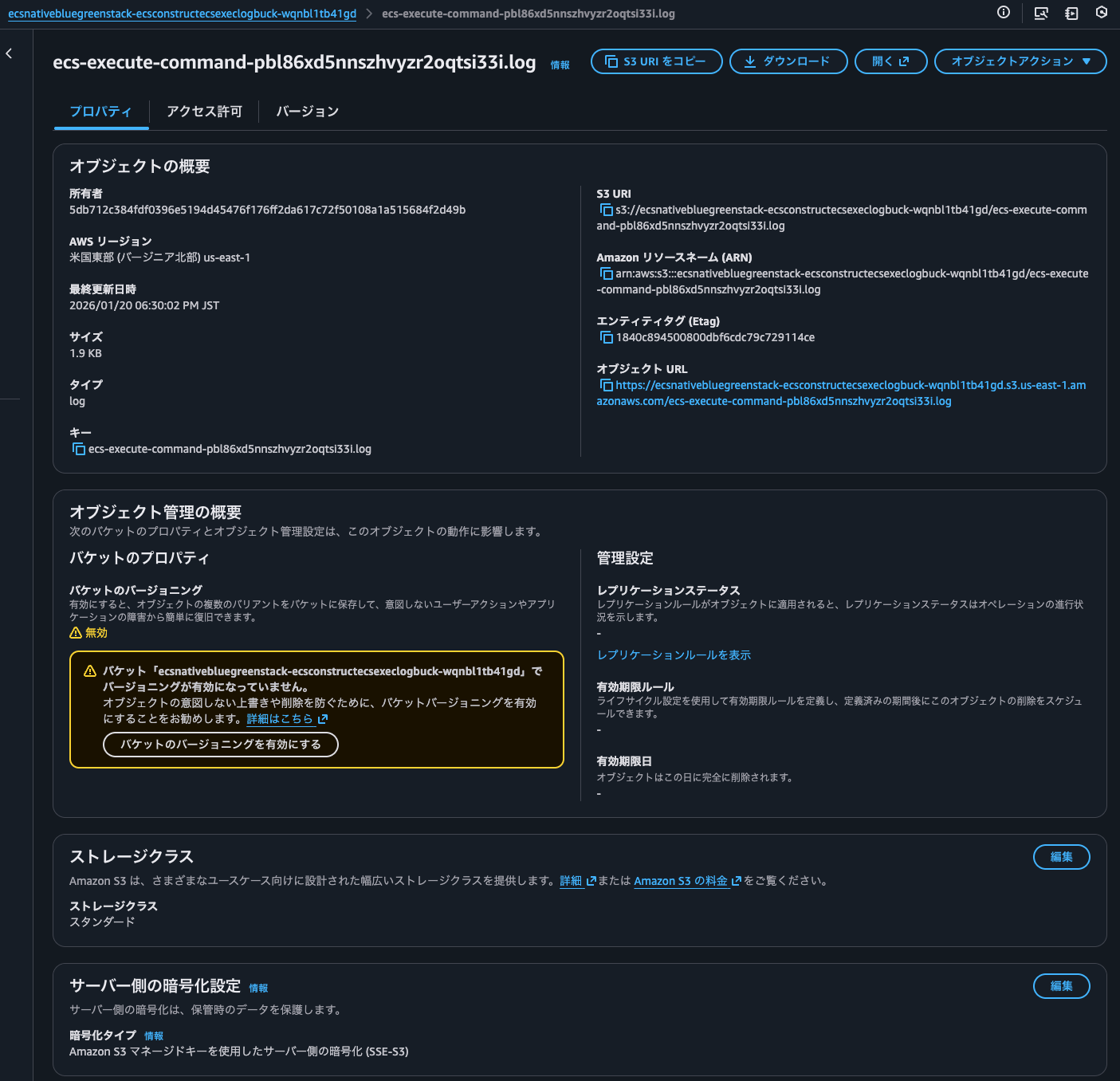
After exit, a log object keyed by the ECS Exec session ID was output to the S3 bucket. The encryption type is SSE-S3.
ECS Exec with a KMS key ID specified for the ECS Exec session, no encryption on the log group, and "Enable CloudWatch encryption" turned on
Let's try ECS Exec with a KMS key ID specified for the ECS Exec session, no encryption on the log group, and Enable CloudWatch encryption turned on.
We change the AWS CDK code as follows.
    // ECS Exec log destinations
    const kmsKey = new cdk.aws_kms.Key(this, "Key");
    const ecsExecLogGroup = new cdk.aws_logs.LogGroup(this, "EcsExecLogGroup");
    const ecsExecLogBucketConstruct = new BucketConstruct(
      this,
      "ecsExecLogBucketConstruct"
    );

    // ECS Cluster
    const cluster = new cdk.aws_ecs.Cluster(this, "Cluster", {
      vpc,
      containerInsightsV2: cdk.aws_ecs.ContainerInsights.ENHANCED,
      executeCommandConfiguration: {
        kmsKey,
        logConfiguration: {
          cloudWatchLogGroup: ecsExecLogGroup,
          cloudWatchEncryptionEnabled: true,
          s3Bucket: ecsExecLogBucketConstruct.bucket,
          s3EncryptionEnabled: true,
        },
        logging: cdk.aws_ecs.ExecuteCommandLogging.OVERRIDE,
      },
    });
The result of cdk diff is as follows.
> cdk diff
[Warning at /EcsNativeBlueGreenStack/Custom::CDKBucketDeployment8693BB64968944B69AAFB0CC9EB8756C/ServiceRole] Failed to add construct metadata for node [ServiceRole]. Reason: ValidationError: The result of fromAwsManagedPolicyName can not be used in this API [ack: @aws-cdk/core:addConstructMetadataFailed]
[Warning at /EcsNativeBlueGreenStack/EcsConstruct/Service/AlternateTargetRole] Failed to add construct metadata for node [AlternateTargetRole]. Reason: ValidationError: The result of fromAwsManagedPolicyName can not be used in this API [ack: @aws-cdk/core:addConstructMetadataFailed]
start: Building EcsNativeBlueGreenStack Template
success: Built EcsNativeBlueGreenStack Template
start: Publishing EcsNativeBlueGreenStack Template (current_account-current_region-6d05c18c)
success: Published EcsNativeBlueGreenStack Template (current_account-current_region-6d05c18c)
Hold on while we create a read-only change set to get a diff with accurate replacement information (use --no-change-set to use a less accurate but faster template-only diff)
Stack EcsNativeBlueGreenStack
IAM Statement Changes
┌───┬────────────────────────────────────────────────────────────────────────────────────────────────────────────────┬────────┬──────────────────────────────────┬───────────────────────────────────────────────────────┬─────────────────────────────────────────────────────────────────────────────────────────────────────────┐
│ │ Resource │ Effect │ Action │ Principal │ Condition │
├───┼────────────────────────────────────────────────────────────────────────────────────────────────────────────────┼────────┼──────────────────────────────────┼───────────────────────────────────────────────────────┼─────────────────────────────────────────────────────────────────────────────────────────────────────────┤
│ - │ * │ Allow │ s3:GetBucketLocation │ AWS:${EcsConstruct/TaskDefinition/TaskRole} │ │
│ │ │ │ ssmmessages:CreateControlChannel │ │ │
│ │ │ │ ssmmessages:CreateDataChannel │ │ │
│ │ │ │ ssmmessages:OpenControlChannel │ │ │
│ │ │ │ ssmmessages:OpenDataChannel │ │ │
├───┼────────────────────────────────────────────────────────────────────────────────────────────────────────────────┼────────┼──────────────────────────────────┼───────────────────────────────────────────────────────┼─────────────────────────────────────────────────────────────────────────────────────────────────────────┤
│ + │ ${EcsConstruct/Key.Arn} │ Allow │ kms:* │ AWS:arn:${AWS::Partition}:iam::${AWS::AccountId}:root │ │
│ + │ ${EcsConstruct/Key.Arn} │ Allow │ kms:Decrypt* │ Service:logs.${AWS::Region}.amazonaws.com │ "ArnLike": { │
│ │ │ │ kms:Describe* │ │ "kms:EncryptionContext:aws:logs:arn": "arn:${AWS::Partition}:logs:${AWS::Region}:${AWS::AccountId}:*" │
│ │ │ │ kms:Encrypt* │ │ } │
│ │ │ │ kms:GenerateDataKey* │ │ │
│ │ │ │ kms:ReEncrypt* │ │ │
│ + │ ${EcsConstruct/Key.Arn} │ Allow │ kms:Decrypt │ AWS:${EcsConstruct/TaskDefinition/TaskRole} │ │
│ │ │ │ kms:GenerateDataKey │ │ │
├───┼────────────────────────────────────────────────────────────────────────────────────────────────────────────────┼────────┼──────────────────────────────────┼───────────────────────────────────────────────────────┼─────────────────────────────────────────────────────────────────────────────────────────────────────────┤
│ + │ * │ Allow │ logs:DescribeLogGroups │ AWS:${EcsConstruct/TaskDefinition/TaskRole} │ │
│ │ │ │ s3:GetBucketLocation │ │ │
│ │ │ │ ssmmessages:CreateControlChannel │ │ │
│ │ │ │ ssmmessages:CreateDataChannel │ │ │
│ │ │ │ ssmmessages:OpenControlChannel │ │ │
│ │ │ │ ssmmessages:OpenDataChannel │ │ │
├───┼────────────────────────────────────────────────────────────────────────────────────────────────────────────────┼────────┼──────────────────────────────────┼───────────────────────────────────────────────────────┼─────────────────────────────────────────────────────────────────────────────────────────────────────────┤
│ + │ arn:${AWS::Partition}:logs:${AWS::Region}:${AWS::AccountId}:log-group:${EcsConstructEcsExecLogGroup567B87CF}:* │ Allow │ logs:CreateLogStream │ AWS:${EcsConstruct/TaskDefinition/TaskRole} │ │
│ │ │ │ logs:DescribeLogStreams │ │ │
│ │ │ │ logs:PutLogEvents │ │ │
└───┴────────────────────────────────────────────────────────────────────────────────────────────────────────────────┴────────┴──────────────────────────────────┴───────────────────────────────────────────────────────┴─────────────────────────────────────────────────────────────────────────────────────────────────────────┘
(NOTE: There may be security-related changes not in this list. See https://github.com/aws/aws-cdk/issues/1299)
Resources
[+] AWS::KMS::Key EcsConstruct/Key EcsConstructKeyDE871070
[~] AWS::ECS::Cluster EcsConstruct/Cluster EcsConstructCluster14AE103B
└─ [~] Configuration
└─ [~] .ExecuteCommandConfiguration:
├─ [+] Added: .KmsKeyId
└─ [~] .LogConfiguration:
├─ [+] Added: .CloudWatchEncryptionEnabled
└─ [+] Added: .CloudWatchLogGroupName
[~] AWS::IAM::Policy EcsConstruct/TaskDefinition/TaskRole/DefaultPolicy EcsConstructTaskDefinitionTaskRoleDefaultPolicy0C05A2A5
└─ [~] PolicyDocument
└─ [~] .Statement:
└─ @@ -90,6 +90,7 @@
[ ] },
[ ] {
[ ] "Action": [
[+] "logs:DescribeLogGroups",
[ ] "s3:GetBucketLocation",
[ ] "ssmmessages:CreateControlChannel",
[ ] "ssmmessages:CreateDataChannel",
@@ -100,6 +101,51 @@
[ ] "Resource": "*"
[ ] },
[ ] {
[+] "Action": [
[+] "kms:Decrypt",
[+] "kms:GenerateDataKey"
[+] ],
[+] "Effect": "Allow",
[+] "Resource": {
[+] "Fn::GetAtt": [
[+] "EcsConstructKeyDE871070",
[+] "Arn"
[+] ]
[+] }
[+] },
[+] {
[+] "Action": [
[+] "logs:CreateLogStream",
[+] "logs:DescribeLogStreams",
[+] "logs:PutLogEvents"
[+] ],
[+] "Effect": "Allow",
[+] "Resource": {
[+] "Fn::Join": [
[+] "",
[+] [
[+] "arn:",
[+] {
[+] "Ref": "AWS::Partition"
[+] },
[+] ":logs:",
[+] {
[+] "Ref": "AWS::Region"
[+] },
[+] ":",
[+] {
[+] "Ref": "AWS::AccountId"
[+] },
[+] ":log-group:",
[+] {
[+] "Ref": "EcsConstructEcsExecLogGroup567B87CF"
[+] },
[+] ":*"
[+] ]
[+] ]
[+] }
[+] },
[+] {
[ ] "Action": "s3:PutObject",
[ ] "Effect": "Allow",
[ ] "Resource": {
✨ Number of stacks with differences: 1
We deploy this and connect to the container with ECS Exec.
~ $ aws ecs execute-command --cluster EcsNativeBlueGreenStack-EcsConstructCluster14AE103B-1MjYOc4hurGm --task fccb314295bf438aa3dc08d17330871a --container web --interactive --command '/bin/sh'

The Session Manager plugin was installed successfully. Use the AWS CLI to start a session.

Starting session with SessionId: ecs-execute-command-h7y4vzsz94o9kzux9lqjvpxqkq
This session is encrypted using AWS KMS.

SessionId: ecs-execute-command-h7y4vzsz94o9kzux9lqjvpxqkq : We couldn't start the session because encryption is not set up on the selected CloudWatch Logs log group. Either encrypt the log group or choose an option to enable logging without encryption.
Yes, it failed with exactly the same error as before.
Perhaps Enable CloudWatch encryption is merely a feature that checks whether the log group is encrypted with KMS. Incidentally, log groups are encrypted even if you do not specify a KMS key.
Log group data is always encrypted in CloudWatch Logs. By default, CloudWatch Logs uses server-side encryption for the log data at rest using 256-bit Advanced Encryption Standard Galois/Counter Mode (AES-GCM). As an alternative, you can use AWS Key Management Service for this encryption. If you do, the encryption is done using an AWS KMS key. Encryption using AWS KMS is enabled at the log group level, by associating a KMS key with a log group, either when you create the log group or after it exists.
Encrypt log data in CloudWatch Logs using AWS Key Management Service - Amazon CloudWatch Logs
ECS Exec with a KMS key ID specified for the ECS Exec session, encryption on the log group, and "Enable CloudWatch encryption" turned on
Next, we run ECS Exec with a KMS key ID specified for the ECS Exec session, encryption on the log group, and Enable CloudWatch encryption turned on.
We specified the KMS key for the log group in the AWS CDK code as follows.
    // ECS Exec log destinations
    const kmsKey = new cdk.aws_kms.Key(this, "Key");
    const ecsExecLogGroup = new cdk.aws_logs.LogGroup(this, "EcsExecLogGroup", {
      encryptionKey: kmsKey,
    });
    const ecsExecLogBucketConstruct = new BucketConstruct(
      this,
      "ecsExecLogBucketConstruct"
    );
The result of cdk diff is as follows.
> cdk diff --no-change-set
[Warning at /EcsNativeBlueGreenStack/Custom::CDKBucketDeployment8693BB64968944B69AAFB0CC9EB8756C/ServiceRole] Failed to add construct metadata for node [ServiceRole]. Reason: ValidationError: The result of fromAwsManagedPolicyName can not be used in this API [ack: @aws-cdk/core:addConstructMetadataFailed]
[Warning at /EcsNativeBlueGreenStack/EcsConstruct/Service/AlternateTargetRole] Failed to add construct metadata for node [AlternateTargetRole]. Reason: ValidationError: The result of fromAwsManagedPolicyName can not be used in this API [ack: @aws-cdk/core:addConstructMetadataFailed]
Stack EcsNativeBlueGreenStack
Resources
[~] AWS::Logs::LogGroup EcsConstruct/EcsExecLogGroup EcsConstructEcsExecLogGroup567B87CF
 └─ [+] KmsKeyId
     └─ {"Fn::GetAtt":["EcsConstructKeyDE871070","Arn"]}

✨  Number of stacks with differences: 1
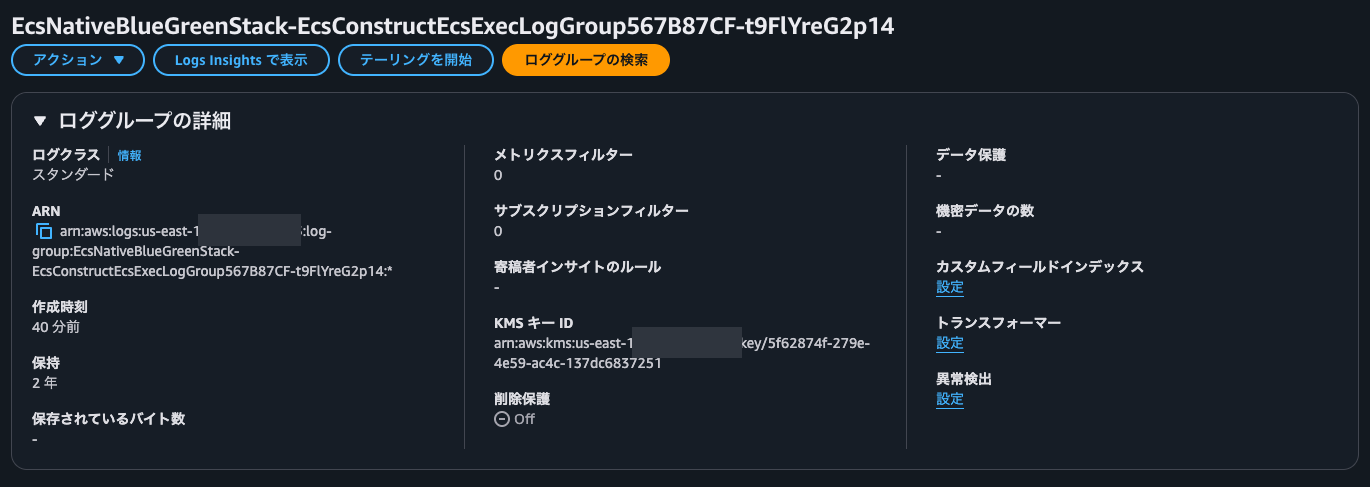
Checking the log group, the KMS key was set.
In this state, we run ECS Exec.
~ $ aws ecs execute-command --cluster EcsNativeBlueGreenStack-EcsConstructCluster14AE103B-1MjYOc4hurGm --task fccb314295bf438aa3dc08d17330871a --container web --interactive --command '/bin/sh'

The Session Manager plugin was installed successfully. Use the AWS CLI to start a session.

Starting session with SessionId: ecs-execute-command-hgkazf7cu2vkn4oztskb8e225u
This session is encrypted using AWS KMS.
/ # whoami
root
/ # exit

Exiting session with sessionId: ecs-execute-command-hgkazf7cu2vkn4oztskb8e225u.
I was able to connect without any problems.
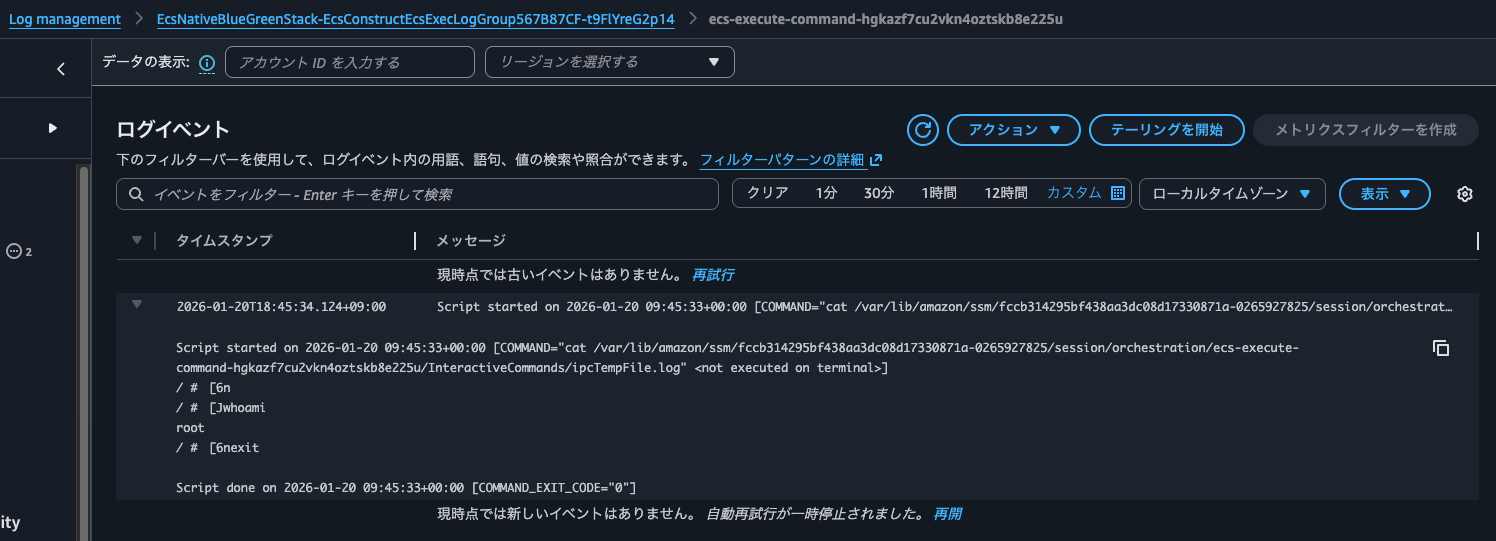
Checking the log group, a log stream had been created, and the characters entered and output in the terminal earlier were recorded.
Checking the S3 bucket, a new object encrypted with SSE-S3 had been added.

Enable S3 encryption may also be an option that raises an error when the S3 bucket is not encrypted with SSE-S3, SSE-KMS, or DSSE-KMS, but since newly created S3 buckets now have default encryption, its effect is hard to notice.
Use It When You Want to Enforce KMS Encryption on the Log Group Side
We checked the effect of the option to enable encryption in the ECS Exec log settings of an ECS cluster.
I feel it is something to use when you want to enforce KMS key encryption on the log group side. For S3 buckets, it does not enforce SSE-KMS, so just as with log groups, if you have a requirement to control KMS key encryption on the user side, be sure to check the default encryption settings on the S3 bucket side.
I hope this article helps someone.
This was Nonpi (@non____97) of the Consulting Department, Cloud Business Division!
