
[Update] Vector Search and Aggregation Are Now Available in Amazon ElastiCache Serverless for Valkey!

This page has been translated by machine translation. View original
Introduction
Hello, I'm Kamino from the Consulting Department, and I love ramen.
Vector search, full-text search, hybrid search, and aggregation are now available in Amazon ElastiCache Serverless for Valkey!
I previously built a semantic cache with node-based ElastiCache for Valkey and Amazon Bedrock AgentCore, but it required a VPC and I had been wishing for Serverless, so I'm happy about this!
This time I'll build the Serverless version.
Main changes
The following searches and aggregations are now available in Serverless on Valkey 9.0 or later.

Until now, Serverless did not support the search commands (FT.CREATE, FT.SEARCH, etc.), and vector search required a node-based cluster. From now on, you can create indexes in Serverless too and search by full-text, tag, numeric, and vector conditions!
The conditions can be combined, so you can write a hybrid search that narrows down by tag and then finds the nearest vectors in a single query.
# Search only the acme tenant's cache and find the 3 nearest vectors
FT.SEARCH semantic_cache_idx "@tenant:{acme}=>[KNN 3 @embedding $vec AS score]" PARAMS 2 vec <埋め込みベクトル>

# Calculate the number of cache entries and the total hit count per tenant
FT.AGGREGATE semantic_cache_idx "@hits:[-inf +inf]" LOAD 2 @tenant @hits GROUPBY 1 @tenant REDUCE COUNT 0 AS entries REDUCE SUM 1 @hits AS total_hits
Another feature I want to combine is the public endpoint added in the September 2026 update.
If you choose public as the connection type, you can connect from the internet without a VPC, but in exchange IAM authentication and TLS 1.3 become mandatory. In the AWS CLI, you specify --connection-type public when creating the cache.
aws elasticache create-serverless-cache \
    --serverless-cache-name my-public-cache \
    --engine valkey \
    --major-engine-version 9 \
    --connection-type public \
    --user-group-id default.iam-user-group
The connection type cannot be changed after the cache is created, so if you want it to be public, decide at creation time.
Combined with this search feature, you no longer need to prepare a VPC just for vector search. In the previous article, I placed a node-based cluster in a VPC and also prepared a NAT Gateway.
This time, neither is needed. It's also nice that you can search from your local PC without a bastion host!
Serverless limits
Serverless has some limits that differ from node-based. Here are the ones relevant to this implementation.
| Item | Serverless | Node-based (9.0 or later) |
|---|---|---|
| Vector dimensions | 4096 | 32768 |
| K for KNN search | 512 | 10000 |
| Prefixes per index | 8 | 16 |
| HNSW M | 32 | 2000000 |
The search feature in Valkey 9.0 (Valkey Search 1.2) can combine filters and vectors with FT.SEARCH, but it does not support the FT.HYBRID command...
What we'll build
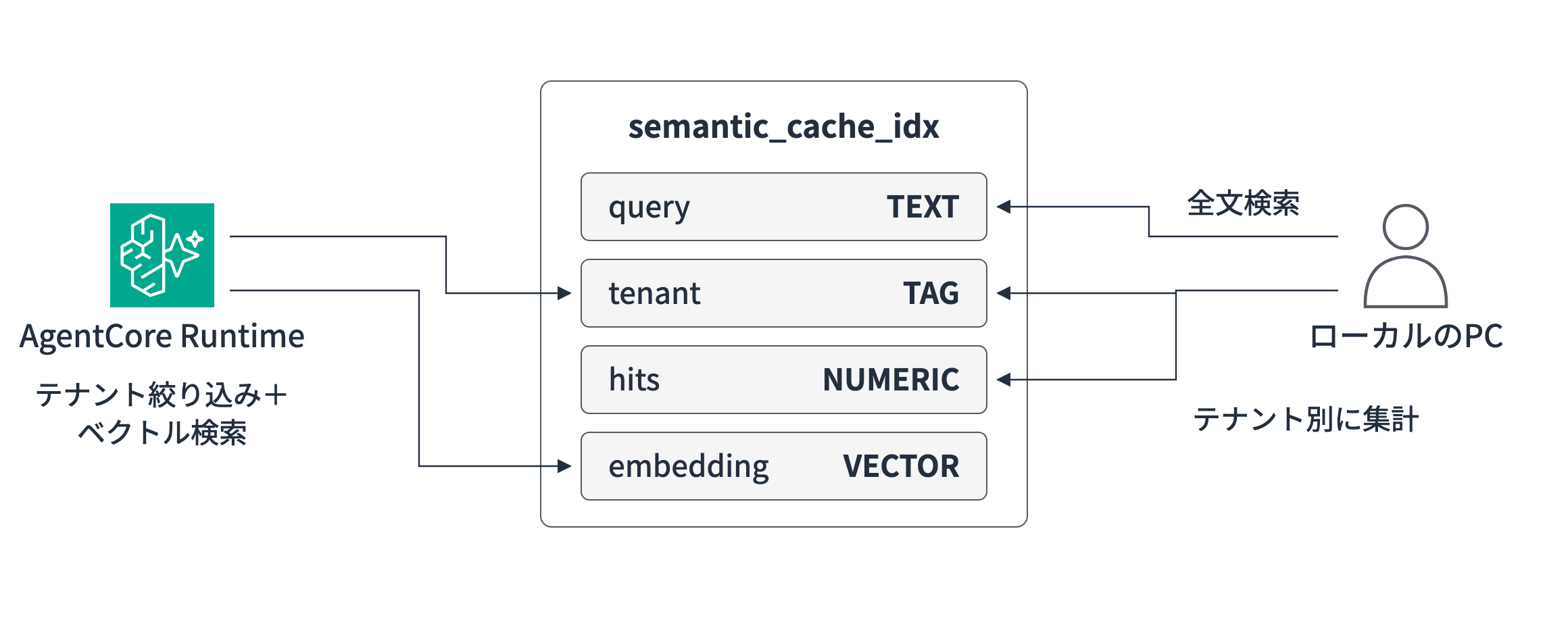
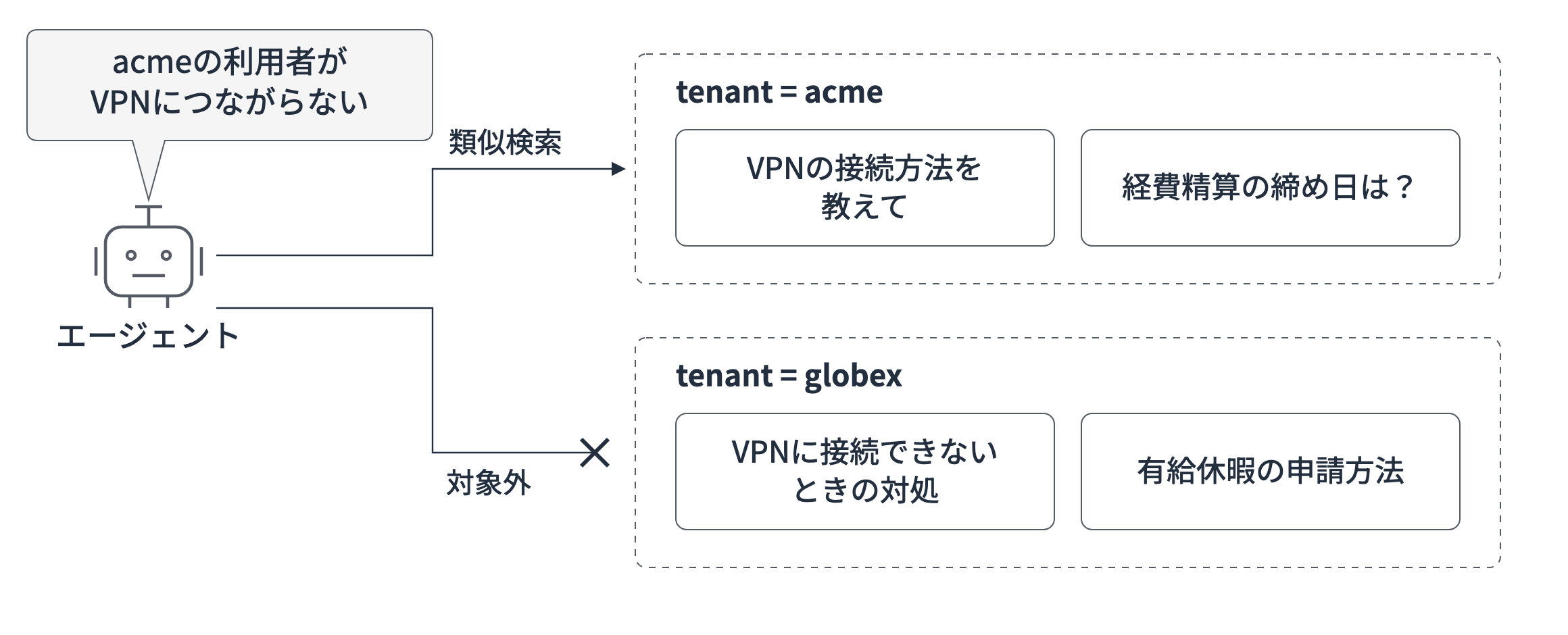
We'll add tenant distinction to the previous semantic cache. Assuming a SaaS help desk, we make only the same tenant's cache the target of similarity search so that users of Company A are not given answers meant for Company B! In this sample, the tenant name is specified by an argument for verification.
The cache is consolidated into a single index.
The Runtime finds answers using tenant filtering and vector search, and from the local PC we'll run full-text search on the question text and per-tenant aggregation to check the behavior!
The full code is on GitHub. In the article, I'll introduce excerpts of the key code.
| Path | Contents |
|---|---|
bin/ lib/ |
CDK app (ElastiCache Serverless, AgentCore Runtime, IAM) |
agent/ |
Agent that runs on the Runtime (Strands Agents + Valkey GLIDE) |
client/ |
Scripts for invoking the Runtime and for full-text search and aggregation against the cache |
git clone https://github.com/yuu551/elasticache-serverless-semantic-cache.git
cd elasticache-serverless-semantic-cache
pnpm install
Create the cache and Runtime with CDK
We'll use the latest CDK at the time of writing (aws-cdk-lib 2.276.0).
Here is an excerpt of the part that creates the cache and Runtime.
// ElastiCache Serverless for Valkey 9 (public endpoint)
const cache = new elasticache.CfnServerlessCache(this, 'Cache', {
  serverlessCacheName: CACHE_NAME,
  engine: 'valkey',
  majorEngineVersion: '9',
  connectionType: 'public',
  userGroupId: 'default.iam-user-group',
});

// AgentCore Runtime V2 (public network without a VPC)
const runtime = new agentcore.Runtime(this, 'Runtime', {
  runtimeName: 'serverlessSemanticCache',
  agentRuntimeArtifact: agentcore.AgentRuntimeArtifact.fromAsset(
    path.join(import.meta.dirname, '../agent'),
    { platform: Platform.LINUX_ARM64 },
  ),
  platformVersion: agentcore.PlatformVersion.V2,
  networkConfiguration: agentcore.RuntimeNetworkConfiguration.usingPublicNetwork(),
  environmentVariables: {
    VALKEY_HOST: cache.attrEndpointAddress,
    VALKEY_CACHE_NAME: CACHE_NAME,
    VALKEY_USER: CACHE_USER,
  },
});
There is also an alpha L2 construct for ElastiCache Serverless (@aws-cdk/aws-elasticache-alpha), but at the time of writing it required specifying a VPC and did not let me choose the connection type.
So I used the L1 CfnServerlessCache and specified connectionType: 'public' to make it a public endpoint.
The user group default.iam-user-group is a group for IAM authentication provided by AWS, so you can get started without creating your own users.
To use IAM authentication, the connecting IAM role or user needs the elasticache:Connect permission. Note that the target resources are both the cache and the user.
runtime.addToRolePolicy(new iam.PolicyStatement({
  actions: ['elasticache:Connect'],
  resources: [
    cache.attrArn,
    this.formatArn({ service: 'elasticache', resource: 'user', resourceName: CACHE_USER, arnFormat: cdk.ArnFormat.COLON_RESOURCE_NAME }),
  ],
}));
Implement the agent
As before, the agent is written with Strands Agents, but I changed the Valkey client to the official Valkey GLIDE. GLIDE supports creating and refreshing IAM authentication tokens, which is convenient.
Connect to the public endpoint with IAM authentication
IAM authentication tokens are used to connect to the public endpoint. A token is a URL signed with IAM credentials and can be created on the spot without calling an API.
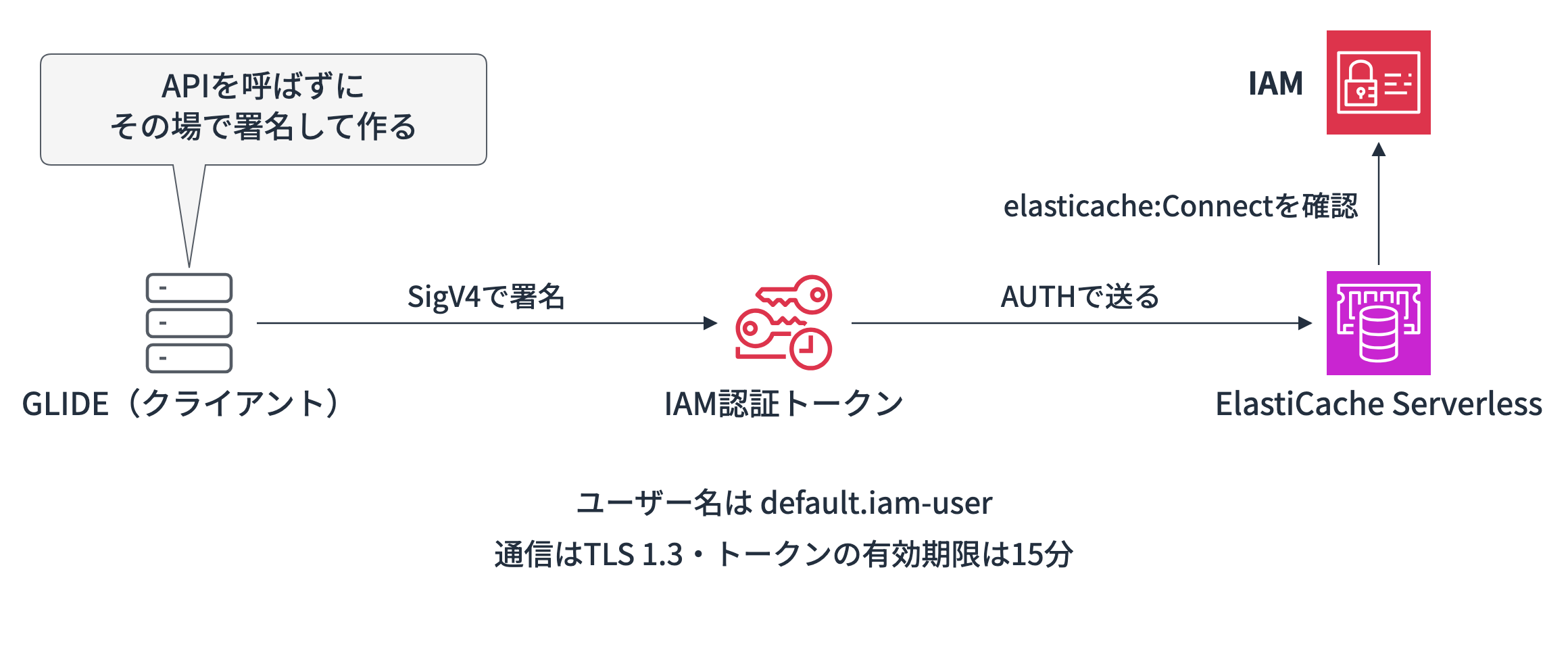
In GLIDE, if you pass IamAuthConfig to the connection settings, it automatically creates and refreshes tokens.
self._config = GlideClusterClientConfiguration(
    addresses=[NodeAddress(host, 6379)],
    use_tls=True,
    request_timeout=5000,
    credentials=ServerCredentials(
        username=user_id,  # default.iam-user
        iam_config=IamAuthConfig(
            cluster_name=cache_name,
            service=ServiceType.ELASTICACHE,
            region=region,
        ),
    ),
)
By the way, with GLIDE's default timeout of 250 ms, warnings appeared during testing, so I extended it to 5 seconds!
Create the connection on the first request
AgentCore Runtime V2 saves the state after startup and preparation as a snapshot, and restores each instance from it. Values initialized at startup are carried over in their snapshot-time state to all restored instances.
For this reason, the official documentation also advises preparing credentials and tokens that have an expiration when processing a request rather than at startup. The IAM authentication token is valid for 15 minutes, so if you create the connection at startup, the token may have expired by the time of restoration from the snapshot.
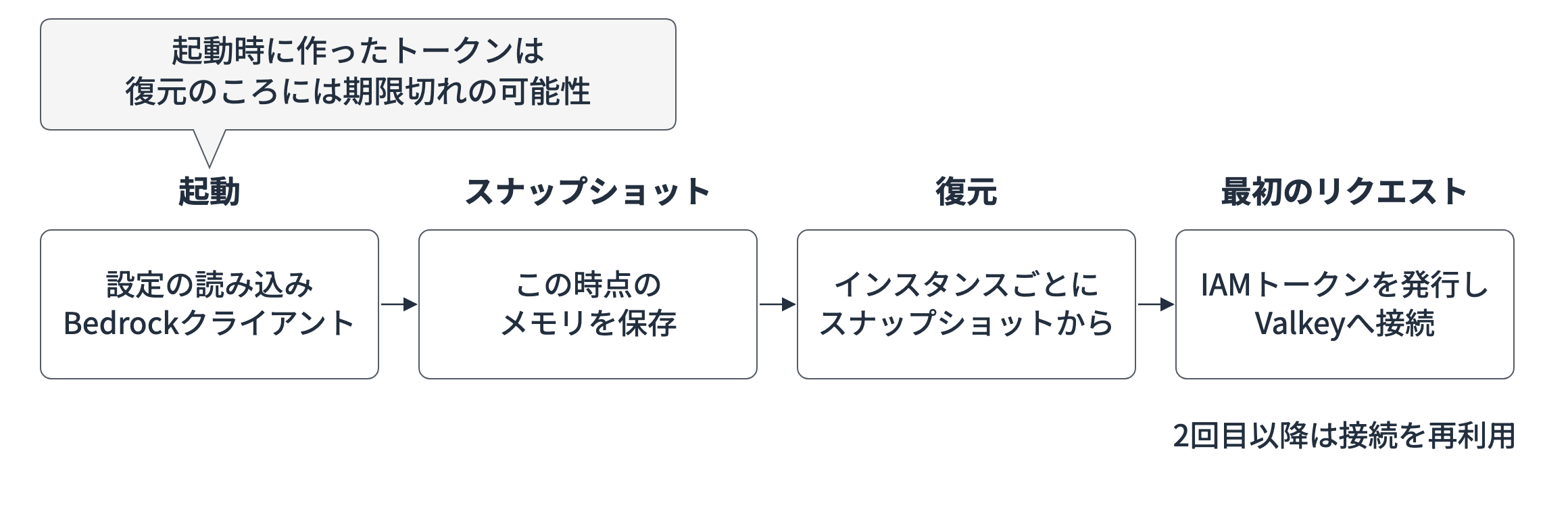
So at startup we only prepare the connection settings, establish the connection itself at the first request, and reuse it within the instance.
async def _get_client(self) -> GlideClusterClient:
    # Runtime V2 is restored from a snapshot, so
    # create connections that use expiring IAM tokens on the first request
    if self._client is None:
        self._client = await GlideClusterClient.create(self._config)
        await self._setup_index(self._client)
    return self._client
Create the index and run hybrid search
Each cache entry is stored as a hash, and the following four fields among them are registered in the index.
| Field | Type | Value stored | Search used for |
|---|---|---|---|
| query | TEXT | The user's question text | Full-text search |
| tenant | TAG | Tenant name (e.g., acme) | Tenant filtering and aggregation grouping |
| hits | NUMERIC | Number of times the cache was hit | Numeric ranges and aggregation |
| embedding | VECTOR | Embedding of the question text (1024 dimensions) | Vector search |
The answer body (answer) is also stored in the same hash, but since it isn't used as a search condition, it isn't registered in the index.
await client.custom_command([
    "FT.CREATE", INDEX_NAME,
    "ON", "HASH",
    "PREFIX", "1", KEY_PREFIX,
    "SCHEMA",
    "query", "TEXT",
    "tenant", "TAG",
    "hits", "NUMERIC",
    "embedding", "VECTOR", "HNSW", "6",
    "TYPE", "FLOAT32",
    "DIM", str(self.dims),
    "DISTANCE_METRIC", "COSINE",
])
In the agent's search, it narrows down candidates by tenant and then runs vector search.
result = await client.custom_command([
    "FT.SEARCH", INDEX_NAME,
    f"@tenant:{{{tenant}}}=>[KNN 3 @embedding $vec AS score]",
    "PARAMS", "2", "vec", vec,
    "RETURN", "1", "score",
])
When the tenant is acme, the query becomes @tenant:{acme}=>[KNN 3 @embedding $vec AS score]. The meaning of each part is as follows.
| Part | Meaning |
|---|---|
@tenant:{acme} |
Make caches whose tenant is acme the candidates |
=> |
Apply the vector search on the right to the candidates narrowed by the condition on the left |
KNN 3 @embedding $vec |
Find the 3 entries whose embedding is closest to the question's embedding ($vec) |
AS score |
Return the closeness (cosine distance) under the name score |
score is a cosine distance (0 to 2), so as before, it is converted to a similarity score from 0 to 1 with 1 - distance / 2, and 0.8 or higher counts as a cache hit.
On a hit, it retrieves the answer for that key and increments hits by 1; on a miss, it creates an answer with Strands Agents and saves it. The flow is the same as before.
Deploy
The environment used for verification is as follows.
| Item | Version / value |
|---|---|
| Region | Tokyo (ap-northeast-1) |
| aws-cdk-lib / AWS CDK CLI | 2.276.0 / 2.1148.0 |
| Node.js / TypeScript | 26.13.0 / 7.0.2 |
| Python (container) | 3.14 |
| uv | 0.13.6 |
| strands-agents / bedrock-agentcore | 1.64.0 / 1.25.4 |
| valkey-glide | 2.6.0 |
| ElastiCache for Valkey | 9.0 (Serverless) |
| Embedding model | Amazon Titan Text Embeddings V2 (1024 dimensions) |
| LLM | Claude Haiku 5.5 (jp inference profile) |
Let's deploy right away!
pnpm cdk deploy
 ✅  ServerlessSemanticCacheStack

✨  Deployment time: 321.4s

Outputs:
ServerlessSemanticCacheStack.CacheEndpoint = semantic-cache-xxxxxx.public.serverless.apne1.cache.amazonaws.com
ServerlessSemanticCacheStack.CacheName = semantic-cache
ServerlessSemanticCacheStack.RuntimeArn = arn:aws:bedrock-agentcore:ap-northeast-1:123456789012:runtime/serverlessSemanticCache-xxxxxxxxxx
The endpoint contains public. Last time, including the VPC and NAT Gateway, it took 617 seconds, so with fewer components, the deployment is shorter too. The cache finished creating in about 2 minutes, and the Runtime took about 3 minutes including snapshot preparation.
Try it out
From the local PC, we invoke it using the scripts in the client folder of the repository. The scripts get the endpoint and the Runtime ARN from the CloudFormation stack outputs, so there's no need to rewrite any values.
cd client
uv sync
Check cache misses and hits
Let's ask a question as tenant acme! The cache is still empty, so it should be a miss.
uv run invoke.py "VPNに接続する方法を教えて" --tenant acme
{
  "response": "VPNの接続は一般的に次の手順で行います。製品によって画面が異なる場合があります。…",
  "cache_hit": false,
  "model_id": "jp.anthropic.claude-haiku-5-5",
  "timing_ms": {
    "embedding": 474.8,
    "vector_search": 3.2,
    "connect_and_index": 2425.6,
    "agent_invocation": 3657.3,
    "total": 6712.6
  }
}
呼び出し全体: 8745.4 ms
The LLM call took 3.7 seconds, and creating the connection and checking the index (connect_and_index) took 2.4 seconds. This is the time it took to create the IAM authentication token on the first request, connect to the cluster, and check whether the index exists.
The vector search itself took 3.2 ms. Conditions such as the region differ, but the previous node-based version took 18.2 ms, so Serverless is fast enough too.
Let's also try the same question and a rephrased question!
uv run invoke.py "VPNに接続する方法を教えて" --tenant acme
uv run invoke.py "VPNのつなぎ方を知りたい" --tenant acme
"cache_hit": true,
"similarity_score": 1.0,
"timing_ms": { "embedding": 553.8, "vector_search": 3.1, "connect_and_index": 1879.6, "total": 2440.8 }
呼び出し全体: 4403.4 ms

"cache_hit": true,
"similarity_score": 0.8661,
"timing_ms": { "embedding": 523.4, "vector_search": 3.2, "connect_and_index": 2135.2, "total": 2666.8 }
呼び出し全体: 5119.3 ms
Both were cache hits! The rephrased question also had a similarity of 0.8661, exceeding the threshold of 0.8.
However, even on hits, connect_and_index takes about 2 seconds every time.
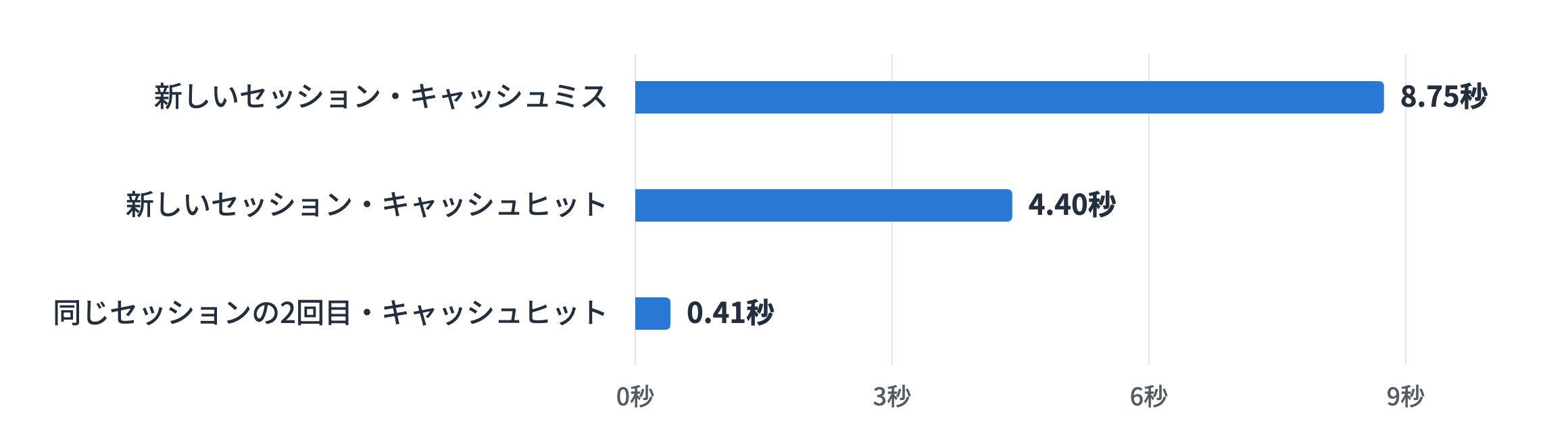
This is because invoke.py creates a new session ID for each call. Each time the session changes, a new instance is restored from the snapshot and reconnects to the cluster.
Reuse the connection within the same session
So let's fix the session ID and invoke three times in a row!
SESSION=$(uuidgen)
uv run invoke.py "経費精算の締め日はいつ?" --tenant acme -s $SESSION
uv run invoke.py "経費精算の締め日はいつ?" --tenant acme -s $SESSION
uv run invoke.py "経費の精算はいつまでに出せばいい?" --tenant acme -s $SESSION
"cache_hit": false,
"timing_ms": { "embedding": 190.2, "vector_search": 3.0, "connect_and_index": 210.2, "agent_invocation": 2654.4, "total": 3190.2 }
呼び出し全体: 5214.2 ms

"cache_hit": true,
"similarity_score": 1.0,
"timing_ms": { "embedding": 160.4, "vector_search": 3.0, "total": 167.8 }
呼び出し全体: 411.0 ms

"cache_hit": true,
"similarity_score": 0.8623,
"timing_ms": { "embedding": 146.5, "vector_search": 2.9, "total": 153.7 }
呼び出し全体: 398.0 ms
From the second call on, connect_and_index disappears, and on hits the response came back in about 160 ms within the Runtime and about 0.4 seconds overall! The first connection took 210 ms, and it varied from about 0.2 to 2.4 seconds depending on the session.
Check that tenant filtering works
This time we'll send the question saved under acme as globex.
SESSION=$(uuidgen)
uv run invoke.py "VPNに接続する方法を教えて" --tenant globex -s $SESSION
uv run invoke.py "VPNのつなぎ方を知りたい" --tenant globex -s $SESSION
"cache_hit": false,
"model_id": "jp.anthropic.claude-haiku-5-5",

"cache_hit": true,
"similarity_score": 0.8661,
"cache_key": "cache:globex:b32d0012f03439a593d0514c8135ef0a",
Even though exactly the same question exists under acme, it was a miss for globex, and the answer was generated by the LLM. The second time, globex's key (cache:globex:...) was hit, so you can see the cache is separated per tenant!
Run full-text search and aggregation from the local PC
Let's connect directly to the cache from the local PC and check!
The connection settings use the same GLIDE IamAuthConfig as the agent, and no tunnel or bastion host is used!
First, we'll search the cached questions for "VPN" with full-text search. For aggregation, I also added one entry, "How do I apply for paid leave?", to globex with invoke.py.
# Search cached question text by keyword using full-text search
command = ["FT.SEARCH", INDEX_NAME, f"@query:{args.query}",
           "RETURN", "3", "query", "tenant", "hits"]
uv run cache_ops.py text 'VPN'
uv run cache_ops.py text 'VPN*'
== text VPN
[ 0 ]
(35.2 ms)

== text VPN*
[
  2,
  {
    "cache:globex:b32d0012f03439a593d0514c8135ef0a": { "query": "VPNに接続する方法を教えて", "tenant": "globex", "hits": "1" },
    "cache:acme:b32d0012f03439a593d0514c8135ef0a": { "query": "VPNに接続する方法を教えて", "tenant": "acme", "hits": "2" }
  }
]
(45.7 ms)
Huh, "VPN" returned 0 results, while the prefix match "VPN*" returned 2.
This is because Valkey's full-text search splits sentences into words at whitespace and symbols.
When I checked the characters used as delimiters with FT.INFO, they were only half-width symbols.
punctuation: ,.<>{}[]"':;!@#$%^&*()-+=~/\|?
Japanese sentences aren't separated by spaces, so "Tell me how to connect to the VPN" becomes a single word as a whole and didn't match "VPN". For the same reason, "expense reimbursement*" matched "When is the expense reimbursement deadline?", but "deadline*", which is in the middle of the sentence, returned 0 results.
We'll try a way to search by Japanese words after the aggregation!
Next, let's try aggregation. We'll calculate the number of cache entries and the total hit count per tenant.
# Aggregate the number of cache entries and the total hit count per tenant
command = ["FT.AGGREGATE", INDEX_NAME, "@hits:[-inf +inf]",
           "LOAD", "2", "@tenant", "@hits",
           "GROUPBY", "1", "@tenant",
           "REDUCE", "COUNT", "0", "AS", "entries",
           "REDUCE", "SUM", "1", "@hits", "AS", "total_hits",
           "SORTBY", "2", "@total_hits", "DESC"]
@hits:[-inf +inf] is a condition that targets all caches that have hits, and it groups by the tenant loaded with LOAD, then calculates the count (COUNT) and the sum of hits (SUM).
uv run cache_ops.py stats
[
  { "tenant": "acme", "entries": "2", "total_hits": "4" },
  { "tenant": "globex", "entries": "2", "total_hits": "1" }
]
(55.0 ms)
acme's 2 cache entries have been used a total of 4 times! Next, let's also extract the top frequently hit questions!
uv run cache_ops.py ranking
[
  { "hits": "2", "query": "VPNに接続する方法を教えて", "tenant": "acme" },
  { "hits": "2", "query": "経費精算の締め日はいつ?", "tenant": "acme" },
  { "hits": "1", "query": "VPNに接続する方法を教えて", "tenant": "globex" }
]
(122.2 ms)
The numbers match the invocations so far. Since you can aggregate directly from the cache which answers are used often, it looks useful for tuning the threshold and reviewing answers.
Split words with Janome and search by Japanese words
As we saw in the full-text search, a Japanese sentence becomes a single word as a whole.
If you want to search by word, there is a way to separate words with spaces using morphological analysis, so I tried it with Janome. Janome is a morphological analysis library that runs with Python alone, and since it bundles a dictionary, you can use it right away with uv add janome.
From here on, I register five question texts in a separate verification index (ja_idx) and compare the search results between the original text and the word-segmented field. The word segmentation extracts nouns, verbs, and adjectives with Janome and converts them to their base forms; this is stored in a separate field (tokens), and search terms are split in the same way.
export VALKEY_HOST=<スタック出力のCacheEndpoint> VALKEY_CACHE_NAME=semantic-cache
uv run janome_search.py setup
uv run janome_search.py search 締め日
uv run janome_search.py cleanup
setup registers the verification index and question texts, and search runs both a prefix match on the original text and a search on the word-segmented field.
@query:締め日*            -> 0件
@tokens:締め日            -> 1件 ["経費精算の締め日はいつ?"]
@tokens:つなぐ            -> 1件 ["VPNのつなぎ方を知りたい"]
@tokens:申請 @tokens:方法 -> 1件 ["有給休暇の申請方法は?"]
We can now search by words in the middle of a sentence, and a search for "connect" also found "how to connect"! If you want to search by keyword, it seems you need to do some preparation like this in advance.
The script is in the repository at client/janome_search.py.
If you use this in the actual semantic cache, the word segmentation would be built into the agent's processing. When saving the cache, you segment the question text and put it in tokens too, and when running full-text search from a local PC or similar, you split the search terms in the same way.
# Create the Tokenizer in __init__ (at startup, before the snapshot)
self.tokenizer = Tokenizer()

def tokenize(self, text: str) -> str:
    """内容語の基本形を空白区切りにする(例: 経費 精算 締め日 いる)"""
    return " ".join(t.base_form for t in self.tokenizer.tokenize(text)
                    if t.part_of_speech.split(",")[0] in CONTENT_POS)

# Add the word-segmented text to the fields saved in store()
await client.hset(key, {
    "query": query,
    "tokens": self.tokenize(query),
    # answer, tenant, hits, and embedding are the same as before
})
We also add a TEXT field for tokens to the index.
When I actually integrated it into the agent and deployed it, I could search the word-segmented text saved by the Runtime from the local PC with queries like @tokens:deadline. However, word segmentation sometimes took longer than on the local PC. Since this is added on top of the response time on a cache miss, there seems to be room for ingenuity in how to integrate it. For example, the following approaches are conceivable.
- Segment the text after returning the answer and add only tokens afterward
- Segment caches that don't have tokens yet in bulk with a periodic batch process
- Lighten the processing by using 2-character splits (bigrams) that don't use a dictionary
These are just examples, though!
Cleanup
When verification is finished, delete the stack.
pnpm cdk destroy
When Serverless fits and cost estimates
The pricing models of Serverless and node-based differ. I've summarized them together with the official documentation's guidelines on which to use.
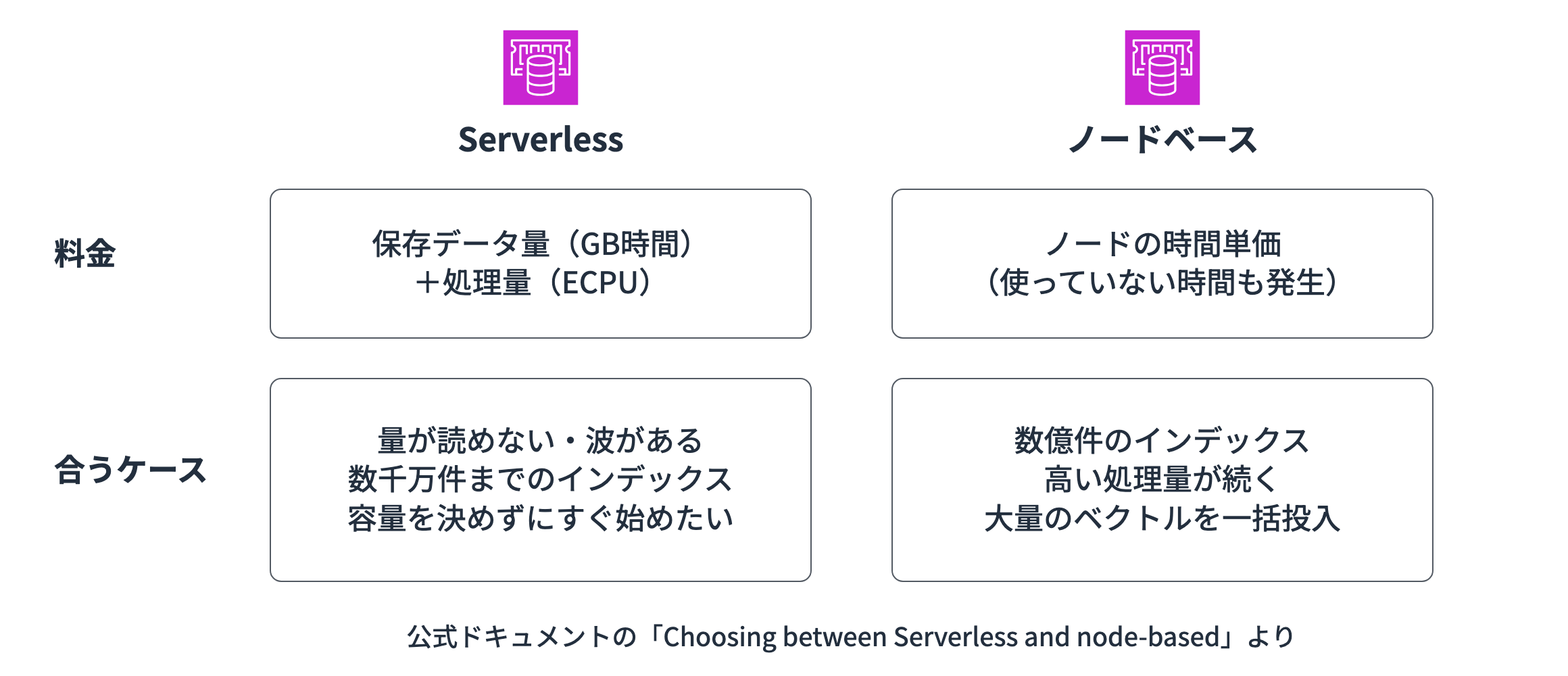
In the early stages or in verification environments, pay-as-you-go Serverless seems like a good fit!
The unit prices in the Tokyo region at the time of writing are as follows.
| Item | Unit price |
|---|---|
| Data storage | $0.101 per GB-hour (minimum 100 MB) |
| ECPU | $0.0027 per million ECPUs |
| Search index | 30% of the target text and numeric data and 10% of the vector data are added to the stored amount |
As a basic rule, reading or writing 1 KB of data is 1 ECPU. Running heavy commands such as searches consumes proportionally more ECPUs. In the pricing page's calculation example, one search is considered to take 1,000 times the processing time of a GET and is estimated at 1,000 ECPUs. Based on this assumption, I made a graph of monthly search counts and the estimated cost.
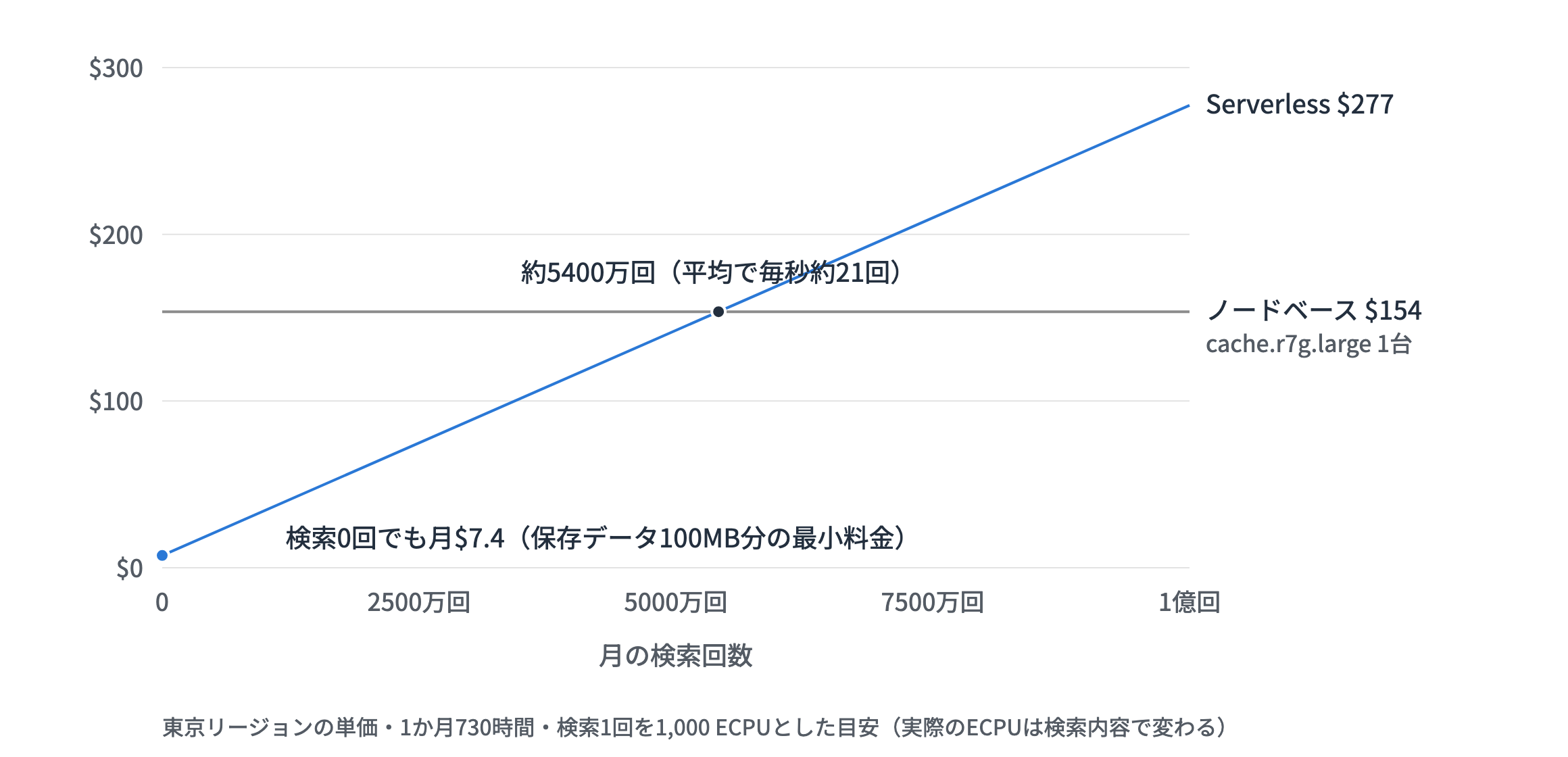
The cache this time has only a few entries, so the stored data fits within the 100 MB minimum charge, and with no searches it costs about $7.4 per month. It increases by $2.7 per million searches, so it breaks even with running one node-based cache.r7g.large at $154 per month at around 54 million searches per month (about 21 per second on average).
With a configuration that calls Bedrock from inside a VPC as last time, the NAT Gateway charge (about $45 per month in Tokyo) is also added, so if you just want to use a cache server, the running cost feels high.
However, the ECPUs per search vary depending on the query contents and index size. When making an actual estimate, you'll want to run queries close to production and check the ECPU consumption in CloudWatch (ElastiCacheProcessingUnits)!
Conclusion
The VPC-related configuration that was troublesome last time has become much cleaner with Serverless and the public endpoint!
I hope this article is of some help. Thank you for reading to the end!