I tried building a low-cost RAG with Gemma 4 31B + S3 Vectors + AgentCore

This page has been translated by machine translation. View original
Introduction
Hello, I'm Kamino from the consulting department, and I want to get better at parking.
The other day, suzuki.ryo wrote an article about Gemma 4 31B's Japanese performance and pricing.
As mentioned in that article, Gemma 4 31B's token price is $0.14 / 1M tokens for input and $0.40 / 1M tokens for output. Compared to other models, it looks like this:
| Model | Input (/ 1M tokens) | Output (/ 1M tokens) | Compared to Gemma 4 31B |
|---|---|---|---|
| Gemma 4 31B | $0.14 | $0.40 | 1x |
| Claude Haiku 4.5 | $0.80 | $4.00 | 5.7〜10x |
| Claude Sonnet 4.6 | $3.00 | $15.00 | 21〜37x |
| Claude Opus 4.8 | $5.00 | $25.00 | 35〜62x |
Gemma 4 is incredibly cheap...!!
I thought it would be interesting to build a RAG as an AI agent if it handles Japanese reasonably well and supports tool calls, so I built a RAG using Amazon Bedrock AgentCore + S3 Vectors.
Since the LLM is cheap, I wanted to keep the vector store costs low too. S3 Vectors incurs charges for storage, Query API calls, and the amount of vectors processed during queries, but for a small number of documents, it's quite affordable. I created a template using Gemma 4 31B + S3 Vectors to dispel the impression that RAG seems expensive and hard to try. Here's the repository.
Here's what it looks like in action.
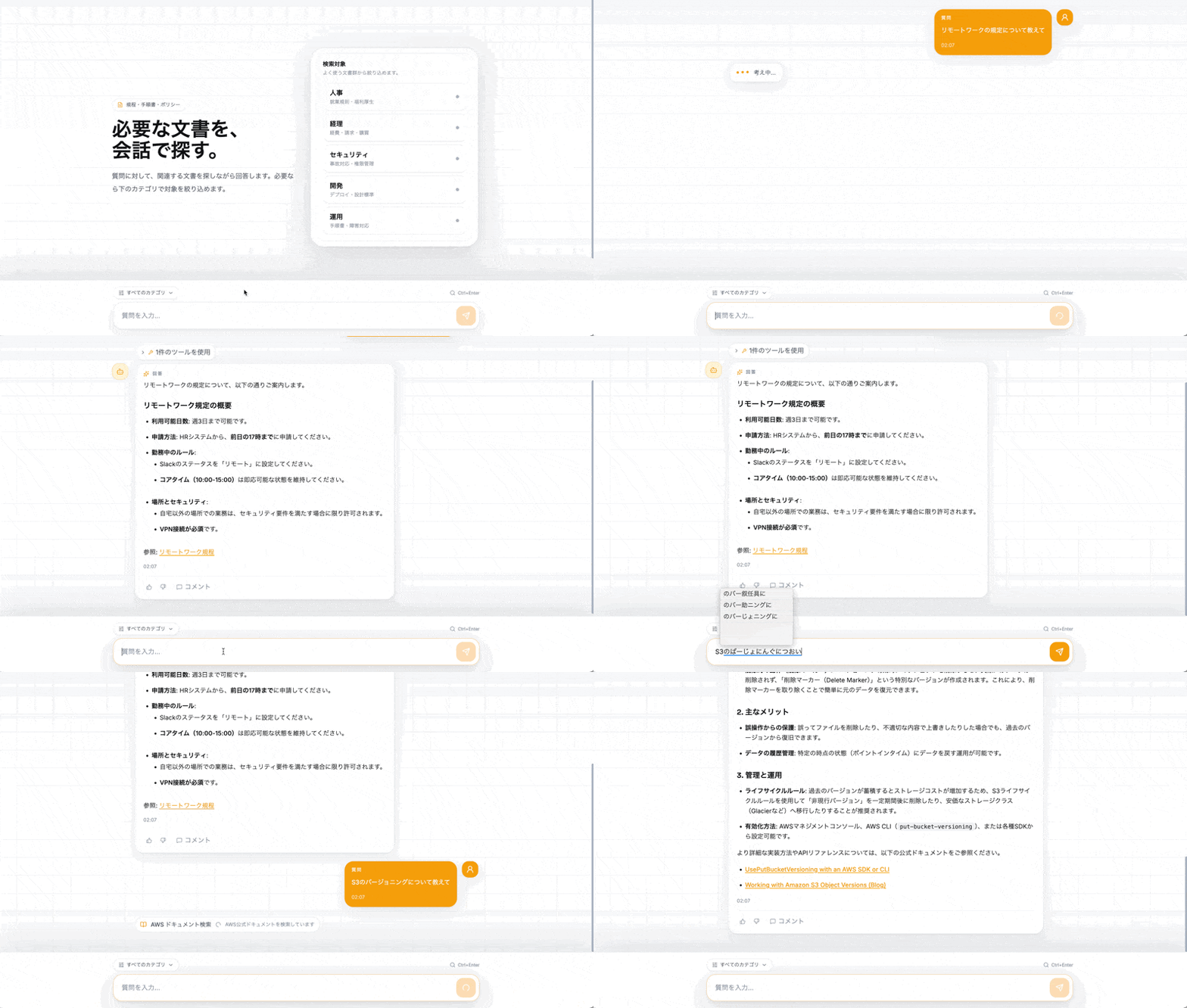
I built this collaboratively with AI and it turned out nicely.
I'd be happy if this makes you want to try RAG! After all, trying it out first is what matters most.
This article introduces the architecture and key implementation points. For the full code and detailed implementation, please refer to the repository.
Prerequisites
The environment used this time is as follows:
- Node.js v24.16.0
- Python v3.13.11
- AWS CLI
- Docker (used for container builds of AgentCore Runtime)
- Gemma 4 31B must be available via bedrock-mantle (as of 2026-06-14, available in us-east-1 etc.; note that the Tokyo region is not available)
Architecture
Amplify is used as the frontend, with an architecture centered around AgentCore.
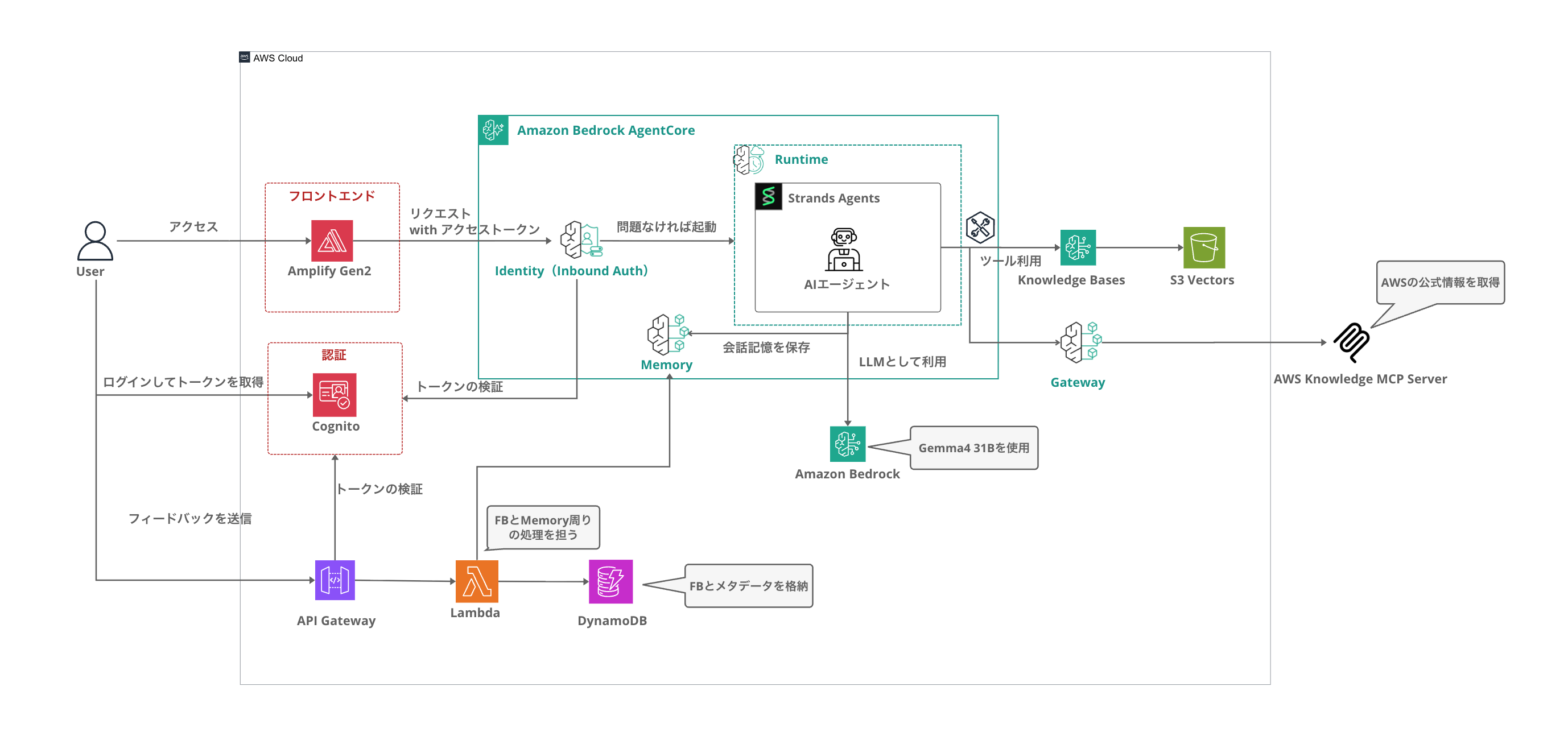
| Component | Technology |
|---|---|
| LLM | Gemma 4 31B (via bedrock-mantle's OpenAI-compatible API) |
| Agent | Strands Agents SDK |
| Knowledge Base | Bedrock Knowledge Bases + S3 data source |
| Vector Store | S3 Vectors (Titan Embedding v2, 1024 dim, cosine) |
| Conversation Memory | AgentCore Memory |
| Agent Execution Environment | AgentCore Runtime |
| MCP Gateway (optional) | AgentCore Gateway + AWS Knowledge MCP Server |
| Authentication | Cognito |
| History API | API Gateway REST API + Cognito User Pool Authorizer + Lambda + AgentCore Memory + DynamoDB |
| Feedback | API Gateway REST API + Cognito User Pool Authorizer + Lambda + DynamoDB |
| Frontend | React + Vite + Tailwind CSS v4 |
| IaC | Amplify Gen 2 + CDK |
The features available are roughly as follows. The minimum features necessary for searching via chat have been implemented.
- Search and answer from the knowledge base in chat format
- Narrow down search targets by category (HR, Accounting, Security, Development, Operations)
- Conversation history retention via AgentCore Memory
- AWS official documentation also searchable as MCP tools via Gateway (optional)
- Feedback (thumbs up / needs improvement / comments) on responses recorded in DynamoDB
- Response quality evaluation script using LLM-as-a-Judge (includes a 15-question test set)
Deployment
Clone the repository and run npm install → npx ampx sandbox --once to create all the following resources at once:
- Cognito (authentication)
- Bedrock Knowledge Base + S3 Vectors
- Sample document upload to S3 and KB sync
- AgentCore Runtime (Gemma 4 31B agent)
- AgentCore Memory
- REST API + Lambda + DynamoDB for conversation history retrieval
- REST API + Lambda + DynamoDB for feedback
git clone https://github.com/yuu551/gemma4-31b-agentcore-sample.git
cd gemma4-31b-agentcore-sample
npm install
npx ampx sandbox --once
Once deployment is complete, amplify_outputs.json is generated. The frontend automatically reads the Runtime ARN and Memory ID from this file, so no environment variable configuration is needed.
npm run dev
Opening it in a browser will display the Cognito authentication screen. After signing up, you can try knowledge search from the chat screen.
If you want to enable AgentCore Gateway, deploy with the environment variable set.
ENABLE_GATEWAY=true npx ampx sandbox --once
Enabled/disabled is managed in amplify/parameters.ts.
With the sandbox command, the frontend is hosted locally, but you can also host it on Amplify, so please refer to the Readme on GitHub for details.
Why S3 Vectors Was Chosen
Let's compare it with common options for RAG vector stores.
| Vector Store | Minimum Monthly Cost | Pricing Model |
|---|---|---|
| OpenSearch Serverless (Classic) | $350~ | OCU hourly billing (minimum 2 OCUs) |
| S3 Vectors | $0~ | Fully pay-as-you-go |
OpenSearch Serverless for Knowledge Bases (Classic, not NextGen) incurs hourly charges for the minimum OCU, which can easily run into hundreds of dollars per month for testing purposes. S3 Vectors charges only for what you use, making it perfect for PoCs or internal tools with a small number of documents. However, you should be aware that hybrid search is not available and there is more latency compared to OpenSearch, but if you're just at the stage of trying things out quickly, you don't need to be too concerned about that.
In this case, S3 Vectors is used as the backend for Bedrock Knowledge Bases. Since queries are made via the Retrieve API, you can leverage managed features such as document syncing and vector conversion, while keeping vector store costs limited to S3 Vectors' pay-as-you-go pricing.
Building Knowledge Base + S3 Vectors with CDK
In CDK, the S3 Vectors and Knowledge Base are built using L1 constructs. A vector store is created with CfnVectorBucket / CfnIndex, and it's linked by specifying S3_VECTORS in the storageConfiguration of CfnKnowledgeBase.
import * as s3vectors from "aws-cdk-lib/aws-s3vectors";
import * as bedrock from "aws-cdk-lib/aws-bedrock";

const vectorBucket = new s3vectors.CfnVectorBucket(ragStack, "VectorBucket", {});

const vectorIndex = new s3vectors.CfnIndex(ragStack, "VectorIndex", {
  vectorBucketArn: vectorBucket.attrVectorBucketArn,
  indexName: "company-docs",
  dataType: "float32",
  dimension: 1024,
  distanceMetric: "cosine",
  metadataConfiguration: {
    nonFilterableMetadataKeys: [
      "AMAZON_BEDROCK_TEXT", "AMAZON_BEDROCK_METADATA",
      "x-amz-bedrock-kb-source-uri", "x-amz-bedrock-kb-chunk-id",
      "x-amz-bedrock-kb-data-source-id",
    ],
  },
});

const kb = new bedrock.CfnKnowledgeBase(ragStack, "KnowledgeBase", {
  name: "agentic-rag-kb",
  roleArn: kbRole.roleArn,
  knowledgeBaseConfiguration: {
    type: "VECTOR",
    vectorKnowledgeBaseConfiguration: {
      embeddingModelArn: `arn:aws:bedrock:${cdk.Aws.REGION}::foundation-model/amazon.titan-embed-text-v2:0`,
    },
  },
  storageConfiguration: {
    type: "S3_VECTORS",
    s3VectorsConfiguration: {
      vectorBucketArn: vectorBucket.attrVectorBucketArn,
      indexName: "company-docs",
    },
  },
});
S3_VECTORS is specified for the type in storageConfiguration, and the VectorBucket and Index are linked via s3VectorsConfiguration. For ingesting documents from the S3 data source into the KB, a CDK custom resource is used to automatically run the document ingestion job at deploy time.
The metadata keys used internally by Knowledge Bases are specified in nonFilterableMetadataKeys of metadataConfiguration. S3 Vectors metadata has a size limit, and if you try to register these keys as filterable, you'll exceed the limit and document ingestion will error. Note that metadata keys not used for filtering must be placed in nonFilterableMetadataKeys.
Running Gemma 4 31B with Strands Agent
Gemma 4 31B is called via bedrock-mantle's OpenAI-compatible API.
Using OpenAIResponsesModel from the Strands Agents SDK, it works as an agent capable of tool execution.
from strands import Agent, tool
from strands.models.openai_responses import OpenAIResponsesModel
from aws_bedrock_token_generator import provide_token

BASE_URL = f"https://bedrock-mantle.{REGION}.api.aws/openai/v1"

model = OpenAIResponsesModel(
    model_id="google.gemma-4-31b",
    client_args={
        "api_key": provide_token(region=REGION),
        "base_url": BASE_URL,
    },
)

agent = Agent(
    model=model,
    tools=[knowledge_search, list_categories],
    system_prompt=SYSTEM_PROMPT,
)
bedrock-mantle has a different endpoint from regular Bedrock (Converse API), and you obtain a bearer token using aws-bedrock-token-generator and pass it. aws-bedrock-token-generator is a library that generates short-lived tokens for bedrock-mantle from AWS credentials, and you can use it simply by calling provide_token(region=REGION).
The method of calling bedrock-mantle from Strands is also introduced in the article below, which is a useful reference!
Agent Search Tool
As an agent tool, a search that calls the Retrieve API of Bedrock Knowledge Bases is implemented.
@tool
def knowledge_search(query: str, category: str = "") -> str:
    """Searches internal documents from the knowledge base."""
    kwargs = {
        "knowledgeBaseId": KNOWLEDGE_BASE_ID,
        "retrievalQuery": {"text": query},
        "retrievalConfiguration": {
            "vectorSearchConfiguration": {"numberOfResults": 5}
        },
    }

    if category and category in CATEGORIES:
        kwargs["retrievalConfiguration"]["vectorSearchConfiguration"]["filter"] = {
            "equals": {"key": "category", "value": category}
        }

    response = bedrock_agent.retrieve(**kwargs)
    # Format and return results
Rather than querying S3 Vectors directly, the search goes through the Knowledge Bases Retrieve API. The Knowledge Bases side automatically handles the embedding conversion, so the agent only needs to pass the query string. Metadata filtering is also supported, so narrowing down the search to a specific category (HR, Accounting, Security, Development, Operations) is possible.
Requesting AgentCore Runtime from SPA
AgentCore Runtime supports JWT authentication, so it can be called directly from the frontend.
const runtime = new agentcore.Runtime(ragStack, "AgenticRagRuntime", {
  runtimeName: "agentic_rag_gemma4",
  agentRuntimeArtifact: agentArtifact,
  authorizerConfiguration: agentcore.RuntimeAuthorizerConfiguration.usingCognito(
    backend.auth.resources.userPool,
    [backend.auth.resources.userPoolClient],
  ),
});
Simply by specifying Cognito in the Runtime's authorizerConfiguration, the frontend can send requests with Authorization: Bearer <accessToken>.
const session = await fetchAuthSession();
const accessToken = session.tokens?.accessToken?.toString();

const response = await fetch(
  `https://bedrock-agentcore.${REGION}.amazonaws.com/runtimes/${runtimeArn}/invocations?qualifier=DEFAULT`,
  {
    method: "POST",
    headers: {
      Authorization: `Bearer ${accessToken}`,
      "Content-Type": "application/json",
      Accept: "text/event-stream",
      "X-Amzn-Bedrock-AgentCore-Runtime-Session-Id": sessionId,
    },
    body: JSON.stringify({ prompt, sessionId, userId }),
  },
);
The Runtime ARN can be read from amplify_outputs.json. If you output it on the CDK side with backend.addOutput({ custom: { runtime_arn: runtime.agentRuntimeArn } }), you can simply import it on the frontend.
Frontend
Since Amplify Gen 2 is CDK-based, Cognito configuration can also be done with just a few lines in amplify/auth/resource.ts. On the frontend side, simply wrapping the entire app with the @aws-amplify/ui-react Authenticator component completes sign-up, login, and token management.
import { Authenticator } from "@aws-amplify/ui-react";

function App() {
  return (
    <Authenticator>
      {({ user }) => <ChatApp user={user} />}
    </Authenticator>
  );
}
It's great that authenticated screens can be created this easily during the verification phase.
Streamdown is used for displaying chat responses.
Streamdown is a library that renders markdown flowing in via SSE in real time, suppressing flickering and layout jumps during streaming. It also supports syntax highlighting for code blocks and was simple to integrate.
<Streamdown isAnimating={!!message.isStreaming}>
  {processedContent}
</Streamdown>
For details on the frontend implementation, please refer to the src/ directory in the repository.
Retaining Conversation History with AgentCore Memory
AgentCore Memory and Strands are integrated to retain conversation history across sessions.
from bedrock_agentcore.memory.integrations.strands.config import AgentCoreMemoryConfig
from bedrock_agentcore.memory.integrations.strands.session_manager import AgentCoreMemorySessionManager

config = AgentCoreMemoryConfig(
    memory_id=MEMORY_ID,
    actor_id=user_id,
    session_id=session_id,
)
session_manager = AgentCoreMemorySessionManager(
    agentcore_memory_config=config,
    region_name=REGION,
)

agent = Agent(
    model=model,
    tools=tools,
    system_prompt=SYSTEM_PROMPT,
    session_manager=session_manager,
)
Simply passing AgentCoreMemorySessionManager to Strands' session_manager automates conversation saving and restoration. Since conversations are separated per user and per session, it's safe to use in multi-user environments.
Managing History List
Conversation content is saved in AgentCore Memory, and when restoring history, the ListEvents API is called via API Gateway + Cognito User Pool Authorizer + Lambda. The configuration uses the JWT sub claim as the actor_id. This ensures that only the history of the currently logged-in user is displayed.
Also, session titles and last updated timestamps displayed in the sidebar are saved as metadata in DynamoDB. After sending a message, the title and last message are updated, and the sidebar references this metadata.
AWS Documentation Search via AgentCore Gateway (Optional)
AWS official documentation can be searched as an MCP tool through AgentCore Gateway. It becomes enabled when deploying with ENABLE_GATEWAY=true.
const gateway = new agentcore.Gateway(ragStack, "KnowledgeGateway", {
  gatewayName: "agentic-rag-gateway",
  authorizerConfiguration: agentcore.GatewayAuthorizer.usingAwsIam(),
});

new agentcore.CfnGatewayTarget(ragStack, "AWSKnowledgeTarget", {
  gatewayIdentifier: gateway.gatewayId,
  name: "aws-knowledge",
  targetConfiguration: {
    mcp: { mcpServer: { endpoint: "https://knowledge-mcp.global.api.aws" } },
  },
});
From the agent side, mcp-proxy-for-aws is used to connect to the Gateway with IAM authentication.
from mcp_proxy_for_aws.client import aws_iam_streamablehttp_client
from strands.tools.mcp import MCPClient

mcp_factory = lambda: aws_iam_streamablehttp_client(
    endpoint=GATEWAY_URL,
    aws_region=REGION,
    aws_service="bedrock-agentcore",
)
tools.append(MCPClient(mcp_factory))
AWS Knowledge MCP Server is an MCP server hosted by AWS, and it can be used simply by adding it as a Gateway target. Since you can search across both internal documents and AWS official documentation, this can be a useful reference if you want to also handle technical questions. It also serves as an example of how to use Gateway. There's no need to force its use.
For configurations using IAM authentication via Gateway, please refer to the article below as needed.
Extending the Gateway
In this case, only the AWS Knowledge MCP Server is added as a Gateway target, but AgentCore Gateway can also accept Lambda, custom MCP Servers, and even AgentCore Runtime itself as targets. For example, you can add internal API calls, external service integrations, custom processing, etc. as tools.
For example, to call another AgentCore Runtime as a tool via Gateway, specify the invocations endpoint of that Runtime as the target and configure IAM authentication.
const runtimeEndpoint =
  `https://bedrock-agentcore.${cdk.Aws.REGION}.amazonaws.com/runtimes/` +
  encodeURIComponent(anotherRuntime.agentRuntimeArn) +
  "/invocations";

new agentcore.CfnGatewayTarget(ragStack, "MyAgentTarget", {
  gatewayIdentifier: gateway.gatewayId,
  name: "my-agent",
  description: "Internal data analysis agent",
  targetConfiguration: {
    mcp: {
      mcpServer: {
        endpoint: runtimeEndpoint,
      },
    },
  },
  credentialProviderConfigurations: [
    {
      credentialProviderType: "GATEWAY_IAM_ROLE",
      credentialProvider: {
        iamCredentialProvider: {
          service: "bedrock-agentcore",
        },
      },
    },
  ],
});
The endpoint format is https://bedrock-agentcore.{region}.amazonaws.com/runtimes/{URL-encoded ARN}/invocations. By specifying an IAM role in credentialProviderConfigurations, the Gateway automatically adds SigV4 signatures to requests.
Without changing the agent's own code, adding targets like this makes it possible to expand what it can do.
For configurations using IAM authentication with MCP Server targets in Gateway, the article below introduces it in detail, so please refer to it as needed.
Feedback Collection
When operating a RAG, user feedback is essential for improving response quality. This time, a mechanism is included to allow users to send "thumbs up / needs improvement" ratings and comments for each response.
API Gateway REST API + Cognito User Pool Authorizer + Lambda + DynamoDB is used as the feedback submission destination.
const feedbackApi = new apigateway.RestApi(ragStack, "FeedbackApi", {
  restApiName: "agentic-rag-feedback",
  deployOptions: { stageName: "prod" },
});

const feedbackAuthorizer = new apigateway.CognitoUserPoolsAuthorizer(ragStack, "FeedbackAuthorizer", {
  cognitoUserPools: [backend.auth.resources.userPool],
});

feedbackResource.addMethod("POST", new apigateway.LambdaIntegration(feedbackFn), {
  authorizer: feedbackAuthorizer,
  authorizationType: apigateway.AuthorizationType.COGNITO,
});
Authentication is done with a Cognito ID token, so who gave feedback on which response can be linked. Feedback stored in DynamoDB can be checked using aggregation and CSV export scripts.
npm run feedback:summary -- --table <TABLE_NAME>
npm run feedback:export -- --table <TABLE_NAME> -o feedback.csv
In addition to automatic LLM-as-a-Judge evaluation, collecting real user feedback gives you material for making decisions about prompt improvements and document additions.
RAG Quality Evaluation with LLM-as-a-Judge
Once you've built a RAG, you'll naturally wonder about its accuracy. I used Gemma 4 31B itself as the evaluating LLM to automatically assess response quality for 15 test questions from three perspectives. The evaluation script is prepared in eval/evaluate.py.
npm run eval -- \
  --runtime-arn <RUNTIME_ARN> \
  --region us-east-1
The Runtime ARN is listed in the custom.runtime_arn field of amplify_outputs.json generated after deployment. When executed, it retrieves RAG responses for all 15 questions, and Gemma 4 31B acts as a judge to score them from 1 to 5 on three axes: Faithfulness / Relevancy / Completeness.
[1/15] q01: How many days per week is remote work possible?...
  RAG response: 289 characters, 1 tool call, 6.9 seconds
  Evaluation: F=5 R=5 C=5 (6.9s)
  Reason: Completely covers the information in the correct answer including "up to 3 days per week" and "apply from HR system by 5pm the previous day", and references the correct document

[2/15] q02: From what amount does taxi fare expense reimbursement require prior approval?...
  RAG response: 152 characters, 1 tool call, 6.1 seconds
  Evaluation: F=5 R=5 C=5 (4.5s)
  Reason: The response completely matches the content of the correct answer, referencing the correct document and answering accurately
These are evaluation results for the sample documents.
| Perspective | Content | Score |
|---|---|---|
| Faithfulness | Whether it's based on KB content (presence of hallucinations) | 5.00 / 5.00 |
| Relevancy | Whether it references the correct document to answer | 5.00 / 5.00 |
| Completeness | Whether it covers the expected information | 4.47 / 5.00 |
| Overall | - | 4.82 / 5.00 |
All 15 questions were answered by searching the correct documents. The slightly lower Completeness score reflects a tendency to omit supplementary information such as RPO (Recovery Point Objective) and MFA requirements. Since the main answers come back accurately, I think this is sufficient accuracy for a model in this price range.
This is based on a simple one-question-one-answer test set and simple evaluation criteria, so scores tend to be high — please treat these as reference values. If you replace them with your own documents, you can also rewrite the test questions in eval/questions.json and evaluate against the new documents using the same script. It's designed to be used alongside the feedback collection mechanism to drive an improvement cycle.
Examples of questions used in evaluation
- How many days per week is remote work possible? Please also tell me how to apply.
- From what amount does taxi fare expense reimbursement require prior approval?
- If you discover a security incident, who should you contact?
- Are there days of the week when production deployments are prohibited?
- Please tell me the approval level required for procurement of 5 million yen or more.
Using Your Own Documents
This sample includes 20 fictional business documents, but you can switch to your own documents simply by replacing the contents of seed/docs/.
Place text files and metadata files as pairs.
seed/docs/
├── my-document.txt                  # Document body
├── my-document.txt.metadata.json    # Metadata (category, title)
{
  "metadataAttributes": {
    "category": {
      "value": { "type": "STRING", "stringValue": "hr" }
    },
    "title": {
      "value": { "type": "STRING", "stringValue": "Remote Work Policy" }
    }
  }
}
On redeployment, BucketDeployment uploads to S3, and the custom resource automatically runs the document ingestion job. Once you've replaced the documents, rewriting the test questions in eval/questions.json also lets you evaluate against the new documents using LLM-as-a-Judge.
Cost Estimate
This is a rough guide for operating with 1,000 questions per month. Please note that these are estimates only and actual costs will vary based on usage.
The assumptions are us-east-1, Gateway enabled, LLM-as-a-Judge not executed, sample documents only, and simple queries (simple Q&A level).
| Item | Estimated Monthly Cost |
|---|---|
| Gemma 4 31B (inference) | ~$0.34 ~ $1.00 |
| Embedding + S3 Vectors | ~$0.05~$0.20 |
| AgentCore Runtime | ~$0.50~$2 |
| AgentCore Memory + Gateway | ~$0.50~$1 |
| Cognito | $0 (within 10K MAU) |
| Amplify Hosting | ~$0.50~$3 |
| API Gateway + Lambda + DynamoDB | ~$0.01~$0.10 |
| Total | ~$3~$7 / month |
LLM inference and AgentCore Runtime are the main billing components. Compared to the minimum cost of OpenSearch Serverless (from $350/month), using S3 Vectors brings the vector store cost close to zero. For phases where you "just want to get it running first," such as PoCs or internal tools, I think this is a very attractive configuration.
Conclusion
I think many people have the impression that building a RAG is costly and hard to try out.
However, with the configuration introduced here, I hope you can get a feel for how it works without too much cost and without too much hassle.
If you find the potential for adoption here, it's perfectly fine to add features based on this repository, or to do some tuning. It would also be interesting to compare accuracy against frontier models like Claude.
For implementation details, please refer to the repository. If you have feedback, feel free to submit it via Issues!
I hope this article has been helpful in some way. Thank you for reading to the end!!
