
The Story of Implementing Knowledge Base Search by Connecting Vertex AI RAG Engine to Google Chat Bot

This page has been translated by machine translation. View original
Introduction
In Part 1, I built a Google Chat Bot with Cloud Functions + Python + uv, and in Part 2, I implemented a progressive update UX with cardsV2.
This time, we finally get to the main topic — integrating a knowledge base search (RAG) into the bot. I'll walk through the entire process of organizing approximately 300 pieces of internal knowledge data, loading them into the Vertex AI RAG Engine, and enabling the bot to automatically answer user questions.
To get straight to the conclusion: setting up the RAG Engine itself was straightforward, but there were Japanese-specific pitfalls in selecting the embedding model, and the process of identifying the root cause was the biggest learning experience.
Architecture
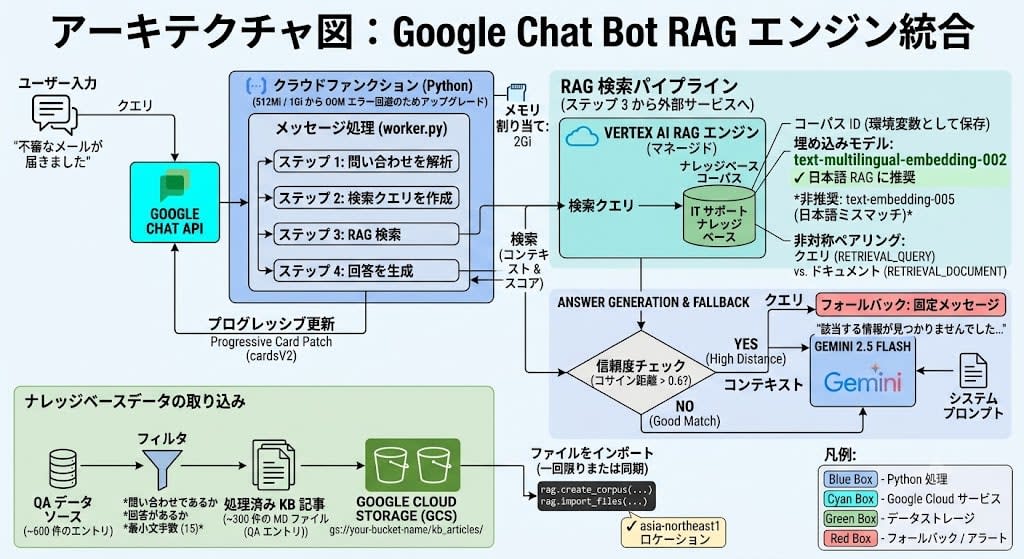
| Item | Choice |
|---|---|
| RAG backend | Vertex AI RAG Engine (managed) |
| Embedding model | text-multilingual-embedding-002 |
| Generation model | Gemini 2.5 Flash |
| Knowledge base | Approximately 300 QA entries (Markdown) |
| Storage | Google Cloud Storage |
| Fallback | Fixed message (guidance to the responsible department) |
Data Preparation: QA Data → KB Entries
Quality Assessment of Source Data
In this case, the source data consisted of approximately 600 QA pairs (question and answer pairs) accumulated internally. The source data was in the format of staff work notes, not user-facing procedure manuals.
Quality Filtering
First, I excluded items that were clearly unsuitable as knowledge entries.
| Filter | Condition | Example |
|---|---|---|
| Non-questions | Items not categorized as inquiries | Work requests, item handovers |
| No answer | Answer field is empty | — |
| Insufficient information | Answer is too short | Fewer than 15 characters |
As a result, roughly half of the "question + meaningful answer" pairs remained.
Policy of Retaining Individual Entries
I adopted a policy of retaining QA pairs as individual KB entries. Initially, I considered an approach of grouping by solution pattern and creating consolidated articles, but I switched to individual retention for the following reasons.
- Preserving variations — Even for the same symptom, the solution differs by situation. Consolidation loses individual context.
- Simplifying the pipeline — Eliminates the need for rule-based matching or manual article creation, making it easy to add new data.
- Synthesis by Gemini — When multiple entries with the same pattern are retrieved in a search, Gemini summarizes the common resolution method in its response, following the instructions in the system prompt.
Handling Source Data in Note Format
When the source data consists of staff work notes (e.g., "Resolved by changing the XX setting"), rather than showing them directly to users, you can instruct Gemini in the system prompt to transform them.
## About the Knowledge Base Format
- The knowledge base contains response records (staff notes).
- When a record is in the format "Resolved by doing XX," please rephrase it as easy-to-follow steps for the user.
- When multiple similar records are included in the search results, please summarize the common resolution method in your response.
Answer quality directly depends on the quality of the source data. To get better answers, improving the descriptions in the source data itself is the most effective approach.
KB Entry Format
Each entry is saved as a Markdown file.
# Excel macros cannot be executed.

**Category**: office

## Resolution

Please change the Trust Center settings.
The question is placed as the title (= the target for matching in vector search), and the answer is placed in the resolution section. The reason for keeping the question is that with the answer alone, lexical matching with the search query can be weak (e.g., the answer may not contain the word "macro").
In the end, approximately 600 items were organized into approximately 300 KB entries.
Setting Up Vertex AI RAG Engine
Why We Chose RAG Engine
With over 300 entries, "context stuffing" — cramming all the text into the prompt — is not realistic. I adopted Vertex AI RAG Engine (managed RAG) for the following reasons:
- Scales without configuration changes even as the KB grows
- Chunking, embedding, and search are managed and require no maintenance
- Operates entirely within the Vertex AI ecosystem with no additional external services required
What Is a Corpus?
A corpus in RAG Engine is a container for the documents that will be searched. Uploaded files are chunked and vectorized within the corpus and stored in a searchable state. It is equivalent to an index in OpenSearch, and you can create multiple corpora for different purposes (e.g., for IT support, HR, or technical documentation).
With OpenSearch, you need to build your own embedding pipeline and k-NN configuration, but with RAG Engine, you simply specify the files and choose an embedding model, and chunking, vectorization, and search index construction are all handled in a managed fashion.
Creating the GCS Bucket and Uploading
First, upload the KB articles to GCS.
# Create GCS bucket
gcloud storage buckets create gs://YOUR_BUCKET_NAME \
  --location=asia-northeast1

# Script to upload KB articles
uv run python scripts/upload_kb.py \
  --project YOUR_PROJECT_ID \
  --bucket YOUR_BUCKET_NAME
upload_kb.py is a script that uploads KB article .md files to GCS, creates a RAG corpus, and imports the files.
from google.cloud import aiplatform, storage
from vertexai import rag

LOCATION = "asia-northeast1"

def main():
    # Initialize SDK only once at the beginning
    aiplatform.init(project=project_id, location=LOCATION)

    # 1. Upload to GCS
    client = storage.Client(project=project_id)
    bucket = client.bucket(bucket_name)
    for md_file in KB_DIR.glob("*.md"):
        blob = bucket.blob(f"kb_articles/{md_file.name}")
        blob.upload_from_filename(str(md_file))

    # 2. Create corpus (first time only)
    corpus = rag.create_corpus(
        display_name="my-it-support-kb",
        description="IT Support Knowledge Base",
    )

    # 3. Import files
    rag.import_files(corpus_name=corpus.name,
                     paths=[f"gs://{bucket_name}/kb_articles/"])
If you omit
locationinaiplatform.init(), it defaults tous-central1. If the corpus is inasia-northeast1, you will get the following error when callingrag.import_files():FAILED_PRECONDITION: Request resource location asia-northeast1 does not match service location us-central1.
Since rag.list_corpora() and rag.create_corpus() work fine but only import_files() fails, it took time to identify the cause. Always run aiplatform.init(location=...) before calling rag.*.
Implementing Search
Search from RAG Engine is performed with rag.retrieval_query().
from vertexai import rag

def retrieve_context(query: str) -> list[dict]:
    response = rag.retrieval_query(
        text=query,
        rag_resources=[rag.RagResource(rag_corpus=corpus_name)],
        rag_retrieval_config=rag.RagRetrievalConfig(
            top_k=5,
            filter=rag.Filter(vector_distance_threshold=0.6),
        ),
    )
    results = []
    for context in response.contexts.contexts:
        results.append({
            "text": context.text,
            "score": context.score,
            "source": context.source_uri,
        })
    return results
vector_distance_threshold is the cosine distance, where a smaller value means higher relevance. Using 0.6 as the threshold, anything above that is judged as "low confidence."
These are easy to confuse, so let me clarify. Cosine similarity ranges from -1 to 1, where values closer to 1 indicate closer meaning. Cosine distance is the inverse, calculated as
1 - similarity, ranging from 0 to 2, where values closer to 0 mean closer meaning. Since the score returned by RAG Engine is cosine distance, a smaller value = a better match.
Metric Range Better Direction Cosine Similarity -1 to 1 Higher (1 = identical) Cosine Distance 0 to 2 Lower (0 = identical)
Answer Generation and Fallback Strategy
Depending on the confidence of the search results, two strategies are used.
def query(question: str) -> str:
    # 1. Search KB
    contexts = retrieve_context(question)

    # 2. Confidence check
    if not contexts or all(c["score"] > 0.6 for c in contexts):
        # Low confidence → honestly return that no information was found in KB
        return "No relevant information was found. Please contact the responsible department."

    # 3. Generate answer using KB information
    return generate_answer(question, contexts)
| Search Score | Strategy | Reason |
|---|---|---|
| < 0.6 (good match) | Gemini answers using KB information | Provides accurate company-specific procedures |
| ≥ 0.6 (low confidence) | Fixed message | Do not speculate on information not in the KB. Guide to the responsible department. |
There is an important design decision here. An architecture that falls back to Google Search grounding (a feature where Gemini answers based on Google search results) for low-confidence cases is also technically possible. However, I adopted the policy of not answering with information outside the knowledge base. For an internal bot, "I don't know, please ask the person in charge" is safer than inaccurate general information.
Obstacle: Japanese Search Quality Was Catastrophic
The setup went smoothly, but when I actually ran tests, some queries returned completely irrelevant search results.
Symptoms
=== "VBA macro cannot be executed" ===
  0.26 | office_macro_blocked.md  ✅ Correct

=== "Cannot log in to the internal system" ===
  0.18 | system_user_lock.md  ✅ Correct

=== "I received a suspicious email" ===
  0.44 | smartphone_google_photos.md  ❌ Completely wrong
Queries containing English or katakana technical terms like VBA or Google Drive searched accurately, but queries in pure Japanese like "suspicious email" failed completely.
Moreover, the article title was "Response when a suspicious email is received" — almost identical text to the query.
Isolating the Cause: Chunking or Embedding?
There were two possible causes.
- Chunking issue — RAG Engine is splitting the file inappropriately, separating the title from the body.
- Embedding model issue — The default
text-embedding-005is not correctly capturing semantic similarity for Japanese text.
Verifying Chunking
I ran a search targeting only a specific file and checked the chunks created by RAG Engine.
response = rag.retrieval_query(
    text="I received a suspicious email",
    rag_resources=[rag.RagResource(
        rag_corpus=corpus,
        rag_file_ids=["<suspicious_email_file_id>"],
    )],
    rag_retrieval_config=rag.RagRetrievalConfig(
        top_k=5,
        filter=rag.Filter(vector_distance_threshold=1.0),
    ),
)
The result showed that the chunk contained the full article text. Since the file was small (approximately 30 lines), it was not split — 1 file = 1 chunk — so chunking was not the issue.
Verifying the Embedding Model
Next, I manually embedded the same text and calculated the cosine distance.
from vertexai.language_models import TextEmbeddingModel, TextEmbeddingInput

model = TextEmbeddingModel.from_pretrained("text-embedding-005")

query = "I received a suspicious email"
article = "Response when a suspicious email is received..."
unrelated = "Google Photos sync settings on smartphone..."

# Embed without task type (default)
embeddings = model.get_embeddings([query, article, unrelated])
# → query vs article: 0.27 (good!)
# → query vs unrelated: 0.46
With the default task type, 0.27 correctly identifies them. So why does it become 0.46 in RAG Engine?
The Root Cause: Asymmetric Task Type Pairing
text-embedding-005 has a concept called task type, where the same text generates different vectors depending on the task type.
How Task Types Work
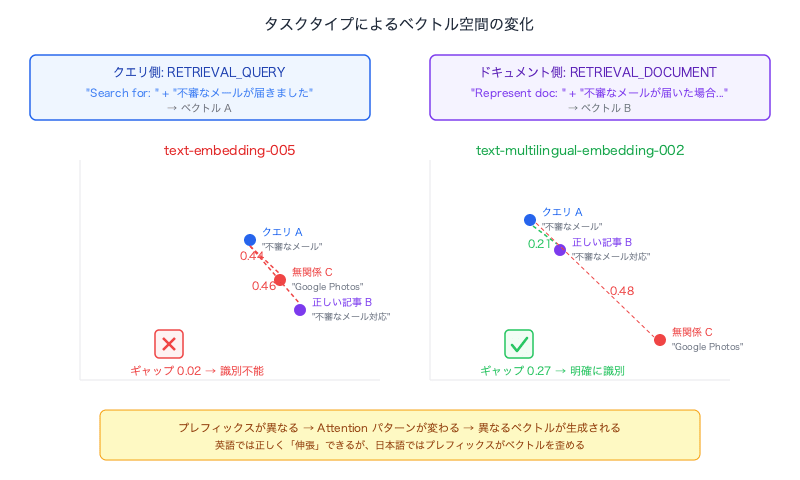
Task types do not switch the model's architecture or weights. Internally, a prefix (instruction text) corresponding to the task type is simply prepended to the text. Conceptually, it works like this:
RETRIEVAL_QUERY    + "suspicious email"  →  Vector A
RETRIEVAL_DOCUMENT + "suspicious email"  →  Vector B
(no prefix)        + "suspicious email"  →  Vector C
Same model, same weights, same Transformer — but because the prefix differs, the attention mechanism pattern changes, resulting in different vectors being generated. It's the same principle as getting different outputs from an LLM when you say "summarize this" versus "translate this."
This asymmetric pairing (using different task types for queries and documents) is designed to absorb the differences in nature between short search queries and long documents. The query-side prefix is trained to "expand intent to bring it closer to the document space," while the document side is trained to "position itself where relevant queries can easily reach."
However, this training depends on the training data. Since text-embedding-005 was primarily trained on English query-document pairs, it can correctly "stretch" for English, but the influence of the prefix distorts rather than helps the vectors for Japanese — that is the essence of this problem.
When Task Types Are Applied
Importantly, task types are applied at both ingest time and query time.
- At ingest time (when importing files into the corpus): Each chunk is embedded with
RETRIEVAL_DOCUMENTand stored in the index. - At query time (when calling
retrieval_query()): The search query is embedded withRETRIEVAL_QUERYand compared against the stored document vectors.
In other words, the asymmetry is baked into the index. To change the document-side task type, you need to recreate the corpus and re-import the files.
RAG Engine internally uses the following pairing:
- Query:
RETRIEVAL_QUERY - Document:
RETRIEVAL_DOCUMENT
When I manually tested with this combination:
q_input = TextEmbeddingInput(text=query, task_type="RETRIEVAL_QUERY")
d_input = TextEmbeddingInput(text=article, task_type="RETRIEVAL_DOCUMENT")
# → Cosine distance: 0.4605  ← Exact match with RAG Engine result!
| Query-side task type | Document-side task type | Cosine distance |
|---|---|---|
| RETRIEVAL_QUERY | RETRIEVAL_DOCUMENT | 0.46 (indistinguishable) |
| RETRIEVAL_DOCUMENT | RETRIEVAL_DOCUMENT | 0.26 (good) |
| SEMANTIC_SIMILARITY | SEMANTIC_SIMILARITY | 0.30 (good) |
It was confirmed that the RETRIEVAL_QUERY / RETRIEVAL_DOCUMENT pair of text-embedding-005 cannot correctly capture semantic similarity in pure Japanese text. Because queries containing English or katakana technical terms work fine, this is an easy problem to miss.
Comparison of Vertex AI Embedding Models
Before getting to the solution, let me summarize the embedding models provided by Vertex AI.
| Model | Dimensions | Languages | Features |
|---|---|---|---|
text-embedding-005 |
768 | English-optimized | Latest English model. Supports task types. Has weaknesses with Japanese RETRIEVAL pairing. |
text-multilingual-embedding-002 |
768 | 100+ languages (strong CJK) | Multilingual-specialized. Supports task types. Recommended for Japanese RAG. |
text-embedding-004 |
768 | English-centric | Previous generation of 005. |
textembedding-gecko@003 |
768 | English | Older generation. No reason to choose for new projects. |
textembedding-gecko-multilingual@001 |
768 | Multilingual | Older generation multilingual model. |
Both 005 and multilingual-002 support output dimension reduction, allowing cost/speed tradeoffs. For new projects, you will generally choose between these two.
Solution: Migrating to text-multilingual-embedding-002
I ran the same test with text-multilingual-embedding-002.
model = TextEmbeddingModel.from_pretrained("text-multilingual-embedding-002")

q_input = TextEmbeddingInput(text=query, task_type="RETRIEVAL_QUERY")
d_input = TextEmbeddingInput(text=article, task_type="RETRIEVAL_DOCUMENT")
# → Cosine distance: 0.2090  ← Significant improvement!
| Model | Query → Correct article | Query → Unrelated article | Discrimination gap |
|---|---|---|---|
| text-embedding-005 | 0.46 | 0.44 | 0.02 (indistinguishable) |
| text-multilingual-embedding-002 | 0.21 | 0.48 | 0.27 (clearly distinguishable) |
I recreated the RAG Engine corpus with text-multilingual-embedding-002.
corpus = rag.create_corpus(
    display_name="my-it-support-kb-v2",
    backend_config=rag.RagVectorDbConfig(
        rag_embedding_model_config=rag.RagEmbeddingModelConfig(
            vertex_prediction_endpoint=rag.VertexPredictionEndpoint(
                publisher_model="publishers/google/models/text-multilingual-embedding-002",
            ),
        ),
    ),
)
Search results after recreation:
=== "I received a suspicious email" ===
  0.21 | suspicious_email.md  ✅

=== "VBA macro cannot be executed" ===
  0.19 | office_macro_blocked.md  ✅

=== "My computer is running slow" ===
  0.18 | pc_slow_troubleshooting.md  ✅

=== "Cannot log in to Salesforce" ===
  0.18 | salesforce_login.md  ✅
The correct article now appears at top-1 for all queries.
Integrating the RAG Pipeline into worker.py
I incorporated the actual RAG processing into the 4-step progressive card built in the previous article.
def process_message(space_name, user_text, sender, ...):
    # Step 1: Analyzing inquiry
    _advance_step(state, "analyze", patcher, message_name)

    # Step 2: Building search query
    _advance_step(state, "build_query", patcher, message_name)

    # Step 3: Searching knowledge base
    contexts = retrieve_context(user_text)

    # Step 4: Generating answer
    if not contexts or all(c["score"] > 0.6 for c in contexts):
        answer = NO_RESULT_MESSAGE
    else:
        answer = generate_answer(user_text, contexts)

    # Add answer to card paragraph by paragraph
    for para in answer.split("\n\n"):
        state.content_paragraphs.append(para.strip())
        patcher.patch(build_progressive_card(state))
Deployment Notes: Out of Memory
512Mi → 1Gi (Initial Deployment)
After the initial deployment, I encountered a problem where the card would freeze at "Analyzing inquiry."
Checking the logs:
Memory limit of 512 MiB exceeded with 529 MiB used.
The google-cloud-aiplatform SDK is heavy, and it was being killed by OOM at 512Mi. Increasing to 1Gi resolved it temporarily.
1Gi → 2Gi (After Going into Production)
However, 1Gi was also insufficient. After going live, an issue arose where sending queries in quick succession would result in no response being returned.
Symptoms and Difficulty
The symptom was vague: "sometimes no answer comes back when submitting queries in rapid succession." The fact that it was "sometimes" rather than always made it tricky. Error handling on the application side was working normally, so it didn't appear to be a code bug.
Debugging Steps
First, I checked error-level logs in Cloud Logging.
gcloud logging read \
  'resource.type="cloud_run_revision"
   AND resource.labels.service_name="YOUR_SERVICE_NAME"
   AND severity>=ERROR' \
  --limit=50 \
  --format='table(timestamp,severity,textPayload)'
Two types of errors were found.
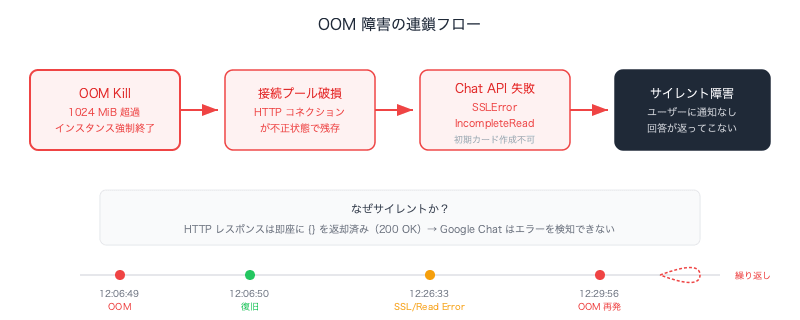
1. OOM (Memory Limit Exceeded)
Memory limit of 1024 MiB exceeded with 1033 MiB used.
Memory limit of 1024 MiB exceeded with 1029 MiB used.
This is the direct cause of instance termination.
2. Connection Errors to Chat API
ssl.SSLError: [SSL: WRONG_VERSION_NUMBER] wrong version number
http.client.IncompleteRead: IncompleteRead(290 bytes read, 400 more expected)
Failed to create initial card
After an instance is killed by OOM and a new one starts up, the HTTP connection pool from the previous instance can be inherited in a corrupted state, causing a chain of SSL errors and incomplete read errors. In other words, it was a cascading failure: OOM → corrupted connection pool → Chat API call failure → unable to even create the initial card → no response.
3. Checking the Timeline
I reviewed all logs around the time of the errors (including INFO level) to understand the sequence of failures chronologically.
12:06:49  ERROR  Memory limit of 1024 MiB exceeded with 1029 MiB used
12:06:50  INFO   Starting new instance (AUTOSCALING)
  ...(normal operation)...
12:26:33  ERROR  Failed to create initial card (SSLError)
12:26:33  ERROR  Failed to create initial card (IncompleteRead)
  ...
12:29:56  ERROR  Memory limit of 1024 MiB exceeded with 1033 MiB used
12:29:57  INFO   Starting new instance (AUTOSCALING)
It was repeating the pattern of OOM → recovery → normal for a while → OOM again. This matched the reports of "sometimes no answer comes back."
Visualizing Memory Usage
Now that the cause was identified as OOM, the next step was to retrieve memory usage trends from the Cloud Monitoring API to determine the appropriate memory limit.
curl -s -H "Authorization: Bearer $(gcloud auth print-access-token)" \
  "https://monitoring.googleapis.com/v3/projects/PROJECT_ID/timeSeries?filter=..." \
  | python3 -c "..."  # Extract average values from distribution data
Results:
| Phase | Memory Usage | Percentage of 1Gi |
|---|---|---|
| Immediately after cold start | ~89 MiB | 9% |
| After SDK initialization (idle) | ~700 MiB | 70% |
| During query processing | ~880 MiB | 86% |
| Peak (maximum 1-minute average) | ~1011 MiB | 98.8% |
Even in the idle state, 70% was already consumed, and memory only had to increase slightly during query processing to reach OOM.
Why It Becomes a Silent Failure
This bot processes requests in a background thread and immediately returns {} as the HTTP response. When an instance is killed by OOM, the background thread is also destroyed, but from Google Chat's perspective, the HTTP request succeeded (200 OK), so no error message like "app is not responding" is displayed. The user receives no notification — the answer simply never comes back.
Thinking About Memory Sizing
Google Cloud best practices recommend keeping peak memory usage at 50–80% of the allocated limit. Below 50% is excessive cost, and above 80% carries a risk of OOM during spikes.
| Memory Limit | Idle | Peak | Verdict |
|---|---|---|---|
| 512Mi | 137% | 197% | OOM |
| 1Gi | 70% | 98.8% | OOM occurring |
| 1.5Gi | 46% | 67% | Borderline (OOM risk from sub-second spikes) |
| 2Gi | 34% | 49% | Within recommended range |
| 4Gi | 17% | 25% | Excessive |
By increasing to 2Gi, the peak usage was kept at approximately 50%, providing sufficient headroom.
Python's (CPython's) internal memory allocator (pymalloc) retains memory pools for freed objects and rarely returns them to the OS. In other words, even after a thread finishes processing and exits, the process's RSS (Resident Set Size) does not decrease. Even if you explicitly call
gc.collect(), internal Python objects are freed but the memory usage as seen by the OS does not change. For this reason, peak memory usage becomes the resident memory, and memory limits must be set to match the peak.
Deployment Command
gcloud functions deploy YOUR_FUNCTION_NAME \
  --gen2 --runtime=python312 --region=asia-northeast1 \
  --source=. --entry-point=handle_chat \
  --trigger-http --no-allow-unauthenticated \
  --memory=2Gi --cpu=1

# First time only: disable CPU throttling (for background threads)
gcloud run services update YOUR_FUNCTION_NAME \
  --region=asia-northeast1 --no-cpu-throttling
The Cloud Run annotation
run.googleapis.com/cpu-throttling: 'false'is maintained across subsequent deployments once set. You only need to rungcloud run services update --no-cpu-throttlingonce during initial setup.
Managing Environment Variables
RAG configuration values are managed via environment variables. Once set with --set-env-vars in Cloud Functions, they are carried over to subsequent deployments.
# First time only
gcloud functions deploy YOUR_FUNCTION_NAME \
  ... \
  --set-env-vars="GCP_PROJECT_ID=your-project,GCP_LOCATION=asia-northeast1,RAG_CORPUS_ID=your-corpus-id,GEMINI_MODEL_ID=gemini-2.5-flash"
| Variable | Purpose |
|---|---|
GCP_PROJECT_ID |
Project ID used for Vertex AI SDK initialization |
GCP_LOCATION |
Region specification (e.g., asia-northeast1) |
RAG_CORPUS_ID |
RAG corpus ID to search against |
GEMINI_MODEL_ID |
Gemini model used for answer generation |
Summary
I connected the Google Chat Bot to Vertex AI RAG Engine and implemented knowledge base search.
| Step | Content |
|---|---|
| Data preparation | Organized QA data → approximately 300 KB entries |
| RAG Engine setup | GCS → corpus creation → file import |
| Embedding model selection | Changed from text-embedding-005 → text-multilingual-embedding-002 |
| Pipeline integration | Search → confidence check → generation (fixed message for low confidence) |
| Deployment | Memory increased incrementally: 512Mi → 1Gi → 2Gi |
The biggest lesson was that when building RAG with Japanese content, you should use text-multilingual-embedding-002 instead of text-embedding-005. Since text-embedding-005 works fine with English and katakana technical terms, this is a trap that may go unnoticed depending on your test cases.
Another lesson was that the quality of the KB data determines the upper limit of answer quality. Since the source data is in the format of staff notes, there are limits to how much Gemini can transform it via system prompt instructions. The most effective approach to getting better answers is to improve the quality of the source data itself.
References
- Vertex AI RAG Engine overview | Google Cloud
- Choose an embeddings task type | Google Cloud
- text-multilingual-embedding-002 | Google Cloud
- Part 1: Building a Google Chat Bot with Cloud Functions + Python + uv in Minimal Configuration
- Part 2: The Story of Hitting Wall After Wall While Implementing a Progressive UX with cardsV2 in Google Chat Bot

