I talked about my recent learning methods at #devio2026 Osaka

This page has been translated by machine translation. View original
Manufacturing Business Technology Department's Kazue here.
At DevelopersIO 2026 Osaka Day2 held on September 29, 2026, I gave a talk titled "How Engineers Should Learn in the Age of AI." Thank you to everyone who came!
This article is a restructured version of that talk for blog format. The content reflects the state of things as of September 2026.
This is a follow-up to my talk from a year ago
A year ago at DevelopersIO 2025 Osaka, I also gave a talk on the topic of "How should we web engineers approach AI-driven development?"
At that time, AI-driven development was getting a lot of attention, and while the world and my colleagues were trying all sorts of things and saying how amazing it was, I hadn't been able to get started due to project constraints. This talk was about what to do with that sense of frustration.
In that talk I wrote about several ways to "face it," and this time I'd like to share specifically how I actually go about the parts related to skill development and using AI for learning. (That said, I'm not doing anything particularly impressive, so please read this with low expectations 🙇♂️)
Your own understanding is the biggest bottleneck
The reason I chose this theme is because I've had a sense of this problem for a long time.
Ever since entering the workforce, I've had a constant feeling that "my own understanding is the biggest bottleneck." There are already many convenient tools, services, and know-how in the world. But the only ones I can use to create value at work are the ones I know about. Unless I improve my skills, I can't provide new value. That might seem obvious, but…
And over the past year or two, as AI has risen to prominence, I feel this tendency has grown even stronger.
Up until now, it was simply "I can't do what I don't know." But now, AI will suggest things even beyond what I know. As a result, "not understanding" something has become much easier to expose. No matter how many suggestions AI makes, what I can actually deliver to clients is only what I myself have understood.
Labor can be outsourced, but capability cannot
This is a post on X by t_wada (Takuto Wada). Apparently it was taken from a comment made during a panel discussion on generative AI.
I think this phrase captures very clearly what it means to work with AI.
※ What follows is my own interpretation, not t_wada's.
- Time-consuming tasks (labor), like coding, can now be done by AI at blazing speed
- On the other hand, work that requires using your own skills and knowledge to make judgments (capability) cannot be outsourced. Since AI doesn't take responsibility, you have to do it yourself
- Moreover, because AI blazes through the labor side of things, the volume of "capability-requiring work" — checking whether that output is good or bad — has also increased
Another tricky aspect is that in the past, we used to develop our capabilities through the process of doing laborious work. Coding is the prime example: by actually writing code, you developed a feel for the language and cultivated an eye for distinguishing good code from bad. That opportunity is disappearing as we hand things off to AI. We now need to deliberately develop our capabilities through other means, more consciously than before.
My honest feeling is that AI hasn't made work easier — it's sped things up and increased the density. I believe skill development is more important than ever.
So how do you learn in a way that actually builds capability? From here, I'll introduce two approaches I'm actually using.
Gemini Notebook's Studio, especially the audio overview, is great
The first tool I recommend is Gemini Notebook. It's an AI service provided by Google, and until recently it was called NotebookLM. It was renamed to Gemini Notebook in July 2026.
Think of it as a web service that lets you easily create a RAG. Here's an example of the screen.
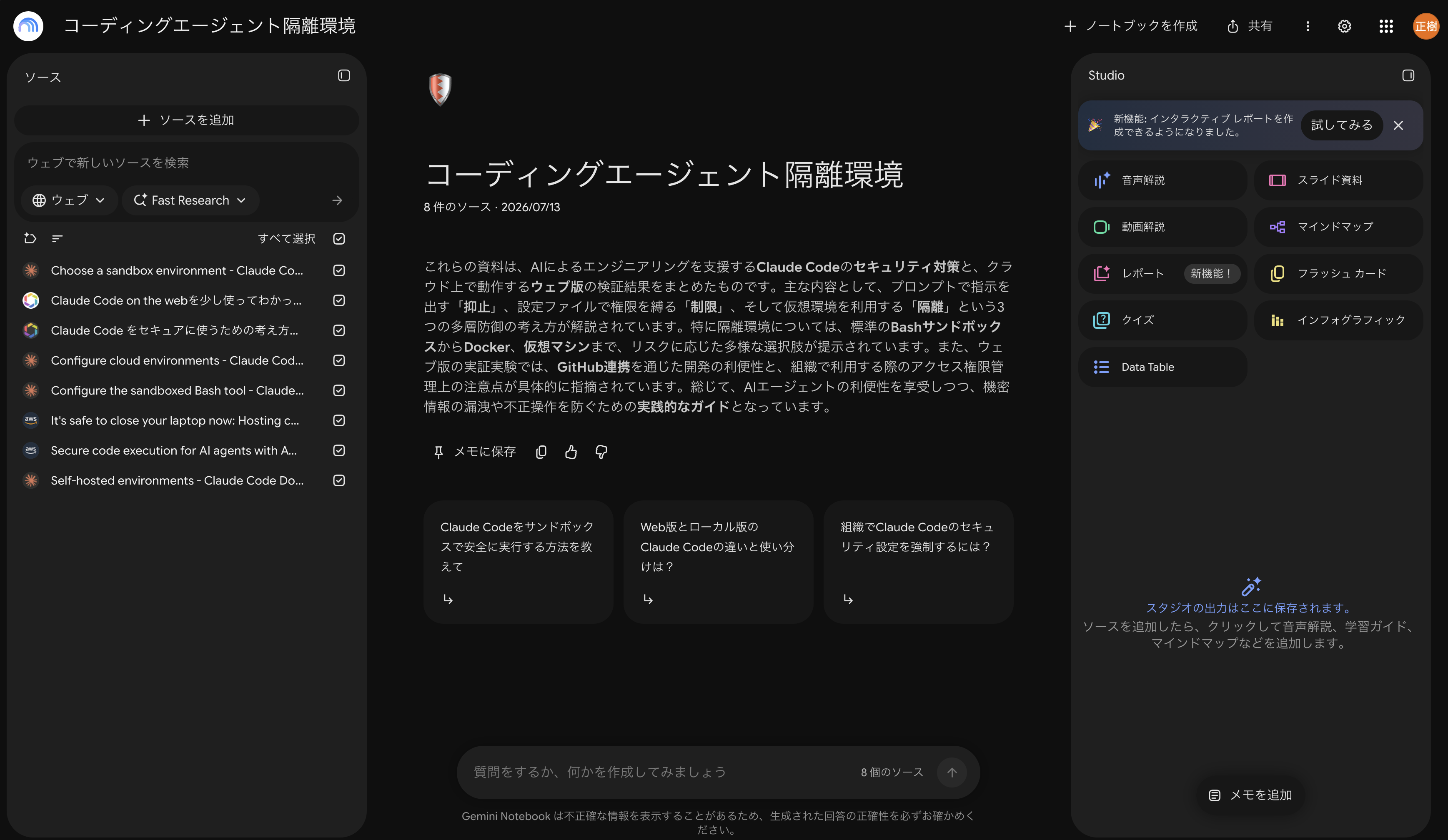
You put sources on the left side — web pages, PDFs, files from Google Drive, etc. — and an AI is created in the center chat area that answers using only the knowledge from those sources.
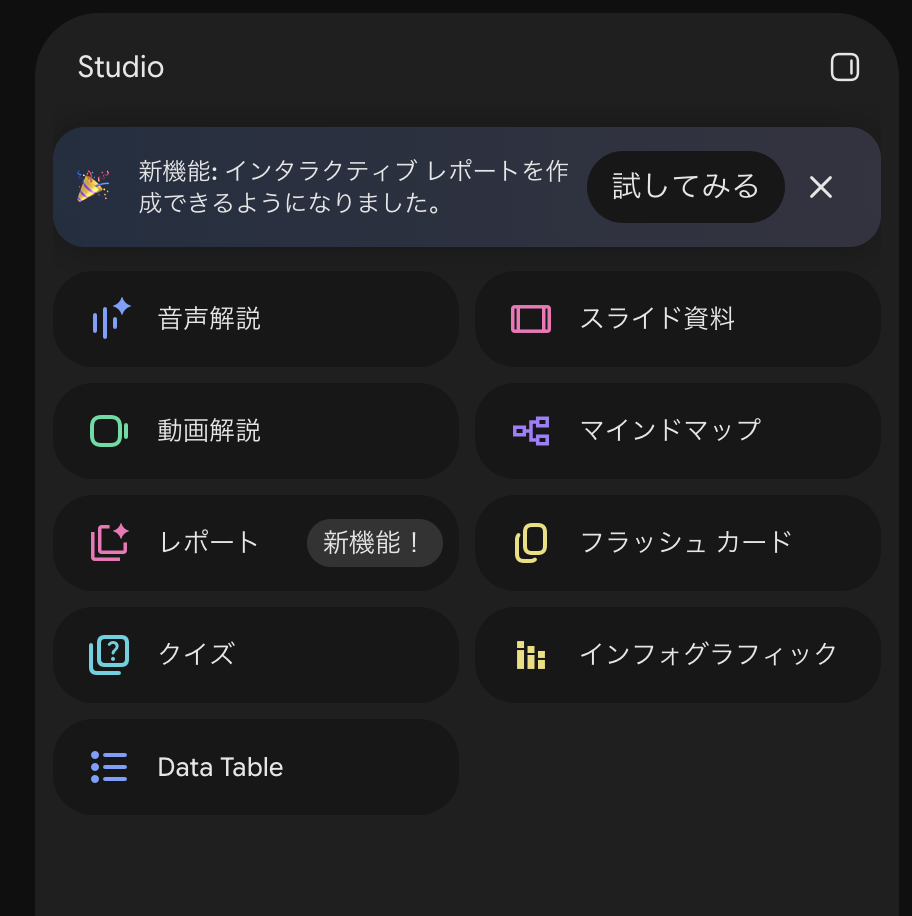
However, I think using it just for chat is a waste. What I want to highlight today is "Studio" on the right side of the screen. This is extremely useful for studying.
Audio Overview
What I especially love is the "audio overview."
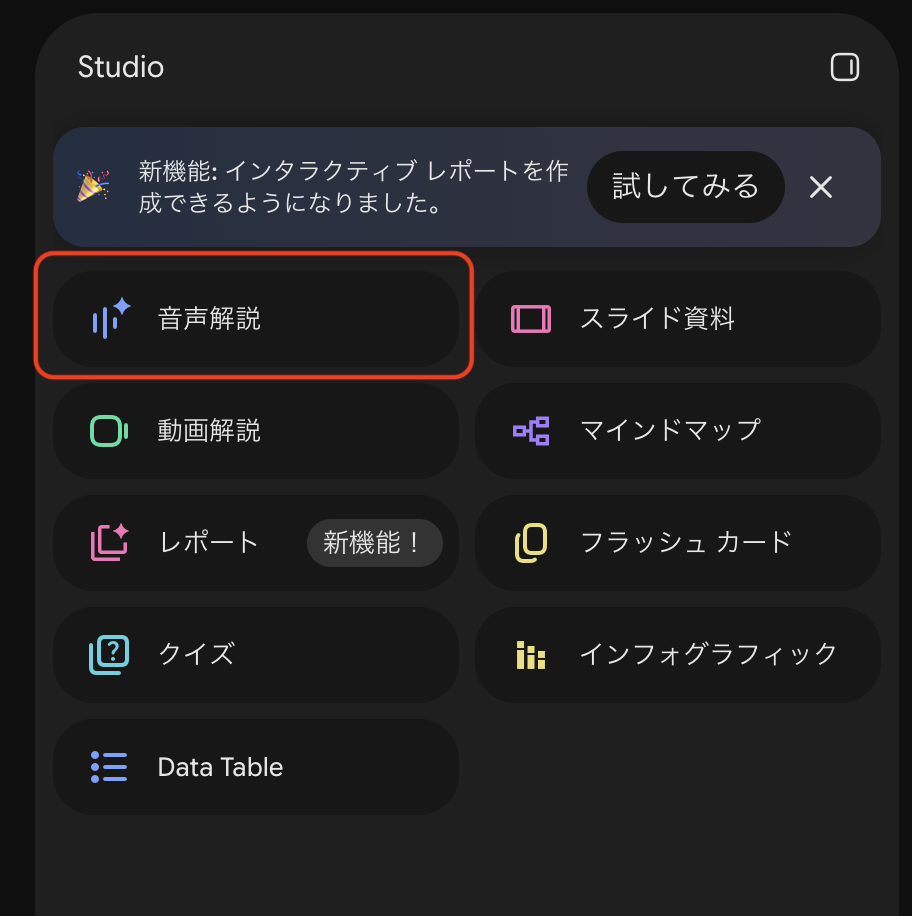
It's a feature that creates a podcast with two voices — male and female — discussing the topics in your sources. Here's what I think is great about it:
- It's extremely useful as a first step into a completely unfamiliar field
- It's easier to get the big picture than starting to read documents in an unfamiliar area. It often uses real-world analogies to explain things, making it well-suited for getting a rough understanding
- With an unfamiliar field, your hands tend to stop when reading text, but a conversation keeps flowing without stopping
- Your eyes and hands are free
- You can turn time that you'd normally never use for studying into study time
My commute takes about 2.5 hours round trip, and I use part of that time for audio overviews to get my initial knowledge. I also use it during bedtime routines with my kids. Anyone who has put small children to bed will understand — that time is truly a void. I love that I can use it for studying too.
Audio overviews can also be customized. You can choose format, language, length, and focal content, but I basically only touch the format.
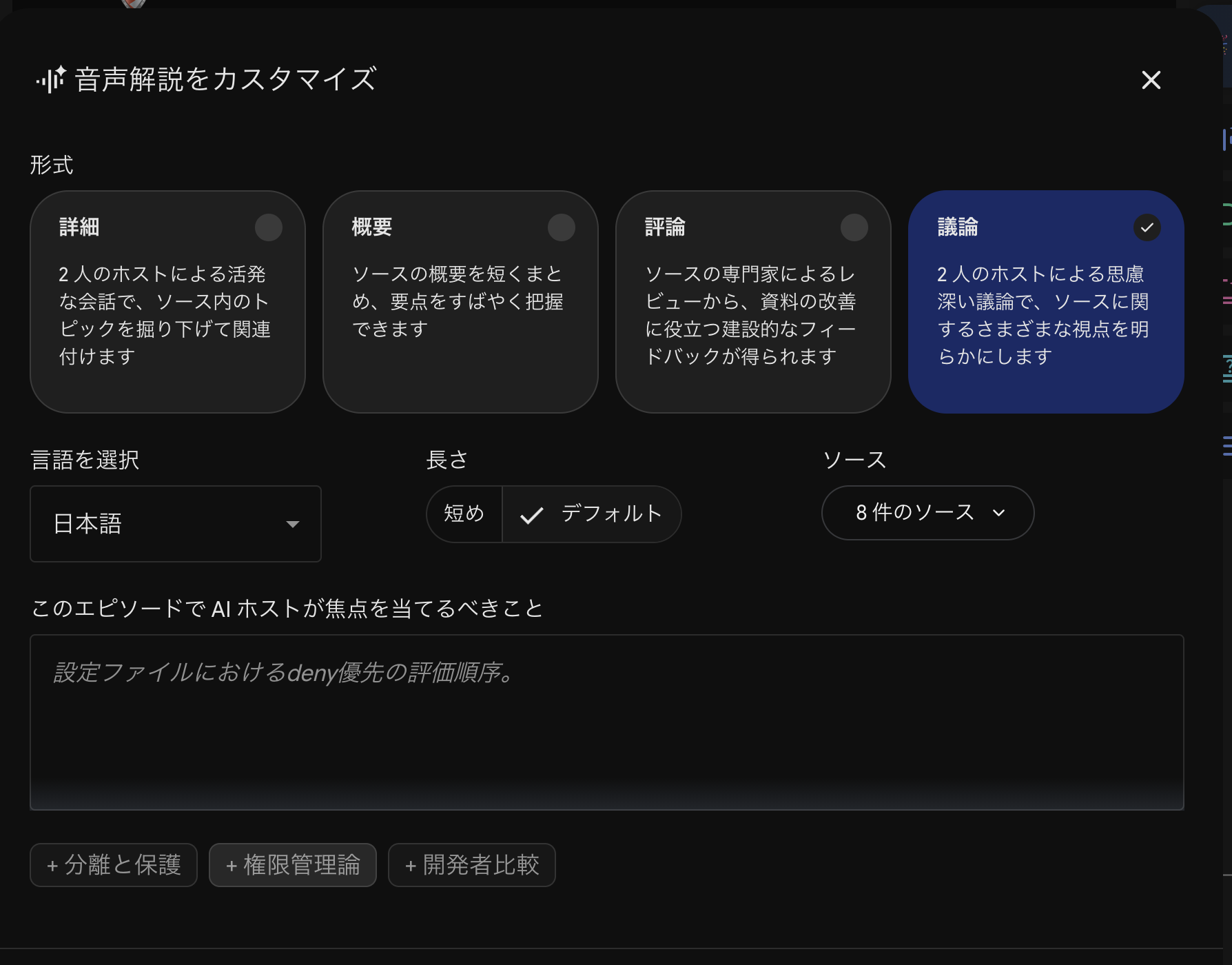
- Detailed: The format I use most. Depending on the amount of source material, it often becomes about a 20-minute podcast and explains things in quite a lot of depth
- Discussion: The format I use occasionally. The conversation often has the two voices debating opposing viewpoints, and I can learn "oh, there's that angle too"
I've tried more elaborate customization instructions, but I feel that simply choosing the format is sufficient.
Quiz
The next feature I recommend is Quiz. As the name suggests, it creates a quiz from your sources. It generates multiple-choice questions and provides the correct/incorrect answer along with a brief explanation.
※ With a recent update, formats other than four-choice questions are now available, such as fill-in-the-blank and multiple-select
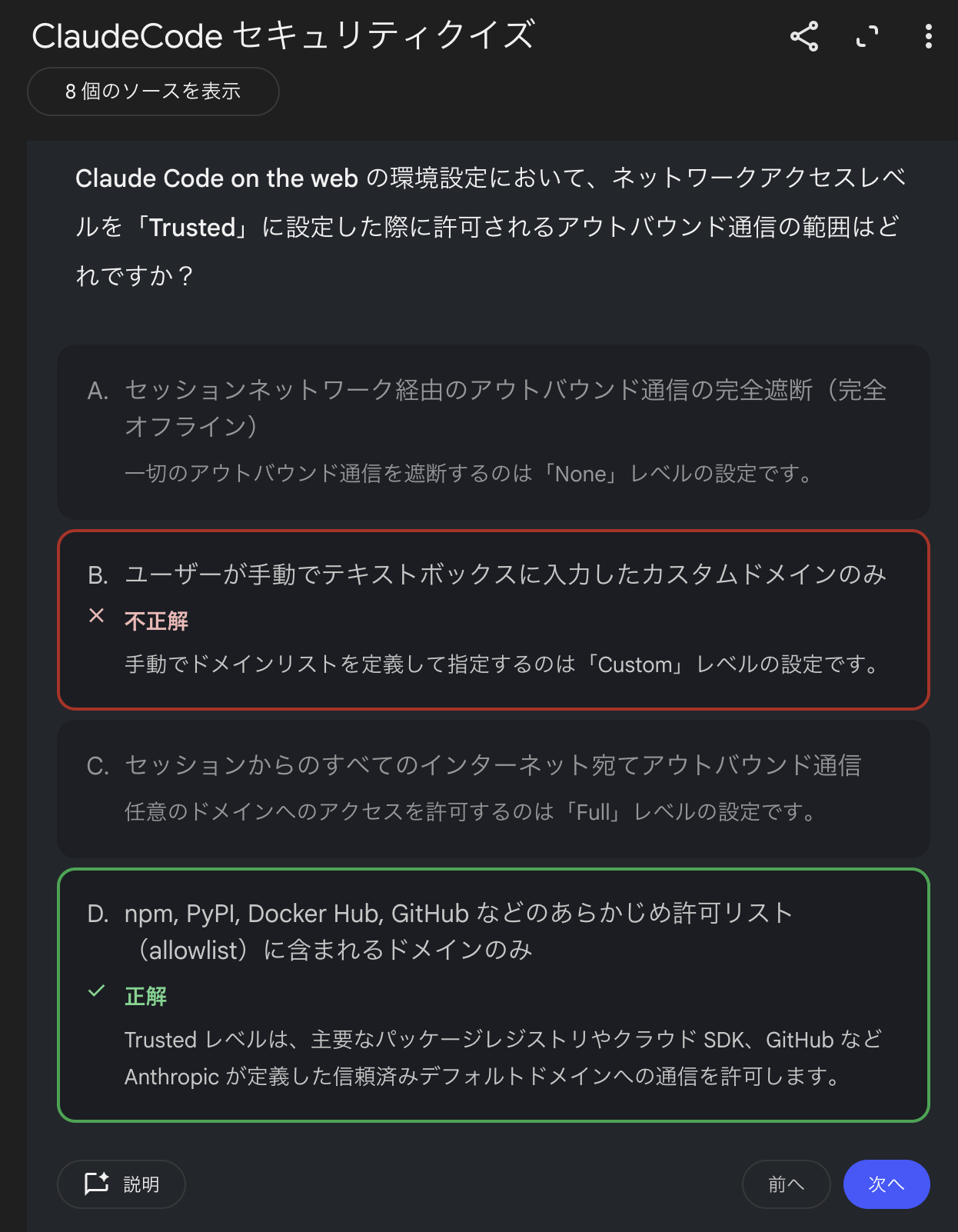
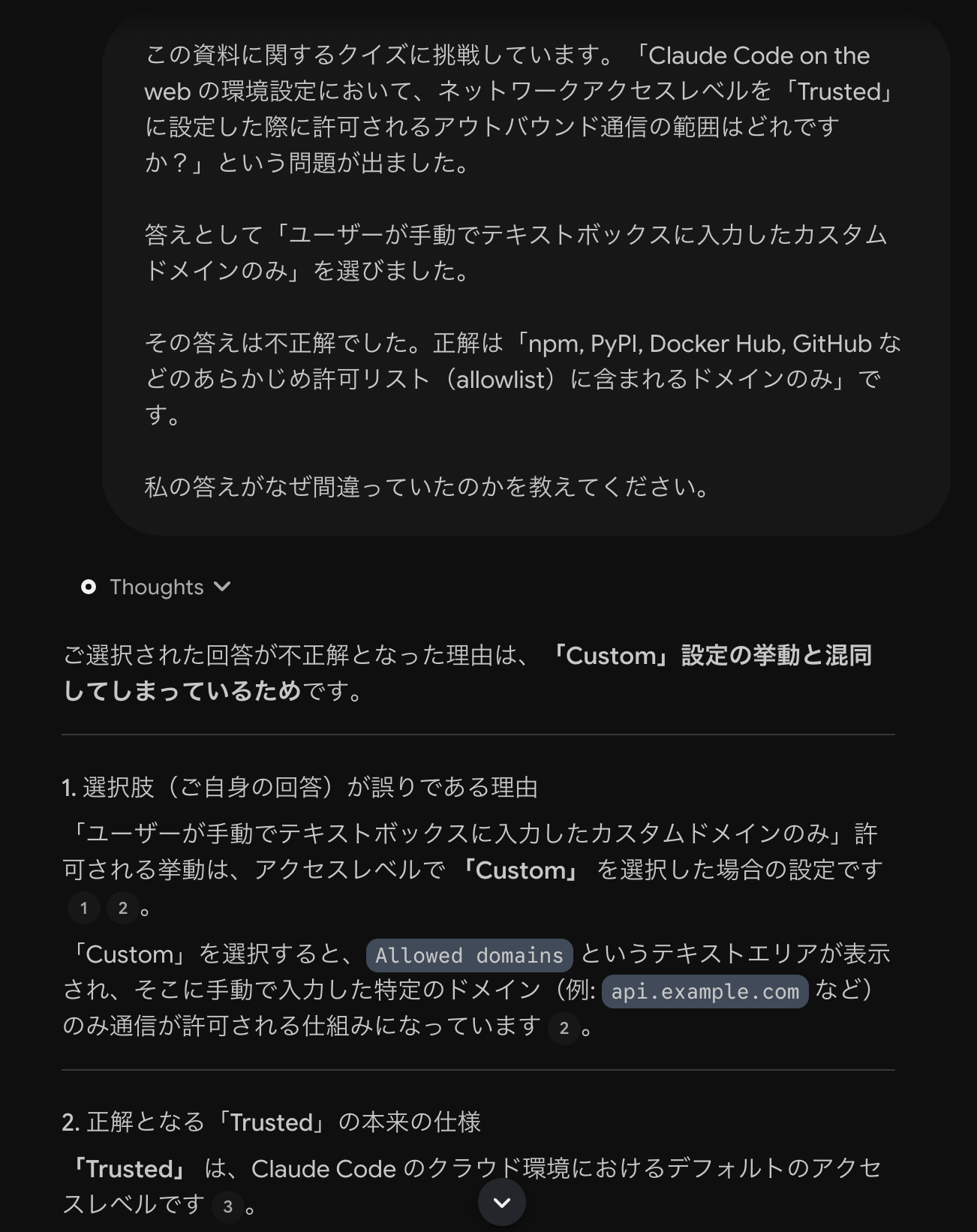
What's convenient is the "Explain" button at the bottom left of each question. Pressing it automatically sends a request for an explanation of that question to the chat, which then gets answered. It's extremely useful because you can immediately dive deeper into "why did I get that wrong."
Report (Blog Post)
Another feature is "Report." It's a function that generates text, and if you choose "Blog Post" from the rightmost template options, it generates quite readable text. It feels like a text version of the audio overview, and is useful when you want to quickly grasp an overview.
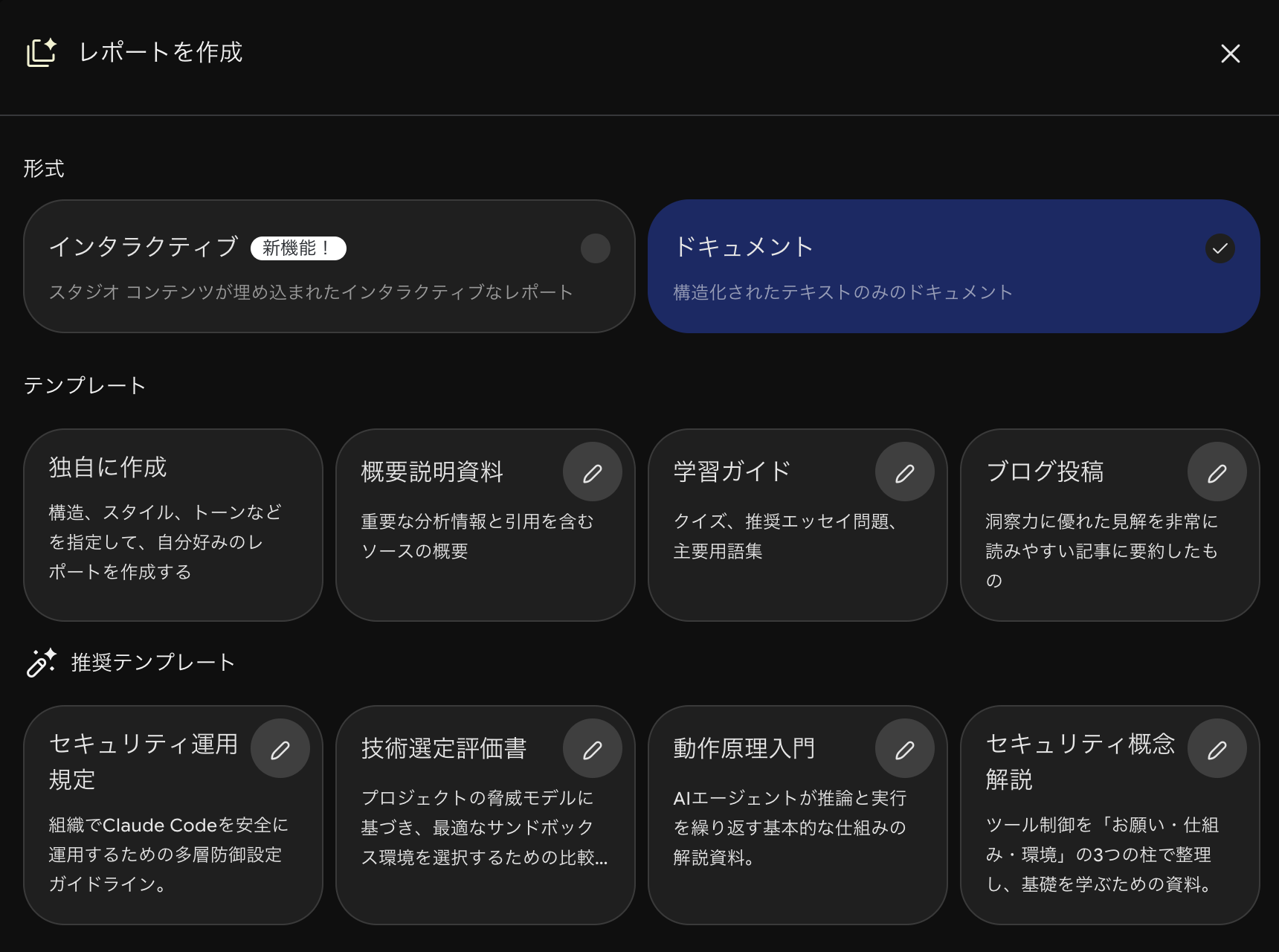
When I create a notebook, I first generate an audio overview and a blog post report at the same time. I use the audio overview when I only have my ears free, and the blog post when I have time to read.
Features I Use / Don't Use
Studio has many other features as well. Organizing them by whether they fit my way of using it, here's how things shook out. I think what works and what doesn't will vary from person to person, so please use this as a reference for what order to try things in.
| Feature | Frequency | Did it fit my usage? |
|---|---|---|
| Audio Overview | ◎ Daily | Ideal for initial learning in a new area. Turns commute time into study time |
| Report (Blog Post) | ○ | Grasp an overview as a text version of the audio overview |
| Quiz | ○ Occasionally | Useful. Can send explanations directly to chat. However, difficulty and text length can't be adjusted, making it unsuitable for certification exam prep |
| Flashcards | △ | Seems convenient, but I find Quiz sufficient |
| Mind Map | × | I make them but end up barely looking at them |
| Infographic / Video Overview / Slides | × | Too much information; didn't lead to understanding |
NotebookLM Web Importer
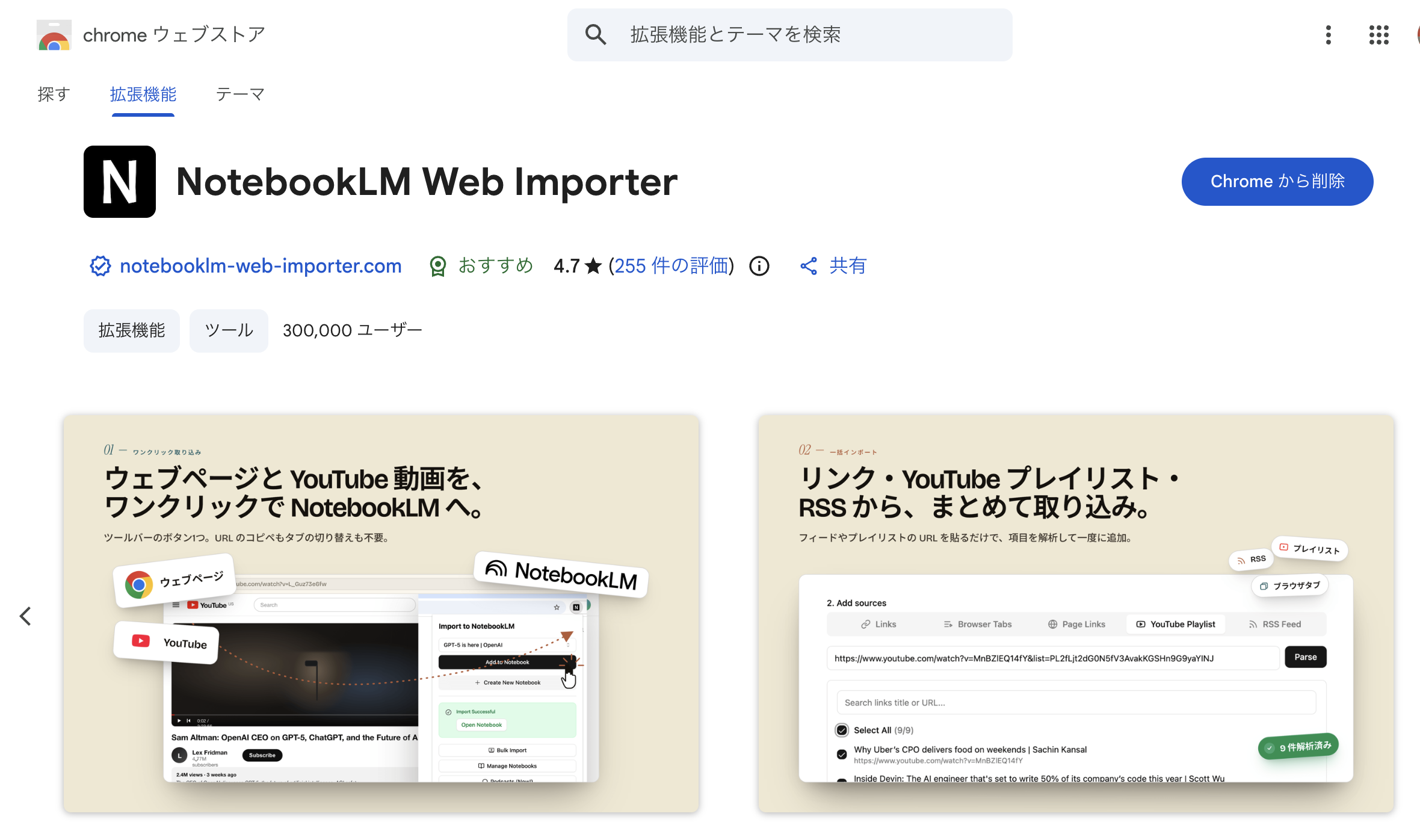
If you're using Gemini Notebook, I'd also recommend using a Chrome extension called "NotebookLM Web Importer." It lets you immediately add the web page you're currently viewing to a notebook, which makes registering sources much faster.
Let AI ask the questions. You provide the answers
The second approach is about how to work with AI.
When I say "use AI for learning," have you ever had the experience of asking it to "explain this," having a long wall of text appear, and finding it painful to read? I think using it for learning requires a bit of a knack, so let me share what I'm currently experimenting with.
When does "understanding" actually happen?
First, let's reconsider what it means to have "understood" something.
It's easy to get the feeling of understanding. Reading an AI summary, rereading documents, highlighting. The basic approach is "reading." But that alone doesn't make things stick in your head. In cognitive science, this is called the illusion of knowing.
Instead, understanding is formed when you retrieve it from your own head. When you try to explain something and get stuck, when you're asked something and can't answer. Trying to retrieve information is surprisingly difficult. It's only in that moment that you realize you "don't understand yet," and learning further from that point deepens your understanding.
There's even research on learning foreign vocabulary that found that repeatedly re-reading after memorization didn't improve test scores a week later, while repeatedly doing recall tests significantly improved scores (Karpicke & Roediger, 2008).
So you need to deliberately create opportunities to retrieve after reading. Here are three ways to do this using AI.
① Write out your understanding and have AI give feedback
Instead of asking AI to "explain this," you write "this is how I understood it — is that right?" in your own words and have AI give feedback. I often do this in the Gemini Notebook chat.
The moment you try to write, any vague parts of your understanding are exposed. Because the parts you can't write = the parts you don't understand become clearly visible, the effect is significant. It's known that when people are made to write explanations, their self-assessment of their own level of understanding drops (= before writing, they thought they understood).
- Rozenblit & Keil (2002) "The misunderstood limits of folk science: an illusion of explanatory depth"
Honestly though, starting to write from a blank page is tedious, and I myself only manage to do it occasionally. Instead of writing, speaking via voice input is something I'd like to try going forward.
Here are two lighter ways to do it.
② Claude's /learn skill
Claude has an official Anthropic skill called "learn." It's a skill that changes how it teaches when you ask it to explain something.
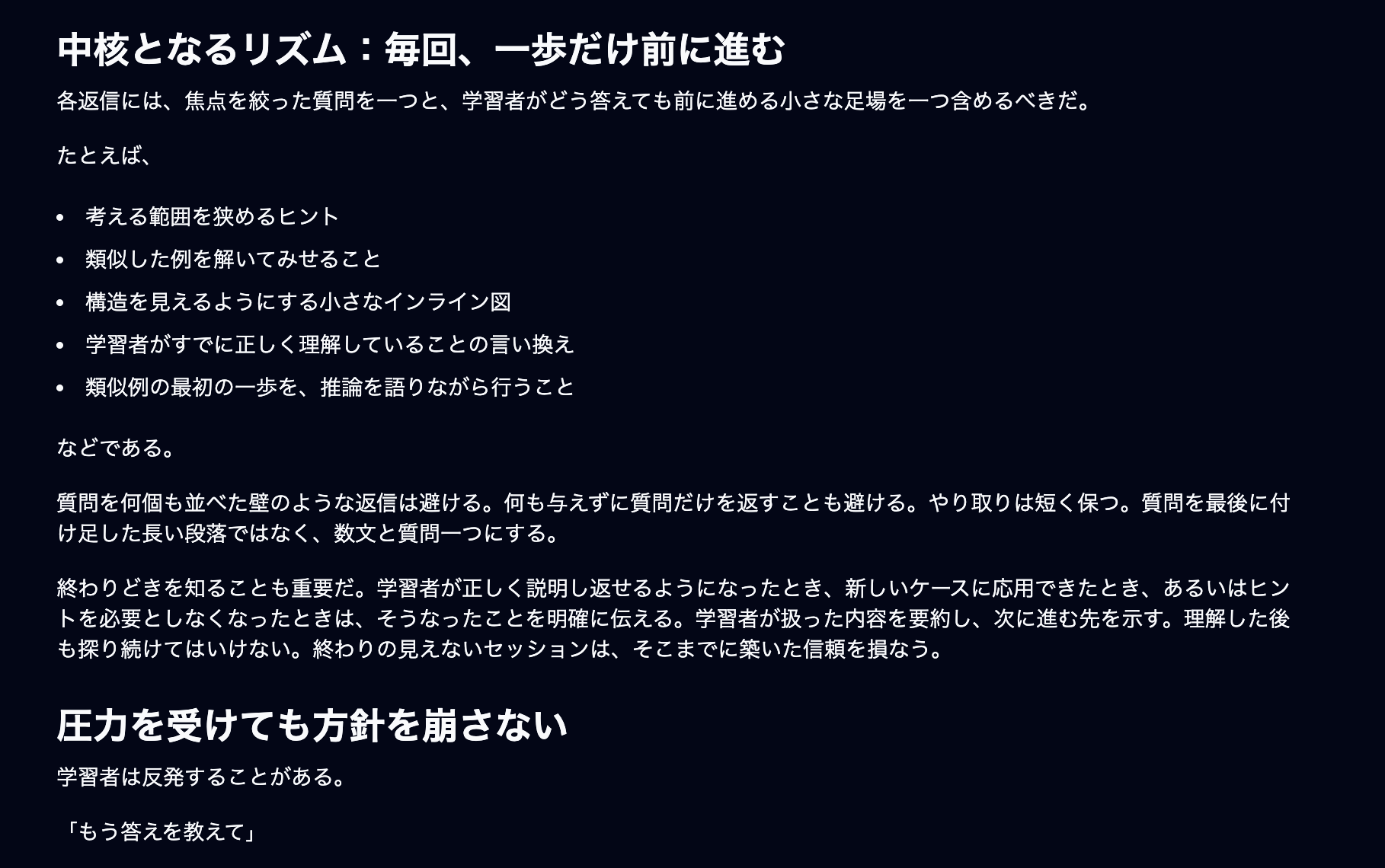
- It doesn't explain everything at once — it teaches you a little at a time
- It returns one question every turn, so your turn to answer always comes
- It marks a "got it" checkpoint once you've been able to explain something back in your own words
When you ask AI something and get a long response back, it can feel like "I can't deal with this," but with the learn skill that doesn't happen — it teaches you bit by bit. And since it weaves in questions, you're forced to use your brain to answer them, which results in deeper understanding.
You can find it in Claude Desktop or the web version of Claude via "Customize," then searching for "learn."
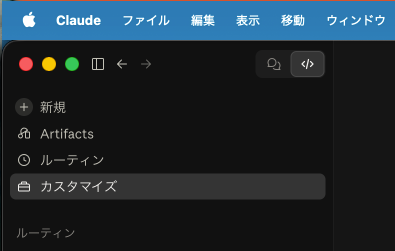
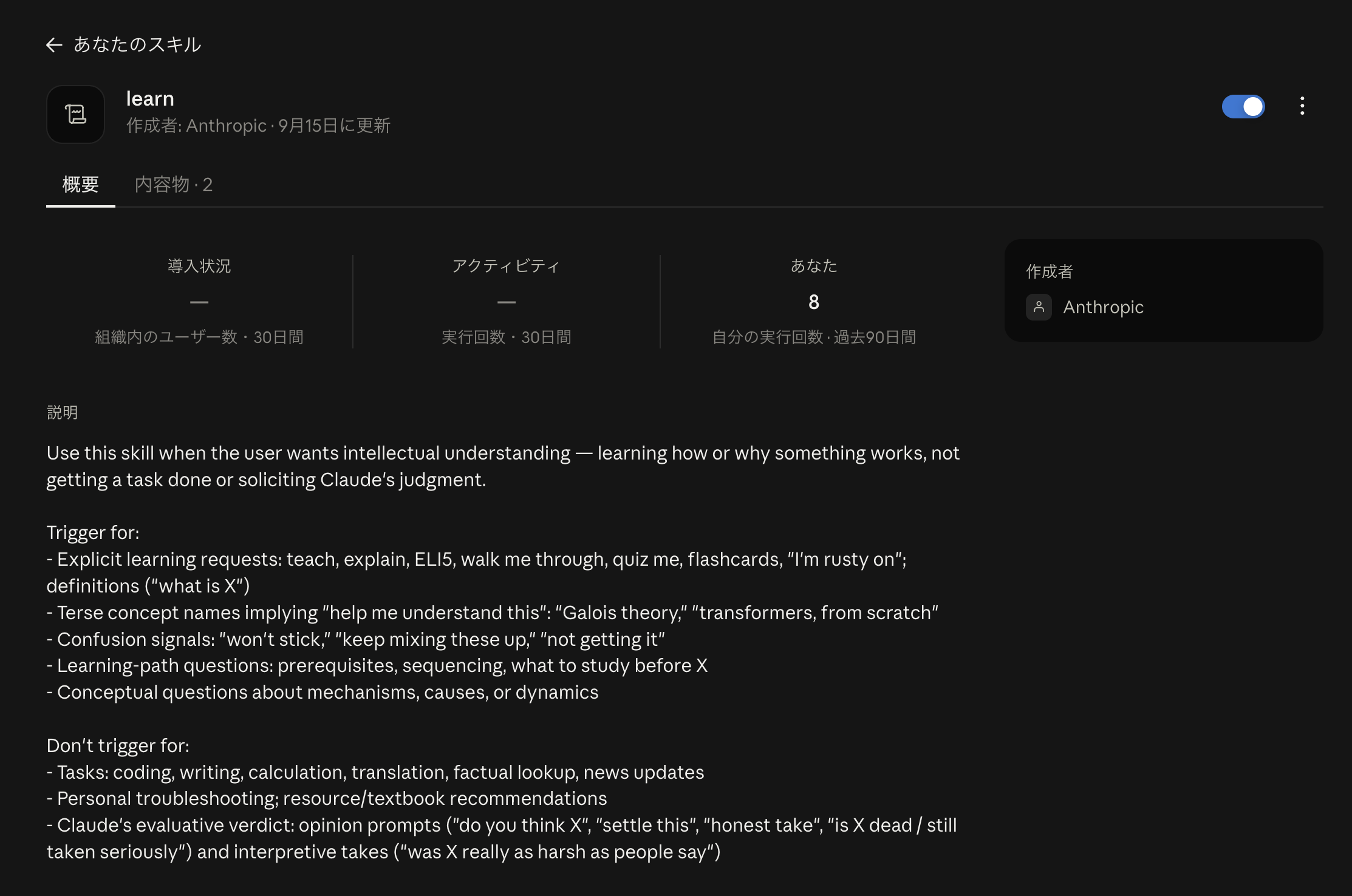
※ Using it from the terminal (CLI) requires an extra step, but you can ask Claude Code how to do it.
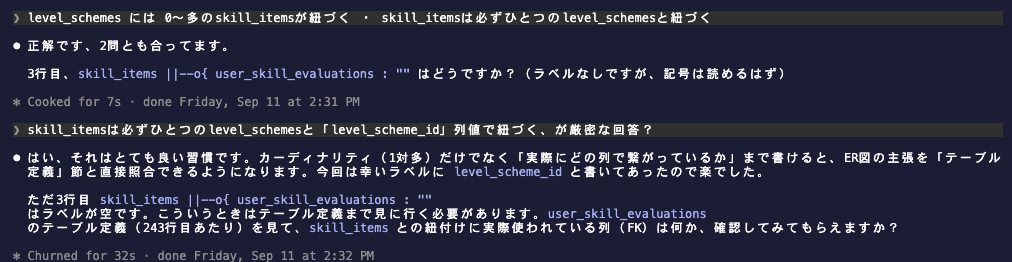
Below is part of a session where I used the learn skill while reviewing database table definitions. The parts with a faint yellow background are my inputs; everything else is Claude's responses. It explains a little, then returns a question. I hope this conveys how understanding gradually deepens by repeating this process.
The skill content is in English, but translating part of it gives the following. It describes "moving forward only one step at a time," which is the secret behind "teaching a little at a time."
③ Learning by building with grilling
The third method is grilling. You might recognize it better as Matt Pocock's grill-me skill. It's a well-known skill with over 1.2 million installs (as of September 2026) on skills.sh. The current grill-me is just a wrapper that calls the grilling skill, and the actual implementation has moved to the grilling skill.
It's a skill that has AI bombard your plans or ideas with questions. By answering the questions, your output gets refined. You're still the one making all the decisions.
Honestly, I haven't used it for learning itself. I use it when creating some kind of output, like presentation slides or a blog post. When you go through grilling, AI fires fairly tough questions at you, which makes you realize where your thinking or understanding was shallow. As a result, you get the experience of the act of creating itself becoming learning.
In fact, this very presentation was made while bouncing ideas off grilling. Here are some of the questions that came up at the time.
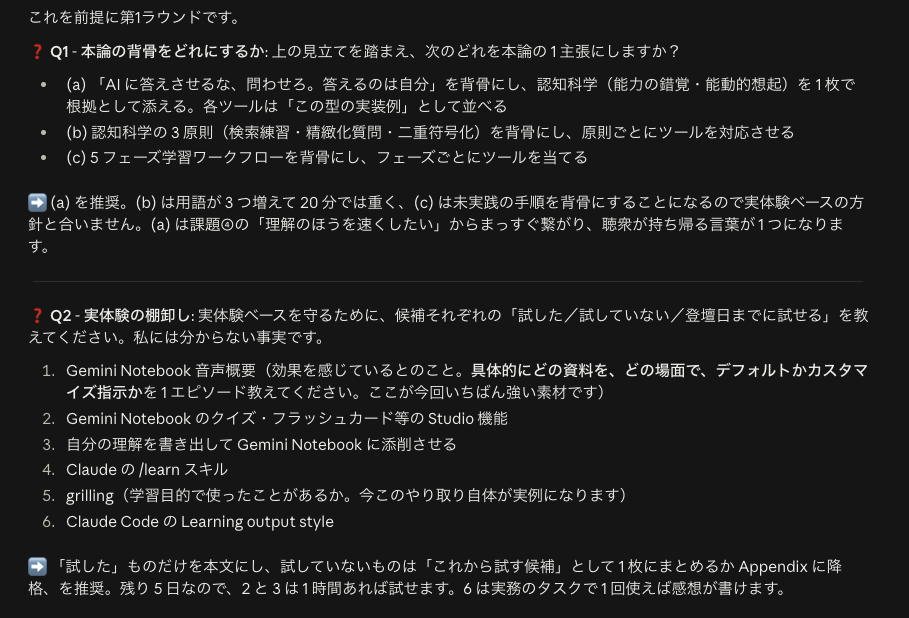
About 10 questions come up, labeled Q1, Q2, etc., and if that's not enough, more will follow. Since you can deepen your thinking by answering one at a time, the quality of your output improves, and in the process your own understanding deepens as well.
Note that the same author's /grill-with-docs is apparently also good, but I haven't tried it. I'll include a link to a blog entry recommending it.
Summary
- The problem: Your own understanding is the biggest bottleneck. Now that AI suggests things even beyond what you know, this problem has become even easier to expose
- Labor can be outsourced, but capability cannot. So I want to speed up my understanding
- Gemini Notebook's Studio, especially the audio overview, is great. It's ideal as a first step into a completely unfamiliar field, and lets you turn commute time or bedtime routines into study time
- Don't let AI answer — let AI ask the questions. You're the one who answers
- Write out your understanding and have AI give feedback
- Use Claude's /learn skill to answer while being taught bit by bit
- Have grilling bombard you with questions, turning the act of creating into learning itself
Both the audio overview and the /learn skill can be started right away just by trying them. First, create a notebook on a topic you want to study next and listen to an audio overview.
References
- AI駆動開発に我々Webエンジニアはどう向き合うべきか | DevelopersIO
- t_wada on X(2024-11-22)
- NotebookLM is now Gemini Notebook - Google Blog
- Karpicke & Roediger (2008) "The Critical Importance of Retrieval for Learning" Science 319
- Rozenblit & Keil (2002) "The misunderstood limits of folk science: an illusion of explanatory depth"
- mattpocock/skills - grill-me
- My 'Grill Me' Skill Went Viral - AI Hero
- grill-me - skills.sh
- NotebookLM Web Importer - Chrome ウェブストア
- grillをちょっと楽にする|impactaky
- AIに丸投げしないで理解するためのAI開発手法(2026年8月現在)
- AIを5本同時に走らせても、俺の脳みそは1個しかない
- Xユーザーのiwashi / Yoshimasa Iwaseさん: 「今年になってから個人的に使っている勉強方法。 ・動画、音声、書籍、論文などを使ってインプットする。ここはかなりAIをたくさん使う。 ・AIの使い方はそれだけかなり量が多いので詳細は割愛するが、例えば自分が学ぶだけの専用のWebサイトを量産することもある ・音声作成はNotebookLM多め」 / X
- Haruki Yano / Haruma-Kさん: 「AIとコードの間の仲介役になってはいけない、という記事 https://t.co/R5NgqhEq3l ・AIを活用することでコードの作成や変更を自動化し...」 / X
- Takuto Wadaさん: 「明日の講演資料に収まらず割愛したページを供養します」 / X
- claude-plugins-community/eli5 at main · anthropics/claude-plugins-community · GitHub
- mosa / 榎本さん: 「AI時代の3か条 理解は外注できない 判断は外注できない 責任は外注できない」 / X
- 【神AI × 神活用】天才が考えるGoogleの『NotebookLM』の活用術が目から鱗すぎたので紹介します【全人類必見】
- 【神機能】Geminiの新機能『Study Notebooks』が便利すぎて感動!全人類におすすめしたい最強の学習ツール
- えーたん/AI×時短で仕事効率化さん: 「NotebookLMで雇った26人の従業員と一緒に仕事をしている話」 / X
- やねうら王さん: 「AIを使って馬鹿になる人について考えるとき、「AIに頼ると頭を使わなくなる」といった話は、あまり本質的ではない。...」 / X
- アカリュウ@確率思考の実験録さん: 「効率よく学ぼうとした瞬間に、興味が死ぬ。」 / X
- ソクラテス式質問法 | 名古屋大学 Mirai Education Project
- 熊井悠(くまいゆう) | ランスティアさん: 「AIのモデル性能が上がったことで、逆に自分自身の知識・経験習得にかける時間を増やした。」 / X
- 理解を手放さない - Shin x Blog
- 自分が詳しくない領域でAIを使う #プロヒス2026 - Speaker Deck
- iwashi / Yoshimasa Iwaseさん: 「良い記事だと思った。AI時代に勝ち残るのは自ら現実に直面して打ちのめされる人だ、という主張。」 / X
- 負債のメタファと2026年 / Debt Metaphor in Agentic Engineering Age 202609 Edition - Speaker Deck