
[Update] GPU Instances Can Now Be Used with Lambda Managed Instances

This page has been translated by machine translation. View original
Introduction
Hello everyone, I'm Akaike.
Have you ever wanted to redeem your tarnished reputation? I have.
At re:Growth 2025 in December 2025, I gave a talk titled "Lambda Managed Instances finally lets us use GPUs on Lambda too! Hooray!"
However, in a later check I found out that GPU instances could not be used, and I published an article of apology and correction...
Since then, I spent my days eagerly waiting for GPU support in Lambda Managed Instances.
And time passed, and on November 16, 2026, Lambda Managed Instances finally supports GPU instances!!!
So this time, I'll share the results of running a Lambda function on a GPU instance, and redeem my reputation.
Update Overview
On November 16, 2026, 13 Lambda APIs were updated, adding settings for using GPU instances with Lambda Managed Instances.
The main changes are as follows.
- Function side
AcceleratorConfig.AcceleratorMemorySize, which specifies GPU memory, was added to 8 function-related APIs such asCreateFunctionandUpdateFunctionConfiguration- It is the GPU memory (GiB) allocated to each execution environment, and the values you can specify are 3, 6, 12, 16, 24, and 48
- The specified value is a minimum, and depending on the instance type, more may be allocated
- Functions that use
AcceleratorConfighave an upper limit of 32,768 MB for/tmp(EphemeralStorage) - The state reason code
IncompatibleAcceleratorInstanceTypeswas added (judging from the name, it seems to be the reason code for when the capacity provider's instance types don't match the function's GPU specification)
- Capacity provider side
- In 5 capacity provider-related APIs such as
CreateCapacityProvider, you can now specify GPU utilization (LambdaCapacityProviderAverageGPUUtilization) in addition to CPU utilization as the criterion for scaling instances in and out - There is no dedicated setting for using GPUs; you specify the GPU instance types you want to use with the existing
AllowedInstanceTypesand so on
- In 5 capacity provider-related APIs such as
- Requirements
- Only functions whose package type is
Image(container image) and whose architecture isx86_64 CapacityProviderConfigmust be specified (in other words, only Lambda Managed Instances functions)
- Only functions whose package type is
As of the time of testing (November 18, 2026), I couldn't find an announcement in What's New.
The Lambda Managed Instances product page doesn't mention GPUs yet, and the Lambda roadmap Issue was still in Developer Preview, so an announcement is probably coming. (Probably)
The Situation Last Time (December 2025)
Last time, in us-east-1, I created capacity providers by specifying GPU-equipped instance types one by one in AllowedInstanceTypes.
As a result, all of them failed with the following error.
The specified instance type(s) g6.xlarge aren't supported for x86_64 architecture. Choose supported instance types for this architecture.
At that time, the only instances available in Lambda Managed Instances were general purpose (M family), compute optimized (C family), and memory optimized (R family).
Investigating the Supported Instance Types
First, as last time, I listed the instance types equipped with accelerators (GPU, Inferentia, Trainium, FPGA, etc.) using DescribeInstanceTypes.
Then I tried creating a capacity provider for each type by specifying it in AllowedInstanceTypes one at a time.
Case of the N. Virginia Region
In the N. Virginia region (us-east-1), I was able to create capacity providers for 37 of the 81 accelerator-equipped types.
| Family | GPU | GPU memory (per GPU) | Sizes that could be created |
|---|---|---|---|
| g4dn | NVIDIA T4 | 16 GB | xlarge to 16xlarge (excluding metal) |
| g5 | NVIDIA A10G | 24 GB | xlarge to 48xlarge |
| g6 | NVIDIA L4 | 24 GB | xlarge to 48xlarge |
| g6e | NVIDIA L40S | 48 GB | xlarge to 48xlarge |
| g6f | NVIDIA L4 (fractional) | 3 to 12 GB | large to 4xlarge |
| gr6 | NVIDIA L4 | 24 GB | 4xlarge, 8xlarge |
| gr6f | NVIDIA L4 (fractional) | 12 GB | 4xlarge |
The only ones that could be created were G-family instances with x86_64 and NVIDIA GPUs.
The values you can specify for AcceleratorMemorySize (3, 6, 12, 16, 24, 48) also seem to correspond to these GPU memory sizes.
On the other hand, the following types resulted in the same aren't supported for ... architecture error as last time.
- P family (p3dn, p4d, p4de, p5, p5en, p6-b200, p6-b300)
- Newer generations of the G family (g7, g7e)
- Graviton-based g5g (arm64)
- Inferentia (inf1, inf2), Trainium (trn1, trn1n)
- FPGA (f2), vt1 for video transcoding
- g4dn.metal
Case of the Tokyo Region
The EC2 instance types offered differ by Region and AZ.
Therefore, even instance types that Lambda Managed Instances supports may not be usable depending on the Region or AZ.
In the Tokyo region, differences in AZs had an effect.
When I specified the three subnets of the default VPC (ap-northeast-1a, 1c, 1d), everything other than g4dn resulted in the following error.
No instance types are available in all VPC availability zones. Choose instance types supported in all Availability Zones or adjust the selection.
This is not a "not supported" error, but an error saying "there is no instance type offered in all the specified AZs."
When I checked with DescribeInstanceTypeOfferings, g5 and g6 family types were offered only in 1a and 1c, and not in 1d.
When I narrowed the subnets down to the two of 1a and 1c, I could also create capacity providers with representative sizes of g5, g6, g6e, g6f, gr6, and gr6f (g5.xlarge, g6.xlarge, g6e.xlarge, g6f.large, gr6.4xlarge, gr6f.4xlarge).
The supported families themselves are the same as in us-east-1.
When using GPU instances, it seems best to check which AZs offer them before deciding on subnets.
Checking the Constraints When Creating Functions
The documentation says AcceleratorConfig can only be used with Lambda Managed Instances functions that use container images.
So I checked what happens when creating functions under different conditions.
Note that at the time of testing, my local AWS CLI (2.36.39) did not support AcceleratorConfig, so I created the functions with CloudFormation, which already supported it.
The two Zip package cases were checked in us-east-1, and the five container image cases were checked using an image built in the test environment described later (Tokyo region).
| Condition | Result |
|---|---|
| Zip package + Lambda Managed Instances | AcceleratorConfig is not supported for functions with the Zip package type. To use AcceleratorConfig, set the package type to Image and specify a container image in Amazon ECR. |
| Zip package + regular Lambda | Invalid request provided: AcceleratorConfig can't be specified unless creating a Lambda Managed Instance function. |
| Container image + regular Lambda | Invalid request provided: AcceleratorConfig can't be specified unless creating a Lambda Managed Instance function. |
| Container image + arm64 | You cannot use a Lambda Managed Instances function with a capacity provider that does not support the architecture of the function |
| Capacity provider that doesn't allow GPUs (m7i.large only) | The specified capacity provider does not include any accelerator instance types. Use a capacity provider with accelerator instance types or remove the AcceleratorConfig. |
| Instance type with insufficient GPU memory (48 GiB specified with g6.xlarge) | The specified capacity provider does not allow for any instance types whose accelerator chips each provide at least 48 GB of memory. Use a capacity provider that allows higher-memory accelerators or reduce the function's AcceleratorMemorySize. |
| Invalid GPU memory value (8 GiB specified) | The specified value for AcceleratorMemorySize isn't valid. The value must be one of 3, 6, 12, 16, 24 or 48 GB. |
In every case, an error occurred at the time the function was created.
Also, the errors for regular Lambda had no Lambda request ID attached.
It seems the error was returned by CloudFormation's validation before the Lambda API was called.
Container image + arm64 is the general error when you associate an arm64 function with an x86_64 capacity provider.
However, as mentioned above, an arm64 GPU instance (g5g) cannot be allowed in a capacity provider, so a configuration that uses GPUs with arm64 cannot be created in the first place.
The error for insufficient GPU memory shows that AcceleratorMemorySize is evaluated as "memory per GPU."
In conclusion, as stated in the documentation, AcceleratorConfig could only be used with Lambda Managed Instances functions that use container images.
GPU Instance Quotas
GPU instances are subject to a quota separate from regular instances, called "Running On-Demand G and VT instances."
This quota is an upper limit on the total vCPUs of running G-family and VT-family instances.
In Lambda Managed Instances, when you publish a function version, three instances are launched by default for AZ redundancy.
Therefore, if you use g6.xlarge (4 vCPU) with the default three instances, you need a quota of 12 vCPUs.
In the test account I used this time, this quota was up to 4 vCPUs, so I'll try with a configuration of one g6.xlarge for now.
Trying It Out
Test Environment
The test environment configuration is as follows.
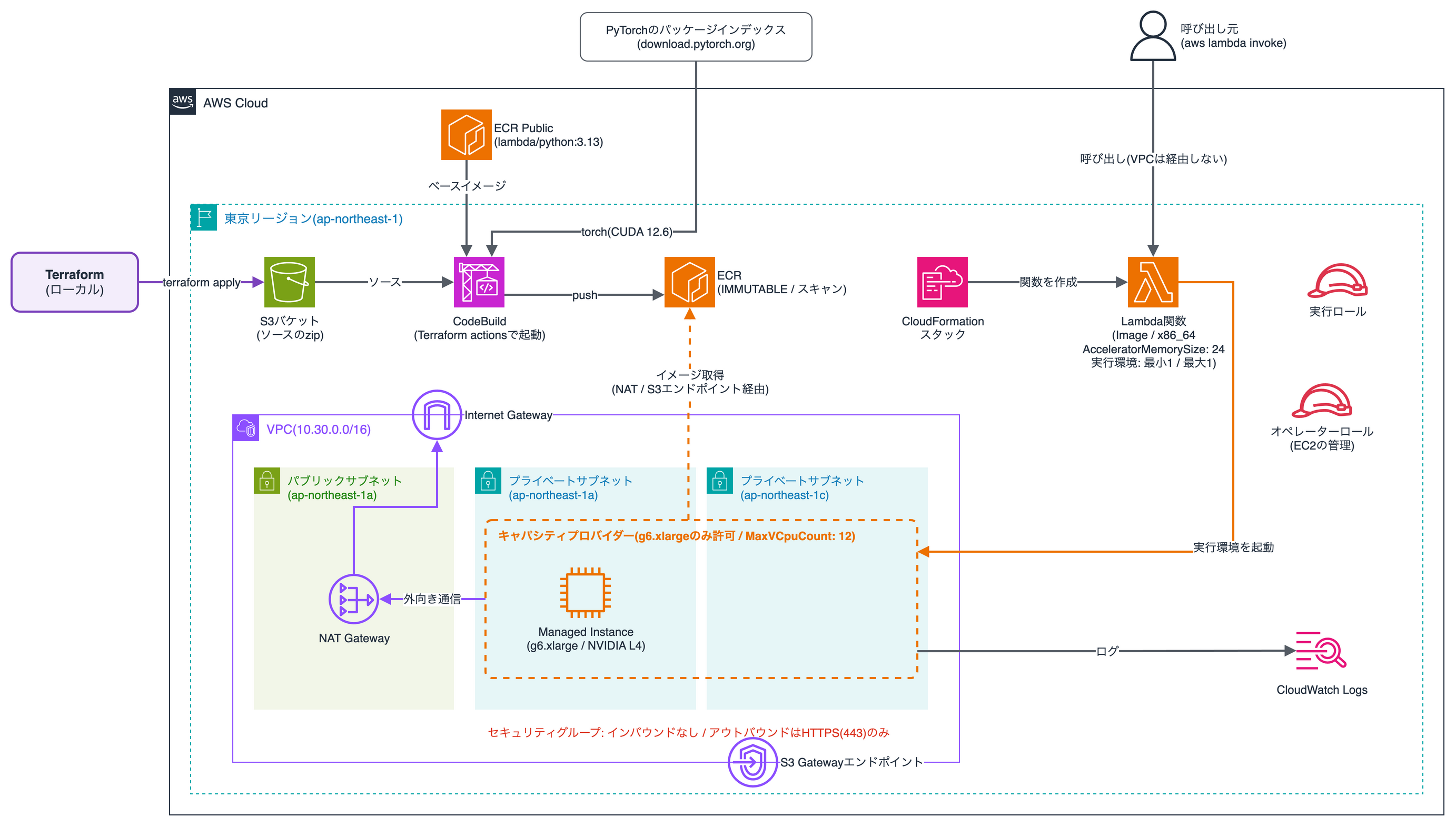
The IaC used for the setup is in the following repository, so feel free to use it.
The main configuration is as follows.
- Region
- ap-northeast-1 (Tokyo). Because the test account's GPU quota in Tokyo was 4 vCPUs
- Network
- Two private subnets (1a and 1c, which offer g6.xlarge in Tokyo)
- Outbound traffic goes through a NAT Gateway, and ECR image layers go through an S3 Gateway endpoint
- The security group has no inbound rules, and outbound is HTTPS (443) only
- Capacity provider
- Only g6.xlarge is allowed, and
MaxVCpuCountis 12, the smallest value that can be specified - What can actually be launched is up to one instance, within the GPU quota (4 vCPUs)
- Only g6.xlarge is allowed, and
- Lambda function
- Container image, x86_64, 8 GB memory,
AcceleratorMemorySizeof 24 GiB - The number of execution environments is a minimum of 1 and a maximum of 1 (
MinExecutionEnvironmentsandMaxExecutionEnvironments)
- Container image, x86_64, 8 GB memory,
- Container image
- A Python 3.13 Lambda base image with PyTorch (CUDA 12.6 build) installed
- The function runs a matrix multiplication of the same size on the CPU and GPU and returns the time taken
- Image build
- Built with CodeBuild and pushed to ECR
- Uses the Terraform actions
aws_codebuild_start_buildto start the build withinterraform apply(no local Docker needed)
What Couldn't Be Written in Terraform
At the time of testing, neither the AWS Provider (6.73.0) nor the AWS Cloud Control Provider (1.110.0) supported the function's AcceleratorConfig.
So only for the GPU function, I created a CloudFormation template, which already supported AcceleratorConfig, with aws_cloudformation_stack.
Note that an Issue and PR for support have already been created for the AWS Provider, so it should be usable soon.
Running the Function on the GPU
Once the function creation is complete, invoke it by specifying $LATEST.PUBLISHED (the most recently published version).
aws lambda invoke --region ap-northeast-1 \
  --function-name lmi-gpu-function \
  --qualifier '$LATEST.PUBLISHED' \
  --cli-binary-format raw-in-base64-out \
  --payload '{"size": 4096, "repeat": 10}' response.json
The response was as follows.
{
  "torch_version": "2.14.1+cu126",
  "cuda_runtime_version": "12.6",
  "cuda_available": true,
  "driver_version": "NVRM version: NVIDIA UNIX Open Kernel Module for x86_64  580.178.04  Release Build  (dvs-builder@U22-I3-AE18-16-4)  Tue Jul  7 12:18:12 UTC 2026",
  "gpu": {
    "name": "NVIDIA L4",
    "device_count": 1,
    "total_memory_gib": 22.03,
    "compute_capability": "8.9"
  },
  "cpu_count": 4,
  "uid": 993,
  "env": {
    "NVIDIA_VISIBLE_DEVICES": null,
    "CUDA_VISIBLE_DEVICES": null,
    "NVIDIA_DRIVER_CAPABILITIES": null
  }
}
The NVIDIA L4 is properly usable from Lambda code. 🎉🎉🎉
- GPU
- One NVIDIA L4 mounted on the g6.xlarge
- Memory visible from PyTorch is 22.03 GiB (24 GB nominal)
- Driver and CUDA
- The host NVIDIA driver is the 580 series (Open Kernel Module)
- PyTorch built for CUDA 12.6 worked without any additional configuration
- Execution user
- The uid is 993, not root
USERis not specified in the Dockerfile
Next are the times for running a matrix multiplication (float32) of the same size on the CPU and GPU.
The CPU available for computation is 2 vCPUs based on the function's memory (8 GB) and the ratio (4:1) setting.
(The cpu_count of 4 in the response is the number of vCPUs of the whole g6.xlarge)
| Matrix size | CPU (per run) | GPU (per run) | Speed ratio |
|---|---|---|---|
| 4096×4096 | 0.680 sec (0.20 TFLOPS) | 0.0103 sec (13.3 TFLOPS) | about 66x |
| 8192×8192 | 5.380 sec (0.20 TFLOPS) | 0.0978 sec (11.2 TFLOPS) | about 55x |
With the GPU, the matrix multiplication was more than 50 times faster.
The total invocation time (platform.report in CloudWatch Logs) was 2.84 seconds for 4096×4096 and 17.9 seconds for 8192×8192, most of which is the CPU-side computation time.
Specifying the Number of Instances
The number of instances launched could be specified by the number of execution environments of the function (MinExecutionEnvironments and MaxExecutionEnvironments in FunctionScalingConfig).
This time I set both to 1, and only one g6.xlarge was launched.
On the other hand, for the capacity provider's MaxVCpuCount (the upper limit of the total vCPUs of launched instances), I could not specify a value smaller than 12.
The minimum value in the API reference is 2, but when I specified 4, the amount for one g6.xlarge, I got the following error.
The requested maximum vCPU count 4 is below the recommended minimum. Increase the vCPU count or reduce current usage and try again.
Therefore, you can't limit it to one instance with MaxVCpuCount.
Note that what you specify is the number of execution environments, so for instance types where multiple execution environments fit on one instance, it may not match the number of instances.
Also, with a one-instance configuration, you lose the AZ redundancy you get with the default three-instance configuration.
Scaling Based on GPU Utilization
With this update, you can now specify GPU utilization (LambdaCapacityProviderAverageGPUUtilization) in the capacity provider's scaling policy.
The scaling policy is target tracking; if you set the scaling mode to Manual and specify a target value (TargetValue), instances are scaled in and out so that GPU utilization approaches that value.
What I could confirm in this test is the following.
- Creating scaling policies
- With a capacity provider that allows GPU instances, a GPU utilization policy could be created, and it could also be used together with a CPU utilization policy
- With a capacity provider that allows only CPU instances, it could not be created, with the error
The LambdaCapacityProviderAverageGPUUtilization metric type is only supported on GPU capacity providers.
- Metrics
- In the CloudWatch
AWS/Lambdanamespace, GPU metrics were output at the capacity provider level (6 kinds such asGPUUtilizationandGPUAllocated) and at the execution environment level (4 kinds such asExecutionEnvironmentGPUUtilization) GPUAllocatedwas 1 andGPUAvailablewas 0, so the single GPU of the g6.xlarge was allocated to the function's execution environmentGPUUtilizationwas 2.22% only for the one minute in which I invoked the function, and 0% otherwise (because the matrix multiplication finishes in under a second)
- In the CloudWatch
Whether it actually scales out when GPU utilization rises could not be confirmed, because the quota only allows one instance.
Conclusion
That was an introduction to the update that makes GPU instances available in Lambda Managed Instances.
After about a year of hardship since my last article, I can finally use GPUs on Lambda...
However, there are the following constraints, so they need to be taken into account when using it.
- The supported instance types are G-family instances with NVIDIA GPUs
- It is limited to x86_64 functions that use container images
- GPU instances may not be offered in some AZs, so pay attention to the AZs of your subnets
- The GPU instance quota is separate from that of regular instances, so check it in advance
This time I re-verified using the same method as last time and went as far as actually running a function on a GPU, so this time it's not wrong information... I hope!
I hope this article helps those who were misled by my previous article, and those who wanted to use GPUs on Lambda.
