Organizing How to Use and Find the Agent Skills Distributed by NVIDIA

This page has been translated by machine translation. View original
Introduction
Hello, this is Mori Shigeru from the Manufacturing Business Technology Department at Classmethod.
NVIDIA has a huge number of software products, and the documentation is split across a separate site for each product. If you try NeMo, the RAG Blueprint, or Omniverse on a DGX Spark, just figuring out which page of which product to start reading takes effort. Versions also update quickly, so even if you ask a coding agent for the steps, the model may answer with outdated option names based on what it knew at training time.
NVIDIA bundles this kind of per-product usage knowledge into Agent Skills and distributes them at build.nvidia.com. A skill contains the steps the agent reads and the locations of the official documentation it should consult. Once installed, you just tell the agent your goal, and it guides you to the steps and documentation for the matching product.
When I previously introduced the VSS (Video Search and Summarization) skills, I only looked at the 10 included in the VSS repo. The current catalog lists 431, and at the end of October 2026 a skill for DGX Spark was added as well.
(This article is as of 2026-05-16)
In this article, I'll introduce the overall picture of the catalog, the contents of the skills for DGX Spark, RAG, RL, and Omniverse, nvidia-skill-finder (a skill for finding skills), and how to install them into Claude Code. At the end I'll also summarize what to check before installing and how to keep up with updates. I hope this resonates with people who feel lost in the sheer number of NVIDIA services and documents.
What are NVIDIA Agent Skills?
NVIDIA Agent Skills are a collection of instruction manuals that teach agents how to use NVIDIA software. Each one is a SKILL.md folder that follows the Agent Skills specification, so it can be read by any agent that supports the spec, such as Claude Code, Codex, and Cursor.
The catalog itself lives in NVIDIA/skills on GitHub, and its README says the following.
This repository is a catalog: skills are maintained in their respective product repos, and mirrored here daily via an automated sync pipeline.
The skills themselves are maintained by product teams such as cuOpt, RAG Blueprint, and DGX Spark in their own repos, and synced to NVIDIA/skills every day. Skill updates are also made in those product teams' repos. build.nvidia.com/skills is the listing page for this catalog, and the same catalog can also be browsed on skills.sh. The plugin marketplace for Claude Code and others includes a finder that searches the catalog for skills.
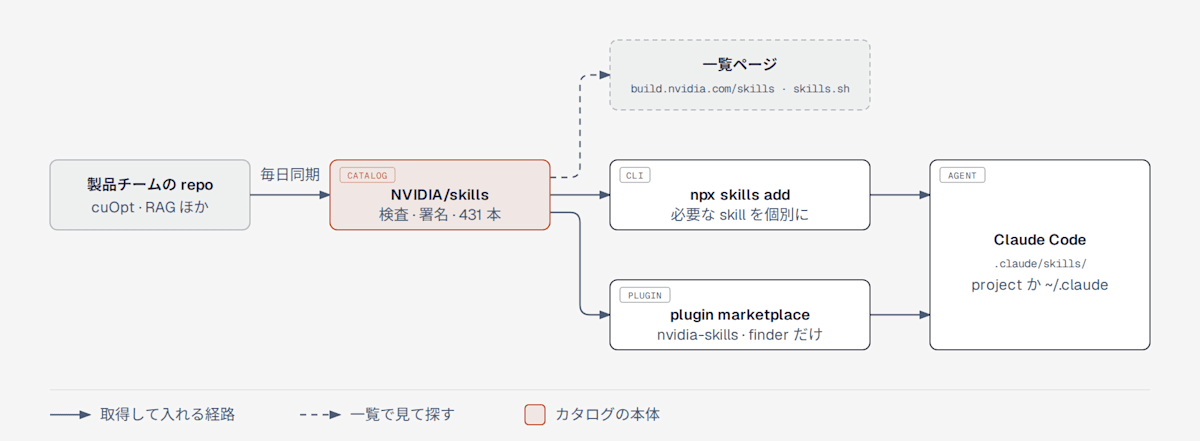
Skills in product teams' repos are synced daily to NVIDIA/skills, inspected and signed, and become the catalog. They can be installed into Claude Code individually with npx skills add, or through a plugin that contains only the finder.
At the sync stage, a skill that doesn't have all of the following accompanying files is not listed in the catalog.
| File | Contents |
|---|---|
SKILL.md |
The steps the agent reads |
skill-card.md |
A card with owner, license, purpose, known risks, and evaluation results |
skill.oms.sig |
NVIDIA's signature over the entire skill folder |
evals/ and BENCHMARK.md |
Evaluation data and a report of the evaluation results |
The skill-card also includes a comparison against the plain state without the skill. For dgx-spark-skills, the correctness rate (Correctness) on Claude Code is reported to have risen from 76.4% to 97.3%. Task achievement (Effectiveness) also rose from 59.6% to 89.9%. This is an evaluation where NVIDIA ran 22 tasks once each, so you won't necessarily get the same numbers on your own machine. Even so, I find it helpful as a basis for deciding whether to install, since it shows in numbers the difference from asking without having the agent read the documentation.
The 431-skill catalog is divided into 22 fields
Running npx skills add nvidia/skills --list fetches the catalog repo and lists the names and descriptions of 431 skills. The list on build.nvidia.com/skills showed 430, so there was a discrepancy of one. The first release in March 2026 (v0.1.0) had 24 skills, including cuOpt and TensorRT-LLM, so it has grown 18 times in just over 7 months.
In skills.sh.json, the classification file for skills.sh, the 431 skills are divided into 22 fields.
| Field | Count | Field | Count |
|---|---|---|---|
| Agentic AI | 26 | Data Science | 8 |
| Physical AI | 48 | Training AI | 73 |
| Robotics | 14 | Inference AI | 30 |
| Robotics Simulation | 7 | Decision Optimization | 8 |
| Vision AI | 79 | GPU Development | 34 |
| Conversational AI | 8 | Quantum Computing | 2 |
| Simulation and Modeling | 10 | Infrastructure | 18 |
| AV Simulation | 1 | AI Factory | 5 |
| In-Vehicle Computing | 1 | AI Storage | 3 |
| Digital Twins | 1 | Networking | 51 |
| Cybersecurity | 1 | Gaming | 3 |
The fields with the most skills are Vision AI, Training AI, and Networking. Of Vision AI's 79 skills, 52 are TAO skills, and of Networking's 51, 50 are DOCA skills.
Looking at the DGX Spark, RAG, RL, and Omniverse skills from the inside
Reading the SKILL.md of each skill, they are all built to "look at the content of the request and route to the manual or documentation that should be read." Instead of a person moving back and forth between documentation sites, the agent acts following this routing. I'll look at the contents in four fields I often work with.
DGX Spark has one entry point that branches into 7 procedures
dgx-spark-skills (0.1.5) is a skill for DGX Spark and GB10-equipped machines, and it has a single entry point. Depending on the content of the request, it goes to read one of the 7 manuals inside.
| When the request is like this | Manual it goes to read |
|---|---|
| You want to check the model, CPU, memory, or disk | identify-spark-system |
| Problems with OTA updates, drivers, networking, or containers | troubleshoot-spark |
| You want to check whether a symptom matches a known issue | known-spark-issues |
| You want to find step-by-step examples (playbooks) | reference-spark-playbooks |
| You want to set up remote connections or a cluster with NVIDIA Sync | use-sync |
| You want to diagnose hardware with Field Diagnostics | run-spark-diagnostics |
| You want to find the forum or gather information for support | get-spark-support |
At the end of SKILL.md, 8 official pages are listed: the hardware overview, the porting guide, the NGC DGX Spark collection, the release notes, known issues, the update guide, the playbooks at build.nvidia.com/spark, and the list of certified machines. The pages a person would open when looking for DGX Spark documentation are written as-is as the reference destinations.
What's interesting is that it explicitly states that version numbers and workarounds are not to be written into the skill.
Use the current NVIDIA release notes and Known Issues instead of embedding version numbers or issue workarounds here.
It is built to avoid the skill itself becoming outdated and instead to read the official pages at that point in time. GB10-equipped machines such as the ASUS Ascent GX10 and Dell Pro Max with GB10 are also included as targets. It's a nice detail that it states that unrelated things with the same name, such as Apache Spark, are out of scope. For diagnostics, log collection, and operations that change the machine, it is set to ask for permission before running.
RAG covers everything from building to evaluation and load testing
The RAG area is divided into skills that run the RAG Blueprint and skills that handle what comes before and after it.
| skill | What it handles |
|---|---|
rag-blueprint |
Building the RAG Blueprint, switching features, investigating problems, shutting down (Docker, Helm, and library configurations) |
nemo-retriever |
Ingesting and searching PDFs, Office documents, audio, and video with the NeMo Retriever 26.8.1 CLI |
rag-eval |
Evaluating answer quality with RAGAS |
rag-perf |
Measuring response time and throughput with aiperf |
rag-blueprint (2.6.0) routes requests into 4 kinds. For building it reads references/deploy.md, for problems troubleshoot.md, and for shutting down shutdown.md, while configuration changes proceed using the steps inside SKILL.md. For GPU requirements it is instructed to read the repo's docs/support-matrix.md, so a person doesn't need to look up which GPU each configuration requires.
The policy is also clear. Things that can be checked with commands, such as GPU, VRAM, drivers, ports, and the NGC API key, are checked without asking, and the only things asked of the user are entering the API key and confirming data deletion. Even if someone who wants to build RAG hasn't learned the NIM or container configuration beforehand, the agent proceeds following the manual.
In the frontmatter of rag-blueprint, read-only commands such as docker ps and kubectl get are listed under allowed-tools. According to Claude Code's documentation, this setting is not a restriction but a pre-approval that lets those commands run without confirmation during the turn in which the skill is invoked. Only read-only commands are listed, but it's something worth looking at before installing.
RL is divided into how to run experiments and the execution environment
The NeMo RL skills are divided into those that handle how to run experiments and those that handle the conventions for each execution environment.
nemo-rl-auto-research is a procedure for forming hypotheses and running experiments with recipes such as GRPO. It checks the git state, creates a branch for the experiment, reads the recipe, related code, and docs/, and then runs the baseline first. Results are recorded in a TSV ledger, and the stopping conditions (number of experiments, deadline, target metric) are converted into numbers and monitored. If no stopping condition is specified, it summarizes the results after the baseline and up to 3 low-risk experiments, then asks whether to continue and stops.
The skill chooses the execution environment based on the situation. If there's a GPU on hand, it runs there. For Kubernetes it goes to read launch-nemo-rl (the steps for starting a RayCluster with nrl-k8s, launching, and monitoring), and for Brev it reads nemo-rl-brev-etiquette (how to use disks and handle secrets). For heavy GPU runs and for creating branches, the rule is to get the user's approval in advance.
There is one caveat. The NeMo Gym skills were included in the first release but are not in the current catalog. The 13, including add-benchmark, are placed in .agents/skills/ in the NVIDIA-NeMo/Gym repo, so if you use Gym you need to look there.
Omniverse handles the long process from CAD to USD
omniverse-cad-to-simready (0.2.0) handles the whole process of turning CAD data into SimReady USD usable in simulation. It first runs a preflight to check the environment, then goes through conversion to USD, minimal validation, assignment of materials and physical properties by Content Agents, conformance to SimReady conventions, verification, and if needed preview rendering, and finally outputs the final USD path and a report.
The manuals for each step are split under references/, and the versions of upstream tools are pinned in upstream-versions.lock.json. A person doesn't need to research which Omniverse tools to combine at which versions, and can proceed with the combination the skill has decided. The prerequisites are Docker and the NVIDIA Container Toolkit, a GPU, Python 3.12, and an API key from the model provider used for material assignment.
There is also omniverse-usd-performance-tuning (0.4.1), which diagnoses heavy USD and handles symptoms such as slow loading, high memory use, and low FPS. For USD collaboration and version control there is omniverse-content-services.
Main skills in other fields
Beyond those four fields, skills are available for NVIDIA's main products as well. The counts are tallied by name prefix.
| Product | Count | Representative skill | What it can do |
|---|---|---|---|
| cuOpt | 7 | cuopt-numerical-optimization-api |
Solve LP, MILP, and QP with cuOpt |
| cuDF | 1 | accelerated-computing-cudf |
Move pandas processing onto GPU DataFrames |
| Nemotron | 6 | nemotron-customize |
Assemble data preparation, SFT, RL, and evaluation into a training pipeline |
| Data Designer | 1 | data-designer |
Build a synthetic data generation pipeline |
| Dynamo | 4 | dynamo-recipe-runner |
Select and deploy inference recipes for Kubernetes |
| DeepStream | 6 | deepstream-generate-pipeline |
Assemble GStreamer pipelines for video inference |
| VSS | 1 | vss-build-vision-ai |
Add video capabilities such as detection, search, and summarization to an agent |
| Jetson | 38 | jetson-build-source |
Rebuild the BSP kernel and device tree |
| Holoscan | 8 | holoscan-install-container |
Install and verify the Holoscan SDK development container |
| CUDA-Q | 2 | cudaq-guide |
Quantum computing simulation and how to write kernels |
| BioNeMo NIMs | 11 | boltz2-nim |
Run protein structure prediction and more with NIMs |
There are three ways to install into Claude Code
There are three routes into Claude Code: installing individually with npx skills, installing as a plugin, and copying the folder by hand. What gets installed and the update mechanism differ, so I'll lay them out in a table first.
| Method | What gets installed | Location | Updates |
|---|---|---|---|
npx skills add nvidia/skills |
Selected skills | The project's .claude/skills/, or ~/.claude/skills/ with --global |
npx skills update |
plugin nvidia-skills |
One finder skill | Claude Code plugin | Follows marketplace updates |
| Manual copy | Selected skills | Any skills folder | Not covered |
Installing with npx skills
This is the basic method NVIDIA recommends. skills is a CLI from vercel-labs, and v1.5.16 or later is required. The official documentation says that 1.5.15 and earlier do not create links in Claude Code's .claude/skills/, so even though the files get installed, they aren't visible from Claude Code. For this trial I pinned it to 1.7.6.
npx -y skills@1.7.6 add nvidia/skills --list
npx -y skills@1.7.6 add nvidia/skills --skill nvidia-skill-finder --agent claude-code --yes
The default is a project-level install, and the skill folder is copied into .claude/skills/ in the directory where you ran it. A skills-lock.json is also created at the project root, recording the source and a hash of the contents.
◇  Security Risk Assessments
│                       Gen               Socket            Snyk
│  nvidia-skill-finder  Safe              0 alerts          Med Risk
│
◇  Installed 1 skill
│  ✓ nvidia-skill-finder (copied)
│    → ~/works/tmp/nvidia-skills-trial/.claude/skills/nvidia-skill-finder
│
└  Done!  Review skills before use; they run with full agent permissions.
At install time, three kinds of security assessments from skills.sh are shown, and at the end a warning appears saying "skills run with the agent's full permissions, so read them before use."
What you pass to --skill is not the folder name but the name: in SKILL.md. Most are the same, but for example the folder ovnewton-usage has the name using-ovnewton. The list from npx skills add nvidia/skills --list is ordered by name, so copying from there avoids confusion.
When this CLI is run from inside Claude Code, the CLI detects the agent, skips the confirmation dialog, and installs non-interactively. If you ask the agent to do the installation, it's safer to decide in the request whether to add --global.
Installing with a plugin
The plugin nvidia-skills contains only the finder. It is listed in Claude Code's official marketplace, and the NVIDIA/skills repo itself can also be added as a marketplace.
# Install from Claude Code's official marketplace
claude plugin install nvidia-skills@claude-plugins-official --scope project

# Add NVIDIA's repo as a marketplace and install
claude plugin marketplace add NVIDIA/skills
claude plugin install nvidia-skills@nvidia-official --scope project
Both are the same plugin, but the versions differed. The official marketplace side is pinned to the 2026-10-15 commit of NVIDIA/skills and is 1.4.0, while installing from NVIDIA's repo gives 1.4.1. I ran this with the CLI this time, but the same operations can also be done from the interactive /plugin screen.
The reason for distributing only the finder is written in the plugin's README.
Shipping only the finder keeps the plugin small: every skill in the skills/ catalog stays reachable without loading each SKILL.md into the agent's context on install.
Looking at claude plugin details, the finder adds about 276 tokens to each session, and about 2.9k tokens are read when it is invoked. The names and descriptions of the 431 skills total about 176,000 characters (in English), so a design that doesn't load everything and instead brings in only what's needed via the finder makes sense.
Copying by hand
For environments where Node.js isn't available, a method of copying the skill folder by hand into ~/.claude/skills/ or similar is also documented. However, the official documentation says "Manual installs do not participate in npx skills update," so they fall outside the update mechanism. I'll check how in the last chapter.
For Codex, it is installed with --agent codex, and Codex reads .agents/skills/ directly. This is according to the official documentation, and I haven't tried it this time.
Tell nvidia-skill-finder your goal and let it search
nvidia-skill-finder is a skill that, when it receives an NVIDIA-related request, searches the catalog for a matching skill and recommends it. According to SKILL.md, it activates for any request involving NVIDIA products or hardware even if the user doesn't ask for a skill. It works in the following order.
- If a matching skill is already installed, hand off to that skill
- Query the latest catalog with
npx skills add nvidia/skills --list. If the CLI is unavailable, read GitHub or build.nvidia.com - Recommend up to 3 matching skills, together with the reason, the install command, and a first request prompt
- Install only after getting approval
It also explicitly states that it must not invent names that aren't in the catalog.
Do not fabricate catalog entries or guess at skill names.
To see the actual recommendations, I sent a request for each of the 4 fields to claude -p, once each, in an empty project with only the finder installed. To remove the influence of personal skills and CLAUDE.md, I added --setting-sources project and the environment variable CLAUDE_CODE_DISABLE_CLAUDE_MDS=1. I did not include the word "skill" in the requests.
| Request | Recommended skills (in order) |
|---|---|
| I want to check the OS and GPU driver of a DGX Spark and look up known issues | dgx-spark-skills |
| I want to set up question answering over in-house PDFs with NVIDIA GPUs and NIM | rag-blueprint, nemo-retriever, rag-eval |
| I want to run GRPO training with NeMo RL | nemo-rl-auto-research, launch-nemo-rl, nemo-rl-brev-etiquette |
| I want to turn factory equipment CAD into USD usable in Omniverse | omniverse-cad-to-simready, omniverse-usd-performance-tuning, omniverse-content-services |
In all four cases the finder started on its own, queried the catalog with npx skills add nvidia/skills --list, and then made its recommendation. At the end each one asked whether it was okay to install and stopped, and never installed without approval. For the DGX Spark request, it included an example first request after installing: "Check the DGX Spark's OS version, kernel, GPU driver, and CUDA version, and check whether any known issues apply." Each run took 45 to 65 seconds, and converted at API list prices cost 0.26 to 0.28 USD. The recommendations are single-run results, so the order and number may vary from run to run.
To see whether it works for people who don't know product names, I also sent 3 requests that wrote only the goal without naming any NVIDIA product, in a separate empty project with only the finder installed.
| Request (no product names) | Recommended skills (in order) |
|---|---|
| I want to run a chatbot that answers questions about in-house PDF manuals on a local GPU machine | jetson-llm-serve, nemo-retriever, rag-blueprint |
| I want to create 3D models for robot simulation from the 3D CAD of factory equipment | omniverse-cad-to-simready, physical-ai-physics-selection, omniverse-usd-performance-tuning |
| I want to train a small language model with reinforcement learning so it can solve math problems (a GPU is available) | nemo-rl-auto-research, jetson-llm-serve |
The finder started in all 3 cases. The CAD request mentions neither NVIDIA nor a GPU, yet the skill that creates SimReady USD in Omniverse came first. Even without knowing the name Omniverse, the finder chose which NVIDIA product to use from the goal.
The reason the Jetson LLM serving skill came first for the PDF request is that the machine I was testing on is a Jetson, and the finder picked that up from the execution environment information. Re-selecting skills to match the machine at hand is quietly appreciated. For the reinforcement learning request, it first answered with a general approach, including a way to try things small with Hugging Face TRL, and then listed the NeMo RL skills. I also find it reassuring as a user that it doesn't lean only on NVIDIA's products but presents them as one path that fits the goal.
One thing to be careful about is that the recommended install commands came with --global --yes. If you approve as is, that skill will be read in every project. This time I removed --global and installed the recommended dgx-spark-skills and rag-blueprint at the project level.
There is a similarly named skill, find-skills from vercel-labs. It is a general-purpose skill that searches all of skills.sh with npx skills find, and is a different thing from the finder narrowed to NVIDIA's catalog. The finder also suggests npx skills find when it can't find anything in NVIDIA's catalog, so the two have separate roles.
Check signatures and scans before installing
Skills run with the agent's permissions, so it's reassuring to check two things before installing.
The first is the signature. Every skill in the catalog carries NVIDIA's signature skill.oms.sig, which can be verified with model-signing. However, as the signing document says, "Signing does not prove a skill is safe." All it tells you is whether the contents are the same as what NVIDIA published.
uv venv .venv-signing
uv pip install --python .venv-signing/bin/python model-signing pyopenssl
curl -fsSL -o nv-agent-root-cert.pem \
  https://raw.githubusercontent.com/NVIDIA/skills/main/nv-agent-root-cert.pem

SKILL_DIR=.claude/skills/dgx-spark-skills
.venv-signing/bin/model_signing verify certificate "$SKILL_DIR" \
  --signature "$SKILL_DIR/skill.oms.sig" \
  --certificate_chain nv-agent-root-cert.pem
All 3 installed skills gave Verification succeeded, and adding a single line to SKILL.md made it fail with a hash mismatch. I'll just note the two places I stumbled in the procedure. If you install only model-signing (1.1.1), the CLI fails to start with No module named 'OpenSSL', so install pyopenssl together with it. For option names, the underscore form --certificate_chain in the README is correct, and the hyphenated form in the signing document gave No such option.
The second is scanning the contents. NVIDIA publishes a scanner for skills called SkillSpector. Running v2.13.3 static analysis (--no-llm), the finder got 41/100 CAUTION, and dgx-spark-skills got 100/100 DO_NOT_INSTALL. That means NVIDIA's scanner said "do not install" about a skill NVIDIA itself signed.
Looking at the contents, the 18 HIGH findings were triggered by the words "APT signing key keyring," by prohibitive statements like "do not overwrite existing files," and by the Base64 of the signature file. On the other hand, the 29 sudo findings are operations that actually change the machine, including rebooting into the firmware setup screen (sudo systemctl reboot --firmware-setup). The manuals assume these are run only after getting permission. Rather than deciding pass or fail by the score, I think a realistic way to use it is to read the flagged places and understand where the steps that change the machine are.
Skills installed by hand are not covered by updates
The README assumes that skills in the catalog are not only added but also revised, renamed, and consolidated.
New skills land continuously, and existing ones are revised, renamed, or consolidated as the catalog evolves.
Skills installed with npx skills can be managed with list, check, and update.
npx -y skills@1.7.6 list
npx -y skills@1.7.6 check
npx -y skills@1.7.6 update
Here I checked how skills copied by hand are treated. In my own working repo, 10 nemoclaw-user-* skills copied by hand from the NemoClaw repo in June 2026 remain. The current catalog has only one NemoClaw skill, nemoclaw-user-guide. This is the result of copying nemoclaw-user-overview, one of my 10, into a test project and running list and check.
nemoclaw-user-overview ~/works/tmp/nvidia-skills-trial/.claude/skills/nemoclaw-user-overview
  Agents: Claude Code  Source: untracked
nvidia-skill-finder    ~/works/tmp/nvidia-skills-trial/.claude/skills/nvidia-skill-finder
  Agents: Claude Code  Source: nvidia/skills

Checking 3 skill(s)…
✓ All project skills are up to date
list shows the source as untracked, and check examined only the 3 skills recorded in skills-lock.json and answered "all up to date." Even if a skill that has disappeared from the catalog remains, anything installed by hand doesn't appear in the check results. According to the README, running npx skills update interactively will notify you of skills that were deleted or consolidated upstream and offer to delete the old copies. But that too applies only to skills the CLI has recorded.
If you have skills copied by hand, the safest approach is to reinstall them with npx skills add and bring them under management.
Summary
NVIDIA's official Agent Skills had become a catalog of 431 skills across 22 fields as of 2026-11-03. Reading the contents, every skill is built to look at the request and route to a manual and the official documentation. For DGX Spark that means 7 procedures and 8 official pages, and for RAG it covers everything from building to evaluation and load testing. If you install the finder, then even when you state only your goal without naming any product, it recommended 1 to 3 skills for all 7 requests and asked for approval before installing. If you're lost in the sheer number of NVIDIA services and documents, I think the shortcut is to start by installing the finder and telling it your goal.
When installing, use npx skills as the basis, and decide for yourself whether to add the recommended --global. A signature only tells you the identity of the distributed files. SkillSpector's static analysis returns DO_NOT_INSTALL even for signed skills, so it's realistic to read the flagged places and understand the steps that change the machine. This time I didn't run the skills' own procedures such as diagnostics and deployment, so how far a recommended skill can actually guide you on real hardware is something I'd like to check another time.
Reference links
- Skills | build.nvidia.com
- NVIDIA/skills — The catalog repo (README,
skills.sh.json, each skill's skill-card) - Advanced Installation — Scope of
npx skills, updates, manual copying - Verify Signed Agent Skills — Signature format and verification steps
- NVIDIA-Verified Agent Skills Provide Capability Governance for AI Agents (2026-05-19)
- NVIDIA/SkillSpector
- vercel-labs/skills — The
skillsCLI - Extend Claude with skills — Claude Code skills and
allowed-tools - Agent Skills Specification