
When I tried to publish a VS Code extension from CI, the authentication situation turned out to be surprisingly deep as of 2026

This page has been translated by machine translation. View original
Introduction
I wanted to set up a VS Code extension I'm building personally so that "publishing a release on GitHub Actions automatically publishes the extension"—but when I started working on it, I realized there were far more considerations than I expected: choosing where to publish, handling authentication, and dealing with token deprecation schedules.
This article is a reconstruction of the questions that came up during the process of actually getting the extension published, aimed at readers who might get stuck in the same places. Specifically, it covers the following four points.
- Where to publish the extension: Marketplace / Open VSX / npm? The "extensions are npm-format packages after all, so should I also publish to npm?" problem
- VS Code Marketplace authentication (PAT) is painful. And PATs are being deprecated at the end of 2026
- The alternative—Entra ID / OIDC—is realistically difficult with GitHub Actions + personal accounts
- Meanwhile, npm has enabled tokenless publishing via Trusted Publishing (OIDC)
As a prerequisite, I also ran into some issues setting up TypeScript / Node versions to get CI working properly, so I'll start from there.
Prerequisites / Environment
- Package manager: pnpm
- CI: GitHub Actions
- Language: TypeScript
- As of writing: July 2026
Fixing CI First: Dependabot Failures, TypeScript 6, Node LTS
Before getting into publishing, I fixed the situation where Dependabot PRs were consistently failing. There were two separate causes.
1. The auto-merge workflow was referencing a non-existent action version
##[error]Unable to resolve action `dependabot/fetch-metadata@v5`, unable to find version `v5`
The latest version of dependabot/fetch-metadata is v3, and v5 doesn't exist. All Dependabot PRs were failing immediately at this step, so fixing it to @v3 resolved the issue.
2. A major TypeScript update broke type checking
Only the PR that upgraded typescript to version 6 had type checking fail like this:
src/util/debounce.ts(2,32): error TS2304: Cannot find name 'setTimeout'.
lib in tsconfig.json was set to ES2020 (not including DOM), so setTimeout / clearTimeout were expected to be provided by @types/node. However, since types wasn't explicitly specified, all @types/* packages were being implicitly included, and with this combination of major updates, these globals could no longer be resolved.
The best practice is "be explicit rather than relying on implicit environment assumptions." For a VS Code extension, write it like this:
{
  "compilerOptions": {
    "lib": ["ES2020"],
    "types": ["node", "vscode"]
  }
}
When you specify types, only the packages listed in that array are included in the global scope. No unnecessary @types/* packages get mixed in, and Node globals are reliably available. Since VS Code extensions also use the vscode module, don't forget to include "vscode" (leaving it out will cause import * as vscode from 'vscode' to fail to resolve).
Align @types/node to the Node LTS, not "latest"
Dependabot was trying to upgrade @types/node to version 26, but here's the situation as of July 2026:
| Version | Status | Notes |
|---|---|---|
| Node 24 | Active LTS | Recommended for production. EOL April 2028 |
| Node 26 | Current | Released April 2026. LTS promotion October 2026 |
| Node 22 | Maintenance LTS | EOL April 2027 |
Since the runtime for VS Code extensions is the Node bundled with VS Code, it makes more sense to align @types/node to "the LTS closest to the execution environment" rather than "latest." Here I went with 24 (LTS) rather than 26 (Current), and configured Dependabot to ignore major updates for @types/node to keep it pinned to the LTS line.
    ignore:
      - dependency-name: "@types/node"
        update-types:
          - "version-update:semver-major"
Where to Publish Extensions: Marketplace / Open VSX / npm
Now for the main topic. The first question that came up was: "VS Code extensions are npm-format packages with a package.json, so should I also publish to npm?"
The short answer is that each publishing destination has a different purpose.
| Destination | Purpose | Authentication | Notes |
|---|---|---|---|
| VS Code Marketplace | For official VS Code users | Azure DevOps PAT (vsce) |
PAT deprecation planned for 2026-12 |
| Open VSX | For VSCodium / Cursor / Windsurf / Gitpod | GitHub login (ovsx) |
Free, no Azure required |
| npm | When distributing as a library | Token or OIDC | Not a distribution channel for the extension itself |
Honestly, there's basically no necessity to publish the extension itself to npm. The reason is that extensions are installed as .vsix from the Marketplace / Open VSX, and nobody installs them via npm install. Moreover, the extension's main depends on the vscode module and won't work outside of VS Code's extension host. Publishing to npm would just result in "packages that don't work" sitting there.
npm publish makes sense when you extract something like rendering logic into a separate, reusable library package. But that's a different thing from the extension itself.
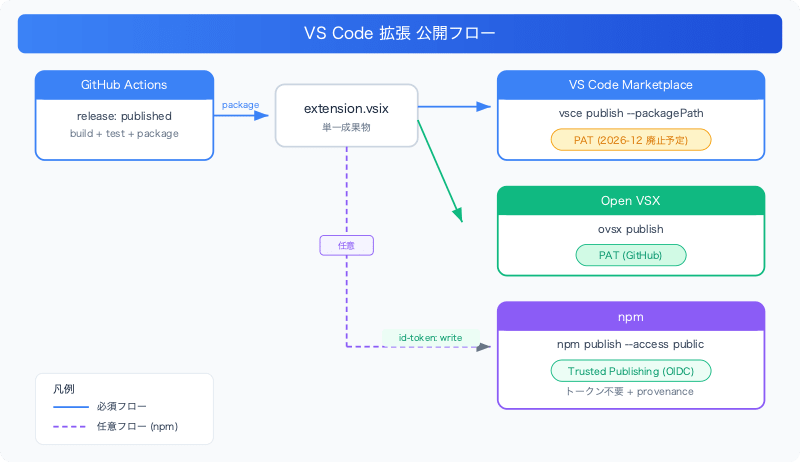
The straightforward approach for Marketplace and Open VSX is to publish the same .vsix to both. Package it once, then publish that same artifact to both registries.
      - name: Package extension
        run: pnpm dlx @vscode/vsce package --no-dependencies -o extension.vsix

      - name: Publish to VS Code Marketplace
        run: pnpm dlx @vscode/vsce publish --no-dependencies --packagePath extension.vsix
        env:
          VSCE_PAT: ${{ secrets.VSCE_PAT }}

      - name: Publish to Open VSX
        run: |
          pnpm dlx ovsx create-namespace YOUR_PUBLISHER -p "$OVSX_PAT" || true
          pnpm dlx ovsx publish extension.vsix -p "$OVSX_PAT"
        env:
          OVSX_PAT: ${{ secrets.OVSX_PAT }}
One thing to note for Open VSX: signing the Eclipse Foundation Publisher Agreement is mandatory (publishing will fail without it). The namespace (corresponding to the publisher field) is automatically created on the first publish, so create-namespace is just a safety net, made idempotent with || true. The namespace "verified badge" is optional and can be applied for later via a GitHub Issue.
VS Code Marketplace Authentication Is Painful
Publishing to the Marketplace requires an Azure DevOps PAT. Obtaining this was the biggest hurdle. I'll document the pitfalls in order.
The PAT is in Azure DevOps, not the Azure portal
You create it at dev.azure.com under "User settings → Personal access tokens"—not at marketplace.visualstudio.com/manage (publisher management) or in Entra ID in the Azure portal. The key points are to set the scope to Marketplace → Manage and the Organization to All accessible organizations (restricting to a single org will cause publish to fail).
Creating an Azure DevOps Organization requires an Azure subscription
This was a recent policy change: creating a new Organization now requires linking an Azure subscription. And free trial (Free Trial) subscriptions are rejected. Pay-As-You-Go subscriptions are "free to hold (a card is required for identity verification, but it's $0 if you don't use anything)," so you effectively need to go through that route.
PAT Deprecation (2026-12) and the Reality of Entra/OIDC
While going through the trouble of setting up a PAT, there's a fact that can't be ignored: Azure DevOps global PATs are scheduled for deprecation on December 1, 2026, and Microsoft recommends migrating to Entra ID-based authentication. The flag on the vsce side is --azure-credential.
I thought "then why not just set up Entra/OIDC from the start?" and investigated, but concluded that it's currently not realistic for GitHub Actions + personal account publisher combinations. The reasons are as follows:
- Microsoft's official instructions assume user-assigned managed identity + Azure Pipelines, and there are no instructions provided for GitHub Actions
- Using
--azure-credentialwith a federated service principal results inverify-patpassing but then getting a "corporate credentials required" error during publish, and the issue was closed as "not planned" (vscode-vsce#1023) - That error stems from a fundamental identity mismatch: presenting an organization tenant Entra token to a personally-owned publisher
In summary, here's the state of PAT versus Entra/OIDC:
| PAT | Entra ID / OIDC | |
|---|---|---|
| Current GitHub Actions support | Proven | Official instructions focus on Azure Pipelines |
| Personal account publisher | Works | Prone to issues (#1023) |
| Deprecation schedule | 2026-12-01 | Future recommendation |
So the practical solution was: "Use PAT for now and re-evaluate the migration before the deprecation deadline." There are roughly 17 months until the deadline, by which time either instructions for GitHub Actions should be in place, or it should be possible to decide whether to move the publisher to an organizational tenant. If you set up the App registration and federated credentials in advance, the actual switchover is just a few lines of diff.
npm Trusted Publishing: Tokenless OIDC Publishing
While the Marketplace side was "PAT is painful, OIDC is still difficult," npm was the opposite—OIDC was pleasant. npm's Trusted Publishing went GA in July 2025, enabling publishing from GitHub Actions without any tokens.
The requirements are simple:
permissions: id-token: writein the workflow- npm CLI on the runner at 11.5.1 or higher
- Configure which GitHub repository / workflow filename (+ optionally, environment) to trust on the npm side
Then NPM_TOKEN becomes unnecessary, and furthermore provenance is automatically attached. In the actual logs, provenance was being recorded in Sigstore's transparency log even without passing any tokens.
permissions:
  contents: read
  id-token: write # npm Trusted Publishing (OIDC)

# ...

      - name: Publish to npm
        run: |
          npm install -g npm@latest   # Ensure >= 11.5.1
          npm publish --access public
One thing to note: if you specify an environment in the npm Trusted Publisher settings, you need to also add environment: to the job side to match. If you didn't specify one, it's not needed.
As a reminder, since there's little necessity to publish the extension itself to npm as mentioned earlier, read this as: "if you're publishing to npm as well, the authentication can be tokenless."
The Completed Workflow
In the end, the workflow releases to all three destinations when a release is published. The npm step is placed last so that even if it fails, it won't stop the more important Marketplace / Open VSX publishing.
name: Publish Extension

on:
  release:
    types: [published]

permissions:
  contents: read
  id-token: write # npm Trusted Publishing (OIDC)

jobs:
  publish:
    runs-on: ubuntu-latest
    steps:
      - uses: actions/checkout@v7
      - uses: pnpm/action-setup@v4
      - uses: actions/setup-node@v6
        with:
          node-version: '24.x'
          cache: 'pnpm'

      - run: pnpm install --frozen-lockfile
      - run: pnpm run typecheck
      - run: pnpm run lint
      - run: pnpm run test

      - name: Package extension
        run: pnpm dlx @vscode/vsce package --no-dependencies -o extension.vsix

      - name: Publish to VS Code Marketplace
        run: pnpm dlx @vscode/vsce publish --no-dependencies --packagePath extension.vsix
        env:
          VSCE_PAT: ${{ secrets.VSCE_PAT }}

      - name: Publish to Open VSX
        run: |
          pnpm dlx ovsx create-namespace YOUR_PUBLISHER -p "$OVSX_PAT" || true
          pnpm dlx ovsx publish extension.vsix -p "$OVSX_PAT"
        env:
          OVSX_PAT: ${{ secrets.OVSX_PAT }}

      - name: Publish to npm
        run: |
          npm install -g npm@latest
          npm publish --access public
When I published the release, all three succeeded. In the logs, Marketplace returned Published YOUR_PUBLISHER.YOUR_EXTENSION vX.Y.Z, Open VSX returned 🚀 Published ..., and npm returned + YOUR_EXTENSION@X.Y.Z with provenance attached.
Summary
My honest impression is that with VS Code extension automated publishing, the judgment calls around "where to publish" and "how to authenticate" are heavier than the workflow YAML itself. Here's a summary of the decision criteria from a practical standpoint:
- Publishing destinations: Marketplace + Open VSX for the extension itself. npm is basically unnecessary (only when extracting a library)
- Marketplace authentication: PAT for now. However, keep the PAT deprecation on 2026-12-01 in mind. Entra/OIDC is currently prone to issues with GitHub Actions + personal accounts, so re-evaluate before the deadline
- Open VSX: Free with low adoption cost. Just don't forget to sign the Eclipse Publisher Agreement
- npm (if publishing): Trusted Publishing with tokenless + provenance is today's optimal solution
- Housekeeping: Align
@types/nodeto Node's LTS, and be explicit withtypesin tsconfig
References
- Publishing Extensions | Visual Studio Code Extension API
- npm trusted publishing with OIDC is generally available | GitHub Changelog
- Trusted publishing for npm packages | npm Docs
- Node.js Releases | endoflife.date
- Open VSX Namespace Access | eclipse-openvsx wiki
- vscode-vsce#1023 - Corporate credentials required with federated service principal