
Build a Chrome Extension for Meeting Minutes with Real-Time Transcription, Translation, and Speaker Diarization on DGX Spark

This page has been translated by machine translation. View original
Introduction
Hello, I'm Shimada from the Classmethod Manufacturing Business Technology Department.
Meeting tools like Google Meet and Zoom come with built-in features for transcription, speaker separation, and summarization by default.
However, in most cases these are processed in the cloud, so they cannot be used in environments where recorded content cannot be sent to the cloud.
I thought that if I could run NVIDIA's open-weight speech models on a DGX Spark, I could do the same thing in a local environment, so I built a Chrome extension that acts as a meeting secretary.
When you start recording in a meeting tab, transcriptions and translations per speaker stream into the side panel, and when you're done, you can save the meeting minutes to a Backlog Wiki.
When I tested it in an internal meeting, the transcription was updated approximately every 0.7 seconds while speaking.
An utterance is finalized when the speaker changes or after 0.6 seconds of silence, and the finalized utterance is replaced with a version polished by an LLM about 1 second later.
I also set up a system to search and retrieve the meeting minutes saved in the Backlog Wiki from the team assistant on Slack using the NemoHermes Backlog skill I created in a previous article.
What I Built
I named the Chrome extension shoki.
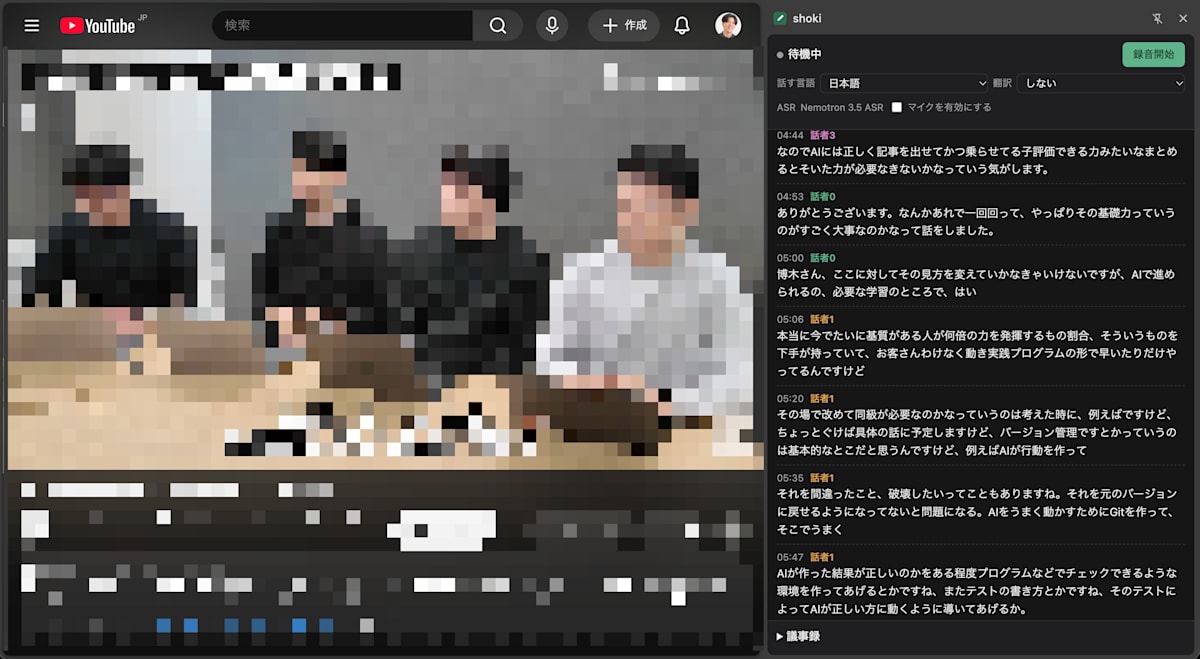
Testing shoki's recording with a roundtable-style video. It transcribes in real time and separates speakers as the video progresses.
Here is what it can do:
- Capture audio from the meeting tab and microphone, and transcribe in real time with speaker labels
- Polish finalized utterances with an LLM before displaying them
- Assign names to speakers (those names are also used in the meeting minutes)
- Translate each utterance (Japanese to English, English to Japanese)
- After stopping the recording, generate a draft of the meeting minutes from the speaker-labeled transcription
- Save the meeting minutes as a Backlog Wiki page
The browser side is a Chrome extension, and all recognition is performed on a server running on the DGX Spark.
Overall Architecture
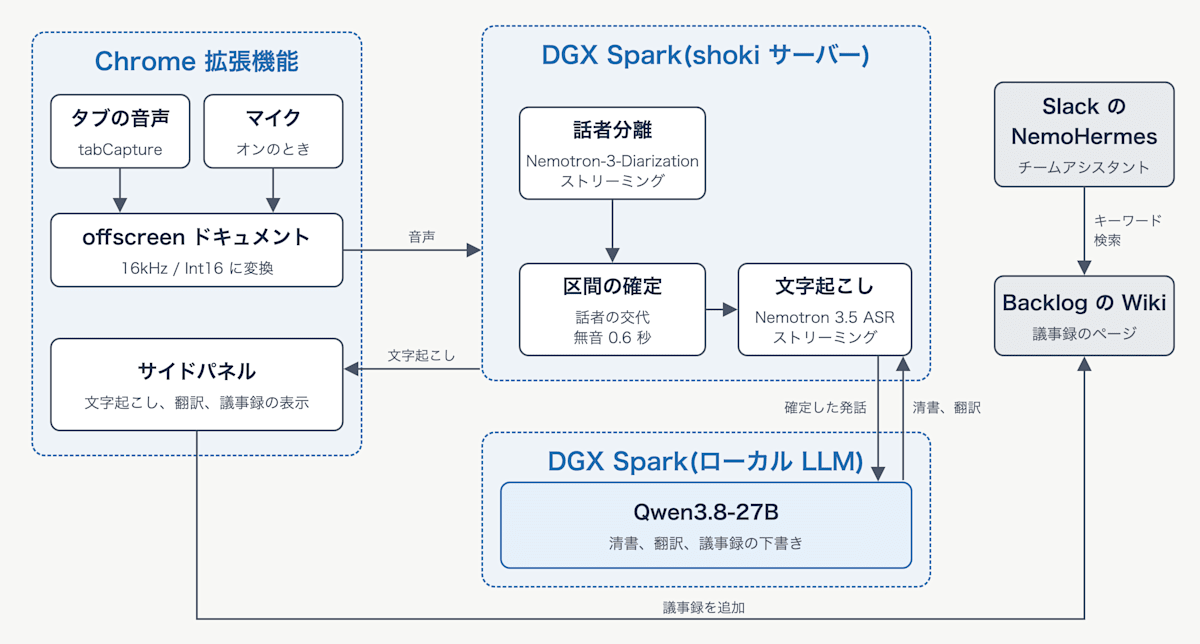
Speech recognition is handled by shoki's DGX Spark, polishing and translation by the local LLM's DGX Spark, and the generated meeting minutes are optionally added to the Backlog Wiki.
The models used are as follows:
| Role | Model | Number of Parameters |
|---|---|---|
| Speaker diarization | nvidia/Nemotron-3-Diarization | 100M |
| Transcription (default) | nvidia/nemotron-3.5-asr-streaming-0.6b fine-tuned on team terminology | 0.6B |
| Polishing, translation, minutes | RadixArk/Qwen3.8-27B-NVFP4 (vLLM on a separate team DGX Spark) | 27B |
The DGX Spark running shoki also hosts models for the Slack team assistant's judgment, among others.
Even adding speaker diarization (peak 0.5 GiB) and transcription (just under 3 GiB peak for the original model), there was more than enough memory.
The server is written in FastAPI, and model inference is performed using Transformers and NeMo.
The server is open to the internal network, and the extension connects to it directly.
Shared token authentication is applied to the API and WebSocket, and connections without a token are rejected.
Capturing Tab Audio with a Chrome Extension
To use it, open the side panel by clicking the shoki icon in the toolbar while on the meeting tab, then press "Start Recording."
The same button changes to "Stop," and pressing it again stops the recording.
Before recording, you can select the spoken language, translation direction, and whether to use the microphone at the top of the side panel.
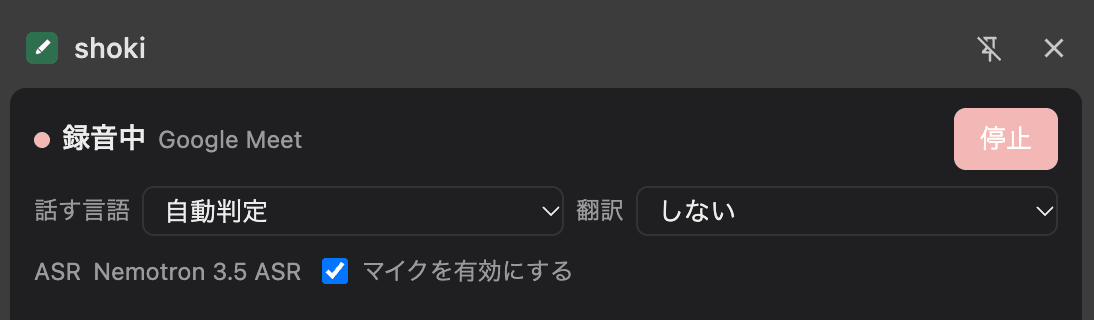
While recording, the name of the tab being recorded and a "Stop" button appear. ASR only displays the model name being used; there is no selection field.
Tab audio is captured using chrome.tabCapture.
getMediaStreamId returns a stream ID for that tab, and passing it to getUserMedia in an offscreen document gives you the tab audio as a stream.
const [tab] = await chrome.tabs.query({ active: true, currentWindow: true });
const streamId = await chrome.tabCapture.getMediaStreamId({ targetTabId: tab.id });
const tab = await navigator.mediaDevices.getUserMedia({
  audio: { mandatory: { chromeMediaSource: "tab", chromeMediaSourceId: streamId } },
});
Recording and the WebSocket are held by the offscreen document rather than the side panel.
Even if the side panel is closed, recording continues, and reopening it redisplays the transcription up to that point.
Speaker Diarization and Transcription
The server applies speaker diarization to the received audio and uses the results to segment the audio into intervals.
A segment is finalized when the speaker changes, when nobody speaks for 0.6 seconds, or when 15 seconds have elapsed, and the transcription for that segment is finalized.
Streaming Speaker Diarization
Nemotron-3-Diarization is a model that returns, for each frame of audio, the probability of who among up to 8 speakers is talking.
The Transformers implementation has a streaming mode, and in shoki a single stream is maintained for the entire recording and advanced each time audio arrives.
self.diar_p.set_streaming_mode("very_low_latency")  # 0.64-second latency
...
x = p(chunk, sampling_rate=SR, is_streaming=True, **kw).to(self.diar_m.device, dtype=self.diar_m.dtype)
out = self.diar_m(**x, speaker_cache=st.cache)
st.cache = out.speaker_cache  # Carry over speaker information from previous chunks
st.logits.append(out.logits)
By passing speaker_cache between chunks, speaker information is carried over, and the same person gets the same number across chunks.
Latency can be selected from 0.32 seconds, 0.64 seconds, or 1.04 seconds.
Since finalizing a segment waits for the diarization output, this latency adds directly to the finalization delay.
In shoki, the middle value of 0.64 seconds is used.
The speaker for each segment is assigned to whichever speaker overlapped with it the most.
Initially, the diarization was re-run from the beginning of the recording each time a segment was finalized.
While this was light—about 1 second for a 21-minute recording overall—the processing time per run grew as the meeting got longer.
Since switching to streaming, the diarization is nearly complete by the time a segment is finalized, bringing the processing time at finalization down to a few milliseconds.
When tested in an internal meeting, the presenter kept the same number from start to finish, and 3 participants were each shown with separate numbers.
The model card lists English, Chinese, and various Indian languages as training data languages but does not mention Japanese; however, within the range I visually verified, the speakers in this meeting were separated almost correctly.
Streaming Transcription
Nemotron 3.5 ASR supports cache-aware streaming inference.
In shoki, a stream is created when a segment begins, and each time audio arrives, only the accumulated chunks are fed to the model to produce intermediate output.
When a segment is finalized, the remaining audio is flushed through to finalize it.
The chunk length is determined by the amount of lookahead in att_context_size, with options of 80ms, 320ms, 560ms, and 1,120ms.
Shorter lengths produce more frequent intermediate output but at reduced accuracy.
In shoki, 560ms is used.
(st.pred_out, texts, c0, c1, c2, st.hyp) = self.m.conformer_stream_step(
    processed_signal=x, processed_signal_length=length,
    cache_last_channel=st.cache[0], cache_last_time=st.cache[1], cache_last_channel_len=st.cache[2],
    keep_all_outputs=last, previous_hypotheses=st.hyp, previous_pred_out=st.pred_out,
    drop_extra_pre_encoded=0 if first else self.cfg.drop_extra_pre_encoded,
    return_transcription=True,
)
The chunk splitting follows the same approach as NeMo's inference script (speech_to_text_cache_aware_streaming_infer.py).
The only change made for live audio is that features are recomputed each time new audio for a segment arrives.
Since this model is configured without feature normalization, recomputing does not change the values for previously fed portions.
When the first 3 minutes of an internal study session recording were fed in real time, the intermediate output was updated 258 times (approximately every 0.7 seconds).
The median delay from the end of a segment to finalization was 1.4 seconds.
This is because finalization waits for the diarization output and 0.6 seconds of silence, but since intermediate output is displayed while speaking, it is barely noticeable on screen.
How Segments Are Split
When tested on the same roundtable video used in the screenshot in the "What I Built" section (4-person conversation), segments were cut every 1–2 seconds when using volume-based splitting.
Even in scenes where one person spoke continuously, the output was fragmented as follows:
01:48 Speaker2  Running out of capacity.
01:48 Speaker2  What does Tikana mean
01:50 Speaker2  I see.
01:51 Speaker2  So once you can see what you want to do to some degree.
01:53 Speaker2  You write the action items to support that
01:55 Speaker2  My eye
01:57 Speaker2  And well, if you want to make a small fix you can go through vl
Since sentences were cut mid-way, ASR had to recognize short audio clips without surrounding context, producing meaningless lines like "My eye."
The cause was the way the volume threshold was set.
Shoki treated the bottom 20% of volume over the past 30 seconds as noise and set the threshold at 2.5 times that value.
In an ongoing conversation, human voices were also included in the bottom 20%, bringing the threshold close to the median of speech volume and causing soft utterance endings to be judged as silence.
Lowering the threshold caused room noise to be judged as speech, and 60% of segments were cut at the 15-second limit.
Adjusting by volume alone was not viable.
I therefore switched to splitting segments based on diarization output.
Since diarization returns who is speaking every 10ms, both the presence of speech and speaker changes are known simultaneously.
A segment is finalized under any of the following conditions:
- When the speaker changes. However, utterances by another person shorter than 1.2 seconds are treated as backchannels and included in the current segment.
- When nobody speaks for 0.6 seconds.
- When 15 seconds have elapsed. In this case, the cut is made at a brief pause within the same speaker's utterance.
Comparing the first 10 minutes of the same video, the results were as follows:
| Splitting method | Number of segments | Median length | Segments under 2 seconds |
|---|---|---|---|
| Volume (0.7-second silence) | 159 | 2.0 seconds | 50% |
| Diarization (speaker change and 0.6-second silence) | 69 | 8.7 seconds | 12% |
With diarization-based splitting, there were only 6 instances in those 10 minutes where nobody spoke for 0.6 seconds or more.
Almost all breaks in a flowing conversation are speaker changes.
Since segments and speakers align, it also became less common for two people's utterances to appear in the same line.
With the current splitting, the latter half of the scene above (from 01:51 onward) becomes a single line (after polishing):
01:49 Speaker2 So once you can see what you want to do to some degree, giving instructions and writing the code becomes the AI's job. And if you want to make small fixes, you can submit a correction request through the AI and it'll reliably fix things, which is great.
With this splitting method, the end of a segment is only determined after waiting for the diarization output.
Since the intermediate transcription reads through to the end of the received audio, it may have read into the beginning of the next segment by the time finalization occurs.
Initially, this was finalized as-is, causing the same text to appear in two consecutive lines.
Now, if the transcription had read past the end of the segment, only the portion within the segment is re-read at finalization time.
Handling Noisy Segments
When volume-based segment splitting was used, ambient microphone sounds and typing noises were also becoming segments.
When those were passed to Whisper, segments where nobody was speaking were filled with phrases like "Yes" and "Thank you very much."
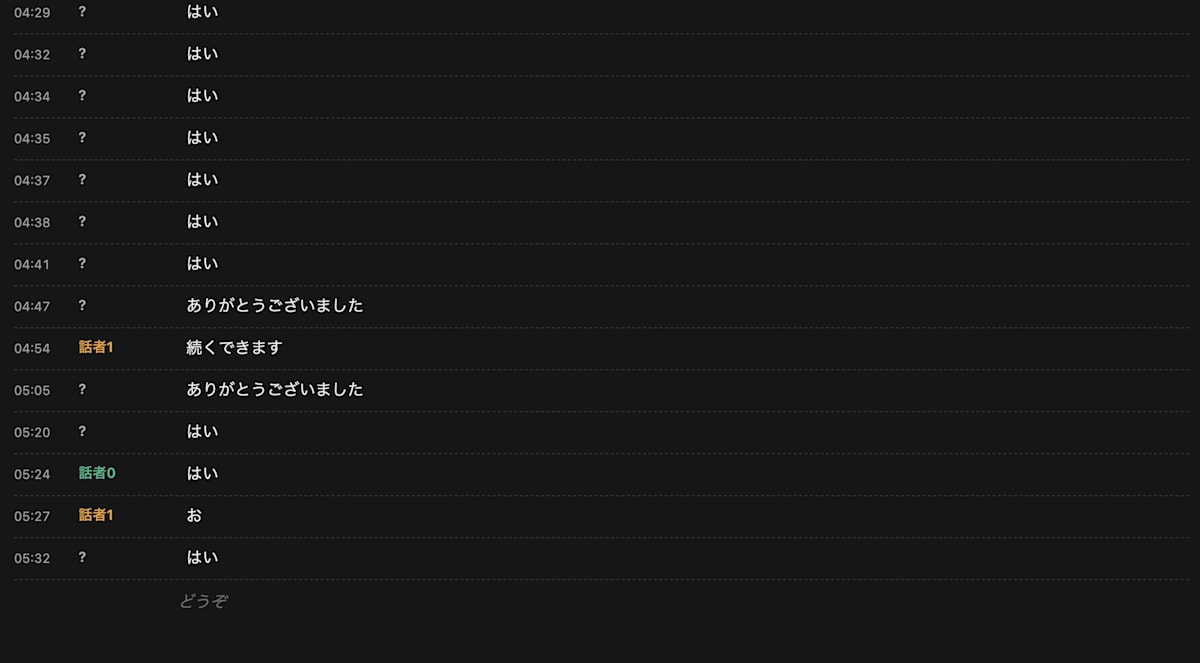
The screen when noisy segments were passed to Whisper. Lines with "?" as the speaker are segments where diarization found no utterance.
This problem was addressed by using the diarization results as a "voice present" judgment.
If the portion of a segment that diarization classifies as someone's utterance is less than 30%, the segment is discarded without being finalized.
# Inside the segment finalization process
ok, segs, t_diar = await self.has_voice(c)  # Whether the proportion of utterance time is >= 0.3
if not ok:
    continue  # Discard without finalizing transcription
When 20 seconds of only noise were prepended and appended to a recording and played through, nothing was output from the noisy segments, and the meeting portion was captured unchanged.
With the current diarization-based segment splitting, almost no noise-only segments are created.
Nevertheless, since Nemotron 3.5 can occasionally produce short words from noise, this check is kept in place.
Comparison of Japanese ASR Models
Among the ASR models used for transcription, the original Nemotron 3.5 ASR showed noticeable misrecognitions in spoken Japanese.
I therefore compared 5 models on the DGX Spark under the same conditions, focusing on models that Nakamura-san from the same department had compared on an L40S.
CER (Character Error Rate) was measured on 100 sentences from the FLEURS Japanese dev set, and processing time was measured on 80 segments from an internal study session recording split by diarization.
All inference was performed on the DGX Spark, processing one segment at a time in batch (not streaming).
The Nemotron 3.5 values are for the original model before fine-tuning.
| Model | CER | Processing time per segment | Peak memory |
|---|---|---|---|
| nvidia/nemotron-3.5-asr-streaming-0.6b | 14.3% | 142ms | 2.6GiB |
| openai/whisper-large-v3 | 3.8% | 930ms | 3.1GiB |
| openai/whisper-large-v3-turbo | 3.9% | 295ms | 1.6GiB |
| kotoba-tech/kotoba-whisper-v2.2 | 5.7% | 205ms | 1.5GiB |
| nvidia/parakeet-tdt_ctc-0.6b-ja | 5.3% | 64ms | 4.8GiB |
In terms of accuracy, Whisper large-v3 and turbo were nearly tied, with turbo running 3 times faster.
Parakeet was the fastest, with accuracy close to Whisper.
Nemotron 3.5 had a CER of 14.3%, which was 2.5 to 3.8 times higher than the other models.
There are also differences in how errors are made.
Nemotron 3.5 frequently confused homophones such as "scientist" (kagakusha) becoming "chemist" (kagakusha written differently) and "feathers" (umou) becoming "military gate" (bumon), and English abbreviations tended to come out in lowercase.
While Whisper large-v3-turbo is superior in accuracy alone, shoki uses only Nemotron 3.5 ASR.
This is because Nemotron 3.5 is the only model among those compared that can output text in streaming fashion while speech is ongoing.
The Japanese accuracy is supplemented through fine-tuning and LLM-based polishing as described next.
The Nemotron 3.5 used here is a version fine-tuned on 48 sentences of team-specific terminology (product names, service names) read aloud in my voice.
LLM-Based Polishing
While speaking, intermediate ASR output streams in italics.
When a segment is finalized, the utterance is displayed in gray with a "Polishing" label, and that utterance along with the preceding 6 utterances is sent to Qwen3.8-27B (NVFP4) for polishing.
When the polished version is returned, the gray text is replaced with the polished text.
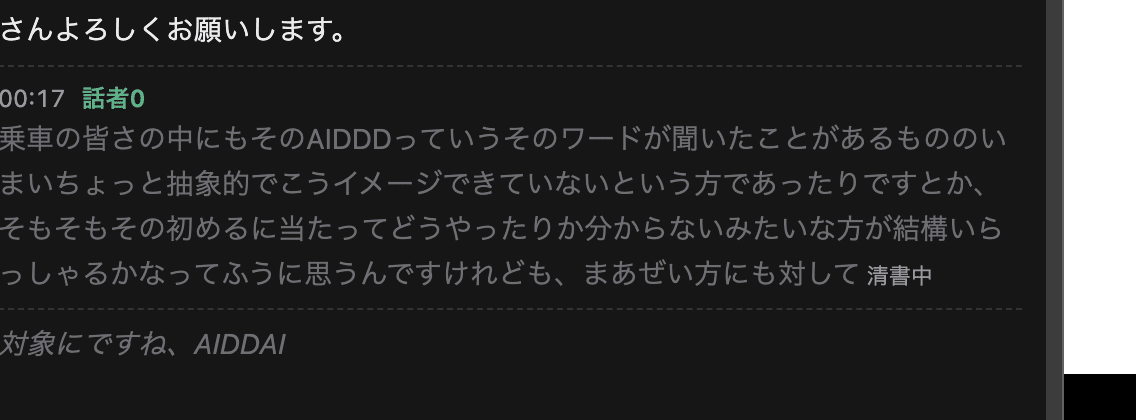
The gray line is an utterance awaiting polishing. The last italic line is intermediate output that has not yet been finalized.
Qwen3.8-27B is a model served by vLLM on a separate team DGX Spark, and no cloud API is used.
The median time from finalization to polished output was approximately 1.1–1.3 seconds.
The pre-polish text can be viewed by hovering the mouse cursor over an utterance on screen.
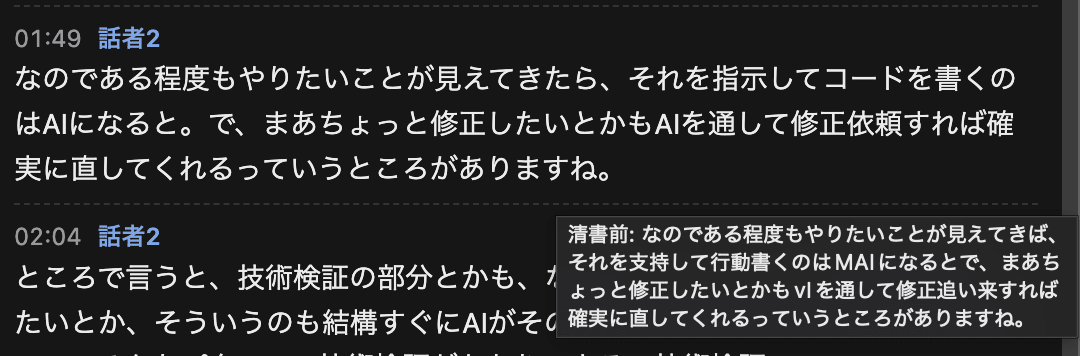
Polishing corrected "shiji shite kōdo kaku" ("write action items to support") to "shiji shite kōdo wo kaku" ("write the code with instructions"), and "shūsei oi ki" to "shūsei irai" ("correction request").
The polishing prompt instructs the model to correct only misrecognitions and not to paraphrase or summarize.
- Correct speech recognition errors (homophones, mishearings) based on surrounding utterances
- Keep English product names, service names, and abbreviations in English. Do not rewrite them in katakana.
- Align terms found in the glossary to the glossary's notation (replace only when a mishearing can be inferred)
- Do not paraphrase, summarize, adjust formality, or add content. Leave spoken language expressions as-is.
The initial prompt did not include the lines about English handling and the glossary.
When measuring against a reference text passed through the same ASR as the shoki server, the polishing was rewriting English product names into katakana (e.g., Nemotron becoming "Nemotoron"), which actually decreased accuracy.
| Data (single sentences without context) | ASR only | Initial prompt | Current prompt |
|---|---|---|---|
| CER for 24 read-aloud sentences | 8.9% | 10.2% | 8.9% |
| Same, correct terminology | 14/16 | 13/16 | 14/16 |
| CER for 55 FLEURS sentences | 24.7% | 23.8% | 24.6% |
When evaluated on single sentences without context, the effect of polishing appears small.
In a meeting, preceding utterances can serve as clues, so homophone errors were often corrected.
On the other hand, there were also cases where filling in likely-sounding words changed the meaning in unintended ways.
This is why the pre-polish text is retained.
Going forward, I would like to improve polishing accuracy by, for example, including meeting participant names in the system prompt.
Translation and Meeting Minutes Draft
Translation and meeting minutes also use the same Qwen3.8-27B.
Translation is requested for each polished utterance, with the preceding 6 utterances passed as context.
When measured on single sentences, it returned results in approximately 0.7 seconds.
Meeting minutes are generated by pressing "Create Minutes" after stopping the recording, based on the entire polished, speaker-labeled transcription.
Speaker names can be assigned by clicking on a speaker label in the side panel and typing a name on the spot.
The output format was specified using the following template:
## Summary
## Decisions Made
## Next Actions
- [Owner] Content
## Discussion Points / Notes
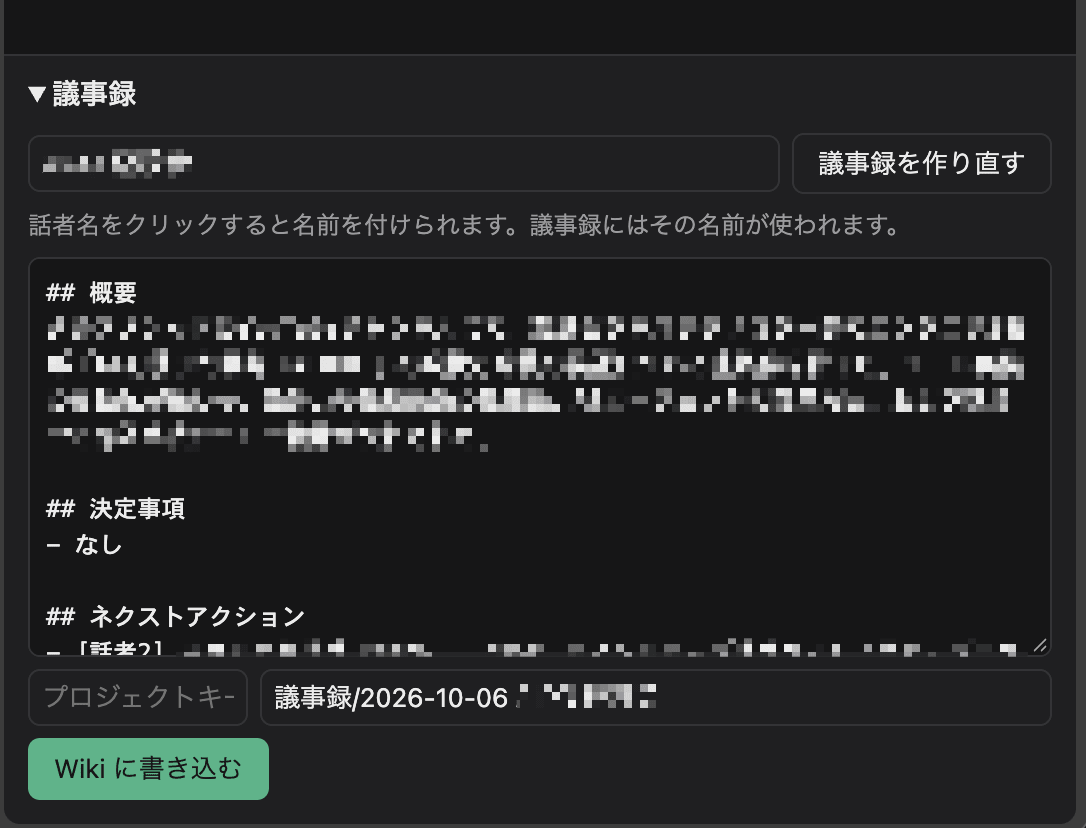
The draft minutes are output following the template headings and can be edited in place before being written to the Wiki.
Saving Meeting Minutes to the Backlog Wiki
The draft minutes can be edited and then saved as a Backlog Wiki page.
The page name defaults to a format like "Minutes/2026-10-05 Regular Meeting," with the date and meeting name included.
Since Backlog Wiki uses "/" in page names to create hierarchies, all minutes are collected in one place.
The shoki server calls the Backlog API's "Add Wiki Page" endpoint (POST /api/v2/wikis).
Since adding a page fails if a page with the same name already exists, in that case the current time is appended to the page name and it is recreated.
I also considered issues and files (shared files) as storage options, but shared files have no addition endpoint in the API, and writing requires WebDAV and a password.
Keyword searching the content via API is also not possible.
With Wiki, writing only requires an API key, and the list API (GET /api/v2/wikis) supports keyword search, which suits the purpose of later retrieval.
Searching Meeting Minutes from NemoHermes
The team assistant running on Slack (NemoHermes) was previously given a skill to search and read Backlog issues in an earlier article.
This skill can call any Backlog API GET endpoint, so searching Wiki pages and retrieving their content can be done without modification.
The only addition was a single section to the skill description.
It was written so that when asked about a past meeting, the assistant first searches for 議事録/ Wikis and responds with the page names and URLs.
## Meeting minutes (Wiki)

Meeting minutes are recorded ... as Wiki pages named `議事録/YYYY-MM-DD <meeting name>`.
When someone asks what was said or decided in a past meeting, search these pages first.
Once in regular use, the expected flow is that asking something like "What was decided in last week's regular meeting?" on Slack would have NemoHermes find the meeting minutes and respond.
Without setting up a separate vector search system, Backlog's built-in search should be usable directly as a meeting minutes search.
Actually saving meeting minutes to the Wiki and retrieving them from Slack is something I plan to try from here.
Closing
I combined NVIDIA's open-weight speech models to build a meeting secretary that does not send audio to the cloud, using a Chrome extension and DGX Spark.
Both transcription and speaker diarization run in streaming mode, producing text from the moment speaking begins, and finalized utterances are polished by an LLM.
The biggest challenge remains Japanese transcription accuracy.
Fine-tuning improved terminology recognition, and polishing reduced homophone errors, but for general speech from other people's voices, CER still exceeds 20%.
Since polishing fills in likely-sounding words from context, if the original errors are severe, the result can become a plausible but differently-meaning sentence.
Both of these points still have room for improvement.
I also set up a system to save meeting minutes to the Backlog Wiki and ask the Slack team assistant about past meetings, so the next step is to put this into actual team use.
References
- nvidia/Nemotron-3-Diarization (Hugging Face)
- nvidia/nemotron-3.5-asr-streaming-0.6b (Hugging Face)
- nvidia/parakeet-tdt_ctc-0.6b-ja (Hugging Face)
- Comparing Japanese ASR Models on NVIDIA L40S (Parakeet from NVIDIA Shows Impressive Results) (DevelopersIO)
- Fine-tuning Nemotron 3.5 ASR on Japanese Speech (DevelopersIO)
- Local Speaker Diarization on a Local Mac with Nemotron-3-Diarization — Even a ~27-Minute Meeting Recording Was Diarized in 6 Seconds (DevelopersIO)
- chrome.tabCapture (Chrome for Developers)
- chrome.offscreen (Chrome for Developers)
- chrome.sidePanel (Chrome for Developers)
- google/fleurs (Hugging Face)
- Backlog API Add Wiki Page (Nulab)
- Backlog API Get Wiki Page List (Nulab)