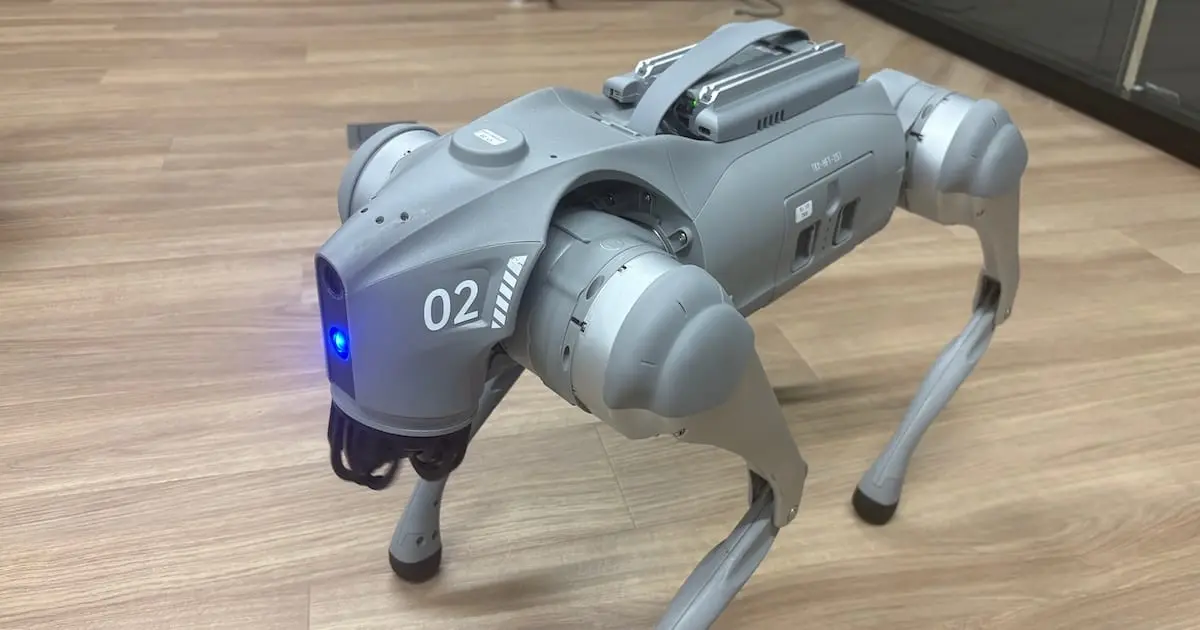
Robot Visual Inspection Agent Leveraging Unitree Go2 and G1: Quasi-Real-Time Path Risk Dashboard for Go2 Realized with Grounding DINO and Geometric Policy

This page has been translated by machine translation. View original
Introduction
Last week, I built a PoC that periodically captures still images from the Unitree Go2's front camera and continuously analyzes them with a local VLM.
The architecture up to last week was as follows.
Go2 front camera
  ↓
Periodic still image capture
  ↓
Observation by Qwen2.5-VL
  ↓
Structured JSON
  ↓
Risk assessment by Python
  ↓
Markdown report
Being able to generate JSON and reports from real camera images was a significant step forward.
On the other hand, as I progressed with evaluating real images, I also realized there are limitations to entrusting all of "object recognition," "position understanding," "path determination," and "risk assessment" solely to a VLM.
For example, there were cases where the VLM recognized a person but could not consistently determine that the person was blocking the robot's straight-ahead path. Output also fluctuated for close-range doors, boxes, and mixed obstacles.
So this week, I redesigned the live risk assessment path as follows.
Go2 front camera
  ↓
Periodic still image capture
  ↓
Object detection by Grounding DINO Tiny
  ↓
Bounding box
  ↓
Geometric calculation with path ROI
  ↓
Deterministic Python risk policy
  ↓
JSON / overlay PNG
  ↓
Streamlit dashboard on DGX Spark
The central theme of this article is the transition from a VLM-centric architecture to one centered on object position information from Grounding DINO and a deterministic geometry policy.
I also connected real Go2 camera images to the inference environment on DGX Spark and completed the pipeline to continuously display GPU inference results on an operator-facing dashboard.
"Near-real-time" in this article means continuously analyzing still images captured every few seconds and displaying the latest results at short update intervals.
This is neither real-time video analysis that directly inputs a video stream, nor a safety-certified collision avoidance system.
Demo Video
What I Accomplished This Week
This week, I mainly implemented and verified the following.
- Building an object detection pipeline using Grounding DINO Tiny
- Deterministic geometric risk assessment using bounding boxes and path ROI
- Path obstruction determination using union occupancy of multiple objects
- Generation of overlay images combining bboxes and path ROI
- Continuous analysis of real Go2 front camera images on DGX Spark
- Mailbox design that treats Go2 images as a single
latest.jpg - Operator-facing risk visualization dashboard using Streamlit
- Analysis process control via START / STOP
- Display of analysis logs, inference time, detected objects, and path obstruction state
- Grounding DINO CUDA inference on DGX Spark GB10 GPU
- Shortening of dashboard update interval and analysis watcher interval
- Implementation of local warning sounds based on risk state
- End-to-end operation verification from real camera input to dashboard display
The architecture this time is also an advisory-only system intended solely for supporting manual operation confirmation.
It has no connection whatsoever to Go2's movement, stopping, turning, or posture control.
Why I Separated the VLM from the Live Risk Assessment Path
In verifications up to last week, I was using Qwen2.5-VL-3B / 7B to obtain observation information like the following from real Go2 camera images.
{
  "scene": "office",
  "objects": [
    "person",
    "boxes",
    "door"
  ],
  "risk_level": "medium",
  "recommended_action": "operator confirmation"
}
Being able to output JSON stably and correctly judging the state of the physical world were separate problems.
The cases that were particularly problematic were as follows.
A person is detected, but the path is judged as clear
A closed door occupies the center of the screen, but it does not become high
Multiple boxes are ahead, but each is individually treated as medium
The difference between near and far objects cannot be stably expressed
Observation results and risk expressions sometimes fluctuate for the same image
For this reason, rather than concluding the VLM was entirely unnecessary, I decided to separate it from the core of the fast and continuously running path risk assessment.
The current division of roles is as follows.
Grounding DINO:
  Detects objects and obtains positions as bounding boxes

Python geometry:
  Calculates the overlap between bounding boxes and the path ROI

Deterministic policy:
  Determines risk level and path_blocked from occupancy and bbox positions

VLM / LLM:
  To be used in the future for scene description, report generation,
  semantic understanding of signs and unknown objects,
  and supplementary explanations when requested by an operator
Comparing the VLM and Grounding DINO for the current task of "how much of the forward path is occupied," the following differences were observed.
| Perspective | VLM-centric architecture | Grounding DINO + geometry policy |
|---|---|---|
| Object position | Text description-centric, position expressions tend to be vague | Can be obtained as bounding boxes |
| Overlap with path ROI | Depends on phrases like "center" or "close" | Can be calculated as ROI intersection area / occupancy ratio |
path_blocked determination |
May judge path as clear even after recognizing a person or box | Can be determined with explicit thresholds and rules |
| Inference speed | Approx. 4–7 sec for Qwen 3B, approx. 16–19 sec for 7B | Sub-second model forward inference confirmed on GB10 |
| Reproducibility | May fluctuate depending on prompt and generated output | Easy to reproduce with the same bbox and same rules |
| Testing | Difficult to unit test expected results in detail | ROI, intersection, union occupancy, and policy can be tested |
| Explainability | Sometimes difficult to trace why the result is high | bbox, ROI, occupancy, and policy reason can be displayed |
| Suitable role | Scene description, reporting, supplementary understanding of unknown objects | Live path risk advisory |
Based on this comparison, the current live path adopted the following architecture.
Fast path:
  Grounding DINO
  → ROI geometry
  → deterministic policy
  → dashboard / advisory

Slow optional path:
  VLM / LLM
  → Japanese explanation
  → report
  → supplementary understanding of ambiguous objects and scenes
In other words, the VLM was not discarded as a failure, but rather separated from the live assessment path where speed, stability, and position information are critical, and reassigned to a role more suited to semantic understanding and explanation.
Grounding DINO and Path ROI
The object detection model used this time is as follows.
IDEA-Research/grounding-dino-tiny
The initial prompt is set as follows.
person. box. chair. cart. door. robot. bag.
Detection results are handled as normalized bounding boxes.
{
  "label": "person",
  "score": 0.92,
  "bbox_normalized": [
    0.31,
    0.42,
    0.69,
    0.98
  ]
}
For the Go2 front camera image, a forward path ROI centered on the lower center was set.
Conceptually, the region is as follows.
Upper image area:
  Distance and background

Center image area:
  Forward space

Lower center image area:
  Close-range path area important when Go2 moves straight ahead
By intersecting an object's bounding box with this ROI, the following information is calculated.
Whether the object overlaps with the ROI
The ratio of the ROI occupied by the object
Whether the object reaches the lower part of the image
How much of the path is collectively occupied by multiple objects
With this architecture, the reason for a risk assessment can be explained.
For example, if a person largely occupies the path in the lower center, the result would be as follows.
{
  "risk_level": "high",
  "path_blocked": true,
  "primary_obstacle": "person",
  "aggregate_route_occupancy_ratio": 0.5948
}
Union Occupancy of Multiple Objects
Looking at only a single object was sometimes insufficient for handling scenes with mixed obstacles.
For example, when multiple boxes or objects are on the path, each bounding box may be medium-level individually, but moving straight ahead may be difficult in aggregate.
Therefore, I added an ROI occupancy ratio for multiple bounding boxes.
The important point is not to simply add the bounding box areas.
If duplicate detections occur for the same object, simple addition would overestimate the occupancy ratio.
Therefore, union coverage is calculated for the bounding box regions within the ROI.
Multiple bboxes
  ↓
Unionize overlapping regions within the ROI
  ↓
  Calculate the occupancy ratio relative to the ROI area
  ↓
aggregate_route_occupancy_ratio
The current high-risk aggregation rule is roughly as follows.
2 or more route-relevant objects
and
aggregate_route_occupancy_ratio >= 0.35
  ↓
high / path_blocked=true
This processing corrected the multiple-box cases.
Provisional high-risk recall with Grounding DINO alone:
  6 / 10
  60%

After adding multi-object aggregation:
  7 / 10
  70%
However, these results are interim results based on a small-scale, high-risk-heavy, provisionally labeled dataset of 12 images.
They do not imply sufficient evaluation of low-risk scenes or proof of safety.
Connecting Real Go2 Camera to DGX Spark
This week, I connected the Go2's front camera images to the inference environment on DGX Spark.
The overall architecture is as follows.
Go2 front camera
  ↓
Unitree SDK2 Python / CycloneDDS
  ↓
DGX Spark host
  ↓
latest.jpg mailbox
  ↓
GPU container
  ↓
Grounding DINO + geometry policy
  ↓
Streamlit dashboard
For capturing Go2 camera images, I used the official front-camera sample included in Unitree SDK2 Python.
python example/go2/front_camera/capture_image.py enP7s7
The JPEG captured from the Go2 was first verified on the DGX Spark host side.
After that, I prepared a capture loop for periodic acquisition and configured it to save only the latest image to the dashboard input folder.
The latest.jpg Mailbox Design
Initially, I considered a method of saving timestamped files for each periodic capture.
go2_front_20260723_100001.jpg
go2_front_20260723_100004.jpg
go2_front_20260723_100007.jpg
...
However, this method has problems.
For example, even if STOP is pressed on the dashboard to stop only the analyzer, images continue to accumulate if the capture process keeps running.
When START is pressed afterward, past images are processed all at once, and the dashboard may display old scenes instead of the current one.
Therefore, I changed the input to a single image mailbox.
samples/local_dashboard_input/
  └── latest.jpg
In the capture loop, it is updated with the following steps.
Official camera image
  ↓
Copy to .latest.jpg.tmp
  ↓
Atomic replace
  ↓
latest.jpg
Conceptually, it is as follows.
shutil.copyfile(
    official_img_path,
    temp_path,
)

temp_path.replace(final_path)
This reduces the possibility of the analyzer reading a partially written JPEG while keeping only the latest single image.
The advantages of this design are as follows.
Raw image backlog does not accumulate while STOP is active
Only the most recent scene is processed after START
The amount of raw image storage does not increase
Easier to reduce privacy and storage burden in actual operation
The policy is to use only latest.jpg for daily input images, and to save only a limited number of overlay PNGs and JSONs in history.
GPU Inference on DGX Spark
The NVIDIA GB10 GPU on DGX Spark is used for inference.
Running Grounding DINO Tiny with CUDA, the following were generated for actual Go2 front camera images.
latest_result.json
latest_overlay.png
history/*.json
history/*_overlay.png
With continuous real-machine input, model forward inference operated mostly sub-second.
However, the time until a new result is visible on screen is not determined solely by model inference.
Go2 camera capture
  ↓
JPEG write
  ↓
Watcher detection
  ↓
Image decode / preprocessing
  ↓
Grounding DINO inference
  ↓
Geometry / JSON / overlay generation
  ↓
Streamlit refresh
  ↓
Browser render
For this reason, it is necessary to consider not only inference_sec but also the end-to-end latency from capture through analysis to dashboard display separately.
In this round of adjustments, the following were shortened.
Analyzer poll interval:
  0.5 sec
  ↓
  0.2 sec

Dashboard status refresh:
  1.0 sec
  ↓
  0.5 sec

Dashboard live panel refresh:
  1.0 sec
  ↓
  0.5 sec
This change improved the perceived responsiveness of screen updates.
Streamlit Dashboard
Among the achievements this time, the Streamlit dashboard is particularly important.
This is not merely a screen that displays the current risk, but is positioned as a common visualization platform for future robot recognition, verification, and operation projects.
Main Screen
The following is the main screen analyzing actual Go2 front camera images.
GUI Screenshot 1
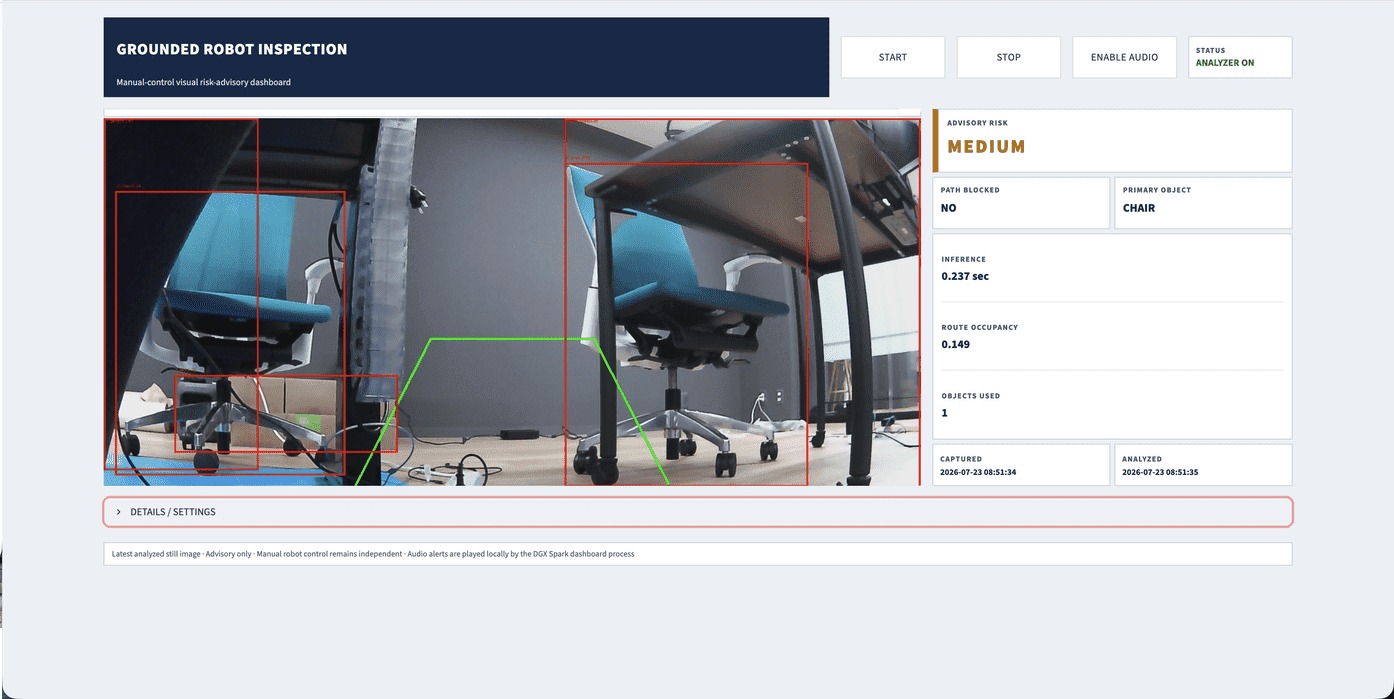
On the left, the latest analyzed camera image is displayed.
The red rectangles are bounding boxes detected by Grounding DINO.
The green trapezoid is the forward path ROI for when Go2 moves straight ahead.
On the right, the following information is aggregated so that the operator can review it quickly.
ADVISORY RISK
PATH BLOCKED
PRIMARY OBJECT
INFERENCE
ROUTE OCCUPANCY
OBJECTS USED
CAPTURED
ANALYZED
In the screenshot, chairs and other objects are detected and partially overlap with the path ROI, so the following state is displayed.
ADVISORY RISK:
  MEDIUM

PATH BLOCKED:
  NO

PRIMARY OBJECT:
  CHAIR

INFERENCE:
  0.237 sec

ROUTE OCCUPANCY:
  0.149
In this way, the presence of objects and the complete obstruction of the straight-ahead path can be confirmed separately.
Even if an object is present in the image, PATH BLOCKED=YES will not necessarily occur unless the ROI occupancy ratio or position exceeds the threshold.
The START, STOP, ENABLE AUDIO, and STATUS at the top allow the operator to control and check the operating state of the analysis process.
Details Screen
Opening DETAILS / SETTINGS allows you to check the detection results and details of the analysis process.
GUI Screenshot 2
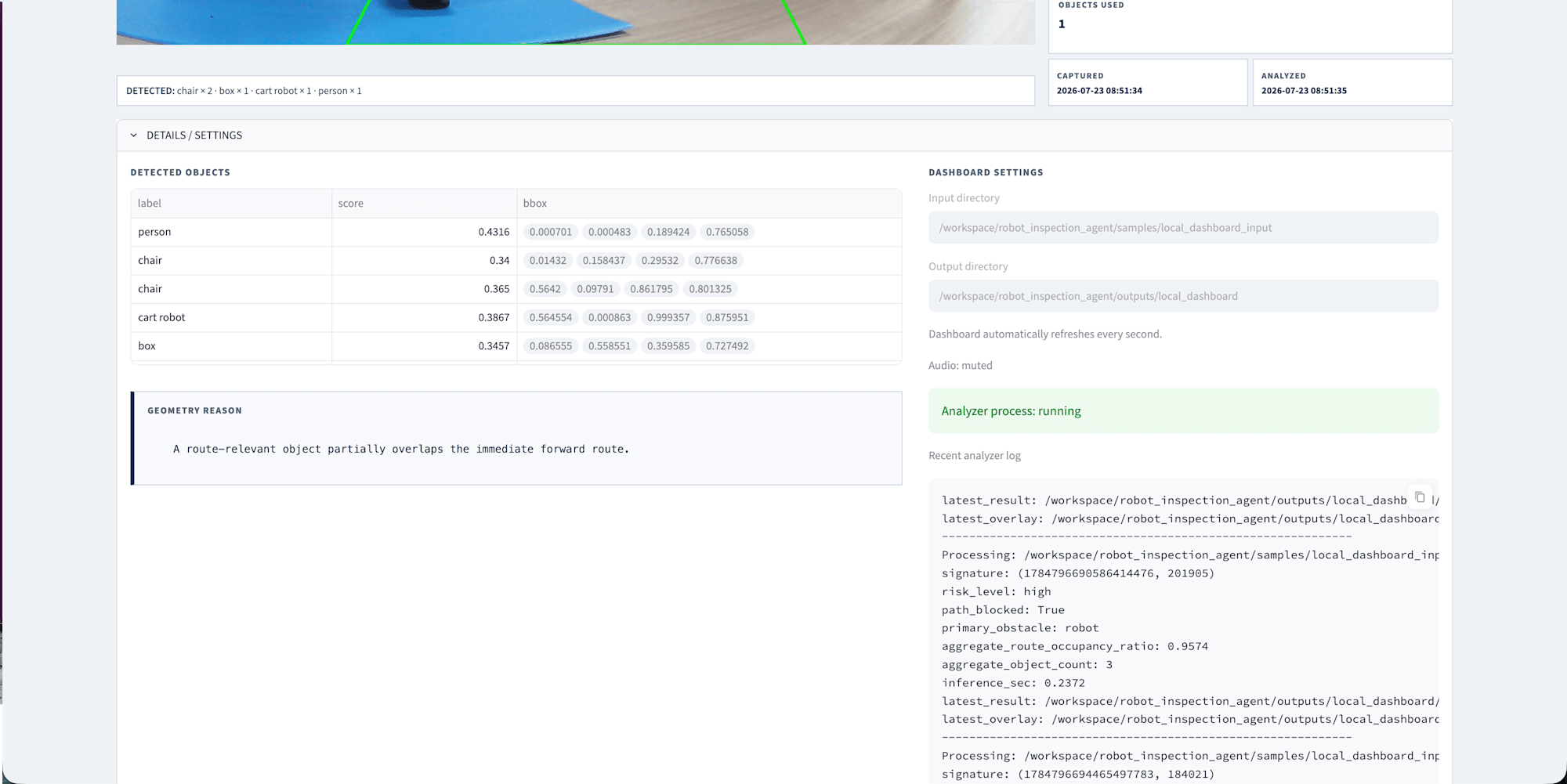

The DETECTED OBJECTS on the left displays the following for each detected object.
label
score
normalized bounding box
This allows you to check the inference results themselves, not just the red rectangles on screen.
Also, GEOMETRY REASON displays the reason for the judgment made by the Python policy.
Example:
A route-relevant object partially overlaps the immediate forward route.
This indicates that the detected object partially overlaps with the current forward path ROI, though it does not immediately imply complete obstruction.
On the right, DASHBOARD SETTINGS allows you to check the following.
input directory
output directory
audio state
analyzer process state
recent analyzer log
Since Analyzer process: running is displayed, you can confirm that the analyzer launched from the dashboard is operating.
The analyzer log at the bottom outputs the processing history of the latest image, risk level, path_blocked, primary obstacle, ROI occupancy ratio, inference time, and more.
This details screen is important not only for visualization, but also as a development and verification screen that can be used for threshold adjustment, model comparison, false positive / false negative checking, and future G1 profile adjustments.
Near-Real-Time Visualization
The dashboard this time continuously displays the latest images periodically captured from Go2.
Go2 camera
  ↓
latest.jpg update
  ↓
Analyzer detects new image
  ↓
JSON / overlay update
  ↓
Dashboard re-displays at 0.5-second intervals
Therefore, operators can check current detection results and path assessments on screen without continuously monitoring SSH logs.
This is not real-time analysis in the sense of directly processing a video stream.
However, by combining periodic capture, GPU inference, and short-interval refresh, sufficiently practical update responsiveness for supporting manual operation was achieved.
Value as a Verification Tool for Future Projects
This dashboard does not end with just this Go2 path risk assessment.
It can be used as a common UI when adding and verifying the following features in the future.
Near-field ROI profile for G1
Distance supplementary information via Depth / LiDAR
Mask refinement using SAM and similar tools
Asynchronous scene description by VLM
Comparison of object detection models
Comparison of thresholds and geometry policies
False positive / false negative review
Operator notes and event history
State visualization for G1 manipulation / beverage handover
For example, even when progressing to a beverage handover task for G1 in the future, the dashboard can serve as a foundation for displaying states such as the following.
TASK STATE
TARGET OBJECT
GRASP STATUS
HANDOVER READY
OPERATOR CONFIRMATION
ABORT STATUS
In this way, the dashboard created this time serves both as a Go2 inspection PoC and as a tool for developing, observing, and verifying future robot AI projects.
Warning Sounds Based on Risk
The dashboard also implements a function to emit short local warning sounds based on the risk level.
The operator can select ENABLE AUDIO on the screen and switch to MUTE as needed.
The current notification policy is as follows.
low:
  Safe
  Notification only when risk state changes to low

medium:
  Caution
  Immediate notification on state change
  Approximately 5-second intervals when medium continues

high:
  Danger
  Immediate notification on state change
  Approximately 2-second intervals when high continues

unknown:
  Confirm
  Immediate notification on state change
  Approximately 10-second intervals when unknown continues
To prevent the same analysis result from being announced repeatedly with each dashboard refresh, analyzed_unix_ms is used to target only new analysis results for assessment.
Also, when the risk state changes, the new state is announced immediately without waiting for the debounce time.
low → high:
  Danger

high → medium:
  Caution

medium → low:
  Safe
The current implementation uses espeak-ng in the Linux environment on DGX Spark.
espeak-ng -v ja -s 165 "危険"
However, since a usable speaker connected to DGX Spark could not be prepared in the demo environment this time, actual audio notifications are not used in the YouTube demo.
The implementation of the audio function and the enable/mute toggle on the dashboard are complete.
In the future, if an HDMI audio output, USB speaker, or audio device on the Spark host can be connected, the current advisory audio can be used as-is.
What is important is that this audio is also merely a caution notice for the operator, and does not perform stopping or movement control of Go2.
Issues Encountered During Implementation
In this implementation, there were many challenges in actual runtime integration rather than with the model itself.
Issue Where Streamlit's Transparent UI Layer Covers Buttons
Initially, there was a problem where the START button was visible but could not be clicked.
The cause was not on the Python side, but that Streamlit's transparent header / toolbar layer remained over the button.
Even though it is visually transparent, it receives pointer events in the browser, so clicks do not reach the button.
The following measures were taken.
Hide header / toolbar / Deploy / decoration
pointer-events: none
Specify z-index and pointer-events: auto for dashboard buttons
This problem was difficult to understand from the dashboard's appearance alone, and it was necessary to check the UI layers and z-index in the browser.
Docker Container UID and PyTorch Cache Issue
When running a GPU container with the host user's UID, there was also a problem where Python internals could not obtain user information and the analyzer terminated immediately after startup.
KeyError:
  getpwuid(): uid not found
This was caused by the absence of a passwd entry for the host UID inside the container.
Ultimately, it was resolved by read-only mounting the host's user/group information in the container runtime.
TorchInductor cache and Hugging Face cache are also specified to be writable locations within the container.
While this is not directly related to robot recognition algorithms, it was an important operational challenge when connecting the real machine, GPU, container, and dashboard.
Current Results and Limitations
With this Go2 v1, the following state has been reached.
Go2 real camera
  ↓
Unitree SDK2 / DDS read-only capture
  ↓
DGX Spark latest.jpg mailbox
  ↓
GB10 CUDA Grounding DINO
  ↓
Deterministic ROI geometry policy
  ↓
JSON / overlay
  ↓
Live Streamlit dashboard
The current visualization is very clear, and when people, doors, boxes, chairs, etc. enter the path ROI, operators can make decisions while checking the basis for the assessment.
On the other hand, the following limitations remain.
Mixed lower-center clutter
Bag
Cable
Floor equipment
Objects not included in the prompt
Scenes where detection bboxes are unstable
Also, the current evaluation data is small-scale and biased toward high-risk cases.
Therefore, what can be said at this point is as follows.
Operated as a grounded visual advisory prototype for real Go2 input

However,
It is not a safety-certified collision avoidance system
Going forward, it will be necessary to create a controlled dataset with a better balance of low / medium / high, and to evaluate false positives and false negatives.
Regarding G1
This time, I did not proceed to actual verification with G1.
This is not so much an incomplete task as it is a deliberate decision not to directly apply the forward path ROI designed for Go2 to G1.
G1 may differ from Go2 in camera position, field of view, and how the near-field area appears.
Therefore, in the next phase, I plan to prepare the following.
go2_forward_route_v1
g1_near_field_v0
The G1-facing ROI will be treated as a provisional profile for near-field inspection first, and adjusted after controlled image collection.
For G1 as well, the current scope is read-only camera inspection, with no connection to walking, arms, grasping, or VLA execution.
Summary
This week, I evolved last week's VLM-centric PoC into a Grounded Multimodal Robot Inspection Agent using real Go2 camera images and the DGX Spark GPU.
The main things accomplished are as follows.
Read-only capture of real Go2 front camera images
Real machine camera integration via Unitree SDK2 Python / CycloneDDS
Grounding DINO inference on DGX Spark GB10 CUDA
Geometric risk assessment using bounding boxes and path ROI
Multi-object union occupancy
Backlog avoidance via latest.jpg mailbox
JSON / overlay generation
Streamlit dashboard controllable with START / STOP
Continuous visualization of real Go2 images
Implementation of local warning sounds based on risk state
GUI foundation also usable for future verification projects
The major learning from this time is as follows.
"For problems where position and occupancy ratio are important, such as path risk, it is easier to improve speed, reproducibility, and explainability by separating object position information from Grounding DINO and a deterministic geometry policy, rather than relying solely on the text output of a VLM."
At this point, Go2 v1 has become a sufficiently demonstrable prototype with real camera, GPU inference, and dashboard connected.
In the next phase, I will further stabilize the current Go2 v1.
Creation of a balanced controlled dataset
Measurement of capture-to-analysis latency
Analysis of hard cases such as mixed clutter
Recording of false positives / false negatives
Stabilization of thresholds and geometry policy
Checking audio output devices on Spark
After that, in order to adapt to G1, which has a different camera position and field of view from Go2, I plan to proceed with designing a G1-specific ROI profile and performing controlled calibration.
Once Go2 stability improvements and G1 adaptation progress, inspection agent v1 will mark a milestone, and it can be used as the foundation for advancing to the next robot AI project.
Note that this system is an advisory-only prototype intended for supporting manual operation confirmation.
The outputs of the detector, geometry policy, dashboard, and audio notifications are not connected to the movement control of Go2 or G1.