![[Security Hub Remediation Steps] [SageMaker.16] SageMaker models should use a private registry in a VPC for the primary container](https://images.ctfassets.net/ct0aopd36mqt/wp-refcat-img-cea52bc8a6ec5cad9021b38df4a08b9e/24c76ee7c1ae7aa7f9676a59c77f8702/aws-security-hub?w=3840&fm=webp)
[Security Hub Remediation Steps] [SageMaker.16] SageMaker models should use a private registry in a VPC for the primary container

This page has been translated by machine translation. View original
Hello! This is Slyman.
Are you running security checks on your AWS environment?
This article introduces remediation steps for the items covered by the AWS Security Hub security status scoring of your AWS environment.
Target Control of This Article
[SageMaker.16] SageMaker models should use a private registry in the VPC for primary containers
[SageMaker.16] SageMaker models should use private registry in VPC for primary containers
Prerequisites
This article is intended for those using the "AWS Foundational Security Best Practices standard" in AWS Security Hub.
For details about AWS Security Hub, please see these blogs.
Description of the Target Control
This control checks whether the primary container of a SageMaker AI model is configured to pull its container image from a private registry within a VPC.
If the repository access mode (RepositoryAccessMode) of the image configuration is set to Vpc, this control passes.
If no image is configured, or if the repository access mode is Platform, this control fails.
The primary container of a SageMaker AI model uses the repository access mode to control where the image used for inference is pulled from.
If you specify Platform, the image is pulled through a path managed by SageMaker AI, and if you specify Vpc, the image is pulled from a private registry that you have prepared within your own VPC.
Unless you have special requirements, set the repository access mode to Vpc and use a private registry within the VPC.
This is because the image is pulled via a VPC endpoint and does not traverse the public internet.
Note that the private registry must be accessible from the same VPC specified for the model, and must be secured with a TLS certificate issued by a public certificate authority.
Also, Amazon ECR does not support Vpc mode.
Therefore, when setting the repository access mode to Vpc, you need to build a private registry such as Docker Registry within the VPC, separate from ECR.
When pulling container images over a public path, there is a risk of pulling from an untrusted registry or of the image being tampered with in transit. If a tampered or malicious image is launched as an inference container, it could lead to contamination of inference results or theft of data handled within the container.
By using a private registry within the VPC, you can limit the image source to a trusted scope and keep communication contained within the VPC.
Remediation is essential to prevent the execution of tampered or malicious images and to protect the data handled by the container.
Note that the repository access mode can only be specified when creating a model, so the configuration of an existing model cannot be changed afterward.
To remediate, you need to recreate the model.
Remediation Steps
How to Check the Control
- Open the AWS Security Hub console
- Select "Findings" from the left menu
- In the filter, specify
SageMaker.16forCompliance Security Control IDand check the findings whose compliance status isFAILED
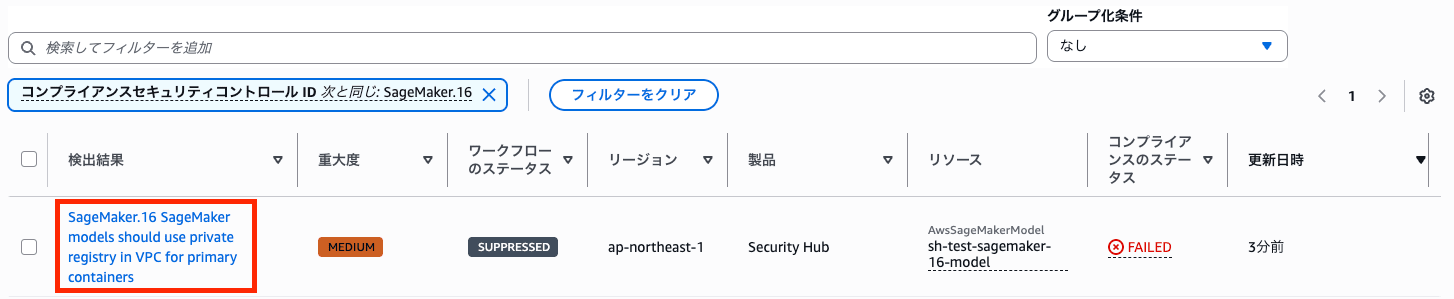
- Check the detected resources and identify the models that require action
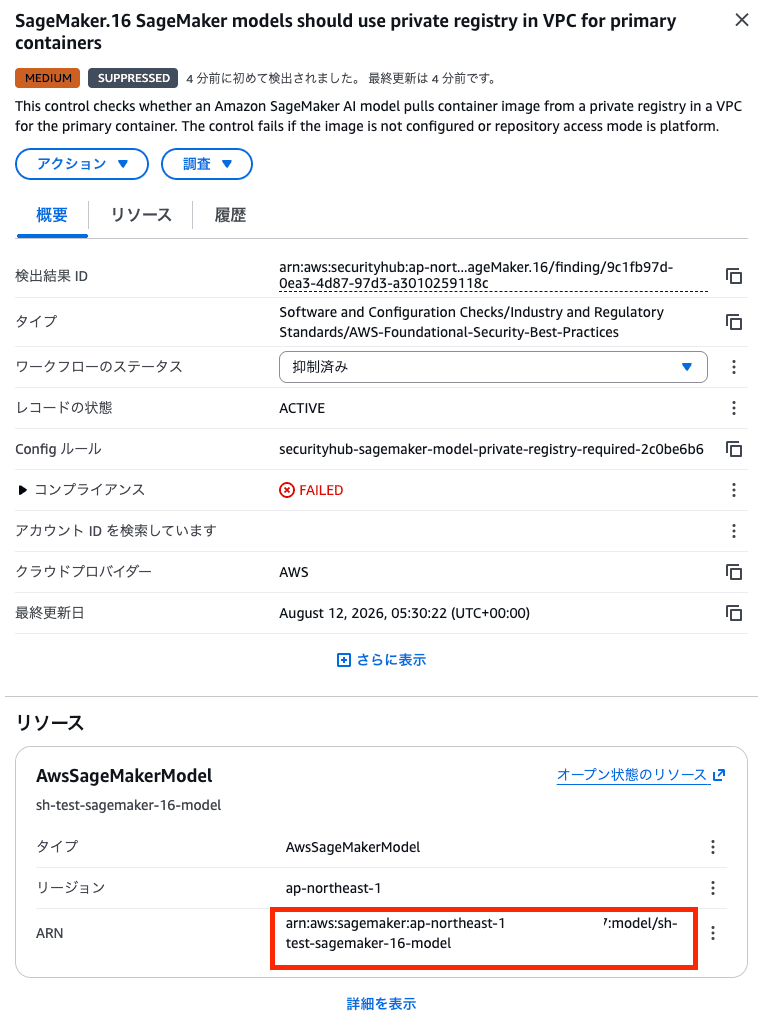
Confirm with Stakeholders
Before performing remediation, please confirm the following points with stakeholders.
- Whether an accessible private Docker registry can be prepared within the VPC (preparation period and operating costs)
- If the private registry requires authentication, whether a Lambda function that provides the credentials can be prepared
Remediation Steps
Because the model configuration cannot be changed after creation, you need to create a new model.
RepositoryAccessMode is a parameter that cannot be specified from the "Create model" screen of the SageMaker AI console, so use the AWS CLI or an AWS SDK (such as boto3).
① Check the Existing Model Configuration
You can check the model from the SageMaker console, but the ImageConfig setting values that this control checks are not displayed. Therefore, check with the AWS CLI.
aws sagemaker describe-model \
  --model-name <モデル名> \
  --region <リージョン>
The cause of the control violation is that PrimaryContainer.ImageConfig does not exist, or that RepositoryAccessMode is Platform.
Also, make a note of the following settings (they are needed when creating the new model).
- Model name
- Container image URI
- Environment variables
- ExecutionRoleArn
- VpcConfig (if configured)
- Tags (if configured)
② Build a Private Docker Registry
To use RepositoryAccessMode: Vpc, you need to build a private Docker registry within the VPC. Because Amazon ECR does not support Vpc mode, build your own registry such as Docker Registry within the VPC, separate from ECR.
If the cost of building and operating the registry is not acceptable, consider setting the workflow status to "Suppressed," with an understanding of the risk of pulling images over the public internet.
For the steps to build a private Docker registry, refer to the official documentation.
The build must satisfy the following requirements.
- Host a registry compliant with the Docker Registry HTTP API V2 within the VPC
- Secure the registry with a TLS certificate issued by a well-known certificate authority (CA)
- If the private registry requires authentication, create a Lambda function that performs the authentication
- Grant the SageMaker model's execution role permissions to access VPC resources
③ Create a Model with ImageConfig Configured
Once you have stored the image in the private registry, create a new model with RepositoryAccessMode: Vpc set in ImageConfig.
With --vpc-config, specify the subnets and security groups in the same VPC as the private registry.
The specified security group must allow inbound communication to the private registry.
aws sagemaker create-model \
  --model-name <新しいモデル名> \
  --primary-container Image=<プライベートレジストリのイメージURI>,ImageConfig={RepositoryAccessMode=Vpc} \
  --vpc-config SecurityGroupIds=<セキュリティグループID>,Subnets=<サブネットID1>,<サブネットID2> \
  --execution-role-arn <実行ロールのARN> \
  --region <リージョン>
- If you use a Lambda function that provides credentials, add
RepositoryAuthConfig={RepositoryCredentialsProviderArn=<Lambda function ARN>}toImageConfig.
④ Update the Endpoint (If Applicable)
If there is an endpoint that uses the old model, update the endpoint configuration so that it references the new model.
- Create an endpoint configuration that references the new model
aws sagemaker create-endpoint-config \
  --endpoint-config-name <新しいエンドポイント設定名> \
  --production-variants VariantName=<バリアント名>,ModelName=<新しいモデル名>,InitialInstanceCount=<インスタンス数>,InstanceType=<インスタンスタイプ> \
  --region <リージョン>
- Update the endpoint with the new endpoint configuration
aws sagemaker update-endpoint \
  --endpoint-name <エンドポイント名> \
  --endpoint-config-name <新しいエンドポイント設定名> \
  --region <リージョン>
- After verifying operation, delete the old model and old endpoint configuration that are no longer needed (optional)
aws sagemaker delete-endpoint-config --endpoint-config-name <旧エンドポイント設定名> --region <リージョン>
aws sagemaker delete-model --model-name <旧モデル名> --region <リージョン>
Verifying the Remediation
This control is evaluated when a change is triggered in the model's repository access mode setting, so the result is displayed as PASSED relatively soon after the model is created.
To verify the setting itself, confirm that the model's repository access mode is Vpc.
Check ImageConfig with describe-model.
aws sagemaker describe-model \
  --model-name <新しいモデル名> \
  --region <リージョン> \
  --query 'PrimaryContainer.ImageConfig'
Example execution result:
{
    "RepositoryAccessMode": "Vpc",
    "RepositoryAuthConfig": {}
}
Please confirm that PrimaryContainer.ImageConfig.RepositoryAccessMode is Vpc.
After remediation, confirm that the finding in Security Hub becomes "PASSED".

Conclusion
This time, I introduced remediation steps for the items covered by the AWS Security Hub security status scoring of your AWS environment.
To address this control, you need to build a private Docker registry within the VPC and configure the model to pull container images from that registry. Please note that Amazon ECR does not support RepositoryAccessMode: Vpc, so you need to prepare a registry separate from ECR.
Note that the similar control [SageMaker.19] is the same kind of check for multi-container inference pipelines. If you use both multi-container and single-container configurations, please consider addressing it as well.
Let's remediate the control and power up the security of your AWS environment!
Thank you for reading to the end! I hope this helps someone.
That's all from Slyman!
