Eliminating the Access Keys of the IAM User Used for Amazon SES SMTP Credentials

This page has been translated by machine translation. View original
Eliminating the access keys of IAM users used for Amazon SES SMTP credentials
Hello, this is Shimon from the Consulting Department.
With AI-powered attacks, the time between a vulnerability being discovered and being exploited is getting shorter.
If an application vulnerability is exploited and configuration files or environment variables are read, the long-term credentials stored there will be used as they are.
Eliminating long-term credentials such as IAM user access keys and replacing them with the temporary credentials of IAM roles is more important than ever.
However, the configuration files and environment variables of applications that send email through the Amazon SES SMTP interface retain SMTP credentials created from an IAM user (hereafter, IAM SMTP credentials).
The IAM SMTP credentials are, in reality, an IAM user's access key.
The SMTP interface does not accept passwords derived from temporary credentials, so simply switching to an Amazon EC2 instance profile or an Amazon ECS task role cannot remove the IAM SMTP credentials from your environment.
If IAM SMTP credentials leak, there is a risk that phishing emails and the like could be sent from your own domain.
They are also subject to IAM.3 (access keys should be rotated within 90 days) in AWS Security Hub CSPM, and moving the password to AWS Secrets Manager does not exempt them.
This article introduces two ways to eliminate the access keys used as IAM SMTP credentials.
The code examples use Python and Boto3.
- Method A: Change sending to the SES API and send with an IAM role
- Method B: Switch applications that can only speak SMTP to Amazon SES Mail Manager SMTP credentials (a password remains, but it can be rotated automatically)
Finally, we retire the IAM users that are no longer used.
1. Why the SMTP username and password are detected as an access key
There are two ways to send email with SES: the SES API and the SMTP interface.
Like an ordinary mail server, the SMTP interface only requires you to configure a hostname (email-smtp.<region>.amazonaws.com), a port, a username, and a password, so applications and packaged products that have email sending functionality can be connected to SES without changing code.
The username and password are, in reality, an IAM user's access key.
When you select "IAM SMTP credentials" in the SMTP settings of the SES console and create them, an IAM user that is allowed only ses:SendRawEmail and its access key are created.
The access key ID becomes the SMTP username as it is.
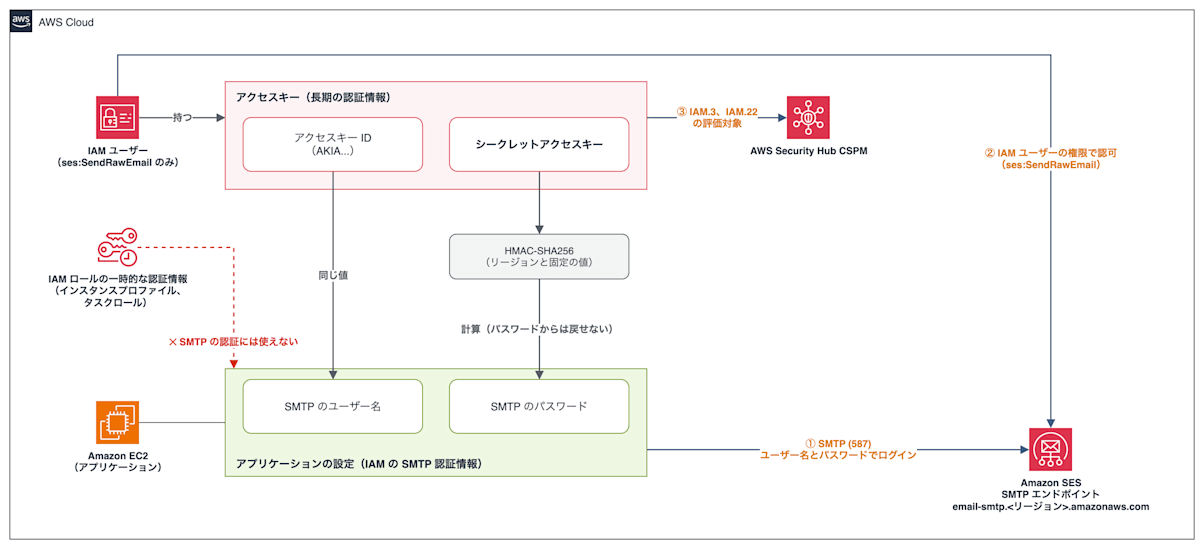
The password is calculated from the secret access key together with fixed public values such as the region. The calculation is hashing with HMAC-SHA256, so the secret access key cannot be recovered from the password.
However, if the secret access key leaks, anyone can derive the password.
Security Hub CSPM does not distinguish this access key from other uses, so even if its permissions are only ses:SendRawEmail, it is subject to IAM.3 and IAM.22 (credentials unused for 45 days or more).
If you rotate the access key within 90 days, you can avoid an IAM.3 finding.
However, each time you need to create a new key with iam:CreateAccessKey and change the settings of every application, and it is still a long-term credential that can be used until the next rotation.
2. Find where IAM SMTP credentials are used
First, find the IAM users for SMTP and the applications that have those IAM SMTP credentials configured.
IAM users for SMTP created in the SES console on or after September 6, 2024 are members of the IAM group AWSSESSendingGroupDoNotRename.
aws iam get-group --group-name AWSSESSendingGroupDoNotRename --query 'Users[].UserName' --output text
Users created before September 6, 2024 are not in the group, and instead have an inline policy and the tag InvokedBy with the value SESConsole.
for u in $(aws iam list-users --query 'Users[].UserName' --output text); do
  aws iam list-user-tags --user-name "$u" \
    --query "Tags[?Key=='InvokedBy' && Value=='SESConsole']" --output text | grep -q . && echo "$u"
done
For each user you find, check the last used date and time, service, and region of the access key.
For a user with two access keys, check the key in AccessKeyMetadata[1] in the same way.
SMTP_USER=ses-smtp-user.20240101-000000
ACCESS_KEY_ID=$(aws iam list-access-keys --user-name "$SMTP_USER" --query 'AccessKeyMetadata[0].AccessKeyId' --output text)
aws iam get-access-key-last-used --access-key-id "$ACCESS_KEY_ID" --query AccessKeyLastUsed
{
    "LastUsedDate": "2026-11-18T08:57:00+00:00",
    "ServiceName": "ses-smtp",
    "Region": "ap-northeast-1"
}
If the last use was through the SMTP interface, the service is ses-smtp, and the region tells you which region's SMTP endpoint it is sending to.
The last use does not tell you which application is using it.
Sending through the SMTP interface is also not recorded in AWS CloudTrail, so you find the applications that use it from their configuration.
Search task-definition environment variables, application configuration files, mail server settings, and so on for the SMTP endpoint hostname (email-smtp.<region>.amazonaws.com) or the access key ID.
sudo grep -rIl 'email-smtp\.' /etc /opt
IAM users created without using the console cannot be found by group or tag.
For an access key ID found in a configuration, run aws iam get-access-key-last-used --access-key-id <access key ID> without --query, and the UserName in the result tells you the owning user.
3. Decide whether to migrate to the SES API or Mail Manager
- Method A: Rewrite the sending process as calls to the SES API, and send with the IAM role attached to the application
- Method B: Keep the application on SMTP and change its destination to the SMTP server provided by Mail Manager. Mail Manager sends out from SES with an IAM role
Method A is the only one that leaves no long-term credentials, so use Method A for your own applications that run in an environment where an IAM role can be attached (EC2, ECS, etc.) and whose code you can change.
Use Method B for anything that can only speak SMTP, such as packaged products, mail server relays, and applications with no planned modifications.
| Aspect | Current (IAM SMTP credentials) | Method A (SES API and IAM role) | Method B (Mail Manager SMTP credentials) |
|---|---|---|---|
| Application changes | None | Rewrite the sending process as SDK calls | Change the hostname, username, and password. If you rotate, you need a mechanism that re-reads the password or restarts at every interval |
| Remaining long-term credentials | Access key | None | SMTP password |
| What can be done when leaked | Sending email. By default it can be sent from anywhere; if you restrict the source in the IAM user's policy, only from that range. If the secret access key leaks, the AWS APIs allowed to the IAM user can also be called | Only the operations allowed to the role | Sending email via Mail Manager. By default it can be sent from anywhere; if you restrict the source, only from that range |
| How long a leaked credential is usable | Until the key is disabled | Until the role's credentials expire | With automatic rotation configured, up to two rotation intervals (because the previous value is also accepted). If not configured, until it is changed |
| IAM.3, IAM.22 | Subject | Not subject | Not subject |
Policies that deny iam:CreateAccessKey (SCPs, etc.) |
Cannot create new ones (existing keys can still send) | Compatible | Compatible |
| Connecting from a private subnet | NAT gateway or SMTP VPC endpoint | NAT gateway or SES API VPC endpoint | NAT gateway or Mail Manager VPC endpoint |
Even with Method B, if the password leaks, email can be sent just as with IAM SMTP credentials.
What you gain with Method B is that the IAM user's access key disappears, that it is compatible with policies that deny iam:CreateAccessKey, that it is no longer subject to IAM.3 and IAM.22, and that automatic rotation limits how long a leaked password can be used.
The SMTP settings of the SES console show Mail Manager as "recommended", but if you can attach an IAM role and change the code, choose Method A.
4. Method A: Send with the SES API and an IAM role
If you are sending from a private subnet using only an SMTP VPC endpoint, prepare an SES API VPC endpoint or a NAT gateway before switching.
How to create an SES API VPC endpoint is introduced in [Update] Amazon SES API VPC endpoints are now available.
4.1 Grant permissions to the application's IAM role
When you pass an assembled MIME message as the Raw body to SendEmail of the SES API v2, it is authorized by ses:SendRawEmail.
If you allow only ses:SendEmail to match the API name, it is denied because ses:SendRawEmail is not allowed.
Allow the role the same action as the policy of the IAM user for SMTP.
Limit Resource to the ARN of the verified identity (domain or email address) of the sender.
{
  "Version": "2012-10-17",
  "Statement": [
    {
      "Effect": "Allow",
      "Action": "ses:SendRawEmail",
      "Resource": "arn:aws:ses:ap-northeast-1:111122223333:identity/example.com"
    }
  ]
}
4.2 Change the sending process
Keep the part that assembles the MIME message as it is, and change only the destination it is passed to, from the SMTP interface to the SES API v2.
import os
# import smtplib
from email.message import EmailMessage

import boto3

msg = EmailMessage()
msg["From"] = os.environ["MAIL_FROM"]
msg["To"] = os.environ["MAIL_TO"]
msg["Subject"] = "SES API test"
msg.set_content("Sent through the SES API v2.")

# Before: log in to the SMTP interface with the IAM SMTP credentials
# with smtplib.SMTP(os.environ["SMTP_HOST"], int(os.environ.get("SMTP_PORT", "587"))) as smtp:
#     smtp.starttls()
#     smtp.login(os.environ["SMTP_USER"], os.environ["SMTP_PASSWORD"])
#     smtp.send_message(msg)

# After: pass the same MIME message to the SES API v2 as raw content
ses = boto3.client("sesv2")
response = ses.send_email(Content={"Raw": {"Data": msg.as_bytes()}})
print("sent", response["MessageId"])
The SDK automatically uses the credentials of the IAM role attached to the application, so you do not write an access key in the code.
For the region, pass the same region as the SMTP endpoint you were sending to until now, using the environment variable AWS_DEFAULT_REGION or similar.
Note that if you enable CloudTrail data events, sending through the SES API can be recorded together with the source role, which could not be traced with the SMTP interface (additional charges apply).
4.3 Remove the IAM SMTP credentials from the application's configuration
After deploying the new sending process, delete the SMTP hostname, username, and password from the places where the application read the IAM SMTP credentials (environment variables, configuration files, etc.).
If a message ID is returned on sending, the application is sending without IAM SMTP credentials placed in it.
5. Method B: If you can only speak SMTP, send with Mail Manager SMTP credentials
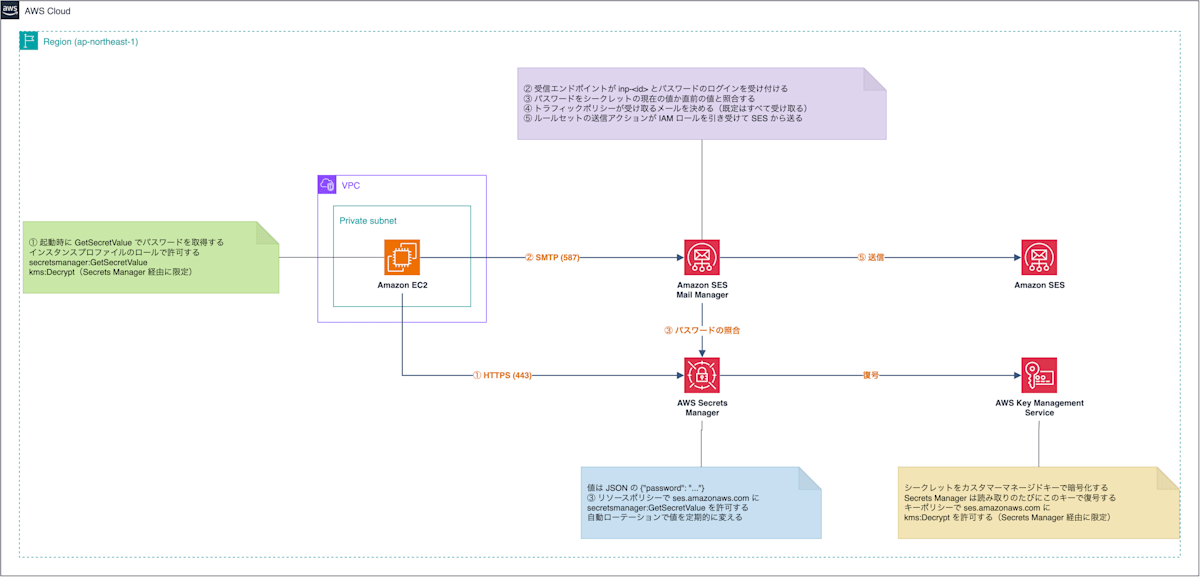
With Mail Manager, you can create an SMTP server operated by AWS (an ingress endpoint with authentication).
The application logs in with a password, and Mail Manager sends the received email out from SES with an IAM role.
The application side does not need an IAM user's access key.
5.1 Create Mail Manager SMTP credentials
To use automatic rotation, in the SMTP settings of the SES console, choose a Secrets Manager secret as the place to store the password (authentication type).
You create this secret yourself before operating the console.
The "Create new" button in the SES console only opens the Secrets Manager creation screen, and the following three points are not configured.
- The value is JSON, and the key is
password(authentication fails with any other key) - Encrypt with a customer managed key. An AWS managed key cannot have its key policy changed and cannot allow SES to decrypt. In the key policy, allow
ses.amazonaws.comto performkms:Decryptvia Secrets Manager - In the secret's resource policy, allow
ses.amazonaws.comto performsecretsmanager:GetSecretValue
First, create a customer managed key that allows SES to decrypt.
{
  "Version": "2012-10-17",
  "Statement": [
    {
      "Sid": "Root",
      "Effect": "Allow",
      "Principal": { "AWS": "arn:aws:iam::111122223333:root" },
      "Action": "kms:*",
      "Resource": "*"
    },
    {
      "Sid": "SesDecrypt",
      "Effect": "Allow",
      "Principal": { "Service": "ses.amazonaws.com" },
      "Action": "kms:Decrypt",
      "Resource": "*",
      "Condition": {
        "StringEquals": {
          "kms:ViaService": "secretsmanager.ap-northeast-1.amazonaws.com",
          "aws:SourceAccount": "111122223333"
        },
        "ArnLike": {
          "aws:SourceArn": "arn:aws:ses:ap-northeast-1:111122223333:mailmanager-ingress-point/*"
        }
      }
    }
  ]
}
KEY_ID=$(aws kms create-key --description mailmanager-smtp --policy file://key-policy.json --query KeyMetadata.KeyId --output text); echo $KEY_ID
Next, create a secret that holds a random password in the password key, encrypted with this customer managed key.
PW=$(aws secretsmanager get-random-password --password-length 32 --exclude-punctuation --query RandomPassword --output text)
SECRET_ARN=$(aws secretsmanager create-secret --name mailmanager-smtp --kms-key-id "$KEY_ID" --secret-string "{\"password\":\"$PW\"}" --query ARN --output text); unset PW; echo $SECRET_ARN
Finally, allow SES to read the secret with the secret's resource policy.
{
  "Version": "2012-10-17",
  "Statement": [
    {
      "Effect": "Allow",
      "Principal": { "Service": "ses.amazonaws.com" },
      "Action": "secretsmanager:GetSecretValue",
      "Resource": "*",
      "Condition": {
        "StringEquals": { "aws:SourceAccount": "111122223333" },
        "ArnLike": {
          "aws:SourceArn": "arn:aws:ses:ap-northeast-1:111122223333:mailmanager-ingress-point/*"
        }
      }
    }
  ]
}
aws secretsmanager put-resource-policy --secret-id "$SECRET_ARN" --resource-policy file://secret-policy.json
Next, in the SMTP settings of the SES console, choose "Mail Manager SMTP", choose "Secret" as the authentication type, and specify the secret you created.
If only applications inside a VPC will connect, choose PrivateLink as the network type under "Advanced settings" to make the ingress endpoint private.
The ingress endpoint, traffic policy, rule set, and IAM role for sending are created together.
The console operations are introduced in I tried the new Amazon SES console feature "Mail Manager SMTP guided setup".
The password is in the secret, so do not download the .csv file on the completion screen.
5.2 Restrict the connection source
The traffic policy created by the SMTP settings of the SES console has a default action of allow and no statements, so the Mail Manager ingress endpoint accepts email to any destination from any connection that can log in, and if the password leaks, email can be sent from anywhere.
How to restrict the connection source to Mail Manager depends on whether the senders are only inside the VPC or also outside.
- If the connection sources are only applications inside the VPC, make the ingress endpoint private. It can then be connected to only through the Mail Manager VPC endpoint (
com.amazonaws.<region>.mail-manager-smtp.auth), and the destination becomes the private DNS name of the VPC endpoint - If you also send from outside the VPC (such as an on-premises mail server), set the traffic policy's default action to deny and add an allow statement conditioned on the range of source IP addresses
How to write traffic policies is summarized in Traffic policies and policy statements, and private ingress endpoints in Ingress endpoints.
5.3 Pass the destination and password to the application
Do not change the application's code; change only the values of the SMTP connection settings.
The destination is the ingress endpoint's hostname (<ID>.edpv.mail-manager-smtp.amazonaws.com; if made private, the private DNS name of the VPC endpoint), the username is the ingress endpoint's ID (starting with inp-), and the port is 25 or 587 with STARTTLS.
Do not write the password in plain text in a configuration file; have the application's startup script or deployment mechanism retrieve it from Secrets Manager at startup and pass the value of the JSON password key.
Senders that cannot have an IAM role attached (such as on-premises mail servers) will have to put the password in the product's settings, and must re-enter it at every rotation.
Allow the application's IAM role to read the secret and to decrypt with the customer managed key only via Secrets Manager.
{
  "Version": "2012-10-17",
  "Statement": [
    {
      "Effect": "Allow",
      "Action": "secretsmanager:GetSecretValue",
      "Resource": "arn:aws:secretsmanager:ap-northeast-1:111122223333:secret:mailmanager-smtp-*"
    },
    {
      "Effect": "Allow",
      "Action": "kms:Decrypt",
      "Resource": "arn:aws:kms:ap-northeast-1:111122223333:key/<キー ID>",
      "Condition": {
        "StringEquals": {
          "kms:ViaService": "secretsmanager.ap-northeast-1.amazonaws.com"
        }
      }
    }
  ]
}
If the SMTP response on sending is 250, the Mail Manager ingress endpoint has accepted the login and the email.
Delivery to the recipient is then performed from SES by the send action of the rule set.
5.4 Rotate the password automatically
Set up automatic rotation on the Secrets Manager secret.
There is no managed rotation or dedicated template for Mail Manager, so you create the rotation function yourself from a generic template.
Mail Manager reads the secret itself, so the function only needs to create and save a new random value.
The templates are in AWS Secrets Manager rotation function templates.
Mail Manager accepts both the secret's current value (AWSCURRENT) and its previous value (AWSPREVIOUS).
Even right after rotation, applications that hold the old value can continue sending.
The previous value remains valid until it is replaced at the next rotation, so a leaked password can be used for up to two rotation intervals.
The shorter the interval, the shorter this period, but the more often applications must re-read the value (Secrets Manager can rotate as often as every 4 hours).
Applications that read the value only at startup must restart at least once per rotation interval and retrieve the value from Secrets Manager again.
If two rotations occur without re-reading, authentication fails with 535.
6. Retire the IAM SMTP credentials
Once you have switched every application that used an IAM user's access key for SMTP, confirm that the access key's last used date and time has not advanced beyond the time of the last switch.
SMTP_USER=ses-smtp-user.20240101-000000
ACCESS_KEY_ID=$(aws iam list-access-keys --user-name "$SMTP_USER" --query 'AccessKeyMetadata[0].AccessKeyId' --output text)
aws iam get-access-key-last-used --access-key-id "$ACCESS_KEY_ID" --query AccessKeyLastUsed
First, disable the key.
If any application stops sending, re-enable the key, switch that application to Method A or Method B, and then disable it again.
aws iam update-access-key --user-name "$SMTP_USER" --access-key-id "$ACCESS_KEY_ID" --status Inactive
For a user with two access keys, check and disable the key in AccessKeyMetadata[1] in the same way.
If there are no problems even after the time when the application with the longest sending interval (such as monthly notifications) would send, delete the IAM user from the IAM console.
Deleting in the console also removes the access keys, group memberships, and inline policies together.
The IAM.3 and IAM.22 findings are resolved by the periodic evaluation after the key is disabled.
Summary
The access keys of IAM users used as IAM SMTP credentials can be eliminated by switching the sending method.
For applications whose code you can change, if you change sending to the SES API and send with an IAM role, no long-term credentials remain either.
For those that can only speak SMTP, if you switch to Mail Manager SMTP credentials, a password remains but the IAM user's access key can be eliminated.
In both cases, once all applications have been switched, first disable the access key, confirm that no application stops sending, and then delete the IAM user.
