![[Small Tip] Tried Calling AgentCore Gateway Inference Targets from Strands Agents](https://devio2024-media.developers.io/image/upload/f_auto,q_auto,w_3840/f_auto,q_auto/v1790875048/eyecatch/edq4dfptctqlcwjhffhs.png)
[Small Tip] Tried Calling AgentCore Gateway Inference Targets from Strands Agents

This page has been translated by machine translation. View original
Introduction
Hello, I'm Kamino from the consulting department, and I love ramen.
Have you ever wanted to use AgentCore Gateway's inference targets from Strands Agents? I suddenly had that urge one day!
While Strands Agents uses the Converse API by default, inference targets don't support the Converse API, so you can't use them as-is. But if you've consolidated your LLMs into the Gateway, you'd want to call AI agents you build from there too, right...!
So this time, as a small tip, I'll try calling from AnthropicModel and OpenAIResponsesModel.
By the way, content related to inference targets was introduced in previous articles, so please refer to them as needed!
Let's get started!
Configuration
The configuration this time looks like this.
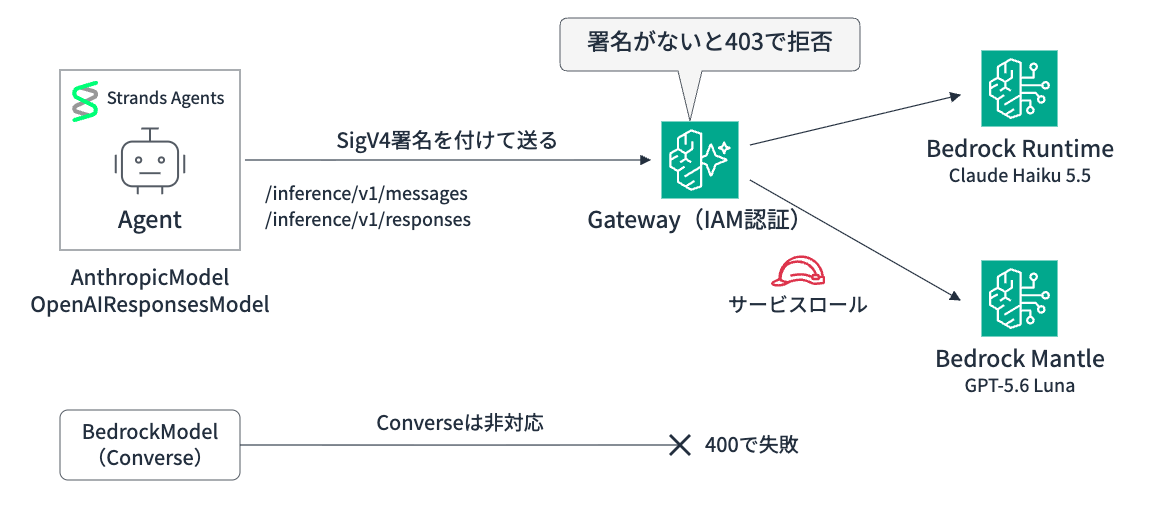
We inject SigV4 signing processing into the HTTP client used by Strands' model classes and send it to the Gateway's inference endpoint. The Gateway is configured with two targets, Bedrock Runtime and Bedrock Mantle, and calls them with a service role.
Haiku 5.5 is called from the Runtime target, and GPT-5.6 Luna from the Mantle target.
The official documentation also states that inference targets can be used directly from the OpenAI SDK and Anthropic SDK. Since these two model classes in Strands use each SDK internally, it should work as long as we align the connection destination and authentication!
Prerequisites
I tried this in the following environment.
| Item | Content |
|---|---|
| Region | us-east-1 (US East - N. Virginia) |
| Python / Package Management | 3.13 / uv |
| strands-agents | 1.62.0 |
| anthropic / openai | 0.125.0 / 2.54.0 |
| boto3 | 1.43.118 |
| Gateway | AgentCore Gateway (AWS_IAM authentication) |
| Target | Inference connector target (Bedrock Runtime, Bedrock Mantle) |
| Models | Claude Haiku 5.5 (us.anthropic.claude-haiku-5-5), GPT-5.6 Luna (openai.gpt-5.6-luna) |
Let's set up the verification environment in advance!
The IAM user or role executing the script should be permitted bedrock-agentcore:InvokeGateway on the target Gateway.
Preparation of the verification environment
Create a working project.
uv init --python 3.13 strands-gw-inference
cd strands-gw-inference
uv add 'strands-agents[anthropic,openai]==1.62.0' 'boto3>=1.43.118' httpx
Attach Bedrock and Mantle invocation permissions to the Gateway's service role. The Bedrock Runtime connector also uses bedrock:List* to retrieve the model list.
ACCOUNT_ID=$(aws sts get-caller-identity --query Account --output text)

aws iam create-role \
  --role-name strands-gw-inference-role \
  --assume-role-policy-document "{
    \"Version\": \"2012-10-17\",
    \"Statement\": [{
      \"Effect\": \"Allow\",
      \"Principal\": {\"Service\": \"bedrock-agentcore.amazonaws.com\"},
      \"Action\": \"sts:AssumeRole\",
      \"Condition\": {\"StringEquals\": {\"aws:SourceAccount\": \"${ACCOUNT_ID}\"}}
    }]
  }"

aws iam put-role-policy \
  --role-name strands-gw-inference-role \
  --policy-name inference \
  --policy-document "{
    \"Version\": \"2012-10-17\",
    \"Statement\": [
      {
        \"Effect\": \"Allow\",
        \"Action\": [\"bedrock:InvokeModel\", \"bedrock:InvokeModelWithResponseStream\", \"bedrock:List*\"],
        \"Resource\": \"*\"
      },
      {
        \"Effect\": \"Allow\",
        \"Action\": \"bedrock-mantle:*\",
        \"Resource\": \"arn:aws:bedrock-mantle:*:${ACCOUNT_ID}:project/*\"
      }
    ]
  }"
Create the Gateway and connector targets for Bedrock Runtime and Bedrock Mantle. Use the URL displayed at the end in subsequent scripts.
import time

import boto3

account_id = boto3.client("sts").get_caller_identity()["Account"]
client = boto3.client("bedrock-agentcore-control", region_name="us-east-1")

gateway = client.create_gateway(
    name="strands-inference-gateway",
    roleArn=f"arn:aws:iam::{account_id}:role/strands-gw-inference-role",
    protocolType="MCP",
    authorizerType="AWS_IAM",
)
gateway_id = gateway["gatewayId"]
while client.get_gateway(gatewayIdentifier=gateway_id)["status"] != "READY":
    time.sleep(5)

# Configure connector targets for Bedrock Runtime and Bedrock Mantle
for name in ("bedrock-runtime", "bedrock-mantle"):
    target = client.create_gateway_target(
        gatewayIdentifier=gateway_id,
        name=name,
        credentialProviderConfigurations=[{"credentialProviderType": "GATEWAY_IAM_ROLE"}],
        targetConfiguration={"inference": {"connector": {"source": {"connectorId": name}}}},
    )
    while (
        client.get_gateway_target(gatewayIdentifier=gateway_id, targetId=target["targetId"])["status"]
        != "READY"
    ):
        time.sleep(5)

print(gateway["gatewayUrl"].removesuffix("/mcp"))
bash setup_iam.sh
uv run setup.py
export GATEWAY_URL=<URL displayed by setup.py>
The environment is ready, so let's try it!
HTTP Client That Attaches SigV4 Signatures
Both the Anthropic SDK and OpenAI SDK communicate via httpx, so we'll create signing processing as httpx Auth. We'll also prepare a KeepOpenAsyncClient that doesn't close the HTTP client even when the SDK's client is closed, and use this to create the signed HTTP client.
I'll explain the reason for not closing later!
import boto3
import httpx
from botocore.auth import SigV4Auth
from botocore.awsrequest import AWSRequest

class GatewaySigV4Auth(httpx.Auth):
    """httpx Auth that attaches SigV4 signatures to requests to the Gateway"""

    requires_request_body = True

    def __init__(self, region: str = "us-east-1"):
        self.region = region
        self.session = boto3.Session()

    def auth_flow(self, request: httpx.Request):
        # Remove headers for API keys added by the SDK since they're not used by the Gateway
        for name in ("authorization", "x-api-key"):
            request.headers.pop(name, None)

        aws_request = AWSRequest(
            method=request.method,
            url=str(request.url),
            data=request.content,
            headers={"content-type": request.headers.get("content-type", "application/json")},
        )
        credentials = self.session.get_credentials().get_frozen_credentials()
        SigV4Auth(credentials, "bedrock-agentcore", self.region).add_auth(aws_request)
        request.headers.update(dict(aws_request.headers))
        yield request

class KeepOpenAsyncClient(httpx.AsyncClient):
    """Continues to use the HTTP client without closing it even when the SDK's client is closed"""

    async def aclose(self) -> None:
        # Do nothing even if the SDK tries to close
        pass

    async def close_for_real(self) -> None:
        # Call this yourself when you're done to close
        await super().aclose()

def signed_http_client() -> KeepOpenAsyncClient:
    return KeepOpenAsyncClient(auth=GatewaySigV4Auth())
Since both SDKs will error if no API key is specified, we pass a dummy value. The Anthropic SDK sends this dummy value in the x-api-key header, and the OpenAI SDK puts it in the Authorization header.
Since the Gateway authentication uses the Authorization header with the SigV4 signature, we remove these headers added by the SDK before signing.
Let's try calling from AnthropicModel first!
Calling from AnthropicModel
For the agent, let's give it a dummy tool that returns weather and assume we're asking about the weather.
from strands import tool

@tool
def get_weather(city: str) -> str:
    """Returns the weather for the specified city"""
    return f"{city} is sunny with a temperature of 18 degrees"
For AnthropicModel, pass the connection destination and signed HTTP client to client_args. Since the Anthropic SDK appends /v1/messages after base_url, specify base_url up to /inference in the Gateway.
Haiku 5.5 is called with us.anthropic.claude-haiku-5-5.
import os

from strands import Agent
from strands.models.anthropic import AnthropicModel

from sigv4_auth import signed_http_client
from tools import get_weather

GATEWAY_URL = os.environ["GATEWAY_URL"]

model = AnthropicModel(
    client_args={
        "base_url": f"{GATEWAY_URL}/inference",
        "api_key": "unused",
        "http_client": signed_http_client(),
    },
    model_id="us.anthropic.claude-haiku-5-5",
    max_tokens=1024,
)

agent = Agent(model=model, tools=[get_weather])
agent("Tell me the weather in Tokyo and Osaka")
uv run agent_claude.py
Tool #1: get_weather

Tool #2: get_weather
The weather in both Tokyo and Osaka is sunny with a temperature of 18 degrees.
It called the tool twice and then responded! Since Strands receives responses via streaming, streaming also works through the Gateway!
Next, let's try an OpenAI model too!
Calling from OpenAIResponsesModel
GPT-5.6 Luna is called using the Responses API.
In Strands, we use OpenAIResponsesModel. Since the OpenAI SDK appends /responses after base_url, set base_url to /inference/v1.
import asyncio
import os

from strands import Agent
from strands.models.openai_responses import OpenAIResponsesModel

from sigv4_auth import signed_http_client
from tools import get_weather

GATEWAY_URL = os.environ["GATEWAY_URL"]

async def main():
    http_client = signed_http_client()
    model = OpenAIResponsesModel(
        client_args={
            "base_url": f"{GATEWAY_URL}/inference/v1",
            "api_key": "unused",
            "http_client": http_client,
        },
        model_id="openai.gpt-5.6-luna",
    )
    agent = Agent(model=model, tools=[get_weather])
    try:
        await agent.invoke_async("Tell me the weather in Tokyo and Osaka")
    finally:
        # Close the HTTP client when finished with the agent
        await http_client.close_for_real()

asyncio.run(main())
uv run agent_gpt.py
Tool #1: get_weather

Tool #2: get_weather
- Tokyo: Sunny, 18°C
- Osaka: Sunny, 18°C
This one also called the tool twice and responded!
Supplementary Note: Why Not Close the HTTP Client
Let me dig a little deeper into why it's not being closed here.
If you pass a regular httpx.AsyncClient with just the signature attached, it fails...
agent_gpt_closed.py
import os

import httpx
from strands import Agent
from strands.models.openai_responses import OpenAIResponsesModel

from sigv4_auth import GatewaySigV4Auth
from tools import get_weather

GATEWAY_URL = os.environ["GATEWAY_URL"]

# For comparison: pass a regular httpx.AsyncClient with just the signature attached
model = OpenAIResponsesModel(
    client_args={
        "base_url": f"{GATEWAY_URL}/inference/v1",
        "api_key": "unused",
        "http_client": httpx.AsyncClient(auth=GatewaySigV4Auth()),
    },
    model_id="openai.gpt-5.6-luna",
)

agent = Agent(model=model, tools=[get_weather])
agent("Tell me the weather in Tokyo and Osaka")
Tool #1: get_weather
Tool #2: get_weather
    raise RuntimeError("Cannot send a request, as the client has been closed.")
RuntimeError: Cannot send a request, as the client has been closed.
It progressed to calling the tools, but the second request to return the tool results errored with "client has been closed."
The cause lies in how OpenAIResponsesModel handles client_args. In Strands Agents 1.62.0 used this time, client_args creates an OpenAI client for each request and closes it when done.
async with openai.AsyncOpenAI(**self._resolve_client_args()) as client:
    try:
        response = await client.responses.create(**request)
A new OpenAI client is created each time, but the HTTP client placed in client_args is the same one passed each time. When the OpenAI client is closed, the HTTP client inside it is also closed, so the second request was failing because a closed HTTP client was being passed.
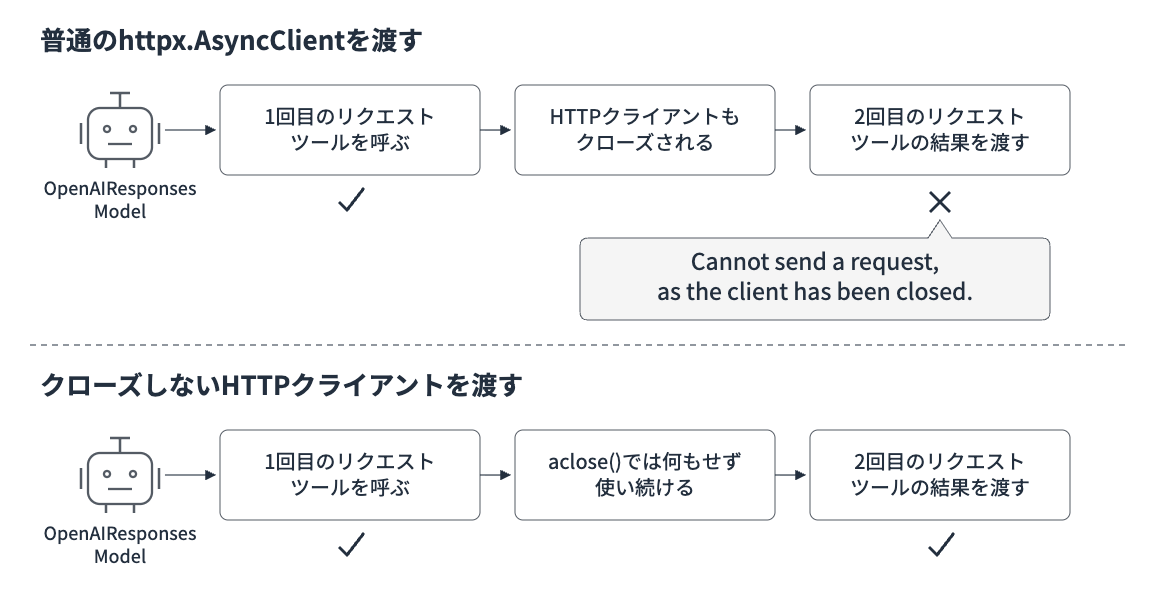
Since OpenAIResponsesModel has no argument to pass an OpenAI client directly, I made the HTTP client not close!
KeepOpenAsyncClient does nothing in aclose(), so the same HTTP client can continue to be used for the second and subsequent requests. Instead, since it can no longer be closed via the SDK, I separately prepared close_for_real() for closing at the end.
Note that AnthropicModel creates a client once at model creation and continues using it, so it works even without the non-closing design.
When Using Multiple Models Together
If you're consolidating models in the Gateway, you'd want to consolidate the way you write things on the Strands side too...!!
Since we have two targets, Runtime and Mantle, this time I tried to figure out the best way to organize them to make use of both.
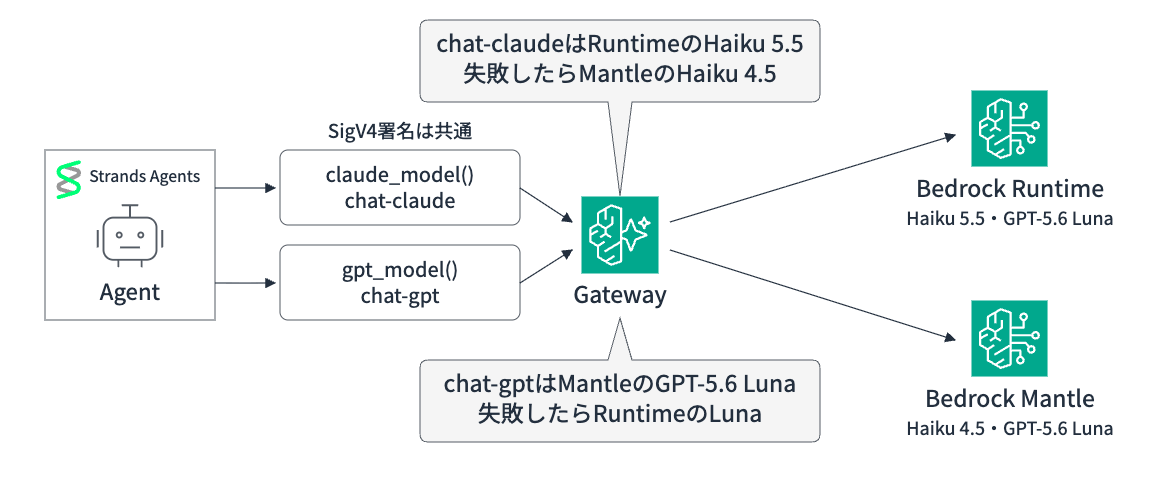
Prepare Functions to Create Models for Each Format
Since Claude uses the Anthropic Messages format and GPT-5.6 Luna uses the Responses format, I separated the functions that create models on the Strands side by format. Since the Gateway doesn't convert the request body format, you need to call in the format appropriate for the model.
import os

from strands.models.anthropic import AnthropicModel
from strands.models.openai_responses import OpenAIResponsesModel

from sigv4_auth import signed_http_client

GATEWAY_URL = os.environ["GATEWAY_URL"]

def claude_model(model_id: str = "chat-claude") -> AnthropicModel:
    """Model called in Anthropic Messages format"""
    return AnthropicModel(
        client_args={"base_url": f"{GATEWAY_URL}/inference", "api_key": "unused", "http_client": signed_http_client()},
        model_id=model_id,
        max_tokens=1024,
    )

def gpt_model(model_id: str = "chat-gpt") -> OpenAIResponsesModel:
    """Model called in OpenAI Responses format"""
    return OpenAIResponsesModel(
        client_args={"base_url": f"{GATEWAY_URL}/inference/v1", "api_key": "unused", "http_client": signed_http_client()},
        model_id=model_id,
    )
The functions are designed to pass the logical names of the rules I'll explain next.
Leave Logical Names and Fallback to Gateway Rules
By designing things so that agent code uses logical names like chat-claude instead of specific model IDs, you can make changes to destinations only on the Gateway side.
This time, I created two logical names for the Claude and GPT families, and set up switching destinations for each. The switching destinations are models that can be called in the same format.
chat-claudesends to Runtime's Haiku 5.5; if that fails, switches to Mantle's Haiku 4.5chat-gptsends to Mantle's Luna; if that fails, switches to Runtime's Luna
Make the time to wait for the first response (firstByteTimeoutMilliseconds) configurable via argument.
import os
import sys
import time

import boto3

client = boto3.client("bedrock-agentcore-control", region_name="us-east-1")
gateway_id = os.environ["GATEWAY_URL"].removeprefix("https://").split(".")[0]
timeout_ms = int(sys.argv[1]) if len(sys.argv) > 1 else 30000

# Determine primary and fallback destinations (models that can be called in the same format) for each logical name
RULES = {
    "chat-claude": (
        {"targetName": "bedrock-runtime", "model": "us.anthropic.claude-haiku-5-5"},
        {"targetName": "bedrock-mantle", "model": "anthropic.claude-haiku-4-5"},
    ),
    "chat-gpt": (
        {"targetName": "bedrock-mantle", "model": "openai.gpt-5.6-luna"},
        {"targetName": "bedrock-runtime", "model": "us.openai.gpt-5.6-luna"},
    ),
}

existing = {
    r["conditions"][0]["matchModels"]["anyOf"][0]["value"]: r["ruleId"]
    for r in client.list_gateway_rules(gatewayIdentifier=gateway_id)["gatewayRules"]
}

for priority, (name, (primary, secondary)) in enumerate(RULES.items(), start=10):
    params = dict(
        gatewayIdentifier=gateway_id,
        priority=priority,
        conditions=[{"matchModels": {"anyOf": [{"value": name, "operator": "StringEquals"}]}}],
        actions=[{
            "routeToTarget": {
                "staticRoute": {
                    **primary,
                    "fallback": {"firstByteTimeoutMilliseconds": timeout_ms, "targetFallback": [secondary]},
                }
            }
        }],
    )
    if name in existing:
        rule_id = existing[name]
        client.update_gateway_rule(ruleId=rule_id, **params)
    else:
        rule_id = client.create_gateway_rule(**params)["ruleId"]
    while client.get_gateway_rule(gatewayIdentifier=gateway_id, ruleId=rule_id)["status"] != "ACTIVE":
        time.sleep(3)
    print(name, "ACTIVE", timeout_ms)
By checking the model in the response, you can see which target's model answered. I set the wait time to 50 milliseconds to intentionally cause the primary side to time out and confirmed the switching.
check_rules.py
import asyncio
import os

from anthropic import AsyncAnthropic
from openai import AsyncOpenAI

from sigv4_auth import signed_http_client

URL = os.environ["GATEWAY_URL"]
anthropic = AsyncAnthropic(base_url=f"{URL}/inference", api_key="unused", http_client=signed_http_client())
openai = AsyncOpenAI(base_url=f"{URL}/inference/v1", api_key="unused", http_client=signed_http_client())

async def main():
    # Checking the model in the response shows which target's model answered
    r = await anthropic.messages.create(model="chat-claude", max_tokens=50, messages=[{"role": "user", "content": "Hello"}])
    print("chat-claude ->", r.model)
    r = await openai.responses.create(model="chat-gpt", input="Hello")
    print("chat-gpt    ->", r.model)

asyncio.run(main())
uv run setup_rules.py && uv run check_rules.py
uv run setup_rules.py 50 && uv run check_rules.py
chat-claude ACTIVE 30000
chat-gpt ACTIVE 30000
chat-claude -> claude-haiku-5-5
chat-gpt    -> openai.gpt-5.6-luna
chat-claude ACTIVE 50
chat-gpt ACTIVE 50
chat-claude -> claude-haiku-4-5-20251001
chat-gpt    -> us.openai.gpt-5.6-luna
Normally, Runtime's Haiku 5.5 and Mantle's Luna answer, and at 50 milliseconds it switched to Mantle's Haiku 4.5 and Runtime's Luna! The fallback is also active on the Responses API route.
Let's also run an agent with a logical name.
from strands import Agent

from gateway_models import claude_model, gpt_model
from tools import get_weather

# Pass only logical names to agents
for name, model in (("chat-claude", claude_model()), ("chat-gpt", gpt_model())):
    agent = Agent(model=model, tools=[get_weather], callback_handler=None)
    result = agent("Tell me the weather in Tokyo and Osaka")
    calls = result.metrics.tool_metrics["get_weather"].call_count
    print(f"== {name} (tool calls: {calls})")
    print(str(result).strip(), "\n")
uv run setup_rules.py && uv run agent_logical.py
== chat-claude (tool calls: 2)
The weather in both Tokyo and Osaka is sunny with a temperature of 18 degrees.

== chat-gpt (tool calls: 2)
- Tokyo: Sunny, 18°C
- Osaka: Sunny, 18°C
Let's also run it with the wait time set to 50 milliseconds, in a state where it has switched to the fallback.
uv run setup_rules.py 50 && uv run agent_logical.py
== chat-claude (tool calls: 2)
Here is the weather information for Tokyo and Osaka:
**Tokyo**
- Weather: Sunny
- Temperature: 18 degrees
**Osaka**
- Weather: Sunny
- Temperature: 18 degrees
Both cities are sunny with the same temperature of 18 degrees. It seems like comfortable weather continues.

== chat-gpt (tool calls: 2)
- Tokyo: Sunny, 18°C
- Osaka: Sunny, 18°C
Both called the tool twice and responded! It's great that the fallback was working fine and we could decide the destination and switching in the Gateway without changing anything on the agent side.
If you're using multiple models from Strands through the Gateway, it seems good to keep these patterns in mind...!
- Unify authentication and the Gateway entry point, and prepare model creation functions for each API format
- Pass logical names to agents, and determine destinations and fallbacks in Gateway rules
- Make fallback destinations models that can be called in the same format
This is just one approach, so depending on how you use it, there might be even better ways to organize things, and I think it would be fun to experiment!
Cleanup
Delete the rules, targets, Gateway, and IAM role.
import os
import time

import boto3

client = boto3.client("bedrock-agentcore-control", region_name="us-east-1")
gateway_id = os.environ["GATEWAY_URL"].removeprefix("https://").split(".")[0]

for rule in client.list_gateway_rules(gatewayIdentifier=gateway_id)["gatewayRules"]:
    client.delete_gateway_rule(gatewayIdentifier=gateway_id, ruleId=rule["ruleId"])
for target in client.list_gateway_targets(gatewayIdentifier=gateway_id)["items"]:
    client.delete_gateway_target(gatewayIdentifier=gateway_id, targetId=target["targetId"])
while client.list_gateway_targets(gatewayIdentifier=gateway_id)["items"]:
    time.sleep(5)
client.delete_gateway(gatewayIdentifier=gateway_id)
print("deleted", gateway_id)
uv run cleanup.py
aws iam delete-role-policy --role-name strands-gw-inference-role --policy-name inference
aws iam delete-role --role-name strands-gw-inference-role
Bonus: JWT Authentication Case
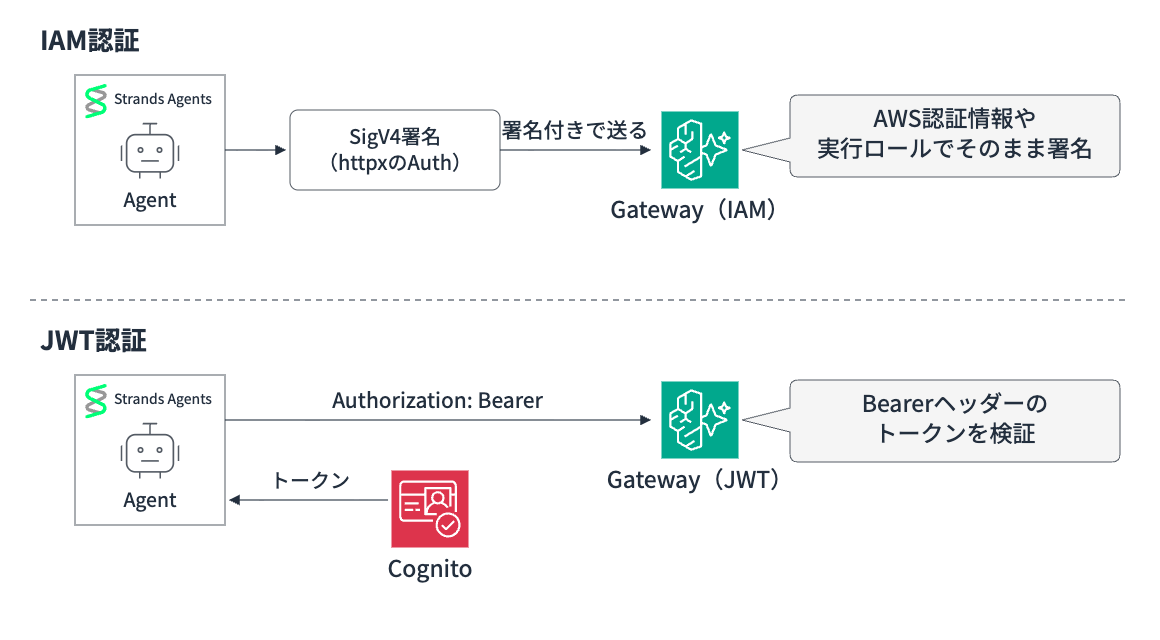
I also tried using JWT authentication for the Gateway inbound. I use an access token issued by Cognito machine-to-machine authentication (client credentials). The inference target configuration is the same as with IAM.
Preparing the verification environment (JWT)
The IAM role uses the one created with setup_iam.sh in the main section. If you deleted it during cleanup, please recreate it. Create a Cognito user pool and a JWT-authenticated Gateway, and save the connection information to jwt_env.json.
import json
import time
import uuid

import boto3

region = "us-east-1"
account_id = boto3.client("sts").get_caller_identity()["Account"]
cognito = boto3.client("cognito-idp", region_name=region)
client = boto3.client("bedrock-agentcore-control", region_name=region)

# Cognito: configuration to issue tokens with client credentials
pool = cognito.create_user_pool(PoolName="strands-gw-jwt-pool")["UserPool"]
pool_id = pool["Id"]
domain = f"strands-gw-jwt-{uuid.uuid4().hex[:8]}"
cognito.create_user_pool_domain(Domain=domain, UserPoolId=pool_id)
cognito.create_resource_server(
    UserPoolId=pool_id, Identifier="gateway", Name="gateway",
    Scopes=[{"ScopeName": "invoke", "ScopeDescription": "invoke gateway"}],
)
app = cognito.create_user_pool_client(
    UserPoolId=pool_id, ClientName="strands-agent", GenerateSecret=True,
    AllowedOAuthFlows=["client_credentials"], AllowedOAuthScopes=["gateway/invoke"],
    AllowedOAuthFlowsUserPoolClient=True,
)["UserPoolClient"]

gateway = client.create_gateway(
    name="strands-inference-gateway-jwt",
    roleArn=f"arn:aws:iam::{account_id}:role/strands-gw-inference-role",
    protocolType="MCP",
    authorizerType="CUSTOM_JWT",
    authorizerConfiguration={
        "customJWTAuthorizer": {
            "discoveryUrl": f"https://cognito-idp.{region}.amazonaws.com/{pool_id}/.well-known/openid-configuration",
            "allowedClients": [app["ClientId"]],
        }
    },
)
gateway_id = gateway["gatewayId"]
while client.get_gateway(gatewayIdentifier=gateway_id)["status"] != "READY":
    time.sleep(5)

for name in ("bedrock-runtime", "bedrock-mantle"):
    target = client.create_gateway_target(
        gatewayIdentifier=gateway_id,
        name=name,
        credentialProviderConfigurations=[{"credentialProviderType": "GATEWAY_IAM_ROLE"}],
        targetConfiguration={"inference": {"connector": {"source": {"connectorId": name}}}},
    )
    while client.get_gateway_target(gatewayIdentifier=gateway_id, targetId=target["targetId"])["status"] != "READY":
        time.sleep(5)

json.dump({
    "gateway_url": gateway["gatewayUrl"].removesuffix("/mcp"),
    "gateway_id": gateway_id,
    "pool_id": pool_id,
    "domain": domain,
    "client_id": app["ClientId"],
    "client_secret": app["ClientSecret"],
}, open("jwt_env.json", "w"))
print("ok", gateway_id)
uv run setup_jwt.py
Here is the function to obtain a token.
import json

import httpx

env = json.load(open("jwt_env.json"))

def get_token() -> str:
    res = httpx.post(
        f"https://{env['domain']}.auth.us-east-1.amazoncognito.com/oauth2/token",
        data={"grant_type": "client_credentials", "scope": "gateway/invoke"},
        auth=(env["client_id"], env["client_secret"]),
    )
    res.raise_for_status()
    return res.json()["access_token"]

GATEWAY_URL = env["gateway_url"]
The Gateway's JWT authentication uses the token in the Authorization: Bearer header.
The Anthropic SDK sends api_key in the x-api-key header, so the token should be passed to auth_token. The OpenAI SDK sends api_key as Bearer, so it can be passed directly to api_key.
from strands import Agent
from strands.models.anthropic import AnthropicModel

from jwt_token import GATEWAY_URL, get_token
from tools import get_weather

model = AnthropicModel(
    client_args={
        "base_url": f"{GATEWAY_URL}/inference",
        "auth_token": get_token(),  # Sent as Authorization: Bearer
    },
    model_id="us.anthropic.claude-haiku-5-5",
    max_tokens=1024,
)

agent = Agent(model=model, tools=[get_weather])
agent("Tell me the weather in Tokyo and Osaka")
from strands import Agent
from strands.models.openai_responses import OpenAIResponsesModel

from jwt_token import GATEWAY_URL, get_token
from tools import get_weather

model = OpenAIResponsesModel(
    client_args={
        "base_url": f"{GATEWAY_URL}/inference/v1",
        "api_key": get_token(),  # Sent as Authorization: Bearer
    },
    model_id="openai.gpt-5.6-luna",
)

agent = Agent(model=model, tools=[get_weather])
agent("Tell me the weather in Tokyo and Osaka")
uv run agent_claude_jwt.py
uv run agent_gpt_jwt.py
Both called the tool twice and proceeded to the answer! Since there is no need to pass the HTTP client yourself, OpenAIResponsesModel also works without an unclosed HTTP client.
Here is a rough summary of the differences between IAM authentication and JWT authentication.
| IAM Authentication | JWT Authentication | |
|---|---|---|
| Strands-side code | SigV4-signed httpx Auth required | Just pass the token |
| AnthropicModel | http_client in client_args |
auth_token in client_args |
| OpenAIResponsesModel | Pass an unclosed HTTP client | Works as-is with client_args |
| Additional requirements | AWS credentials and execution role suffice | IdP and token retrieval processing |
JWT is simpler!
However, since the token is only passed once at model creation time, for long-running agents you will need to consider processes such as recreating it before the expiration (Cognito access tokens expire after 1 hour by default).
Cleanup (JWT)
import json
import time

import boto3

env = json.load(open("jwt_env.json"))
client = boto3.client("bedrock-agentcore-control", region_name="us-east-1")
gateway_id = env["gateway_id"]
for target in client.list_gateway_targets(gatewayIdentifier=gateway_id)["items"]:
    client.delete_gateway_target(gatewayIdentifier=gateway_id, targetId=target["targetId"])
while client.list_gateway_targets(gatewayIdentifier=gateway_id)["items"]:
    time.sleep(5)
client.delete_gateway(gatewayIdentifier=gateway_id)

cognito = boto3.client("cognito-idp", region_name="us-east-1")
cognito.delete_user_pool_domain(Domain=env["domain"], UserPoolId=env["pool_id"])
cognito.delete_user_pool(UserPoolId=env["pool_id"])
uv run cleanup_jwt.py
rm jwt_env.json
aws iam delete-role-policy --role-name strands-gw-inference-role --policy-name inference
aws iam delete-role --role-name strands-gw-inference-role
Conclusion
I was successfully able to call the AgentCore Gateway inference target from Strands Agents! There are some quirks, but it's manageable... I think native integration in this area would make it much easier to use!
Also, when consolidating multiple models, my impression was that it would be easier to handle by separating the function for creating models by API format and routing them with Gateway rules!
I hope this article is helpful in some way. Thank you very much for reading to the end!
