Starting in Spring 2024, iOS Apps That Don't Support Privacy Manifests Will Be Rejected

This article was published more than one year ago. Please be aware that the information may be outdated.
This page has been translated by machine translation. View original
At WWDC23, Apple announced a major change in how privacy is handled. From spring 2024 onward, apps that do not support Privacy Manifests will apparently be rejected during review of new submissions and updates.
It is unclear exactly when "spring 2024" is, but assuming March 2024, the deadline is already less than four months away. So that you don't have to panic at the last minute, this article introduces the process of supporting Privacy Manifests using an app I develop personally.
As described later, supporting Privacy Manifests requires action on both the "app" and the "SDK (library)" side. This article focuses mainly on handling it in the "app". For the Privacy Manifests support status of "libraries", I have written separately in "We surveyed the status of Privacy Manifests support for third-party SDKs", so please refer to that as well.
Overview of Privacy Manifests
For details about Privacy Manifests, refer to Riruossa's report "[iOSDC Japan 2023 Report] I attended "Understanding from the basics! Privacy changes to address by next spring"."
My personal understanding is that these newly added privacy requirements exist because the handling of privacy information by third-party SDKs embedded in apps was a black box, and also because Apple is looking toward automating the privacy information disclosures of apps. In June 2023, Apple announced that it would "publish information within the year", and finally on December 7, additional information was released.
Analysis of the current state of the app to be supported
The iOS app I develop, "Four Cropper", is a simple app where the user selects an image and splits it into four. This app incorporates things like "persisting settings" and "subscription support". I often use it as a guinea pig when researching feature proposals. The points relevant to privacy support this time are as follows.
- Persisting settings using UserDefaults
- Third-party libraries already integrated
- Collecting app statistics with Firebase Analytics and Crashlytics
- Subscription support through RevenueCat
What to do for Privacy Manifests support
What needs to be done for Four Cropper's Privacy Manifests support falls broadly into three items.
- Declaring the APIs used by the app, such as UserDefaults
- Declaring "App Privacy"
- PrivacyInfo.xcprivacy support in third-party SDKs
Declaring the APIs in use
Developers need to check whether the APIs their app uses fall under the Privacy Manifests requirements, and declare the API groups used and the reasons.
Details about the applicable APIs can be found in the "Apple Developer Documentation".
| API group | Access target | Key name |
|---|---|---|
| File timestamp APIs | File timestamps | NSPrivacyAccessedAPICategoryFileTimestamp |
| System boot time APIs | System boot time | NSPrivacyAccessedAPICategorySystemBootTime |
| Disk space APIs | Available disk space | NSPrivacyAccessedAPICategoryDiskSpace |
| Active keyboard APIs | List of active keyboards | NSPrivacyAccessedAPICategoryActiveKeyboards |
| User defaults APIs | UserDefaults | NSPrivacyAccessedAPICategoryUserDefaults |
As mentioned above, Four Cropper uses UserDefaults to save settings. Since it is used to read and write information that only the app itself can access, specifying "CA92.1" as the reason is sufficient.
Declaring "App Privacy"
Define "App Privacy" in PrivacyInfo.xcprivacy. This is equivalent to the information displayed on the app's page on the App Store. Since it has been several years since entering "App Privacy" became required, most apps have probably already handled it. The work here is simply to transcribe it into plist format while checking your app's web page.
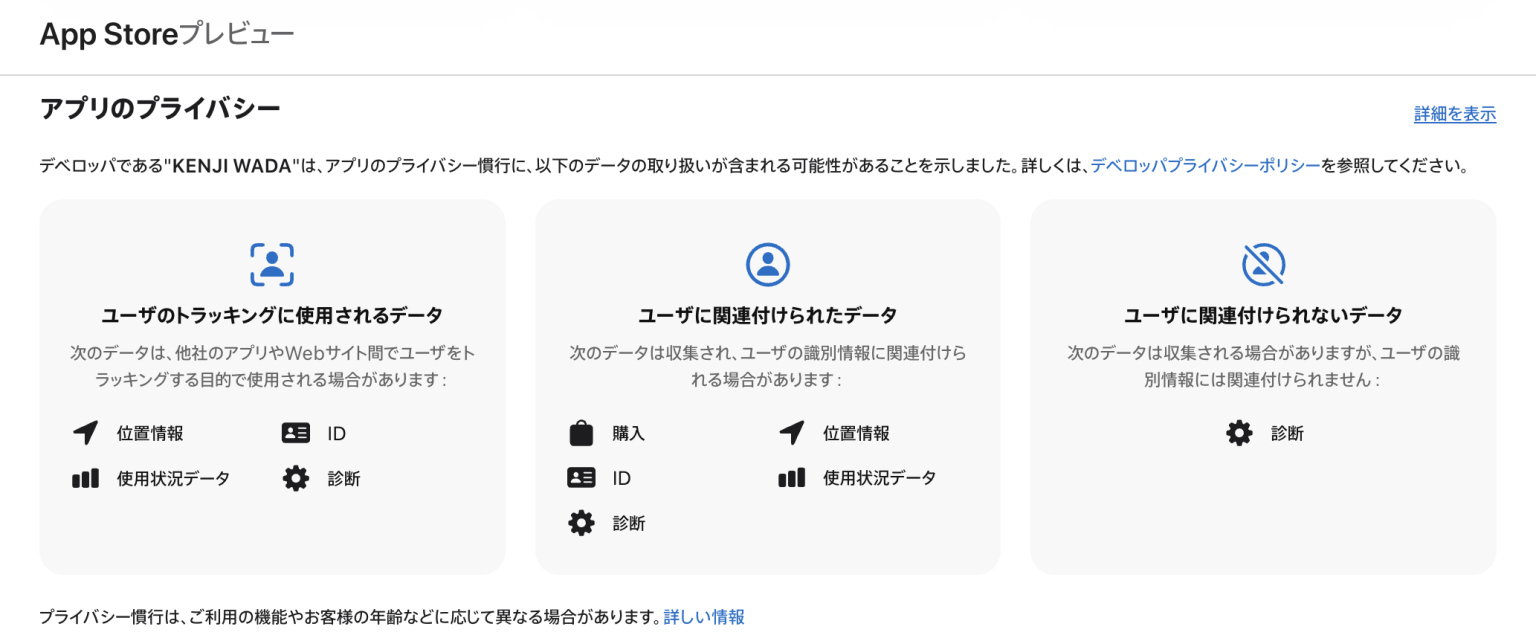
As an aside, there are many cases where third-party SDK providers publish documentation on how to configure "App Privacy". For example, if you use AdMob or RevenueCat, you can fill it in by following the pages below.
Third-party SDK support
PrivacyInfo.xcprivacy support in third-party SDKs is also necessary. Apple has published a partial list of "SDKs that require a privacy manifest and signature".
At present, there is nothing we app developers can do. We can only wait for each third party to respond, so please check the release notes on the official sites from time to time. Firebase, which is often used in app development, appears to be discussing its support on GitHub.
Four Cropper uses Firebase Analytics, Crashlytics, and RevenueCat. Unless the Privacy Manifests support of at least these third-party SDKs is completed, the app cannot be said to be fully compliant either.
Other commonly used libraries are also covered, such as the image caching libraries Kingfisher and SDWebImage, the progress dialog libraries MBProgressHUD and SVProgressHUD, and the networking library Alamofire, so we need to wait for the Privacy Manifests support of at least these SDKs.
Added January 11, 2024: I wanted a list of the Privacy Manifests support status for each third-party SDK (library), so I compiled it separately in "We surveyed the status of Privacy Manifests support for third-party SDKs".
Concrete implementation of PrivacyInfo.xcprivacy
Add a PrivacyInfo.xcprivacy file to the project and declare the types and purposes of data the app uses.
Now, let's actually add privacy information to an existing app. Select "New Files..." to add a file. Select App Privacy in the Resource category and click the Next button.

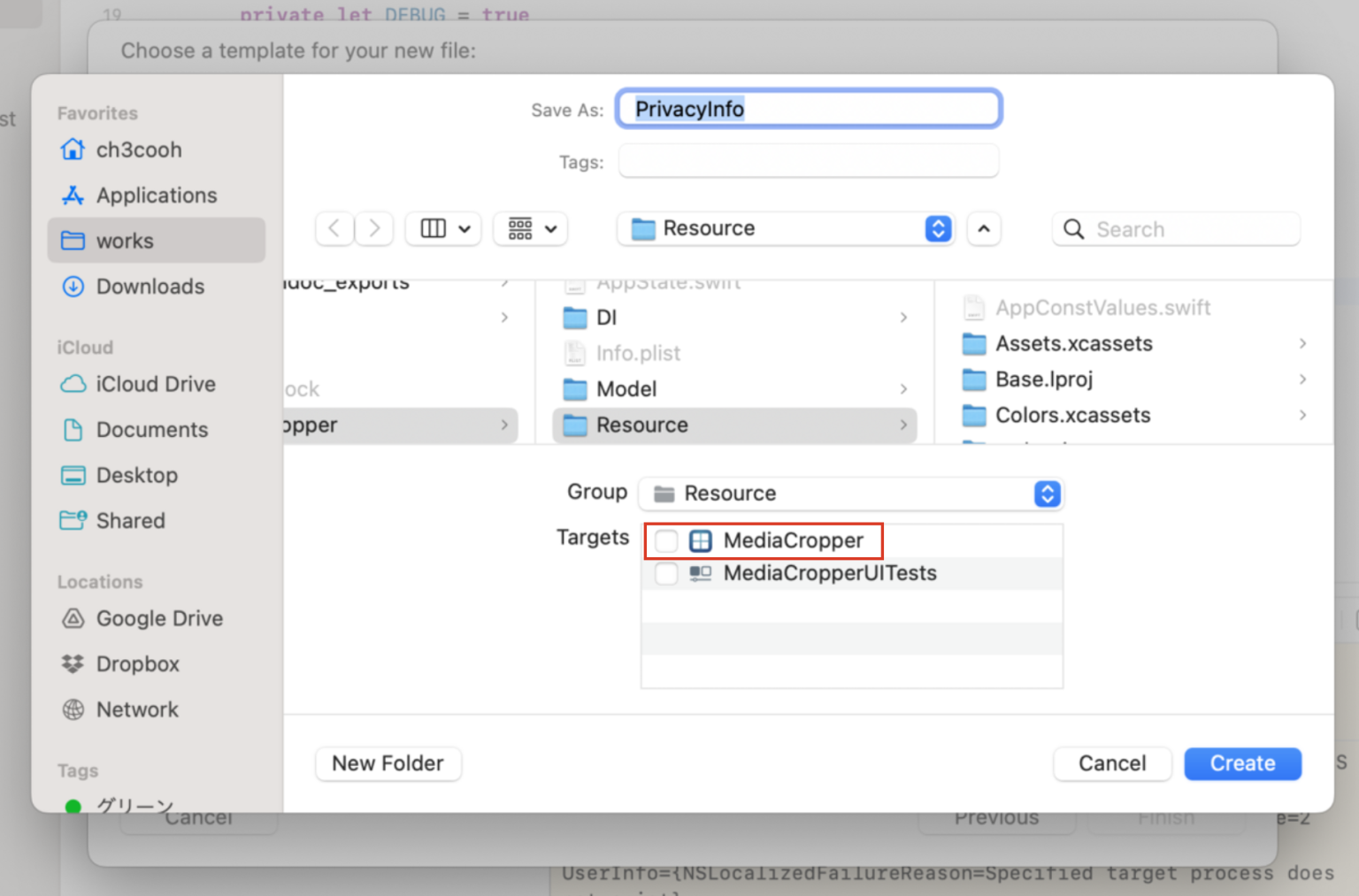
Leave the file name as the default "PrivacyInfo". Unlike when adding source code, no target is selected by default, so you need to choose which target to add PrivacyInfo.xcprivacy to. It is a good idea to remember to check the target at this point.
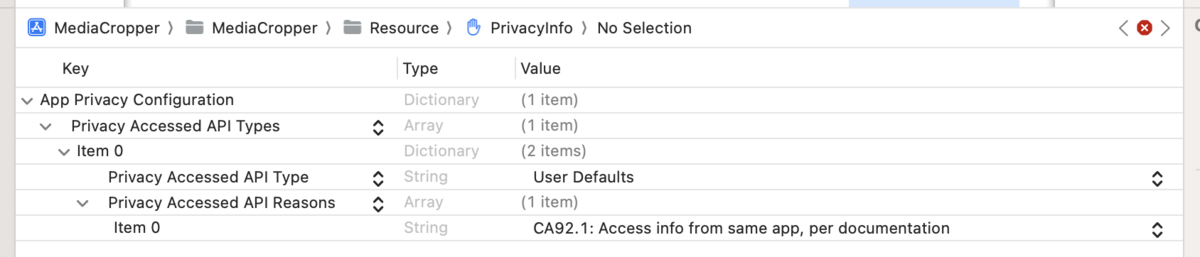
Since this app uses UserDefaults, I entered the following.
Next, for the "App Privacy" declaration, add data categories as shown below. Because Four Cropper displays ads using AdMob, it uses "Location (coarse location)" for "user tracking" and it is "linked to the user". Therefore, I entered the following.
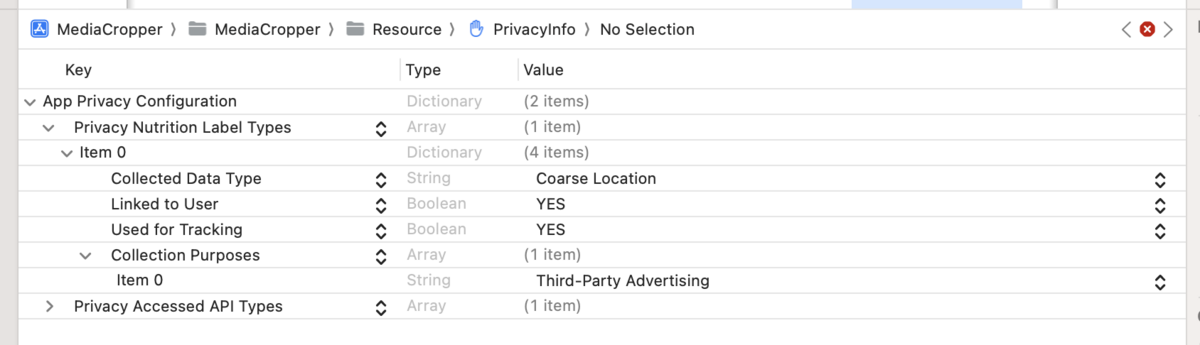
Similarly, add the remaining data categories while checking "App Privacy (Details)" on the app's App Store page. In the end, PrivacyInfo.xcprivacy looked like the following.
<?xml version="1.0" encoding="UTF-8"?>
<!DOCTYPE plist PUBLIC "-//Apple//DTD PLIST 1.0//EN" "http://www.apple.com/DTDs/PropertyList-1.0.dtd">
<plist version="1.0">
<dict>
    <key>NSPrivacyCollectedDataTypes</key>
    <array>
        <dict>
            <key>NSPrivacyCollectedDataType</key>
            <string>NSPrivacyCollectedDataTypeCoarseLocation</string>
            <key>NSPrivacyCollectedDataTypeLinked</key>
            <true/>
            <key>NSPrivacyCollectedDataTypeTracking</key>
            <true/>
            <key>NSPrivacyCollectedDataTypePurposes</key>
            <array>
                <string>NSPrivacyCollectedDataTypePurposeThirdPartyAdvertising</string>
            </array>
        </dict>
        <dict>
            <key>NSPrivacyCollectedDataType</key>
            <string>NSPrivacyCollectedDataTypeDeviceID</string>
            <key>NSPrivacyCollectedDataTypeLinked</key>
            <true/>
            <key>NSPrivacyCollectedDataTypeTracking</key>
            <true/>
            <key>NSPrivacyCollectedDataTypePurposes</key>
            <array>
                <string>NSPrivacyCollectedDataTypePurposeThirdPartyAdvertising</string>
            </array>
        </dict>
        <dict>
            <key>NSPrivacyCollectedDataType</key>
            <string>NSPrivacyCollectedDataTypePurchaseHistory</string>
            <key>NSPrivacyCollectedDataTypeLinked</key>
            <true/>
            <key>NSPrivacyCollectedDataTypeTracking</key>
            <false/>
            <key>NSPrivacyCollectedDataTypePurposes</key>
            <array>
                <string>NSPrivacyCollectedDataTypePurposeThirdPartyAdvertising</string>
                <string>NSPrivacyCollectedDataTypePurposeAppFunctionality</string>
            </array>
        </dict>
        <dict>
            <key>NSPrivacyCollectedDataType</key>
            <string>NSPrivacyCollectedDataTypeProductInteraction</string>
            <key>NSPrivacyCollectedDataTypeLinked</key>
            <true/>
            <key>NSPrivacyCollectedDataTypeTracking</key>
            <true/>
            <key>NSPrivacyCollectedDataTypePurposes</key>
            <array>
                <string>NSPrivacyCollectedDataTypePurposeThirdPartyAdvertising</string>
                <string>NSPrivacyCollectedDataTypePurposeAnalytics</string>
            </array>
        </dict>
        <dict>
            <key>NSPrivacyCollectedDataType</key>
            <string>NSPrivacyCollectedDataTypeAdvertisingData</string>
            <key>NSPrivacyCollectedDataTypeLinked</key>
            <true/>
            <key>NSPrivacyCollectedDataTypeTracking</key>
            <true/>
            <key>NSPrivacyCollectedDataTypePurposes</key>
            <array>
                <string>NSPrivacyCollectedDataTypePurposeThirdPartyAdvertising</string>
                <string>NSPrivacyCollectedDataTypePurposeAnalytics</string>
            </array>
        </dict>
        <dict>
            <key>NSPrivacyCollectedDataType</key>
            <string>NSPrivacyCollectedDataTypeCrashData</string>
            <key>NSPrivacyCollectedDataTypeLinked</key>
            <false/>
            <key>NSPrivacyCollectedDataTypeTracking</key>
            <true/>
            <key>NSPrivacyCollectedDataTypePurposes</key>
            <array>
                <string>NSPrivacyCollectedDataTypePurposeThirdPartyAdvertising</string>
                <string>NSPrivacyCollectedDataTypePurposeAnalytics</string>
            </array>
        </dict>
        <dict>
            <key>NSPrivacyCollectedDataType</key>
            <string>NSPrivacyCollectedDataTypePerformanceData</string>
            <key>NSPrivacyCollectedDataTypeLinked</key>
            <true/>
            <key>NSPrivacyCollectedDataTypeTracking</key>
            <true/>
            <key>NSPrivacyCollectedDataTypePurposes</key>
            <array>
                <string>NSPrivacyCollectedDataTypePurposeThirdPartyAdvertising</string>
                <string>NSPrivacyCollectedDataTypePurposeAnalytics</string>
            </array>
        </dict>
    </array>
    <key>NSPrivacyAccessedAPITypes</key>
    <array>
        <dict>
            <key>NSPrivacyAccessedAPITypeReasons</key>
            <array>
                <string>CA92.1</string>
            </array>
            <key>NSPrivacyAccessedAPIType</key>
            <string>NSPrivacyAccessedAPICategoryUserDefaults</string>
        </dict>
    </array>
</dict>
</plist>
That completes the work of adding privacy information to the app. Next, we will verify whether the added declarations are set correctly.
Generate a privacy report to verify the implementation is correct
As of Xcode 15.1, there is no way to automatically generate PrivacyInfo.xcprivacy. To check whether it is set correctly, "generating and reviewing a privacy report" is the only method. The process of generating a privacy report is as follows.
- Create an archive: In Xcode, select "Product > Archive" to create an archive of the app
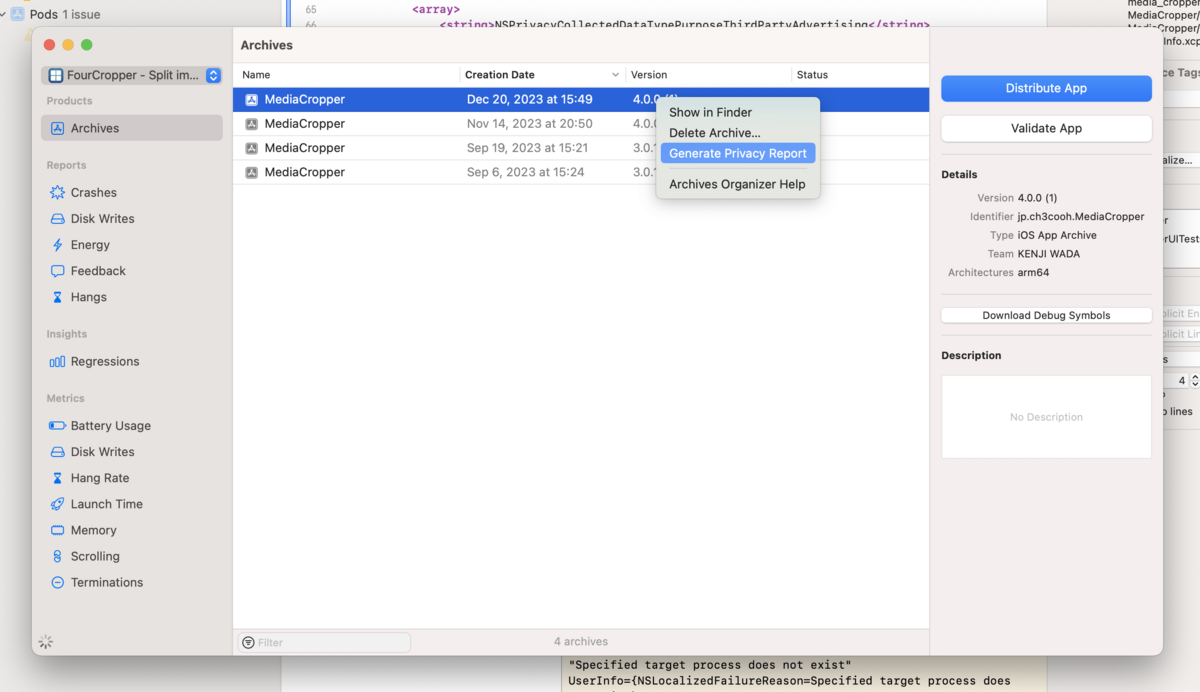
- Generate the privacy report: In the Organizer, right-click the archived item and select "Generate Privacy Report"
- Save the privacy report: Output the privacy report to any path
- Check the privacy report: Double-click the PDF file to open it and check the contents
Right-click the archived item and select "Generate Privacy Report" from the context menu.
The privacy report is output to the path you chose, so double-click it to check the report.
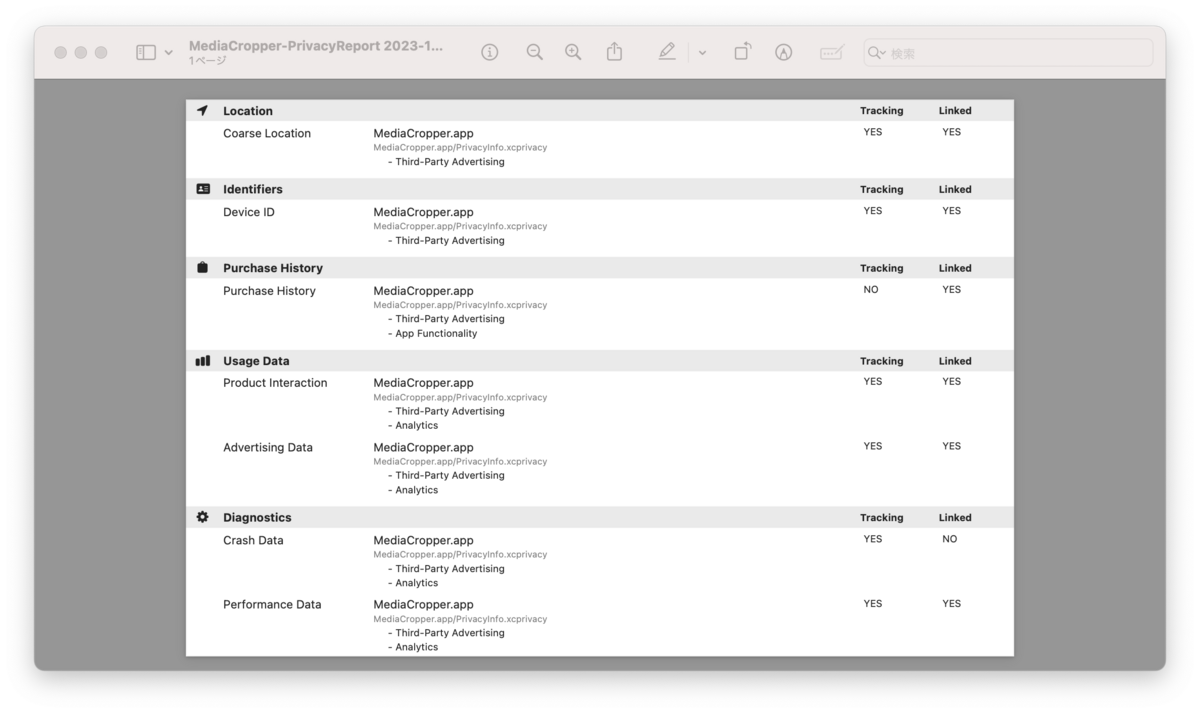
Check whether the output privacy report corresponds to each item in "App Privacy (Details)" at the bottom of the app's page on the App Store.
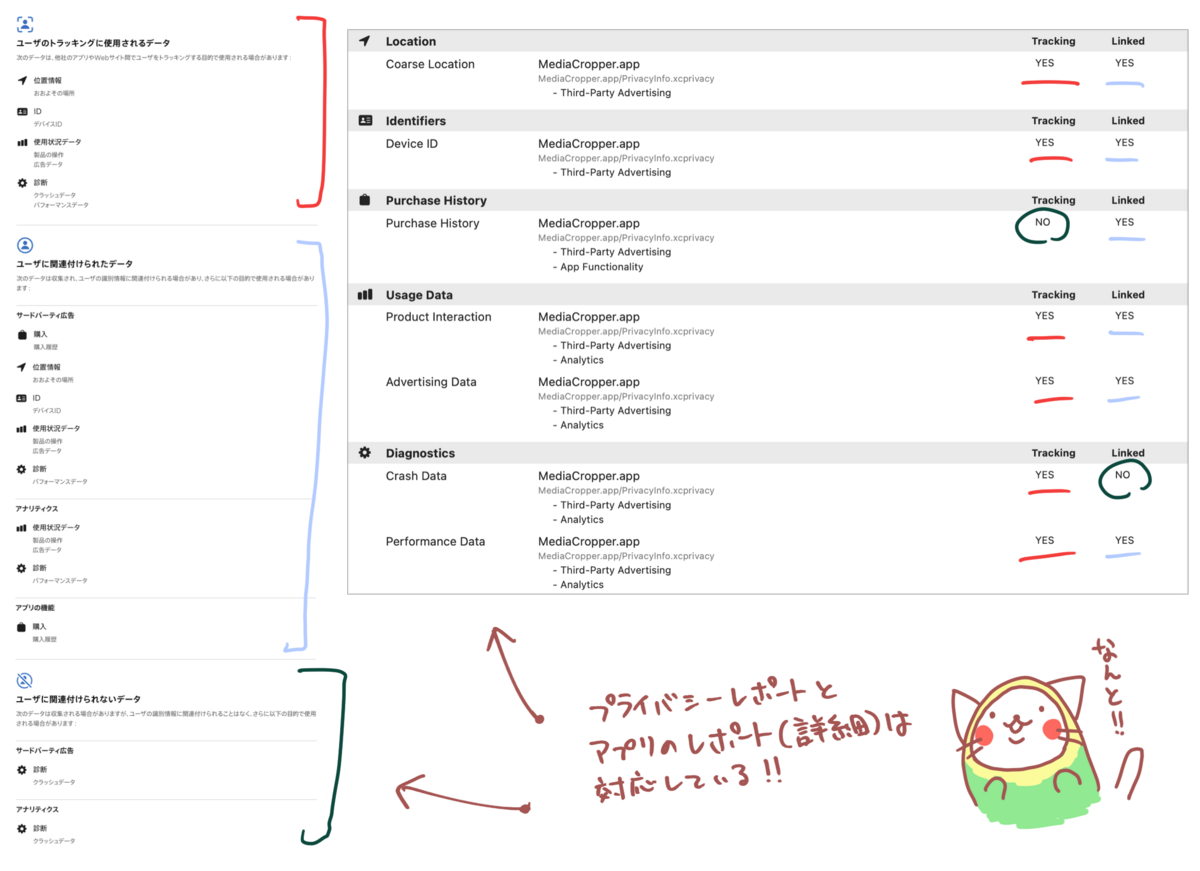
Troubleshooting: A mistake in PrivacyInfo.xcprivacy produces an empty PDF
Even if there is a mistake in PrivacyInfo.xcprivacy, basically no error occurs. An empty PDF is simply generated. If an empty PDF is generated, it indicates that there is some error in the settings of PrivacyInfo.xcprivacy.
However, it doesn't tell you which setting is wrong, so if you get stuck, it takes some effort, but it is probably better to add a new PrivacyInfo, add settings little by little from scratch, and output and check the report each time.
Summary
Supporting Privacy Manifests has a set deadline, so preparations need to be made in advance. It is essential for app developers to fulfill their accountability to users and earn their trust, so prompt response to the new privacy requirements is required. On the other hand, we have to wait for third-party SDKs to respond, and that becomes a bottleneck, which is quite frustrating.
Also, at this point it is a hassle that privacy information must be managed twice, in Privacy Manifests and in App Store Connect. Just as app icons that used to be laboriously uploaded to App Store Connect came to be read from the app binary, I hope the day will come when we no longer have to enter privacy information by hand.
Appendix: Data categories and collection purposes
From "Describing data use in privacy manifests | Apple Developer Documentation". The "categories" and "collection purposes" of data collected by an app or third-party SDK are as follows.
The values had not appeared publicly until now, but the data types are already familiar from "App Privacy" in App Store Connect.
Data categories
| Classification | Data type | Value |
|---|---|---|
| Contact info | Name | NSPrivacyCollectedDataTypeName |
| Email address | NSPrivacyCollectedDataTypeEmailAddress | |
| Phone number | NSPrivacyCollectedDataTypePhoneNumber | |
| Physical address | NSPrivacyCollectedDataTypePhysicalAddress | |
| Health & fitness | Health | NSPrivacyCollectedDataTypeHealth |
| Fitness | NSPrivacyCollectedDataTypeFitness | |
| Financial info | Payment info | NSPrivacyCollectedDataTypePaymentInfo |
| Credit info | NSPrivacyCollectedDataTypeCreditInfo | |
| Location | Precise location | NSPrivacyCollectedDataTypePreciseLocation |
| Coarse location | NSPrivacyCollectedDataTypeCoarseLocation | |
| User content | Emails or text messages | NSPrivacyCollectedDataTypeEmailsOrTextMessages |
| Photos or videos | NSPrivacyCollectedDataTypePhotosorVideos | |
| Identifiers | User ID | NSPrivacyCollectedDataTypeUserID |
| Device ID | NSPrivacyCollectedDataTypeDeviceID | |
| Purchases | Purchases | NSPrivacyCollectedDataTypePurchaseHistory |
| Usage data | Product interaction | NSPrivacyCollectedDataTypeProductInteraction |
| Advertising data | NSPrivacyCollectedDataTypeAdvertisingData | |
| Diagnostics | Crash data | NSPrivacyCollectedDataTypeCrashData |
| Performance data | NSPrivacyCollectedDataTypePerformanceData |
Collection purposes
| Purpose | Value |
|---|---|
| Third-party advertising | NSPrivacyCollectedDataTypePurposeThirdPartyAdvertising |
| Developer's advertising or marketing | NSPrivacyCollectedDataTypePurposeDeveloperAdvertising |
| Analytics | NSPrivacyCollectedDataTypePurposeAnalytics |
| Product personalization | NSPrivacyCollectedDataTypePurposeProductPersonalization |
| App functionality | NSPrivacyCollectedDataTypePurposeAppFunctionality |
(Added 2024/3/22) The new privacy requirements have taken effect
At the end of February, the concrete enforcement schedule for the new privacy requirements for App Store submissions was announced.
From March 13, privacy manifests are checked at review submission, and a warning email is sent if there are deficiencies. From May 1, compliance with privacy manifests is required, and apps with deficiencies will be rejected.
I summarized the warning email that is sent when an app with incomplete privacy manifest support is submitted for review, as of March 14, in the following article.