
Template-Driven Prompt Engineering — Schema Design for Obtaining High-Quality AI Output Even for Non-Engineers

This page has been translated by machine translation. View original
Introduction
When we deployed AI tools internally, we heard feedback like: "I don't know how to write prompts," "It's tedious to write the same instructions every time," and "Output quality varies depending on the person."
We needed a mechanism that would allow anyone to get high-quality AI output just by filling out a form, without any knowledge of prompt engineering. So we designed a system that encapsulates prompt quality into templates and only asks users for domain-specific input.
Prerequisites & Environment
- TypeScript
- Template definitions in JSON format
- SvelteKit (UI framework)
Template Schema Design
Overview of the Template Type
export interface Template {
  id: string;
  name: string;
  description: string;
  instruction: string;
  parameters: Record<string, TemplateParameter>;
  webSearch: boolean;
  type?: "simple" | "workflow" | "api_chain" | "custom";
  processors?: ProcessorDefinition[];
  metadata?: TemplateMetadata;
}

export interface TemplateParameter {
  type: string;
  description: string;
  required: boolean;
}

export interface TemplateMetadata {
  complexity: "simple" | "medium" | "complex";
  estimatedTime?: number;
  tags?: string[];
  category?: string;
  version?: string;
  author?: string;
}
The most important design decision here is the separation of instruction and parameters.
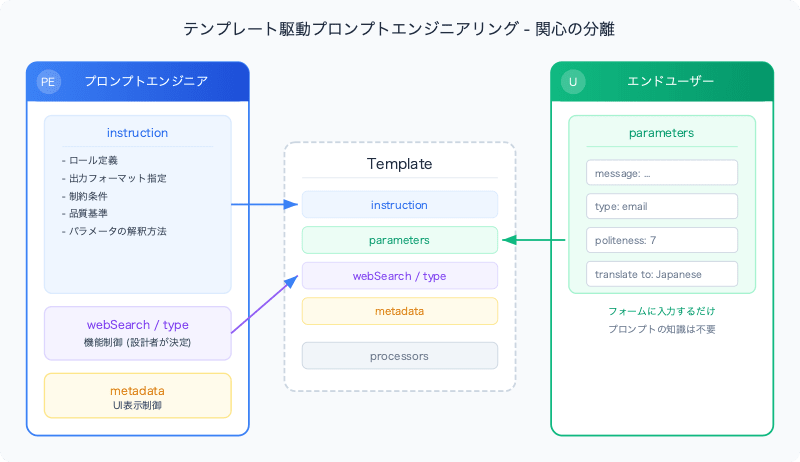
Separation of instruction and parameters
instruction (system prompt)      ← designed by prompt engineers
parameters (user input fields)   ← filled in by end users
instruction condenses prompt engineering knowledge. Output format specifications, role definitions, constraints, quality standards — everything goes here. Users never touch this part.
parameters are the values that users actually enter. Text, numbers, choices, and other inputs are defined here according to the template's purpose.
Real Example: Message Improvement Template
{
  "id": "message_improver",
  "name": "Message & Mail Improver",
  "description": "Improve and polish your messages or emails for better clarity, tone, and effectiveness.",
  "instruction": "You are a professional communication specialist who improves messages and emails. Your task is to:\n\n1. **Content Enhancement**: Improve the clarity, tone, and effectiveness of the input message\n2. **Type-Specific Optimization**: \n   - **Email**: Use appropriate email structure, subject consideration, professional tone\n   - **SMS**: Keep concise, direct, and mobile-friendly while maintaining clarity\n3. **Politeness Level**: Adjust the message according to the specified politeness level:\n   - **Casual (1-2)**: Friendly, informal tone with casual expressions\n   - **Standard (3-4)**: Polite, everyday professional language\n   - **Formal (5-6)**: Business-appropriate formality and structure\n   - **Very Formal (7-8)**: Highly professional, respectful language\n   - **Ultra Formal (9-10)**: Most formal, ceremonial level of respect\n...\n\n## Output Format:\nProvide ONLY the improved (and optionally translated) message. Do not include any explanations, notes, headers, or additional formatting.",
  "parameters": {
    "message": {
      "type": "string",
      "description": "Enter the message or email content you want to improve",
      "required": true
    },
    "type": {
      "type": "string",
      "description": "Select message type: 'email' for email messages, 'sms' for SMS/text messages",
      "required": true
    },
    "politeness": {
      "type": "number",
      "description": "Set politeness level (1-10)",
      "required": true
    },
    "translate to": {
      "type": "string",
      "description": "Optional: Target language for translation (e.g. Japanese, English)",
      "required": false
    }
  },
  "webSearch": false
}
Users only see four input fields. The complex prompt design in the instruction is never exposed to users. Note that parameter key names (including names with spaces like translate to) are used directly as labels in the prompt, so natural phrasing for end users is prioritized.
Schema Design Decisions
Controlling webSearch at the Template Level
webSearch: boolean; // fixed per template
We designed the system so that users do not decide whether web search is on or off. Reasons:
- ZIP code lookup template requires up-to-date address information →
webSearch: true - Message improvement template requires no external information →
webSearch: false
When users turn on web search, responses may become slower or irrelevant information may get mixed in. The template designer sets the optimal value based on the use case.
type Definition for parameters
export interface TemplateParameter {
  type: string;       // "string" | "number", etc.
  description: string; // description shown in the UI
  required: boolean;   // whether the field is required
}
The type field allows dynamic switching of UI components. For string, a textarea; for number, a slider or number input, and so on.
Building parameters
Template parameters are assembled into a prompt in a simple key-value format.
let prompt = "# input\n";

Object.entries(parameterValues).forEach(([key, value]) => {
  prompt += `${key}: ${value}\n`;
});
Example output:
# input
message: Dear team, I want to tell you about the meeting tomorrow.
type: email
politeness: 7
translate to: Japanese
This prompt is sent to the AI along with the instruction. Since the instruction describes how to interpret the parameters (such as politeness level definitions), the meaning of the user input is correctly conveyed to the AI.
Validation
Required parameter checks are performed on the UI side.
const missingRequired = Object.entries(selectedTemplate.parameters)
  .filter(([key, param]) => param.required && !parameterValues[key])
  .map(([key]) => key);

if (missingRequired.length > 0) {
  error = m.please_fill_required({ fields: missingRequired.join(', ') });
  return;
}
With i18n-compatible error messages, users are notified of any fields left empty by name.
Template Routing
Templates are routed to different processing pipelines based on the type field.
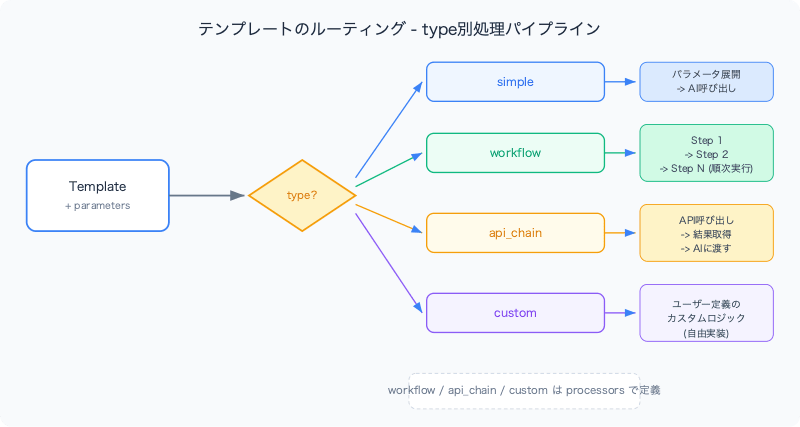
type?: "simple" | "workflow" | "api_chain" | "custom";
| type | Purpose | Processing |
|---|---|---|
| simple | Simple prompt execution | Parameter expansion → AI call |
| workflow | Multi-step processing | Sequential execution per step |
| api_chain | External API integration | API call → pass results to AI |
| custom | Custom processing | User-defined logic |
For types other than simple, processing steps are defined in the processors field.
export interface ProcessorDefinition {
  type: "ai_call" | "validation" | "transformation" | "api_call" | "formatting";
  id: string;
  name: string;
  config: ProcessorConfig;
  dependencies?: string[];  // IDs of preceding processors this depends on
}

// ProcessorConfig holds different settings depending on the processing type
export type ProcessorConfig = Record<string, unknown>;
For example, a template of type api_chain can define processing that calls an external API and passes the result to the AI.
{
  "type": "api_chain",
  "processors": [
    {
      "type": "api_call",
      "id": "fetch_data",
      "name": "Fetch External Data",
      "config": {
        "endpoint": "/api/lookup",
        "method": "GET"
      }
    },
    {
      "type": "ai_call",
      "id": "analyze",
      "name": "Data Analysis",
      "config": {
        "instruction": "Analyze and summarize the retrieved data"
      },
      "dependencies": ["fetch_data"]
    }
  ]
}
The dependencies field ensures that the result of fetch_data is passed to analyze in the correct order.
Managing Multilingual Templates
Templates are organized in separate directories per locale.
src/lib/templates/
├── en/
│   ├── message_improver.json
│   ├── zipcode_extractor.json
│   └── omikuji_fortune.json
└── ja/
    ├── message_improver.json
    ├── zipcode_extractor.json
    └── omikuji_fortune.json
Even for templates with the same functionality, depending on the language:
description(user-facing explanation) differsinstruction(system prompt) may differ (there are cases where giving instructions in Japanese improves the quality of Japanese output)descriptionwithinparametersdiffers
UI Control Through Metadata
export interface TemplateMetadata {
  complexity: "simple" | "medium" | "complex";
  estimatedTime?: number;
  tags?: string[];
  category?: string;
}
The complexity field can be used to color-code template difficulty in the UI, and category can be used for filtering. This is useful for navigation as the number of templates grows.
Summary
The core of template-driven prompt engineering is separation of concerns.
| Concern | Owner | Template Field |
|---|---|---|
| Prompt quality | Prompt engineer | instruction |
| Domain-specific input | End user | parameters |
| Feature control | Template designer | webSearch, type |
| UI display | Frontend | metadata, description |
"People who can write good prompts" and "people who want to use AI" are different people. By separating these two roles through the template schema, the overall quality of prompts across the organization can be raised.