テンプレート駆動プロンプトエンジニアリング — 非エンジニアでも高品質なAI出力を得るスキーマ設計

はじめに
社内でAIツールを展開したとき、こんな声がありました。「プロンプトの書き方がわからない」「毎回同じ指示を書くのが面倒」「人によって出力の品質がバラバラ」。
プロンプトエンジニアリングの知識がなくても、フォームに入力するだけで高品質なAI出力を得られる仕組みが必要でした。そこで、プロンプトの品質をテンプレートに封じ込め、ユーザーにはドメイン固有の入力だけを求める設計にしました。
前提・環境
- TypeScript
- JSON形式のテンプレート定義
- SvelteKit(UIフレームワーク)
テンプレートスキーマの設計
Template型の全体像
export interface Template {
  id: string;
  name: string;
  description: string;
  instruction: string;
  parameters: Record<string, TemplateParameter>;
  webSearch: boolean;
  type?: "simple" | "workflow" | "api_chain" | "custom";
  processors?: ProcessorDefinition[];
  metadata?: TemplateMetadata;
}

export interface TemplateParameter {
  type: string;
  description: string;
  required: boolean;
}

export interface TemplateMetadata {
  complexity: "simple" | "medium" | "complex";
  estimatedTime?: number;
  tags?: string[];
  category?: string;
  version?: string;
  author?: string;
}
ここで最も重要な設計判断は、instructionとparametersの分離です。
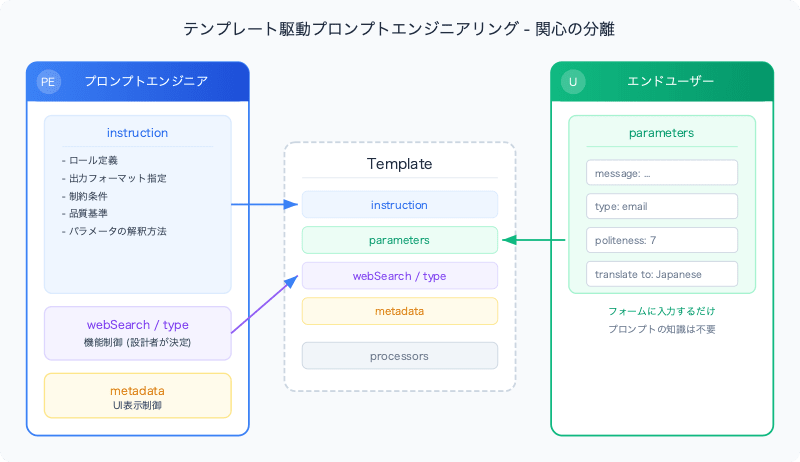
instructionとparametersの分離
instruction(システムプロンプト)  ← プロンプトエンジニアが設計
parameters(ユーザー入力フィールド)← エンドユーザーが入力
instruction にはプロンプトエンジニアリングの知識が凝縮されています。出力フォーマットの指定、ロールの定義、制約条件、品質基準——すべてがここに入ります。ユーザーはこの部分に触れません。
parameters はユーザーが実際に入力する値です。テキスト、数値、選択肢など、テンプレートの用途に応じて必要な入力を定義します。
実例:メッセージ改善テンプレート
{
  "id": "message_improver",
  "name": "Message & Mail Improver",
  "description": "Improve and polish your messages or emails for better clarity, tone, and effectiveness.",
  "instruction": "You are a professional communication specialist who improves messages and emails. Your task is to:\n\n1. **Content Enhancement**: Improve the clarity, tone, and effectiveness of the input message\n2. **Type-Specific Optimization**: \n   - **Email**: Use appropriate email structure, subject consideration, professional tone\n   - **SMS**: Keep concise, direct, and mobile-friendly while maintaining clarity\n3. **Politeness Level**: Adjust the message according to the specified politeness level:\n   - **Casual (1-2)**: Friendly, informal tone with casual expressions\n   - **Standard (3-4)**: Polite, everyday professional language\n   - **Formal (5-6)**: Business-appropriate formality and structure\n   - **Very Formal (7-8)**: Highly professional, respectful language\n   - **Ultra Formal (9-10)**: Most formal, ceremonial level of respect\n...\n\n## Output Format:\nProvide ONLY the improved (and optionally translated) message. Do not include any explanations, notes, headers, or additional formatting.",
  "parameters": {
    "message": {
      "type": "string",
      "description": "Enter the message or email content you want to improve",
      "required": true
    },
    "type": {
      "type": "string",
      "description": "Select message type: 'email' for email messages, 'sms' for SMS/text messages",
      "required": true
    },
    "politeness": {
      "type": "number",
      "description": "Set politeness level (1-10)",
      "required": true
    },
    "translate to": {
      "type": "string",
      "description": "Optional: Target language for translation (e.g. Japanese, English)",
      "required": false
    }
  },
  "webSearch": false
}
ユーザーが見るのは4つの入力フィールドだけです。instructionの複雑なプロンプト設計はユーザーの目に触れません。なお、パラメータのキー名(translate toのようにスペースを含む名前)はそのままプロンプトのラベルとして使われるため、エンドユーザーにとって自然な表記を優先しています。
スキーマの設計判断
webSearchをテンプレートレベルで制御する
webSearch: boolean; // テンプレートごとに固定
Web検索のON/OFFはユーザーの判断に委ねない設計にしました。理由:
- ZIPコード検索テンプレートでは最新の住所情報が必要 →
webSearch: true - メッセージ改善テンプレートでは外部情報は不要 →
webSearch: false
ユーザーがWeb検索をONにすると、レスポンスが遅くなったり、無関係な情報が混ざったりする可能性があります。テンプレート設計者がユースケースに応じて最適な値を設定します。
parameterのtype定義
export interface TemplateParameter {
  type: string;       // "string" | "number" など
  description: string; // UIに表示する説明文
  required: boolean;   // 必須かどうか
}
typeフィールドを使い、UIコンポーネントを動的に切り替えられます。stringならテキストエリア、numberならスライダーやナンバーインプットなど。
parametersの組み立て
テンプレートのパラメータは、シンプルなキー・バリュー形式でプロンプトに組み込まれます。
let prompt = "# input\n";

Object.entries(parameterValues).forEach(([key, value]) => {
  prompt += `${key}: ${value}\n`;
});
出力例:
# input
message: Dear team, I want to tell you about the meeting tomorrow.
type: email
politeness: 7
translate to: Japanese
instructionとこのプロンプトがAIに送信されます。instructionにはパラメータの解釈方法が記述されているため(politenessレベルの定義など)、ユーザー入力の意味がAIに正しく伝わります。
バリデーション
必須パラメータのチェックはUI側で行います。
const missingRequired = Object.entries(selectedTemplate.parameters)
  .filter(([key, param]) => param.required && !parameterValues[key])
  .map(([key]) => key);

if (missingRequired.length > 0) {
  error = m.please_fill_required({ fields: missingRequired.join(', ') });
  return;
}
i18n対応のエラーメッセージで、未入力のフィールド名をユーザーに通知します。
テンプレートのルーティング
テンプレートのtypeフィールドに応じて、異なる処理パイプラインにルーティングされます。
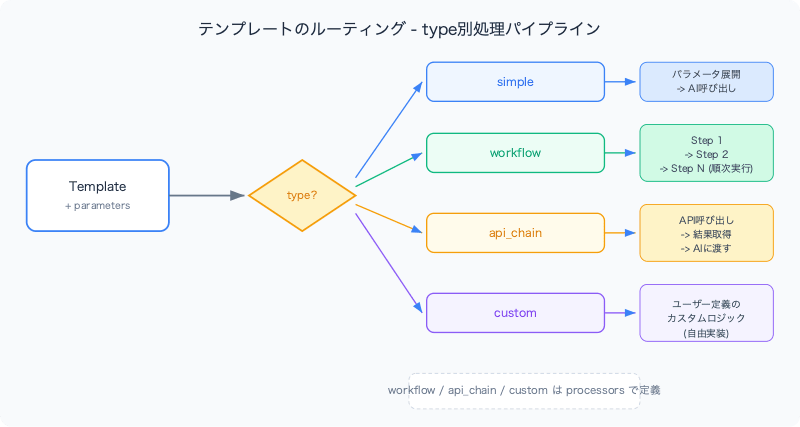
type?: "simple" | "workflow" | "api_chain" | "custom";
| type | 用途 | 処理 |
|---|---|---|
| simple | 単純なプロンプト実行 | パラメータ展開 → AI呼び出し |
| workflow | 複数ステップの処理 | ステップごとの順次実行 |
| api_chain | 外部API連携 | API呼び出し → 結果をAIに渡す |
| custom | カスタム処理 | ユーザー定義のロジック |
simple以外のタイプでは、processorsフィールドで処理ステップを定義します。
export interface ProcessorDefinition {
  type: "ai_call" | "validation" | "transformation" | "api_call" | "formatting";
  id: string;
  name: string;
  config: ProcessorConfig;
  dependencies?: string[];  // 依存する前段のprocessor ID
}

// ProcessorConfigは処理タイプごとに異なる設定を持つ
export type ProcessorConfig = Record<string, unknown>;
たとえば、api_chainタイプのテンプレートでは、外部APIを呼び出してその結果をAIに渡す処理を定義できます。
{
  "type": "api_chain",
  "processors": [
    {
      "type": "api_call",
      "id": "fetch_data",
      "name": "外部データ取得",
      "config": {
        "endpoint": "/api/lookup",
        "method": "GET"
      }
    },
    {
      "type": "ai_call",
      "id": "analyze",
      "name": "データ分析",
      "config": {
        "instruction": "取得したデータを分析して要約してください"
      },
      "dependencies": ["fetch_data"]
    }
  ]
}
dependenciesフィールドにより、fetch_dataの結果がanalyzeに渡される順序が保証されます。
多言語テンプレートの管理
テンプレートはロケールごとにディレクトリを分けて管理しています。
src/lib/templates/
├── en/
│   ├── message_improver.json
│   ├── zipcode_extractor.json
│   └── omikuji_fortune.json
└── ja/
    ├── message_improver.json
    ├── zipcode_extractor.json
    └── omikuji_fortune.json
同じ機能のテンプレートでも、言語によって:
description(ユーザー向け説明)が異なるinstruction(システムプロンプト)が異なる場合がある(日本語で指示した方が日本語出力の品質が上がるケースなど)parametersのdescriptionが異なる
メタデータによるUI制御
export interface TemplateMetadata {
  complexity: "simple" | "medium" | "complex";
  estimatedTime?: number;
  tags?: string[];
  category?: string;
}
complexityフィールドを使い、UIでテンプレートの難易度を色分け表示したり、categoryでフィルタリングしたりできます。テンプレートが増えてきたときのナビゲーションに役立ちます。
まとめ
テンプレート駆動プロンプトエンジニアリングの核心は関心の分離です。
| 関心 | 担当者 | テンプレートのフィールド |
|---|---|---|
| プロンプトの品質 | プロンプトエンジニア | instruction |
| ドメイン固有の入力 | エンドユーザー | parameters |
| 機能制御 | テンプレート設計者 | webSearch, type |
| UIの表示方法 | フロントエンド | metadata, description |
「良いプロンプトを書ける人」と「AIを使いたい人」は別の人です。テンプレートスキーマでこの2つの役割を分離することで、プロンプトの品質を組織全体で底上げできます。