
I tried controlling the number of simultaneous connections using the new ALB feature Target Optimizer

This page has been translated by machine translation. View original
On November 20, 2025, a new feature for Application Load Balancer (ALB), Target Optimizer, was released.
Control of simultaneous connections, which was previously handled by WAF and web servers, can now be managed more effectively through coordination between ALB and targets. I had an opportunity to test whether limiting the number of simultaneous connections to targets under ALB can prevent performance degradation caused by excessive connections, so I'd like to share my experience.
Environment Configuration
This time, to mimic an ECS sidecar configuration, I used Docker on EC2 with --network host mode to co-locate the agent and application.
- OS: Amazon Linux 2023 (al2023-ami-2023.9.20251117.1-kernel-6.1-x86_64)
- App: Node.js (delay controlled by query parameters)
- Agent: AWS Target Optimizer Agent
EC2 (Docker & Application)
I launched a Node.js application that intentionally introduces a 1-second delay and a Target Optimizer agent that relays and controls requests from ALB.
#!/bin/bash
# 1. Update system packages
yum update -y

# 2. Install Docker
yum install -y docker

# 3. Start and enable Docker service
systemctl start docker
systemctl enable docker

# 4. Download Target Optimizer agent image
docker pull public.ecr.aws/aws-elb/target-optimizer/target-control-agent:latest

# 5. Create directory for Node.js application
mkdir -p /app

# 6. Create Node.js application with configurable delay (using query parameter ?delay=<ms>)
cat > /app/app.js << 'EOF'
require('http').createServer(async (req, res) => {
  const delay = parseInt(new URL(req.url, 'http://localhost').searchParams.get('delay')) || 0;
  if (delay > 0) await new Promise(r => setTimeout(r, delay));
  res.writeHead(200, {'Content-Type': 'text/plain'});
  res.end(`OK (${delay}ms delay)\n`);
}).listen(8080, () => console.log('Server running on port 8080'));
EOF

# 7. Create Dockerfile
cat > /app/Dockerfile << 'EOF'
FROM node:alpine
COPY app.js .
CMD ["node", "app.js"]
EOF

# 8. Build Docker image
cd /app && docker build -t delay-app .

# 9. Launch Node.js application container
docker run -d \
  --name delay-app \
  --restart unless-stopped \
  --network host \
  delay-app

# 10. Launch Target Optimizer agent container
docker run -d \
  --name target-optimizer-agent \
  --restart unless-stopped \
  --network host \
  -e TARGET_CONTROL_DATA_ADDRESS=0.0.0.0:80 \
  -e TARGET_CONTROL_CONTROL_ADDRESS=0.0.0.0:3000 \
  -e TARGET_CONTROL_DESTINATION_ADDRESS=127.0.0.1:8080 \
  -e TARGET_CONTROL_MAX_CONCURRENCY=1 \
  public.ecr.aws/aws-elb/target-optimizer/target-control-agent:latest
Creating ALB Target Group
I created an ALB for testing.
When creating the target group, I configured the --target-control-port setting.
This allows the ALB to communicate with the agent through the specified port (3000 in this case) to understand the congestion status.
Creating Target Group with Target Optimizer enabled (CLI)
aws elbv2 create-target-group \
  --name optimized-tg \
  --protocol HTTP \
  --port 80 \
  --vpc-id <VPC-ID> \
  --target-control-port 3000 \
  --region ap-northeast-1

# --target-control-port specifies the communication port with the agent
- Managed rule (GUI) settings
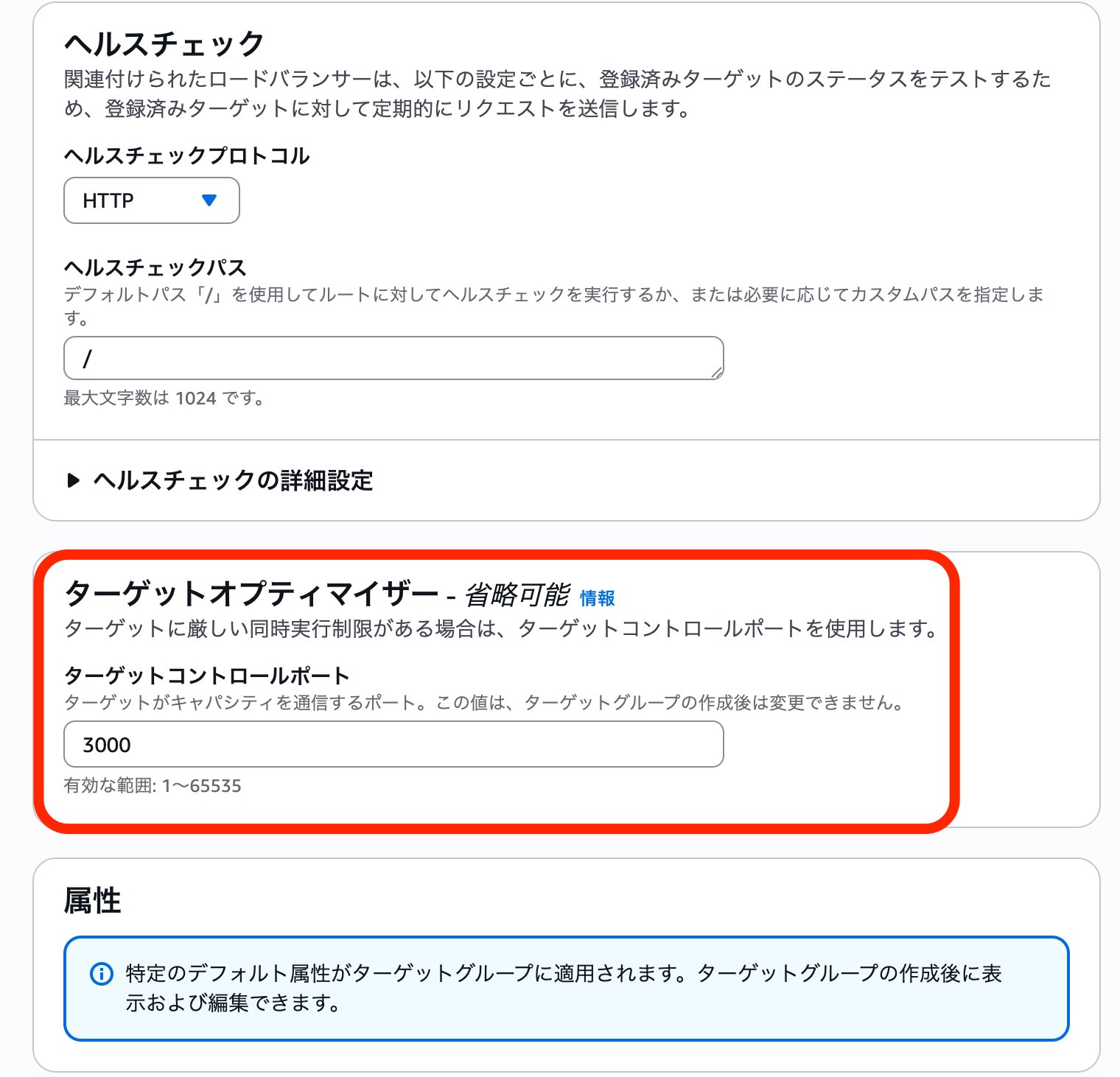
For this test, the target control port was set to "3000" to match the EC2 agent, and the Target Optimizer agent container port "80" was set as the communication destination.
Operation Verification
I intentionally added a "1-second" delay to each request to observe the behavior when the number of simultaneous connections exceeds the limit (set to 1 in this case).
Test Script
#!/bin/bash
DELAY=${1:-0}
ALB_DNS=$(aws elbv2 describe-load-balancers --region ap-northeast-1 --query 'LoadBalancers[0].DNSName' --output text)
URL="http://$ALB_DNS/?delay=$DELAY"

run_requests() {
  local PARALLEL=$1
  local RESULT=$(seq 1 $PARALLEL | xargs -P $PARALLEL -I {} curl -s --http1.1 -o /dev/null -w "%{http_code}\n" "$URL" 2>/dev/null)
  local S=$(echo "$RESULT" | grep -c "200" || true)
  local F=$(echo "$RESULT" | grep -c "503" || true)
  echo "$S $F"
  sleep 1
}

echo "=== Test Configuration ==="
echo "Delay time: ${DELAY}ms"
echo "URL: $URL"
echo ""

echo "=== Warming up (2 parallel requests, 10 seconds) ==="
START_TIME=$(date +%s)
WARMUP_SUCCESS=0
WARMUP_FAILED=0

while [ $(($(date +%s) - START_TIME)) -lt 10 ]; do
  read S F <<< $(run_requests 2)
  WARMUP_SUCCESS=$((WARMUP_SUCCESS + S))
  WARMUP_FAILED=$((WARMUP_FAILED + F))
done

echo "Warmup complete: Success=$WARMUP_SUCCESS, Failed=$WARMUP_FAILED"
echo ""
sleep 2

echo "=== Target Optimizer Parallel Load Test (30 seconds each) ==="
echo "Parallel | Success(200) | Failed(503) | Success Rate"
echo "---------|-------------|-------------|-------------"

for PARALLEL in 1 2 4 8 16; do
  START_TIME=$(date +%s)
  SUCCESS=0
  FAILED=0

  while [ $(($(date +%s) - START_TIME)) -lt 30 ]; do
    read S F <<< $(run_requests $PARALLEL)
    SUCCESS=$((SUCCESS + S))
    FAILED=$((FAILED + F))
  done

  TOTAL=$((SUCCESS + FAILED))
  if [ $TOTAL -gt 0 ]; then
    RATE=$(awk "BEGIN {printf \"%.1f%%\", ($SUCCESS*100.0/$TOTAL)}")
  else
    RATE="0.0%"
  fi
  printf "%6d | %9d | %9d | %s\n" $PARALLEL $SUCCESS $FAILED "$RATE"
done

echo ""
echo "=== Test Complete ==="
Test Results
I increased the number of parallel requests from 1 to 16. The configuration consisted of 2 EC2 instances, each with an agent configured with MAX_CONCURRENCY=1.
| Parallel | Success(200) | Failed(503) | Success Rate |
|---|---|---|---|
| 1 | 15 | 1 | 93.8% |
| 2 | 21 | 9 | 70.0% |
| 4 | 30 | 30 | 50.0% |
| 8 | 30 | 90 | 25.0% |
| 16 | 30 | 210 | 12.5% |
Even as the number of parallel requests increased, the number of successful requests plateaued at "30", and excess requests were appropriately rejected with 503 Service Unavailable errors.
- Note regarding the 30 successful requests: The application processing time (1 second) + script wait time (1 second) = approximately 2 seconds per cycle. During the 30-second test, about 15 cycles were executed, with each of the 2 EC2 instances handling 1 request per cycle (15 cycles × 2 instances = 30 successful requests).
Access Log Analysis
The ALB access logs also confirmed the operation of Target Optimizer.
- Successful log (200)
The processing time (target_processing_time) was 1.004s, showing that the request was successfully processed after the 1-second application delay.
| Item | Value |
|---|---|
| Protocol | http |
| Time | 2025-11-21T16:10:02.724784Z |
| ALB | app/alb-XXXXX/a7c2180283d10881 |
| Client | 203.xx.xx.xx:53426 |
| Target | 172.31.24.14:80 |
| Processing time | request=0.000s / target=1.004s / response=0.000s |
| ELB status | 200 |
| Target status | 200 |
| Received bytes | 144 |
| Sent bytes | 163 |
| Request | GET /?delay=1000 HTTP/1.1 |
| User-Agent | curl/8.11.1 |
http 2025-11-21T16:10:02.724784Z app/alb-XXXXX/a7c2180283d10881 203.xx.xx.xx:53426 172.31.24.14:80 0.000
1.004 0.000 200 200 144 163 "GET http://my-alb-XXXXX.ap-northeast-1.elb.amazonaws.com:80/?delay=1000 HTTP
/1.1" "curl/8.11.1" - - arn:aws:elasticloadbalancing:ap-northeast-1:123456789012:targetgroup/optimized-tg/
41e7338699cf44e9 "Root=1-69208ed9-4b1b24d81a741acd3b4a42dd" "-" "-" 0 2025-11-21T16:10:01.720000Z
"forward" "-" "-" "172.31.24.14:80" "200" "-" "-" TID_7290691baf7245469508aa6a42bd733c "-" "-" "-"
- Failed log (503)
The 503 error was returned by ALB or the agent before reaching the target (target IP is -).
This confirms that Target Optimizer successfully protects backend applications from excessive load.
| Item | Value |
|---|---|
| Protocol | http |
| Time | 2025-11-21T16:10:01.738713Z |
| ALB | app/alb-XXXXX/a7c2180283d10881 |
| Client | 203.xx.xx.xx:53464 |
| Target | - (not reached) |
| Processing time | request=-1s / target=-1s / response=-1s |
| ELB status | 503 |
| Target status | - |
| Received bytes | 144 |
| Sent bytes | 162 |
| Request | GET /?delay=1000 HTTP/1.1 |
| User-Agent | curl/8.11.1 |
*Note: In ALB access logs, when a request doesn't reach the target, the processing time fields are recorded as -1.
http 2025-11-21T16:10:01.738713Z app/alb-XXXXX/a7c2180283d10881 203.xx.xx.xx:53464 - -1 -1 -1 503 - 144
162 "GET http://my-alb-XXXXX.ap-northeast-1.elb.amazonaws.com:80/?delay=1000 HTTP/1.1" "curl/8.11.1" - -
arn:aws:elasticloadbalancing:ap-northeast-1:123456789012:targetgroup/optimized-tg/41e7338699cf44e9 "Root=1
-69208ed9-4a2f731a0e5fabfe6f9d184f" "-" "-" 0 2025-11-21T16:10:01.736000Z "forward" "-" "-" "-" "503" "-"
"-" TID_3e941d6f5423694e9f3f8e512cc30b7c "-" "-" "-"
Conclusion
This verification confirms that Target Optimizer effectively blocks requests exceeding application limits before they reach the target.
Since control occurs at the ALB level (in cooperation with the agent), it serves as an effective means of "rate limiting (bulkhead)" to protect application processes.
While this verification was conducted using Docker on EC2, it can be particularly useful for precisely controlling concurrent executions per task when implemented in Amazon ECS with the sidecar pattern.
This feature is especially valuable for "generative AI/LLM applications" where each request takes a long time to process and there are physical parallel processing limitations with GPU resources, helping to maintain overall system stability.