
I Introduced SMS Two-Factor Authentication into an Existing PHP System Using Twilio Verify

This page has been translated by machine translation. View original
Introduction
When you want to add two-step verification to a login that uses only an ID and password, building one-time password generation and expiry management yourself takes a lot of effort. So I tried integrating Twilio Verify into a PHP session-based login and completing the login with a code sent by SMS to a smartphone.
As a result, the Twilio-related processing came down to two functions, "send a code" and "check a code", each requiring just one line. The only change to the existing login process was a branch that inserts a code entry screen after the ID and password check passes.
What is Twilio Verify?
Twilio Verify is an API that sends a verification code via SMS, voice call, or email, and checks the code entered by the user. Because Twilio handles code generation, storage, expiry, and checking, the app does not need to hold the code. Verify also provides the phone number used as the SMS sender, so you do not need to buy a number.
Test environment
- PHP 8.3.36 (built-in server on macOS)
- twilio/sdk 8.14.0
- Destination: a Japanese mobile phone (Android)
- Date of testing: November 15, 2026
Intended audience
- Those who want to add two-step verification to a web app built with PHP sessions
- Those who find building their own one-time passwords or migrating the entire authentication platform too heavy
References
- Verify API (Twilio official documentation)
- Verification Check (Twilio official documentation)
- Error 21608 (Twilio official documentation)
Architecture
The login flow is as follows. Even if the existing ID and password check passes, the login is not completed immediately. A code is sent via Verify, and the login is completed when the check returns approved.
The only thing the app needs to remember is the state that a user is waiting to be verified. The code itself is held by Twilio.
Implementation
Creating a Verify Service
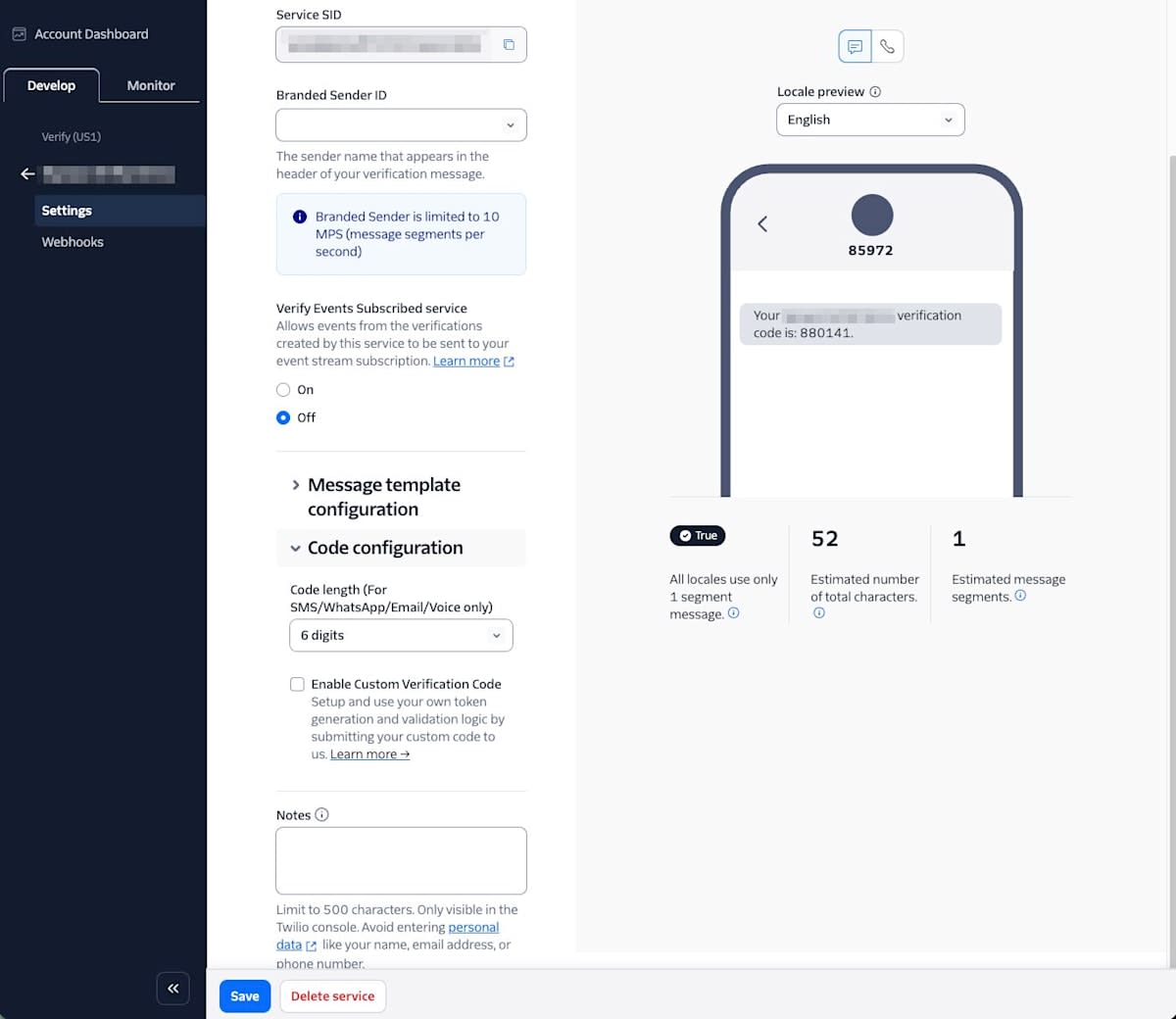
To use Verify, you need a Verify Service that bundles settings such as the number of digits in the code and the name shown in the message. This time I created one from the Verify screen in the Twilio Console and set the code length to 6 digits. The Service SID that starts with VA, shown after creation, is used in the app's settings.
SDK and credentials
From PHP, I use the official twilio/sdk. Normally you install it with composer require twilio/sdk. Because twilio/sdk has no dependent packages, this time I placed the source of GitHub release 8.14.0 and loaded the bundled src/Twilio/autoload.php.
For authentication I use a Twilio API Key. The API Key SID and secret, plus the account SID, three values in total, are read from environment variables so that they are not written in code or files.
Two functions that call Twilio
I put the Twilio-related processing together in the following file. This is the full code for this article.
<?php
// Two-step verification with Twilio Verify. These two functions are all that is added to the existing login process.
require_once __DIR__ . '/../vendor/twilio-php/src/Twilio/autoload.php';

use Twilio\Rest\Client;

function verifyService()
{
    $twilio = new Client(getenv('TWILIO_API_KEY'), getenv('TWILIO_API_SECRET'), getenv('TWILIO_ACCOUNT_SID'));
    return $twilio->verify->v2->services(getenv('TWILIO_VERIFY_SERVICE_SID'));
}

// 1. Send a verification code by SMS to the user's mobile phone
function sendCode(string $phone)
{
    return verifyService()->verifications->create($phone, 'sms', ['locale' => 'ja']);
}

// 2. Check the code entered by the user
function checkCode(string $phone, string $code): bool
{
    $check = verifyService()->verificationChecks->create(['to' => $phone, 'code' => $code]);
    return $check->status === 'approved';
}
sendCode receives the destination phone number in E.164 format (the form starting with +81) and sends an SMS. Specifying ja for locale makes the message Japanese. checkCode has Twilio check the entered code, and returns true only when the result is approved.
Integrating into the existing login
I added the following two places to the login process. When the ID and password check passes, call sendCode to put the user in a waiting-for-verification state, and when checkCode returns true on the code entry screen, complete the login.
            case 'login':
                // The part equivalent to the existing app's ID and password authentication
                $ok = hash_equals(DEMO_LOGIN_ID, (string) ($_POST['login_id'] ?? ''))
                    && hash_equals(DEMO_PASSWORD, (string) ($_POST['password'] ?? ''));
                if (!$ok) {
                    flash('ID またはパスワードが違います。');
                    break;
                }
                session_regenerate_id(true);
                $_SESSION['pending_user'] = DEMO_LOGIN_ID;
                // From here, Twilio Verify: send the verification code by SMS
                $verification = sendCode($phone);
                $_SESSION['verification_sid'] = $verification->sid;
                $_SESSION['api'] = ['sendCode' => $verification->status, 'sent_at' => date('H:i:s')];
                break;
            case 'verify':
                if (!isset($_SESSION['pending_user'])) {
                    break;
                }
                $code = (string) ($_POST['code'] ?? '');
                if (!preg_match('/^[0-9]{6}$/', $code)) {
                    flash('6 桁の数字を入力してください。');
                    break;
                }
                // Twilio Verify: check the entered code
                if (checkCode($phone, $code)) {
                    session_regenerate_id(true);
                    $_SESSION['authenticated_user'] = $_SESSION['pending_user'];
                    unset($_SESSION['pending_user'], $_SESSION['verification_sid']);
                    $_SESSION['api']['checkCode'] = 'approved';
                } else {
                    $_SESSION['api']['checkCode'] = 'pending (不一致)';
                    flash('認証コードが違います。');
                }
                break;
(※ The CSRF token check and the part that switches screens are omitted.)
Users waiting for verification are stored in the session as pending_user, and users who have completed login as authenticated_user. The post-login screen is displayed only when authenticated_user exists, so a user who has not yet had their code checked cannot proceed to the dashboard. The session ID is regenerated when the check passes so that the same session ID is not reused before and after login.
Testing and results
Sending and checking from the command line
First, I confirmed sending and checking with the script app/bin/run smoke, which calls sendCode and checkCode from the command line.
送信先: 末尾<下4桁> / Service: <Verify Service SID>
送信 API: status=pending, 0.59 秒, 送信時刻 11:23:16, sid=<Verification SID>
(※ The send time is displayed in UTC. In Japan time it is 20:23:16.)
The SMS arrived within the same 20:23 minute. The sender was 0120996242, and the body was as follows.
あなたの(SAMPLE TEST) 認証コード:267218
The results of checking a wrong code and then the received code, in that order, are as follows.
$ app/bin/run smoke check 000000
照合に失敗しました。
$ app/bin/run smoke check 267218
approved: 認証に成功しました。
End-to-end check on the login screen
Next, I did an end-to-end check from the login screen in a browser. After entering the ID and password, an SMS was sent and the code entry screen appeared. At the bottom of the screen I added a field that shows Twilio's responses.
sendCode: pending
sent_at: 20:29:58
When I first entered a wrong code, "The verification code is incorrect." was displayed and I stayed on the code entry screen. When I entered the received code, the dashboard was displayed, and the check result was approved.
sendCode: pending
sent_at: 20:29:58
checkCode: approved
Summary
With Twilio Verify, adding SMS two-step verification to an existing PHP login takes just two functions and one input screen. First register your own number as a Verified Caller ID and confirm that it works, and then complete the business information registration and review before going to production, so you can start using it with peace of mind. I hope this is helpful for those who want to easily add two-step verification to an existing web app.