I tried Vercel AI Gateway as an OpenRouter user

This page has been translated by machine translation. View original
Introduction
I had been using OpenRouter in my day-to-day development to call Claude-based models, but I wanted to see for myself how Vercel AI Gateway differs, so I tried both services side by side with the same prompts.
This article is aimed at readers who have experience with OpenRouter but have never used Vercel AI Gateway. It summarizes the results of comparing the two services side by side. Rather than ranking one above the other, I will lay out the facts of what differs and how.
What is Vercel AI Gateway?
Vercel AI Gateway is an AI model integration API provided by Vercel. In addition to integration with the Vercel AI SDK, it exposes both an OpenAI Chat Completions-compatible endpoint and an Anthropic Messages-compatible endpoint, and provides observability features within the Vercel dashboard.
What is OpenRouter?
OpenRouter is a unified gateway service that lets you work with hundreds of AI models published by multiple providers through a single API. It has an OpenAI Chat Completions-compatible endpoint, and allows you to describe per-model fallbacks and provider selection within a single request.
Testing Environment
- Test date: May 1, 2026
- Model used:
anthropic/claude-haiku-4.5(the caching section also usesanthropic/claude-sonnet-4.5)
Target Audience
- Developers who have experience calling Claude-based models via OpenRouter and are trying Vercel AI Gateway for the first time
- People who want to understand the differences in response structure and observability features when choosing an AI model gateway
- People considering how to integrate AI calls with their in-house monitoring infrastructure
References
- Vercel AI Gateway Documentation
- Vercel AI Gateway: Provider Options
- Vercel AI Gateway: Observability
- OpenRouter Documentation
- OpenRouter: Model Fallbacks
- OpenRouter: Input/Output Logging
Basic Chat Completions calls can be tested by simply swapping the baseURL
The first thing I found is that, for basic Chat Completions calls, very few changes are needed to point an existing OpenRouter client at Vercel AI Gateway. Both services expose an OpenAI Chat Completions-compatible endpoint, and both use Authorization: Bearer <token> for authentication.
When I actually called GET /v1/models and compared Claude-based model IDs, 12 model IDs were common to both services. For example, anthropic/claude-haiku-4.5, which I used in this article, can be called with the same ID on both the Vercel side and the OpenRouter side.
When writing with the OpenAI-compatible SDK, you can switch simply by replacing baseURL.
import OpenAI from 'openai';

// For Vercel AI Gateway
const vercelClient = new OpenAI({
  apiKey: process.env.AI_GATEWAY_API_KEY,
  baseURL: 'https://ai-gateway.vercel.sh/v1',
});

// For OpenRouter
const openrouterClient = new OpenAI({
  apiKey: process.env.OPENROUTER_API_KEY,
  baseURL: 'https://openrouter.ai/api/v1',
});
With the Vercel AI SDK, simply specifying the model as a string makes AI Gateway the default provider. As long as AI_GATEWAY_API_KEY is set as an environment variable, no additional client configuration is needed.
import { generateText } from 'ai';

const { text } = await generateText({
  model: 'anthropic/claude-haiku-4.5',
  prompt: 'Reply with exactly: ok',
});
Differences in response metadata structure
The client differences are minimal, but when you read the response contents, the differences between the two services become clear. When sending the same prompt, same model, and same parameters, the three most notable differences were as follows.
■ Display of the selected provider
Vercel: choices[0].message.provider_metadata.gateway.routing.resolvedProvider
OpenRouter: Top-level provider field
■ Additional fields in choices[0].message
Vercel: Includes provider_metadata.{anthropic, gateway}
OpenRouter: Has refusal and reasoning, and also lists choices[0].native_finish_reason
■ Cache-related fields in usage
Vercel: cache_creation_input_tokens and market_cost appear directly under it
OpenRouter: Does not have the above, but has prompt_tokens_details.cache_write_tokens
Vercel maintains the standard OpenAI-compatible format while consolidating the selected provider and routing details under choices[0].message.provider_metadata.gateway. OpenRouter, on the other hand, indicates the selected provider via the top-level provider field. The structure of placing cost and cost_details directly under usage is similar between both services. When migrating, the main area where you need to change how you retrieve data is around the selected provider name.
Routing metadata is always included in responses
One thing I noticed on the Vercel side is that routing metadata is included in every response. Even without triggering a fallback, originalModelId, resolvedProvider, fallbacksAvailable, planningReasoning, and modelAttempts are returned inside provider_metadata.gateway.routing every time. For example, in this verification, for a call to anthropic/claude-haiku-4.5, a single response revealed that the available fallback candidates were ["bedrock", "vertexAnthropic"], that it ultimately succeeded via the direct Anthropic route, and that the provider attempt completed in one try.
Full text of Vercel AI Gateway's provider_metadata.gateway
{
  "routing": {
    "originalModelId": "anthropic/claude-haiku-4.5",
    "resolvedProvider": "anthropic",
    "resolvedProviderApiModelId": "claude-haiku-4-5-20251001",
    "fallbacksAvailable": ["bedrock", "vertexAnthropic"],
    "planningReasoning": "System credentials planned for: anthropic, bedrock, vertexAnthropic. Total execution order: anthropic(system) → bedrock(system) → vertexAnthropic(system)",
    "canonicalSlug": "anthropic/claude-haiku-4.5",
    "finalProvider": "anthropic",
    "modelAttemptCount": 1,
    "modelAttempts": [
      {
        "modelId": "anthropic:claude-haiku-4-5-20251001",
        "canonicalSlug": "anthropic/claude-haiku-4.5",
        "success": true,
        "providerAttemptCount": 1,
        "providerAttempts": [
          {
            "provider": "anthropic",
            "providerApiModelId": "claude-haiku-4-5-20251001",
            "credentialType": "system",
            "success": true,
            "startTime": 3274894.19934,
            "endTime": 3275274.606483,
            "providerRequestId": "req_011XXXXXXXXXXXXXXXXXXXXX",
            "statusCode": 200,
            "providerResponseId": "msg_01XXXXXXXXXXXXXXXXXXXXX"
          }
        ]
      }
    ],
    "totalProviderAttemptCount": 1
  },
  "cost": "0.000087",
  "marketCost": "0.000087",
  "inferenceCost": "0.000087",
  "inputInferenceCost": "0.000022",
  "outputInferenceCost": "0.000065",
  "generationId": "gen_01XXXXXXXXXXXXXXXXXXXXXXXX"
}
When receiving via streaming, the same structure arrives in the delta.provider_metadata of the final chunk. There is no need to query a separate endpoint to retrieve routing information.
On the other hand, in OpenRouter responses, while the selected provider itself can be confirmed via the provider field, fallback candidates and attempt history are not visible in the response. Only when a fallback is triggered does the model field in the response change to the name of the model that was actually used.
Caching operates at different layers
Both services have a "caching feature," but they are fundamentally different.
Within the scope of the current official documentation, Vercel AI Gateway does not appear to have a cache that holds entire responses at the gateway layer. Instead, it is designed to transparently use prompt caching provided by providers such as Anthropic. When you specify providerOptions.gateway.caching: 'auto', AI Gateway automatically inserts cache_control at the end of static content for providers that require explicit cache markers, such as Anthropic and MiniMax.
When I actually sent system: [{ type: 'text', text: <long text>, cache_control: { type: 'ephemeral' } }] to the Anthropic Messages-compatible endpoint, the first response for claude-sonnet-4.5 returned cache_creation_input_tokens: 3,202, confirming that a cache write had occurred on the Anthropic side. However, when I sent the same prompt again in a subsequent request, cache_creation_input_tokens remained at 3,202 and cache_read_input_tokens was 0, meaning no cache read was observed. I was unable to identify the cause from this verification alone, but it is possible that factors such as the location of the cache_control specification, differences in request content, provider-side caching conditions, or AI Gateway's routing path may have had an effect.
OpenRouter, on the other hand, has a gateway-layer response cache that can be enabled with the X-OpenRouter-Cache: true header. The cache key is constructed from the API key, model, endpoint type, whether streaming is enabled, and the SHA-256 hash of the request body, and for a default of 5 minutes (adjustable from 1 second to 86,400 seconds via X-OpenRouter-Cache-TTL), the same request will receive an instant response.
In testing, for the same request to claude-haiku-4.5, the first call took 1,127 ms and the second was reduced to 33 ms. On a cache hit, token consumption is 0 and the charge is recorded as 0.
What emerged from the verification is that Vercel AI Gateway plays the role of passing through the provider's cache, while OpenRouter has a path where the gateway itself returns a cached response for cases where the same request arrives repeatedly. If you want to cache entire responses on the application side, with Vercel you will need to set up a separate caching layer.
What you can see in the dashboard
The information observable in the dashboards also differs between the two services.
| Information | Vercel | OpenRouter |
|---|---|---|
| Time-series graphs | Usage (Spend by Model, P50 TTFT by Model, Requests by Model, All Tokens) | Activity (Spend, Requests, Tokens) |
| Aggregation by API key | API key view in Requests | Handled by filters on the Logs page |
| Aggregation by project | Project view in Requests | Not supported |
| Individual logs and request details | Individual logs in Requests | Logs page and detail view (prompt and completion content is displayed when input/output logging is turned ON in Observability) |
Vercel AI Gateway Dashboard
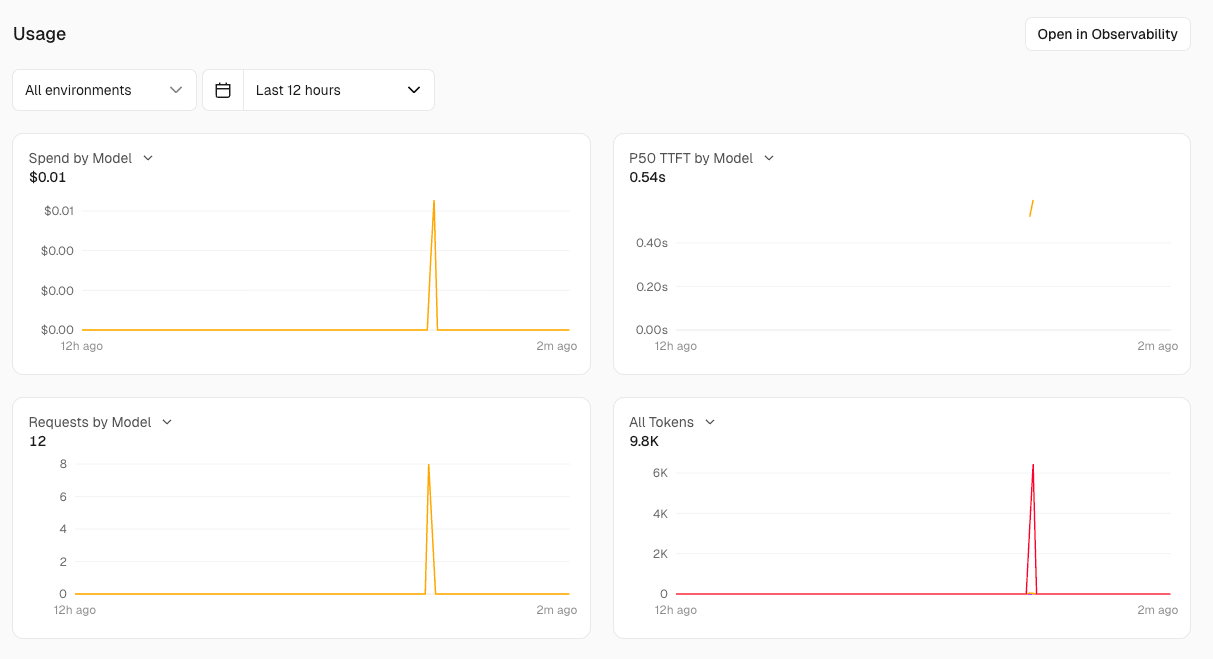
The AI Gateway tab in the Vercel dashboard has two views: Usage and Requests. Usage displays four graphs: Spend by Model, P50 TTFT by Model, Requests by Model, and All Tokens.
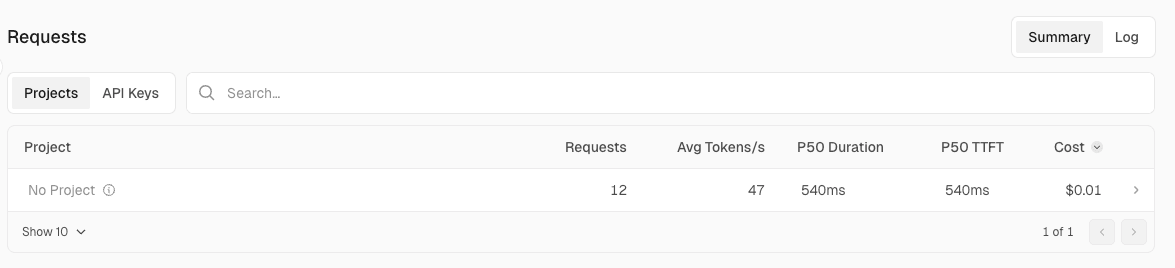
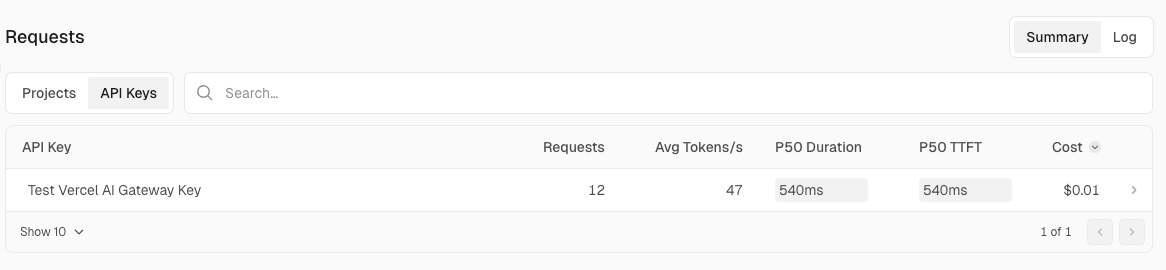
The Requests view allows you to drill down into requests from three perspectives: by project, by API key, and as individual logs.
■ By project
■ By API key
■ Individual logs
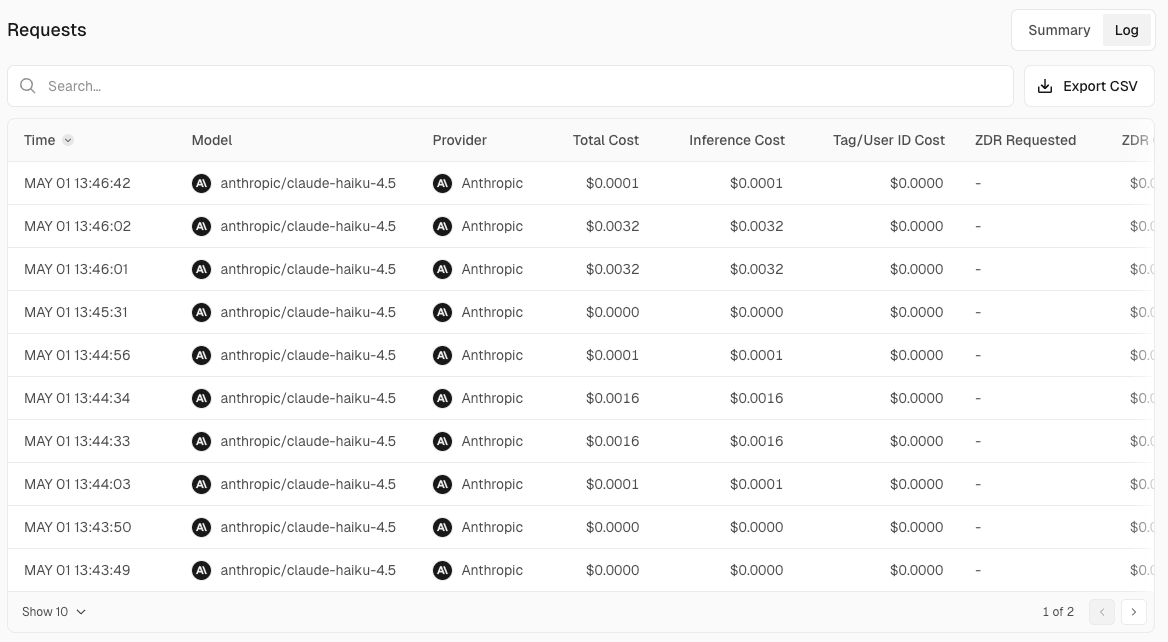
OpenRouter Dashboard
The OpenRouter Activity page displays three graphs: Spend, Requests, and Tokens.
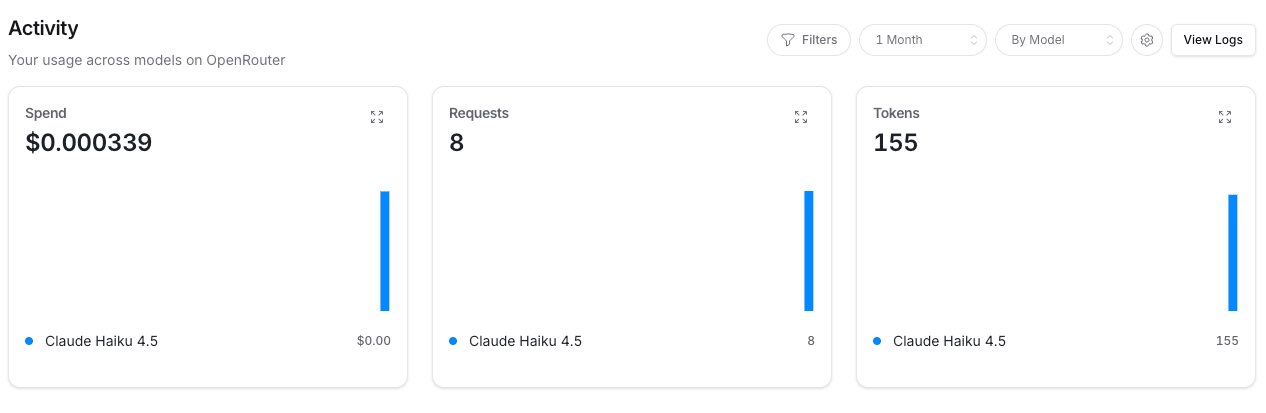
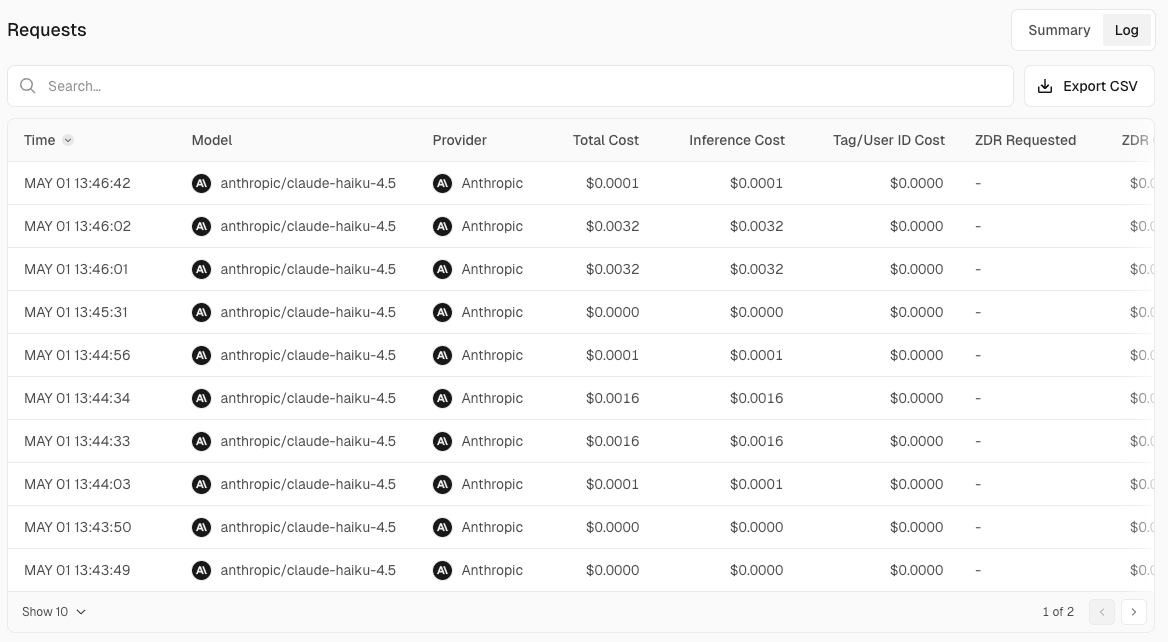
The Logs page lets you view a list of requests. Model, provider, token count, cost, and other details are listed row by row.
Clicking on each request lets you view the prompt and completion contents.
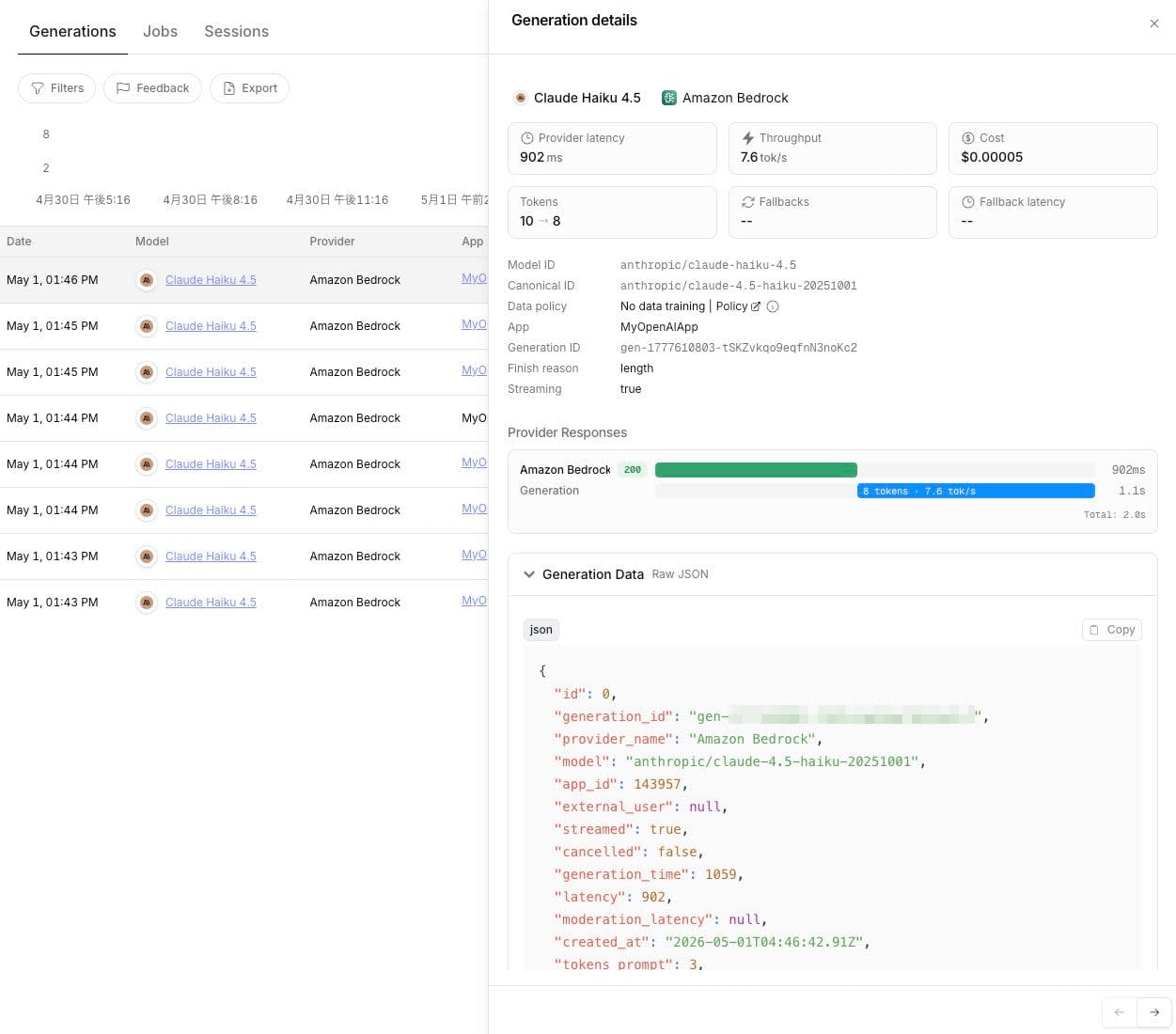
However, input/output logging is disabled by default and must be explicitly toggled from Observability.

Conclusion
Coming from a background of using OpenRouter and trying Vercel AI Gateway, I found clear differences between the two services in where observability information is stored and which layer handles caching. Vercel always includes routing metadata in responses and integrates its dashboard into the Vercel project structure, while OpenRouter exposes usage.cost and cost_details.upstream_inference_* at the top level, and provides gateway-layer response caching and broadcast to external observability tools.
Rather than asking which is better, I think the practical approach is to choose based on where you want to retrieve observability information, which layer you want to handle caching, and which monitoring infrastructure you want to integrate with. Since the effort to redirect your local code to Vercel AI Gateway is as simple as swapping the baseURL, I recommend trying it first and confirming the differences for yourself.

