![[New Service] I tried AWS Blocks (Preview) both locally and on AWS sandbox](https://images.ctfassets.net/ct0aopd36mqt/348VnC3440CoUtpS4pd5NS/8a7182ab96a0851a72a88d40328811b3/aws.png?w=3840&fm=webp)
[New Service] I tried AWS Blocks (Preview) both locally and on AWS sandbox

This page has been translated by machine translation. View original
This is Ishikawa from the Cloud Business Division. AWS Blocks, an open-source framework that allows you to configure application backends with TypeScript, has entered Public Preview, so I tried it out on both local and AWS sandbox environments.
On June 16, 2026, AWS released AWS Blocks as a Public Preview. AWS Blocks is an open-source framework that defines application backends in TypeScript by combining backend building blocks such as database tables, user authentication, real-time communication, file uploads, background jobs, and AI agents as "Blocks".
The standout feature is that it works locally without an AWS account. Locally, an environment including Postgres, authentication, and real-time communication starts up with mock implementations, and the same application code can be deployed to AWS without any changes.
In this article, using the Todo app generated by the default template as a subject, I will cover local startup, minor code modifications, and type safety verification, then deploy to an AWS sandbox and confirm that data is actually written to real AWS resources. Note that since this is a Public Preview, APIs and templates may change in the future. The version at the time of verification is noted in the "Prerequisites" section.
What is AWS Blocks
In AWS Blocks, the backend is defined in aws-blocks/index.ts and the frontend in src/. Since the frontend directly imports and calls the backend's typed API like import { api } from 'aws-blocks', there is no client code generation step, and the backend and frontend share the same TypeScript types.
Each Block runs with a mock implementation (in-memory, etc.) locally, and when deployed to AWS, it automatically resolves to the AWS implementation. For example, DistributedTable resolves to a DynamoDB table, AuthBasic resolves to a DynamoDB table holding user information, and Realtime resolves to API Gateway handling WebSockets.
This mechanism of "using the same index.ts for each environment" is realized through Node.js conditional exports and thin wrappers within the generated project.
The default template used for verification uses the following Blocks. In addition to these, Database (PostgreSQL + Kysely), FileBucket, AsyncJob, CronJob, Agent, KnowledgeBase, EmailClient, and others are also provided.
AuthBasic— Username/password authentication (JWT session)DistributedTable— Structured data defined with Zod schema (with secondary index support)Realtime— Real-time delivery via WebSocketApiNamespace— Type-safe RPC from browser to backend
There are many more as well.
Trying it out
Prerequisites
- An AWS account is not required for local development with AWS Blocks (an account is only needed for the AWS deployment steps)
- Verification environment
- macOS
- Node.js v22.22.0 / npm 10.9.4 (AWS Blocks requires Node.js 22 or higher and npm 10 or higher)
- Template: default (blocksTemplateVersion 0.1.0)
- Main packages: @aws-blocks/blocks 0.1.4 / @aws-blocks/core 0.1.3 / @aws-blocks/bb-auth-basic 0.1.1 / @aws-blocks/bb-distributed-table 0.1.2 / @aws-blocks/bb-realtime 0.1.1
- AWS deployment region: ap-northeast-1 (CDK bootstrap completed)
Creating a project
First, generate a project with npm create.
% npm create @aws-blocks/blocks-app@latest my-todo-app

> npx
> "create-blocks-app" my-todo-app

Creating Blocks app in /Users/ishikawa.satoru/workspaces/cc/blog/20260620-aws-blocks-preview/org/my-todo-app...
Installing dependencies...
npm warn EBADENGINE Unsupported engine {
npm warn EBADENGINE   package: 'my-todo-app@0.1.0',
npm warn EBADENGINE   required: { node: '>=22.0.0' },
npm warn EBADENGINE   current: { node: 'v20.20.0', npm: '11.11.0' }
npm warn EBADENGINE }

added 307 packages, and audited 345 packages in 28s

56 packages are looking for funding
  run `npm fund` for details

1 low severity vulnerability

To address all issues, run:
  npm audit fix

Run `npm audit` for details.

✓ Blocks app created!

Next steps:
  cd /Users/ishikawa.satoru/workspaces/cc/blog/20260620-aws-blocks-preview/org/my-todo-app
  npm run dev

Then open http://localhost:3000

See README.md for an overview and AGENTS.md for AI agent instructions.
npm create @aws-blocks/blocks-app internally runs @aws-blocks/create-blocks-app. Including dependency installation, 308 packages are added, and a project with aws-blocks/ (backend) and src/ (frontend) is generated.
Starting locally (no AWS account required)
Start the local development server with npm run dev.
cd my-todo-app/
% npm run dev

> my-todo-app@0.1.0 dev
> tsx watch aws-blocks/scripts/server.ts

Loading backend...
Deploying local resources...
  🔌 Attaching dev server (from @aws-blocks/bb-realtime/ws-server)
📝 Generating client code...
AWS Blocks local server running on http://localhost:3000

  ➜  http://localhost:3000/
Opening http://localhost:3000 in the browser displays a sign-in screen.
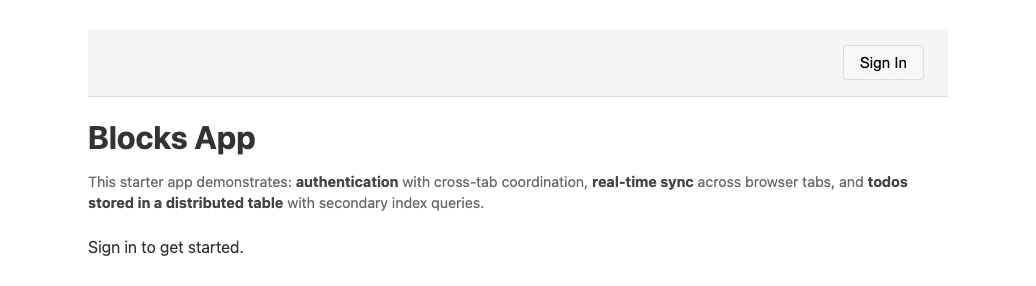
After creating an account from "Sign In" and signing in, a Todo input field and list are displayed. You can add Todos with a specified priority (High / Medium / Low), toggle completion status with checkboxes, and sort by priority using the "Priority" button.
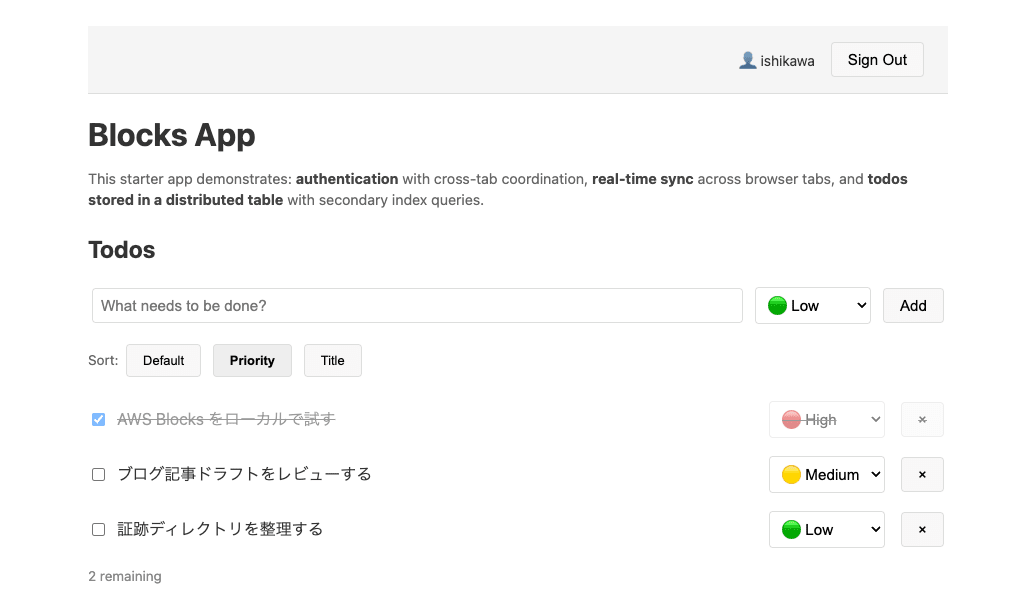
Up to this point, authentication, data storage, and sorting all worked without an AWS account.
Reading the backend code
The backend definition is consolidated in a single file, aws-blocks/index.ts. Authentication, data model, real-time communication, and API are all declared here. Here is an excerpt.
import { ApiNamespace, Scope, AuthBasic, DistributedTable, Realtime } from '@aws-blocks/blocks';
import { z } from 'zod';

const scope = new Scope('my-app');

// ─── Auth ────────────────────────────────────────────────────────────────────
const auth = new AuthBasic(scope, 'auth', {
  passwordPolicy: { minLength: 8 },
  crossDomain: process.env.BLOCKS_SANDBOX === 'true',
});
export const authApi = auth.createApi();

// ─── Data ────────────────────────────────────────────────────────────────────
// Zod schema = runtime validation + TypeScript types + DynamoDB table shape.
const todoSchema = z.object({
  userId: z.string(),       // partition key — per-user isolation
  todoId: z.string(),       // sort key — unique within a user
  title: z.string(),
  completed: z.boolean(),
  priority: z.number(),     // 1=high, 2=medium, 3=low
  version: z.number(),      // optimistic locking — incremented on each update
  createdAt: z.number(),
});

const todos = new DistributedTable(scope, 'todos', {
  schema: todoSchema,
  key: { partitionKey: 'userId', sortKey: 'todoId' },
  indexes: {
    // Secondary indexes: query todos sorted by priority or title.
    // The partition key is always userId (per-user isolation), the sort key varies.
    byPriority: { partitionKey: 'userId', sortKey: 'priority' },
    byTitle: { partitionKey: 'userId', sortKey: 'title' },
  },
});

// ─── Realtime ────────────────────────────────────────────────────────────────
const rt = new Realtime(scope, 'live', {
  namespaces: {
    todos: Realtime.namespace(z.object({
      action: z.enum(['created', 'updated', 'deleted']),
      todoId: z.string(),
    })),
  },
});

// ─── API ─────────────────────────────────────────────────────────────────────
export const api = new ApiNamespace(scope, 'api', (context) => ({

  async subscribeTodos() {
    const user = await auth.requireAuth(context);
    return rt.getChannel('todos', user.username);
  },

  async createTodo(title: string, priority: number = 2) {
    const user = await auth.requireAuth(context);
    const todoId = `${Date.now().toString(36)}-${Math.random().toString(36).slice(2, 8)}`;
    const todo = {
      userId: user.username,
      todoId,
      title,
      completed: false,
      priority,
      version: 1,
      createdAt: Date.now(),
    };
    await todos.put(todo);
    await rt.publish('todos', user.username, { action: 'created' as const, todoId });
    return todo;
  },
  :
  :
  /**
   * Toggle todo completion with optimistic locking.
   * Uses `ifFieldEquals` to detect concurrent writes. On conflict,
   * throws ConditionalCheckFailedException — caller should re-read and retry.
   */
  async toggleTodo(todoId: string) {
    const user = await auth.requireAuth(context);
    const todo = await todos.get({ userId: user.username, todoId });
    if (!todo) throw new Error('Todo not found');
    await todos.put(
      { ...todo, completed: !todo.completed, version: todo.version + 1 },
      { ifFieldEquals: { version: todo.version } },
    );
    await rt.publish('todos', user.username, { action: 'updated' as const, todoId });
    return { success: true };
  },
  :
  :
}));
The DistributedTable schema is defined with Zod, which simultaneously serves as runtime validation, TypeScript types, and the DynamoDB table shape. The byPriority and byTitle declared in indexes will later be confirmed to be created as DynamoDB secondary indexes on the AWS side.
The API is declared inside ApiNamespace. Each method follows a pattern of "authentication → processing → real-time delivery", and toggleTodo also implements optimistic locking via ifFieldEquals.
Making a small modification and verifying hot reload
I tried adding a clearCompleted API to the backend that "deletes all completed Todos at once". I added the following inside the ApiNamespace in aws-blocks/index.ts.
/** Delete all completed todos at once. Returns the number removed. */
async clearCompleted() {
  const user = await auth.requireAuth(context);
  const all = await Array.fromAsync(
    todos.query({ where: { userId: { equals: user.username } } })
  );
  const completed = all.filter((t) => t.completed);
  for (const t of completed) {
    await todos.delete({ userId: user.username, todoId: t.todoId });
    await rt.publish('todos', user.username, { action: 'deleted' as const, todoId: t.todoId });
  }
  return { removed: completed.length };
}
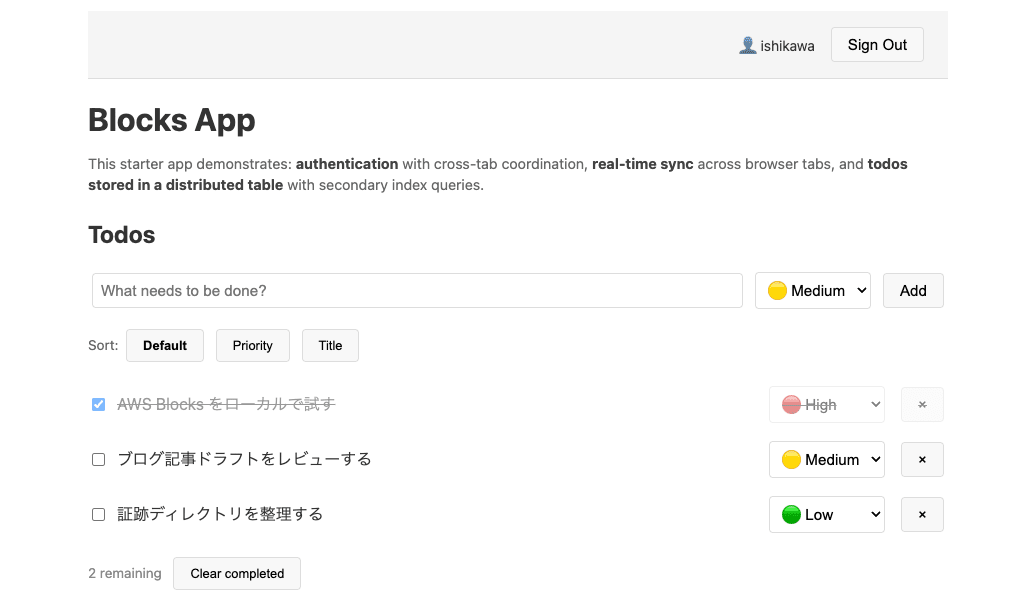
I also added a "Clear completed" button and a handler to call it in the frontend src/index.ts. Running the type check confirms that the added method can be called type-safely from the frontend with no errors.
% npm run typecheck

> my-todo-app@0.1.0 typecheck
> tsc --noEmit
After reloading the browser, the "Clear completed" button appeared via hot reload, and clicking it deleted only the completed Todos.
Deploying to AWS sandbox
I deployed what was running locally directly to AWS. npm run sandbox is a command that builds a temporary verification environment using Lambda hot-swap.
% npm run sandbox

> my-todo-app@0.1.0 sandbox
> tsx aws-blocks/scripts/sandbox.ts

🚀 Deploying to AWS...
   (This may take a few minutes on first deploy)
Bundling asset my-todo-app-stack-satoruishikawa-0hwgkl/Handler/Code/Stage...

  ...0747fa0accce45da63222b7fd286365049cf2eb4ac08b7-building/index.js  928.5kb

⚡ Done in 112ms

✨  Synthesis time: 1.68s

(node:9612) Warning: NodeVersionSupportWarning: The AWS SDK for JavaScript (v3)
versions published after the first week of January 2027
will require node >=22. You are running node v20.20.0.

To continue receiving updates to AWS services, bug fixes,
and security updates please upgrade to node >=22.

More information can be found at: https://a.co/c895JFp
(Use `node --trace-warnings ...` to show where the warning was created)
(node:9612) Warning: NodeVersionSupportWarning: The AWS SDK for JavaScript (v3)
versions published after the first week of January 2027
will require node >=22. You are running node v20.20.0.

To continue receiving updates to AWS services, bug fixes,
and security updates please upgrade to node >=22.

More information can be found at: https://a.co/c895JFp
my-todo-app-stack-satoruishikawa-0hwgkl: start: Building my-todo-app-stack-satoruishikawa-0hwgkl Template
my-todo-app-stack-satoruishikawa-0hwgkl: success: Built my-todo-app-stack-satoruishikawa-0hwgkl Template
(node:9612) Warning: NodeVersionSupportWarning: The AWS SDK for JavaScript (v3)
versions published after the first week of January 2027
will require node >=22. You are running node v20.20.0.

To continue receiving updates to AWS services, bug fixes,
and security updates please upgrade to node >=22.

More information can be found at: https://a.co/c895JFp
my-todo-app-stack-satoruishikawa-0hwgkl: start: Publishing my-todo-app-stack-satoruishikawa-0hwgkl Template (current_account-current_region-1ac4c392)
my-todo-app-stack-satoruishikawa-0hwgkl: success: Published my-todo-app-stack-satoruishikawa-0hwgkl Template (current_account-current_region-1ac4c392)
my-todo-app-stack-satoruishikawa-0hwgkl: creating CloudFormation changeset...
Changeset arn:aws:cloudformation:ap-northeast-1:123456789012:changeSet/cdk-deploy-change-set/789b1894-b7c6-44cf-aa5d-6e2c611c840c created and waiting in review for manual execution (--no-execute)
my-todo-app-stack-satoruishikawa-0hwgkl: deploying... [1/1]

 ✅  my-todo-app-stack-satoruishikawa-0hwgkl

✨  Deployment time: 149.97s

Outputs:
my-todo-app-stack-satoruishikawa-0hwgkl.APIEndpoint1793E782 = https://ot0i4m1yxe.execute-api.ap-northeast-1.amazonaws.com/prod/
my-todo-app-stack-satoruishikawa-0hwgkl.ApiUrl = https://ot0i4m1yxe.execute-api.ap-northeast-1.amazonaws.com/prod/aws-blocks/api
my-todo-app-stack-satoruishikawa-0hwgkl.RealtimeWsUrl = wss://dlv30yq2ee.execute-api.ap-northeast-1.amazonaws.com/rt
Stack ARN:
arn:aws:cloudformation:ap-northeast-1:123456789012:stack/my-todo-app-stack-satoruishikawa-0hwgkl/8d314bd0-6c8e-11f1-a765-06d2106e79fd

✨  Total time: 164.86s

✅ Sandbox deployed!
📡 API URL: https://ot0i4m1yxe.execute-api.ap-northeast-1.amazonaws.com/prod/aws-blocks/api
📝 Generating client code...
[Realtime] BLOCKS_RT_WS_URL not set — getChannel() will return incomplete descriptors
(node:10169) Warning: NodeVersionSupportWarning: The AWS SDK for JavaScript (v3)
versions published after the first week of January 2027
will require node >=22. You are running node v20.20.0.
:
:
The CloudFormation stack was deployed, creating a total of 82 resources. The deployment time was approximately 155 seconds. After deployment, npm run sandbox continues to serve the frontend locally, with the frontend calling the API running on AWS.
Verifying the created AWS resources
Let's confirm what resources were actually created.
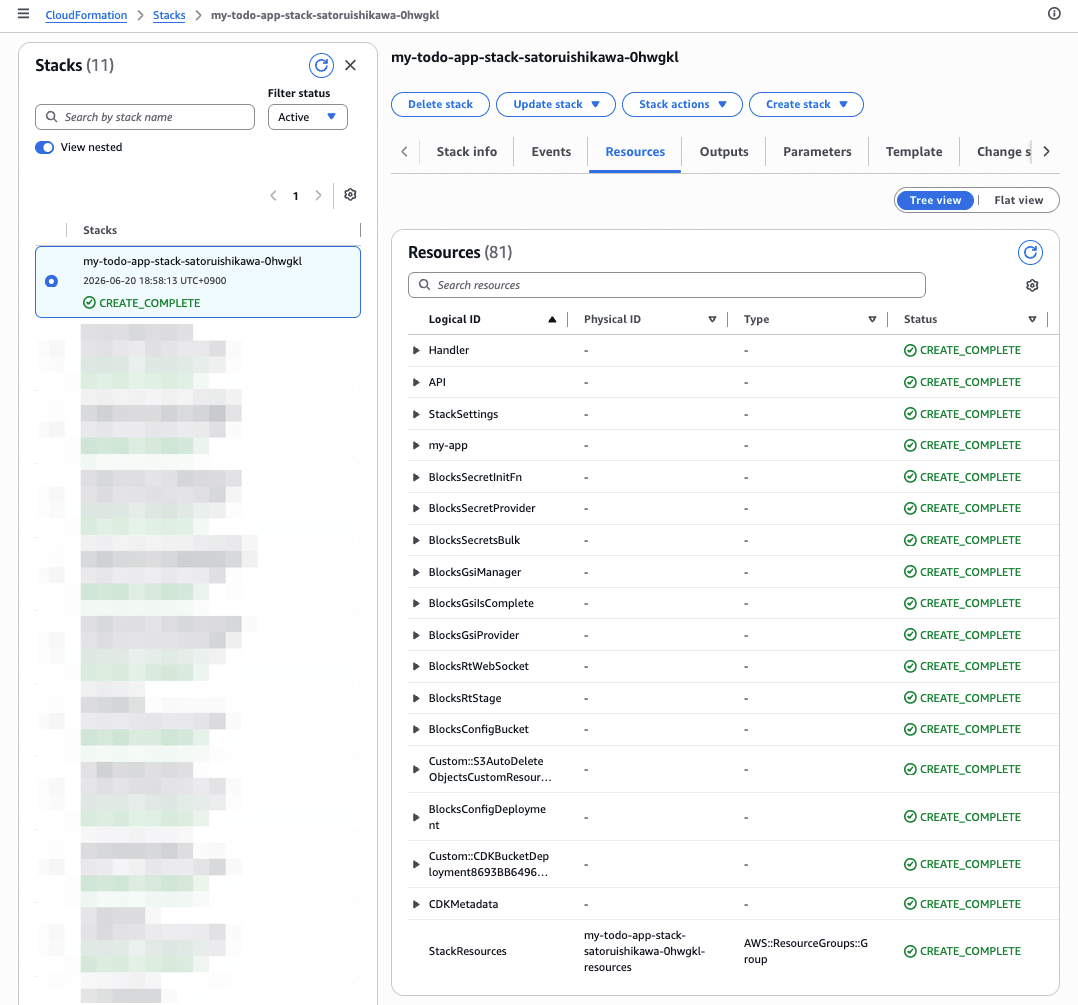
4 DynamoDB tables, 10 Lambda functions, and both a REST API Gateway (main API) and an API Gateway V2 for WebSocket were created. Looking at the DynamoDB table names, you can see that the Blocks defined in index.ts directly correspond to AWS resources.
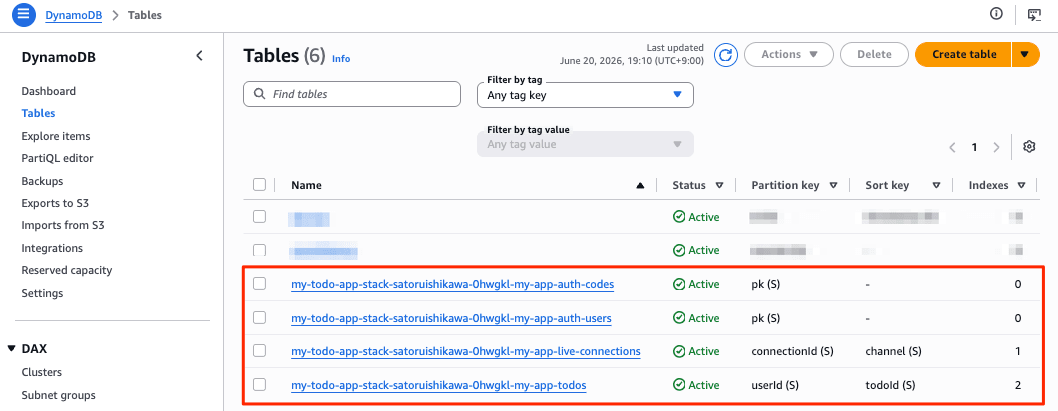
I also verified how DistributedTable maps to DynamoDB configuration.
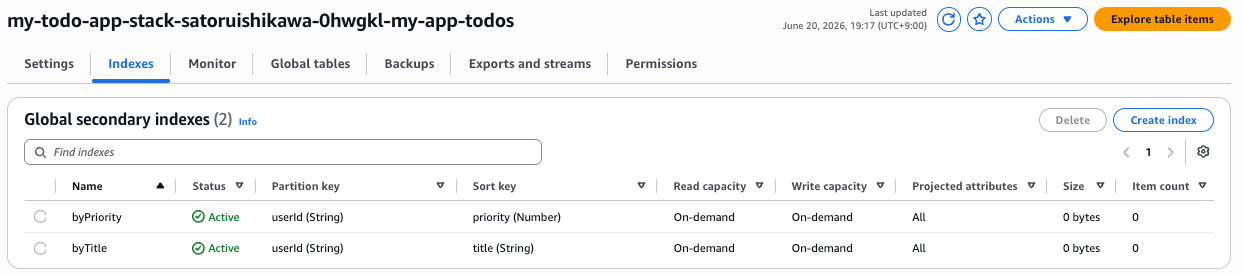
The billing mode is on-demand, and the byPriority / byTitle declared in indexes in index.ts were created exactly as DynamoDB Global Secondary Indexes (GSIs).
Verifying operation on AWS
The same frontend (http://localhost:3000) that was running locally now calls the API on AWS. Since the DynamoDB on the AWS side is new, I signed up again and added 2 Todos.
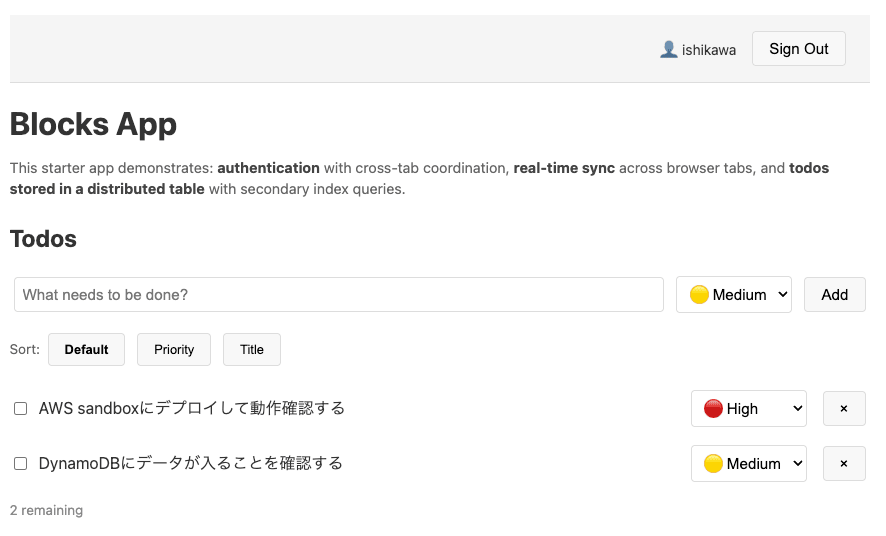
Let's verify that this operation was actually written to the real DynamoDB.
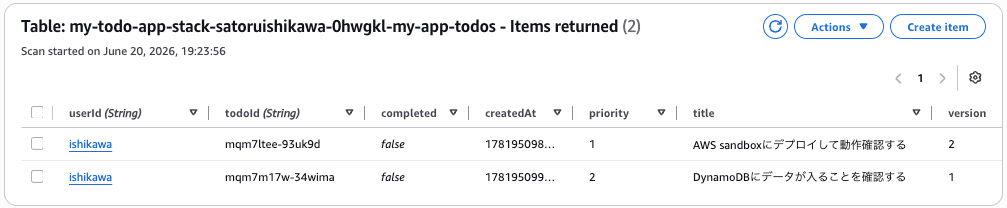
I was able to confirm that the strings entered in the browser were stored directly in the AWS DynamoDB table. The auth-users table also had 1 signed-up user registered. It was confirmed that code running locally could be run on AWS without any code changes.
When deployed to AWS sandbox (npm run sandbox), logs are displayed in the terminal's standard output each time the web browser accesses it.
Cleanup
When verification is complete, pressing Ctrl+C stops the sandbox and makes it inaccessible from the web browser.
^C
Shutting down...

Shutting down...

🛑 Stopping local processes...
   (AWS resources are still running)

   To destroy AWS resources, run: npm run sandbox:destroy

19:28:51 [tsx] Previous process hasn't exited yet. Force killing...
19:28:51 [tsx] Previous process hasn't exited yet. Force killing...
%
As the message above indicates, use npm run sandbox:destroy to delete (Delete Stack) the resources.
% npm run sandbox:destroy

> my-todo-app@0.1.0 sandbox:destroy
> tsx -C cdk aws-blocks/scripts/sandbox-destroy.ts

🗑️  Destroying sandbox...
my-todo-app-stack-satoruishikawa-0hwgkl: destroying... [1/1]
(node:16056) Warning: NodeVersionSupportWarning: The AWS SDK for JavaScript (v3)
versions published after the first week of January 2027
will require node >=22. You are running node v20.20.0.

To continue receiving updates to AWS services, bug fixes,
and security updates please upgrade to node >=22.
:
:
All 82 resources were deleted. After checking for the stack's existence just to be sure, a non-existence error was returned, confirming that no resources remained.
Note that in sandbox mode, the deletion policy for all resources in the generated index.cdk.ts is set to destroy, and deletion protection for RDS etc. is also disabled, making it possible to delete everything together with the stack. This setting is not applied in npm run deploy for production use.
Discussion
Here is a summary of the points I was able to clarify through actual testing.
- The same
aws-blocks/index.tsis used across local, CDK synthesis, and Lambda execution contexts through three wrappers —client.js(JSON-RPC proxy for browsers),index.cdk.ts(CDK synthesis),index.handler.ts(Lambda entry) — and conditional exports. The mechanism by which Block declarations resolve to mocks locally and to DynamoDB or API Gateway on AWS was confirmed from both the code and actual resource perspectives. - The frontend directly shares types with the backend, so changing a backend signature immediately causes a compile error in the frontend. The RPC transport (JSON-RPC) is auto-generated and invisible to developers by design.
- The mapping was straightforward:
DistributedTable'sindexesdeclaration mapped to DynamoDB GSIs, and the Zod schema mapped to the table shape. DynamoDB was created with on-demand billing.
Here are also some notes when trying this as a Public Preview.
- The verified version is in the 0.1.x series, and the version obtained via
npm create ... @latestmay change in the future. For reproducibility, it is recommended to record the execution date and the versions of the generated@aws-blocks/*packages. - Local data persistence depends on the mock implementation. If you need to rigorously verify persistence, you will need to deploy to AWS or consider using the
DatabaseBlock (PostgreSQL). AuthBasicis a convenient authentication method using username/password. Depending on production requirements, you may need to choose Blocks such asAuthCognitoorAuthOIDC.- A notice appears at startup indicating that anonymous usage data will be collected. If you want to disable this, you can do so with
AWS_BLOCKS_DISABLE_TELEMETRY=1or similar. - Local verification is purely mock-based, and AWS-specific behaviors such as IAM, networking, service quotas, and latency need to be verified after deployment.
Closing
I tried AWS Blocks end-to-end — from local startup, minor code modifications, and type safety verification, to deploying to AWS sandbox and confirming writes to real resources. The experience of being able to start building a backend prototype without an AWS account and deploy the same code to AWS felt worth trying for anyone who wants to pursue full-stack development in a local-first manner.
Since this is a Public Preview, the content of this article reflects the state at the time of verification (June 20, 2026, @aws-blocks/blocks 0.1.4). I will continue to watch for future changes and updates toward GA. Since you can try it locally without an AWS account, I recommend getting started by running npm run dev first if you're interested.
